Healthcheck and Version Addresses
General Approach
You can perform healthcheck and version checks for Apinizer modules using two main methods:
- From Within Kubernetes
- From Outside Kubernetes
Performed by sending requests through internal service names using the curl command from a pod within the cluster. This method is ideal for diagnosing intra-cluster communication problems.
If your modules are exposed externally (NodePort, LoadBalancer, Ingress), performed by sending requests directly to access URLs from your local machine or server. This method is useful for testing general accessibility and external integrations.
Checks from Within Kubernetes
With this method, you can check the accessibility and status of Apinizer modules over the internal network within the Kubernetes cluster.
Pods and Their Status
Check all Pods in the cluster and their status:
kubectl get pods -A
This command outputs all pods in your system. In the example below, all pods are running healthily:
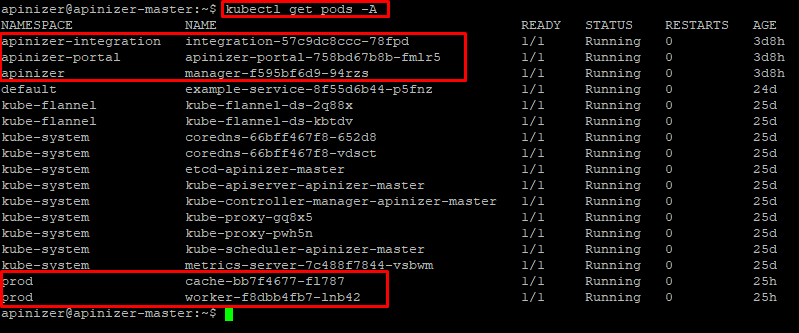
In the output, you can see that all Pods are in Running status and the READY column is 1/1. This indicates that the pods are healthy.
Service Information
Check the information of Services that enable communication between Pods:
kubectl get svc -A
Sample output:

The following table shows the service information for Apinizer modules:
| Module | Service Name | Service Type | Namespace | Internal Port | External Port (Exposed) |
|---|---|---|---|---|---|
| Manager | manager | NodePort | apinizer | 8080 | 32080 |
| Worker | worker-http-service | NodePort | prod | 8091 | 30080 |
| Cache | cache-http-service | ClusterIp | prod | 8090 | - |
| Integration | integration-http-service | NodePort | apinizer-integration | 8092 | 30088 |
| Portal | apinizer-portal-service | NodePort | apinizer-portal | 8080 | 32090 |
Based on this information, URLs can be created in the following template and checked by sending curl from any pod within Kubernetes:
http://<SERVICE_NAME>.<NAMESPACE>.svc.cluster.local:<SERVICE_INTERNAL_PORT>/apinizer/management/health
Module-Based Checks
Manager
Healthcheck:
kubectl exec -it <any_pod_name> -n <namespace> -- curl -X GET http://manager.apinizer.svc.cluster.local:8080/apinizer/management/health
Version Information:
kubectl exec -it <any_pod_name> -n <namespace> -- curl -X GET http://manager.apinizer.svc.cluster.local:8080/apinizer/management/version
Worker
Healthcheck:
kubectl exec -it <any_pod_name> -n <namespace> -- curl -X GET http://worker-http-service.prod.svc.cluster.local:8091/apinizer/management/health
Version Information:
kubectl exec -it <any_pod_name> -n <namespace> -- curl -X GET http://worker-http-service.prod.svc.cluster.local:8091/apinizer/management/version
Cache
Healthcheck:
kubectl exec -it <any_pod_name> -n <namespace> -- curl -X GET http://cache-http-service.prod.svc.cluster.local:8090/apinizer/management/health
Version Information:
kubectl exec -it <any_pod_name> -n <namespace> -- curl -X GET http://cache-http-service.prod.svc.cluster.local:8090/apinizer/management/version
Integration
Healthcheck:
kubectl exec -it <any_pod_name> -n <namespace> -- curl -X GET http://integration-http-service.apinizer-integration.svc.cluster.local:8092/apinizer/management/health
Version Information:
kubectl exec -it <any_pod_name> -n <namespace> -- curl -X GET http://integration-http-service.apinizer-integration.svc.cluster.local:8092/apinizer/management/version
Portal
Healthcheck:
kubectl exec -it <any_pod_name> -n <namespace> -- curl -X GET http://apinizer-portal-service.apinizer-portal.svc.cluster.local:8080/apinizer/management/health
Version Information:
kubectl exec -it <any_pod_name> -n <namespace> -- curl -X GET http://apinizer-portal-service.apinizer-portal.svc.cluster.local:8080/apinizer/management/version
Checks from Outside Kubernetes
If your Apinizer modules are configured to be accessible from outside Kubernetes (for example, services of type NodePort, LoadBalancer, or through an Ingress Controller), you can send requests directly using an HTTP client like Postman or curl from your local terminal.
For Apinizer modules' services exposed externally with NodePort service type, access can be provided from any client through Kubernetes Node IP addresses and Node Ports. The following table presents the details of Apinizer services:
| Module | Service Name | Service Type | Namespace | Internal Port | External Port (Exposed) |
|---|---|---|---|---|---|
| Manager | manager | NodePort | apinizer | 8080 | 32080 |
| Worker | worker-http-service | NodePort | prod | 8091 | 30080 |
| Cache | cache-http-service | ClusterIp | prod | 8090 | - |
| Integration | integration-http-service | NodePort | apinizer-integration | 8092 | 30088 |
| Portal | apinizer-portal-service | NodePort | apinizer-portal | 8080 | 32090 |
Module-Based Checks
Manager
Healthcheck:
curl "http://<MANAGER_ACCESS_URL>/apinizer/management/health"
Version Information:
curl "http://<MANAGER_ACCESS_URL>/apinizer/management/version"
Worker
Healthcheck:
curl "http://<WORKER_ACCESS_URL>/apinizer/management/health"
Version Information:
curl "http://<WORKER_ACCESS_URL>/apinizer/management/version"
Integration
Healthcheck:
curl "http://<INTEGRATION_ACCESS_URL>/apinizer/management/health"
Version Information:
curl "http://<INTEGRATION_ACCESS_URL>/apinizer/management/version"
Portal
Healthcheck:
curl "http://<PORTAL_ACCESS_URL>/apinizer/management/health"
Version Information:
curl "http://<PORTAL_ACCESS_URL>/apinizer/management/version"
Cache Module: The Cache module is not exposed externally by default in installations (ClusterIP service type). Therefore, if you want to perform health-check and version-check directly from outside Kubernetes, the Cache service's port 8090 must be configured to be accessible externally.