Writing Logs from MongoDB to Elasticsearch with Bash Script
The purpose of this document is to send traffic logs that could not be sent from the relevant collection in MongoDB with a bash script when there is a problem in the sending process from Administration > Analytic > Migrate Unsent Traffic page to the relevant log source, in cases where MongoDB is shown as Failover method to any log connector in environments on Administration > Gateway Infrastructure > Gateway Runtimes page in Apinizer Manager and logs accumulate there.
Bash Script Access Requirements: Bash script will run on MongoDB primary server and MongoDB primary server must have access permission to Elasticsearch server's port 9200.
Bash Script Package Requirements: Bash script uses jq package for JSON data parsing operations. To check if jq package is installed:
jq --version
If jq package is not installed:
# For Red Hat based systems
sudo dnf install jq

# For Debian based systems
sudo apt-get update
sudo apt-get install jq
Since jq package is found in default repositories of most modern Linux distributions, it can be installed with these commands even on offline servers.
Things to Consider: When running the bash script, intensive processing load may occur on MongoDB depending on the size of log data. This situation may cause an increase especially in memory (RAM) usage. To prevent possible performance issues, it is important to regularly check server resources with the following commands while the script is running:
free -g
systemctl status mongod.service
If RAM usage is high or MongoDB service shows signs of stopping, it is recommended to stop the script, examine resource usage, and optimize MongoDB configuration or log sending if necessary.
1) MongoDB Database Collection Pre-work
The following information about the relevant collection needs to be obtained by connecting to MongoDB database:
-
Collection Name: The name of the collection to be sent to Elasticsearch should be determined (according to Apinizer version UnsentMessage or log_UnsentMessage). This collection should be the collection in the apinizerdb database from which data will be retrieved and transferred to Elasticsearch.
-
Document Count: The total document count in the collection helps you understand the amount of data to be transferred to Elasticsearch. This is important for you to consider database size.
-
Collection Size: The total size of the collection is used to determine how large the data is and what impact it may have on transfer time and performance.
-
Data Format and Schema Check: The format of documents in the collection should be checked for correct transfer to Elasticsearch. If necessary, data may need to be transformed or schema may need to be made compatible.
Gathering this information ensures the process proceeds correctly and allows you to see possible problems in advance.
mongosh mongodb://localhost:25080 --authenticationDatabase "admin" -u "<USERNAME>" -p "<PASSWORD>"

# Shows all databases in databases
show dbs

# Selects apinizerdb database
use apinizerdb

# Shows collections in apinizerdb database
show collections

# Checks total document count in 'UnsentMessage' collection
db.UnsentMessage.countDocuments({})

# Calculates storage size of 'UnsentMessage' collection in MB
db.UnsentMessage.stats().storageSize / (1024 * 1024).toFixed(2)

# Backup is taken excluding UnsentMessage and log_UnsentMessage collections before work
sudo mongodump --host <IP_ADDRESS> --port 25080 --excludeCollection UnsentMessage --excludeCollection log_UnsentMessage -d apinizerdb --authenticationDatabase "admin" -u apinizer -p <PASSWORD> --gzip --archive=<DIRECTORY>/apinizer-backup-d<DATE>-v<APINIZER_VERSION>--1.archive
2) Checking if Documents to be Sent from MongoDB to Elasticsearch Exist in Elasticsearch
Before transferring logs from MongoDB to Elasticsearch, Apinizer Correlation ID (aci) values are tested by taking one document from the beginning and end of the UnsentMessage collection.
Retrieving Log Data from MongoDB
vi mongo_test.sh
mongo mongodb://<MONGO_IP>:25080 --authenticationDatabase "admin" -u "apinizer" -p
# If Mongo version is 6 and above, the following command is executed
mongosh mongodb://<MONGO_IP>:25080 --authenticationDatabase "admin" -u "apinizer" -p

use apinizerdb
# To get aci value of first document
db.UnsentMessage.find({}, { content: 1, _id: 0 }).sort({ _id: 1 }).limit(1).forEach((doc) => { print(JSON.parse(doc.content).aci);});
# To get aci value of last document
db.UnsentMessage.find({}, { content: 1, _id: 0 }).sort({ _id: -1 }).limit(1).forEach((doc) => { print(JSON.parse(doc.content).aci);});
Checking Logs in Elasticsearch
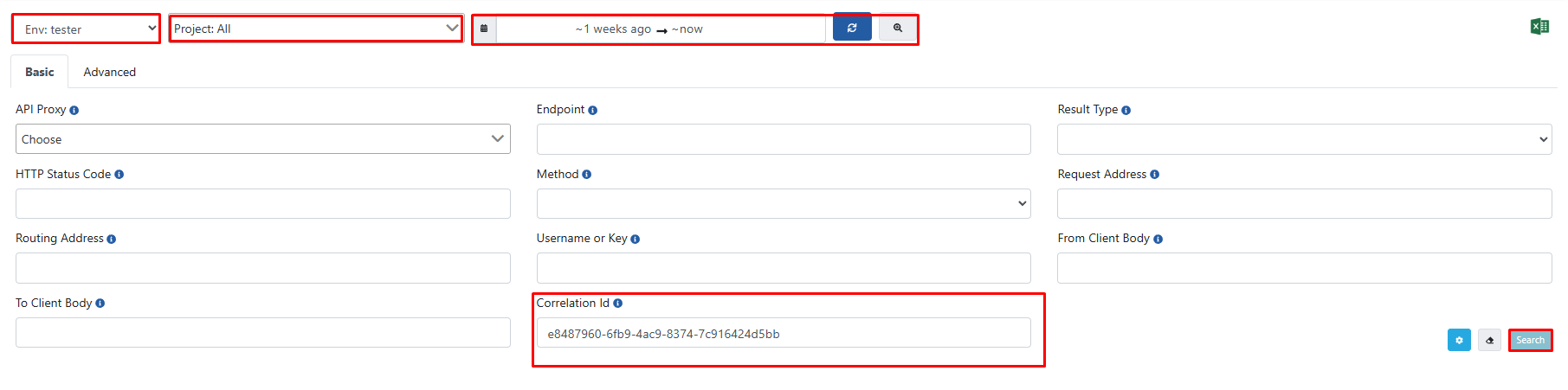
ACI values of the first and last documents are verified by checking if they exist in Elasticsearch through Apinizer interface.
At this point, relevant ACI values need to be checked in all environments, all projects, and a wide time range.
3) If Logs Are Not Found in Elasticsearch, Testing with Limited Amount of Data First
In this section, we run the script we will actually run with a small dataset to check if it works correctly.
A determined amount of logs are written to Elasticsearch and then deleted from MongoDB. Deleted documents are saved to a file in case they cannot be written to Elasticsearch. Also, ACI values are stored in a separate file to check if logs exist in Elasticsearch through Apinizer.
If logs are successfully written to Elasticsearch, we can proceed to the next stage.
Creating File Structure
First, the directory where the bash script will run is created and necessary files are prepared:
mkdir mongo-to-elastic-test
cd mongo-to-elastic-test/
touch aci.txt data.json yedek.json mongo_test_log.txt mongo_test.sh
chmod +x mongo_test.sh
Test Script
vi mongo_test.sh
MONGO_URI="mongodb://<MONGO_USER>:<MONGO_USER_PASSWORD>@<MONGO_IP>:25080/admin?replicaSet=apinizer-replicaset"
MONGO_DB="apinizerdb"
MONGO_COLLECTION="UnsentMessage"
TEST_SIZE=150

ES_URL="http://<ELASTIC_IP>:9200"
ES_INDEX="<ELASTIC_DATA_STREAM_INDEX>(apinizer-log-apiproxy-exampleIndex)"

data=$(mongo "$MONGO_URI" --quiet --eval "JSON.stringify(db.getSiblingDB('$MONGO_DB').$MONGO_COLLECTION.find({}, {'_id': 1, 'content': 1}).limit($TEST_SIZE).toArray())" | grep -vE "I\s+(NETWORK|CONNPOOL|ReplicaSetMonitor|js)")
# If Mongo version is 6 and above, data is retrieved as follows
# data=$(mongosh "$MONGO_URI" --quiet --eval "JSON.stringify(db.getSiblingDB('$MONGO_DB').$MONGO_COLLECTION.find({}, {'_id': 1, 'content': 1}).limit($TEST_SIZE).toArray())")
delete_ids=()

for row in $(echo "$data" | jq -r '.[] | @base64'); do
    # Decode the base64 encoded row and extract _id and content
    _id=$(echo $row | base64 --decode | jq -r '._id["$oid"]')
    content=$(echo $row | base64 --decode | jq -r '.content')
    aci_value=$(echo "$content" | jq -r '.aci')

    echo "Processed ID: $_id, ACI Value: $aci_value" >> aci.txt

    # Save content to file
    echo "$content" > <DIRECTORY>/mongo-to-elastic-test/data.json
    echo "$row" >> <DIRECTORY>/mongo-to-elastic-test/yedek.json

    # Send data to Elasticsearch
    response=$(curl -s -X POST "$ES_URL/$ES_INDEX/_doc" -H "Content-Type: application/json" --data-binary @<DIRECTORY>/mongo-to-elastic-test/data.json)

    # Extract successful shard count from the response
    successful=$(echo "$response" | jq -r '._shards.successful')
    if [ "$successful" -eq 1 ]; then
        delete_ids+=("$_id")
    fi
done

# Create the ids_string for the delete operation in MongoDB
ids_string=$(printf "ObjectId(\"%s\"), " "${delete_ids[@]}" | sed 's/, $//')  # Removing trailing comma

# Perform deletion from MongoDB
if [ ${#delete_ids[@]} -gt 0 ]; then
    mongo "$MONGO_URI" --quiet --eval "db.getSiblingDB('$MONGO_DB').$MONGO_COLLECTION.deleteMany({ '_id': { \$in: [$ids_string] } })"
    # If Mongo version 6 and above, the data is deleted as follows
    # mongosh "$MONGO_URI" --quiet --eval "db.getSiblingDB('$MONGO_DB').$MONGO_COLLECTION.deleteMany({ '_id': { \$in: [$ids_string] } })"
    echo "Deletion operation successful!"
fi
Running Script
Script is run in the background with the following command:
nohup bash <DIRECTORY>/mongo_test.sh > mongo_test_log.txt 2>&1 &
ps aux | grep <PROCESS_ID>
Checking Logs in Elasticsearch
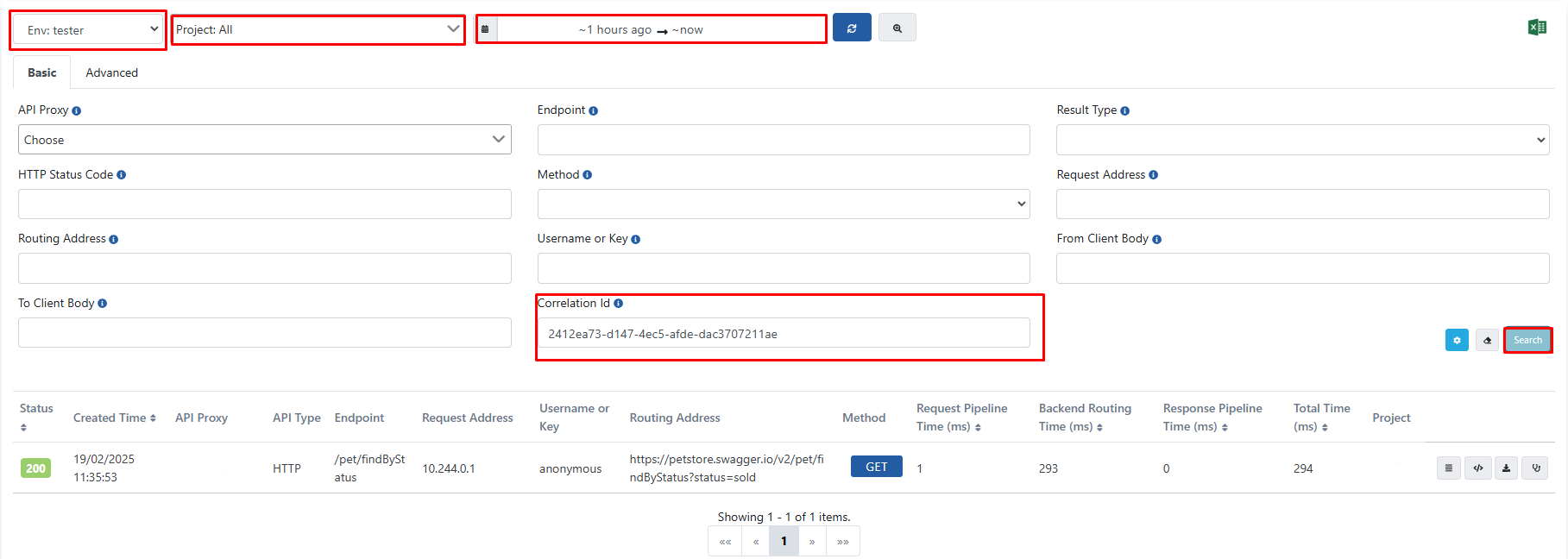
After the script is run, ACI values listed in the aci.txt file are verified by checking if they exist in Elasticsearch through Apinizer interface.
At this point, relevant ACI values need to be checked in all environments, all projects, and a wide time range. And when ACI values are entered, relevant logs should come as in the image below.
4) Main Script
So far, we have checked whether data is only written to MongoDB as failover and whether these are sent back to Elasticsearch.
The following Bash script retrieves data from MongoDB in batches of 1000, writes them to Elasticsearch, and deletes successfully transferred data from MongoDB.
The TOTAL_BATCHES parameter in the script should be set according to the total document count in UnsentMessage or log_UnsentMessage collections. The total amount of data to be processed is determined by the formula TOTAL_BATCHES × 1000.
Creating File Structure
First, the directory where the bash script will run is created and necessary files are prepared:
mkdir mongo-to-elastic
cd mongo-to-elastic/
touch data.json mongo_to_elastic_log.txt mongo_to_elastic.sh
chmod +x mongo_to_elastic.sh
Production Script
vi mongo_to_elastic.sh
MONGO_URI="mongodb://<MONGO_USER>:<MONGO_USER_PASSWORD>@<MONGO_IP>:25080/admin?replicaSet=apinizer-replicaset"
MONGO_DB="apinizerdb"
MONGO_COLLECTION="UnsentMessage"

ES_URL="http://<ELASTIC_IP>:9200"
ES_INDEX="<ELASTIC_DATA_STREAM_INDEX>(apinizer-log-apiproxy-exampleIndex)"
BATCH_SIZE=1000
TOTAL_BATCHES=<TOTAL_BATCHES = DOCUMENTSIZE / 1000>

for ((i=1; i<=TOTAL_BATCHES; i++)); do
    data=$(mongo "$MONGO_URI" --quiet --eval "JSON.stringify(db.getSiblingDB('$MONGO_DB').$MONGO_COLLECTION.find({}, {'_id': 1, 'content': 1}).limit($BATCH_SIZE).toArray())" | grep -vE "I\s+(NETWORK|CONNPOOL|ReplicaSetMonitor|js)")
    # If Mongo version is 6 and above, data is retrieved as follows
    # data=$(mongosh "$MONGO_URI" --quiet --eval "JSON.stringify(db.getSiblingDB('$MONGO_DB').$MONGO_COLLECTION.find({}, {'_id': 1, 'content': 1}).limit($BATCH_SIZE).toArray())")

    delete_ids=()

    for row in $(echo "$data" | jq -r '.[] | @base64'); do
        # Decode the base64 encoded row and extract _id and content
        _id=$(echo $row | base64 --decode | jq -r '._id["$oid"]')
        content=$(echo $row | base64 --decode | jq -r '.content')

        # Save content to file
        echo "$content" > <DIRECTORY>/mongo-to-elastic/data.json
        # Send data to Elasticsearch
        response=$(curl -s -X POST "$ES_URL/$ES_INDEX/_doc" -H "Content-Type: application/json" --data-binary @<DIRECTORY>/mongo-to-elastic/data.json)
        # Extract successful shard count from the response
        successful=$(echo "$response" | jq -r '._shards.successful')
        if [ "$successful" -eq 1 ]; then
            delete_ids+=("$_id")
        fi
    done

    # Create the ids_string for the delete operation in MongoDB
    ids_string=$(printf "ObjectId(\"%s\"), " "${delete_ids[@]}" | sed 's/, $//')  # Removing trailing comma

    # Perform deletion from MongoDB
    if [ ${#delete_ids[@]} -gt 0 ]; then
        mongo "$MONGO_URI" --quiet --eval "db.getSiblingDB('$MONGO_DB').$MONGO_COLLECTION.deleteMany({ '_id': { \$in: [$ids_string] } })"
        # If Mongo version 6 and above, the data is deleted as follows
        # mongosh "$MONGO_URI" --quiet --eval "db.getSiblingDB('$MONGO_DB').$MONGO_COLLECTION.deleteMany({ '_id': { \$in: [$ids_string] } })"
        echo "Deletion operation successful!"
    fi
done
Running Script
Script is run in the background with the following command:
nohup bash <DIRECTORY>/mongo_to_elastic.sh > mongo_to_elastic_log.txt 2>&1 &
ps aux | grep <PROCESS_ID>
Script Progress Check
While the script is running, the log file should be checked. If an expression like the following is continuously added to the log file, the script is successfully progressing with data transfer:
{ "acknowledged" : true, "deletedCount" : 1000 }
Also, record counts can be checked through MongoDB to verify if logs are being transferred:
mongo mongodb://<MONGO_IP>:25080 --authenticationDatabase "admin" -u "apinizer" -p
# If Mongo version is 6 and above, the following command is executed
mongosh mongodb://<MONGO_IP>:25080 --authenticationDatabase "admin" -u "apinizer" -p

use apinizerdb
db.UnsentMessage.countDocuments({})
5) Possible Errors and Solutions Related to Script
Script Getting Stuck or Not Writing Any Data to Log File
This situation may occur due to the command transferring data from MongoDB to Elasticsearch timing out. As a solution, _id values of MongoDB documents that take longer than 2 seconds to transfer are saved to the timeout_ids array. Thus, problematic documents are skipped and the transfer operation continues.
This problem is solved with the improvements made in the following script:
MONGO_URI="mongodb://<MONGO_USER>:<MONGO_USER_PASSWORD>@<MONGO_IP>:25080/admin?replicaSet=apinizer-replicaset"
MONGO_DB="apinizerdb"
MONGO_COLLECTION="UnsentMessage"

ES_URL="http://<ELASTIC_IP>:9200"
ES_INDEX="<ELASTIC_DATA_STREAM_INDEX>(apinizer-log-apiproxy-exampleIndex)"
BATCH_SIZE=1000
TOTAL_BATCHES=<TOTAL_BATCHES = DOCUMENTSIZE / 1000>
timeout_ids=()

for ((i=1; i<=TOTAL_BATCHES; i++)); do
    if [ ${#timeout_ids[@]} -gt 0 ]; then
        timeout_ids_json=$(printf "ObjectId(\"%s\"), " "${timeout_ids[@]}" | sed 's/, $//')
        query="{'_id': { \$nin: [$timeout_ids_json] }}"
    else
        query="{}"
    fi
    data=$(mongo "$MONGO_URI" --quiet --eval "JSON.stringify(db.getSiblingDB('$MONGO_DB').$MONGO_COLLECTION.find($query,{'_id': 1, 'content': 1}).limit($BATCH_SIZE).toArray())" | grep -vE "I\s+(NETWORK|CONNPOOL|ReplicaSetMonitor|js)")

    # If Mongo version is 6 and above, data is retrieved as follows
    # data=$(mongosh "$MONGO_URI" --quiet --eval "JSON.stringify(db.getSiblingDB('$MONGO_DB').$MONGO_COLLECTION.find($query, {'_id': 1, 'content': 1}).limit($BATCH_SIZE).toArray())")

    delete_ids=()

    for row in $(echo "$data" | jq -r '.[] | @base64'); do
        # Decode the base64 encoded row and extract _id and content
        _id=$(echo $row | base64 --decode | jq -r '._id["$oid"]')
        content=$(echo $row | base64 --decode | jq -r '.content')

        # Save content to file
        echo "$content" > <DIRECTORY>/mongo-to-elastic/data.json
        # Send data to Elasticsearch
        response=$(curl -s -X POST "$ES_URL/$ES_INDEX/_doc" -H "Content-Type: application/json" --data-binary @<DIRECTORY>/mongo-to-elastic/data.json)

        # Extract successful shard count from the response
        successful=$(echo "$response" | jq -r '._shards.successful')
        if [ "$successful" -eq 1 ]; then
            delete_ids+=("$_id")
        else
            timeout_ids+=("$_id")
        fi
    done

    # Perform deletion from MongoDB
    if [ ${#delete_ids[@]} -gt 0 ]; then
        ids_string=$(printf "ObjectId(\"%s\"), " "${delete_ids[@]}" | sed 's/, $//')
        mongo "$MONGO_URI" --quiet --eval "db.getSiblingDB('$MONGO_DB').$MONGO_COLLECTION.deleteMany({ '_id': { \$in: [$ids_string] } })"
        # If Mongo version 6 and above, the data is deleted as follows
        # mongosh "$MONGO_URI" --quiet --eval "db.getSiblingDB('$MONGO_DB').$MONGO_COLLECTION.deleteMany({ '_id': { \$in: [$ids_string] } })"
    fi
done
If Script Has tcmalloc: large alloc 1073741824 bytes Error in Log File
This error occurs because data retrieved in batches takes up too much space in memory. As a solution, the BATCH_SIZE value needs to be reduced. For example, BATCH_SIZE can be reduced from 1000 to 10.
If Script Has mongo_to_elastic_log.txt: line 17: /usr/bin/mongo: Argument list too long Error in Log File
This error occurs because content fields in the UnsentMessage collection are too large. This error occurs when the size of arguments passed on the command line exceeds system limits. The script can continue working by skipping large-sized data. For this, the skip parameter can be used to skip a specific data size:
data=$(mongo "$MONGO_URI" --quiet --eval "JSON.stringify(db.getSiblingDB('$MONGO_DB').$MONGO_COLLECTION.find($query,{'_id': 1, 'content': 1}).skip(<SKIP_DATA_SIZE>).limit($BATCH_SIZE).toArray())" | grep -vE "I\s+(NETWORK|CONNPOOL|ReplicaSetMonitor|js)")
If MongoDB version 6 or higher is used, the same operation is performed using the mongosh command.
6) Reclaiming Disk Space in MongoDB After Script Completes Log Transfer
After the script successfully transfers data in the UnsentMessage collection to Elasticsearch, a compact operation should be performed to clean unnecessary empty spaces taking up space in MongoDB and optimize disk usage.
mongosh mongodb://<MONGO_IP>:25080/apinizerdb --authenticationDatabase "admin" -u "apinizer" -p

db.runCommand({compact: "UnsentMessage"})
This command reorganizes the physical storage space of the UnsentMessage collection. Especially after large data transfer operations, it is recommended to run this command on MongoDB secondary node.
In single node systems, since the collection will be locked during compact operation, it is recommended to run it when usage is not intensive or when database downtime can be tolerated.