Apinizer Possible Issues and Solutions
GetCapabilities Routing Issue in Geographic Information Systems Services
Problem
Addresses in the WSDL returned with GetCapabilities in Geographic Information Systems services need to be moved to Apinizer.
Solution
With a Business Rule or Script policy to be added to section 2, if the value 'GetCapabilities' comes in the 'request' key as a query param in the url, the address here should be changed with string replace to route to the relevant proxy in Apinizer.
Client IP Address Appearing as 10.244.x.x
Problem
Client IP address appears as 10.244.x.x in Kubernetes environment.
Reason/Why
In Kubernetes NodePort structure, if X-Forwarded-For value does not come from client, it routes the pod's IP address to the application behind by default. As a solution, we can solve it by making the externalTrafficPolicy value Local, but this time since NodePort does not route incoming requests to other servers in the Cluster, access problems occur. It is necessary to know the relevant Node and go to it.
Solution
Since Apinizer Workers will be placed behind a structure like Nginx or F5, xff information needs to be added to the header in the relevant loadbalancer's configuration file as follows.
This setting can be made for Nginx as follows:
location /apigateway/ {
    proxy_set_header X-Forwarded-For $proxy_add_x_forwarded_for;
    proxy_pass http://api.inst.com/apigateway/;
} # end location
Headers Containing Underscores Not Appearing in API Traffic Logs
Problem
Headers containing underscores not appearing/being transferred in API Traffic Logs.
Reason/Why
While this issue is not related to Apinizer, it is related to the default settings of Nginx, which may be used in front of Apinizer.
Nginx is widely used as a web server and reverse proxy server. However, in Nginx's default configuration, HTTP headers containing underscore (_) characters in their names are not processed and passed. This is because underscores are not standard in HTTP RFC.
Solution
To solve this problem, you should set the underscores_in_headers directive to on in the Nginx configuration file. This ensures Nginx processes headers containing underscores correctly.
vi /etc/nginx/nginx.conf
http {
    underscores_in_headers on;
}
For Ingress Nginx:
apiVersion: v1
kind: ConfigMap
metadata:
  name: nginx-configuration
  namespace: ingress-nginx
  labels:
    app: ingress-nginx
data:
  enable-underscores-in-headers: "true"
Turkish Characters Being Transferred Corrupted
Problem
Turkish characters are being transferred corrupted.
Reason/Why
Character set information should be set to Content-Type header during data transmission from client side.
Solution
Client should send by setting the value part to application/xml; charset=UTF-8 in the Content-Type: application/xml pair it sends as an example.
Scientific Notation Error in XML→JSON Transformation
Problem
In REST API Proxy definitions where the backend returns XML responses, an error occurs during XML→JSON transformation. For example, values such as 1234E567890 in the ProductCode field interrupt the conversion.
Reason/Why
In Jackson-based XML→JSON transformation, fields containing a mix of letters and digits (product code, serial number, etc.) may be interpreted as numeric expressions. When the letter E is read as exponential notation, the value is parsed as BigDecimal and the conversion fails.
Solution
In the API Proxy definition, under Response Options, if Jackson Transformation is used, the Write Numbers as Strings option should be enabled.
Use Show Sample Message to verify the transformation result.
The Write Numbers as Strings option applies to the entire transformation, not only the problematic field. Genuinely numeric fields such as Quantity and Amount are also returned as strings in JSON. The client application consuming this API must read those fields as strings and perform type conversion where needed.
PKIX Path Building Failed Error
Problem
PKIX path building failed: sun.security.provider.certpath.SunCertPathBuilderException: unable to find valid certification path to requested target
Solution
The public certificate of the relevant address should be added to Apinizer from the Certificate Management page.
If there is no browser that can access the address, it can be downloaded with the following command on a server with openssl application installed and that can access the address:
openssl s_client -showcerts -connect server.com:443 </dev/null 2>/dev/null|openssl x509 -outform PEM > serverscertfile.pem
Login Issue in Apinizer 2024.05.4+ Version
Problem
I updated Apinizer to version 2024.05.4 or later but cannot login to the interface.
Reason/Why
With the security patch made in version 2024.05.4, value checking of client IPs where browsers are located in Apinizer Management Console has been made mandatory.
Therefore, organizations connecting to the interface using "Kubernetes Ingress Controller" need to make settings to send client ip information with X-Forwarded-For header.
Solution
The "use-forwarded-headers" key should be added with "true" value to the data section in Config Maps definition:
apiVersion: v1
kind: ConfigMap
metadata:
  name: nginx-configuration
  namespace: ingress-nginx
data:
  use-forwarded-headers: "true"
The "nginx.ingress.kubernetes.io/use-forwarded-headers" key should be added with "true" value to the annotation section in Ingress resource definition:
apiVersion: networking.k8s.io/v1
kind: Ingress
metadata:
  name: apinizer-manager-ingress
  namespace: apinizer
  annotations:
    nginx.ingress.kubernetes.io/use-forwarded-headers: "true"
One of the following headers must come from the load balancer side:
- X-Forwarded-For
- Proxy-Client-IP
- WL-Proxy-Client-IP
- HTTP_X_FORWARDED_FOR
- HTTP_X_FORWARDED
- HTTP_X_CLUSTER_CLIENT_IP
- HTTP_CLIENT_IP
- HTTP_FORWARDED_FOR
- HTTP_FORWARDED
- HTTP_VIA
- REMOTE_ADDR
The Gateway checks the above headers in order and uses the first valid IP address found.
:::
Header Keys Containing Underscores Not Being Transferred
Problem
Header keys containing _ (underscore) character are not being transferred to logs and backend when coming to Apinizer Gateway.
Reason/Why
By default, Nginx and Ingress-Nginx Controller do not accept headers containing _ (underscore) character. Therefore, the header is blocked before reaching the gateway.
Solution
The "enable-underscores-in-headers" key should be added with "true" value to the data section in Config Maps definition:
apiVersion: v1
kind: ConfigMap
metadata:
  name: nginx-configuration
  namespace: ingress-nginx
data:
  enable-underscores-in-headers: "true"
For Nginx to send this header, underscores_in_headers on; configuration should be made:
server {
    ...
    underscores_in_headers on;
    ...
}
Certificate Issue in WS-S/WS-STS Token Retrieval in SOAP Services
Problem
WS-S or WS-STS policies used in SOAP services cannot retrieve tokens due to "PKIX path building failed: sun.security.provider.certpath.SunCertPathBuilderException: unable to find valid certification path to requested target" error.
Reason/Why
Since the certificate loaded to Apinizer cannot be seen in SOAP service call, token retrieval of this service needs to be done through reverse proxy.
Solution
A reverse proxy that routes with the relevant token retrieval address is created and the token retrieval address of the wss/wssts policy in the service using tokens is given as this service. In rare cases, it may be necessary to change the address in the xml message with script through reverse proxy.
ERR_13611_VALUE_MISSING_ON_RDN Error During LDAP Login Setting
Problem
ERR_13611_VALUE_MISSING_ON_RDN error during LDAP login setting.
Reason/Why
This error usually indicates a missing value.
Solution
Especially User Base DN Attribute is skipped because it seems unnecessary, entering this value and making person search in LDAP at a limited level can solve the problem.
DNS Resolution Performance Issue
Problem
Some service addresses not being resolved instantly in systems with intensive environment usage or high number of rate limit definitions.
Reason/Why
This situation is caused by insufficient DNS resolution performance.
Solution
CPU and RAM resources should be increased to enable processing more queries simultaneously.
Deployment should be reconfigured so that there is one CoreDNS pod on each worker node. This way, DNS queries can be processed in a distributed manner without piling up at a central point.
SSL Certificate Issue in MSSQL Connections
Problem
I updated Apinizer to version 2025.07.4 or later but I'm getting an error in my Sql Server (MSSQL) connections: Failed to initialize pool: "encrypt" property is set to "true" and "trustServerCertificate" property is set to "false" but the driver could not establish a secure connection to SQL Server by using Secure Sockets Layer (SSL) encryption: Error: PKIX path building failed: sun.security.provider.certpath.SunCertPathBuilderException: unable to find valid certification path to requested target.
Reason/Why
MSSQL jdbc library has been updated with the security update made in version 2025.07.4.
With this library, tls 1.2 and above are mandatory in jdbc connections. Encrypt default value is true and this requires a connection with a correct certificate. This error is encountered in databases using self-signed, incorrectly configured certificates, or not using certificates.
Solution
SSL certificate should be correctly configured in the connection to your database. The relevant certificate should be added to Apinizer under Secret Manager > Certificates.
Note: In your internal systems and development or test environments, this error in MSSQL database connections (including DB2API) can be temporarily resolved by adding the following parameters to the JDBC URL:
;trustServerCertificate=true(recommended temporary workaround; add carefully and consider possible security implications)- In some environments,
;encrypt=truemay also be required ;encrypt=false(not recommended)
Timezone Region Error in Oracle Connections
Problem
Oracle database connections (including DB2API) cannot be established and the following error is received:
DB Connection (...) could not be established. ... Failed to initialize pool: ORA-00604: error occurred at recursive SQL level 1 ORA-01882: timezone region not found
Reason/Why
The Oracle JDBC driver returns ORA-01882: timezone region not found when the timezone region is not properly provided in the connection string.
Solution
Add ?oracle.jdbc.timezoneAsRegion=false to the Oracle database connection string. If the connection URL already contains query parameters, use &oracle.jdbc.timezoneAsRegion=false instead.
This parameter makes the Oracle JDBC driver interpret timezone information as an offset rather than a region name. After updating your connection definition, retest the DB2API or relevant connection.
Service Error During Uploads Larger Than 100 MB
Problem
The service returns errors and requests fail when uploading large files.
Reason/Why
The default value of the file upload–related parameters is 100 MB, which is insufficient for the current large file upload requirements.
Solution
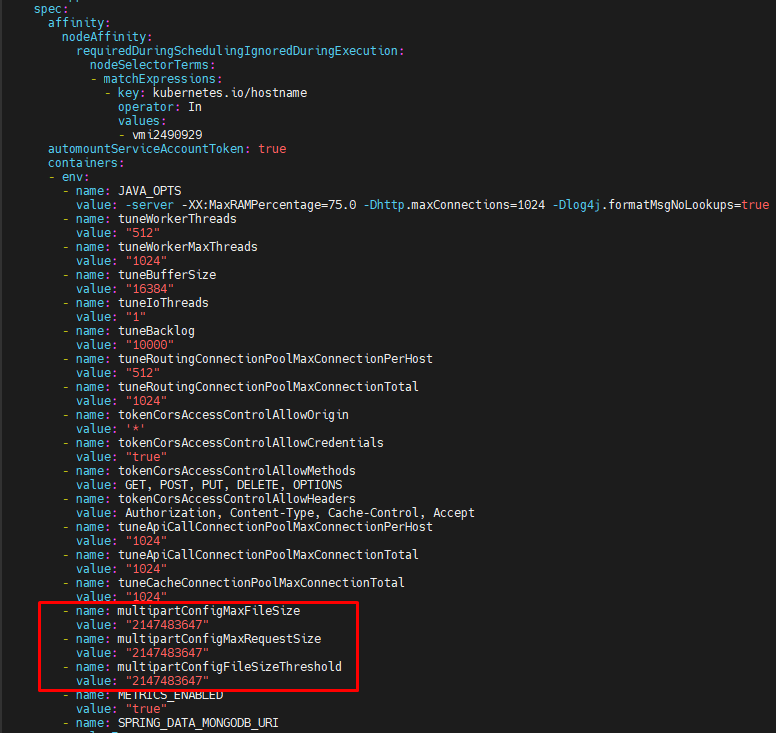
To increase this limit, the relevant parameters must be updated with appropriate values in bytes on the deployment named worker in the Kubernetes environment.
multipartConfigMaxFileSize
multipartConfigMaxRequestSize
multipartConfigFileSizeThreshold
The maximum allowed value is 2147483647 bytes (2 GB − 1 byte) due to integer limits.
   - name: multipartConfigMaxFileSize
     value: "2147483647"
   - name: multipartConfigMaxRequestSize
     value: "2147483647"
   - name: multipartConfigFileSizeThreshold
     value: "2147483647"
The values must be defined in bytes and added under the spec → containers → env section of the worker deployment, as shown in the image below.
Cache Pod Entering Error Loop During Apinizer Upgrade
Problem
When updating cache deployments during Apinizer upgrade, if the Cache pod enters an error loop with the following error:
Joining node's version 4.2.8 is not compatible with cluster version 4.1
(Rolling Member Upgrades are only supported in Hazelcast Enterprise)
Solution
To resolve this issue, you can use one of the following methods:
Scale down the cache deployment by setting its replicas to 0 to stop all pods:
kubectl scale deployment cache --replicas=0 -n apinizer
Wait for the pods to completely shut down. Then set the replicas back to the original value to restart the pods:
kubectl scale deployment cache --replicas=3 -n apinizer
The new pods will start with the updated version.
You can perform a clean restart by deleting old replicaset definitions.
This operation may delete old pods, so it should be done carefully. The deployment will automatically create new pods.
Edit the deployment YAML file and change the deploymentStrategy from RollingUpdate to Recreate:
apiVersion: apps/v1
kind: Deployment
metadata:
  name: cache
spec:
  strategy:
    type: Recreate
  replicas: 3
  # ... other settings
This method shuts down all pods at once instead of gradually, then creates new ones.
Excessive Application Logs and Threshold Notifications
Problem
Application Logs records are growing beyond expectations and the following notification is received:
This notification was created because threshold value was exceeded for Apinizer Gateway - Application Logs Monitor! Please control your log levels or clear old logs.
Reason/Why
This situation may have more than one cause.
Changing the API Proxy Log Level for Debugging
When the debug level is left enabled on the Application Logs tab, log volume increases. Apinizer does not turn this level off automatically.
High Log Volume at ERROR Level
If the record count is high even though logs are at the ERROR level, there may be a system issue and these logs should be reviewed. Actual error notifications must not be ignored.
The Application Logs settings screen shows the last saved setting from the page, not the live state.
Solution
Setting the log level directly to ERROR as an administrator may cause development teams to miss the logs they expect during their work. Related teams should therefore be informed first.
If logs are at a level other than ERROR, the level can be set to ERROR from the Application Logs tab. To make this the default on every pod start, the following parameter can be added to the worker deployment file:
logLevel: ERROR
For details, see Gateway Settings — Additional Variables.
It is recommended to clean these logs every 3 days. If the related settings on the Admin Application Log Cleanup Tasks page are not enabled, they should be enabled and adjusted.
An alert is enabled by default for excessive Application Logs. When the record count reaches the 10,000 limit, notifications appear from the top-right corner of Apinizer. If logging is used heavily in a test environment, the daily log alarm threshold for the worker can be adjusted to a suitable level.
In future versions, the debug level is planned to open with a short default duration and turn off automatically when that period ends.