

Documentation Index
Fetch the complete documentation index at: https://docs.apinizer.com/llms.txt
Use this file to discover all available pages before exploring further.
Introduction
API integration provides the ability to create workflows by seamlessly connecting one or more endpoints.Pre-Installation Steps
Before starting the installation of Apinizer API Integration, the following should be noted:Apinizer Installation
Learn API Manager installation
Installation Steps
API Integration Installation is done in two ways.- If Kubernetes management is done through Apinizer, you can install API Integration through API Manager.
- If Kubernetes management is not done through Apinizer, manual installation can be done to Kubernetes and then connection can be established with API Manager.
API Integration Installation
If API Integration Installation Will Be Done Through API Manager
For API Integration installation through API Manager, the following section must be active in the General Settings menu.

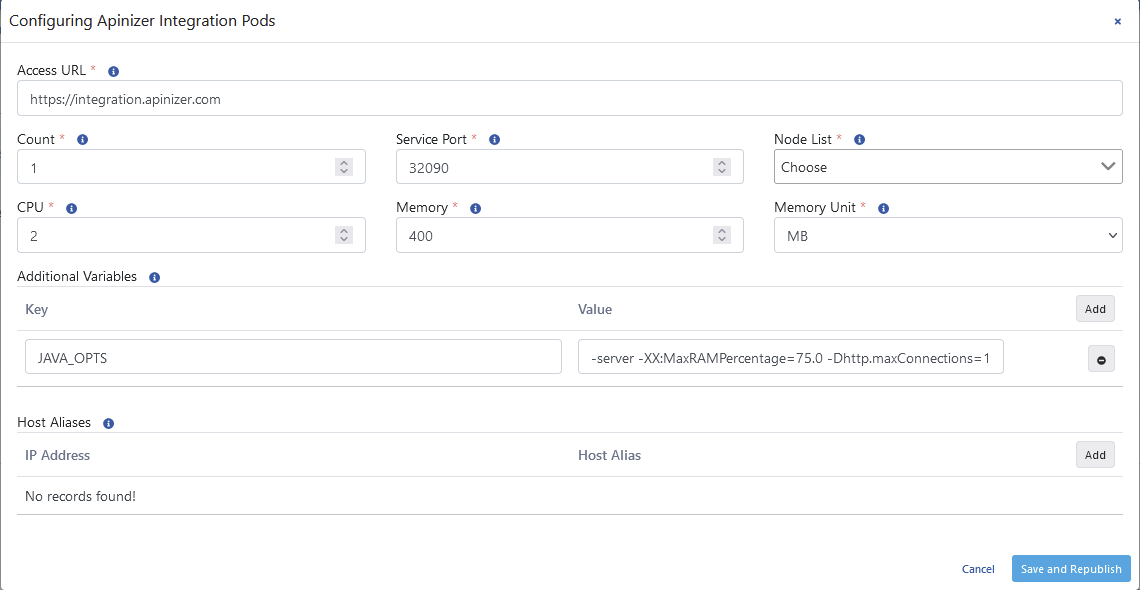
| Field | Description |
|---|---|
| Access URL (Access URL) | API Integration access address. Example address: http://<API_INTEGRATION_ACCESS_URL>:<PORT>. |
| Count (Count) | API Integration application count, adjusts the replicaSet setting in Kubernetes Cluster. |
| Service Port (Service Port) | API Integration access port. |
| Node List (Node List) | Sets which Kubernetes Worker servers the Pods will run on. Adjusts the NodeAffinity setting in Kubernetes. |
| CPU | Information about the maximum CPU core count the Pod will use. |
| Memory (Memory) | Maximum memory value the Pod will use. |
| Memory Unit (Memory Unit) | The unit of the value required for memory is selected; MB, GB. |
| Additional Variables (Additional Variables) | Variables and values to be run in the Pod are defined. |
| Host Aliases (Host Aliases) | IP addresses in the network can sometimes be placed behind host names, if these cannot be resolved through nameserver or are not defined in the host file, Host Alias definition must be made for application pods to resolve these names. Multiple domain names can be entered for each IP address. |
Additional VariablesWhen configuring the Java Options setting in the Additional Variables field, the following warning should be considered:
- When
-Xmxand-Xmsparameters are used, automatic heap sizing is disabled. - When
-Xmxand-Xmsparameters are used, automatic heap sizing is disabled. - Apinizer sets JVM Heap values to use 75.0% of the memory given to the container since it runs inside the container.
- UseContainerSupport is active by default.
- Old flags
-XX:{Min|Max}RAMFractionare now deprecated. There is a new-XX:MaxRAMPercentageflag that takes a value between 0.0 and 100.0 and defaults to 75.0. Therefore, if there is a 1 GB memory limit, the JVM heap is limited to ~ 750 MB by default.
If API Integration Installation Will Not Be Done Through API Manager
A namespace is created for Integration.
Next Steps
API Integration Overview
Get detailed information about API Integration
Multi-Region Installation
Learn Multi-Region installation
API Portal Installation
Learn API Portal installation
Apinizer Installation
Learn Apinizer installation