Script-2-API Kullanımı
Script-2-API, herhangi bir kod editörüne ihtiyaç olmadan JavaScript veya Groovy script dilleri ile metotlar oluşturarak REST API oluşturmanızı sağlar.
Özel tanımlı değişkenler ile mesaj bölümlerini kod içinde kullanabilme, güncelleyebilme ya da silebilme işlemleri gerçekleştirilebilir.
Bu içerikte, mail işlemlerinin yönetildiği bir REST API için Script-2-API tanımlama, sırasıyla mail göndermek için sendMail metodu oluşturma, REST API'yi API Proxy olarak oluşturma, yükleme ve test etme işlemleri anlatılacaktır.
1. Script-2-API Oluşturma
REST API'yi Script API Oluştur penceresinde oluşturun.
- Ana menüde Geliştirme → API Oluşturucu → Script-2-API öğesini seçin. + Yeni düğmesine tıklayın. Script API Oluştur penceresi açılır.
- Ad alanına Mail API yazın. Bir açıklama girin.
- İlk uç nokta bölümünde HTTP Metot olarak POST seçin. Yol alanına /sendMail yazın. Dil olarak Groovy seçin.
- Yeni düğmesine tıklayın. Apinizer Script-2-API'yi bir başlangıç script'iyle kaydeder ve düzenleyiciyi açar.
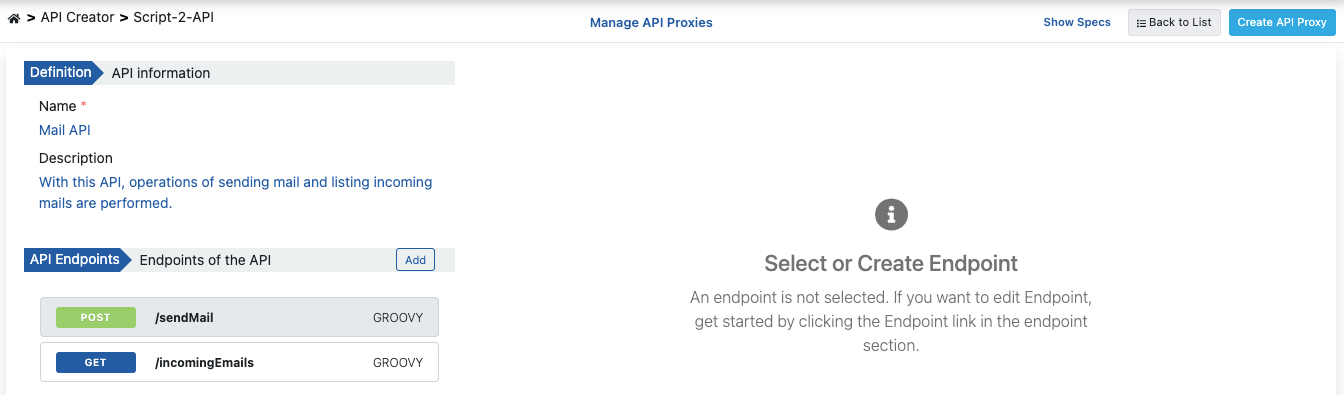
1.1. /sendMail Script'ini Yazma
/sendMail uç noktası istek gövdesinden e-posta bilgilerini okur ve e-posta gönderir. Script Groovy diliyle yazılır.
- Sol sütunda POST /sendMail uç noktasını seçin. Yapılandır düğmesine tıklayın. Yapılandırma paneli açılır.
- Başlangıç script'ini aşağıdaki Groovy koduyla değiştirin.
- Kaydet düğmesine tıklayın.
Başka bir uç nokta eklemek için API Uç Noktaları başlığının yanındaki + düğmesine tıklayın.
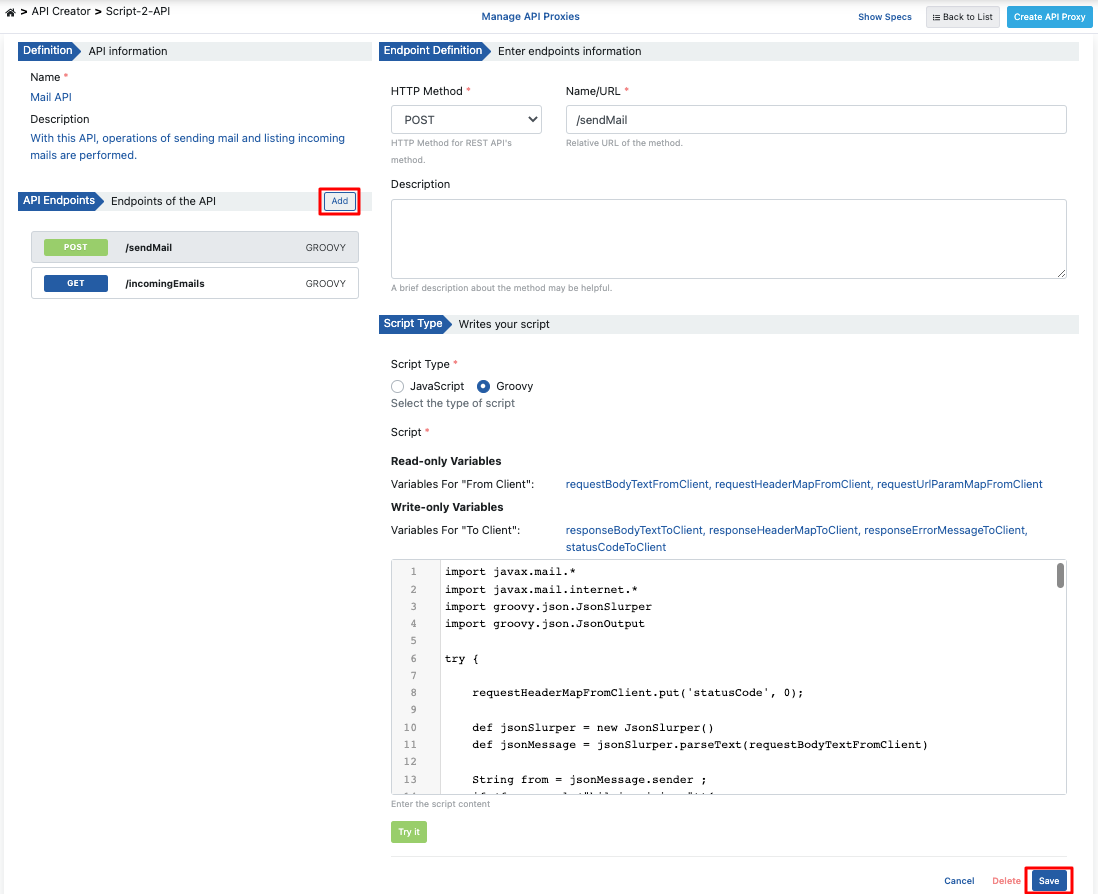
Script'i kaydetmeden önce test etmek için Yapılandırma panelinin altındaki Script'i test et düğmesine tıklayın. Script'i Test Etme penceresi script'i örnek veriyle çalıştırır. Ayrıntılar için Script'i Test Etme bölümüne bakın.
Groovy kodu;
import javax.mail.*
import javax.mail.internet.*
import groovy.json.JsonSlurper
import groovy.json.JsonOutput

try {
    requestHeaderMapFromClient.put('statusCode', 0);
    def jsonSlurper = new JsonSlurper()
    def jsonMessage = jsonSlurper.parseText(requestBodyTextFromClient)

    String from = jsonMessage.sender;
    if (from.equals("bilgi.apinizer")){
        from="info@apinizer.com";
    } else if(from.equals("apinizer.hata")){
        from="warning@apinizer.com";
    } else {
        statusCode=400;
        requestErrorMessageFromClient = JsonOutput.toJson([
            isTheOperationSuccessful: false,
            errorMessage: 'Hatalı gönderen bilgisi',
            errorCode:'01-ERR-02'
        ])
        return;
    }

    String to=jsonMessage.reciever;
    String cc=jsonMessage.recieverInformation;
    String bcc=jsonMessage.recieverInformation;

    if(!to?.trim() && !cc?.trim() && !bcc?.trim()){
        requestErrorMessageFromClient = JsonOutput.toJson([
            isTheOperationSuccessful: false,
            errorMessage: 'En az bir alıcı eklenmeli',
            errorCode:'01-ERR-03'
        ])
        statusCode=400;
        return;
    }

    String subject=jsonMessage.subject;
    if(subject?.trim()){
        subject=""
    }

    String content=jsonMessage.content;
    if(content?.trim()){
        content=""
    }

    String mimeType=jsonMessage.contentType;
    if(mimeType?.trim()){
        mimeType="text/html;charset=utf-8"
    }

    // Init constants of sender email account.
    String email = "apinizer.hata"
    String password = ""
    String host = "mail.apinizer.com"
    String port = "25" // "465" "587"

    // Set up properties.
    Properties props = System.getProperties()
    props.put("mail.smtp.user", email)
    props.put("mail.smtp.host", host)
    props.put("mail.smtp.port", port)
    props.put("mail.smtp.auth", "false")
    props.put("mail.smtp.starttls.enable", "false")
    props.put("mail.smtp.socketFactory.class", "javax.net.ssl.SSLSocketFactory")
    props.put("mail.smtp.ssl.trust", host) // Change host to "*" if you want to trust all host.

    Session session = Session.getInstance(props, new javax.mail.Authenticator() {
        protected PasswordAuthentication getPasswordAuthentication() {
            return new PasswordAuthentication(email, password);
        }
    });

    // Set up message.
    MimeMessage message = new MimeMessage(session)
    message.setFrom(new InternetAddress(from))
    if(to?.trim()){
        message.addRecipients(Message.RecipientType.TO, new InternetAddress(to))
    }
    if(cc?.trim()){
        message.addRecipients(Message.RecipientType.CC, new InternetAddress(cc))
    }
    if(bcc?.trim()){
        message.addRecipients(Message.RecipientType.BCC, new InternetAddress(bcc))
    }
    message.setSubject(subject)
    message.setContent(content, mimeType)

    try {
        // Send mail.
        Transport.send(message)
    } catch (MessagingException e) {
        e.printStackTrace();
        statusCode=500;
        responseErrorMessageToClient = JsonOutput.toJson([
            isTheOperationSuccessful: false,
            errorMessage: 'Error occurred while sending mail:' + e.getMessage(),
            errorCode:'01-ERR-04'
        ])
        return;
    }

    statusCode=200;
    responseBodyTextToClient = JsonOutput.toJson([
        isTheOperationSuccessful: true,
        errorMessage: '',
        errorCode:''
    ])
} catch (MessagingException e) {
    e.printStackTrace();
    statusCode=500;
    responseErrorMessageToClient = JsonOutput.toJson([
        isTheOperationSuccessful: false,
        errorMessage: 'Error occurred while sending mail:' + e.getMessage(),
        errorCode:'01-ERR-05'
    ])
    return;
}
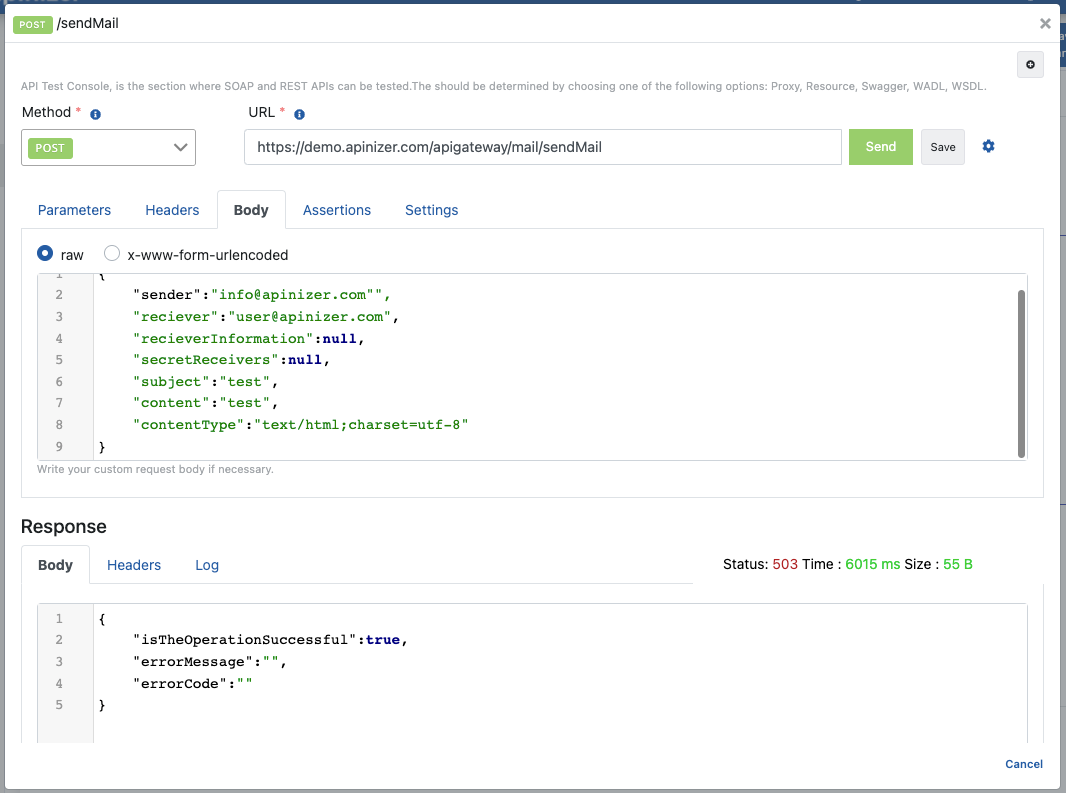
Eposta gönderirken isteğin gövdesinde aşağı JSON gövdesi olmalıdır;
{
 "sender":"info@apinizer.com",
 "reciever":"user@apinizer.com",
 "recieverInformation":null,
 "secretReceivers":null,
 "subject":"test",
 "content":"test",
 "contentType":"text/html;charset=utf-8"
}
Başarılı yanıt döndüğünde aşağı şablondaki mesaj şablon örneğiyle karşılaşılır;
{
 "isTheOperationSuccessful":true,
 "errorMessage":"",
 "errorCode":""
}
Hatalı yanıt döndüğünde aşağı şablondaki mesaj şablon örneğiyle karşılaşılır;
Script Error: {
 "isTheOperationSuccessful":false,
 "errorMessage":"Error occurred while sending mail:Invalid Addresses",
 "errorCode":"01-ERR-04"
}
2. API Tanım Belgelerini Görüntüleme
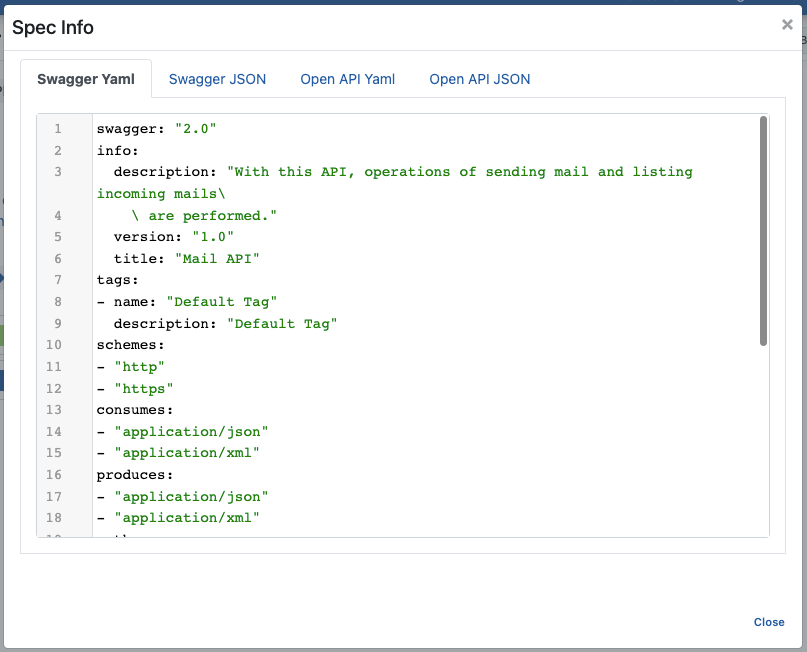
Mail API'nin tanım dosyalarına erişmek için düzenleyicinin üstündeki Spec'leri göster (Show Specs) düğmesine tıklayın.

Spec Bilgisi diyaloğunu içeren görsele aşağıda yer verilmiştir:
3. API Proxy Oluşturma
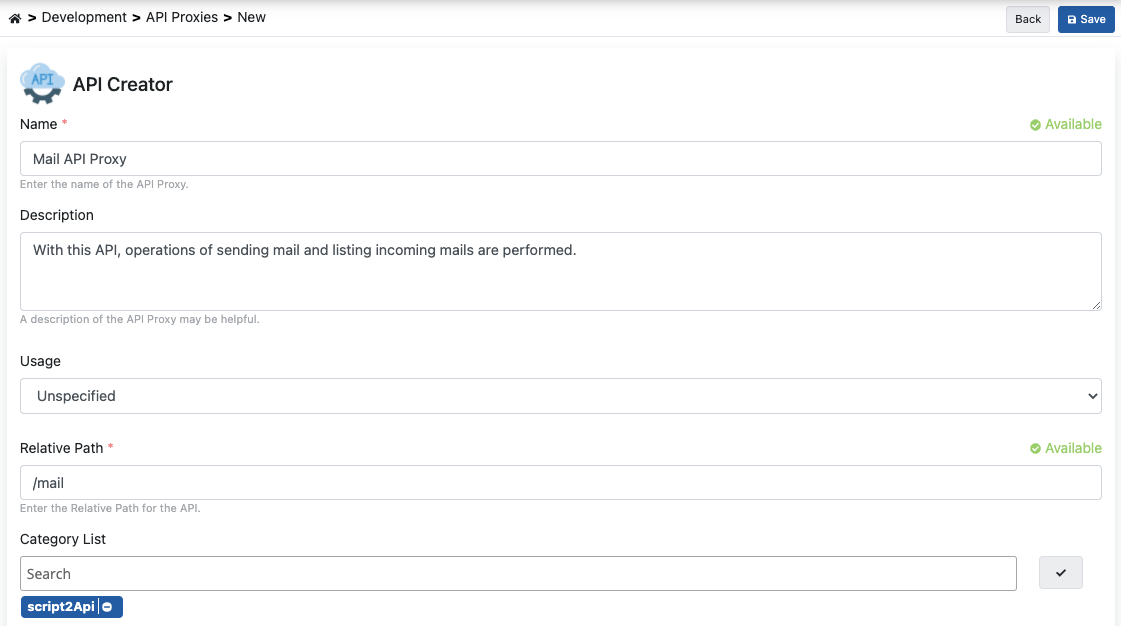
Script-2-API ekranından API Proxy Oluştur (Create API Proxy) butonuna tıklanarak anında API Proxy oluşturulabilir.

API Proxy Oluştur penceresi açılır. Aşağıdaki görseldeki alanları doldurun. Oluştur ve yükle (Create and deploy) düğmesine tıklayın.
3.1 API Proxy'yi Canlıya Alma
Mail API Proxy, tanımı yapılmış ortam (environment) üzerine hızlı bir şekilde yüklenip (deploy), istemcilerin tüketimine açılabilir.
Yüklenecek ortamlar alanında bir ortam işaretlediyseniz Oluştur ve yükle düğmesi API Proxy'yi zaten yükler. Sonradan yüklemek için API Proxy ekranındaki Yükle (Deploy) düğmesinin açtığı pencereyi kullanın.

Aynı işlemi Script-2-API ekranındaki Proxyleri Yönet (Manage API Proxies) düğmesiyle de yapabilirsiniz.

4. Test Etme
Uç noktayı Script-2-API ekranındaki Dene (Try it) paneliyle test edebilirsiniz:
- Sol sütunda POST /sendMail uç noktasını seçin. Uç noktanın başlığındaki Dene düğmesine tıklayın. Dene paneli açılır.
- API Proxy ve Ortam değerlerini kontrol edin.
- Gövde sekmesine e-posta bilgilerini yazın. Gönder düğmesine tıklayın.
Ayrıntılar için Script-2-API'yi Deneme bölümüne bakın. API Proxy sayfasından /sendMail uç noktasının test edilmesini içeren görsel aşağıdadır: