Access to Apinizer Services with Kubernetes Ingress
Kubernetes provides a powerful platform for managing distributed applications. However, an appropriate way is needed to provide access to these applications from the outside world. At this point, Kubernetes's Ingress object and NGINX Ingress Controller come into play. This document explains step by step how NGINX Ingress Controller will be installed and how access will be provided to Apinizer Services with Ingress.

What is Kubernetes Ingress?
Ingress is a kubernetes object used to provide access to applications in Kubernetes cluster from the outside world.
It can route requests coming to a specific host name or path to a specific service. For example, it can route a request coming to example.com/app address to a Kubernetes service named app-service.
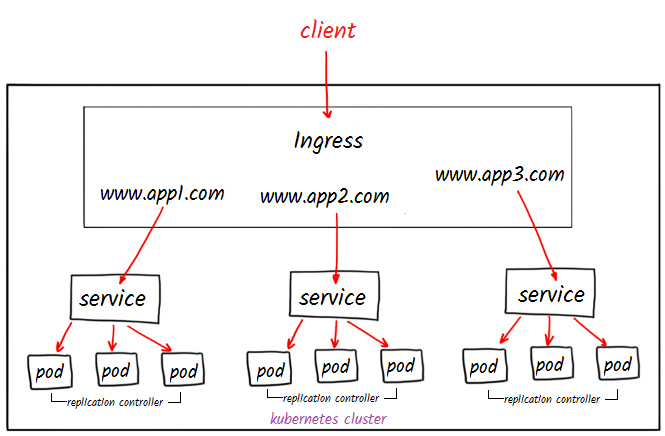
What is Nginx Ingress Controller?
NGINX Ingress Controller uses NGINX to route requests coming to applications running in a Kubernetes cluster. It monitors Ingress objects and routes incoming requests to different services according to specific rules. In Kubernetes ecosystem, there are also various other Ingress Controllers besides NGINX. The most well-known of these are: traefik, HAProxy, Envoy, Ambassador.
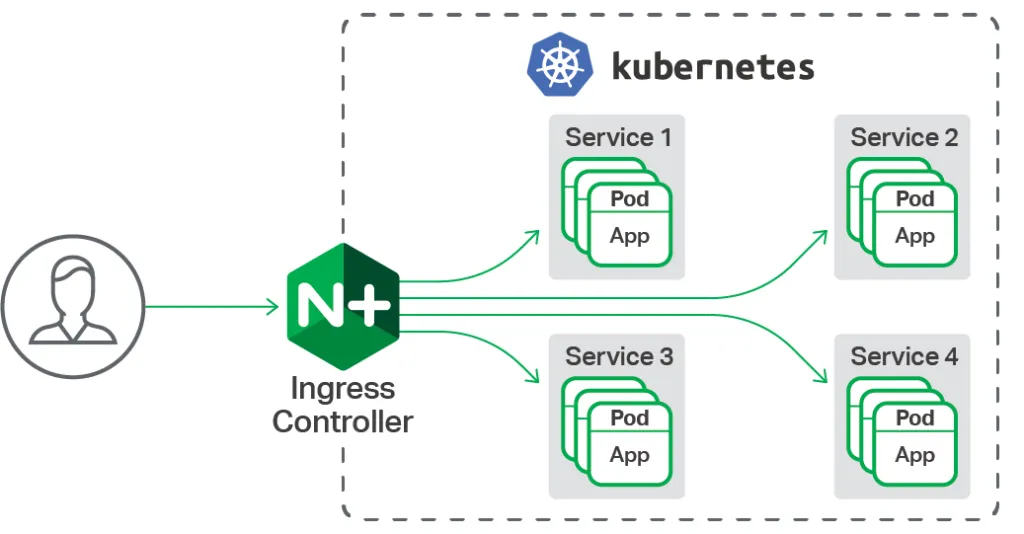
In this document, access to the application is provided by installing NGINX Ingress Controller. When you want to expose your kubernetes cluster to the outside in your cloud provider (AWS, GCP, Azure, etc.), you create a service of LoadBalancer type and an IP is automatically assigned to you. This IP is used to provide external access to the service. However, in non-cloud (on-premises) or bare-metal environments, a tool like MetalLB is needed for LoadBalancer service.
This application will be performed on a virtual machine with Ubuntu operating system located locally.
If you are working in a Cloud environment, you can skip MetalLB installation.
MetalLB Installation
MetalLB (Metal Load Balancer) is a network load balancer solution for Kubernetes clusters.
You can perform MetalLB installation to kubernetes cluster with the following command.
kubectl apply -f https://raw.githubusercontent.com/metallb/metallb/v0.13.5/config/manifests/metallb-native.yaml
Check the status of pods created with the following command and wait until they are ready ("ready").
kubectl get all -n metallb-system
Creating External IP Pool
An IP address pool needs to be created for MetalLB usage.
Create a yaml file and add the content of IPAddressPool type found below.
vim ip-pool.yaml
The IP range you specify in the address section will be your IP address that you will access from external environments.
You need to give an empty IP range accessible from local network
In this example, the range 172.16.100.170-172.16.100.180 is given.
apiVersion: metallb.io/v1beta1
kind: IPAddressPool
metadata:
  name: ip-pool
  namespace: metallb-system
spec:
  addresses:
  - 172.16.100.170-172.16.100.180   #Replace with IP addresses suitable for you.
Create an IP address pool by applying the yaml file.
kubectl apply -f ip-pool.yaml
Now it has added IP addresses in the specified range to this pool. When you create a service of LoadBalancer type, an IP will be automatically assigned to you.
Nginx Controller Installation
You can install nginx controller to kubernetes cluster using Helm. The purpose of using Helm is to manage all configuration files needed to bring up applications in Kubernetes cluster and facilitate the installation process.
In this step, first install helm and then add Nginx controller repo.
sudo snap install helm --classic
helm repo add ingress-nginx https://kubernetes.github.io/ingress-nginx
helm repo update
Now you can perform nginx-controller installation using Helm.
helm install ingress-nginx ingress-nginx/ingress-nginx --namespace ingress --set controller.ingressClassResource.name=nginx --create-namespace
When you run the command above, it will give you this output.

After Nginx Controller installation is successfully completed, there is a specific check stage.
Now it should be checked whether an IP is assigned in the external-ip field of the ingress-nginx-controller (loadbalancer type) service from the services created in the installation.
kubectl get svc -n ingress-nginx
When checked, it is seen that an external-ip has been assigned to provide external access.

Nginx controller is now ready.
X-Forwarded-For (XFF) Configuration
Starting with Apinizer 2024.05.4, the Management Console requires client IP information to be validated. When accessing through Ingress, the X-Forwarded-For (XFF) header must be passed correctly so that Apinizer receives the real client IP.
Add the use-forwarded-headers key with the value true to the data section of the ConfigMap definition:
apiVersion: v1
kind: ConfigMap
metadata:
  name: nginx-configuration
  namespace: ingress-nginx
data:
  use-forwarded-headers: "true"
If the namespace you used during the Helm installation differs (for example ingress), edit the metadata.namespace and metadata.name fields of the ConfigMap according to your environment. You can find the existing Controller ConfigMap with the kubectl get configmap -n <namespace> command.
Apply the yaml file:
kubectl apply -f nginx-configuration.yaml
The following annotation must also be added to the Ingress object that will be created in the next step:
nginx.ingress.kubernetes.io/use-forwarded-headers: "true"
One of the following headers must be present on the load balancer side:
- X-Forwarded-For
- XFF
- Proxy-Client-IP
- WL-Proxy-Client-IP
- HTTP_X_FORWARDED_FOR
- HTTP_X_FORWARDED
- HTTP_X_CLUSTER_CLIENT_IP
- HTTP_CLIENT_IP
- HTTP_FORWARDED_FOR
- HTTP_FORWARDED
- HTTP_VIA
- REMOTE_ADDR
API Manager (Management Interface) and API Portal check the headers above in order and use the first valid IP to determine the client IP.
Now, the next step to provide access to Apinizer application is to create an Ingress object.
This way, we can facilitate access to Apinizer Management Interface by defining a specific DNS name and prefix.
Apinizer Deploy Example
In the following command output, the namespace and POD where Apinizer Management Interface runs are shown.

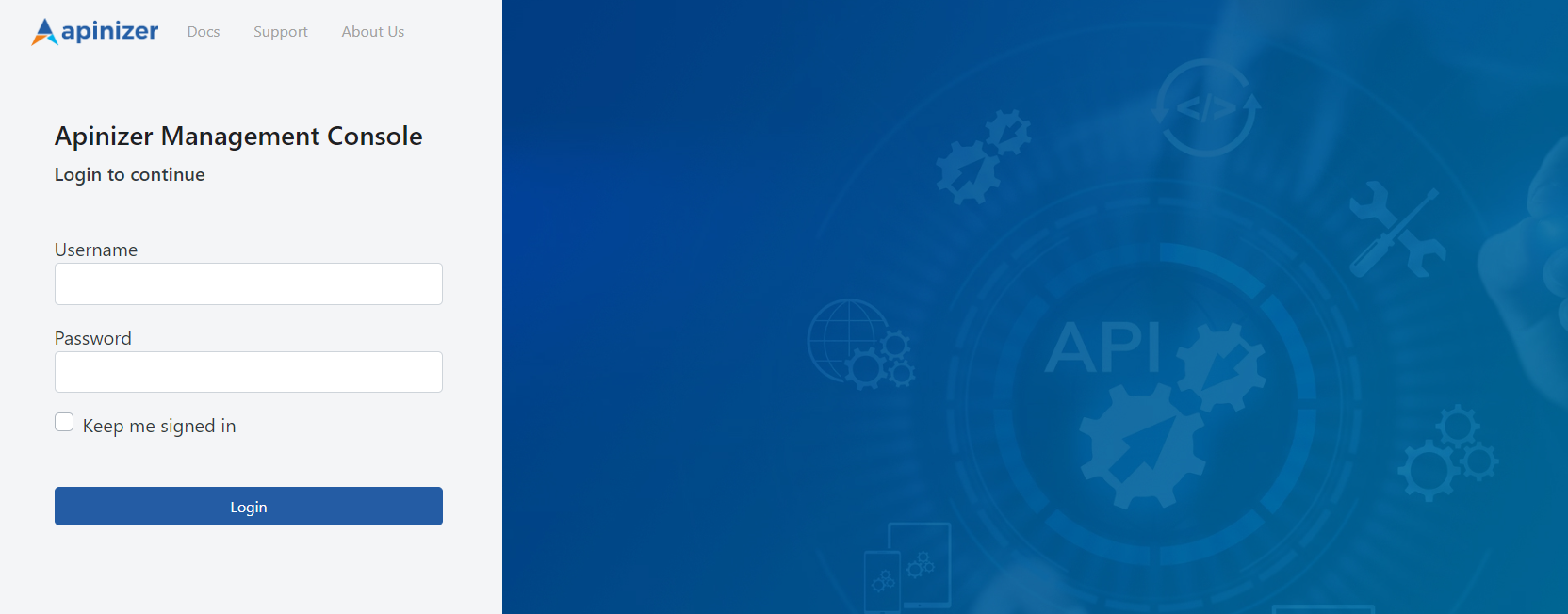
Ingress definitions we will make to access our application running in this pod (for the screen below to appear) are explained in the next section.
Creating Ingress Object
Before using Ingress, an Ingress resource needs to be created to define how your application will be accessed at which URLs.
Ingress resource specifies rules that route incoming requests to targets by being monitored by Nginx Ingress Controller.
Create an Ingress object in Kubernetes by creating a yaml file and editing relevant configurations according to ourselves.
vi ingress.yaml
Add Ingress content and edit the fields specified in the warning section below according to yourself.
apiVersion: networking.k8s.io/v1
kind: Ingress
metadata:
  name: manager-ingress
  namespace: apinizer
  annotations:
    kubernetes.io/ingress.class: "nginx"
    nginx.ingress.kubernetes.io/rewrite-target: /index.html
    nginx.ingress.kubernetes.io/use-forwarded-headers: "true"
spec:
  rules:
  - host: demo.apinizer.com
    http:
      paths:
      - path: /
        pathType: Prefix
        backend:
          service:
            name: manager
            port:
              number: 8080
If Using Certificate:
You can edit the key, cert and namespace fields below according to your environment.
kubectl create secret tls api-tls-secret --key tls.key --cert tls.crt -n apinizer
apiVersion: networking.k8s.io/v1
kind: Ingress
metadata:
  name: manager-ingress
  namespace: apinizer
  annotations:
    kubernetes.io/ingress.class: "nginx"
    nginx.ingress.kubernetes.io/rewrite-target: /index.html
    nginx.ingress.kubernetes.io/use-forwarded-headers: "true"
spec:
  ingressClassName: nginx
  tls:
  - hosts:
    - api.test.com  			# You should write your own domain here
    secretName: api-tls-secret  # Secret will be used here
  rules:
  - host: api.test.com 			# You should write your own domain here
    http:
      paths:
      - path: /
        pathType: Prefix
        backend:
          service:
            name: manager
            port:
              number: 8080
You can edit the specified fields according to your application.
host: demo.apinizer.com In this field, Ingress rules are defined. Host field specifies which DNS name incoming requests will be routed to.
path: / In this field, it is specified which target incoming requests will be routed to according to a specific URL path. In this example, requests with / path match this rule.
pathType: Prefix In this field, it is specified that the specified path is a prefix. That is, requests with / path match all paths starting with / prefix.
backend: service: name: manager In this field, the name of the target service where requests will be routed is written.
port: number: 8080 In this field, your service's port number (8080) is specified.
In this application, we will continue without using certificate.
Create an ingress object using the yaml file.
kubectl apply -f ingress.yaml
You can run the following command to check the correctness and operability of the created Ingress object.
kubectl get ing -A
Ingress object has been created and IP information created in ingress-nginx-controller service is visible in the address field.

Also, you should see the host address you specified in Ingress YAML file here.
Important: It may be necessary to wait 1-2 minutes and check a few times for Ingress to assign an address.
To see the result of this work, you can make a request to the following address:
curl -H "Host: demo.apinizer.com" http://172.16.100.170
If you haven't purchased a domain name from a service provider, you can make a local record on your own computer for testing purposes. How to do this operation is explained in the document below according to a server with Ubuntu operating system.
First, if you want to add a DNS record on your own computer to manage your domain name, you can follow the steps below.
DNS Definition
As the first step, open the /etc/hosts file with a text editor.
This file is a local DNS (Domain Name System) file where IP addresses and corresponding host names are matched.
vi /etc/hosts
Add the external-ip address provided by the ingress-nginx-controller service coming from Nginx Controller and the DNS address you specified in Ingress YAML file to this file.
<external-ip> demo.apinizer.com
Result
curl command can be used in the test step or access can be provided through browser.
When a request is made to demo.apinizer.com/apinizer/management/health address, the result should be as follows:

When accessed with browser, Apinizer Management Interface screen will come.
Now you are using an ingress to provide access to Apinizer and the expected result was successful.