Topology 3: High Availability
This page is prepared for those who want to install Apinizer in critical production environments with high availability requirements. This topology provides %99.9+ uptime, automatic failover, and data replication.
Overview
Topology 3 is a topology designed for high availability, where all critical components run in a cluster structure. All components are distributed across 12 servers.
Architectural Structure
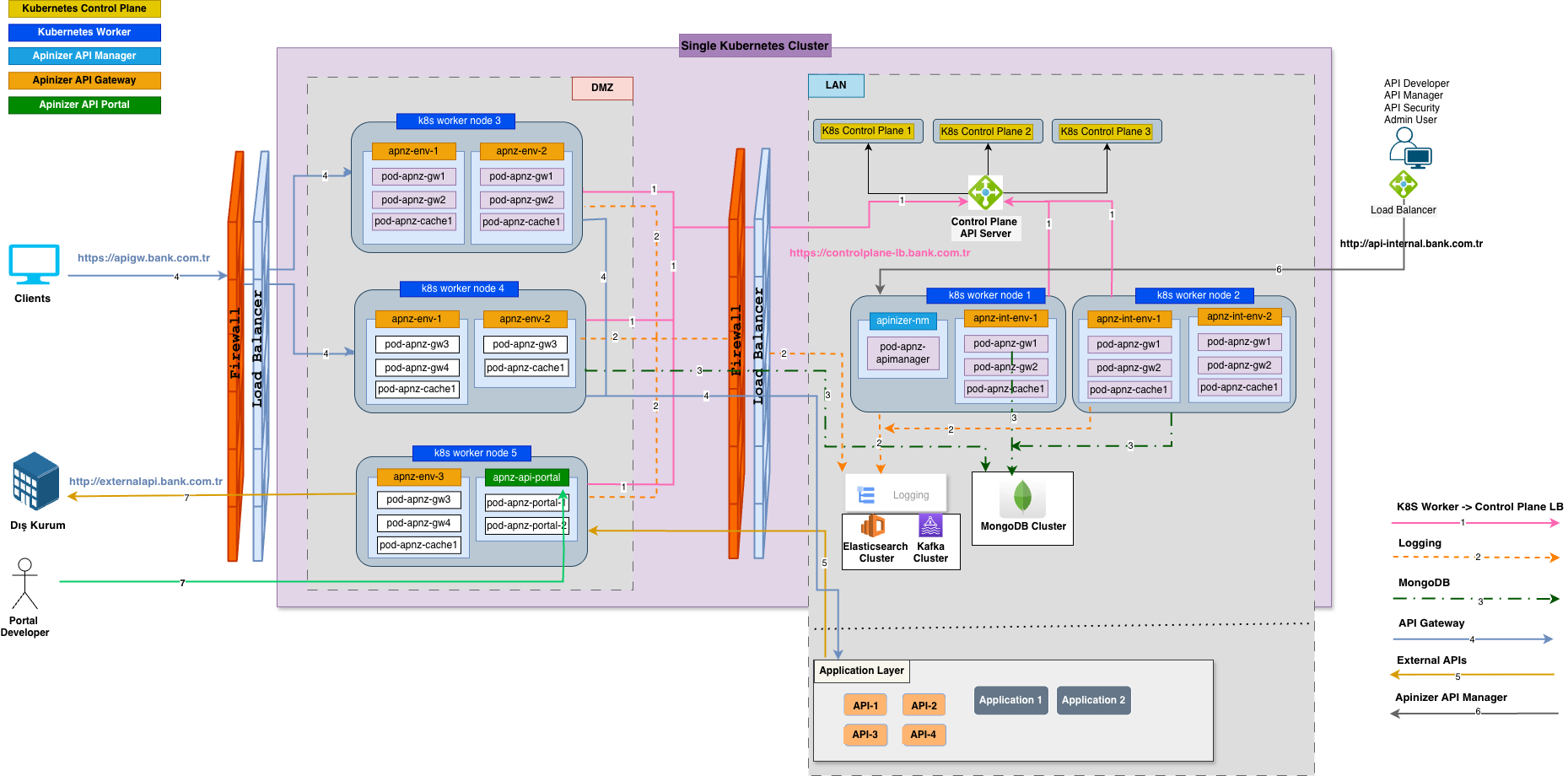
1. System Requirements
For detailed system requirements, you can refer to the Overview page.
Operating System
- Ubuntu Server 24.04 LTS or RHEL 9.x
- Minimum kernel version: 5.4+
- SELinux: Disabled (for RHEL) or Permissive mode
Software Components
| Component | Version/Requirement |
|---|---|
| Kubernetes | 1.31.0+ (HA Cluster) |
| Docker/Containerd | Version compatible with Kubernetes |
| MongoDB | Any version (Replica Set - 3 node minimum) |
| Elasticsearch | 7.9.2+ (Cluster - 3 node minimum) |
| Network Plugin | Flannel 0.27.4 (or compatible) |
| Load Balancer | HAProxy 2.0+ or Nginx 1.18+ (HA configuration) |
For detailed information about software components: Overview - Components Required by Apinizer
Network Requirements
- Internet Access: Required during installation
- DNS: Working DNS resolution
- Firewall: Required ports must be open
- Load Balancer: HA configuration (VIP)
- Network Latency: < 1ms between nodes (same datacenter)
For detailed information about network topology and port requirements: Network Topology and Port Requirements
2. Hardware Requirements
The requirements below are specified for the recommended minimum configuration. They should be increased according to your service loads.
| No | Operating System | CPU | RAM | Disk | Installations |
|---|---|---|---|---|---|
| Server 1 | Ubuntu Server 24.04 LTS / RHEL 9.x | 4 | 8GB | 100GB | Kubernetes Control-Plane Node 1 |
| Server 2 | Ubuntu Server 24.04 LTS / RHEL 9.x | 4 | 8GB | 100GB | Kubernetes Control-Plane Node 2 |
| Server 3 | Ubuntu Server 24.04 LTS / RHEL 9.x | 4 | 8GB | 100GB | Kubernetes Control-Plane Node 3 |
| Server 4 | Ubuntu Server 24.04 LTS / RHEL 9.x | 10 | 12GB | 100GB | Kubernetes Worker Node 1 |
| Server 5 | Ubuntu Server 24.04 LTS / RHEL 9.x | 10 | 12GB | 100GB | Kubernetes Worker Node 2 |
| Server 6 | Ubuntu Server 24.04 LTS / RHEL 9.x | 10 | 12GB | 100GB | Kubernetes Worker Node 3 |
| Server 7 | Ubuntu Server 24.04 LTS / RHEL 9.x | 4 | 8GB | 200GB | MongoDB Replica Set Node 1 |
| Server 8 | Ubuntu Server 24.04 LTS / RHEL 9.x | 4 | 8GB | 200GB | MongoDB Replica Set Node 2 |
| Server 9 | Ubuntu Server 24.04 LTS / RHEL 9.x | 4 | 8GB | 200GB | MongoDB Replica Set Node 3 |
| Server 10 | Ubuntu Server 24.04 LTS / RHEL 9.x | 8 | 32GB | 2TB | Elasticsearch Cluster Node 1 (Master+Data) |
| Server 11 | Ubuntu Server 24.04 LTS / RHEL 9.x | 8 | 32GB | 2TB | Elasticsearch Cluster Node 2 (Master+Data) |
| Server 12 | Ubuntu Server 24.04 LTS / RHEL 9.x | 8 | 32GB | 2TB | Elasticsearch Cluster Node 3 (Master+Data) |
Worker node server resources include the gateway pod limits (W8: 8 core / 8 GB) plus a ~2 core / ~4 GB reservation for Kubernetes system components (kubelet, kube-proxy, container runtime, operating system).
Important: The CPU, disk, and RAM values above are given as examples. These values may vary according to traffic volume, number of APIs, policy complexity, and other factors. To determine your actual hardware requirements, it is recommended to calculate according to the rules on the Capacity Planning page.
3. Network Topology
DMZ and LAN Separation (Mandatory)
For high availability topology, DMZ (Demilitarized Zone) and LAN (Local Area Network) separation is mandatory. This structure provides security and high availability.
Network Structure:
-
Internet: Traffic from the outside world is directed to the DMZ zone through a Load Balancer with high availability configuration (Port 443/80).
-
DMZ Zone: Worker nodes (3 units) are located in this zone. The Load Balancer distributes traffic among these three worker nodes, providing load balancing and high availability.
-
LAN Zone: Manager, MongoDB Replica Set (3 nodes), and Elasticsearch Cluster (3 nodes) are located in this zone.
For detailed information about DMZ and LAN zones: Overview - Core Concepts and Network Topology and Port Requirements
Port and Firewall Permissions
In this topology, servers are separated into DMZ and LAN zones. Worker nodes are in DMZ, Control-Plane, MongoDB, and Elasticsearch nodes are in LAN. Firewall rules control communication between zones and ensure only necessary ports are opened.
For detailed information about port requirements and firewall rules: You can refer to the Network Topology and Port Requirements page. This page explains in detail all port requirements and firewall rules for Kubernetes, MongoDB, Elasticsearch, and Apinizer components.
4. Capacity Planning
This topology runs with 3 W8 worker nodes. Benchmark-based planning values:
| Metric | Value |
|---|---|
| Worker Tier | W8 (8 core / 8 GB RAM) × 3 nodes |
| Daily Planning Capacity | ~30M requests/day (3 × 10M/day) |
| Uptime Target | 99.9%+ |
| Usage Purpose | Critical production — high availability |
Rolling Updates and Capacity: During zero-downtime rolling updates, Kubernetes temporarily takes one node offline. In this topology, 2 active nodes (~20M requests/day) remain during an update. For zero-downtime updates under full load, it is recommended to have total worker node capacity at least 2× your traffic requirements, or to add extra nodes during the update window.
For detailed information about capacity planning: You can refer to the Capacity Planning page. This page explains in detail traffic estimation, hardware requirements, MongoDB and Elasticsearch data size calculations, and benchmark performance results.
Pre-Installation Checklist
Before starting installation, you should make the following preparations:
| Category | Check Item |
|---|---|
| Infrastructure | [ ] 12 servers prepared (3 Control-Plane + 3 Worker + 3 MongoDB + 3 Elasticsearch) |
| [ ] Load Balancer prepared (HA configuration) | |
| [ ] Operating system installed (Ubuntu 24.04 LTS or RHEL 9.x) | |
| [ ] Network connectivity between servers tested (< 1ms latency) | |
| [ ] DNS resolution working | |
| [ ] Internet access available | |
| [ ] VIP (Virtual IP) configured | |
| Network | [ ] DMZ and LAN zones configured |
| [ ] Firewall rules configured | |
| [ ] Load balancer HA configured | |
| [ ] SSL/TLS certificates prepared | |
| [ ] Required ports opened | |
| [ ] Network segmentation applied | |
| Software | [ ] Kubernetes HA cluster installation packages ready |
| [ ] MongoDB replica set installation packages ready | |
| [ ] Elasticsearch cluster installation packages ready | |
| [ ] Apinizer images accessible (DockerHub or private registry) | |
| [ ] Load balancer software installed (HA) | |
| Security | [ ] SSH keys configured |
| [ ] Sudo access configured | |
| [ ] Security updates performed | |
| [ ] Firewall rules tested | |
| [ ] SSL/TLS certificates prepared | |
| [ ] Network segmentation tested |
For detailed pre-installation recommendations: You can refer to the Pre-Installation Recommendations page.
Usage Scenarios
This topology is ideal for critical production environments, high-traffic systems (~30M requests/day and above, 3×W8), high availability requirements (99.9%+ uptime), critical business processes, and systems with data security requirements.
For detailed information about topology selection guide and usage scenarios: You can refer to the Deployment Models page.
Limitations and Points to Consider
Points to consider for this topology:
- High cost requirements (12 servers + Load Balancer)
- Complex installation and management processes
- High network bandwidth requirements
- Requirement for expert system administrator
- Regular maintenance and monitoring requirements
- High disk space requirements (especially for Elasticsearch)