Transferring Traffic Logs to Syslog
API traffic logs are configured here, on the Gateway environment's log connectors — they are not part of the SIEM streams. Audit, session, token and application events are forwarded from the SIEM & Log Forwarding page instead. Forwarding API traffic through the SIEM streams is planned for a later release.
First, go to the Administration > Connection Configurations > Syslog page and create a Syslog connection definition.
Then add a syslog connector to the gateway environment where logs will be sent as syslog, and select the Syslog connection definition you created. For details, see the Adding Connectors to Gateway Environments page.
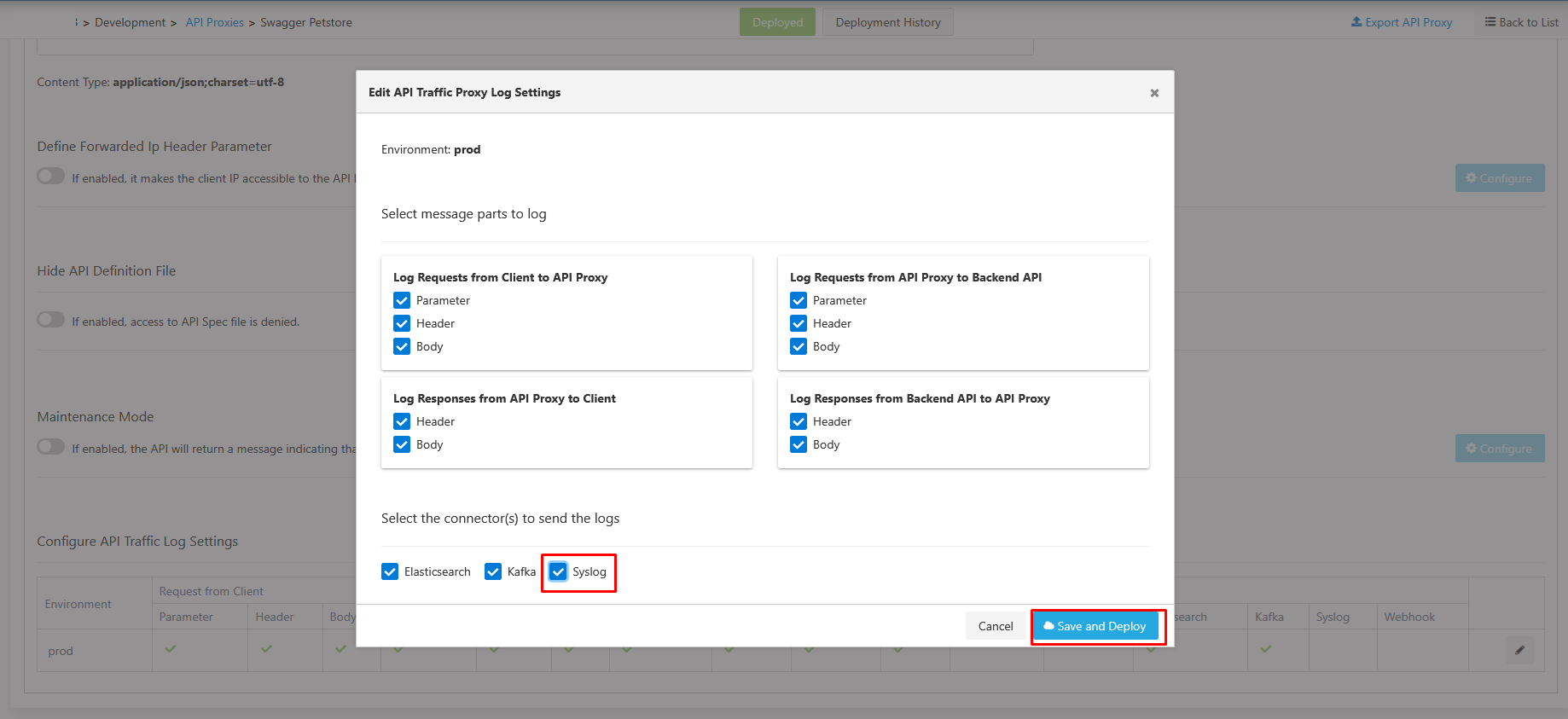
After this setting is made, this connector will be active by default for all API Proxies added.
For API Proxies added before this setting, this setting must be enabled. This can be done either from the settings tab of the relevant API Proxy or from the Administration → Analytics → API Traffic Log Settings page.
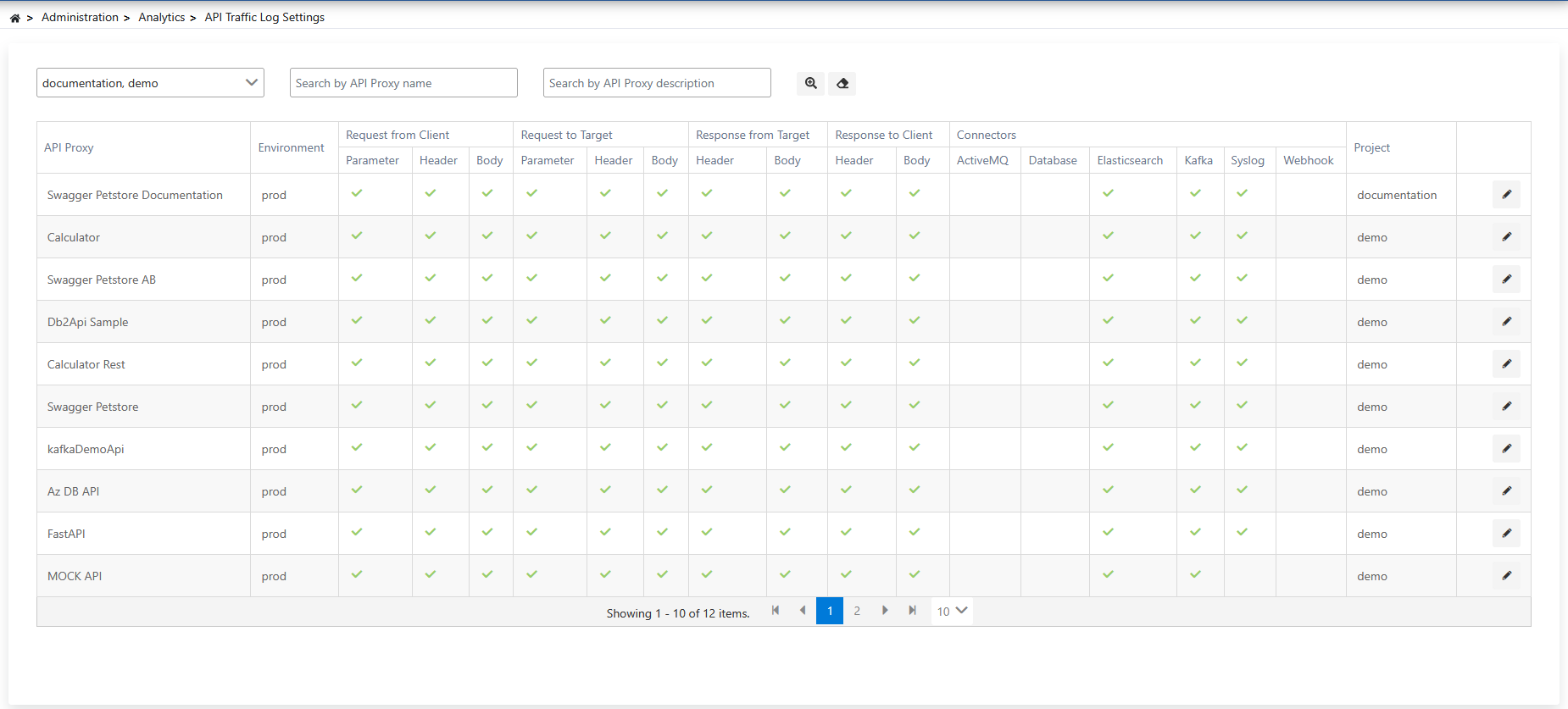
After the necessary settings are made, the API Traffic Log format sent via syslog will be as follows. For the data structure documentation of API Traffic logs, see the API Traffic Log Record Data Structure page.
{
  "@timestamp":"2025-06-11T08:19:48.810Z",
  "aci":"da7082df-fbea-4352-a2a2-db72acf97f11",
  "ei":"63ca7ed05c8e155862d99e11",
  "pi":"68493b6e80f5de2a3c29c511",
  "api":"68493bb680f5de2a3c29c611",
  "apn":"Swagger Petstore Documentation",
  "eat":"REST",
  "aprp":"/documentation/petstore",
  "apmi":"28bf6962-b1db-4339-bf15-bc3a6392639",
  "apmn":"/pet/findByStatus",
  "hr1ra":"XX.XXX.0.1",
  "hr1hm":"GET",
  "hr1pi":"/documentation/petstore/pet/findByStatus",
  "uok":"anonymous",
  "ra":"https://petstore.swagger.io/v2/pet/findByStatus?status=sold",
  "rrc":0,
  "rfc":0,
  "trqpt":3,
  "trspt":1,
  "trt":325,
  "tapt":329,
  "sr1t":0,
  "sr2t":4114,
  "ch":false,
  "sc":200,
  "rt":"SUCCESS",
  "fcrp":[{"k":"status","v":"sold"}],
  "fcrh":[{"k":"X-Real-IP","v":"10.244.0.81"}],
  "tbap":[{"k":"status","v":"sold"}],
  "tbah":[{"k":"X-Real-IP","v":"10.244.0.81"}],
  "fbarh":[{"k":"Connection","v":"close"}],
  "fbarb":"[{\"id\":9223372036854748624,\"name\":\"Salma\",\"status\":\"sold\"}]",
  "tch":[{"k":"Connection","v":"close"}],
  "tcb":"[{\"id\":9223372036854748624,\"name\":\"Salma\",\"status\":\"sold\"}]"
}
Recommendations for Large Traffic Records
API traffic log records that include request/response bodies commonly reach around 200 KB. The default settings below are tuned for that range; if your traffic log records are consistently larger, review both the connection settings on the Apinizer side and the receiving rsyslog server's configuration.
Send Queue Byte Ceiling
The Syslog connection's outbound queue is bounded by a byte ceiling (64 MB by default) in addition to its message-count limit, so a burst of large records cannot grow the queue without bound. The byte ceiling applies at its 64 MB default even when the field is never filled in — at 200 KB per record that is roughly 327 messages, so the queue fills noticeably earlier than under the message-count limit alone. Raise it deliberately on high-volume installations. When the queue is full, new records go to the failover connector described below if one is enabled; failover is disabled by default, and without it those records are dropped. See the Syslog connection page for the full parameter list.
Length-Prefixed Framing
Traffic log records are often multi-line JSON. Over a plain TCP syslog connection, a line break inside the record can be mistaken for the end of the message unless length-prefixed (octet-counted) framing is used. Selecting the RFC_5425 syslog message format on the connection enables this framing automatically, so the record reaches the syslog server exactly as it left the gateway.
If you would rather not raise the receiving server's limits at all — or you are on UDP, where there is no framing to lengthen in the first place — the Syslog connection can split an oversized record into several syslog messages instead; see Splitting Oversized Messages.
rsyslog Server-Side Settings
The receiving rsyslog server also needs to accept frames of that size. A typical imtcp input configuration for ~200 KB (and larger) traffic log records looks like this:
input(type="imtcp" port="514" maxFrameSize="2000000" SupportOctetCountedFraming="on")

global(maxMessageSize="2097152")
global(oversizemsg.report="on")
maxFrameSizeon theimtcpinput defaults to 200,000 bytes, which a ~200 KB record can already exceed — raise it to comfortably cover your largest expected record.global(maxMessageSize="...")is a separate setting frommaxFrameSizeand must be raised together with it.oversizemsg.report="on"logs records that still exceed the configured limit instead of silently dropping them.
maxFrameSize is only recognized by rsyslog 8.1905 and later. Older rsyslog versions reject the configuration with parameter maxFrameSize not known — confirm the server version before rolling this out.
Configure a Failover Connector
Because large records make the send queue fill up faster under load, it is worth configuring a failover connector for the Syslog connector on the environment, so that records which cannot be delivered while the primary queue is full are not lost. Failover is disabled by default; until it is enabled, those records are dropped and a batched warning is logged roughly every 30 seconds. See Adding Connectors to Gateway Runtime Environments for how to define a failover connector and connection.