Virtual Server Installation
Apinizer ships as self-contained standalone packages with bundled OpenJDK 25 — no host Java required. Sensitive configuration (MongoDB connection URI, etc.) is encrypted in place via a Jasypt master key; the JVM never sees ciphertext and the master key never leaves the host filesystem.
The installer needs root privileges via sudo, but no interactive root login is required. This is compatible with hardened environments where direct root SSH is disabled (common in finance and regulated sectors).
Installation Flow
Install modules in this order:
- MongoDB — Required, must be pre-configured and reachable
- API Manager — Required, the management console
- API Gateway (Worker) — Required, the API Gateway runtime
- Optional: Cache, Integration, API Portal
General Requirements
Common requirements for all modules:
- Linux x86-64 (glibc) — Ubuntu 20.04+, RHEL/Rocky/Alma 8+, Debian 11+, Oracle Linux 8+
- An operator with
sudoprivilege (no root login required) openssl,systemd,tar,curl(typically pre-installed)- A reachable Apinizer MongoDB instance (replica set recommended for production)
MongoDB is mandatory; all other modules depend on it. Elasticsearch is optional.
Pre-installation: Decide which optional modules you need (Cache for quota state, Integration for task flows, API Portal for end-users). This determines which download steps to prepare in advance.
In the download commands, replace <APINIZER_VERSION> with the folder name under releases/<module>/ on packages.apinizer.com (e.g. 2026.10.0). Use the same release tag for every module. Confirm your target release in the release notes.
API Manager Installation
The Apinizer Management Console (API Manager) is the component through which Apinizer is managed. It is the central hub for proxy configuration, environment management, user access control and monitoring.
1. Download
Download the latest tarball from packages.apinizer.com:
VERSION=<APINIZER_VERSION>
curl -fSLO "https://packages.apinizer.com/apinizer-packages/releases/apimanager/${VERSION}/apinizer-apimanager-${VERSION}-linux-x64.tar.gz"
curl -fSLO "https://packages.apinizer.com/apinizer-packages/releases/apimanager/${VERSION}/checksums.sha256"
sha256sum -c checksums.sha256
2. Extract
sudo mkdir -p /opt
sudo tar -xzf apinizer-apimanager-${VERSION}-linux-x64.tar.gz -C /opt
sudo mv /opt/apinizer-apimanager-${VERSION} /opt/apinizer-manager
The package layout is:
/opt/apinizer-manager/
├── bin/        # start / stop / install / encrypt scripts and systemd unit
├── conf/       # application.env (master.key generated by installer)
├── lib/        # Spring Boot fat jar + lib/jasypt/ helper jar
├── runtime/    # Bundled OpenJDK 25 (Temurin)
└── logs/       # Runtime logs (created on first start)
3. Configure
Edit conf/application.env and provide the required parameters:
sudo vi /opt/apinizer-manager/conf/application.env
| Key | Description |
|---|---|
SPRING_DATA_MONGODB_URI | MongoDB connection string (e.g. mongodb://user:pass@host:25080/?replicaSet=rs0&authSource=admin) |
SPRING_DATA_MONGODB_DATABASE | Database name (e.g. apinizer) |
Optional sections cover SSL, server port, JVM tuning, and logging path.
Plaintext values are accepted at this point — do not start the service yet. The next step encrypts them in place.
4. Run the Installer
The installer creates a dedicated apinizer system user, sets file permissions, generates a random Jasypt master key in conf/master.key, and registers the systemd service.
sudo /opt/apinizer-manager/bin/apimanager-install.sh
To delegate this to a non-root operator without granting full root, add a sudoers entry:
apinizer-admin ALL=(root) NOPASSWD: /opt/apinizer-manager/bin/apimanager-install.sh
After install, the master key is owned by apinizer:apinizer and is mode 400 — only the service user can read it.
5. Encrypt Sensitive Values
Run the encrypt helper with no arguments to encrypt the standard fields in conf/application.env in place. Already-encrypted (or empty) values are skipped, and a timestamped backup is written next to the file.
sudo -u apinizer /opt/apinizer-manager/bin/apimanager-encrypt.sh
The standard fields it encrypts are:
SPRING_DATA_MONGODB_URISPRING_DATA_MONGODB_DATABASE
After it runs, the env file looks like this (values quoted so bash source does not choke on the parentheses):
SPRING_DATA_MONGODB_URI="ENC(eXq1J9z...kTu4=)"
SPRING_DATA_MONGODB_DATABASE="ENC(zMv3K7p...lQw9=)"
6. Start the Service
sudo systemctl start apinizer-apimanager
sudo systemctl status apinizer-apimanager
sudo journalctl -u apinizer-apimanager -f
The service is enabled at install time, so it will also start automatically after a reboot.
7. Verify
Confirm the API Manager is responding on the configured port (default 8080):
curl -fsS http://127.0.0.1:8080/management/health
Expected: a 200 OK response with health details (visible to authenticated admins; anonymous responses contain only the status).
Operations
sudo systemctl status apinizer-apimanager
sudo systemctl restart apinizer-apimanager
sudo systemctl stop apinizer-apimanager
sudo journalctl -u apinizer-apimanager -f
Manual control (without systemd):
sudo -u apinizer /opt/apinizer-manager/bin/apimanager-start.sh           # background
sudo -u apinizer /opt/apinizer-manager/bin/apimanager-start.sh -f        # foreground
sudo -u apinizer /opt/apinizer-manager/bin/apimanager-stop.sh
Security Model
apinizeris a system account with/sbin/nologin— no interactive shell.conf/master.keyis mode400, owned byapinizer. Only that user (and root) can read it.conf/application.envis mode600. ENC(...) values are decrypted bybin/apimanager-start.shat boot (using the bundledlib/jasypt/jasypt-*.jar+ the master key) and exported to the JVM as plain values. The JVM never sees the ciphertext; the master key never leaves the host filesystem.- The systemd unit applies hardening flags:
NoNewPrivileges,PrivateTmp,ProtectSystem=strict,ProtectHome,ReadWritePaths=…/logs. Application can only write underlogs/.
Back up conf/master.key to your secrets vault. If the master key is lost, all ENC(...) values are unrecoverable and must be re-entered in plaintext, then re-encrypted with a new key.
For API Manager troubleshooting, see Troubleshooting.
For upgrading or uninstalling this module, see Version Upgrade and Uninstall pages.
Next Step — Gateway Installation (Mandatory)
API Manager is now installed and running. You must now install at least one Gateway and define it as an environment in the Manager — this is Apinizer's actual API Gateway and is mandatory for routing API traffic.
API Gateway (Worker) Installation and Configuration
The Gateway (Worker) is Apinizer's actual API Gateway module — the entry point for API requests and where policies are applied. On a virtual server, the Gateway is installed on a separate host (or the same host) and registered with the Manager as a Remote Environment.
1. Download
Download the latest tarball from packages.apinizer.com:
VERSION=<APINIZER_VERSION>
curl -fSLO "https://packages.apinizer.com/apinizer-packages/releases/worker/${VERSION}/apinizer-worker-${VERSION}-linux-x64.tar.gz"
curl -fSLO "https://packages.apinizer.com/apinizer-packages/releases/worker/${VERSION}/checksums.sha256"
sha256sum -c checksums.sha256
2. Extract
sudo mkdir -p /opt
sudo tar -xzf apinizer-worker-${VERSION}-linux-x64.tar.gz -C /opt
sudo mv /opt/apinizer-worker-${VERSION} /opt/apinizer-worker
The package layout is:
/opt/apinizer-worker/
├── bin/        # start / stop / install / encrypt scripts and systemd unit
├── conf/       # apinizer-worker.env (master.key generated by installer)
├── lib/        # Worker shaded launcher jar + lib/jasypt/ helper jar
├── runtime/    # Bundled OpenJDK 25 (Temurin)
└── logs/       # Runtime logs (created on first start)
3. Configure
Edit conf/apinizer-worker.env and provide the required parameters:
sudo vi /opt/apinizer-worker/conf/apinizer-worker.env
| Key | Description |
|---|---|
SPRING_DATA_MONGODB_URI | MongoDB connection string (e.g. mongodb://user:pass@host:25080/?replicaSet=rs0&authSource=admin) |
SPRING_DATA_MONGODB_DATABASE | Database name (e.g. apinizer) |
APINIZER_ENVIRONMENT_NAME | Name of the Environment to bind this Worker to. Must exactly match an Environment created in API Manager (Server Management → Environments). In Kubernetes the Worker reads this from the pod namespace; in standalone mode you must set it explicitly. Setting this also flips ApiGateway.standalone=true and is logged at startup. |
WORKER_TIMEZONE | Timezone offset (e.g. +03:00) |
Optional sections cover JVM tuning, Undertow thread/buffer sizes, HTTP/2, WebSocket, gRPC, CORS defaults, X-Forwarded-For parsing and multipart upload limits. Recommended defaults for production:
JAVA_OPTS="-server -XX:MaxRAMPercentage=75.0 -Dhttp.maxConnections=4096 -Dlog4j.formatMsgNoLookups=true"
tuneWorkerThreads=1024
tuneWorkerMaxThreads=4096
tuneBufferSize=16384
tuneIoThreads=4
tuneBacklog=10000
tuneRoutingConnectionPoolMaxConnectionPerHost=1024
tuneRoutingConnectionPoolMaxConnectionTotal=4096
tuneReadTimeout=30000
tuneNoRequestTimeout=60000
If the Gateway type will serve HTTP + WebSocket traffic, set http2Enabled=false. Many WebSocket clients do not negotiate HTTP/2 cleanly, so leaving HTTP/2 off avoids handshake regressions.
Plaintext values are accepted at this point — do not start the service yet. The next step encrypts them in place.
4. Run the Installer
The installer creates a dedicated apinizer system user, sets file permissions, generates a random Jasypt master key in conf/master.key, and registers the systemd service.
sudo /opt/apinizer-worker/bin/apiworker-install.sh
To delegate this to a non-root operator without granting full root, add a sudoers entry:
apinizer-admin ALL=(root) NOPASSWD: /opt/apinizer-worker/bin/apiworker-install.sh
After install, the master key is owned by apinizer:apinizer and is mode 400 — only the service user can read it.
5. Encrypt Sensitive Values
Run the encrypt helper with no arguments to encrypt the standard fields in conf/apinizer-worker.env in place. Already-encrypted (or empty) values are skipped, and a timestamped backup is written next to the file.
sudo -u apinizer /opt/apinizer-worker/bin/apiworker-encrypt.sh
The standard fields it encrypts are:
SPRING_DATA_MONGODB_URISPRING_DATA_MONGODB_DATABASE
After it runs, the env file looks like this (values quoted so bash source does not choke on the parentheses):
SPRING_DATA_MONGODB_URI="ENC(eXq1J9z...kTu4=)"
SPRING_DATA_MONGODB_DATABASE="ENC(zMv3K7p...lQw9=)"
6. Start the Service
sudo systemctl start apinizer-apiworker
sudo systemctl status apinizer-apiworker
sudo journalctl -u apinizer-apiworker -f
The service is enabled at install time, so it will also start automatically after a reboot.
7. Verify
The Worker is a non-Spring traffic gateway — it does not expose a /management/health endpoint. To verify it has started, watch the journal log for the listener line:
sudo journalctl -u apinizer-apiworker -f | grep -E 'Listener|started|ApiGateway'
You should see Undertow bind to the configured ports (HTTP/HTTPS/gRPC depending on which Gateway Runtimes you have deployed from the Manager).
Operations
sudo systemctl status apinizer-apiworker
sudo systemctl restart apinizer-apiworker
sudo systemctl stop apinizer-apiworker
sudo journalctl -u apinizer-apiworker -f
Manual control (without systemd):
sudo -u apinizer /opt/apinizer-worker/bin/apiworker-start.sh           # background
sudo -u apinizer /opt/apinizer-worker/bin/apiworker-start.sh -f        # foreground
sudo -u apinizer /opt/apinizer-worker/bin/apiworker-stop.sh
Security Model
apinizeris a system account with/sbin/nologin— no interactive shell.conf/master.keyis mode400, owned byapinizer. Only that user (and root) can read it.conf/apinizer-worker.envis mode600. ENC(...) values are decrypted bybin/apiworker-start.shat boot (using the bundledlib/jasypt/jasypt-*.jar+ the master key) and exported to the JVM as plain values. The JVM never sees the ciphertext; the master key never leaves the host filesystem.- The systemd unit applies hardening flags:
NoNewPrivileges,PrivateTmp,ProtectSystem=strict,ProtectHome,ReadWritePaths=…/logs. Application can only write underlogs/. - File handle limit (
LimitNOFILE=1048576) and process limit (LimitNPROC=65536) are raised — the Worker terminates a high number of concurrent client sockets and benefits from generous ulimits.
Back up conf/master.key to your secrets vault. If the master key is lost, all ENC(...) values are unrecoverable and must be re-entered in plaintext, then re-encrypted with a new key.
For Gateway (Worker) troubleshooting, see Troubleshooting.
For upgrading or uninstalling this module, see Version Upgrade and Uninstall pages.
Defining the Gateway as an Environment in the Manager
After the Gateway server is installed on Linux and the apinizer-apiworker.service is running, navigate to Manager UI Server Management → Gateway Runtimes → New.
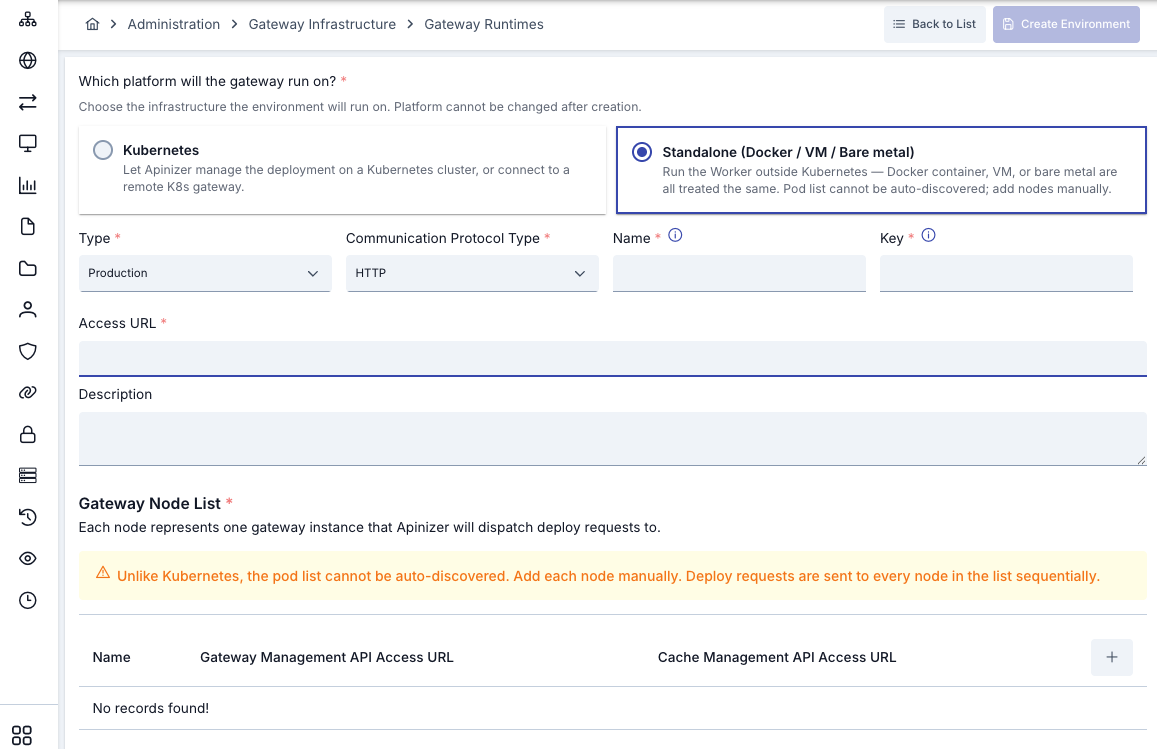
Form Fields
| Field | Value |
|---|---|
| Platform | Virtual Server |
| Management Type | Remote Gateway |
| Environment Type | DEV / TEST / PROD |
| Communication Protocol Type | Matches the service you exposed (HTTP / HTTPS / gRPC / WebSocket) |
| Environment Name | Must exactly match the APINIZER_ENVIRONMENT_NAME env value (case-sensitive) |
| Environment Key | API URL prefix (e.g., prod) |
| Access URL | Gateway external access URL (e.g., https://gateway.example.com) |
Gateway Node List (Manual URL Table)
When Remote Gateway is selected, a Gateway Node List table appears on the form. For each node:
| Field | Description |
|---|---|
| Name | Identifier (e.g., node-1) |
| Gateway Management API URL | http://<NODE_IP>:8091 (Gateway Management API endpoint) |
| Cache Management API URL | http://<CACHE_IP>:8092 (Cache Management API endpoint, if used) |
These URLs must be reachable from Manager. Manager uses these addresses for proxy push, health checks, and diagnostics on the Gateway. Make sure firewall rules and port forwarding allow Manager → Worker 8091 traffic.
Publishing the Environment
Click Create. For a virtual-server Gateway, Apinizer does NOT perform any deployment — the Gateway was already installed on Linux in the steps above. Manager only records the connection metadata and attempts to connect to the Gateway. If successful, the environment is marked as published.
After publishing, you can deploy API Proxies to this Remote Gateway. Manager pushes API Proxy YAMLs to the Gateway's Management API endpoint.
For Gateway additional variables (JVM tuning, gRPC, WebSocket, CORS, security, etc.) and configurations (System Settings, Backup, etc.), see Gateway Settings.
Common Settings
Client Secret Recovery Key (Manager)
If you also want API client secrets sealed with a key specific to this installation, add the APINIZER_CLIENT_SECRET_KEK variable to the Manager's env file in the conf/ directory. The value is a Base64-encoded key of exactly 32 bytes:
APINIZER_CLIENT_SECRET_KEK=<GENERATED_VALUE>
# Optional, default 1
APINIZER_CLIENT_SECRET_KEK_VERSION=1
The value can also be stored encrypted in the env file as ENC(...). If you have more than one Manager server, use the same value on all of them and back up the key: if the key changes or is lost, secrets sealed with it can no longer be shown and the affected secrets must be rotated. For details, see the KEK description on the Kubernetes installation page.
JVM Tuning
API Manager and Gateway both support heap and GC parameter tuning:
For API Manager, edit conf/application.env:
JAVA_OPTS="-Xms1g -Xmx2g -XX:+UseG1GC"
jvmOverride=true
For Gateway, edit conf/apinizer-worker.env:
JAVA_OPTS="-server -XX:MaxRAMPercentage=75.0 -XX:+UseG1GC"
jvmOverride=true
When jvmOverride=true, your JAVA_OPTS take precedence over the auto-detection defaults.
Timezone Synchronization
All Apinizer modules must use the same timezone or quota rollovers, cron jobs and scheduled task flows will drift:
- API Manager: Set via
APIMANAGER_TIMEZONEinapplication.env(IANA zone id, e.g.Europe/Istanbul; optional, defaults to the host timezone) - Gateway (Worker): Set via
WORKER_TIMEZONEinapinizer-worker.env(e.g.+03:00or IANA zone id) - Cache (if used): Set via
CACHE_QUOTA_TIMEZONEinapinizer-cache.env - Integration (if used): Set via
INTEGRATION_TIMEZONEinapinizer-integration.env(IANA zone id, e.g.Europe/Istanbul)
Verify all values match before starting the services.
Log Management
Logs are stored in multiple locations:
- systemd journal:
sudo journalctl -u apinizer-apimanager -for-u apinizer-apiworker - Local logs directory:
/opt/apinizer-manager/logs/or/opt/apinizer-worker/logs/ - Log rotation: Handled by systemd and logrotate (if configured at the OS level)
For production, configure a centralized log aggregator (Elasticsearch, Splunk, etc.) via the Manager UI under Admin → Log Connectors.
HTTP Security Headers (Content-Security-Policy)
The API Manager sends a Content-Security-Policy header with every response, alongside X-Frame-Options: DENY, Referrer-Policy and Permissions-Policy. The default policy is:
default-src 'self'; script-src 'self'; style-src 'self' 'unsafe-inline'; img-src 'self' data:; font-src 'self' data:; object-src 'none'; base-uri 'self'; form-action 'self'; frame-ancestors 'none'
script-src is 'self' only. The Manager console runs no inline or dynamically evaluated script, and the Portal Pages / Portal Appearance preview renders your portal HTML without executing the <script> blocks in it. Those scripts run inside the API Portal application, which this header does not govern, so custom portal scripts are unaffected.
style-src still allows 'unsafe-inline': Angular injects component styles as inline <style> elements at runtime. Replacing this with a per-request nonce is a separate, larger change; until it lands, a security scanner keeps reporting the style directive as permissive. The remaining directives — object-src, base-uri, form-action and frame-ancestors — block plugin content, <base> hijacking, off-site form submission and framing.
The policy is configurable. In conf/application.env (standalone) or as a container environment variable (Docker, Kubernetes) — this example additionally allows images from a trusted CDN:
APINIZER_APIMANAGER_SECURITY_CONTENT_SECURITY_POLICY="default-src 'self'; script-src 'self'; style-src 'self' 'unsafe-inline'; img-src 'self' data: https://cdn.example.com; font-src 'self' data:; object-src 'none'; base-uri 'self'; form-action 'self'; frame-ancestors 'none'"
The same setting in application.yml:
apinizer-apimanager:
  security:
    content-security-policy: "default-src 'self'; script-src 'self'; style-src 'self' 'unsafe-inline'; img-src 'self' data: https://cdn.example.com; font-src 'self' data:; object-src 'none'; base-uri 'self'; form-action 'self'; frame-ancestors 'none'"
An empty or unset value falls back to the default policy shown at the top, so clearing the variable never leaves the Manager without a policy. Restart the API Manager after changing it. If you had set this variable to the earlier "strict" example (script-src 'self'), you can remove it: the default is now that policy.
Optional Modules
Install any of the following modules based on your deployment needs:
- Cache (Hazelcast)
- Integration (Quartz)
- API Portal
- API Manager with SSL
(Optional) — This module is only needed if you run quotas, OIDC sessions or circuit-breaker policies. Skip this tab if you do not need distributed state.
The Apinizer Cache (Hazelcast data grid) backs quota counters, OIDC session tokens, circuit-breaker state and client-flow banners across all Gateways.
Requirements
- Linux x86-64 (glibc) — Ubuntu 20.04+, RHEL/Rocky/Alma 8+, Debian 11+, Oracle Linux 8+
- An operator with
sudoprivilege (no root login required) openssl,systemd,tar,curl(typically pre-installed)- A reachable Apinizer Manager-managed MongoDB instance (replica set recommended for production)
- Open ports between Cache nodes and Workers:
5701/tcp— Hazelcast wire protocol (member-to-member)8090/tcp— Spring Boot HTTP (Worker → Cache REST calls)
1. Download
VERSION=<APINIZER_VERSION>
curl -fSLO "https://packages.apinizer.com/apinizer-packages/releases/cache/${VERSION}/apinizer-cache-${VERSION}-linux-x64.tar.gz"
curl -fSLO "https://packages.apinizer.com/apinizer-packages/releases/cache/${VERSION}/checksums.sha256"
sha256sum -c checksums.sha256
2. Extract
sudo mkdir -p /opt
sudo tar -xzf apinizer-cache-${VERSION}-linux-x64.tar.gz -C /opt
sudo mv /opt/apinizer-cache-${VERSION} /opt/apinizer-cache
3. Configure
Edit conf/apinizer-cache.env:
sudo vi /opt/apinizer-cache/conf/apinizer-cache.env
| Key | Description |
|---|---|
SPRING_DATA_MONGODB_URI | MongoDB connection string (same as Manager and Gateway) |
SPRING_DATA_MONGODB_DATABASE | Database name (must match Manager and Gateway) |
CACHE_QUOTA_TIMEZONE | Quota window timezone offset (e.g. +03:00). Must match the Worker and Manager values or quota rollovers will drift. |
For single-node deployment, no further settings are needed. For multi-node cluster:
APINIZER_CACHE_CLUSTER_MEMBERS=10.0.0.11,10.0.0.12,10.0.0.13
All members of the cluster must list exactly the same set of IPs. TCP/IP discovery in Hazelcast is symmetric — if node B does not list A, B will not accept A as a member even though A reaches B.
4. Install and Encrypt
sudo /opt/apinizer-cache/bin/apicache-install.sh
sudo -u apinizer /opt/apinizer-cache/bin/apicache-encrypt.sh
5. Start the Service
sudo systemctl start apinizer-apicache
sudo systemctl status apinizer-apicache
sudo journalctl -u apinizer-apicache -f
Expected startup logs:
Cache running in STANDALONE mode (cluster: apnz-hz-cluster)
Standalone Hazelcast cluster members: 10.0.0.11,10.0.0.12,10.0.0.13
Members {size:3, ver:3} [
    Member [10.0.0.11]:5701 - ...
    Member [10.0.0.12]:5701 - ...
    Member [10.0.0.13]:5701 - ...
]
If only one member is listed in a multi-node setup, check firewall rules on 5701/tcp and that every node lists the same peers.
6. Wire the Gateway to the Cache
Each Worker (apinizer-worker) must reach all Cache nodes on 5701/tcp and use the same Hazelcast cluster name. The Worker reads the cluster name from its own configuration; no Worker-side change is needed beyond keeping the names in sync.
7. Register Cache in the Manager
In the Manager UI, navigate to Admin → Cache Servers and add:
| Field | Value |
|---|---|
| Host | Cache server hostname/IP |
| Port | 8090 |
For upgrading or uninstalling this module, see Version Upgrade and Uninstall.
(Optional) — This module is only needed if you run task-flow scheduler workloads. Skip this tab if you do not use task flows / scheduled jobs.
The Apinizer Integration tier (Quartz-based task-flow scheduler) runs task flows registered by the Manager.
Requirements
- Linux x86-64 (glibc) — Ubuntu 20.04+, RHEL/Rocky/Alma 8+, Debian 11+, Oracle Linux 8+
- An operator with
sudoprivilege (no root login required) openssl,systemd,tar,curl(typically pre-installed)- A reachable Apinizer Manager-managed MongoDB instance (the same instance the Manager uses)
- Open ports:
8092/tcp— Spring Boot HTTP (Manager → Integration REST calls). Lock this to the Manager's IP/CIDR only.
1. Download
VERSION=<APINIZER_VERSION>
curl -fSLO "https://packages.apinizer.com/apinizer-packages/releases/integration/${VERSION}/apinizer-integration-${VERSION}-linux-x64.tar.gz"
curl -fSLO "https://packages.apinizer.com/apinizer-packages/releases/integration/${VERSION}/checksums.sha256"
sha256sum -c checksums.sha256
2. Extract
sudo mkdir -p /opt
sudo tar -xzf apinizer-integration-${VERSION}-linux-x64.tar.gz -C /opt
sudo mv /opt/apinizer-integration-${VERSION} /opt/apinizer-integration
3. Configure
Edit conf/apinizer-integration.env:
sudo vi /opt/apinizer-integration/conf/apinizer-integration.env
| Key | Description |
|---|---|
SPRING_DATA_MONGODB_URI | MongoDB connection string (same instance as Manager) |
SPRING_DATA_MONGODB_DATABASE | Database name (must match the Manager database) |
INTEGRATION_TIMEZONE | IANA zone id (e.g. Europe/Istanbul). Must match the Manager and Worker timezone. |
4. Install and Encrypt
sudo /opt/apinizer-integration/bin/apiintegration-install.sh
sudo -u apinizer /opt/apinizer-integration/bin/apiintegration-encrypt.sh
5. Start the Service
sudo systemctl start apinizer-apiintegration
sudo systemctl status apinizer-apiintegration
sudo journalctl -u apinizer-apiintegration -f
Expected startup logs:
Integration timezone set to: Europe/Istanbul
Initializing Custom MongoDB Job Store
Quartz Scheduler Prod Environment Setup started
MongoDB connection established for Quartz Job Store
Quartz MongoDB Statistics - Jobs: ..., Triggers: ..., Calendars: ..., Locks: ...
Tomcat started on port 8092 (http)
6. Multi-node / HA
Multiple Integration nodes can share the same MongoDB database — they form a clustered Quartz scheduler automatically:
- Each node auto-generates its
org.quartz.scheduler.instanceId(no manual config needed) - Triggers are locked via MongoDB so the same job never fires on two nodes at once
- Misfired jobs are recovered on startup
Just point every node at the same MongoDB URI + database.
Stand up Integration nodes in pairs at minimum if you need fail-over for time-critical scheduled flows. With one node, a host restart blocks scheduled runs until the JVM is back up.
7. Register Integration in the Manager
In the Manager UI, navigate to Admin → Integration Servers and add:
| Field | Value |
|---|---|
| Host | Integration server hostname/IP |
| Port | 8092 |
For upgrading or uninstalling this module, see Version Upgrade and Uninstall.
(Optional) — This module provides an end-user portal for API discovery and consumption. Skip if you do not need a public API portal.
Apinizer API Portal is the end-user-facing portal for discovering and consuming published APIs.
Requirements
| Component | Requirement |
|---|---|
| OS | Linux x86-64 (glibc-based: Ubuntu 20.04+, RHEL 8+, Debian 11+, Oracle/AlmaLinux/Rocky 8+) |
| CPU | 2 cores minimum (x86-64-v3) |
| RAM | 2 GB minimum, 4 GB recommended |
| Disk | 1 GB free under the install directory; additional space for logs |
| Network | Outbound HTTPS to the Apinizer Manager REST endpoint |
| Privileges | A user with sudo rights |
| Java | Not required (bundled JRE) |
1. Download
VERSION=<APINIZER_VERSION>
curl -fLO "https://packages.apinizer.com/apinizer-packages/releases/apiportal/${VERSION}/apinizer-apiportal-${VERSION}-linux-x64.tar.gz"
curl -fLO "https://packages.apinizer.com/apinizer-packages/releases/apiportal/${VERSION}/checksums.sha256"
sha256sum -c checksums.sha256
2. Extract
The standard install location is /opt/apinizer-portal:
sudo mkdir -p /opt
sudo tar -xzf apinizer-apiportal-${VERSION}-linux-x64.tar.gz -C /opt
sudo mv /opt/apinizer-apiportal-${VERSION} /opt/apinizer-portal
3. Configure
Edit conf/application.env:
sudo vi /opt/apinizer-portal/conf/application.env
# REQUIRED
API_PORTAL_ID=<id-from-the-manager>
API_PORTAL_MANAGEMENT_API_BASE_URL=https://manager.example.com
API_PORTAL_MANAGEMENT_API_KEY=<api-key-from-the-manager>

# Optional
SERVER_PORT=8080
The API_PORTAL_ID and API_PORTAL_MANAGEMENT_API_KEY are generated from the Manager UI under Portal → API Keys.
At this point you may leave secrets as plaintext; encryption is added in step 5.
4. Run the Installer
sudo /opt/apinizer-portal/bin/apiportal-install.sh
5. Encrypt Sensitive Values (Optional, Recommended)
sudo -u apinizer /opt/apinizer-portal/bin/apiportal-encrypt.sh
6. Start the Service
sudo systemctl start apinizer-apiportal
sudo systemctl status apinizer-apiportal
sudo journalctl -u apinizer-apiportal -f
Once up, the portal is reachable at http://<server-ip>:8080.
7. Verify
curl -fsS http://localhost:8080/apiportal/management/health
# Expected: {"status":"UP"}
For upgrading or uninstalling this module, see Version Upgrade and Uninstall.
(Optional) — Use this to enable HTTPS on the API Manager.
To start API Manager with SSL, configure the certificate and key in conf/application.env:
sudo vi /opt/apinizer-manager/conf/application.env
Add or uncomment:
SSL_ENABLED=true
SSL_KEY_STORE=/opt/apinizer-manager/conf/keystore.jks
SSL_KEY_STORE_PASSWORD=<password>
SSL_KEY_STORE_TYPE=JKS
SSL_KEY_ALIAS=tomcat
SERVER_PORT=8443
If you have a PKCS12 keystore, convert it to JKS:
keytool -importkeystore \
  -srckeystore keystore.p12 \
  -srcstoretype PKCS12 \
  -srcstorepass <p12-pass> \
  -destkeystore keystore.jks \
  -deststoretype JKS \
  -deststorepass <jks-pass>
Copy the keystore to /opt/apinizer-manager/conf/ and set correct permissions:
sudo cp keystore.jks /opt/apinizer-manager/conf/
sudo chown apinizer:apinizer /opt/apinizer-manager/conf/keystore.jks
sudo chmod 600 /opt/apinizer-manager/conf/keystore.jks
Optionally encrypt the SSL_KEY_STORE_PASSWORD:
sudo -u apinizer /opt/apinizer-manager/bin/apimanager-encrypt.sh
Reload systemd and restart:
sudo systemctl daemon-reload
sudo systemctl restart apinizer-apimanager
Verify:
curl -kfsS https://127.0.0.1:8443/management/health
Production Checklist
Before going live, verify:
- MongoDB replica set is running and reachable from all modules
- All module timezones match (Manager, Gateway, Cache, Integration)
- Master keys are backed up to a secure location (lost keys = unrecoverable encrypted values)
- Gateway Environment name exactly matches
APINIZER_ENVIRONMENT_NAMEin the Worker config - At least one Gateway Runtime is deployed from the Manager to the Gateway Environment
- Cache (if used) and Workers can reach each other on the correct ports (5701/tcp, 8090/tcp)
- Integration (if used) is registered in the Manager and reachable on port 8092
- API Portal (if used) has valid API credentials from the Manager
- Firewall rules permit traffic between modules on required ports
- Log aggregation is configured (optional but recommended for production)
- systemd services are enabled so modules restart after a host reboot