Cost Settings
Costs are calculated and reported in USD, priced per model from your catalog.
Per-Model Pricing
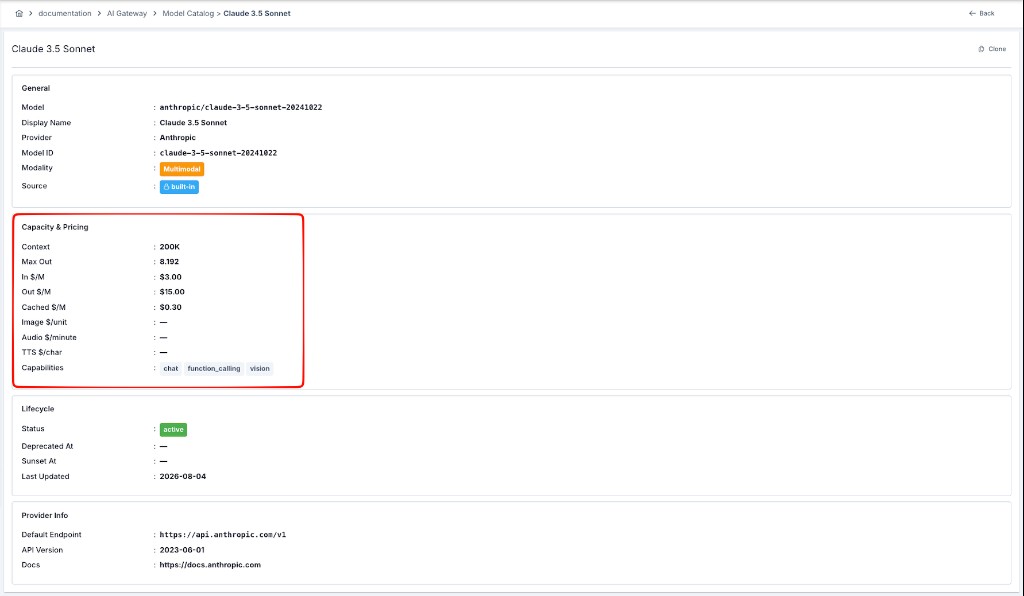
Every model in your model catalog has a configurable input and output price, expressed per 1M tokens:
gpt-4o
  Input:  $0.005 per 1M tokens
  Output: $0.015 per 1M tokens

gpt-4-turbo
  Input:  $0.01 per 1M tokens
  Output: $0.03 per 1M tokens
Pricing changes apply going forward — historical usage keeps the price that was in effect when it was recorded.
Go to AI Gateway → LLM Providers and open the Model Catalog tab; pricing lives in each model's Capacity & Pricing section.
A table of every model in use is displayed. Select a row to edit its pricing.
Edit the input and output price fields. A model with no price configured is treated as free.
New requests use the updated price immediately; already-recorded usage is not recalculated.
Cost Reconciliation
Every request's cost is reconciled from three token counts, priced independently:
Tokens sent to the model as the prompt.
Tokens generated by the model in its response.
Prompt tokens the provider served from its own prompt/context cache instead of reprocessing them, usually billed at a lower rate than standard input tokens.
Cached tokens are a provider-side mechanism (OpenAI prompt caching, Anthropic prompt caching, etc.) — not Apinizer's own semantic cache, which avoids calling the model at all for a similar prior request. A request can use provider-side caching and still be a full, billable call to the model.
Because each is priced separately, your cost reports reflect exactly what was consumed rather than a single blended rate.
Cost in Reports
Once pricing is configured, cost figures appear throughout Reports and Analytics:
- Dashboard cost-to-date
- Cost breakdown by model, project, team, and deployment type
- Exported reports with cost columns
Permissions
Cost Settings can only be viewed and edited by system administrators. Other roles continue to see usage and cost breakdowns in reports, without the ability to change pricing.