LLM Providers and Connections
Overview
An LLM Provider Connection is a secure, encrypted link to an external LLM service (OpenAI, Anthropic, Azure, a self-hosted engine, etc.). Each connection holds the provider type, API credentials, and deployment metadata, and becomes available to any AI Gateway for routing once saved.
The hub is mounted in two places, and all three tabs (Providers, Model Catalog, Definitions) follow the same scoping rule as the Connections screens:
- Project menu (AI Gateway → LLM Providers): each tab lists only the records created in the active project.
- Admin menu: lists everything — built-in/shared records and every project's records.
Scoping applies to the lists only. Selection dropdowns — picking a provider in an AI Proxy policy, choosing a catalog entry on a provider form, Clone from Catalog — still offer the project's own records plus the shared/built-in ones, exactly like connection selection elsewhere in Apinizer.
Provider Categories
OpenAI, Anthropic, Azure OpenAI, Google Vertex AI, Google AI Studio, AWS Bedrock, Cohere, Mistral, DeepSeek, Groq, Moonshot, Zhipu, Qwen, xAI, Together AI, Fireworks AI, Cerebras, Hugging Face, OpenRouter, Perplexity, NVIDIA NIM, Voyage AI — hosted and scaled by the provider.
vLLM, Ollama — models running on infrastructure you operate.
Any endpoint Apinizer doesn't have a built-in profile for — pick the adapter family it speaks and define your own paths.
Code is the value the Provider Type Catalog definition's code field carries — the internal identifier a connection's provider type resolves against. The APNZ-6550 catalog refresh added nine of the cloud providers below (Google AI Studio, plus the xAI through NVIDIA NIM rows) — all speak an OpenAI-compatible wire format, so no new adapter family was needed:
| Provider | Code | Deployment (default) | Notes |
|---|---|---|---|
| OpenAI | openai | Cloud | GPT-4o, GPT-4 Turbo, GPT-3.5, and other OpenAI models |
| Anthropic | anthropic | Cloud | Claude models |
| Azure OpenAI | azure-openai | Cloud | OpenAI models hosted on Azure |
| Google Vertex AI | vertex | Cloud | Gemini and PaLM models |
| Google AI Studio | google-ai-studio | Cloud | Direct Gemini API surface — separate from Vertex, no GCP project or OAuth2 required |
| AWS Bedrock | bedrock | Cloud | Claude, Llama, Mistral, Titan, and Nova models |
| Cohere | cohere | Cloud | Command models |
| Mistral | mistral | Cloud | Mistral/Mixtral models |
| DeepSeek | deepseek | Cloud | DeepSeek-V3/R1 |
| Groq | groq | Cloud | Fast inference on Groq's LPU hardware |
| Moonshot (Kimi) | moonshot | Cloud | Kimi models |
| Zhipu (GLM) | zhipu | Cloud | GLM models |
| Qwen (DashScope) | qwen-dashscope | Cloud | Alibaba Qwen models |
| xAI | xai | Cloud | Grok models |
| Together AI | together | Cloud | Open-weight model aggregator |
| Fireworks AI | fireworks | Cloud | Open-weight model inference |
| Cerebras | cerebras | Cloud | Cerebras Inference |
| Hugging Face | huggingface | Cloud | Inference Providers router |
| OpenRouter | openrouter | Cloud | Multi-provider aggregator — model IDs are vendor/model-shaped |
| Perplexity | perplexity | Cloud | Perplexity Router API |
| NVIDIA NIM | nvidia-nim | Cloud | NVIDIA-hosted surface |
| Voyage AI | voyage | Cloud | Embedding-only provider |
| vLLM | vllm | On-Premise | Self-hosted inference engine |
| Ollama | ollama | On-Premise | Local LLM inference |
| Custom OpenAI-Compatible | custom-openai-compat | On-Premise (default) | Any endpoint that speaks the OpenAI API format |
Deployment Type
Each connection declares whether the LLM runs in the cloud or on-premise:
- Cloud — the LLM is managed by the provider (any "Cloud" row in the table above)
- On-Premise — the LLM runs in your infrastructure (vLLM, Ollama, a custom OpenAI-compatible endpoint)
Deployment type is auto-filled based on provider type when you create a connection, but you can override it if needed (for example, a self-hosted vLLM instance running on a cloud VM).
Credentials
All API keys and secrets are encrypted at rest and never logged. Connections are managed through Apinizer's credential system, the same system used to secure API Proxy access.
Who Holds the Credential: Gateway or Client
Every connection answers one question up front — who supplies the upstream provider's credential on a request:
| Credential Source | Behavior |
|---|---|
| Provided by AI gateway (default) | Apinizer stores the key and signs every request with it — the behavior every connection had before this setting existed. |
| Provided by client | Apinizer stores no credential at all. Every request must already carry the provider's own header; the gateway forwards that header untouched instead of injecting a stored value. Budget, cost, and rate limits still attach to the Apinizer credential that made the call — only the upstream key belongs to the client. |
Provided by client is for installations that don't want the provider's raw key stored inside Apinizer at all — the caller (or a proxy in front of it) supplies its own key on every request. Because nothing is stored, Test Connection asks for a temporary credential just for that one probe, and that value is never saved.
Where the Key Travels: Header or Query Parameter
For the API-key family of authentication (Bearer token, an API key in a named header, or a custom header — see Credential Type Label below), a second setting decides where the key is placed on the outbound request:
| API Key Location | Shape | Notes |
|---|---|---|
| Header (default) | <header name>: <prefix><key> | Every mainstream provider. |
| Query parameter | ?<parameter name>=<key> | Appended to the URL — Gemini's native endpoint accepts ?key=. Discouraged when a header alternative exists, since a key placed in the URL can end up in access logs. |
Basic auth, AWS Signature V4, and the Google service-account (OAuth2) flow each have a fixed transport of their own and are unaffected by this setting.
Key Prefix
The text placed in front of the key value on the wire. Left blank, it defaults to the credential type's own prefix (Bearer for a Bearer token, nothing for a raw API key). Set it explicitly to an empty value for a provider that wants the raw key with no prefix (Anthropic's x-api-key style), or to something like Token for a provider that expects Authorization: Token <key>.
Allowing a Client to Override the Stored Key
On a gateway-held connection, Allow clients to override with their own key lets an individual request bypass the stored credential: if the incoming request already carries the connection's own auth header, that value is forwarded instead of the stored key — the same pattern Kong calls allow_override. Left off (the default), any such header on the incoming request is dropped before the call is signed, so the stored key can never leak by a client simply guessing the header name.
Credential Type Label
The Credential Type shown in the form (Bearer token, API key in a header, API key as a query parameter, Basic — username + password, AWS Signature V4, Google service account, or No authentication) is not a separate stored field — it's a label derived from the underlying Auth Scheme, plus (for the API-key shapes) the API Key Location setting above:
| Credential Type shown | Underlying Auth Scheme | API Key Location |
|---|---|---|
| Bearer token | BEARER | — |
| API key in a header | API_KEY_HEADER or CUSTOM | Header |
| API key as a query parameter | API_KEY_HEADER or CUSTOM | Query |
| Basic — username + password | BASIC | — |
| AWS Signature V4 | AWS_SIGV4 | — |
| Google service account (JSON) | OAUTH2 | — |
| No authentication | NONE | — |
API_KEY_HEADER and CUSTOM share the same "API key" credential type on screen — both send one key as a header or query parameter, and only differ in whether the header name and prefix come from the catalog's defaults or from values you typed yourself.
Request and Response Translation
Clients always talk to Apinizer in the OpenAI format — there's no separate Anthropic Messages or Gemini inbound format to integrate against. Apinizer translates each outbound request into the target provider's native format and normalizes the response (including streamed chunks) back to the OpenAI canonical format before it reaches your client.
Bedrock's InvokeModelWithResponseStream API uses a binary event-stream framing the worker doesn't parse. A streaming chat request routed to a Bedrock connection is rejected with a configuration error before any call reaches AWS — nothing is attempted and nothing is billed. Set streaming: false for that leg, or route streaming traffic through a different provider. Non-streaming (unary) Bedrock chat requests are unaffected.
Provider Capability Matrix
Not every connection type supports every endpoint, and not every provider gets a full request/response rewrite into its own wire format — some are forwarded in OpenAI's format as-is because the provider already speaks it (or is expected to); a smaller set is actively translated.
| Provider | Chat completions | Chat streaming | Embeddings | Audio / image (STT, TTS, image generation) |
|---|---|---|---|---|
| OpenAI, Azure OpenAI, Custom OpenAI-Compatible, vLLM, Ollama | ✅ | ✅ | ✅ | ✅ |
| Mistral, Zhipu (GLM), Qwen (DashScope), Together AI, Google AI Studio | ✅ | ✅ | ✅ | ❌ |
| DeepSeek, Groq, Moonshot (Kimi), xAI, Fireworks AI, Cerebras, Hugging Face, OpenRouter, Perplexity, NVIDIA NIM | ✅ | ✅ | ❌ (chat-only, no first-party embeddings endpoint) | ❌ |
| Cohere | ✅ | ✅ | ❌ (not yet — needs a dedicated adapter) | ❌ |
| Voyage AI | — (embedding-only provider) | — | ✅ | ❌ |
| Anthropic | ✅ (native translation) | ✅ (native translation) | ❌ (no embeddings endpoint at all — connect a Voyage AI provider instead, see Built-in Templates below) | ❌ |
| Google Vertex AI (Gemini) | ✅ (native translation) | ✅ (native translation, SSE) | ❌ (not yet) | ❌ |
| AWS Bedrock — Anthropic models | ✅ (native translation) | ❌ (see warning above) | ❌ (not yet) | ❌ |
| AWS Bedrock — Titan, Llama, Mistral, Nova | ✅ (forwarded as an OpenAI-shaped body; native translation isn't implemented for these families yet) | ❌ | ❌ (not yet) | ❌ |
A ❌ on Embeddings or Audio/Image means Apinizer rejects the request before contacting the provider — nothing is attempted, and nothing is billed.
Native Translation vs. Pass-Through
Only three connection types get an actual request/response rewrite into their own schema: Anthropic, Google Vertex AI (Gemini), and AWS Bedrock when the routed model is an Anthropic-on-Bedrock model (any model ID containing anthropic., including cross-region inference profiles like us.anthropic.*). Every other provider — including Bedrock's Titan/Llama/Mistral/Nova models and Cohere — receives the client's OpenAI-shaped request forwarded unchanged.
For the three natively-translated providers, a handful of OpenAI request fields have no equivalent and are silently dropped (logged as a WARN on the worker, never surfaced to the client):
| OpenAI field | Anthropic | Google Vertex AI (Gemini) |
|---|---|---|
model | kept in the body | not in the body — carried in the URL path |
| System / developer message | mapped to top-level system | mapped to systemInstruction |
max_tokens / max_completion_tokens | required — falls back to the model catalog's max output, then 4096, if the client omits it | optional — set only when the client provides it |
tools[].function | mapped to tools[].input_schema | mapped to functionDeclarations |
tool_choice: "none" | dropped (tool definitions are dropped too) | mapped to mode: "NONE" (tool definitions are kept) |
temperature | clamped to 1.0 if the client sends higher | forwarded as-is (0–2 range) |
stop | mapped to stop_sequences | mapped to stopSequences (only the first 5 entries) |
user | mapped to metadata.user_id | dropped |
n, presence_penalty, frequency_penalty, logit_bias, logprobs, seed, response_format, parallel_tool_calls | dropped | dropped |
| Non-text message content (image, audio, …) | dropped — text-only today | dropped — text-only today |
Usage accounting also differs by family: Anthropic's client-facing prompt_tokens adds cached tokens on top of fresh input tokens, while Gemini's promptTokenCount already includes them. Apinizer accounts for this difference internally, so cost tracking and quotas stay correct no matter which family served the request — see Reports and Analytics and Token Quotas.
When a proxy fails over between providers in different families — for example, an Anthropic primary with an OpenAI or Gemini backup — each leg's request is always rebuilt from your original client request, never from a previous leg's already-translated native body. See Failover Chains.
Model Discovery
"Model discovery" means two different things here — note which one is meant.
Client-side discovery — GET /v1/models
The connections a proxy uses for chat traffic can also be discovered through GET /v1/models, OpenAI's model-listing contract — instead of hardcoding a model name on the client side, client.models.list() (OpenAI SDK), LangChain, or LiteLLM can discover it automatically. The list only returns models actually served by that proxy's routing, not the entire catalog. See the AI Gateway Overview page's Model Discovery section for details.
Admin-side discovery — the Discover Models button
The Discover Models button in the connection form's Models section fetches the provider's live model list so you can pick which ones to add. You no longer have to copy model names out of the provider's documentation by hand, which also removes the typo-driven "model not found" failures.
The same button is also available in the Models section of the connection's view screen, where the result is shown read-only (no selection, nothing is added). View permission (AI Development → View) is enough to run discovery; to add a discovered model, switch to the form with the Open Edit Form button in the result dialog. When discovery fails, the dialog also shows why: the provider does not implement a discovery endpoint (HTTP 404), the provider rejected the request (HTTP status), the environment was not found, or the worker in the selected environment did not respond.
How it works:
- Pick an environment from the dropdown at the top of the form — the same selection Test Connection uses. This matters in enterprise installations, where the provider is often reachable only from the Worker network.
- Click Discover Models. The request goes to the same address with the same authentication headers as Test Connection; the only difference is that the response body is read.
- The right-side panel lists what came back. Models already stored on the connection are marked
Already addedand cannot be selected; the rest show asNew. - Tick the ones you want and click Add Selected. They are appended to the form's table — not saved. Click Save on the connection to persist them.
The panel also reports missing models: ones stored on the connection that the provider no longer lists. These are usually retired models, and a request will fail at runtime if routing still selects one. Apinizer does not remove them automatically — the provider may have returned a short list because of a transient fault, and a silent delete would break working routing; the call is yours.
Discovery only brings back the model id, display name, context window and max output tokens. Pricing, modality and capability fields are not returned — providers report those in inconsistent units, so importing them automatically would produce wrong cost reporting. You have three ways to fill them: let them be completed from the model catalog when you save (see below), fill them in by hand through the row's edit (pencil) action — it opens the model panel described below — or use Clone from Catalog to pull the catalog values.
Filling model type and pricing from the catalog
When you Save the connection, Apinizer tries to complete the empty model type (modality) and pricing fields of every row in the Supported Models table from the bundled model catalog. Matching is done on provider + model id, never on the model id alone — identifiers such as gpt-4o are shared across vendors, and matching on the id alone would leak one provider's pricing into another provider's connection.
Three rules govern this:
- Only empty fields are filled. A value you typed, or one that came from discovery, is never overwritten.
- A custom model with no catalog entry is left untouched. Apinizer does not assign it a default type: a wrong classification would silently break model-type validation and cost calculation. You can find these models with the Unspecified filter on the AI Proxy list, which is evaluated per provider: a model id that is classified on one connection but left blank on another counts as unspecified only for the connection where it is blank.
- Scope is respected. Only built-in catalog rows, rows shared by an administrator, and rows belonging to your own project are used. When more than one of them defines the same model id, the most specific one wins — your own project's row first, then the administrator's shared row, then the built-in row — so the result never depends on the order the rows happen to be read in.
Connections that already exist are filled in once, automatically: upgrading to 2026.09.2 runs the same completion over every stored LLM connection, so you do not have to open and re-save each provider. The three rules above apply unchanged, and running it again changes nothing.
You can always edit the field by hand: open the row's model panel with the pencil icon and set Model Type, which may be left blank. Picking a model that is already in the table from the Clone from Catalog dialog does not add a second row — it fills in only the empty fields of the existing one.
A model with no type recorded appears under no value of the Model type filter on the AI Development → AI Proxies list, and for models with no token concept (image generation, audio) the cost is computed as 0 USD. Because of this, the gateway logs a warning once per model whenever it prices a request for a model whose price is unknown.
Managing the Model List
On the provider edit page the Models table itself is read-only — models are added and edited in a right-side panel instead of inline table cells:
- Add Model opens an empty model panel; the pencil icon at the end of a row opens the same panel pre-filled with that row.
- The panel holds the model identity (Model ID, Display Name), capacity (Context Window, Max Output Tokens), list pricing (Input / Output / Cached $/1M) and two toggles: Allowed at gateway (turn off to block the model for all consumers) and Deprecated (marks the model for sunset; existing calls still pass).
- Save Model writes the panel back into the table; in edit mode a Delete button removes the row. Either way, nothing is persisted until you click Save and Deploy on the page.
- Clone from Catalog now keeps already-added rows visible in its list and marks them Added instead of hiding them; a search box filters both the clone and discovery panels (both open as right-side panels).
The read-only view page shows the same table with an N allowed counter and Allowed/Blocked and Active/Deprecated status pills — use Edit Provider to change anything.
Similarly, the Auth & Limits section on the edit page is a read-only summary; the Configure button opens a right-side panel with the auth scheme, API key/secret, auth header name, organization id, provider RPM/TPM limits and the cold-start retry option. Save in the panel applies the values to the form; they persist with Save and Deploy.
If the provider does not expose a model-listing endpoint (some self-hosted deployments), discovery returns HTTP 404 with a "this provider does not implement model discovery" result. That is not a connection failure — add the models by hand with Add Model. AWS Bedrock and Google Vertex AI connections don't support discovery yet, same as Test Connection.
Built-in Templates
Five built-in provider templates ship with the installation: OpenAI Provider, Voyage AI Provider, DeepSeek Provider, Moonshot (Kimi) Provider and Zhipu (GLM) Provider. Each comes with the endpoint and a default model filled in, but no API key. Being installation-owned, they are listed under the admin menu — the project-mode list shows only the project's own connections.
The intended flow is to clone a template and enter your own API key; the template itself is owned by the installation and may be refreshed by an upgrade.
The default model on these templates targets embedding generation (for example text-embedding-3-small on the OpenAI template), because that is the most common starting point for RAG and the semantic cache. A template is not locked to embeddings — after cloning it you can change the default model and use the same provider for chat/completion as well.
Creating a Connection
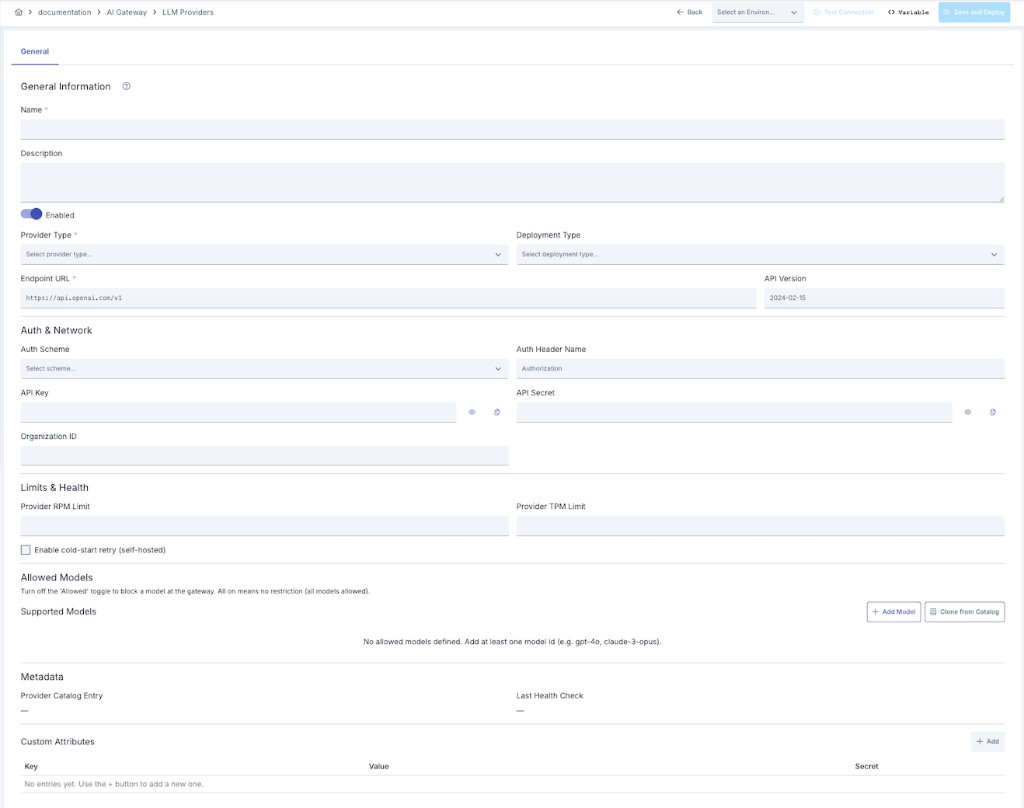
In the Apinizer UI, go to AI Gateway → LLM Providers. The hub has two tabs — Providers and Model Catalog — make sure you're on the Providers tab. The provider cards can be narrowed with the search box plus the provider type and status (Enabled/Disabled) filters on the toolbar; each card shows the provider's health (Healthy / Down / Unknown), endpoint, type, status and allowed-model count.
Click the Add button. The Choose a provider dialog opens.
Pick a tile under Managed cloud or Self-hosted — any row in the Provider Categories table above — or choose Custom provider if yours isn't listed. See Choosing a Provider Type below for what each pick fills in.
Deployment type auto-fills:
- If the provider is vLLM, Ollama, Custom OpenAI-Compatible, or a Custom provider → defaults to On-Premise
- Every other provider (OpenAI, Anthropic, Azure, Vertex, Bedrock, and all the newer cloud providers) → defaults to Cloud
In the Auth & Limits section click Configure — credentials are edited in the right-side panel it opens (see Managing the Model List). Paste the API key or secret there. Apinizer encrypts and never logs credentials.
Examples:
- OpenAI: paste your
sk-...key - Anthropic: paste your
sk-ant-...key - Azure: paste the endpoint URL and key
- vLLM / Ollama: paste the base URL (e.g.,
http://localhost:8000)
If your cloud provider has an on-premise instance (or vice versa), toggle the Deployment Type dropdown to Cloud or On-Premise.
Pick the environment to test against from the dropdown at the top of the form — the Test Connection button stays disabled until you do.
The check runs from the Worker deployed to that environment rather than from the Manager, so it exercises the same network path — firewall rules, egress restrictions, proxies — the connection will actually use once it's live, and it resolves any ${env.X} variables in the endpoint or credentials the same way a real request would.
Apinizer sends a single request to the provider's model-list endpoint using your saved credentials; any 2xx response counts as a pass.
AWS Bedrock and Google Vertex AI connections don't support Test Connection yet — their signing schemes (AWS SigV4, Google OAuth2) aren't wired into the check. Save these connections without testing; this doesn't affect chat or embedding traffic, only the pre-save probe and the periodic status shown in Reports and Analytics.
Click Save. The connection is encrypted and stored. Credentials are never visible in logs or exports.
Endpoint URL only needs the provider's base address — the request path (/chat/completions, /embeddings, /audio/transcriptions, /audio/speech, /images/generations, /responses) is appended automatically based on the request type, so it should not be typed into this field. See Effective Endpoint Paths below for how that combination is built, and how to preview it.
API Version feeds three different things depending on the provider: it's sent as the anthropic-version header on an Anthropic connection, used in the model-list probe behind Test Connection for Azure, and — for Azure OpenAI specifically — also appended to the actual chat/embedding request URL as an api-version query parameter.
Choosing a Provider Type
Creating or changing a connection's provider opens the Choose a provider dialog instead of a plain dropdown:
- A search box filters the list as you type.
- Managed cloud and Self-hosted groups list every built-in provider type — any row in the Provider Categories table above. This catalog is fixed, read-only reference data shipped with Apinizer: nothing in it can be created, edited, or deleted, from the UI or through APIops. See Provider Type Catalog for how it's maintained across upgrades.
- Picking a tile copies that provider's default endpoint, credential type and header, adapter, request paths, and deployment type onto the connection (see How a Connection's Defaults Are Resolved); an empty Name field is also suggested from the provider's code.
- At the bottom, Not listed? opens Custom provider — see below.
The Change button next to the provider chip on the connection form reopens this dialog. Re-picking overwrites the type-derived fields (endpoint, credential scheme, adapter, paths, deployment type) with the new choice's values, but keeps the connection's name, description, stored credential, and model list untouched.
Custom Provider
Pick Custom provider when your vendor isn't in the built-in list. Apinizer has no catalog entry for it, so nothing is pre-filled and nothing is hidden:
- Deployment Type defaults to On-Premise — override it if the endpoint is actually a cloud service.
- Credential Type — pick the authentication your provider expects (Bearer token, an API key in a header or query parameter, Basic, and so on; see Credential Type Label above).
- Adapter family — which wire format the provider speaks: OpenAI-compatible, Anthropic, Gemini, Bedrock, or vLLM. This is optional; left empty, requests silently fall back to the OpenAI-compatible format.
- Chat Completion Path comes pre-filled with
/chat/completionsand can be edited — it's the one path a custom provider needs to be reachable at all. The other paths (embedding, Responses, transcription, speech, image generation) start empty; fill in only the ones you actually route traffic to. - The Advanced section shows every field with nothing hidden, since only you know which endpoints your provider serves.
A custom provider isn't a catalog entry — its adapter and paths are ordinary fields stored directly on the connection, so it moves with the connection everywhere a connection moves: export and import it as an LLM Provider package through the Export/Import Wizard, or manage it through the APIops LLM Providers endpoint, where it appears with providerType: "OTHER" plus its own adapter and path fields.
Effective Endpoint Paths
When you pick a provider type, its wire protocol and endpoint paths (chat completion, embedding, Responses, transcription, speech, image generation) are copied onto the connection. The Advanced section of the connection form shows those values under Edit paths, where they're editable — useful when a provider changed a path, or your deployment needs a different one than the shipped default.
Editing a path here only affects this connection; the built-in catalog itself is fixed and cannot be edited (see Provider Type Catalog), so a later Apinizer upgrade can never silently overwrite the change, and it never affects any other connection using the same provider type.
A path that isn't listed means the catalog says nothing about that modality, and the provider type's default applies. On older connections created before this shipped the section doesn't appear at all, and behaviour is unchanged.
Using variables in paths
Endpoint paths support the same variable resolution as the endpoint address itself:
${env.variableName} for an environment variable, #{variableName} for a context variable.
Resolution happens at request time, not at save time — so you can write
/api/${env.apiVersion}/chat once in the catalog and have the same definition resolve to v1 in
development and v2 in production.
The effective address is built as endpoint + path, and both halves go through resolution. If a
variable is not defined the text is left verbatim (the request does not fail, it simply does not go
where you expected) — identical to how the endpoint address behaves.
Query Strings and API Versioning in the Final URL
Two more rules apply once endpoint + path is turned into the address a request is actually sent to:
- A query string already embedded in the endpoint moves to the end. If the endpoint value itself carries a query string, it no longer lands ahead of the path in the final address — the path is inserted first and the original query string is appended after it, so the address stays well-formed instead of being split in two.
- Azure OpenAI connections get
api-versionappended automatically. When API Version is filled in, it's added to the request URL as anapi-versionquery parameter — unless the URL already contains one, in which case it isn't added a second time. No other provider type gets API Version appended to the URL this way; on an Anthropic connection, for example, the same field is sent as theanthropic-versionheader instead and never touches the URL.
AWS Bedrock and Google Vertex AI connections don't go through this endpoint + path combination at all — their request address is computed entirely by provider-specific code (AWS SigV4 signing for Bedrock; project, location, and an OAuth2 token for Vertex), so neither rule above, nor the paths described earlier in this section, apply to them.
Merged Address Preview
The connection form's Effective Endpoint Paths section also shows a Combined Address Preview: the endpoint combined with the resolved chat completion path, and — for provider types that support it — the resolved embedding path, applying the same rules described above. This is the actual URL a request is sent to, shown read-only so you can sanity-check a connection before saving it.
On an AWS Bedrock or Google Vertex AI connection, the preview is replaced with a note that the address is computed entirely by provider-specific code, for the same reason those two providers are excluded above. ${env.variableName} references anywhere in the endpoint or API Version are shown raw in the preview rather than resolved — resolution only happens at request time.
Using Connections in Routing
Once created, a provider connection is available for API Proxy routing. When you create an AI Gateway, you map each model to the connection that should serve it:
# Example: route requests for "gpt-4o" to the OpenAI connection
Proxy: "my-chat-api"
Models:
  - name: "gpt-4o"
    provider: "OpenAI" # reference the saved connection
  - name: "gpt-4-turbo"
    provider: "OpenAI"
  - name: "claude-3-sonnet"
    provider: "Anthropic" # different connection
For the bundled list of models and their default pricing, see Model Catalog and Pricing. To chain multiple connections together for failover, cost-aware, or latency-aware routing, see Routing and Failover.
LLM provider connections can also be managed through the APIops REST API; see API Reference: LLM Providers.
Monitoring Connections
- Usage by Deployment — see how many tokens were consumed by cloud vs. on-premise connections on the Analytics page's Usage Reports tab, under By Deployment Type
- Cost Attribution — each connection logs its deployment type in traffic records for accurate cost allocation
- Failover & Load Balancing — multiple connections to the same provider can be chained together for redundancy (see Routing and Failover)
Deleting a Connection
An LLM provider connection that is in use cannot be deleted. The delete is rejected while anything still points at it, and the error message names where those references live.
The reason is that a provider is a reference-type asset: it is never copied into the proxy or policy document, it is resolved by id at runtime. Without the guard, deleting one would leave dangling references behind and the live gateway would fail on the very next request.
The check covers four containers at once — API Proxy, Proxy Group, Policy Group and standalone (global) policies — across these reference paths:
- An API Proxy's AI routing: primary provider, failover chain, conditional routes, primary pool and semantic embedding provider
- The embedding provider of Semantic Cache and RAG Injection policies
- The external guardrail provider of Prompt Guard and Topic Guard policies
To delete the connection, remove those references first or point them at another provider. The same rule applies to deletes made through APIops: DELETE /apiops/projects/{projectName}/llm-providers/{providerName}/ returns 400 Bad Request for a connection that is still in use.
The Used by API Proxies panel on the connection's detail screen shows which proxies are bound to it before you delete.
Troubleshooting
Connection Test Failed
- Select an environment first — Test Connection is disabled until you do, and the check always runs through that environment's Worker, not the Manager
- Verify the API key or endpoint URL is correct
- Check that credentials have the required permissions
- Ensure the provider service is reachable from the selected environment's network — not just from the Manager's
- AWS Bedrock and Google Vertex AI connections don't support Test Connection yet — save without testing
Credentials Not Saving
- Ensure you have admin permissions
- Clear browser cache and try again
Wrong Deployment Type Selected
- Edit the connection and toggle Deployment Type to the correct value
- Deployment type changes are retroactive (logs will show the updated type going forward)