Export Import
The renewed Export/Import Wizard lets you export an object (API Proxy, Proxy Group, global policy, policy group, etc.) together with everything it depends on in a single package, and when you import that package into another project or another Apinizer installation, map every dependency to its counterpart in the destination. The goal is to move a configuration to another project or environment without rebuilding it by hand or losing its references.
Supported Object Types
The wizard groups the exportable/importable object types into eight categories. The Dependencies column shows whether exporting that type involves an extra dependency step:
| Category | Object Type | Dependencies |
|---|---|---|
| API Management | API Proxy | Yes |
| API Management | Proxy Group | Yes |
| API Management | API Creator (DB to API / Script to API / Mock API) | Yes |
| API Management | Policy Group | Yes |
| API Management | Test Collection | Yes |
| API Management | API Specification | No |
| Global Settings | Global Policy | Yes |
| Global Settings | Settings Group | Yes |
| Global Settings | Environment Variable | No |
| Global Settings | Global Variable | No |
| Global Settings | SIEM Settings | Yes |
| Identity | Certificate / Key Store / Crypto Key / JWK | No |
| Identity | IP Group | No |
| Identity | Consumer | Yes |
| Identity | Application | Yes |
| Identity | Consumer Role | No |
| Identity | Identity Service (LDAP / Database / API / OIDC Provider) | Yes |
| Identity | Registered Organization | No |
| Identity | Limit Plan | No |
| Identity | API Client | Yes |
| Identity | Limit Assignment | Yes |
| Monitoring | Uptime Monitor | Yes |
| Monitoring | Anomaly Detector | Yes |
| Analytics | Custom Query | Yes |
| Analytics | Custom Query Filter | Yes |
| Analytics | Report Configuration | Yes |
| Integration | Task Flow | Yes |
| Integration | Connection | Yes |
| AI | LLM Provider | Yes |
| AI | Vector DB | Yes |
| AI | Knowledge Base | Yes |
| AI | PII Preset | No |
| AI | Prompt Guard Preset | No |
| AI | DLP Preset | No |
| AI | Prompt Template | No |
| AI | Prompt Decorator | No |
| AI | Topic Category | No |
| Portal | API Product | Yes |
An MCP server or A2A agent is no longer a separate exportable object type. It travels inline — inside the MCP Call (LLM) / MCP Call (Fixed) (or A2A Call (LLM) / A2A Call (Fixed)) policy that embeds it, and inside a Passthrough MCP/A2A Gateway's own routing configuration — as part of the API Proxy package that contains it. A package from an older release that still carries a standalone MCP/A2A connection object is rejected on import with an explanatory error rather than silently skipped.
Reaching It from the Menu
The entity-level Export/Import wizard is reachable from two places: the Export/Import group in the project menu, and the Administration → Export/Import group. The Administration group also holds the two whole-project pages:
- Export Project — exports an entire project as a single ZIP. The page lets you pick the project explicitly from a permission-filtered list (only projects where you hold
PROJECT_MANAGEMENT / EXPORT_IMPORT); the active project, if any, is only pre-selected, and Export stays disabled until a project is chosen. The entry therefore does not need an active project, and the menu and the page require the samePROJECT_MANAGEMENT / EXPORT_IMPORTpermission (system administrators always pass). If you hold the permission in no project, the page shows an explanatory empty state instead of the list. - Import Project — imports a whole-project package and creates a new project from it. Because it creates the project, it needs no active project and is visible to system administrators only. The same page is also reachable from the button on the Administration → Projects screen.
The whole-project package is not part of the entity wizard's type catalog. That is a deliberate scope split: a project package carries different semantics — creating a new project, inspecting the package, choosing relative paths.
The Connection Object Type in the Wizard
Connection is a main object type of its own, under the wizard's Integration category. It covers: Database Pool, Kafka, Elasticsearch, Mail, FTP, Graylog, Syslog, RabbitMQ, ActiveMQ, Webhook, Logback, SNMP, LDAP Pool and Linux Script — on all 14 of those list screens, the row menu's primary Export action and the toolbar Import button now open this wizard type directly, with the connection preselected (project scope, or Admin scope when opened from Administration). See Import Advisories Outside the Wizard below for the one exception.
- Certificate dependencies travel with it: Kafka's and Syslog's key store and trust store, Webhook's key store and trust store, an LDAP Pool's certificate, and a Mail connection's certificate all surface automatically on this type's dependency step and can be packaged along — resolved the same way as any other certificate dependency described in Mapping & Dependencies above. A
${VARIABLE}reference in a connection's host, URL or password field travels the same way, as an environment or global variable dependency. - OTLP is outside this type: an OpenTelemetry (OTLP) connection is not part of this catalog and keeps its own separate path — it still exports and imports through the Import dialog on its own admin screen.
- How it differs from the list screen's "Export as File" button: on these 14 screens, the row menu's secondary Export as File item (the raw single-file ZIP capability, kept from before this type existed) exports only the connection's own fields. For LDAP Pool, Mail, Kafka, Syslog and Webhook — the five types that can carry a certificate or key store — this legacy item now bundles that certificate/key store into the same file too, resolved by name the same way the wizard's own dependency step does; on import it is matched to a certificate of the same name on the target, created if none exists, or updated/duplicated there following the same Replace Existing / Import as New rule as any other certificate reference. The other nine connection types (Database, Elasticsearch, FTP, Graylog, RabbitMQ, ActiveMQ, Logback, SNMP, Linux Script) carry no such material and are unaffected. When you need the certificate to travel together with the connection, the row menu's primary Export action — this wizard type — does the same thing, with the dependency step to review it first.
It's reachable the same way as every other type — the project menu's Export/Import group and Administration → Export/Import — gated by the Connections permission category.
The API Specification Object Type in the Wizard
API Specification is a main object type under the wizard's API Management category. It exports a definition created directly in the Spec Designer — reachable both from the wizard's own type list and, on the Spec Designer list screen itself, from the row menu's Export action and the header's Import button (which opens the wizard's import step with this type preselected). It carries no dependencies of its own, so export and import both skip straight to the review/options step.
Only standalone definitions — the ones you create and edit directly in Spec Designer — appear in this list. A specification generated from an API Proxy is not a separate object here: it stays part of that proxy's own package and travels with it, exactly as before. An imported specification is never linked to a proxy, whichever installation it came from.
Import as New is refused when the target project already has a specification with the same title — rename it in the Options step, or use Replace Existing to update the existing one in place instead.
Usage Flow
The flow adapts automatically to whether the object type you pick carries dependencies:
- Types with dependencies (API Proxy, Proxy Group, API Creator, Global Policy, Policy Group, Settings Group, Test Collection, Consumer, Application, Identity Service, Connection, LLM Provider, Vector DB, Knowledge Base, API Client, Limit Assignment, Task Flow, Uptime Monitor, Anomaly Detector, Custom Query, Custom Query Filter, Report Configuration, SIEM Settings, API Product) go through the wizard's full steps: you select the object(s), the dependency tree is resolved, you choose which dependencies to include on export; on import, every dependency is mapped to its counterpart in the target project. If none of the selected objects turn out to have a resolvable dependency, the Dependencies step shows an explicit empty-state message instead of a blank list.
- Types without dependencies (Environment Variable, Global Variable, the certificate family, IP Group, Consumer Role, Registered Organization, Limit Plan, PII Preset, Prompt Guard Preset, DLP Preset, Prompt Template, Prompt Decorator, Topic Category, API Specification) skip the extra dependency/mapping step — the object is exported directly as soon as it is selected, and on import the wizard moves straight from the file upload to the options step.
- Export
- Import
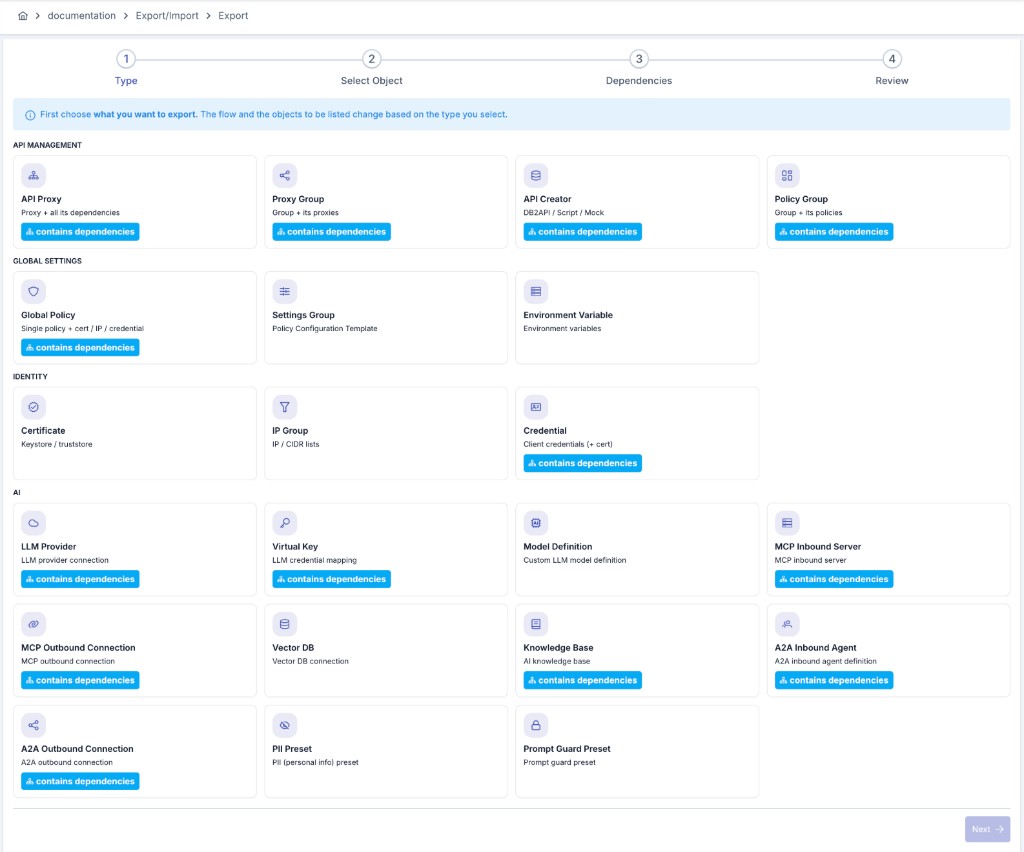
Choose the object type to export (API Proxy, Global Policy, Consumer, etc.).
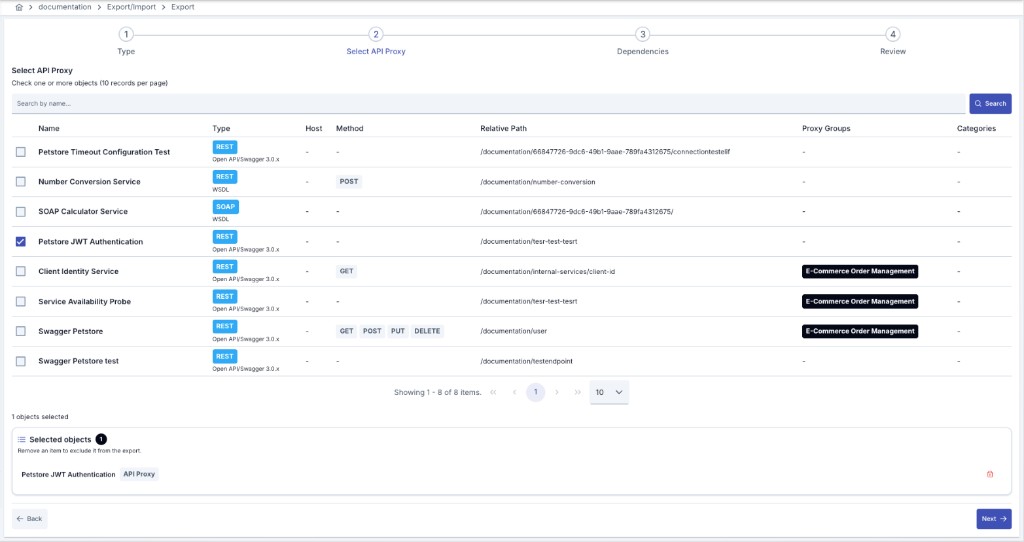
The project's objects of that type are listed; you can select more than one at once.
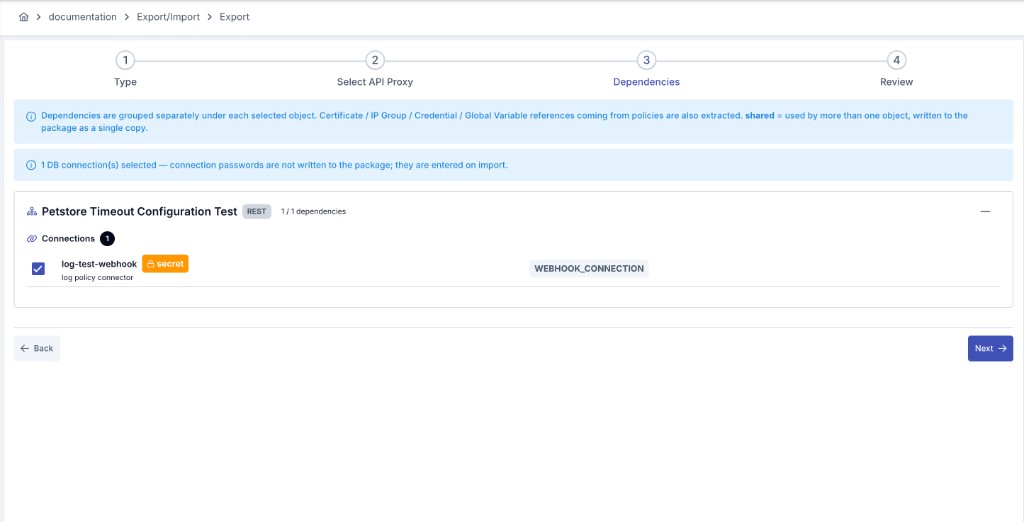
Every global policy, settings group, certificate, IP group, consumer, environment/global variable, and API Creator connection used by the selected object(s) is scanned automatically. You can uncheck any dependency you don't want. An automatic advisory scan (certificate expiry, secret reminders, missing environment variables) is shown here too.
The package contents are summarized, you give it a file name, and it is downloaded as a ZIP.
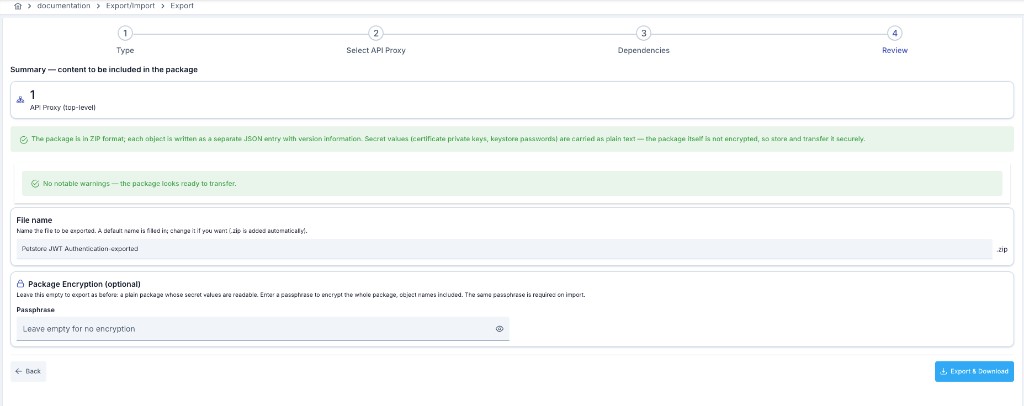
Under Package Encryption (optional) you can set a passphrase for the package: with a passphrase the whole package — the names of the objects inside it included — is encrypted, and leaving the field empty produces a plain package exactly as before. Once you type a passphrase, a Passphrase (confirm) field appears; until the two match, a passphrases do not match warning is shown and the download button stays disabled. The passphrase itself is never stored anywhere and cannot be recovered — losing it means the package can never be imported again.
Choose the object type to import. If the uploaded package doesn't match the selected type, the wizard detects the package's actual content and prompts you to pick the correct type.
Upload the exported ZIP/JSON file; its contents (main object, member API Proxies if any, dependencies) are analyzed and listed.
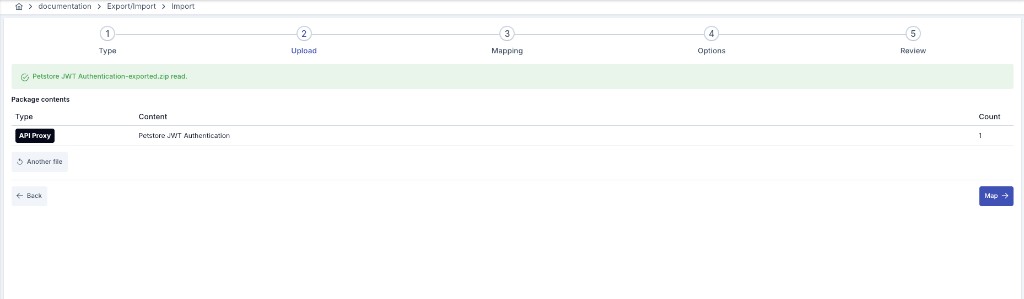
An encrypted package is recognized automatically: a This package is encrypted prompt appears with a passphrase field and an Unlock button, and the contents cannot be analyzed until you enter the passphrase and unlock the package. Entering the wrong passphrase does not unlock the package — the field is cleared and an inline message lets you try again.
If you upload a Postman or Testnizer collection .json file here by mistake, the wizard now recognizes it and tells you so directly, with a button that takes you to the Test Console → Test Collections page, where that file format is imported — instead of the generic "type does not match" message this used to show.
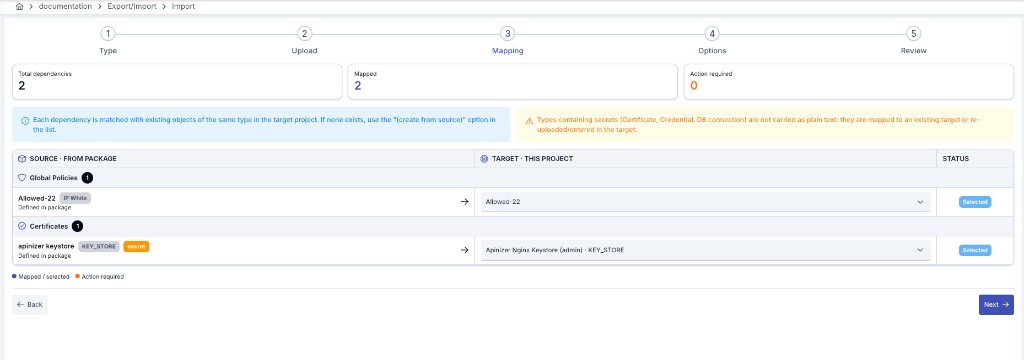
Every dependency in the package is mapped to an existing object of the same type in the target project; if none exists, a new object can be created from the packaged definition. In packages with multiple objects, you can remove the ones you don't want to import.
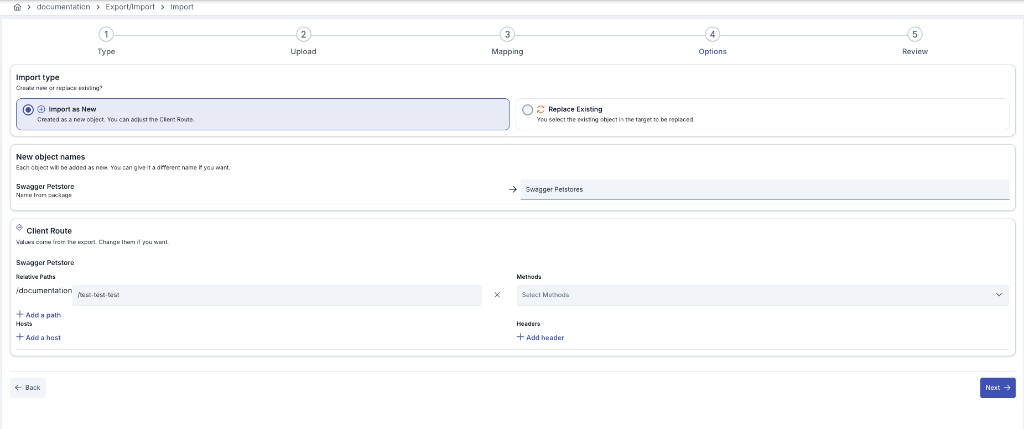
Choose between Import as New (create as a new object) and Replace Existing (fully update an existing object in the target). For an API Proxy/Proxy Group, the Client Route (relative path, host, method, header) can be edited here.
Import as New refuses a name that is already taken, and the message says which of three situations it is: the name exists in the target project (use Replace Existing, or rename it here), the package itself carries the same name twice for the same kind of object (rename one of the two copies), or the name is taken elsewhere on this installation. The last case applies to object types whose names must be unique across all projects — consumer usernames, environment variables, AI preset catalogs and model definitions — so the import can be refused even though the target project visibly does not contain the object; the name may belong to another project, to the shared (admin) scope, or to a built-in item. There is nothing in this project for Replace Existing to update in that case, so rename the object before importing, or import it into the project that already owns the name.
Replace Existing does not normally run this check — it assumes the record it will update already exists. As of Apinizer 2026.09.4, Environment Variable is the one exception: when the target project holds no variable of that name yet, Replace Existing checks the same installation-wide scope first. It is refused with the same "name taken elsewhere on this installation" reason if the name is already in use there. Every other Replace Existing target is unaffected — a project that already holds a variable of that name still gets that record updated, exactly as before.
A Connection name collision is checked more narrowly, but immediately — as soon as you type or accept the name on this step, instead of only surfacing once you click Import. It is flagged when the name is already used in the target project or in the shared (admin) scope; a name used only in some other, unrelated project is not flagged here.
Replace Existing's target list only offers records the import could actually update. For a Connection, a record that belongs to the shared (admin) scope is shown, labeled with that scope, but greyed out and cannot be selected from a project-scoped import — restart the import with Admin (global) as the destination to replace it there instead. For a Consumer, the target list is a search box rather than a full dropdown: type part of a username to find it. Importing from Administration into the shared (admin) scope searches every project at once, and a Project filter is offered there to narrow that cross-project search; each result is labeled with its own project, and a consumer belonging to a different project than the one you're importing into is fully selectable: pick it, and a notice confirms the record is updated in its own project and stays there — it is not moved into the project you're importing into. Because that target belongs to a different project, the permission check for that pick runs against the target's own project (Identity → Export/Import there) rather than the scope you launched the import from; a system administrator acting from the admin scope is exempt from this check. Importing from inside a project instead searches only that project's consumers, with no project filter to show — a consumer belonging to another project never appears there — restart the import from Administration to reach it. If the package's own username already matches a consumer visible to the search, that consumer is offered pre-selected. When the matched consumer has since been migrated into an API Client, a notice explains that its username, password, key and organization are kept as they are and only its other fields are updated by the replace.
Replace Existing keeps the object's identity: the target record's id, the key/secret pair an API Proxy or Proxy Group uses for client authentication, and a Policy Group's runtime key all stay as they are; the source installation's keys carried in the package are never written to the target. Deployment state is kept as well: every environment the target is deployed to is marked "redeploy required", because the content has changed while the Gateway still serves the previous definition — redeploy to that environment to make the change live. An object created with Import as New starts with a fresh identity and keys and is deployed nowhere; an import never deploys on its own.
A Test Collection Replace matches tests by their portable test identity. A matching test keeps its target MongoDB id and creation date while its portable content is updated; a new identity inserts a new test. The default Merge and preserve mode keeps tests that exist only in the target. Full replace is available only in the Import Wizard: it shows the exact direct tests that would be deleted and requires explicit confirmation. If the selected collection changes after that preview, the import is refused before any write and must be analyzed again. Full replace never deletes child collections, sibling collections, or their tests. Old packages without portable test identities remain supported; a stable identity is derived from the legacy package row and a second import updates the same target test.
When a consumer is imported, references into the source installation — organization, certificate/keystore/truststore, crypto key and JWK, the identity service it authenticates against (LDAP, database, API, OIDC provider, JWT regeneration API), roles, Portal application/account, and per-environment details (environment-specific password and IP list) — that cannot be found on the target are cleared (for list fields only the unresolved entries are removed) and listed as a warning in the import summary; with Replace Existing the target's existing valid reference is kept instead of an unresolved package value, and that decision is reported in the same summary. A source installation's identifier is never stored as is.
A Consumer's Access Control List — the API Proxies and Proxy Groups granted to it, with their expiry, environment access and blocked methods or endpoints, see Consumer Access Control Settings — never travels in a consumer package, on the wizard, on a single-object (JSON) import, or over APIops. Import as New creates a consumer with no access at all; you grant it separately on the target. Replace Existing leaves the target consumer's existing Access Control List exactly as it is — nothing from the package is added, removed, or changed. This is deliberate: access control is specific to the installation and environment it runs in. It does not apply to a whole-project export/import (Administration → Export Project / Import Project), which still carries access control with it.
For the Portal application and account references specifically, "found" is narrower than "exists". A Portal application is kept only when the consumer carries an organization the target project can use (one registered to that project or to the admin project, exactly the set the consumer screen's organization picker offers; an organization of another project is never accepted, whatever its identifier) and the application belongs to that same organization; an application of another organization counts as not found even though the record itself is real, and a consumer without a resolvable organization keeps no application reference at all (there is nothing to verify it against). The application's project is deliberately not checked (the Portal records a project on an application only while it serves a single project, and never updates it afterwards), so applications of the admin project, of another project, or with no project at all are all accepted as long as the organization matches. An internal application (created by an administrator, not through the Portal) has no organization and is instead kept when its project is blank, the admin project, or the importing project. A Portal account is an attribution, not an ownership: with a kept application it only has to exist on the same portal; without one it has to exist and be attached to the consumer's organization, either as its primary organization or through an active membership. Either reference that fails these checks is cleared and reported exactly like any other unresolved reference. With Replace Existing, an import never changes the consumer's organization: the target keeps its organization whatever the package carries, and a package with a different organization is reported. An organization change goes through the consumer's Transfer action, which also moves the API clients, access rows and tokens that follow it. The target's own application and account go through the same checks and are kept only when they pass; a package that carries no application or account reference keeps the target's verified application and account, and that decision is reported too. Only the organization and the Portal application/account are treated this way. Every other reference (certificate, keystore, truststore, crypto keys, JWK, identity service, roles, per-environment details) follows the package on Replace Existing: a package that carries no value for such a field clears the target's value without a warning, exactly as saving the consumer with that field empty would.
When an Identity Service (an LDAP / Database / API / OIDC Provider connection) is imported, the state of its most recent synchronization run — the last run's outcome, a pending manual-trigger request, or the claim that a run is currently active — is installation-local and never travels with the package. Import as New starts this state empty, as if the new connection had never been synchronized. Replace Existing keeps the target's current state; the package never overwrites these fields. If a synchronization run on the target changes this state between when the package was analyzed and when you confirm the import, the import is refused with "This package was analysed before the destination changed. Run the analysis again so the mapping and replace choices are made against the current state. Nothing was imported." — analyze the package again and retry.
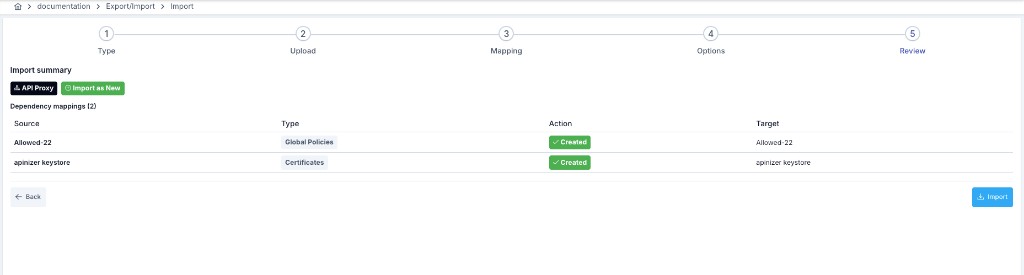
A summary shows what will be created versus mapped; once confirmed, the import is applied.
The import is applied against the target as it was when the package was analysed. If the target project changed after the analysis in a way that affects the mapping or replace choices (for example an object of the same name was created in another tab), the import stops without writing anything, with the warning "This package was analysed before the destination changed"; upload the package and run the analysis again. Objects you create with the Create button on the Mapping step do not trigger this warning.
When you click Create on a dependency row, the create may also bring other objects into being in this project (for example, creating an MCP gateway's source API Proxy also materialises that proxy's own policy group and global policies). The wizard automatically links only the objects this create produced to rows that are still unmapped; such a row shows an Auto-mapped badge on the Mapping step with a tooltip explaining why. It never links a row automatically to an object of the same name that already existed in the target project: a row you deliberately left empty stays empty and that reference is dropped on import. Auto-mapped rows are shown with an Auto-mapped tag in the Review table, and listed separately in the Import confirmation dialog and on the import result screen. To override one, simply pick a different target from the list — the badge disappears as soon as you do.
When you click Create on a dependency row, the references to dependencies you already mapped (for example the LLM provider a global policy uses) are kept on the created object. A reference to a dependency that is not mapped yet is left empty, and the screen shows a warning that lists those references. Map that dependency first, then open the created object and set the reference by hand. To avoid this, create or map the providers first, and then create the policies that use them. The same warning is repeated on the final summary screen of the wizard after the import.
Package Encryption
Encryption is optional and off by default. A package exported without a passphrase is produced exactly as it was before and stays compatible with earlier Apinizer versions, so nothing changes for your existing export/import habits.
When you set a passphrase on the export wizard's last step, the entire package is encrypted. This protection covers not only the secret values inside the package but the names of the objects in it as well — someone who obtains the package cannot tell anything about its contents from the outside, not even which proxies, certificates or policies it carries.
The encryption key is derived directly from your passphrase. The passphrase itself is never written into the package and is not stored by Apinizer either; the only thing that can open the package is the same passphrase you typed on export.
The passphrase cannot be recovered. Because Apinizer does not store it, there is no way to reset a forgotten or lost passphrase or to recover it from the package — the package can never be imported again.
Share the package and the passphrase over separate channels. Sending the package by e-mail and writing the passphrase into that same e-mail defeats the protection encryption gives you.
When to Use It
Prefer encryption especially in these situations:
- The package carries secret values such as a certificate's private key or a key store's password.
- The package will travel over an unsecured channel such as e-mail, a file sharing service or a shared directory.
When the package stays in a secure environment and carries no secret values, you can continue without a passphrase.
Encryption over APIops
The same encryption is available when you automate export/import over APIops; you can import a package produced by the wizard over APIops, or the other way round. For parameter and request-header details see the related API Reference pages: Export API Proxy, Import API Proxy, Export Key and Export Keystore.
Package Integrity
Every package Apinizer exports carries a record of its own contents: an extra file named apinizer-transfer-manifest.json that lists which files are in the package, what each of them is, and a fingerprint of each one. On import, Apinizer recalculates those fingerprints and compares them with the record before anything is written to the destination.
- A package that arrives exactly as Apinizer produced it imports as it always did — you will not notice the check.
- A finding that shows the package changed after export no longer ends the import on its own; a single acknowledgment carries it through. Three situations fall under that acknowledgment: a file inside the package whose content changed (its fingerprint no longer matches the record); a file added to or removed from the package; and an integrity record that cannot be read at all, or that disagrees with the files actually in the package. The decision is yours in all three: acknowledge it and the import continues with the package exactly as it arrived, decline and the import stops there with nothing at all written. When you acknowledge a record that cannot be read, the package is imported as if it carried no record.
- How the acknowledgment is asked for depends on the screen. The wizard opens no separate window: the difference appears as a warning line on the step and the import continues. The single-file Import dialogs outside the wizard — the one on a connection's list screen and the policy Import dialog of an API Proxy or API Proxy Group (which imports a policy package as a local policy) — show a confirmation window titled Package Content Has Changed; confirming it opens the package again with the difference accepted. Those dialogs also ask for the passphrase of an encrypted package the same way, with an inline field after the first attempt. Administration → Projects → Import Project shows the same confirmation window; there the package is checked before the project is created, so a package you do not acknowledge leaves no empty project behind.
- An acknowledged import stays traceable: when it finishes you see a warning telling you how many files disagreed with the record, and the acknowledging user — together with which package was acknowledged and when — is written to the operational log. That entry does not appear on the Audit Logs screen; it lives in the operational log only.
- A package with no integrity record at all is not blocked. Packages produced by earlier Apinizer versions carry none and keep importing exactly as before; the wizard, the Import dialog on a connection's list screen and the Import Project screen show a "this package carries no integrity record" warning in that case. The policy Import dialog does not show this warning; there the package is imported silently.
- What still cannot be acknowledged is about compatibility, not about the package having changed: a package carrying an integrity record format this installation does not know, one declaring a critical feature it does not recognise, or one produced with an unsupported fingerprint method is refused with a clear message instead of being read halfway. And if a file inside the package cannot be read at all — a text editor replaced its quotes with smart quotes, for example — it genuinely cannot be parsed, so that is not acknowledgeable either.
This acknowledgment records that you continued knowing the package changed after export; it says nothing about who produced it. After acknowledging, review the imported objects: the difference was not produced by Apinizer.
Package files opened and saved again by a Windows text editor — the invisible marker such editors add at the start of a file, and the change of line endings — no longer break the import. Once the difference is acknowledged, the import runs through to the end.
If your process relies on unzipping an export file, editing a file inside it and re-compressing it, that package will no longer import automatically — you'll need to give the acknowledgment above to complete the import. Make the change in the source installation and export again, then use the file Apinizer produced as-is.
Re-packing a package without touching its contents still works — the check looks at each file's own content, not at how the archive was built. Prefer the original file anyway: some tools alter the files while re-compressing them.
Over APIops, see Import Objects for the acknowledgeChecksumMismatch parameter — which accepts all three situations above — and the advisory the response carries back when it was used.
Objects That Could Not Be Exported
If an object cannot be written into the package while it is being produced, the export still completes for everything else — but the name of the missing object is now recorded inside the package's content record instead of disappearing without a trace. If a package turns out to be missing something you selected, open the record file inside it: the objects that did not make it are listed there by name.
A certificate, key store or crypto key that had never been assigned to any environment used to fail this way silently: the export produced a blank entry for it, and the problem only surfaced later, on the importing installation, as an unreadable entry. That case is now exported correctly. More generally, when an object still cannot be serialized, export no longer completes with a blank entry in its place — it stops immediately and names the object's type and name, so you can fix it on the source installation before the package ever leaves it.
Packages That Carry Secret Material
Some object types travel with their secret values readable inside the package — an AI provider's API key, a key store's password, or a certificate's private key, for example. An Uptime Monitor's, Anomaly Detector's, Task Flow Manager's or Report Generator's package carries one more such value: when a notification connector inside it has its own privacy setting turned on, the salt behind that connector's masking/hashing rules travels in the package as plain text too — the same way a SIEM destination's privacy salt does (see SIEM Settings below). When such an object is included, the export wizard now warns you before you download the file and names the objects concerned; the warning never shows the values themselves.
Treat such a file as you would the secrets in it, and where it has to leave a trusted environment, export it with a passphrase — see Package Encryption above.
Very Old Packages Can No Longer Be Imported
Types such as an LLM Provider, a Vector DB and an OpenTelemetry (OTLP) connection write their secret values into the package in readable form, and the import encrypts them again on the destination. Much older packages, produced before that behaviour, carry the same fields already encrypted. Importing one of those encrypts the value a second time and leaves it irreversibly unusable — and the import still reports success, so the problem only surfaces the first time the provider is called.
From this release such a package is refused instead of being silently corrupted: the import stops and you get an error telling you to export the package again from the source installation with a current Apinizer version. Re-producing the package on the source installation is the fix; there is nothing that can be repaired in the old file you already hold.
Connection definitions (mail, LDAP, database, SNMP, Elasticsearch, FTP, RabbitMQ, ActiveMQ and Linux Script) and the identity services are outside this rule: their secret values travel encrypted in the package and are stored on the destination as they are. If a package of one of those types does carry a secret in plain text — a hand-written GitOps file, say, or a package produced from a record that a much older version stored in plain text — the import now stores that value encrypted on the destination. A data repair that runs during the upgrade encrypts values that were already stored in plain text, and leaves values that are already encrypted untouched.
The integrity record shows that a package was not damaged or altered by accident. It does not prove who produced it: the record travels inside the package, so whoever can change the package can rewrite the record as well.
Only exporting with a passphrase gives you that stronger guarantee — a package that cannot be opened without the passphrase cannot be modified without it either.
Import Permissions and Limits
Who May Open the Wizard
The Export/Import screens (Export and Import) require Export/Import in at least one of these categories in your active project: Project Management, API Management, Global Settings, Identity, Secrets, Connections, API Creator, AI Development, AI Budgets, AI Analytics.
Project administrators and system administrators always pass. The Administration menu's Export/Import entries are shown to system administrators once a project is active; only the Import Project page needs no active project (it creates the project). A user holding Export/Import in none of these categories — a project member with only Analytics, for example — does not see the entry in the menu and cannot reach it by typing the address either; they are redirected to the access-denied page. The Import shortcut buttons on the Certificate, KeyStore, Consumer, Connection and API Creator lists follow the same permission: without it the button is not shown, so no shortcut leads to a screen you cannot open. On the 14 non-OTLP connection list screens this button opens the wizard's import step with type Connection preselected — Admin scope when opened from the Administration mount, the active project's scope otherwise.
Being able to open the screen does not decide what you may transfer — the rules below do, and every request is checked again on the server.
Who May Import What
An import is authorized against the project you are importing into, not against the project the package came from. Two rules apply, in order:
- If you hold Project Management → Export/Import in the destination project, you may import the whole package.
- Otherwise each object in the package is checked one by one: for every object you need Export/Import on that object's own category in the destination project. One object you lack permission for stops the whole import, and because the check runs before the first record is written, nothing is left half-imported.
This applies to the wizard, to single-object (JSON) imports and to APIops transfers alike. The check covers every object the package carries: a Consumer, certificate or connection inside an API Proxy package, and the DB/Script/Mock API definition embedded in a proxy, are each asked about on their own category. A user holding only API Management Export/Import, for instance, cannot import an API Proxy package that contains a Consumer — that also needs Export/Import on Identity.
The same rule covers the "create from package" option on the mapping step: the object created there is authorized against its own category, not against the main type you picked in the wizard.
If the package cannot be read — a corrupt ZIP, invalid content or a missing passphrase — the request is refused, because it cannot be authorized; an unreadable package is never treated as one whose permission check may be skipped.
Earlier versions had two gaps here: the per-object check ran only on single-object imports, so a ZIP package was accepted on the destination-project check alone; and in the wizard, a package that could not be read fell back to checking the main object type only, letting the other objects in it be written without a permission check. Both are closed. If your operators import packages into projects where they hold only category-level permissions, confirm those permissions cover every object type in the packages they use — dependencies and embedded API Creator definitions included; where they do not, an import that used to complete will now report a permission error.
Package Size
An import bounds how far a package may expand: at most 20,000 files, at most 256 MB per file, and at most 1 GB in total. Real exports stay far below these limits. A package that exceeds one of them is refused with an explanatory message; export it in smaller parts.
Mapping & Dependencies
Dependency detection and mapping are the most critical part of the wizard — how portable an object is depends on every resource it uses being resolved correctly in the destination.
Policy Group Dependency Detection & Mapping
- When an API Proxy, Proxy Group, or Policy Group is exported, every policy inside it is scanned; each policy marked global (standalone or inside a policy group) is listed as its own dependency.
- The global policies inside a Policy Group are added as separate dependencies in addition to the group itself — so both the group and the global policies inside it are created or mapped correctly in the destination. Local (non-global) child policies travel embedded with the group.
- Every policy also surfaces the certificate, IP group, and consumer it uses as its own dependencies (for example, the JWK used by a JOSE policy, or the IP group used by an IP rule policy).
- When a Proxy Group is exported, each member API Proxy is resolved with its own full dependency tree, exactly as if it were exported on its own.
- A dependency used by more than one selected object is shown only once, flagged as shared, and written into the package only once.
Global Policy / Environment Variable / Consumer Key Mapping
- Replace Existing on a Global Policy or Policy Group updates more than that object's own record: every API Proxy, Proxy Group, and Policy Group that already carries an embedded copy of it is updated with the new content too, and every environment where one of those is deployed is marked redeploy required — the running Gateway keeps serving the previous version until you redeploy it there; the import itself never deploys anything on its own. Import as New creates a separate policy or group and leaves every proxy, proxy group, and policy group already using the original one untouched — and so does the classic (non-wizard) Import screen's own "replace" option for a Global Policy or Policy Group: it never replaces the target in place, it always appends an
-importedsuffix and creates a new record, so no proxy, proxy group, or policy group already using the original is ever touched. - When a Global Policy is mapped to an existing target policy on import, every API Proxy, Proxy Group, and Policy Group that references it is repointed to the target policy — so no duplicate is created from a name collision, and the same target policy keeps being used.
- Environment variable dependencies are matched by name: every
${VARIABLE_NAME}reference in the package is rewritten to the name of the target variable you choose. If no variable of the same name exists in the target, you can create a Global or an Environment-specific variable from the packaged definition; creating an environment-specific one maps the source environment names to target environments. Variable values are never included in the package — they must be entered in the target separately. - Consumer dependencies are matched by username; secrets such as passwords or keys never travel as plain text — they are either mapped to an existing consumer or re-entered in the target. When a consumer's certificate, key store, or trust store reference can't be resolved in the target, it is no longer left silently broken: the reference is cleared, and the import report carries a visible warning so you know to re-select the correct certificate there.
- When a Certificate / Key Store / Crypto Key / JWK dependency is mapped, every file that references it (a consumer's private key, the JWK used by a JOSE policy, a proxy's secure-connection certificates, etc.) is rewritten to point at the target's identity. Where a package does carry such secret material — for example when a certificate or a key store is exported on its own — exporting it with a passphrase is what keeps that material unreadable outside the target.
- An environment id inside a package belongs to the source installation, so a certificate-family entry whose environment has no counterpart in the target is dropped on import rather than persisted. Where such a reference is still present on an object, the Certificate, Key Store, Crypto Key and JWK screens flag it with an Unknown environment warning instead of printing a raw identifier — the broken assignment stays visible and can be corrected from that same row. The API Manager's own
apimanagerenvironment is the one exception: it is a pseudo-environment that never exists as a row under Environments, is always treated as valid, and is shown under its own name. - When a database connection dependency is mapped, the API Creator's embedded connection reference is repointed to the target connection; connection passwords are never included in the package, and only connections of the same database type are offered as mapping candidates (for example, an Oracle connection can only be mapped to another Oracle connection).
Excluded Dependency Behavior
- In a package with multiple objects (for example several API Proxies, or a Proxy Group's member proxies), you can remove an object you don't want from the import; only the dependencies used exclusively by that object are dropped with it — dependencies also used by an object you kept remain in the package.
- If you uncheck a dependency on export, it is left out of the package entirely; the object that references it keeps carrying the source reference as-is, and if that dependency doesn't exist in the target, the reference has to be completed there manually.
- Before export, an automatic advisory scan runs: certificates nearing expiry, secret environment variables, certificate/connection/consumer secret reminders, and — on the import side — environment variables missing from the target project are all reported here. These reminders describe an unencrypted package; if you export with a passphrase, the values they warn about are encrypted along with the rest of the package.
Unresolved References Reported on Every Surface
- As of Apinizer 2026.09.4, dropping and reporting an unresolved reference is no longer specific to this wizard. A legacy single-object JSON import, an APIops import, and the whole-project Import Project screen (see Project Creation) now drop the same kind of reference too — and each names it in its own import result, instead of clearing it silently. The policy Import dialog on an API Proxy/Proxy Group is one such legacy path: it imports an exported policy as a local policy. A reference cleared from that incoming policy is now named in its import result as well.
- Reference kinds newly covered by this reporting: an Identity Service's own connection pool (LDAP or Database); an OIDC or API Identity Service's own certificate; an API Proxy's or Proxy Group's settings template; a DB-to-API API Creator's database connection; a Knowledge Base's Vector DB and embedding provider; a Custom Query's, Custom Query Filter's, Report Configuration's, or Anomaly Detector's API Proxy references; an Uptime Monitor's notification connections and test environments; and a Task Flow's connections.
- With Replace Existing, a single-valued reference keeps the target's own current value when that value still resolves — an Identity Service's connection pool or certificate, an API Proxy/Proxy Group's settings template, a Knowledge Base's Vector DB or embedding provider, or an Uptime Monitor's test environment. It is never overwritten by an unresolved package value, and keeping it is reported too, the same way a kept certificate-family reference is (see Global Policy / Environment Variable / Consumer Key Mapping above). A list-type reference has no such target fallback — a Custom Query's, Custom Query Filter's, Report Configuration's, or Anomaly Detector's API Proxy list, or an Uptime Monitor's or Task Flow's connections. Only the entries that still resolve are kept; the rest are dropped and reported.
Relative Path Rules on Project Import
- On export, the source project's relative-path prefix is stripped from the API Proxy/Proxy Group's Client Route, leaving only the proxy-specific suffix in the package — so the package isn't tied to the source project.
- On import, the target project's own relative-path prefix (when enabled) is prepended automatically; the Client Route editor shows this prefix as fixed (non-editable), and only the proxy-specific suffix can be edited — so the proxy comes online under the correct path in the new project without the prefix being duplicated.
AI Object Dependency Detection & Mapping
- An LLM Provider's dependency step does not package its provider type: the provider types are shipped with Apinizer, so on import the connection is re-linked automatically to the same provider type in the target, and a custom provider (
providerType: OTHER) carries its wire protocol and paths on the connection itself. The models of a provider (with their prices, Enabled state and access control) travel inside the LLM Provider package. There is no separate model export type. The LLM Provider itself always carries its own secret (its API key/secret), so it is always packaged as a secret dependency. - In the Wizard, a model's access control entry that names a consumer or an application follows your mapping: if you map that consumer or application onto another one, the entry keeps the target you chose and is not matched again by the source name. If the target is not a consumer or application of that type in the provider's scope, the entry is dropped. Entries you did not map are still matched by name. If you create a provider in the mapping step and later point that row at an existing provider, the row is a plain mapping again, and the model access control of that existing provider is not rewritten from the package.
- The LLM Gateway shortcut in the type picker is only a shortcut: an LLM Gateway package is an API Proxy package, and it is imported through the API Proxy type.
- A Knowledge Base surfaces the Vector DB connection and the embedding LLM Provider it was built on. Only the knowledge base's own definition travels in the package — the documents already indexed into it are not part of it and have to be (re-)ingested in the target.
- MCP/A2A gateway proxies are exported as API Proxies (
type=MCP/type=A2A) with no separate connection dependency to resolve: a Passthrough proxy's backend server(s) and a Tool Call / Agent Call policy's embedded server are packaged inline, as part of the proxy itself. - Vector DB also goes through the dependency step: a Vector DB connection's settings can contain environment variable references — they are resolved and mapped the same way as any other dependency. When neither applies to the selection, the step shows the same empty-state message described above. PII Preset and Prompt Guard Preset carry no reference to another exportable object — each is a self-contained pattern definition — so both are exported directly, without a separate dependency step.
- PII Preset and Prompt Guard Preset — including the ones scoped to your own project — can only be created or edited by a system administrator. From a regular project, the wizard's object list only shows presets already made available to your project; the platform's built-in preset catalog does not appear there.
MCP Source API Proxy Dependency & Mapping
- When an MCP Gateway exposes another API Proxy's endpoints as tools (Expose Tools mode), each distinct API Proxy behind those tools surfaces as its own dependency, labeled MCP Source API Proxies — this is different from the inline server definition described above (a Passthrough proxy's backend, or a Tool/Agent Call policy's embedded server), which keeps traveling inline as part of the gateway's own package.
- On import, every source proxy reference is resolved in this order: (1) the mapping you make explicitly on the wizard's mapping step; (2) failing that, exactly one API Proxy in the target project carrying the same name and the same API type; (3) failing that, the copy of the proxy the package carries, when you kept it included on export — that copy is imported as a new object and then bound to the tool. A package re-imported into the very same installation can additionally resolve by the proxy's original id when none of the above applies.
- Replace Existing on the MCP Gateway itself never replaces the source proxy it resolves to: when the tool binds to a proxy that already exists in the target through step 1 or 2 above, that proxy's own content is left untouched — only the gateway's own definition is replaced. The source proxy follows its own Replace Existing / Import as New choice only when it was also selected as a main object in the same operation.
- Before anything is written, the import is refused in three cases: the source proxy can't be resolved by mapping, by name+type, or from the package at all (
mcpSourceProxyUnresolved); more than one API Proxy of the same name and API type exists in the target, so which one to bind to is ambiguous (mcpSourceProxyAmbiguous); or a tool is pinned to one specific operation (HTTP method + path) of the source proxy and that operation doesn't exist on the proxy the import would bind it to (mcpToolEndpointMissing). Each message names the gateway and the tool and says what to do next — map the tool to the intended proxy on the mapping step, add the missing endpoint there, or export the gateway again with its source proxies included. - This dependency requires the destination to be on Apinizer 2026.09.3 or later: a package carrying it cannot be imported into an earlier installation.
An Uptime Monitor's or Anomaly Detector's notification connector — the mail or webhook connection its alerts go out on — is packaged as a dependency the same way any other connector-based reference is, and so is its failover connection, when failover is enabled for it, exactly like a SIEM destination's failover connector (see SIEM Settings below). If that connection, or its failover counterpart, cannot be resolved on the target, it is cleared from the monitor or detector. This is reported, rather than left as a raw id that resolves to nothing.
An Uptime Monitor's test can also name one or more environments to run in. Each belongs to the source installation, the same way an Anomaly Detector's does (below). One that doesn't resolve on the target is dropped from the monitor and reported, not carried over as a raw id.
An Anomaly Detector's environment belongs to the source installation, so it is never carried over as a raw reference: if it doesn't resolve to an environment on the target, it is dropped and reported the same way an unresolved certificate-family environment is, and the imported detector arrives with no environment selected — it cannot be saved or activated on the target's Anomaly Detector screen until you pick a valid one there. With Replace Existing, the target record's own, already-valid environment is kept as it is; only Import as New is affected. As of Apinizer 2026.09.4, a target environment that does resolve, but whose Elasticsearch connection is not defined or is disabled there, is kept rather than dropped. A real environment that still needs its Elasticsearch connection enabled is a better starting point than no environment at all. This case is reported as a warning too, naming the detector — complete or enable that connection before activating it.
The Application Object Type in the Wizard
Application is a main object type under the wizard's Identity category. It carries an Internal application — one created on the Consumers screen. Portal applications are not listed: their portal, account and subscriptions do not travel.
- Matching. An application is matched by name inside the target project. Import as New is refused when the project already holds an application with that name; rename it in the Options step, or use Replace Existing.
- Dependencies. The consumer roles the application names travel as dependencies, the same way a consumer's do.
- What does not travel. The application key is created again on the target. The portal link, promotion and deletion requests are never carried.
- Replace Existing keeps the target application's key, reference id and status (change the status with Activate and Deactivate) and its organization (change it with Transfer). A package cannot switch the Do not log traffic setting of the target back on.
- A role, environment or organization reference from another installation that does not resolve on the target is cleared and listed in the import summary, as for a consumer. Secret metadata entries travel as ciphertext.
Identity and Limit Management Types
Limit Plan, API Client and Limit Assignment are three types of the wizard's Identity category. They are matched between installations by a stable name or key rather than by an internal record id, so a rename on either side can't turn a match into a mismatch. An imported plan limits nobody until an assignment applies it, and an imported client or assignment never starts working on its own.
- Limit Plan — arrives as an active plan with the packaged rule body. It limits nobody until an assignment applies it to an identity.
- API Client — arrives inactive and waiting on a secret. A client's secret is never part of the package — create a secret for it on the target (Client Secrets tab), then activate it from the ⋯ menu (Status → Activate).
- Limit Assignment — arrives as a saved, not yet applied assignment of a plan to its subject. It affects no traffic until you apply it on the target, from the Limits tab of its subject.
Limit Plan
- A limit plan travels as a single file with its rule body. It has no dependency step, but the API proxies, proxy groups, endpoints, environments and LLM providers its limits are targeted at are matched by name in the target project. A limit whose target does not exist there is removed from the imported plan and reported in the import summary.
- A plan created with Import as New is active and carries the packaged rule body. It limits nobody until it is assigned to an identity.
- Replace Existing updates the target plan's name, description and labels and replaces its rule body with the packaged one. The target's active state is kept, so on an active plan the new body reaches the gateways at once, for every assignment that uses the plan. If the target plan is the limit profile of a portal subscription plan, the replace is skipped and reported; change that subscription plan's rate limit and quota instead.
- Matching against the target is by the plan's stable plan key, never by its display name. Import as New is refused when that key is already held by another plan in the target — a rename in the Options step does not avoid this; use Replace Existing for it instead.
API Client
- A typed OAuth client belonging to a consumer or an application can travel. A client has no management screen of its own — it's managed from its owner's (consumer's or application's) detail screen.
- The client's secret material (client secret) never enters the package. An imported client always arrives inactive and waiting on a secret; its first secret has to be created on the target, and the client activated, separately.
- Replace Existing updates only the client's name and issuance settings; the target's secret(s), usage state, suspension/revocation history and counters are left exactly as they are. A Replace whose packaged owner does not match the target client's current owner is refused outright — a client can never be moved to another owner.
- The client identifier is unique across the whole installation, across every project. If the packaged identifier is already held by another client — even one living in a different project — the import is refused; no new identifier is silently minted.
- If the client's owner (a consumer or an application) cannot be found on the target, or the owner's name matches more than one application there, the file's import is refused rather than creating an ownerless or ambiguously-owned client. When the owner is a consumer, that consumer can be packaged as a consumer dependency; when the owner is an application, it must already exist under the same name in the target — an application is not packaged as a dependency of its client, so import it first with the Application type.
Limit Assignment
- A limit assignment defined for a subject (consumer, API client, application, organization, API proxy, or a rule-based group) can travel.
- Import never puts a ceiling into effect: a new assignment always arrives as Draft and is never pushed to any Gateway.
- Replace Existing updates the target's content only while it is still Draft; a target that is already Active or Ended is left untouched and reported in the import summary.
- Dependencies: the plan(s) it names can be packaged with it; when its subject is a consumer the matching consumer can be packaged too, and likewise its own API Client when the subject is one. When the target is a proxy or proxy group, that's a reference only — the target object itself is never packaged and must already exist under the same name on the target. The environment travels by name and is only validated on the target, never translated.
- The import is refused for that file if the subject, target, environment, or a named plan cannot be resolved on the target — a reference is never silently dropped.
- An assignment whose subject is a project or the whole installation is refused, because project and platform limits were removed: that file is skipped and the import summary names it, while the rest of the package imports. An installation-wide assignment never appears in the wizard's object list either.
The Access Entitlement type is removed from the wizard, because access is now defined only on the Access Control List (ACL). An older package that still contains Access Entitlement files imports normally: each such file is skipped, and the import result shows the advisory "These access entitlements were NOT imported". Give the access again from the Access Control screen if it is still needed. The same advisory is returned in the APIops import response. The ACL itself is still not part of package transfer.
API Product Subscription Plans
An API Product's subscription plans travel inside the product's own package — they are not a separate object type you select. On import, each plan is re-attached to the imported product and is then treated exactly like a plan saved from the plan screen: the limit profile the gateway enforces is created immediately, so an imported plan applies its rate limit and quota from the moment it exists. No follow-up "open the plan and save it" step is needed, and no plan arrives advertising a ceiling that nothing applies.
- Import as New gives each plan its own newly generated profile on this installation. A profile the plan referenced on the source installation is never carried over — profiles belong to the installation that enforces them.
- Replace Existing updates the target plan's own profile in place instead of opening a second one, so every subscription already bound to it keeps resolving the same profile and simply sees the new numbers.
- When a Replace changes a plan's rate limit, quota, interval or on-exceed behavior, the plan's already-approved subscriptions are resynchronized in the background, so the gateway stops applying the ceiling the package replaced.
- A packaged plan whose rate limit or quota permits no calls at all (
0or a negative number) is not imported: it is skipped before anything is written for it, and the reason appears among the import report's dropped references. The rest of the package imports normally — one unusable plan does not discard everything else. Correct the plan on the source installation and export again. - A plan's packaged reference to its own limit profile is only kept when that profile is a genuine, published, unmanaged entry of the matching family in the target catalog (see Profiles Owned by a Subscription Plan). A reference to a profile that turns out to be owned by another plan, unpublished, of the wrong family, or simply missing on the target is dropped and reported the same way; the plan keeps the rate limit and quota numbers from the package and gets its own newly generated profile from them, exactly as a plan saved directly on the target would.
Cloning a whole portal (Portal Settings → Clone/Transfer) applies the same rule with one difference: because a portal package's applications and subscriptions reference its plans, an unusable plan refuses the whole clone before the first record is written, rather than being skipped. Nothing is created, and the message names the plan to correct. The clone result also lists every plan whose packaged limit-profile reference could not be kept for the reasons above, alongside the field and the reason, the same way the wizard's import report does.
SIEM Settings
SIEM Settings, listed under Global Settings, is one of the two types that belong to no project (the other is API Product): there is exactly one of it per installation, and only a system administrator can export or import it, whether through the wizard or through APIops. Because it has no owning project, it never appears in a project's own Export/Import menu; reach it only from Administration → Export/Import.
- What travels: the whole SIEM & Log Forwarding configuration exports as a single file — every destination (its connector reference, payload profile, size policy, privacy profile and stream rules) and the two local-storage switches. A destination's connector — and its failover connector, when it has one — is a dependency exactly like any other connector-based type: package it along, or map it to an existing connection configuration by name on import.
- What never travels: a stream's authority (Legacy or Active) is never part of the package and is never changed by an import — only the SIEM & Log Forwarding page itself, on the target, can cut a stream over. The record's server-managed fields (its revision counter, its last-modified stamp) are likewise never carried; the target keeps its own.
- Replace Existing replaces the target's destination list wholesale with the package's, and takes the two local-storage switches from the package as well. The target's own stream authority is left exactly as it is.
- Import as New appends the package's destinations to the target's existing list — a name already in use there gets an
-importedsuffix — and leaves the target's local-storage switches and stream authority untouched. - A destination whose connector can't be resolved on the target — the packaged connection wasn't included, and no connection of the same name and type exists there either — still imports, just with Enabled turned off, and the import result names the destination and the connection it couldn't find. It is never silently imported active with a broken reference, and it is never silently dropped. The same applies to a destination's failover connector.
- A destination created by Import as New that forwards the API Security stream, and that carries no privacy profile of its own, is seeded with the same masking rules a destination created directly on the page gets — see Privacy profile.
- The privacy salt travels in the package as plain text, unchanged — the same way a connector's salt already travels inside other packages today. This is deliberate: two installations only produce matching hashes when they share the same salt. Because of that, if the package might sit somewhere shared — a CI repository, a shared drive — export it with a passphrase (see Package Encryption above); an unencrypted package leaves that salt, and everything hashed with it, readable to whoever has the file.
Import Advisories Outside the Wizard
OTLP is the one connection kind that still carries a lightweight, single-file Import dialog directly on its own list screen, under Connection Management: it has no wizard-catalog counterpart at all, so it applies the uploaded package straight away, without this wizard's dependency or mapping steps. The other 14 connection types — Kafka, Webhook, Email, Elasticsearch, database, and the rest listed there — no longer carry this separate dialog: each list screen's row-menu Export and toolbar Import now go through the wizard's own Connection type described above instead. An encrypted package can still be imported through OTLP's dialog: when the uploaded file is passphrase-protected, the dialog asks for the passphrase after the first Import attempt — enter the passphrase the package was exported with and press Import again. A wrong passphrase is reported inline and can be corrected without re-selecting the file.
That dialog now surfaces the same two advisories the wizard's own Review & Import step does — a reference the import could not resolve and had to clear, or a provider's secret that was overwritten because an existing target was replaced — right on the dialog itself, worded exactly like the wizard's. Previously this information only ever reached a server log line, never the screen the operator was looking at.
Transfer API v2 (APIops)
For a CI/CD pipeline, the same export/import engine is also available as a versioned Management API surface: Transfer API v2. It adds one guarantee neither this wizard nor the plain APIops export/import calls give a script — that what gets applied is exactly what the pipeline inspected, with nothing having moved in between.
The flow is preview-then-apply, in four calls: a preview resolves the export selection (and its dependencies) and hands back a digest; the export run repeats the request with that digest and is refused if the selection would now resolve differently. On the import side, a preflight analyzes the uploaded package against the target project and hands back its own digest; the import run repeats the package with that digest — refused if the target project changed since — and requires an Idempotency-Key header so a retried pipeline step can never apply the same import twice.
This is additive: the existing /export-import/{type}/export|import endpoints keep working exactly as before, for pipelines that don't need the drift check. Full request/response shapes, error keys and a worked curl example are in Transfer API v2.
Usage Scenarios
Transfer Between Environments
Assume that there are two Apinizer applications installed in two different environments named production and test due to access restrictions. The production environment serves clients, while the test environment serves software developers. It is desired that API Proxies and applied policies and configurations in the test environment also be applied to the production environment. In this case, the API Proxy in the test environment is exported together with its dependencies. The resulting package is then imported into the production environment through the wizard, and each dependency is mapped to its counterpart there.
Configuration Tracking
Configuration changes can be tracked. The organization may want to track differences in policy settings due to security rules. For this, the exported policy, API Proxy, or project configuration file should be added to the CI process.
Related Pages
- If you need to move APIs between environments in the same installation with automatic variable mapping and approval workflows, see API Promotion — its dependency-detection logic overlaps with the wizard described here, but API Promotion is built for approval-gated transfers between environments of the same installation.
- Environment Variables
- Proxy Group
- LLM Providers and Models
- Knowledge Bases
- Vector Database
- MCP Gateway
- A2A Gateway
- SIEM & Log Forwarding
- Connection Management
Related Operations
- Export API Proxy
- Import API Proxy
- Export Key
- Export Keystore
- Global Policies
- Transfer API v2 - The versioned, preview-then-apply CI/CD surface built on this same engine