Application Log Cleanup Tasks
Various data may need to be logged in Apinizer. This data may not be meaningful after a certain period and may cause database growth. It will be beneficial to clean the collections given below at regular intervals.
If this operation is desired to be done automatically, the setting for logs to be deleted can be made from this screen. For active records, a task that runs at the beginning of each hour if hour is selected, or at 00:00 each night if day is selected, deletes relevant records before the specified date.
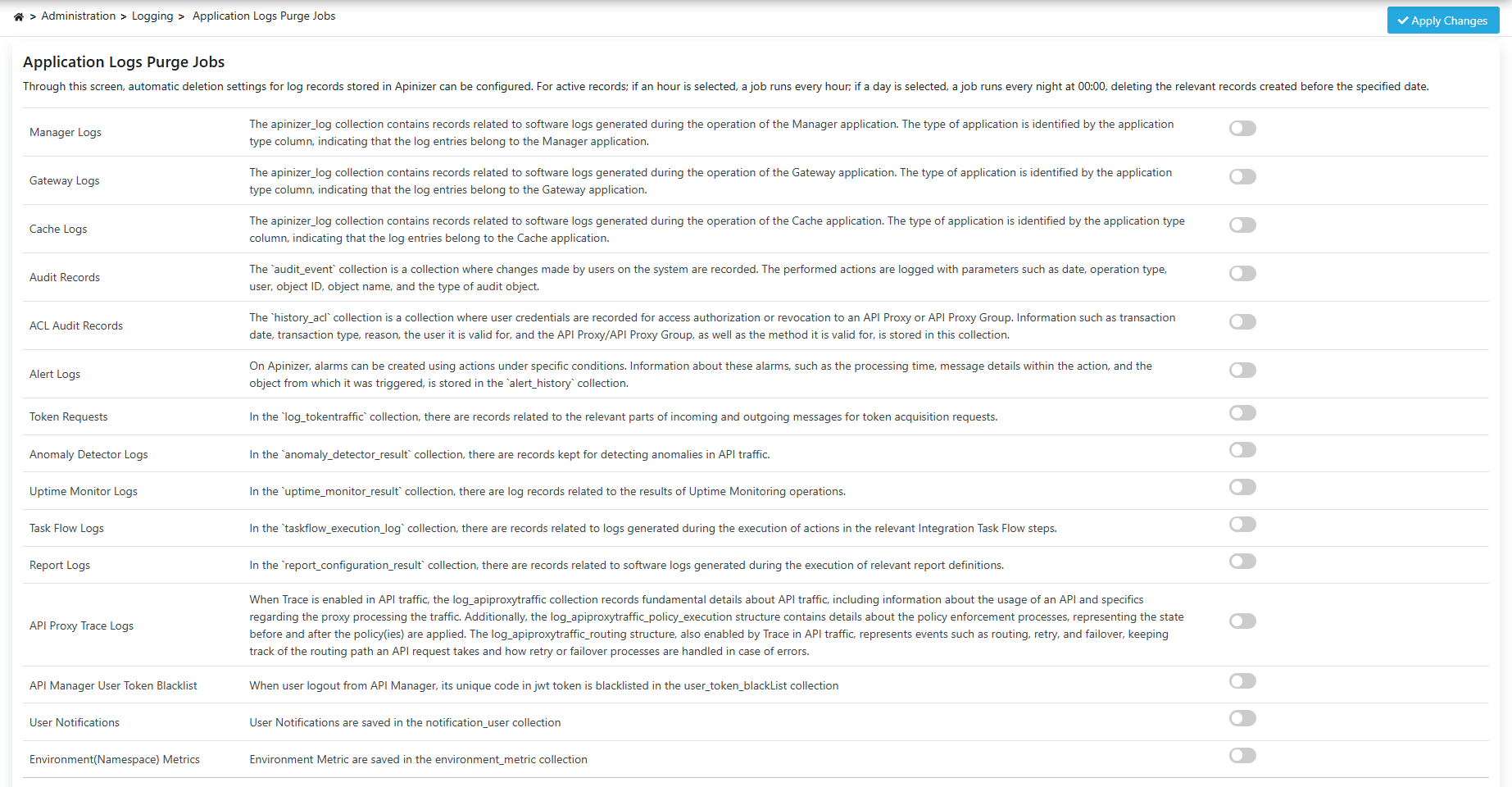
Configuration Fields
The fields used for Application Log Cleanup Task configuration are shown in the table below:
| Field | Description |
|---|---|
| Manager Logs | Sets how old Manager application software logs that occur during operation will be deleted. |
| Gateway Logs | Sets how old Gateway application software logs that occur during operation will be deleted. |
| Cache Logs | Sets how old Cache application software logs that occur during operation will be deleted. |
| TCP Connectivity Test History | Sets how old TCP connectivity test results will be deleted. |
| Alert Logs | Sets how old log records belonging to Alarms created on Apinizer will be deleted. |
| Token Requests | Sets how old records of requests made to get tokens will be deleted. |
| API Security Events | Sets how old records of Gateway requests blocked by a policy or failed with an error, kept for the Security Events screen, will be deleted. |
| API Access Events | Sets how old records of every request that passed through the Gateway, successful ones included, kept for the API Access tab of the Security Events screen, will be deleted. Disabled by default. This collection receives one row per request, so keep the period short — 3 to 7 days — rather than matching the 30 days that suits API Security Events. |
| Portal Login Logs | Sets how old records of API Portal sign-ins, sign-outs and account lockout/password events, kept for the API Portal Login Logs screen, will be deleted. Disabled by default; while it stays off, no portal login record is ever deleted. |
| Audit Records | Sets how old records kept for the Audit Records screen will be deleted. Disabled by default (365 days once enabled); while it stays off, no audit record is ever deleted. Set the period according to your organization's own regulatory retention obligations — data-protection law, a sector regulation such as BDDK, ISO 27001, or PCI DSS, or an internal records policy — rather than for storage convenience alone. |
| Login Records | Sets how old records kept for the Login Records screen will be deleted. Disabled by default (365 days once enabled), with the same regulatory consideration as Audit Records above. A record produced by unmasking a pseudonymized AI value is never deleted by this setting, even while it is enabled, because that record also serves as the compliance trail for the unmask action itself. |
| Anomaly Detector Logs | Sets how old log records belonging to anomaly detection operations created on Apinizer will be deleted. |
| Uptime Monitor Logs | Sets how old log records belonging to uptime monitoring operations created on Apinizer will be deleted. |
| Task Flow Logs | Sets how old log records belonging to Task Flow operations created on Apinizer will be deleted. |
| Report Logs | Sets how old log records belonging to report operations created on Apinizer will be deleted. |
| API Proxy Trace Logs | Sets when log records kept when Trace feature is active in API traffic will be deleted. |
| API Manager User Token Blacklist | Sets when the records kept when logging out from API Manager will be deleted. These are not ordinary log records: they are what stops a signed-out session from being resumed with the same token. A period shorter than the longest token the installation can issue (24 hours, or 30 days when Remember Me is used) is therefore extended automatically — otherwise deleting the record would make an already signed-out token valid again. A longer period is applied exactly as configured. |
| User Notifications | User Notifications are kept in the notification_user collection. |
| Environment(Namespace) Metrics | Environment(Namespace) Metrics are kept in the environment_metric collection. |
| Identity Synchronization History | Sets how old the durable record of identity provider (LDAP / Database / API / OIDC) synchronization runs will be deleted. Disabled by default; while it stays off, no run record is ever deleted. |
| Quota Alarm Logs | Sets how old the records of quota alarm notifications sent when a quota threshold was reached will be deleted. |
| LLM Health History | Sets how old the results of periodic health checks against LLM providers (status and latency) will be deleted. |
| MCP Health History | Sets how old the results of periodic health checks against MCP servers (status and latency) will be deleted. |
| AI Trace Logs | Sets how old AI Gateway trace records will be deleted. These records already expire on their own according to the trace mode (24 hours, 7 days or 30 days); this setting adds a further retention control. |
| AI A2A Task Logs | Sets how old Agent-to-Agent (A2A) task records will be deleted. Completed tasks already expire on their own; this setting adds a further retention control. |
| AI Token Usage | Sets how old the daily aggregated AI token usage records will be deleted. These records are used for billing and reporting, so choose a long period to avoid losing historical usage reports. |
| Quota Usage Window History | Sets how old the archived quota usage windows, kept after each quota window closes, will be deleted. |
| Bulk Limit Assignment History | Sets how old the records of bulk limit assignment runs (assigning a plan or window to many consumers at once) and their per-consumer issue rows will be deleted. Queued or running runs are never deleted. Disabled by default; while it stays off, no run record is ever deleted. |
| Lifecycle Purge Run History | Sets how old the records of purge and erasure runs and their per-item issue rows will be deleted. These records are the evidence of what was anonymised or removed, by whom and with whose approval. Only finished runs are deleted. Disabled by default; while it stays off, no run record is ever deleted. |
ACL audit logs (history_acl) still cannot be deleted through purge jobs — they are always kept in the database; for manual cleanup, refer to the database growth management scripts.
Audit Records (audit_event) and Login Records (persistent_audit_event) are compliance logs too, but unlike history_acl they can now be given an automatic expiration period, from the Audit Records and Login Records rows above. Both stay disabled by default, so deciding whether to auto-expire either kind of record, and for how long, is left entirely to your organization's own regulatory obligations rather than being made for you.
Regular operation of log cleanup tasks increases system performance and keeps database size under control.