ActiveMQ
Overview
What is its Purpose?
Connection provides reliable access to ActiveMQ brokers, centralizing message sending and receiving operations.
Eliminates configuration repetition by providing reusable connection parameters across different Integration Flow steps.
Provides consistent deployment processes between Development, Test, and Production through environment-based management.
Provides performance and durability in high-traffic scenarios thanks to advanced timeout management.
Working Principle
When a Message Queue connection is requested from within an Integration Flow or Connector, the system reads the configured connection parameters.
Authentication to broker is performed with basic Authentication mechanism (username/password) or optional SSL/TLS certificate verification.
JMS messages are transmitted or consumed synchronously/asynchronously to Queue or Topic targets over AMQP/TCP protocol.
When the operation completes, the connection is closed; the Close Timeout value is applied during closing.
In case of connection error, timeout, or authentication error, error details are logged, system automatically retries and produces a warning message to the user.
Usage Areas
Application components executing asynchronous message queue operations via ActiveMQ.
Reliable message broadcast and consumption in Queue or Topic-based integrations.
High volume message scenarios in business intelligence, notification, or integration services.
AMQP-based event sharing in inter-microservice communication.
Including legacy JMS applications in modern Integration Flow steps.
Technical Features and Capabilities
Basic Features
Protocol Flexibility: Provides connections suitable for different ActiveMQ distributions with AMQP or TCP protocol selection.
Destination Management: Manages Queue or Topic destinations from a single screen, storing them together with necessary credentials.
Session Acknowledgement Policy: Reliable delivery with CLIENT_ACKNOWLEDGE default; AUTO_ACKNOWLEDGE for fast integration or SESSION_TRANSACTED for transactional control.
Environment-Based Configuration: Ability to define separate connection parameters for each environment (Development, Test, Production).
Enable/Disable Control: Activating or deactivating the Connection (enable/disable toggle). In passive state, the connection cannot be used but its configuration is preserved.
Advanced Features
Timeout Management: Connection, request response, and message sending durations can be precisely adjusted in milliseconds.
Content Customization: Message metadata is standardized with Content-Type and Content-Encoding fields.
Client ID Definition: Persistent subscription or durable consumer scenarios become possible thanks to JMS ClientID support.
Connection Test Feature: Ability to validate connection parameters before saving via "Test Connection" button.
Export/Import Feature: Exporting Connection configuration as a ZIP file. Importing to different environments (Development, Test, Production). Version control and backup capability.
Connection Monitoring: Monitoring connection health and performance metrics.
Connection Parameters
Mandatory Parameters
Description: Connection name (must be unique)
Example Value: Production_ActiveMQ
Notes: Should not start with space, special characters should not be used
Description: ActiveMQ broker access address
Example Value: tcp://mq.prod.local:61616
Notes: Includes protocol (amqp/tcp) and port value
Description: ActiveMQ access username
Example Value: mq_service_user
Notes: Authorized account should be used
Description: Password belonging to the user
Example Value: ********
Notes: Secret manager should be used for password storage
Description: Queue or Topic selection
Example Value: QUEUE
Notes: Enum values: QUEUE, TOPIC
Description: Message queue or topic name
Example Value: order.events.queue
Notes: Should comply with namespace rules
Description: Connection protocol to be used
Example Value: AMQP
Notes: Enum values: AMQP, TCP
Description: JMS session acknowledgement type
Example Value: AUTO_ACKNOWLEDGE
Notes: Enum values: AUTO_ACKNOWLEDGE, CLIENT_ACKNOWLEDGE, SESSION_TRANSACTED, DUPS_OK_ACKNOWLEDGE
Description: Environment selection reference
Example Value: env-prod-01
Notes: Environment list comes from Environment service
Optional Parameters
Description: Wait time for message sending
Default Value: 60000
Recommended Value: 30000 - 120000 range according to need
Description: Response wait time
Default Value: 60000
Recommended Value: 45000 for critical operations
Description: Connection closing time
Default Value: 60000
Recommended Value: 90000 for long sessions
Description: Time to connect to broker
Default Value: 60000
Recommended Value: 90000 ms in high latency networks
Description: Message content type
Default Value: application/json
Recommended Value: application/xml according to workload
Description: Message character set
Default Value: UTF-8
Recommended Value: Standard UTF-8 usage is recommended
Description: Persistent subscription identity
Default Value: apinizer-activemq-clientid
Recommended Value: Mandatory in durable topic subscriptions
Timeout Parameters
Description: Maximum wait time for connection establishment
Default: 60000
Unit: milliseconds
Notes: UI only enforces a required-field check; there is no min/max.
Description: Maximum wait time for request response
Default: 60000
Unit: milliseconds
Notes: UI only enforces a required-field check; there is no min/max.
Description: Connection closing time
Default: 60000
Unit: milliseconds
Notes: UI only enforces a required-field check; there is no min/max.
Description: Expected longest duration for message sending
Default: 60000
Unit: milliseconds
Notes: UI only enforces a required-field check; there is no min/max.
Usage Scenarios
Situation: New order messages are falling into ActiveMQ queue
Solution: Destination Type=QUEUE, Destination Name=order.events.queue, Protocol=AMQP
Expected Behavior: Integration Flow consumes order messages sequentially
Situation: Websocket notifications will be distributed via topic
Solution: Destination Type=TOPIC, Destination Name=notifications.topic, ClientID=notif-producer
Expected Behavior: All subscribers receive real-time notifications
Situation: Production broker only accepts SSL
Solution: Protocol=TCP, Broker URL=ssl://mq.prod.local:61617, SSL certificate attachments
Expected Behavior: Encrypted connection is successfully established
Situation: Batch job is sending large message packages
Solution: Send Timeout=120000, Request Timeout=120000
Expected Behavior: Message sending completes without interruption
Situation: Test broker is low-resource
Solution: Request Timeout=45000, Content Type=application/json
Expected Behavior: Resource usage is optimized, test runs stably
Situation: Need to switch to backup broker
Solution: Broker URL is updated to secondary address, activated with Enable toggle
Expected Behavior: Traffic seamlessly shifts to backup broker
Resilience (Circuit Breaker)
A connection-level circuit breaker can be enabled to protect log delivery from a failing broker. It only affects log delivery — traffic, token, and audit logs sent through this connection; API proxy backend calls and task flow executions that use the same connection type are not affected and keep their existing error handling.
Description: Turns the connection-level circuit breaker on or off
Default: false (disabled)
Notes: Leave empty to inherit the platform-wide default from Management → System Settings → Logging & Monitoring → Connector Circuit Breaker
Description: Number of failed log deliveries within the error window that trips the circuit open
Default: 5
Min: 1 | Max: 10000
Description: How long the circuit stays open before a single recovery attempt is made
Default: 30
Min: 1 | Max: 3600
Unit: seconds
When the error threshold is reached, the circuit opens: log delivery through this connection is skipped entirely for the duration of the sleep window — the broker is not contacted at all. Skipped log events are routed to the failover connection defined on this connector in the Gateway Environment when failover is enabled, otherwise they are dropped and counted. Only log delivery is affected; API proxy backend calls and task flow executions keep their normal behavior. After the sleep window elapses, a single attempt is made to reach the broker again — success closes the circuit, failure reopens it for another sleep window. In multi-pod deployments, circuit state is evaluated independently per pod.
Changes to these fields take effect for API Proxies using this connection only after redeployment.
Connection Configuration
Creating New Apache ActiveMQ
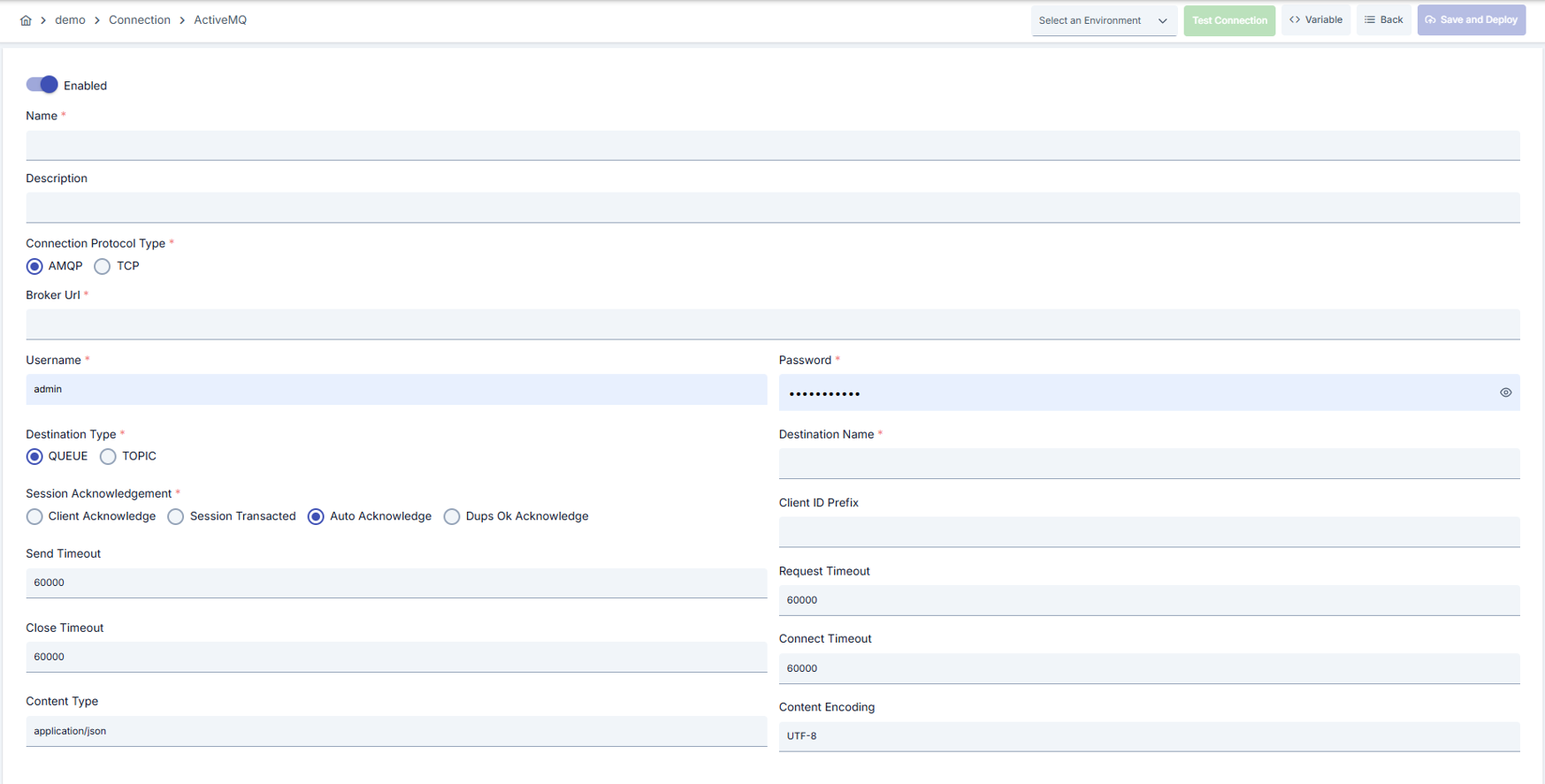
Configuration Steps
- Go to Connection → Apache ActiveMQ section from the left menu.
- Click the [+ Create] button at the top right.
Enable Status (Active Status):
Set active/passive status with toggle. New connections are active by default.
Name (Mandatory):
Example: Production_ActiveMQ
- Enter unique name, should not start with space.
- System automatically checks. Green checkmark: available. Red X: existing name.
Description:
Example: "Order queue integration"
- Max. 1000 characters.
- Describe the purpose of the connection.
In the action button area at the top of the page, you can use the [<> Variable] button to select dynamic values, and using global variables, you can manage connection parameters with variable-based values instead of fixed values. For detailed information, review the Dynamic Variables page.
- Select environment from dropdown menu: Development, Test, or Production.
- Different connection parameters can be defined for each environment.
- Enter Broker URL, ActiveMQ Connection Protocol Type, Destination Type, Destination Name fields.
- Broker URL should comply with AMQP/TCP schema; destination type should be selected as Queue or Topic.
- Determine Session Acknowledgement type according to your JMS strategy. Optionally fill Content Type, Content Encoding, Client ID fields.
- Client ID is required in durable topic subscriptions.
- Enter Send Timeout, Request Timeout, Connect Timeout, Close Timeout values in milliseconds.
- Optimize timeout durations according to broker response times for heavy traffic.
- Fill Username and Password fields. If SSL/TLS requirements exist, configure broker URL with ssl:// and add necessary certificates to Environment repository.
- Click the [Test Connection] button.
- Test whether connection parameters are correct.
- Successful: Green confirmation message, Failed: Error details are shown.
- Click the [Save and Deploy] button at the top right.
Checklist:
- Unique name
- Mandatory fields filled
- Test connection successful (recommended)
Result:
- Connection is added to list.
- Becomes available for use in Integration Flow and Connector steps.
- Becomes active according to environment.
Deleting Connection
- Select Delete from the ⋮ menu at the end of the row.
- Or click the [Delete] button on the connection detail page.
Check Before Deleting:
- May be used in Integration Flow or Connector steps.
- Assign an alternative connection if necessary.
- Take backup with Export before deleting.
Alternative: Deactivate
- Use Disable option instead of deleting.
- Connection becomes passive but is not deleted.
- Can be reactivated when needed.
Exporting/Importing Connection
In this step, users can export (export) existing connections for backup, moving to different environments, or sharing purposes, or import (import) a previously exported connection again. This operation is used to maintain data integrity in version control, transition between test and production environments, or inter-team sharing processes.
Export
Go to the connection's view screen and click the [Export] button at the top right. ZIP file is automatically downloaded.
The row's ⋮ menu now has two items: the primary Export opens the Export/Import Wizard with this connection preselected — any ${VARIABLE} reference in its host, URL or password field surfaces automatically on the dependency step; the secondary Export as File downloads the ZIP described below directly, without going through the wizard.
Format: {Date}-connection-{ConnectionName}-export.zip
Example: 13 Nov 2025-connection-Production_ActiveMQ-export.zip
- Connection JSON file
- Metadata information
- Dependency information (e.g., certificates, key store)
- Backup
- Moving between environments (Test → Prod)
- Versioning
- Team or project-based sharing
Import
- Click [Import Apache ActiveMQ] button on the main list — it now opens the Export/Import Wizard's import step with type Connection preselected (Admin scope when opened from Administration); the old upload dialog is gone.
- Select the exported package and follow the wizard's steps.
- The wizard checks format, name conflicts and dependency availability before you confirm the import.
Scenario 1: Name Conflict → Overwrite the old connection or create with a new name.
Scenario 2: Missing Dependencies → Create missing certificates or key stores first or exclude them during import.
Connection Usage Areas
Steps:
- Create the connection.
- Verify the connection with Test Connection.
- Save and activate with Save and Deploy.
- Make sure the connection is in Enabled status.
- The connection is selected in steps that need to send messages to, or consume messages from, an ActiveMQ queue or topic.
- Example: Steps like "Send Message", "Consume Message".
- Connection selection is made from the Connection field in the configuration of these steps.
- In scheduled tasks (e.g., sending messages at certain intervals, file processing, etc.), access to external systems is provided by selecting connection.
- When connection changes, job execution behavior is updated accordingly.
- Connection correctness can be checked independently from Integration Flow with Connection Test feature.
- This test is critical in the debugging process.
Best Practices
Things to Do and Best Practices
| Category | Description / Recommendations |
|---|---|
| Destination Management | Bad: Routing all workloads to a single queue. Good: Defining separate Queue/Topic for different business types. Best: Using own destination for each business type and documenting naming standards. |
| Protocol Selection | Bad: Using default TCP and ignoring security requirements. Good: Preferring TCP in internal network, AMQP in external network. Best: Providing encrypted communication using SSL/TLS supported AMQP |
| Session Acknowledgement Policy | Bad: Using AUTO_ACKNOWLEDGE in all flows. Good: Switching to CLIENT_ACKNOWLEDGE in critical operations. Best: Using SESSION_TRANSACTED in transactional flows and applying rollback on failure. |
| Credential Management | Bad: Storing username/password as plain text. Good: Masking in configuration file. Best: Retrieving dynamically via Secret Manager or environment variable. |
| Observability | Bad: Not tracking connection logs. Good: Monitoring basic error logs. Best: Sending timeout and broker metrics to centralized monitoring system. |
| Environment Management | Bad: Using the same connection parameters in all environments. Good: Creating separate connections for each environment. Best: Managing all environments in a single connection using Environment option, only changing environment during inter-environment transitions. |
| Connection Test | Bad: Saving and deploying connection without testing. Good: Verifying with Test Connection before saving. Best: Testing after every parameter change, performing full integration test in test environment before moving to production. |
Security Best Practices
| Security Area | Description / Warnings |
|---|---|
| Broker Access Authorization | Allow only service accounts that need it. Apply role-based policies and remove unnecessary users. |
| Password Management | Periodically renew passwords, use minimum 16 characters, activate audit logs to prevent unauthorized sharing. |
| Durable Subscriber Protection | Keep Client IDs unique, do not use the same identity in multiple applications; otherwise message loss may occur. |
| Credential Management | Store sensitive information such as username and password using environment variable or secret manager. Do not hardcode credentials in code or configuration files. Periodically update passwords. |
| SSL/TLS Usage | Always enable SSL/TLS in Production environment. Use self-signed certificates only in development environment. Track certificate expiration dates and renew on time. |
| Access Control | Allow only authorized users to change Connection configuration. Store connection change logs. Apply change approval process for critical connections. |
Things to Avoid
| Category | Description / Warnings |
|---|---|
| Wrong Destination Name | Why to avoid: Broker target cannot be found, messages are lost. Alternative: Validate destination names in deployment pipeline. |
| Non-Standard Encoding | Why to avoid: Consumers may not be able to decode the message. Alternative: Maintain UTF-8 standard, coordinate if different encoding is needed. |
| Using Production Connection in Test Environment | Why to avoid: Test data can be written to production system, real users can be affected, security risk occurs. Alternative: Create separate connections for each environment, use environment parameter, separate connection names by adding prefix according to environment (Test_, Prod_). |
| Very Low Timeout Values | Why to avoid: Connection constantly times out in network delays, requests fail. Alternative: Adjust timeout values according to real usage scenarios, measure network latency and determine timeouts accordingly. |
Performance Tips
| Criterion | Recommendation / Impact |
|---|---|
| Broker Cluster Integration | Recommendation: Use failover URI structure (failover:(tcp://node1:61616,tcp://node2:61616)). Impact: Automatic reconnection is provided in broker interruptions. |
| Message Throughput | Recommendation: Increase the Send Timeout value in high volume sends. Impact: Message queues are consumed without accumulation. |
| Ack Strategy | Recommendation: Provide manual control with CLIENT_ACKNOWLEDGE in critical flows. Impact: Reduces message loss risk. |
| Timeout Values Optimization | Recommendation: Measure real network latency, adjust timeout values accordingly, avoid very low or very high timeouts. Impact: Unnecessary waits are prevented, fast fail-over is provided, user experience improves. |
| Connection Monitoring | Recommendation: Track timeout rates, perform connection health check, set up alerting. Impact: Problems are detected proactively, performance bottlenecks are identified early, downtime decreases. |
Troubleshooting
| Problem | Possible Causes | Solution Steps |
|---|---|---|
| Cannot Connect to Broker | - Wrong Broker URL - Firewall barrier - Broker service is down | 1. Verify Broker URL and port 2. Test network access (telnet, nc) 3. Check broker logs |
| Destination Not Found | - Queue/topic not created - Wrong name entered - Authorization missing | 1. Verify destination from broker management console 2. Update connection parameter 3. Check user permissions |
| Connection Timeout | - Network delay - Target system responding slowly - Timeout value too low | 1. Check network connectivity 2. Check target system health 3. Increase timeout values 4. Review connection logs |
| Authentication Failed | - Wrong username/password - Expired credentials - Authorization problem | 1. Verify credentials 2. Check that user is active in target system 3. Check that necessary permissions are granted 4. Check SSL/TLS certificates |
| Connection Test Successful But Integration Flow Gives Error | - Different connection may be selected in Integration/Connector step - Step may be misconfigured - Flow/Job may not be redeployed | 1. Check that Connection's enable toggle is active 2. Verify that correct connection is selected in Integration Flow 3. Redeploy Connection 4. Redeploy Integration Flow or Job 5. Check Gateway logs |
Frequently Asked Questions (FAQ)
| Category | Question | Answer |
|---|---|---|
| General | Can I manage multiple destinations within the same broker with a single connection? | Yes, the same Apache ActiveMQ connection can be used with different destinations in different Integration Flow steps; target destination configuration must be done separately in each step. |
| General | Does message consumption completely stop when connection is disabled? | When disabled, the connection is not reused, integration steps return error or force connection selection. |
| Technical | What settings should I change to switch from AMQP to TCP? | Set ActiveMQ Connection Protocol Type value to TCP, update Broker URL to tcp:// or ssl:// schema, check firewall ports. |
| Technical | How is durable topic subscription activated? | Set Destination Type=TOPIC, enter ClientID field uniquely and enable durable subscriber option on Integration Flow side. |
| Usage | Is automatic retry performed on connection if queue is full? | If broker side returns error, ActiveMQ client retries; still you need to track application logs and do capacity planning. |
| General | Can I use the same connection in multiple Integration Flows? | Yes, the same connection can be used in multiple Integration Flow or Connector steps. This provides centralized management and guarantees configuration consistency. However, changes made to the connection will affect all usage locations, so care should be taken. |
| Usage | Should I create different connections for Test and Production? | Yes, it is recommended to create separate connections for each environment. Alternatively, you can manage all environments within a single connection using the environment parameter. This approach provides easier management and less error risk. |
| Technical | Test Connection is successful but not working in Integration Flow, why? | Several reasons may exist: 1) Connection enable toggle may be passive, 2) A different connection may be selected in Integration step, 3) Connection may not be deployed, 4) Integration Flow may not have been redeployed yet. |
Examples for BROKER URL
AMQP URL Examples
| Scenario | URL Example | Description |
|---|---|---|
| Simple Connection | amqp://localhost:5672 | Most basic AMQP connection |
| Authenticated | amqp://user:password@localhost:5672 | Connection with username and password |
| SSL/TLS | amqps://secure-broker.example.com:5671 | Secure AMQP connection |
| Multiple Brokers | amqp://broker1:5672,amqp://broker2:5672 | Connection to multiple brokers |
| With Timeout Settings | amqp://localhost:5672?transport.connectTimeout=30000&transport.requestTimeout=30000 | Timeout values specified |
| SSL and Failover | amqps://broker:5671?transport.trustStoreLocation=/path/truststore.jks&failover.maxReconnectAttempts=5 | SSL and reconnection settings |
| With Prefetch Settings | amqp://broker:5672?jms.prefetchPolicy.all=1000 | Message prefetch settings |
| Multi-Featured | amqp://broker:5672?jms.prefetchPolicy.all=1000&amqp.idleTimeout=30000&transport.connectTimeout=30000 |
TCP URL Examples
| Scenario | URL Example | Description |
|---|---|---|
| Simple Connection | tcp://localhost:61616 | Most basic TCP connection |
| Authenticated | tcp://user:password@localhost:61616 | Connection with username and password |
| With Timeout Settings | tcp://localhost:61616?soTimeout=30000&soWriteTimeout=30000 | Timeout values specified |
| Simple Failover | failover:(tcp://broker1:61616,tcp://broker2:61616) | Basic failover configuration |
| With SSL | ssl://secure-broker:61617?needClientAuth=true&keyStore=/path/keystore.jks | SSL certificate connection |
| Performance Optimized | tcp://localhost:61616?tcpNoDelay=true&socketBufferSize=65536 | Optimized for performance |
| High Availability | failover:(tcp://primary:61616,tcp://backup:61616)?maxReconnectAttempts=-1 | Configured for high availability |
| Full Failover | failover:(tcp://broker1:61616,tcp://broker2:61616)?initialReconnectDelay=1000&maxReconnectDelay=30000&maxReconnectAttempts=5 | Detailed failover settings |
| Production Environment | failover:(tcp://prod1:61616,tcp://prod2:61616)?randomize=true&priorityBackup=true&useExponentialBackOff=true | Optimized for production environment |
Important Parameters and Values
| Parameter Type | Parameter | Example Value | Description |
|---|---|---|---|
| Timeout | soTimeout | 30000 | Socket read timeout (ms) |
| Timeout | soWriteTimeout | 30000 | Socket write timeout (ms) |
| Failover | maxReconnectAttempts | 5 | Maximum reconnection attempts |
| Failover | initialReconnectDelay | 1000 | Initial connection delay (ms) |
| Performance | tcpNoDelay | true | TCP Nagle algorithm disabled |
| Performance | socketBufferSize | 65536 | Socket buffer size (bytes) |
| Prefetch | jms.prefetchPolicy.queuePrefetch | 1000 | Prefetch count for Queue |
| Prefetch | jms.prefetchPolicy.topicPrefetch | 1000 | Prefetch count for Topic |
| SSL | needClientAuth | true | Client certificate required |
| SSL | verifyHost | true | Host verification active |
Common Usage Scenarios
| Scenario | Protocol | Recommended URL |
|---|---|---|
| Development | AMQP | amqp://localhost:5672 |
| Development | TCP | tcp://localhost:61616 |
| Test | AMQP | failover:(amqp://test1:5672,amqp://test2:5672)?failover.maxReconnectAttempts=3 |
| Test | TCP | failover:(tcp://test1:61616,tcp://test2:61616)?maxReconnectAttempts=3 |
| Production | AMQP | amqps://prod:5671?transport.trustStoreLocation=/certs/truststore.jks&failover.maxReconnectAttempts=-1 |
| Production | TCP | failover:(tcp://prod1:61616,tcp://prod2:61616)?randomize=true&maxReconnectAttempts=-1 |
| High Security | AMQP | amqps://secure:5671?transport.verifyHost=true&transport.trustStoreLocation=/certs/truststore.jks |
| High Security | TCP | ssl://secure:61617?needClientAuth=true&keyStore=/certs/keystore.jks |
| High Performance | AMQP | amqp://fast:5672?jms.prefetchPolicy.all=2000&amqp.maxFrameSize=1048576 |
| High Performance | TCP | tcp://fast:61616?tcpNoDelay=true&socketBufferSize=131072&wireFormat.maxFrameSize=104857600 |