Database
Overview
What is its Purpose?
Makes Connection definitions reusable in Integration Flow steps by collecting them centrally.
Facilitates management by providing configuration from a single point for different database types (Oracle, MySQL, PostgreSQL, MongoDB, Trino, etc.).
Optimizes resource consumption in high traffic and provides consistent response time with Connection Pool parameters.
Supports secure deployment and audit processes with environment-based credential and JDBC URL management.
Working Principle
When Database connection is requested from within Integration Flow or Connector, the system reads configured connection parameters.
Existing Connection is taken from the pool with C3P0 compatible pool strategy; if limit is exceeded, a new Connection is created.
Authentication is performed with username/password or credential set connected to environment variable.
SQL/NoSQL commands are transmitted to the target Database driver via JDBC or Mongo URI and response is received.
After the operation is completed, Connection returns to the pool, unused connections for a long time are closed.
In case of connection error, timeout, or authentication error, detailed error record and log routing are provided through the deployment result dialog box.
Usage Areas
Integration Flow steps that perform transactional CRUD operations via API Gateway.
Connector scenarios that write to database after message consumption.
Data synchronization, reporting, and archiving tasks based on Scheduled Jobs.
DevOps teams testing environment-specific connection sets and migration projects.
Technical Features and Capabilities
Basic Features
Oracle, MySQL, PostgreSQL, SQL Server, DB2, Sybase, Apache Hive/Impala, MongoDB, and Trino options are managed in a single form.
Configuration time is shortened by automatically filling the recommended JDBC/URI template when database type changes.
JDBC URL, username, and password fields provide masking and autocomplete support with environment variables.
Ability to define separate connection parameters for each environment (Development, Test, Production).
Making Connection active or passive (enable/disable toggle). In passive state, connection cannot be used but its configuration is saved.
Advanced Features
Unique Connection names are guaranteed with real-time name exist service.
Connection sharing can be done thanks to the move to global project function.
Detailed DeploymentResult dialog opens after save, enable, or test operations.
Ability to verify connection parameters before saving with "Test Connection" button.
Exporting Connection configuration as ZIP file. Importing to different environments (Development, Test, Production). Version control and backup capability.
Monitoring connection health, pool status, and performance metrics.
Connection Parameters
Required Parameters
Description: Connection name (must be unique)
Example Value: Production_DBPool
Notes: Should not start with space, special characters should not be used
Description: One of the supported EnumDatabaseType values
Example Value: POSTGRES
Notes: Type selection determines JDBC URL template
Description: Connection string containing target Database address
Example Value: jdbc:postgresql://db-host:5432/core
Notes: Can be selected as environment variable
Description: Indicates whether credentials are required
Example Value: true
Notes: Recommended for MongoDB and most JDBC drivers
Description: Published environment where Connection will be applied
Example Value: Production
Notes: Must be selected for Test Connection
Optional Parameters
Description: Text describing the purpose of Connection
Default Value: (Empty)
Recommended Value: Customer data ETL write
Description: Database username or environment variable
Default Value: Environment variable
Recommended Value: Separate secret for each environment
Description: Password or secret manager reference
Default Value: Environment variable
Recommended Value: Should be retrieved from secret manager / vault
Timeout and Connection Pool Parameters
Description: Maximum wait time for establishing connection
Default: 30000
Notes: The UI only enforces a required-field check; there is no min/max.
Unit: milliseconds
Description: Maximum number of connections in Connection pool
Default: 5
Notes: The UI's min: 1 requirement applies only to the Initial Pool Size and Min Pool Size fields; the Max Pool Size field has no min/max limit.
Unit: count
Description: Health check period for connections in pool
Default: 30000
Notes: The UI only enforces a required-field check; there is no min/max.
Unit: milliseconds
Description: Time for closing unused connection
Default: 120000
Notes: The UI only enforces a required-field check; there is no min/max.
Unit: milliseconds
Description: Maximum time a connection can stay in pool
Default: 180000
Notes: The UI only enforces a required-field check; there is no min/max.
Unit: milliseconds
Usage Scenarios
Situation: Writing to customer table from Gateway
Solution: POSTGRES, Pool Size=10, Test Checkout active
Expected Behavior: Sequential INSERT operations with low latency
Situation: Scheduled Job pulling night report
Solution: ORACLE, Idle Test=60000, Max Age=900000
Expected Behavior: Pool remains stable in long queries
Situation: Writing REST calls to MongoDB
Solution: MONGODB, Credentials off, user info in URI
Expected Behavior: Single connection is reused for each document write
Situation: Self-service analytics flow
Solution: TRINO, Pool Size=3, Timeout=45000
Expected Behavior: Excessive load is not placed on Trino coordinator
Situation: Old core banking system
Solution: DB2, Use Credentials=true, SSL/TLS on
Expected Behavior: Transactional operations proceed securely
Situation: Bulk insert to SQL Server after Kafka consumption
Solution: SQL_SERVER, Pool Size=20, Increment=5
Expected Behavior: Multiple consumer threads are not blocked
Resilience (Circuit Breaker)
A connection-level circuit breaker can be enabled to protect log delivery from a failing database server. It only affects log delivery — traffic, token, and audit logs written through this connection; API proxy backend calls and task flow executions that use the same connection type are not affected and keep their existing error handling.
Description: Turns the connection-level circuit breaker on or off
Default: false (disabled)
Notes: Leave empty to inherit the platform-wide default from Management → System Settings → Logging & Monitoring → Connector Circuit Breaker
Description: Number of failed log deliveries within the error window that trips the circuit open
Default: 5
Min: 1 | Max: 10000
Description: How long the circuit stays open before a single recovery attempt is made
Default: 30
Min: 1 | Max: 3600
Unit: seconds
When the error threshold is reached, the circuit opens: log delivery through this connection is skipped entirely for the duration of the sleep window — the database server is not contacted at all. Skipped log events are routed to the failover connection defined on this connector in the Gateway Environment when failover is enabled, otherwise they are dropped and counted. Only log delivery is affected; API proxy backend calls and task flow executions keep their normal behavior. After the sleep window elapses, a single attempt is made to reach the database server again — success closes the circuit, failure reopens it for another sleep window. In multi-pod deployments, circuit state is evaluated independently per pod.
Changes to these fields take effect for API Proxies using this connection only after redeployment.
Connection Configuration
Creating New Database Connection Pool
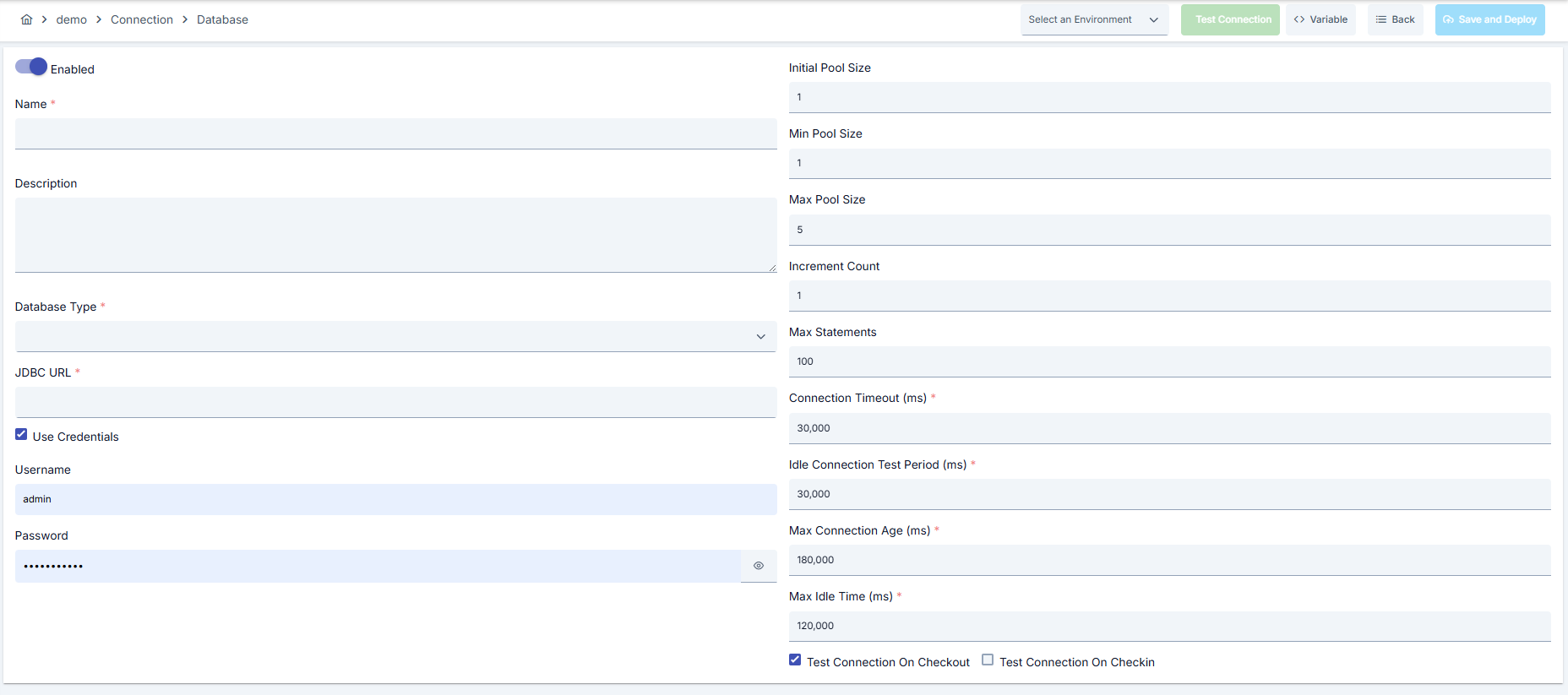
Configuration Steps
- Go to Connection → Database Connection Pool section from the left menu.
- Click the [+ Create] button in the top right.
Enable Status (Active Status):
Set active/passive status with toggle. New connections are active by default.
Name (Name) Required:
Example: Production_DBPool
- Enter unique name, should not start with space.
- System automatically checks. Green checkmark: available. Red X: existing name.
Description (Description):
Example: "Reporting queries of Order service"
- Max. 1000 characters.
- Describe the purpose of Connection.
In the action button area at the top of the page, you can use the [<> Variable] button to select dynamic values, and with global variables, you can manage connection parameters with variable-based values instead of fixed values. For detailed information, review the Dynamic Variables page.
- Select environment from dropdown menu: Development, Test, or Production.
- Different connection parameters can be defined for each environment.
- Select target driver from Database Type list; recommended JDBC template comes automatically.
- Edit JDBC / Connection URL field or bind environment variable with Select Variable button.
- Add driver-specific parameters in URL for MongoDB and Trino.
You can use the same connection for different environments using environment variable.
- If Use Credentials is selected, username/password fields become visible.
- Enter value for each field or select variable with environment variable autocomplete.
- Use Credentials can be turned off for unique URI that does not require credentials (e.g., Mongo SRV).
- Adjust pool parameters such as Initial/Min/Max Pool Size, Increment Count, Max Statements according to traffic volume.
- Enter Connection Timeout, Idle Connection Test Period, Max Idle Time, Max Connection Age values in milliseconds.
- Configure Test Connection On Checkout/Checkin checkboxes for drivers other than MongoDB/Trino.
- Add ssl=true or similar parameter to JDBC URL for databases requiring SSL/TLS.
- Hide secrets using environment variable for LDAP or vault-based credentials.
- Do not use plain text password in Production environment.
Always use SSL/TLS in Production environment and manage passwords through secret manager.
- Click [Test Connection] button.
- Test whether connection parameters are correct.
- Successful: Green confirmation message, Failed: Error details are shown.
- Click [Save and Deploy] button in the top right.
Checklist:
- Unique name
- Required fields filled
- Test connection successful (recommended)
Result:
- Connection is added to list.
- Becomes available for use in Integration Flow and Connector steps.
- Becomes active according to environment.
Connection created successfully! You can now use it in Integration Flow and Connector steps.
Deleting Connection
Method 1: Select Delete from ⋮ menu at end of row.
Method 2: Click [Delete] button on Connection detail page.
Check Before Deleting:
- May be used in Integration Flow or Connector steps.
- Assign an alternative connection if necessary.
- Backup with Export before deleting.
Alternative: Deactivate
- Use Disable option instead of deleting.
- Connection becomes passive but is not deleted.
- Can be reactivated when needed.
Exporting/Importing Connection
In this step, users can export (export) existing connections for backup, moving to different environments, or sharing purposes, or import (import) a previously exported connection again. This operation is used to maintain data integrity in version control, transitions between test and production environments, or inter-team sharing processes.
Export
Go to the connection's view screen and click the [Export] button at the top right. ZIP file is automatically downloaded.
The row's ⋮ menu now has two items: the primary Export opens the Export/Import Wizard with this connection preselected — any ${VARIABLE} reference in its host, URL or password field surfaces automatically on the dependency step; the secondary Export as File downloads the ZIP described below directly, without going through the wizard.
Format: {Date}-connection-{ConnectionName}-export.zip
Example: 13 Nov 2025-connection-Production_DBPool-export.zip
- Connection JSON file
- Metadata information
- Dependency information (e.g., certificates, key store)
- Backup
- Moving between environments (Test → Prod)
- Versioning
- Team or project-based sharing
Import
- Click [Import Database Connection Pool] button on the main list — it now opens the Export/Import Wizard's import step with type Connection preselected (Admin scope when opened from Administration); the old upload dialog is gone.
- Select the exported package and follow the wizard's steps.
- The wizard checks format, name conflicts and dependency availability before you confirm the import.
Scenario 1: Name Conflict → Overwrite old connection or create with new name.
Scenario 2: Missing Dependencies → Create missing certificates or key stores first or exclude during import.
Usage Areas of Connection
Steps:
- Create Connection.
- Verify connection with Test Connection.
- Save and activate with Save and Deploy.
- Ensure Connection is in Enabled status.
Database Connection Pool is selected from Connection field in steps requiring SQL or NoSQL data. Examples: steps like "Database Query", "Bulk Insert", "Metadata Lookup".
Connection is selected in scheduled ETL, reporting, or cleanup tasks to access external systems. When job is redeployed, current connection parameters are used.
Connection accuracy can be checked independently of Integration Flow with Connection Test feature. This test provides quick verification in pooling and credential changes.
Log Target Usage — Table Schema
The settings in this section apply only when this database connection is selected as a log target (for API Proxy Traffic, Policy Capture, Audit Events, Application, Token Traffic, or Unsent Message logs). If the connection is used for other purposes — such as DB-to-API integration, authentication, task flows, or SQL-based policies — these fields have no effect and are ignored.
Default Schema
A single schema prefix can be defined for all log tables. When set, the schema name is prepended to every log table name during INSERT operations. If left empty, INSERTs run without a schema prefix.
Example: Setting the default schema to analytics causes log writes to target analytics.log_ApiProxyTraffic instead of log_ApiProxyTraffic.
Per-Table Overrides
The schema and table name can be customized individually for each log type. This allows different log types to be directed to different schemas or stored under custom table names.
- If the per-table schema is left empty, the default schema is used.
- If the per-table table name is left empty, Apinizer's standard table name is used.
The following log types and their default table names are available:
| Log Type | Default Table Name |
|---|---|
| API Proxy Traffic | log_ApiProxyTraffic |
| Policy Capture | log_PolicyCapture |
| Audit Events | log_AuditEvent |
| Application Log | log_Application |
| Unsent Messages | log_UnsentMessage |
| Token Traffic | log_TokenTraffic |
Identifier Formats
Schema and table name fields accept any identifier format supported by the target database:
| Format | Syntax | Supported By |
|---|---|---|
| Unquoted | schemaname | All databases — Oracle and DB2 automatically uppercase unquoted names (e.g. hr → HR) |
| Double-quoted | "schemaname" | Oracle, PostgreSQL, MSSQL, DB2, Trino — ANSI SQL standard; required for case-sensitive names |
| Backtick-quoted | `name` | MySQL, Hive, Impala |
| Bracket-quoted | [name] | MSSQL |
Single quotes (') are not supported for identifier names — in SQL they denote string literals, not identifiers.
Case-Sensitive Table Name Example
If a table was created with a case-sensitive lowercase name, the identifier must be quoted when referencing it:
CREATE TABLE "HR"."logtablosu" (...)
In this case, configure the fields as follows:
- Schema:
HR(or"HR"— both are equivalent in Oracle for uppercase names) - Table Name:
"logtablosu"— double quotes are required because the table was created with a case-sensitive lowercase name
When using a custom table name, the columns and data types must match Apinizer's expected structure exactly. Otherwise, INSERT operations will fail with column-not-found errors. For the required table structure, see Table Creation Commands for Apinizer Logs.
Best Practices
Things to Do and Best Practices
Bad: Leaving Pool Size=1 for all databases.
Good: Measuring traffic and manually adjusting min/max values.
Best: Adjusting Max Pool Size according to traffic and providing elastic scaling with Increment Count.
Bad: Manually writing host and port and forgetting to change in environments.
Good: Entering separate URL for each environment.
Best: Moving single form to all environments with reference using environment variable autocomplete.
Bad: Entering password as plain text and sharing.
Good: Using secret manager only in production.
Best: Using secret references in all environments and planning rotation.
Bad: Managing different connection objects on test and prod.
Good: Copying with Export/Import.
Best: Using environment selector in single connection and putting JSON export under version control.
Bad: Using same connection parameters in all environments.
Good: Creating separate connection for each environment.
Best: Managing all environments in single connection using environment option, only changing environment during inter-environment transitions.
Bad: Saving and deploying Connection without testing.
Good: Verifying with Test Connection before saving.
Best: Testing after each parameter change, performing full integration test in test environment before moving to production.
Security Best Practices
Update passwords periodically, verify consistency by performing Test Connection in all environments after change.
Route Connection definitions to database endpoints accessible only from relevant VPC/VNet, do not use unnecessary public IP.
Assign minimum permissions to database users; only allow necessary schemas and operations, do not use DBA privileged accounts.
Store sensitive information such as username and password using environment variable or secret manager. Do not hardcode credentials in code or configuration files. Update passwords periodically.
Always enable SSL/TLS in Production environment. Use self-signed certificates only in development environment. Track certificate expiration dates and renew on time.
Allow only authorized users to change Connection configuration. Store Connection change logs. Apply change approval process for critical connections.
Things to Avoid
Why to avoid: Risk of accessing production data from test environment.
Alternative: Verify environment dropdown before saving, use Prod_, Test_ prefixes in naming.
Why to avoid: Unnecessary sessions open on target Database, resources are exhausted.
Alternative: Determine Max Pool Size according to traffic metrics, update with monitoring.
Why to avoid: If SSL/TLS is off, data is transmitted as plain text.
Alternative: Add ssl=true to JDBC URL and use trusted CA certificate.
Why to avoid: Test data may be written to production system, real users may be affected, security risk occurs.
Alternative: Create separate connection for each environment, use environment parameter, separate connection names by adding prefix according to environment (Test_, Prod_).
Why to avoid: Connection constantly times out in network delays, Integration steps fail.
Alternative: Adjust timeout values according to real usage scenarios, measure network latency and determine timeouts accordingly.
Why to avoid: The connection pool is always active; setting Max Pool Size too low makes requests queue until the pool frees up, while setting it too high opens unnecessary sessions on the target database and exhausts resources.
Alternative: Size Initial Pool Size / Min Pool Size / Max Pool Size / Increment Count according to traffic volume, and use Idle Connection Test Period and Max Idle Time to regularly evict idle connections.
Performance Tips
Recommendation: Create separate connection definitions for intensive SELECT/INSERT flows.
Effect: Reduces pool starvation risk, response times are balanced.
Recommendation: Use different Connection for read replica and primary DB.
Effect: Replica performance is maintained, write operations are not affected.
Recommendation: Edit automatically filled JDBC URLs according to project standard and save as template.
Effect: Time to open new connection shortens, error rate decreases.
Recommendation: Adjust Max Pool Size according to traffic volume, and set Idle Connection Test Period and Max Idle Time based on connection health.
Effect: Connection opening cost decreases, response times decrease, resource usage is optimized.
Recommendation: Measure real network latency, adjust timeout values accordingly, avoid very low or very high timeouts.
Effect: Unnecessary waits are prevented, fast fail-over is provided, user experience improves.
Recommendation: Monitor Connection pool usage, track timeout rates, perform connection health check, set up alerting.
Effect: Problems are detected proactively, performance bottlenecks are identified early, downtime decreases.
Troubleshooting
JDBC URL Cannot Be Validated
Host/port may be incorrect, SSL parameters may be missing, or DNS may not be resolvable.
Validate URL with ping/tnsping in test environment.
Add SSL parameters to JDBC string.
Update DNS record or hosts entry.
Credential Mask Not Closing
Variable expression may be incomplete, Environment service may not have returned result, or Use Credentials toggle may be wrong.
Complete syntax in username/password field.
Retrigger environment variable search.
Reset fields by closing and reopening toggle.
Connection Timeout
Network delay, target system responding slowly, or timeout value may be too low.
Check network connectivity.
Check target system health.
Increase timeout values.
Review Connection logs.
Authentication Failed
Wrong username/password, expired credentials, or permission problem may exist.
Verify credentials.
Check that user is active in target system.
Check that necessary permissions are granted.
Check SSL/TLS certificates.
Pool Exhausted
Pool size may be too low, connection leak may exist, or traffic may be too high.
Increase the Max Pool Size value.
Check that connections are properly closed.
Set idle connection timeouts.
Monitor Connection usage metrics.
Connection Test Successful But Integration Flow Gives Error
Different connection may be selected in Integration/Connector step, step may be incorrectly configured, or Flow/Job may not have been redeployed.
Check that Connection's enable toggle is active.
Verify that correct connection is selected in Integration Flow.
Redeploy Connection.
Redeploy Integration Flow or Job.
Check Gateway logs.
Frequently Asked Questions (FAQ)
Which database types are supported?
Oracle, MySQL, PostgreSQL, SQL Server, DB2, Sybase, Apache Hive/Impala, MongoDB, and Trino connections can be defined through the same form.
Can I use different credentials depending on environment?
Yes, you can provide separate username/password references for each environment with environment dropdown and environment variable autocomplete.
Are MongoDB and JDBC parameters the same?
No, URI field works in mongodb:// format for MongoDB and Increment Count, Max Statements fields are automatically hidden.
Which fields control pool tests?
Test Connection On Checkout/Checkin checkboxes are active in JDBC types using c3p0 driver; they are disabled in MongoDB and Trino.
Where do I see deployment result errors?
Error messages, log links, and return actions are listed in the DeploymentResult window that opens after Save/Test operation.
Can I use the same connection in multiple Integration Flows?
Yes, the same connection can be used in multiple Integration Flow or Connector steps. This provides central management and guarantees configuration consistency. However, care should be taken as changes made to connection will affect all usage locations.
Is using Connection pool mandatory?
Connection pool usage is not mandatory but strongly recommended in high-traffic systems. Reusing existing connections instead of opening new connection on each request significantly increases performance.
Should I create different connections for Test and Production?
Yes, it is recommended that you create separate connection for each environment. Alternatively, you can manage all environments within a single connection using environment parameter. This approach provides easier management and less error risk.
Test Connection successful but not working in Integration Flow, why?
Several reasons may exist:
- Connection enable toggle may be passive
- Different connection may be selected in Integration step
- Connection may not have been deployed
- Integration Flow may not have been redeployed yet