Audit Records
Filtering
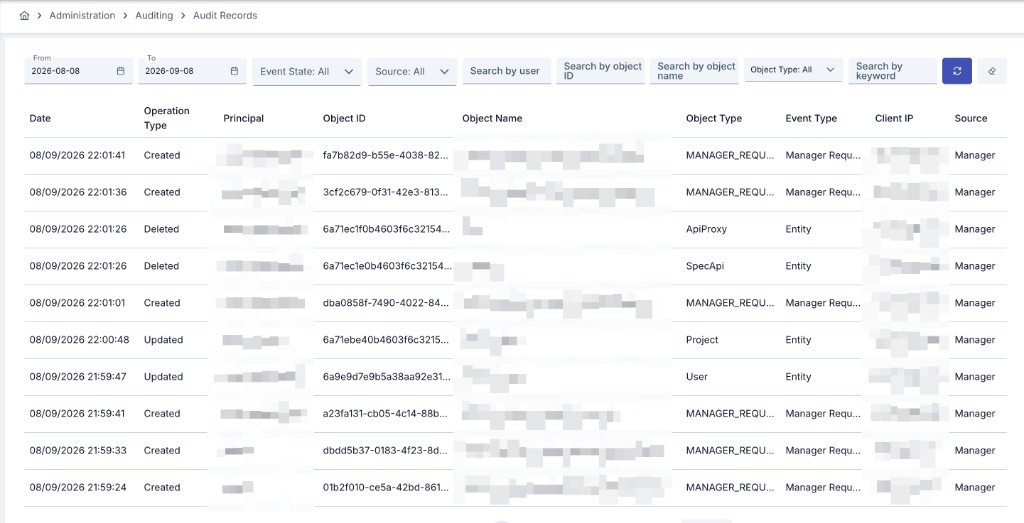
You can view results in the log table by setting criteria from the filter section at the top of the page. Filter contents can be cleared with the delete button.
Date fields can also be typed directly, in addition to picking a date from the calendar. If you open a record's Change Details and return to the list, the date range you had set is kept.
When this screen is opened from an asset's own Audit and Rollback view — a tab, or on some screens the More actions (⋯) > History > Audit and Rollback side panel (see Asset Lifecycle), the object identifier and object type are fixed to that asset and cannot be changed.
The Source filter narrows the list to one of the four front doors a record can come from: Manager (the Management Console and the Management APIs), APIOps, Portal (the API Portal's management backend — see Portal Events below), or System (a background job or migration with no request behind it). The Portal ID column, shown in the platform-wide (project-less) view, identifies which portal a Portal-sourced record belongs to; it is empty for every other source. A Project column names the project the record belongs to; it is empty for Manager Request and Access Denied records, which belong to no project.
Event Types
Audit Records can capture thirty-five different kinds of events, shown in the Event Type column together with the Client IP the operation came from. Eight of them are described here; the other ten — deployments, promotions, and ACL changes — are covered under Operation Events below, one more — project deletion — under Project Deleted Event, and sixteen more — the API Portal's own domain events — under Portal Events.
| Event Type | When it is recorded |
|---|---|
| Entity | An asset — an API Proxy, a Policy, a connection, and so on — is created, updated, or deleted. This is the event covered by Change Details below. |
| Manager Request | A write operation reaches the Management Console screens, the Management APIs, APIops, or the API Portal's management backend, once the setting described below is turned on. |
| Access Denied | A request to the Management Console or the Management APIs is rejected — either because the caller was not authorized for the operation, or because the caller presented an authentication token that was invalid or expired. Recorded regardless of the setting below. |
| Secret Revealed | A secret already stored in Apinizer is shown to an operator in clear text — an API client secret reveal, a certificate, keystore or private key download, an LLM provider, vector database or OIDC identity provider edit form that returns a decrypted value, a Portal account password reveal, or the eye or copy button of a masked secret field in the Management Console. The record names the entity, the kind of secret, and how it was disclosed, and — where exactly one secret is involved — a non-reversible fingerprint of the value, never the value itself. Outcome is always success; a refusal is already covered by Access Denied above and is not recorded twice. |
| Export | An export package leaves the installation, whether produced by the Export/Import Wizard, the legacy export endpoint, or APIops. One record per package, whichever surface produced it — never one per object inside it. The record carries the package's object types, its item count, whether it carries secret material, and whether the package itself is passphrase-encrypted. Outcome is success or failure, depending on whether the package was actually produced. |
| API Token Created | A Management API access token is minted for a user, from the Users screen or through APIops. The record carries the token's owner and a non-reversible fingerprint of the token — never the token itself. |
| API Token Revoked | A Management API access token is revoked. Carries the same fields as API Token Created, fingerprinted the same way, so the two records can be paired to see a token's whole lifetime. |
| PII Unmask | A pseudonymized PII value handled by the AI Gateway is turned back into the original. Outcome is success or failure; a request rejected for lack of permission is already recorded as Access Denied above and is not written here a second time. |
An Access Denied record produced by an authorization failure and one produced by an invalid or expired authentication token are both written with outcome denied, and the record distinguishes the two causes. A request that presents no credentials at all, and the sign-in, token-refresh, and sign-out endpoints, are not recorded here — a failed sign-in already produces its own Login Records entry. To keep a burst of invalid-token requests from flooding the log, at most 20 such records are written per second.
Opening a record's details additionally shows its Outcome (success, failure, or denied), the User Agent sent by the client, a Correlation ID that ties together every audit row produced by the same request, and the Source the request came from (Management Console, APIops, API Portal, or System for background operations with no request behind them).
The value of a secret is never written to an audit record, under any event type — at most a short, non-reversible fingerprint of it. Opening an edit screen that returns a decrypted value, or calling a GET endpoint that returns one, does not by itself produce a Secret Revealed record: only the moment the value is actually disclosed does — the eye or copy button on a masked field, or a surface where the value leaves in the response body or a downloaded file, such as an API client secret reveal, an export, or a certificate/keystore/private-key download.
Manager Request and Access Denied records are not tied to a specific project, so they only appear when Audit Records is viewed without a project filter. That platform-wide view, and the records of every project, are open to System Admin and Project Admin users. Every other user only sees the scopes in which they hold the Audit → View permission: a project's records require that permission in that project, and the platform-wide records require it in the Administration menu, which is carried by roles such as System Analyzer. For those users the platform-wide list is narrowed to the same scopes, so it shows the platform-wide records plus the records of the projects they may read, and nothing else.
Operation Events
Beyond the eight event types above, Audit Records also captures ten kinds of operation events — deployments, promotion executions, and ACL grants and revokes. Each is written by the operation itself, in addition to that operation's own history record:
| Event Type | When it is recorded | Key details | Outcome |
|---|---|---|---|
| Deploy | An API Proxy or a Proxy Group is pushed to an Environment — including a push that fails. | Target type (API Proxy or Proxy Group), the Environment, the revision (when available), the deployment description, and — on failure — the reason reported by the gateway. | Success or Failure |
| Undeploy | An API Proxy or a Proxy Group is withdrawn from an Environment — including a withdrawal that fails. | The same details as Deploy. | Success or Failure |
| Promotion Requested | A promotion execution is created, whether it starts running immediately or first waits for approval. | The mapping, the source and target instance and API, and whether approval is required. | Success |
| Promotion Approved | A pending promotion execution is approved, for immediate or scheduled execution. | The approver, and the scheduled time when the execution was scheduled rather than run right away. | Success |
| Promotion Rejected | A pending promotion execution is rejected. | The rejection reason. | Success |
| Promotion Started | A scheduled promotion execution begins running — either automatically when its scheduled time arrives, or because it is started early with Execute Now. | Whether the run began on schedule or was started early. | Success |
| Promotion Executed | A promotion execution finishes. | How long it ran, how many steps it went through, and the error message on a failed run. | Success or Failure |
| Promotion Cancelled | A running or scheduled promotion execution is cancelled. | The status the execution was in when it was cancelled. | Success |
| ACL Grant | A consumer is granted access to an API Proxy's methods — one record per consumer-API Proxy pair, never one per method. | The source (ACL or Portal), the reason for the change, the consumer and its organization, the API Proxy, and up to the first twenty granted method names, with a count of any beyond that. | Success |
| ACL Revoke | A consumer's access to an API Proxy's methods is revoked. Same granularity as ACL Grant. | The same fields as ACL Grant. | Success |
These records are written in addition to the product's own history for each operation — the API Proxy and Proxy Group deployment history, promotion executions, and ACL Audit Records — none of which change: their screens, retention, and content stay exactly as before. A failed deploy or undeploy attempt of an API Proxy is recorded here even though that proxy's own deployment history only keeps successful pushes; a Proxy Group's own deployment history already records a failed push too.
Project Deleted Event
When a project is deleted, a single summary record is written with the Project Deleted event type. It contains the result (success, partial or failure), the number of deleted records, the number of completed steps, the number of active legal holds at deletion time, the duration, and the failed steps (first 20). If the result is a failure, the audit record's outcome is Fail as well; a partial result (for example an unreachable worker) is stated in the summary. For details of the deletion itself, see Project Deletion.
Portal Events
Beyond the events above, Audit Records also captures sixteen portal domain events — the things developers actually do on an API Portal: registering an application, subscribing to an API product, joining or managing an organization, opening a support ticket, and minting or revoking a personal API access token. Each is written in addition to the entity's own record for that change, carries the Portal ID in its details, and is always Source: Portal.
| Event Type | Produced by | Key details |
|---|---|---|
| Portal App Created | Registering a new application on My Apps. | App id, app name, organization id |
| Portal App Deleted | Deleting an application from My Apps. | App id, app name, organization id |
| Portal Subscription Requested | Subscribing an application to an API product. | App id, API product id, plan type |
| Portal Subscription Approved | An administrator (or auto-approval) approves a pending subscription. | App id, API product id, plan type, approver |
| Portal Subscription Rejected | An administrator rejects a pending subscription. | App id, API product id, plan type |
| Portal Subscription Cancelled | Unsubscribing an application from an API product. | App id, API product id |
| Portal Organization Member Invited | Inviting a user to an organization. | Organization id, invited account id, role |
| Portal Organization Member Added | A member is added — directly by an organization manager, or by accepting an invitation. | Organization id, member account id, role |
| Portal Organization Member Role Changed | An organization manager changes a member's role. | Organization id, member account id, new role |
| Portal Organization Member Removed | A member is removed from an organization. | Organization id, member account id |
| Portal Organization Join Requested | A developer requests to join an existing organization (self-service signup flow). | Organization id, requester account id |
| Portal Organization Join Approved | An organization manager approves a join request. | Organization id, requester account id |
| Portal Organization Join Rejected | An organization manager rejects a join request. | Organization id, requester account id |
| Portal Ticket Created | Opening a support ticket on Support, whether the built-in ticketing system or the Jira integration is in use. | Ticket id, subject (capped at 128 characters — never the ticket body) |
| Portal API Token Created | Minting a personal API access token from My Apps. | Token name, expiry — never the token value |
| Portal API Token Revoked | Revoking a personal API access token. | Token name — never the token value |
The principal recorded on a portal event is the portal account that performed it — not the Management API service account the API Portal backend authenticates with. This is possible because the API Portal backend identifies the signed-in developer on every call it makes to the Manager; a call whose caller cannot be identified this way falls back to the service account, exactly as before this event catalog existed.
They are always written to this screen's audit_event collection, but — unlike Audit and Session — the Portal stream has no legacy recipient list to fall back to: to forward these sixteen event types to an external SIEM at all, switch the dedicated Portal stream to Active on SIEM & Log Forwarding.
Recording Manager Console Requests
A denied write request produces two rows that share the same Correlation ID: an Access Denied row (always recorded) and, when the setting below is on, a Manager Request row with the outcome denied. This is intentional; filter by Correlation ID to see them together.
Recording of Manager Request events is off by default. Enable it with the Audit Manager Requests switch under Management → System Settings → General Settings → Audit Log. Once enabled, every write operation (POST, PUT, PATCH, or DELETE) sent to the Management Console screens, the Management APIs, APIops, and the API Portal's management backend is recorded — except the sign-in, token refresh, and sign-out endpoints, which are already tracked in detail on the Login Records page.
Access Denied events are always recorded independently of this setting, since they represent rejected requests rather than completed operations. A single rejected request can therefore appear both as a Manager Request record with a denied outcome and, if the rejection was an authentication or authorization failure, as a separate Access Denied record.
The query string and authentication headers (such as Authorization or Cookie) are never written to audit records for these events — only the path, the HTTP method, the outcome, and the duration are captured, unless the request body capture described below is turned on for this record.
Recording the request body
Beyond the path and the method, you can additionally capture the request body of a Manager Request record. Enable it with the Audit Manager Request Bodies switch under Management → System Settings → General Settings → Audit Log; it is off by default and has no effect unless Audit Manager Requests above is also on.
This capture is narrower than Manager Request recording itself:
- It applies only to the Management Console's own
/apiendpoints — not to APIops, not to the API Portal's management backend, and not to the Management APIs used for integration. - Only an
application/jsonrequest body is captured; any other content type is skipped. - A body larger than 16 KB is marked as truncated and is not stored at all, rather than being stored partially.
- Certificate, keystore, JWK, cryptographic key, license, export, and package import/export endpoints are always excluded, regardless of this setting. This also covers the Keystore Studio tool: its body is never captured, because it is entirely key material by design — the operation itself (who, when, on which endpoint, and the outcome) is still recorded.
- Field names that look like a secret are removed from the captured body, and values that look like a token or a key are replaced with a short, non-reversible hash — the same discipline applied everywhere else in audit records. A field is also removed when it is known to carry a secret by its type, even if its own name gives no hint — a self-issued API client secret, for instance, is now removed from the captured body this way. When the body could not be interpreted as its expected shape, the same removal is attempted from the raw text; if no field name can be determined at all, the body is not stored for that record rather than being stored with the secret left in it.
The captured body reaches an external SIEM destination only when the destination's Include the reference object in the payload switch is on — see SIEM & Log Forwarding.
Change Details
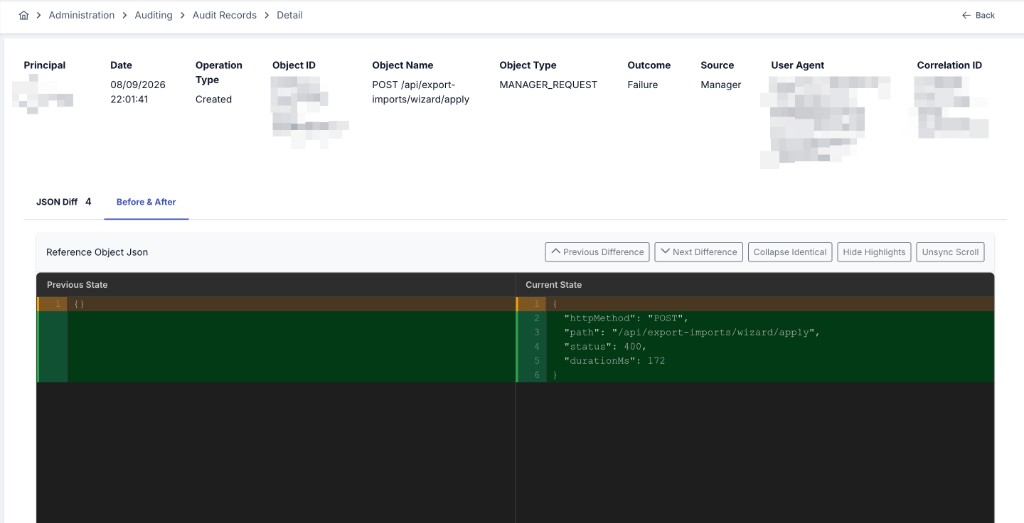
The "Change Details" screen is displayed by clicking the detail button with the eye icon on the right of the data. The page allows you to see changes made on the system by comparing them as old version and new version through the diff editor it provides.
For a record written from this version onward, the detail screen also shows:
- A change status, telling you how complete the comparison below is — whether it reflects a full comparison against the previous version, whether this is the object's first recorded version so there was nothing to compare against, whether only hidden fields could have changed (see Changes that only affect hidden fields below), or whether the change was large enough that only the list of changed fields is kept rather than a full value-by-value comparison.
- A set of tags summarizing what kind of change this was, at a glance — for example an endpoint added or removed, a policy changed, or a role's permissions changed.
- A table listing every changed field, with its operation, its path, and its old and new value. A changed entry inside a list — an endpoint, a policy, an ACL grant — is identified by its own name or identifier, so it keeps the same row across records even when its position in the list changes.
Records written before this version keep the old/new comparison in the diff editor only, with no change status, tags, or field-level table.
Hidden Fields in Audit Records
Hidden values such as passwords, API keys, tokens, client secrets and private keys are not written to audit records. They are not stored in encrypted form either — they simply do not appear in the recorded snapshot, so they cannot be read from the comparison screen. This applies to every record type audited on the system; it is not limited to a specific screen. The token-signing key of a Gateway Runtime (JWT Token Validation Key) is covered as well.
This rule applies to records written from this version onwards. Audit records created before the upgrade are not modified retroactively and keep the values they were written with. If those older records need to be cleaned, evaluate it as a separate database maintenance task.
The first time you save an asset that carries hidden fields after the upgrade, the comparison screen shows those fields as if they had been removed: the previous record still contains them, while the new one no longer does. This is expected — from the second save onwards the comparison returns to normal.
Changes that only affect hidden fields
When only a hidden field changes — for example when a password or an API key is rotated — the old and the new snapshot look identical, because neither of them contains the value. An audit record is still created in this case, so the operation, the user who performed it and its time remain traceable. Only the value itself is not visible. From this version, the change status on such a record says so explicitly, rather than leaving it to look like nothing changed.
Restoring a previous record
Restoring an asset to a previous state from its audit history does not restore hidden fields; they are kept at their current value. See the Asset Lifecycle page for details.