Login Records
To configure forwarding login records outside MongoDB via connectors (Elasticsearch, Kafka, Webhook, etc.), see SIEM & Log Forwarding — the Session stream — and Session stream — event types and legacy payload for the event types and payload.
This screen covers sign-ins to the Management Console only. API Portal developer/portal-user sign-ins are recorded separately — see API Portal Login Logs.
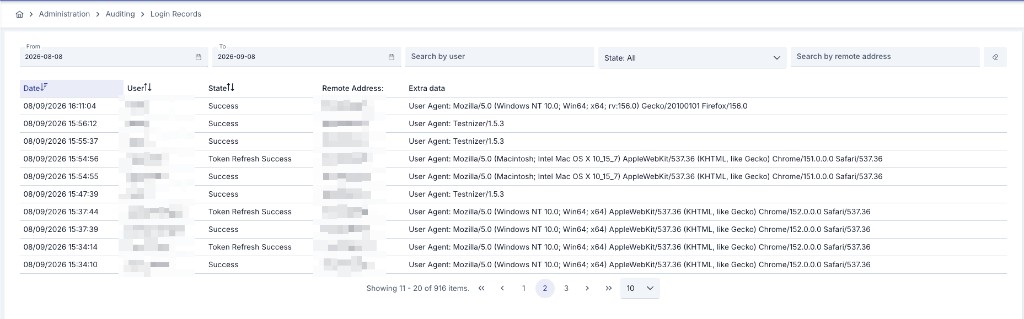
Filtering
You can view results in the log table by setting criteria from the filter section at the top of the page. Filter contents can be cleared with the delete button. Date fields can be typed directly, in addition to picking a date from the calendar.
For the IP information of people logging into the Management Console to be correctly retrieved, the real IP must be transmitted with the X-Forwarded-For header by the load balancer or firewall used by the organization.
Event Types
Alongside successful and failed sign-in attempts, the Login Records screen also tracks sign-out and project token refresh events:
| Event | Description |
|---|---|
| Success | The user signed in successfully. |
| Failure | The sign-in attempt was rejected; see Reason below. |
| Logout | The user ended their session. |
| Token Refresh Success | The user's session moved to a different project, or the first project was selected right after signing in. Refreshing the session token while staying on the same project is not recorded, so this event stays meaningful rather than routine. |
| Token Refresh Failure | The session token could not be refreshed for the requested project; see Reason below. |
| Account Locked | The account was locked after too many failed sign-in attempts. |
| Password Changed | A user's password was set or changed. The record's user is whoever made the change — the account holder, or an administrator; the affected account is named in the message. See Reason below. |
| Password Change Required | A user signed in with a password that must be changed before anything else can be done — because it expired, or because an administrator required it. See Reason below. |
| Password Policy Violation | A password was rejected for not meeting the configured password policy. See Reason below. |
User Agent and Reason
Each record's details show the User Agent sent by the client. Failure, Token Refresh Failure, Account Locked, Password Changed, Password Change Required, and Password Policy Violation records additionally carry a Reason:
| Reason | Meaning |
|---|---|
BAD_CREDENTIALS | The username or password is incorrect. |
ACCOUNT_LOCKED | The account is currently locked. |
ACCOUNT_DISABLED | The account has been deactivated. |
TOO_MANY_ATTEMPTS_IP | A sign-in attempt with a user name that exists in no store, from an address that has already made as many such attempts as the captcha and lock settings allow together. |
CAPTCHA_REQUIRED | A sign-in attempt with a user name that exists in no store (neither in the database nor in a configured LDAP directory), below that address threshold. The attempted name is recorded as the principal, as for every failed attempt. |
LDAP_ERROR | An LDAP-type account tried to sign in while no active LDAP directory is configured in the Management Console. |
NO_PROJECT_PERMISSION | The user does not have permission for the requested project. |
LDAP_IDENTITY_MISMATCH | The account's LDAP connection accepted the password, but the entry it returned is not the entry recorded on the local account (a same-named entry elsewhere in the directory), or two sign-ins bound the account to different connections at the same moment. No sign-in and no token is granted; compare the account's recorded distinguished name under Users with the directory. |
LDAP_IDENTITY_UNRESOLVED | The local account cannot be tied to one directory entry: no distinguished name is recorded, its recorded LDAP connection is no longer active, its distinguished name is held by none or by several active connections, or the account's two DN fields disagree. Not counted towards the lock. An administrator saves the account under Users (using Search in LDAP when there are several connections); see the Distinguished Name field there. |
LDAP_IDENTITY_AMBIGUOUS | The submitted user name cannot be tied to one account: either more than one configured LDAP directory contains it at a first sign-in, or more than one local account holds the same login. No account is selected and no sign-in is granted; an administrator reconciles the accounts or directories. Not counted towards the lock. |
LDAP_PROVISIONING_UNAVAILABLE | A user signing in through LDAP for the first time could not be created, because first-time account creation is paused until its login-uniqueness safeguard is in place. Not counted towards the lock. |
LDAP_DIRECTORY_UNAVAILABLE | A user signing in for the first time could not be looked up, because no configured LDAP directory could be reached or searched. Not counted towards the lock. |
OTHER | The attempt failed for a reason not covered above. This is also the code for an LDAP directory that is configured but could not be reached (connection, TLS or search failure on every directory the account may use): the record's message names the cause, the attempt is not counted towards the account's lock, and the user still sees the same "username or password is incorrect" answer as every other failure. |
SELF (Password Changed) | The user changed their own password. |
ADMIN (Password Changed) | An administrator set the password for the user. |
EXPIRED_FORCED (Password Changed) | The password was changed to satisfy a required or expired-password change. |
EXPIRED (Password Change Required) | The password had passed its configured validity period. |
ADMIN_RESET (Password Change Required) | An administrator's password assignment must be replaced at the next sign-in. |
minLength (Password Policy Violation) | The password is shorter than the configured minimum length. |
maxLength (Password Policy Violation) | The password is longer than the configured maximum length. |
requireUppercase (Password Policy Violation) | The password does not contain a required uppercase letter. |
requireLowercase (Password Policy Violation) | The password does not contain a required lowercase letter. |
requireDigit (Password Policy Violation) | The password does not contain a required digit. |
requireSymbol (Password Policy Violation) | The password does not contain a required special character. |
characterClasses (Password Policy Violation) | The password does not contain enough different character types. |
historyReuse (Password Policy Violation) | The password matches one of the user's recent previous passwords. |