LDAP Login Settings
This section contains the LDAP connection configurations required for users to be able to log in to the Apinizer Management Console by integrating with identity management systems that exist in their organizations and are accessible via LDAP connection. With these settings, users can log in to the Apinizer Management Console with their username and password on the LDAP connection and access projects authorized through LDAP groups.
Editing Settings
Click the Management → System Settings → LDAP Settings button.
An image containing LDAP login settings is shown below:
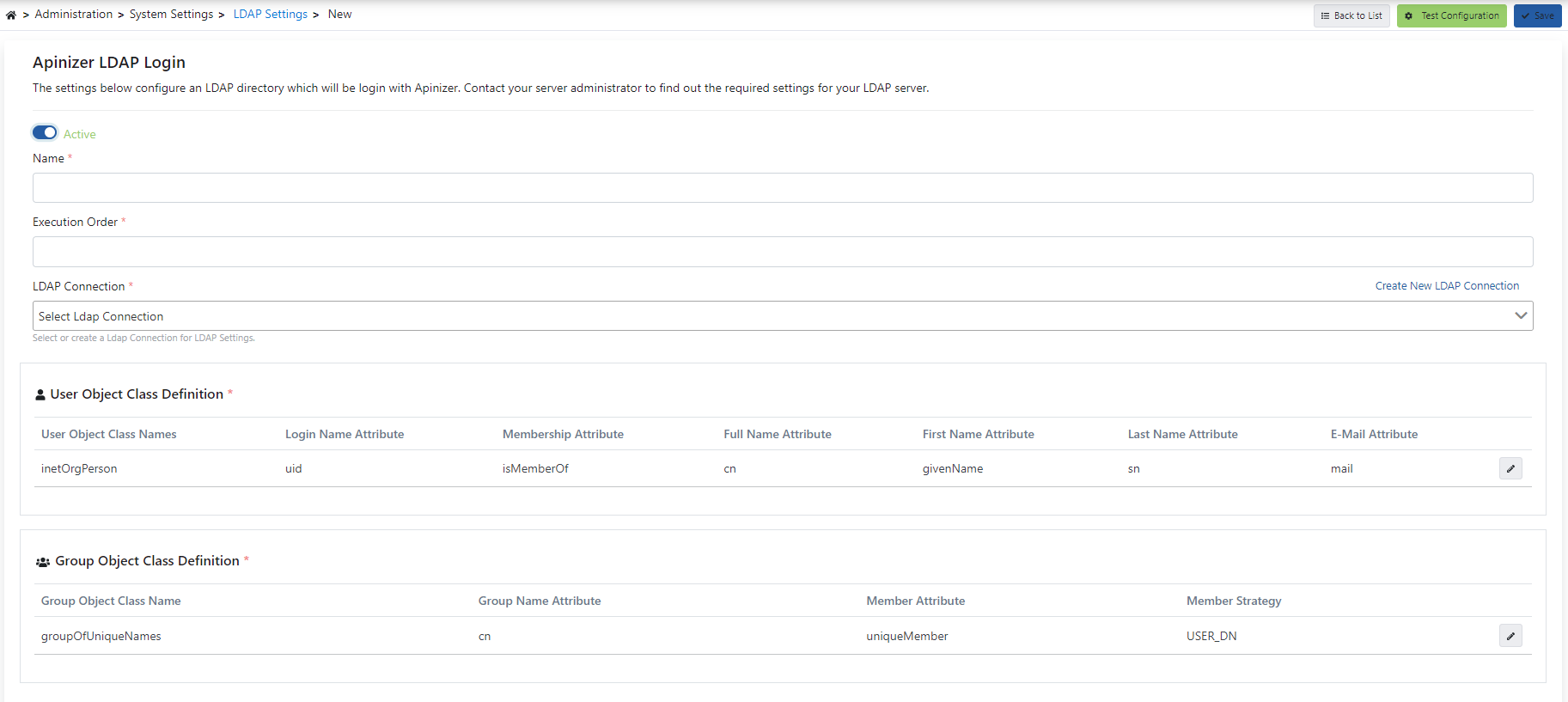
The fields used for LDAP login settings are shown in the table below.
| Field | Description |
|---|---|
| Name | Name information is entered for LDAP Settings. |
| Execution Order | The execution order of LDAP Settings is determined. The execution order is prioritized according to this order. |
| LDAP Connection (LDAP Connection) | LDAP Connection is selected or a new one is created for LDAP Settings. |
| User Object Class Definition (User Object Class Definition) | User class is created to filter LDAP Users. |
| Group Object Class Definition (Group Object Class Definition) | Group is created to filter LDAP classes. |
The Flow Strip
A strip with six steps is shown at the top of the screen: Connect → Bind → Users → Groups → Membership → Management console rights. The strip shows the order of the path from the directory to a management console right. Click a step. The screen scrolls to that section.
The sixth step is specific to this screen. The LDAP login setting has no synchronization. Apinizer reads the directory live at every sign-in.
Explain
Click [Explain] at the top of the screen to open a nine step report for a single user. Enter the user name. The password is optional. If you enter a password, Apinizer also runs a sign-in attempt.
The report answers these questions:
- With which filter the user was searched in the directory, and whether it was found.
- Which attributes the service account was able to read.
- Whether the membership was resolved from the user attribute, from the group member list, or from the organizational unit tree.
- Which membership mode is in effect, and which groups were resolved.
- Which project team the user joins.
- Which system right the user gets.
Every row shows a result, an explanation, and a copyable technical detail. Click [Copy] to turn the whole report into plain text. The password never appears in a row, in a detail, or in a log.
Directory Presets
Click [Apply Preset] and pick a directory type to fill the user and group definition fields below with matching defaults: Active Directory, OpenLDAP, 389 Directory Server / FreeIPA, or Active Directory (groups kept as organizational units). A confirmation dialog states that the chosen preset's values will replace anything you already entered, and that nothing is saved until you review the values and save the form yourself.
Testing the Connection Step by Step
Click [Test connection (step by step)] to run a check with these steps, instead of a single pass/fail result:
- Configuration Check
- Server Connection
- Secure Connection (TLS)
- Service Account Sign-in
- Directory Information
- Schema Check
- Base DN Read
If you also entered a Username for Test and password, an additional sign-in attempt is run as the last step. Each step shows a result, an explanation, a suggestion, and a copyable technical detail. The original [Test the Configuration] button described below is still available.
User Object Class Definition
Class name(s) to be used to filter users are entered. These class names are used to identify specific user objects and play an active role in filtering operations.
An image containing login settings to filter users is shown below:
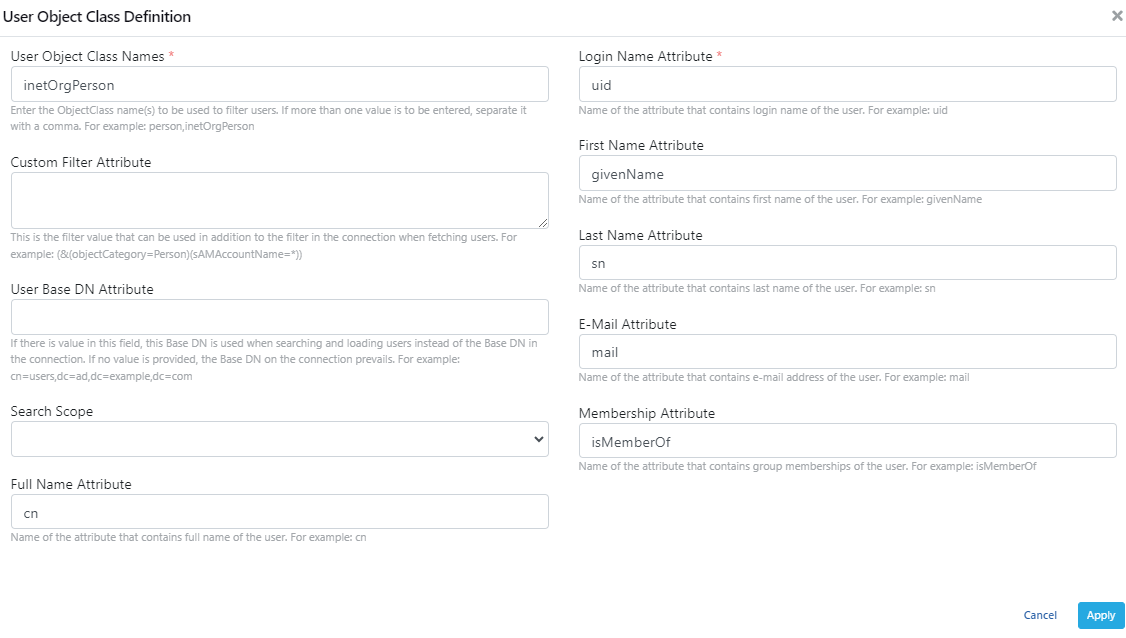
The fields used for LDAP user object class definition login settings are shown in the table below.
| Field | Description |
|---|---|
| User Object Class Names (User Object Class Names) | Class name(s) to be used to filter users are entered. |
| Custom Filter Attribute (Custom Filter Attribute) | Filter value that can be used in addition to the filter in the connection when retrieving users is entered. |
| User Base DN Attribute (User Base DN Attribute) | If this value is filled, this Base DN is used when searching and loading users instead of the Base DN in the connection. If no value is provided, the Base DN in the connection becomes valid. |
| Search Scope (Search Scope) | Specifies at what level the search operation will be performed on the base dn. |
| Full Name Attribute (Full Name Attribute) | The name of the attribute to be used to find the user's full name is entered. |
| Login Name Attribute (Login Name Attribute) | The name of the attribute (login name) to be used for the user's system login is entered. |
| First Name Attribute (First Name Attribute) | The name of the attribute indicating the user's first name is entered. |
| Last Name Attribute (Last Name Attribute) | The name of the attribute indicating the user's last name is entered. |
| E-Mail Attribute (E-Mail Attribute) | The name of the attribute indicating the user's e-mail address is entered. |
| Membership Attribute (Membership Attribute) | The name of the attribute indicating the user's group memberships is entered. |
Group Object Class Definition
Specifies the class name to be used to filter groups.
An image containing login settings to filter group classes is shown below:
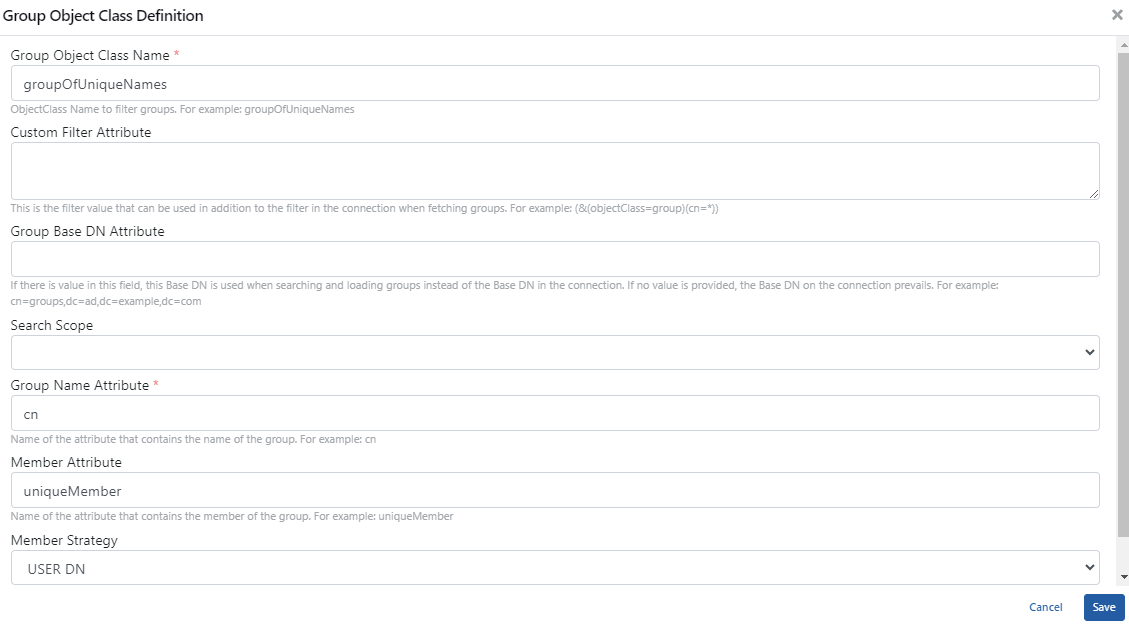
The fields used for LDAP group object class definition login settings are shown in the table below.
| Field | Description |
|---|---|
| Group Object Class Name (Group Object Class Name) | The class name to be used to filter groups is entered. |
| Custom Filter Attribute (Custom Filter Attribute) | Filter value that can be used in addition to the filter in the connection when retrieving groups. |
| Group Base DN Attribute (Group Base DN Attribute) | If there is a value in this field, this Base DN is used when searching and loading groups instead of the Base DN in the connection. If no value is provided, the Base DN in the connection becomes valid. |
| Search Scope (Search Scope) | Specifies at what level the search operation will be performed on the base dn. |
| Group Name Attribute (Group Name Attribute) | The name of the attribute that holds the group name is entered. |
| Member Attribute (Member Attribute) | The name of the attribute that holds group members is entered. |
| Member Strategy (Member Strategy) | The method to be used to determine group members is selected. |
Membership Column
The Group Object Class Definition table has a How is membership determined? column. The column shows how Apinizer finds the groups of a user. When the column is empty, Apinizer applies the current behaviour. Click the pencil icon on the row to change the mode.
Group to System Right Mapping
You can give a system right to every user in an LDAP group. The table is in the Management console rights section.
Click [Add row] to add a row to the table. Select one system right on every row. Enter the group name or the full distinguished name in the group field. Press Enter. The value turns into a tag. You can enter more than one group for a right.
| Field | Description |
|---|---|
| System right (System right) | The right that the LDAP group gives. One of seven system rights is entered: System Admin, Analyzer, Project Admin, API Portal Manager, API Portal Business User, API Portal Developer User, Promotion Manager. |
| LDAP groups (LDAP groups) | The groups that give this right. A group name (Admins) or a full distinguished name (cn=Admins,ou=Groups,dc=corp) is accepted. |
When you enter a bare group name, Apinizer compares the group's own name only. It does not look at the rest of the name. A group with the same name in another organizational unit also matches. Write the full distinguished name for the System Admin right. The audit record shows the full distinguished name of the group that gave the right.
Rules:
- You can leave the table empty. An empty table keeps the current behaviour. Apinizer gives no system right over LDAP.
- The match is case insensitive.
- You cannot enter the same system right on two rows. The save is rejected with an error message.
- Apinizer resolves the mapping again at every sign-in. When a user leaves the group, the right is revoked at the next sign-in.
- A right that you grant by hand stays. Apinizer revokes only the right that LDAP gave.
- When a right that you granted by hand also matches a group in the mapping table, LDAP takes ownership of it at the first LDAP sign-in. The right is then revoked when the user leaves the group. To keep the right by hand, remove that group from the mapping row.
- Project membership does not come from this table. Project membership comes from the project team. The team name matches the LDAP group name or its full distinguished name.
LDAP is the authority. If you remove an LDAP granted right by hand on the Users screen, the right comes back at the next sign-in while the group membership lasts. To remove the right for good, take the user out of the LDAP group, or delete the mapping row.
Do not bind the System Admin right to an LDAP group only. Keep at least one administrator account defined by hand, so that you can sign in when the directory cannot be reached. Apinizer does not revoke the right when the revoke would leave no active administrator, and it writes a warning entry.
When LDAP grants the Project Admin right, Apinizer does not add the user to projects automatically. Define the project membership on the project team.
The (LDAP) Mark on the Users List
On the Management → Users screen an (LDAP) mark can be shown next to a right name. The mark says that an LDAP group gave the right. Hover over the mark. An explanation is shown.
The step by step test plan for this feature is in the description of issue APNZ-5643.
To see an example scenario for the real-world use of these settings, visit the API Manager LDAP Integration page.