Role Permission Details
In Apinizer, it is impossible for a user to access a project without authorization, or even perform an action within that project that is outside their authorization level. Users must have a role(s) to be able to perform actions in any project.
This page contains detailed permission matrices for project-level roles. For the general authorization model and system-level roles, see the Authorization Matrix page.
If a user or team needs more or fewer permissions than those in the default roles, a new role can be created that can be fully customized accordingly.
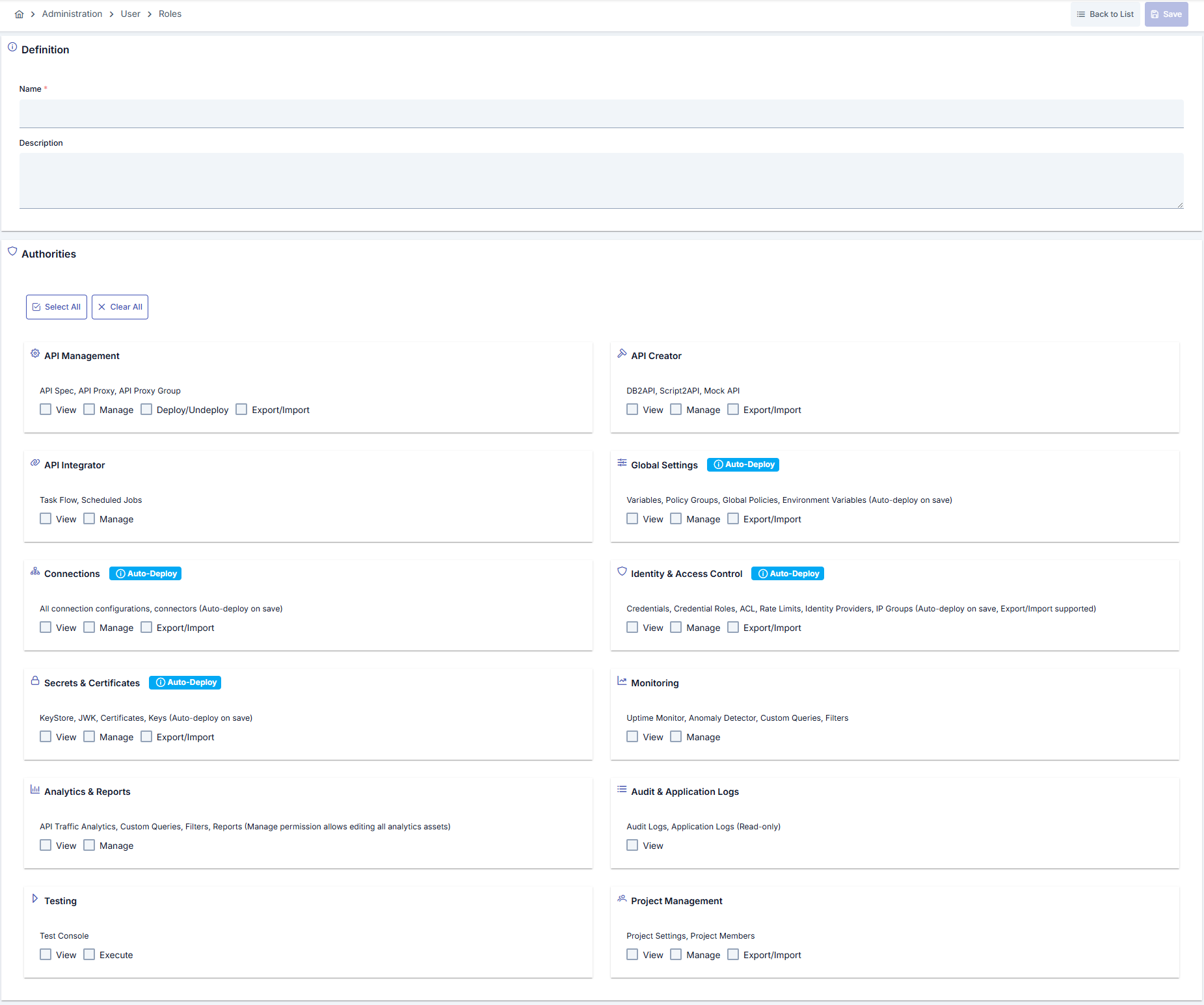
Creating a New Role
The image below contains the role creation settings:
Default Roles and Permissions
Project Owner
Description: Role with all permissions in the project. Cannot be deleted or edited.
Permissions: All actions in all categories
| Category | View | Manage | Deploy/Undeploy | Execute | Export/Import |
|---|---|---|---|---|---|
| API Management | ✓ | ✓ | ✓ | - | ✓ |
| API Creator | ✓ | ✓ | - | - | ✓ |
| API Integrator | ✓ | ✓ | - | ✓ | - |
| Global Settings | ✓ | ✓ | - | - | ✓ |
| Connections | ✓ | ✓ | - | - | ✓ |
| Identity & Access Control | ✓ | ✓ | - | - | - |
| Secrets & Certificates | ✓ | ✓ | - | - | ✓ |
| Monitoring | ✓ | ✓ | - | - | - |
| Analytics & Reports | ✓ | - | - | - | - |
| Audit & Application Logs | ✓ | - | - | - | - |
| Testing | ✓ | - | - | ✓ | - |
| Project Management | ✓ | ✓ | - | - | ✓ |
API Developer
Description: Role that can manage API Proxies, deploy, and perform integration operations.
Permissions:
| Category | View | Manage | Deploy/Undeploy | Execute | Export/Import |
|---|---|---|---|---|---|
| API Management | ✓ | ✓ | ✓ | - | ✓ |
| API Creator | ✓ | ✓ | - | - | ✓ |
| API Integrator | ✓ | ✓ | - | ✓ | - |
| Global Settings | ✓ | ✓ | - | - | ✓ |
| Connections | ✓ | ✓ | - | - | ✓ |
| Identity & Access Control | ✓ | ✓ | - | - | - |
| Secrets & Certificates | ✓ | ✓ | - | - | ✓ |
| Monitoring | ✓ | ✓ | - | - | - |
| Analytics & Reports | ✓ | - | - | - | - |
| Audit & Application Logs | ✓ | - | - | - | - |
| Testing | ✓ | - | - | ✓ | - |
| Project Management | ✓ | ✓ | - | - | ✓ |
Note: If API Management Manage permission exists, the system automatically adds API Integrator Execute, Connections Manage, Identity & Access Control Manage, and Secrets & Certificates Manage permissions.
API Manager
Description: Role that can manage APIs, perform analysis and monitoring.
Permissions:
| Category | VIEW | MANAGE | DEPLOY_UNDEPLOY | EXECUTE | EXPORT_IMPORT |
|---|---|---|---|---|---|
| API_MANAGEMENT | ✓ | ✓ | ✓ | - | ✓ |
| API_CREATOR | ✓ | - | - | - | - |
| API_INTEGRATOR | ✓ | - | - | - | - |
| GLOBAL_SETTINGS | ✓ | - | - | - | - |
| CONNECTIONS | ✓ | - | - | - | - |
| IDENTITY | ✓ | - | - | - | - |
| SECRETS | ✓ | - | - | - | - |
| MONITORING | ✓ | ✓ | - | - | - |
| ANALYTICS | ✓ | - | - | - | - |
| AUDIT | ✓ | - | - | - | - |
| TESTING | ✓ | - | - | ✓ | - |
| PROJECT_MANAGEMENT | ✓ | ✓ | - | - | ✓ |
API Creator
Description: Role that can perform API creation operations such as DB to API, Script to API, Mock API.
Permissions:
| Category | VIEW | MANAGE | DEPLOY_UNDEPLOY | EXECUTE | EXPORT_IMPORT |
|---|---|---|---|---|---|
| API_MANAGEMENT | ✓ | - | - | - | - |
| API_CREATOR | ✓ | ✓ | - | - | ✓ |
| API_INTEGRATOR | ✓ | - | - | - | - |
| GLOBAL_SETTINGS | ✓ | - | - | - | - |
| CONNECTIONS | ✓ | - | - | - | - |
| IDENTITY | ✓ | - | - | - | - |
| SECRETS | ✓ | - | - | - | - |
| MONITORING | ✓ | - | - | - | - |
| ANALYTICS | ✓ | - | - | - | - |
| AUDIT | ✓ | - | - | - | - |
| TESTING | ✓ | - | - | ✓ | - |
| PROJECT_MANAGEMENT | ✓ | ✓ | - | - | ✓ |
Note: If API Creator Manage permission exists, the system automatically adds API Integrator View, Monitoring View, Analytics & Reports View, and Audit & Application Logs View permissions.
API Security
Description: Role that manages identity management, credentials, certificates, and connection security.
Permissions:
| Category | VIEW | MANAGE | DEPLOY_UNDEPLOY | EXECUTE | EXPORT_IMPORT |
|---|---|---|---|---|---|
| API_MANAGEMENT | ✓ | - | - | - | - |
| API_CREATOR | - | - | - | - | - |
| API_INTEGRATOR | - | - | - | - | - |
| GLOBAL_SETTINGS | ✓ | - | - | - | ✓ |
| CONNECTIONS | ✓ | ✓ | - | - | ✓ |
| IDENTITY | ✓ | ✓ | - | - | ✓ |
| SECRETS | ✓ | ✓ | - | - | ✓ |
| MONITORING | ✓ | - | - | - | - |
| ANALYTICS | ✓ | - | - | - | - |
| AUDIT | ✓ | - | - | - | - |
| TESTING | ✓ | - | - | ✓ | - |
| PROJECT_MANAGEMENT | ✓ | ✓ | - | - | ✓ |
Note: If Identity & Access Control Manage permission exists, the system automatically adds Monitoring View, Analytics & Reports View, and Testing View+Execute permissions.
API Analytics
Description: Role that can perform analysis and reporting operations.
Permissions:
| Category | VIEW | MANAGE | DEPLOY_UNDEPLOY | EXECUTE | EXPORT_IMPORT |
|---|---|---|---|---|---|
| API_MANAGEMENT | ✓ | - | - | - | - |
| API_CREATOR | - | - | - | - | - |
| API_INTEGRATOR | ✓ | - | - | - | - |
| GLOBAL_SETTINGS | - | - | - | - | - |
| CONNECTIONS | - | - | - | - | - |
| IDENTITY | - | - | - | - | - |
| SECRETS | - | - | - | - | - |
| MONITORING | ✓ | - | - | - | - |
| ANALYTICS | ✓ | ✓ | - | - | - |
| AUDIT | ✓ | - | - | - | - |
| TESTING | - | - | - | - | - |
| PROJECT_MANAGEMENT | ✓ | ✓ | - | - | ✓ |
Note: If Analytics & Reports View permission exists, the system automatically adds API Integrator View permission.
API Tester
Description: Role that can perform test operations.
Permissions:
| Category | VIEW | MANAGE | DEPLOY_UNDEPLOY | EXECUTE | EXPORT_IMPORT |
|---|---|---|---|---|---|
| API_MANAGEMENT | ✓ | - | - | - | - |
| API_CREATOR | ✓ | - | - | - | - |
| API_INTEGRATOR | ✓ | - | - | - | - |
| GLOBAL_SETTINGS | - | - | - | - | - |
| CONNECTIONS | ✓ | - | - | - | - |
| IDENTITY | ✓ | - | - | - | - |
| SECRETS | ✓ | - | - | - | - |
| MONITORING | - | - | - | - | - |
| ANALYTICS | - | - | - | - | - |
| AUDIT | - | - | - | - | - |
| TESTING | ✓ | ✓ | - | ✓ | - |
| PROJECT_MANAGEMENT | ✓ | ✓ | - | - | ✓ |
Note: If Testing Execute permission exists, the system automatically adds Testing Manage, API Integrator View, Connections View, Identity & Access Control View, and Secrets & Certificates View permissions.
Automatic Permission Expansion
The system automatically adds additional permissions for roles with certain permissions. This is to meet inter-role dependencies and workflow requirements:
- API Developer (if API Management Manage exists): API Integrator Execute, Connections Manage, Identity & Access Control Manage, Secrets & Certificates Manage
- API Creator (if API Creator Manage exists): API Integrator View, Monitoring View, Analytics & Reports View, Audit & Application Logs View
- API Security (if Identity & Access Control Manage exists): Monitoring View, Analytics & Reports View, Testing View+Execute
- API Analytics (if Analytics & Reports View exists): API Integrator View
- API Tester (if Testing Execute exists): Testing Manage, API Integrator View, Connections View, Identity & Access Control View, Secrets & Certificates View