Token Management Settings
Reach this screen by following Administration → System Settings → Token Management Settings. These settings only affect the response body produced by the token endpoint; the default values preserve the current behavior.
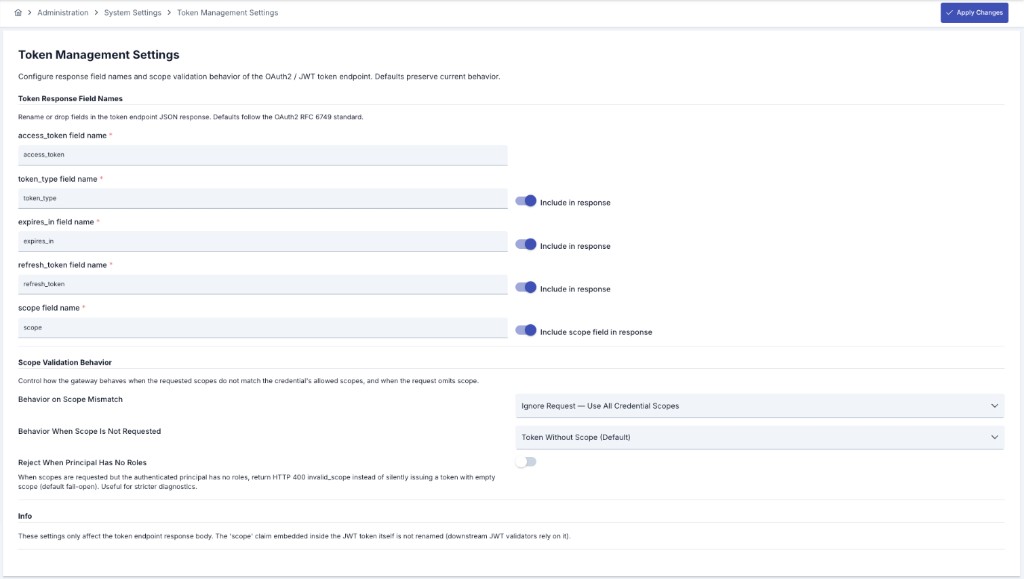
Token Response Field Names
You can rename the standard field names in the JSON response body returned by the token endpoint, or drop a field from the response entirely. The default names follow the OAuth2 RFC 6749 standard.
| Field | Description |
|---|---|
| access_token field name | The name of the field that carries the access token. This field is mandatory per RFC 6749 §5.1; it can be renamed but cannot be removed from the response. |
| token_type field name | The name of the field that carries the token type. When "Include in response" is disabled, it is omitted. |
| expires_in field name | The name of the field that carries the token validity duration. When "Include in response" is disabled, it is omitted. |
| refresh_token field name | The name of the field that carries the refresh token. When "Include in response" is disabled, it is omitted. |
| scope field name | The name of the scope field returned alongside the token. When "Include scope field in response" is disabled, scope is not added to the response at all. |
These settings only affect the token response body. The scope claim embedded inside the JWT token itself is not renamed, so the receiving systems that validate the token are not affected.
expires_in Value Unit
By default the token endpoint returns the expires_in field in milliseconds (the legacy Apinizer behavior). RFC 6749 §5.1 defines expires_in as the token lifetime in seconds, so a strict OAuth2 client may misread the millisecond value (for example, interpret 60000 as ~16.6 hours instead of 60 seconds) and fail to refresh the token in time.
| Option | Behavior |
|---|---|
| Emit expires_in in Seconds (Disabled by default) | When disabled, expires_in is returned in milliseconds (legacy behavior, preserved for backward compatibility). When enabled, expires_in is returned in seconds as required by RFC 6749 §5.1. |
This option affects only the response expires_in field. The JWT exp claim (an absolute timestamp) and the X-IssuedAt / X-ExpiresAt response fields are unaffected.
If your existing clients already compensate for the millisecond value, enabling this option will halve the lifetime they compute and may cause premature token refreshes. Leave it disabled for existing integrations; enable it for new integrations that expect RFC-compliant seconds.
A token issued to an API client always reports expires_in in seconds, regardless of this setting. This setting only governs tokens issued to a credential.
Scope Validation Behavior
Scope indicates which permissions are requested with a token request and is used in the token acquisition with scope flow. The resolved scope is returned in the response body, alongside the token. This behavior works identically in both the "Manage From This Policy" and "Manage From ACL" management modes.
Which scopes are returned in the response depends on the two settings below.
Behavior on Scope Mismatch
Determines how the gateway behaves when some of the scopes requested by the client are not defined on the user or credential.
| Option | Behavior |
|---|---|
| Strict — Return Error (Default) | If any requested scope is not defined, an HTTP 400 invalid_scope error is returned and no token is issued. Matches RFC 6749 §5.2. |
| Lenient — Issue Token with Intersection | A token is issued with only the defined scopes; invalid scopes are silently dropped. |
| Ignore Request — Use All Scopes | The requested scope list is ignored; the token is issued with all scopes defined on the user or credential. |
Behavior When Scope Is Not Requested
Determines how the token's scope field is produced when the client requests no scope at all.
| Option | Behavior |
|---|---|
| Token Without Scope (Default) | If the request does not include scope, the token is issued without scope and the scope field is omitted from the response. |
| Use All Scopes | If the request does not include scope, all defined scopes are used and included in the response. |
Rejecting When the Principal Has No Roles
By default, when scopes are requested but the authenticated user or credential has no roles at all, the gateway fails open: it issues a token with an empty scope instead of returning an error. Enable Reject When Principal Has No Roles to make this case a hard failure that returns an HTTP 400 invalid_scope error instead, which is useful for stricter diagnostics.
| Option | Behavior |
|---|---|
| Reject When Principal Has No Roles (Disabled by default) | When enabled and scopes are requested while the principal has no roles, an HTTP 400 invalid_scope error is returned. When disabled, a token with empty scope is issued (the legacy fail-open behavior). |
This setting has no effect under the Ignore Request — Use All Scopes mismatch mode, because that mode ignores the requested scope entirely.
An API client has no role/scope source of its own in this version — the "principal has no roles" case above is always true for one. So with Reject When Principal Has No Roles disabled (the default), an API client always gets a scopeless token; with it enabled, a scope-requesting API client is always refused with HTTP 400 invalid_scope.
For scope to be returned with a value, the relevant user or credential must have a role (scope) defined. For the role definition steps, see the Token Acquisition with Scope section. If no role is defined, scope is returned empty even in Strict mode — unless Reject When Principal Has No Roles is enabled, in which case an HTTP 400 invalid_scope error is returned.
Revocation Strictness
Revoking a credential, an API client, or an organization's credentials already kills every token those actions can reach: a stored (opaque) token is deleted outright, and an API client's already-issued JWTs are cut off by a stamped token cutoff that the gateway checks on every request. Revocation Strictness governs only the narrow residual case those two mechanisms cannot reach at all — see Known Limit: Legacy JWT Paths Outside the Revocation Cascade for exactly which tokens that is.
| Option | Behavior |
|---|---|
| Degraded (Default) | No additional check is made anywhere, and nothing is written to a denylist. A caller's own RFC 7009 revoke call against one of the two unreachable JWT shapes is accepted but has no effect — the token keeps validating until it expires on its own, exactly as before this version. Every token validation, on every path, pays nothing extra. |
| Strict | The same RFC 7009 revoke call additionally records the JWT's hash in a dedicated denylist, bounded to the token's own remaining lifetime. From then on, every request on the two unreachable JWT paths consults that denylist before accepting the token — at the cost of one extra cache lookup, on exactly those two paths and nowhere else. |
The extra lookup Strict adds is fail-closed: if the denylist cache cannot be reached, the request is refused rather than let through unchecked. This is deliberate — answering "not revoked" when the check simply could not run would quietly hand a Strict installation Degraded's guarantees at the worst possible moment — but it means a cache outage stops traffic on these two JWT paths for a Strict tenant for as long as the outage lasts. Every other path — every API client's traffic, every other fenced JWT, and all of a Degraded installation — is unaffected by that same outage. This is also why Degraded suits most installations: it is the setting most already run today, it costs nothing extra, and it only leaves a gap on token shapes that were already outside any revocation cascade before this version existed.
An entry Strict writes to its denylist lives for exactly as long as the token it denies would otherwise remain valid, and no longer — by default nothing evicts it sooner to free up space. This matters because a denylist entry is a negative assertion ("this token was revoked"): losing one early does not deny a request, it quietly allows one again before its real expiry. Degraded is unaffected, since it writes to no denylist at all.
An installation that would rather bound this denylist's size than let it grow unconstrained can still do so, through a dedicated setting (hazelcast.map.max.size.token-denylist) kept deliberately separate from the general cache-size setting described in Distributed Cache — tuning general cache memory can never silently shrink this security control by accident. Setting a bound is a deliberate trade-off, though: once it is reached, the least-recently-used entries are evicted (per node), and the revoked tokens they covered start validating again until their own expiry.
Revocation Strictness is a single tenant-wide setting; it cannot be set per policy, per API client, or per environment.
This version also stores a lookup-optimized fingerprint (a SHA-256 hash) alongside each token's own value, together with supporting database indexes, so that large token collections stay fast to search. This is an internal performance change only — it alters none of the behavior described on this page or on the Credentials page.