Login Log Connector Configuration
This feature forwards user sign-in/sign-out events to external systems (Elasticsearch, Kafka, Webhook, etc.) through connectors. It applies to API Manager (system users) and API Portal (portal users).
Overview
Apinizer tracks user sign-in/sign-out events in two layers:
| Source | Who | Settings Location |
|---|---|---|
| API Manager | Administrators / system users | System Settings > SIEM & Log Forwarding (Session stream) |
| API Portal | Portal end users (developers) | Portal Settings > Login Log tab |
For both layers, records are always written to the Apinizer database and cannot be turned off; you can additionally define one or more connector targets to send the same events to external systems.
1. API Manager – System User Login Log
1.1 Where to Configure
System Settings → SIEM & Log Forwarding → Destinations → Session stream
Connector targets for Management Console login logs are configured on the SIEM & Log Forwarding page, as rules on the Session stream, and no longer under General Settings. That page also lets you filter which login events reach a destination, apply a privacy profile, and switch the payload to the canonical Apinizer JSON v2 envelope. The payload formats documented below are what the Legacy Raw profile produces, unchanged.
1.2 Screen Fields
| Field | Description |
|---|---|
| Save to Database | Management Console login records are always written to the MongoDB persistent_audit_event collection; this cannot be turned off. The SIEM page shows the stream as Always stored. |
| Connector Targets | The destinations that have a rule for the Session stream on the SIEM & Log Forwarding page. |
To view Management Console login records, see Login Records.
1.3 Adding a Connector
- Open Administration → System Settings → SIEM & Log Forwarding and click Add Destination.
- Select a connection configuration (ConnectionConfig) previously defined for the environment.
- Switch on the Session stream for that destination and, optionally, narrow it with event types, outcomes or a scope.
- Use the Enabled switch to make the destination Active or Inactive.
See SIEM & Log Forwarding for the destination, rule and profile reference.
Connectors are defined per environment. A connection configuration must first be created on the Connection Configuration screen and assigned to the relevant environment.
1.4 Events Emitted
| Event | eventType | Description |
|---|---|---|
| Successful login | LOGIN_SUCCESS | Username and password verified |
| Failed login | LOGIN_FAILURE | Invalid credentials or locked account |
| Sign-out | LOGOUT | The user signed out of the Management Console |
| Token refresh (project switch) | TOKEN_REFRESH_SUCCESS | The session token was renewed for a different project |
| Token refresh denied | TOKEN_REFRESH_FAILURE | The user has no permission in the requested project (reasonCode=NO_PROJECT_PERMISSION) |
| Account locked | ACCOUNT_LOCKED | The account was locked after too many failed attempts |
| Password changed | PASSWORD_CHANGED | A user's password was set or changed — by the account holder or by an administrator |
| Password change required | PASSWORD_CHANGE_REQUIRED | The user signed in with a password that must be changed before anything else can be done |
| Password policy violation | PASSWORD_POLICY_VIOLATION | A password was rejected for not meeting the configured password policy |
Every event also carries userAgent, and failed events carry a machine-readable reasonCode. See Login Records for the full field and reason-code reference.
1.5 JSON Payload Sent to Connectors
{
  "source": "API_MANAGER",
  "principal": "username",
  "email": null,
  "displayName": null,
  "eventDate": "2026-03-31T10:00:00Z",
  "eventType": "LOGIN_SUCCESS",
  "remoteAddress": "1.2.3.4",
  "message": null,
  "errorType": null,
  "portalId": null,
  "accountId": null
}
Graylog connectors receive this same event as a GELF message with the short message
LogLogin. When Append to Message is on, the JSON above is written to the GELF
full_message field; when Append to Attributes is on, each populated field
(source, principal, email, displayName, eventDate, eventType, remoteAddress,
message, errorType, portalId, accountId, userAgent, reasonCode,
targetProjectId) is sent as a separate GELF additional field. Fields that are null
are omitted from the additional fields.
1.6 Failed Login Example
{
  "source": "API_MANAGER",
  "principal": "username",
  "email": null,
  "displayName": null,
  "eventDate": "2026-03-31T10:01:00Z",
  "eventType": "LOGIN_FAILURE",
  "remoteAddress": "1.2.3.4",
  "message": "Bad credentials",
  "errorType": "org.springframework.security.authentication.BadCredentialsException",
  "portalId": null,
  "accountId": null
}
2. API Portal – Portal User Login Log
2.1 Where to Configure
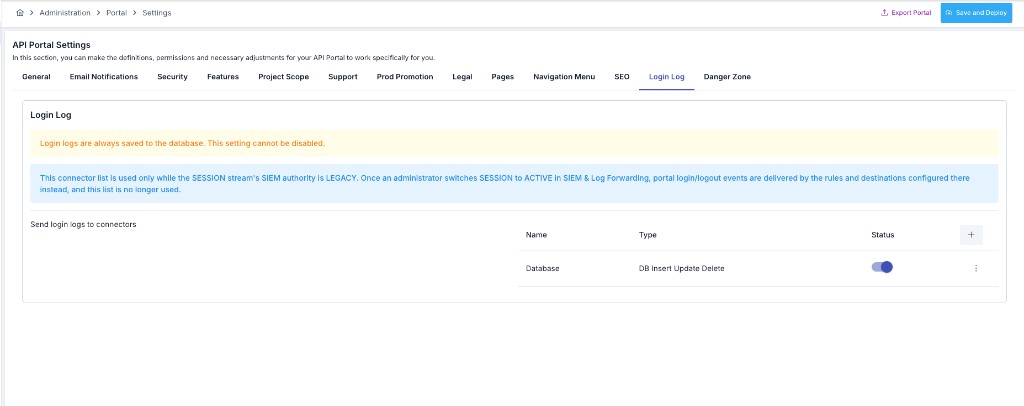
Portal Management → [Select Portal] → Settings → Login Log tab
2.2 Screen Fields
| Field | Description |
|---|---|
| Connector Targets | List of external connection configurations to which login logs are sent. |
Portal login log records are always written to the MongoDB portal_login_logs collection; this cannot be turned off. Portal login log settings are independent per portal — each portal can have its own connectors.
This connector list is only used while the Session stream's SIEM authority is Legacy. Once an administrator switches Session to Active on SIEM & Log Forwarding, portal sign-in/sign-out events are delivered by the rules and destinations configured there instead, for every portal at once, and this list stops being used.
To view and filter portal login records, see API Portal Login Logs.
2.3 Adding a Connector
The steps match API Manager:
- On the Login Log tab, click
+in the connector table. - Select the appropriate connection configuration and save.
2.4 Events Emitted
The portal emits ten event types. For the first two, the eventType sent to a connector is translated to the value existing connectors already expect; every other type is sent with its own name, unchanged:
| Event | eventType sent to connector | Description |
|---|---|---|
| Successful login | LOGIN_SUCCESS | Portal user signed in |
| Failed login | LOGIN_FAILURE | Invalid credentials, or the sign-in was refused for another reason (an account waiting for approval, unconfirmed, disabled, rejected, or belonging to another portal) |
| Sign-out | PORTAL_LOGOUT | The portal user signed out |
| Account locked | PORTAL_ACCOUNT_LOCKED | The account was locked after too many failed sign-in attempts |
| Password changed | PORTAL_PASSWORD_CHANGED | The account's password was changed — self-service, by an administrator, via a reset link, or because a forced/expired password had to be replaced |
| Password change required | PORTAL_PASSWORD_CHANGE_REQUIRED | The account must change its password before it can be used further |
| Password reset requested | PORTAL_PASSWORD_RESET_REQUESTED | The account holder requested a password reset |
| Password policy violation | PORTAL_PASSWORD_POLICY_VIOLATION | A password was rejected for not meeting the portal's configured password policy |
| Account disabled | PORTAL_ACCOUNT_DISABLED | The account was disabled — today, only by the inactive-account job |
| Account unlocked | PORTAL_ACCOUNT_UNLOCKED | An administrator unlocked the account |
2.5 JSON Payload Sent to Connectors
{
  "source": "API_PORTAL",
  "principal": null,
  "email": "user@example.com",
  "displayName": "Full Name",
  "eventDate": "2026-03-31T10:05:00Z",
  "eventType": "LOGIN_SUCCESS",
  "remoteAddress": "5.6.7.8",
  "message": null,
  "errorType": null,
  "portalId": "portal-abc123",
  "accountId": "account-xyz789"
}
3. Supported Connector Types
All Apinizer connector types can be used for login logs. Common scenarios:
| Connector Type | Typical Use |
|---|---|
| Elasticsearch | Centralized log search and dashboards (Kibana, etc.) |
| Kafka / RabbitMQ / ActiveMQ | Real-time event streaming / SIEM integration |
| Webhook | HTTP POST to any REST endpoint |
| Database | External relational database (JDBC), writes to log_LoginLog table |
| Syslog / Graylog | Traditional syslog infrastructure |
When the Database connector type is selected, login log records are written to the log_LoginLog table. This table is not created automatically — you must create it manually before enabling the connector. See Apinizer Log Table Creation Commands for the CREATE TABLE statement for each supported database type (Oracle, MySQL/MariaDB, PostgreSQL, SQL Server).
4. Multiple Connectors
You can define multiple connectors for both Manager and Portal. Each connector can be toggled Active or Inactive independently.
When a connector is inactive, nothing is sent to that connector even if a log event occurs.
5. Database Persistence
Login log records are always written to the Apinizer database, for both layers — Management Console records to persistent_audit_event, and portal records to portal_login_logs. Neither can be turned off; the connector targets configured above are an additional copy, sent alongside the database write, not instead of it.
6. Known Limitations / Roadmap
No known limitations at this time.