Gateway Runtimes
Gateway Infrastructure provides all the tools needed to create and manage Gateway Runtime environments where API Proxies will run in the Apinizer platform, manage Kubernetes resources, configure Gateway Engine, configure SSL/TLS certificates, and manage API traffic log connectors.
Module Components
The Gateway Infrastructure module is managed through the following pages:
Creating Gateway Runtime environments, Gateway Engine configuration, environment publishing, and metric monitoring.
Creating and configuring distributed Cache Servers. Cache Servers can run in independent namespaces from Gateway pods.
General settings of Apinizer Platform Gateway Runtime environments, deployment and pod management, monitor and settings.
Add log connectors to Gateway Runtime environments and configure where API traffic logs are written.
Securely starting Apinizer modules (Manager, Gateway, Portal) with SSL/TLS certificates and providing HTTPS connections.
What is Gateway Runtime?
Gateway Runtime (Environment) is a runtime execution context for API Proxies in an organization. For one or more API Proxies to be accessible, they must be deployed to a Gateway Runtime environment. An API Proxy can be deployed to a single Gateway Runtime environment or to multiple environments.
This appears when the Kubernetes Namespace and Resources are managed with Apinizer option is marked as Active from the System General Settings screen.
A Gateway Runtime environment provides an isolated area as a system resource to run Gateways. It allows creating multiple Gateway Runtime environments in the Apinizer platform.
Gateway Runtime management is performed in two ways:
- Managed by Apinizer: All Kubernetes definitions required for Gateway Runtimes are created and managed through the API Manager screen
- Remote Gateway: Only standard data of existing Kubernetes definitions are recorded in the API Manager screen
Gateway Runtimes and Cache Servers are now created and managed separately. For Cache Server creation and management, see the Distributed Cache page.
:::
Gateway Runtime Roles
A Gateway Runtime environment can be created in different roles as Production, Development/Test.
The point to note here is that for a client to access an API Proxy, it must be deployed to at least one Gateway Runtime environment.
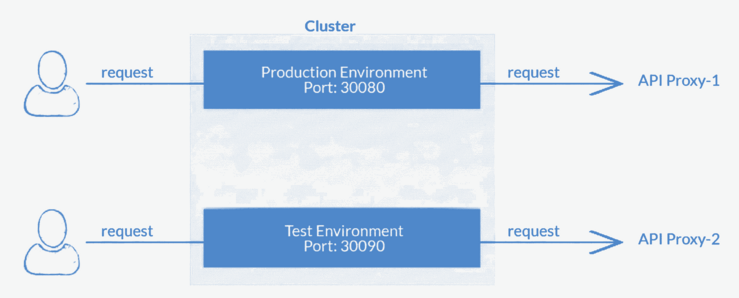
Used to test API Proxies or Applications active in the test environment. Testing can also be done to measure the adequacy of resources in hardware.
If product development is done far from the test environment, it can cause problems in progress.
API Proxies or Applications active in the production environment are used for end users. This environment is designed to carry the load of clients.
Gateway Runtime Architecture
Gateway Runtime is designed to be used in environments where many APIs are spread across multiple teams or projects. The Gateway Runtime concept in Apinizer corresponds exactly to the namespace in Kubernetes.
The Gateway Runtime environment you create and deploy in Apinizer is created as a namespace in Kubernetes. A Gateway Runtime environment contains namespace, deployment, pod, replica set, service, and access URL components.
All Gateway Runtime environments created with the Apinizer Platform are also located within the Kubernetes cluster.
Kubernetes Namespace Concept:
Kubernetes clusters can manage large amounts of unrelated workloads simultaneously. Kubernetes uses a concept called namespace to eliminate the complexity of objects within the cluster.
Namespaces enable grouping objects together and filtering and controlling these groups as a unit. Whether used to apply customized access control policies or to separate all units for a test environment, namespaces are a powerful and flexible structure for managing objects as a group.
Namespaces provide a scope for object names within the cluster. While names within a namespace must be unique, the same name can be used in different namespaces.
For detailed information, see Kubernetes Documentation.
Gateway Runtime Components
Namespace
The Gateway Runtime concept in the Apinizer Platform corresponds to the Namespace concept in the Kubernetes environment.
Log Connectors
Log connector definitions where all API Traffic and requests in the created Gateway Runtime environment will be logged.
Deployment
Gateway Runtime deployment is defined:
- Gateway Runtime (Worker Server): Core module of the Apinizer Platform, responsible for routing all API requests to BackendAPI and works as Policy Enforcement Point. Gateway Runtimes are now managed independently from Cache Servers and can run in different namespaces.
Service
Gateway Runtime Service is created to access the Apinizer Worker pod in Gateway Runtime Deployment. Service is the layer that handles requests coming to all pods. It is located in front of pods in terms of position.
Service information is defined when each Gateway Runtime environment is created. However, it is important that all Apinizer Workers in the cluster are managed with a service. Also, service ports in the Apinizer Platform must be unique. NodePort is used by default and service types other than this are not supported by Apinizer.
Access URL
Access URL is the external access address of the Proxy. It is specified as https://<your-IP-address>. Messages can be sent to Proxies using external access address information.
Gateway Runtime Access Address
An API Proxy can be accessed through the access address of the Gateway Runtime environment it is deployed to.
Access Address Structure
Let the access address of an API Proxy be:
http://demo.apinizer.com/apigateway/myproxy
| Component | Description |
|---|---|
http://demo.apinizer.com/ | Gateway Runtime Environment Access Address |
apigateway/ | Root Context |
myproxy | API Proxy Relative Path |
Access Address Configuration
The access address to be defined for the Gateway Runtime environment is generally the DNS address defined in a load balancer such as WAF or Nginx. Gateway Runtime environments defined in Apinizer correspond to a namespace in Kubernetes. A Kubernetes service of NodePort type is automatically created by Apinizer for access to Apinizer Workers running in the namespace. A service is created with the value entered in Engine Service Port when creating the Gateway Runtime environment.
Example Service Configuration
Example service information to access Apinizer Worker:
If the Engine Service Port value is 30080 (default value and should be different for each Gateway Runtime environment), it should be specified in the DNS definition in your WAF or Nginx server as follows:
http://kubernetes-worker-node-IP:30080/
Gateway Runtime Creation
Images containing general definition information when creating a Gateway Runtime environment are shown below:
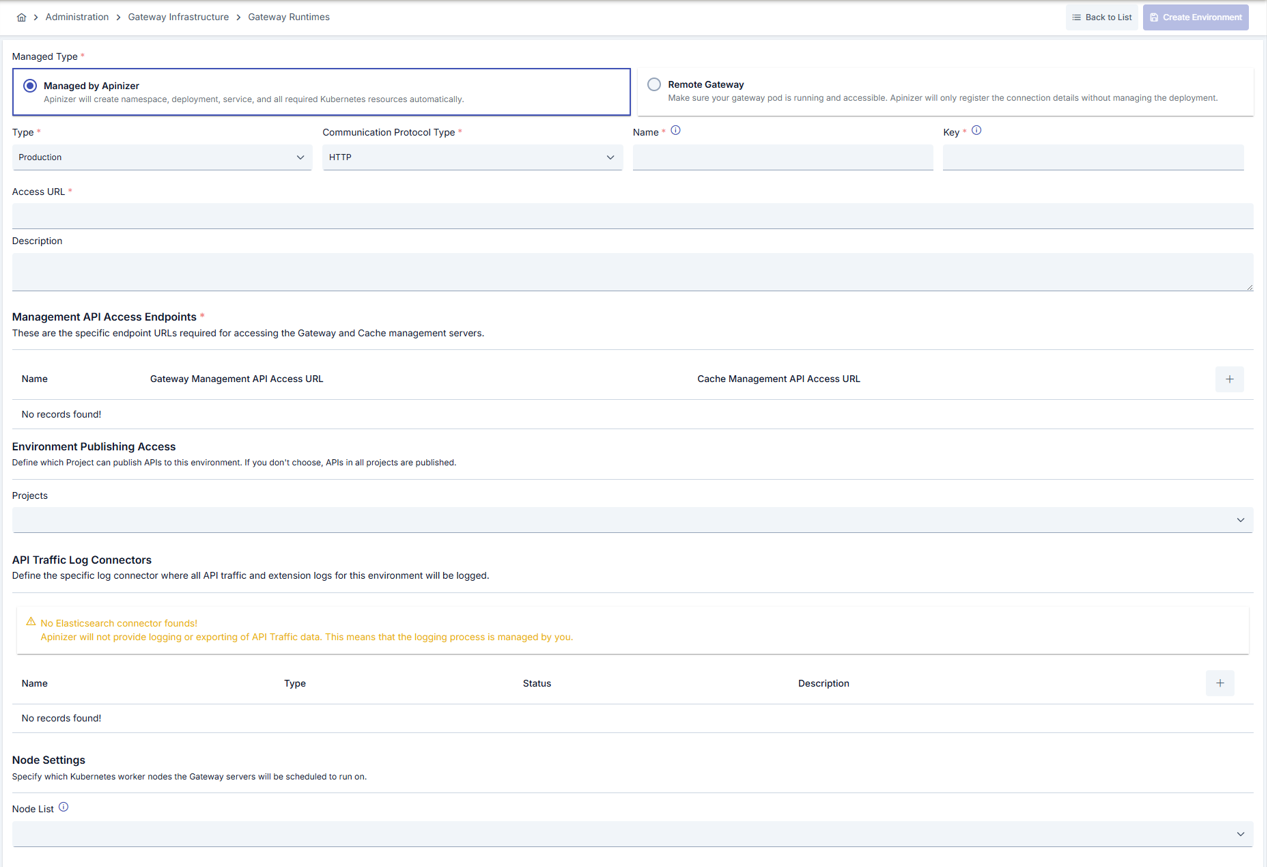
Fields containing general definition information when creating a Gateway Runtime environment:
| Field | Description |
|---|---|
| Managed Type (Managed Type) | Determines how the Gateway Runtime will be managed. Managed by Apinizer: Apinizer automatically creates namespace, deployment, service, and all required Kubernetes resources. Remote Gateway: Ensure that your Gateway pod is running and accessible. Apinizer only records connection details and does not manage the deployment. |
| Type (Type) | A value appropriate to the license and the environment used must be selected. Test or Production can be selected. |
| Communication Protocol Type (Communication Protocol Type) | One of HTTP, gRPC, HTTP+Websocket communication protocols can be selected. |
| Name (Name) | The name of the Gateway Runtime environment. Corresponds to the namespace in Kubernetes. |
| Key (Key) | A shortened key specific to the environment used for the created Gateway Runtime environment. |
| Access URL Address (Access URL) | The external access address of API Proxies running within the Gateway Runtime environment. |
| Description (Description) | Can be used for management convenience and important notes. |
| Environment Publishing Access / Projects (Environment Publishing Access / Projects) | Projects where the Gateway Runtime environment can be used can be selected from here, or the selection can be left empty for use in all projects. If one or more projects are selected, they must also be added for use in newly created projects. Default value is unselected. |
| Node List (Node List) | Select which kubernetes servers the created Gateway Runtime environment will run on. |
Renaming an Environment
Changing an existing environment's Name immediately refreshes the deploy records of every API Proxy and Proxy Group already deployed to it — no republish is needed for the rename itself, since those records are matched to the environment by its internal id, not by name.
Namespace Independence:
Gateway pods and Cache Server pods can now run in different Kubernetes namespaces. Gateway pods can access Cache Servers in other namespaces using Kubernetes service discovery (e.g., http://cache-http-service.apinizer-cache.svc.cluster.local:8090). This provides more flexible infrastructure management and allows you to separate Gateway and Cache workloads.
Communication Protocol Type Selection:
The type selected here determines which environment API Proxies can be deployed to:
- REST and SOAP API Proxies → to environments of type HTTP
- gRPC API Proxies → to environments of type gRPC
- Websocket API Proxies → to environments of type HTTP+Websocket
Project Selection: If a project is selected, it means that only API Proxies within that project can be deployed to this environment.
Management API Access Endpoints
You can configure multiple Management API Access Endpoints for Gateway and Cache communication. Each endpoint configuration includes:
| Field | Description |
|---|---|
| Name | A descriptive name for the API endpoint configuration (e.g., "Production Cluster", "DR Site") |
| Gateway Management API Access URL | The health check address of your gateway server. This is where Apinizer Management Console connects to Gateway pods for configuration updates. Example: http://worker-management-api-http-service.prod.svc.cluster.local:8091 |
| Cache Management API Access URL | The health check address of your Cache Server. Gateway pods use this URL to connect to Cache Servers. Example: http://cache-http-service.apinizer-cache.svc.cluster.local:8090 |
Multiple Endpoints:
You can configure multiple Management API endpoints for different scenarios:
- Multi-region deployments: Configure separate endpoints for each region
- High availability: Set up redundant endpoints for failover
- Cluster separation: Use different endpoints for different Kubernetes clusters
When multiple endpoints are configured, you can select which endpoint to use via the environmentClusterName variable in Additional Variables.
Endpoint Configuration:
- Each endpoint must have both Gateway and Cache Management API URLs configured
- URLs should use Kubernetes service discovery format for cross-namespace communication
- Ensure network connectivity between Management Console, Gateway pods, and Cache Server pods
API Proxy Traffic Log Connectors
Log connectors where all API Proxy Traffic and extensions in the Gateway Runtime environment will be logged are defined here.
An image containing API Proxy Traffic Log Connector definitions is shown below:

For more information about adding log connectors to the Gateway Runtime environment, see this page.
Gateway Engine Configuration
Gateway engine corresponds to Gateway pods in the Kubernetes environment.
- Gateway engine (
apinizer-worker): The core module of the Apinizer Platform, responsible for routing all API requests to BackendAPI and works as Policy Enforcement Point
Images containing Gateway engine definitions are shown below:
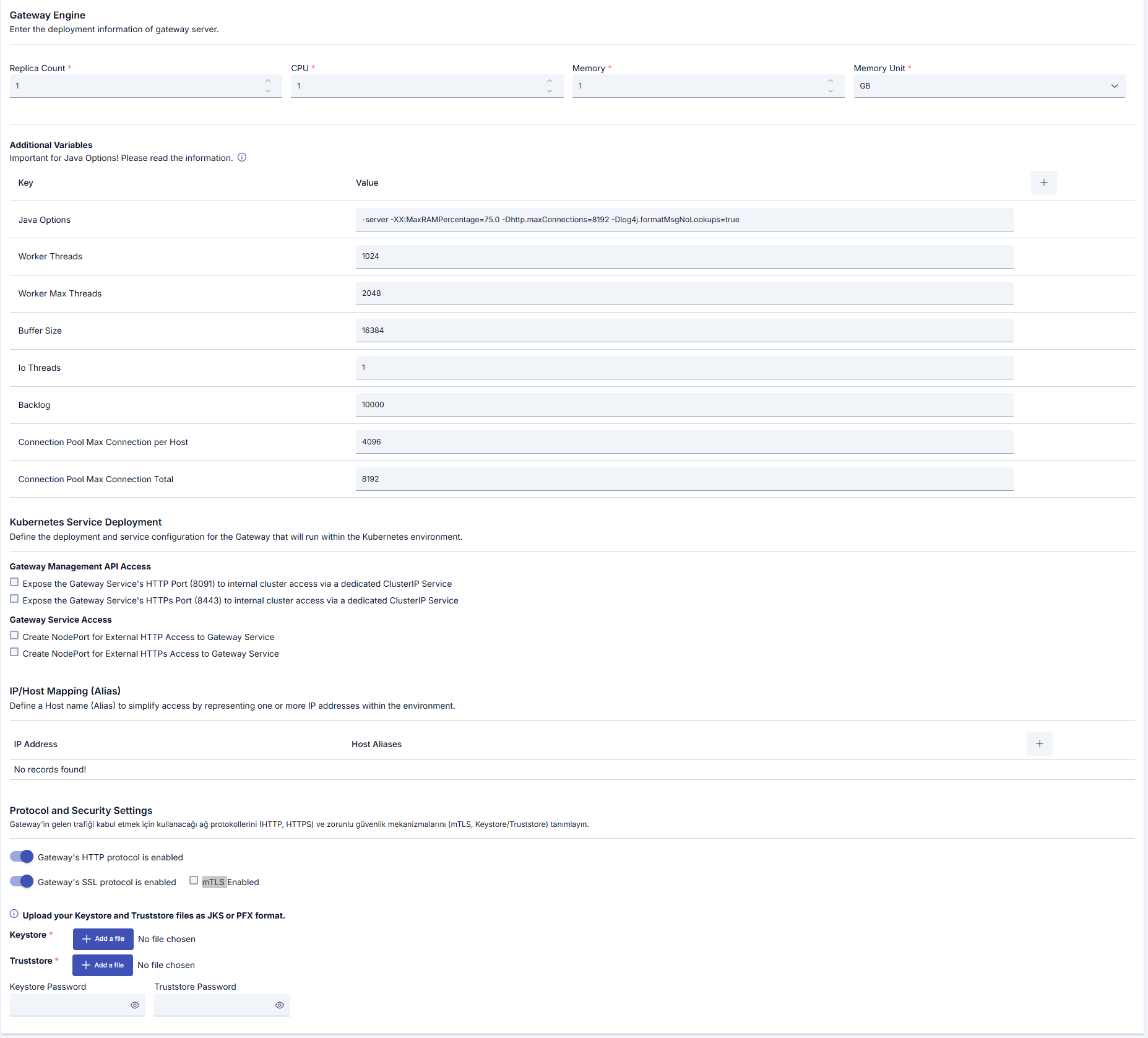
Basic Settings
| Field | Description |
|---|---|
| Count (Count) | The number of Gateway engines corresponds to the "replicas" value in Kubernetes deployment. Specifies the number of Pods that will be created in the Kubernetes Cluster to be created. |
| CPU | The maximum number of CPU cores the pod will use. |
| Memory (Memory) | The maximum memory value the pod will use. |
| Memory Unit (Memory Unit) | The unit of the value required for memory is selected; MB, GB. |
Recommended Values (by Benchmark Tier):
| Tier | CPU | Memory Size | Usage Purpose |
|---|---|---|---|
| W1 | 1 | 2 GB | Test / PoC |
| W2 | 2 | 2 GB | Small production |
| W4 | 4 | 4 GB | Standard production |
| W8 | 8 | 8 GB | High-volume production |
JVM memory and GC settings are automatically configured by the entrypoint based on container resource limits. Heap is allocated at 60% for W1/W2 and 65% for W4/W8. No manual -Xmx/-Xms parameters are needed. For detailed benchmark data and capacity guidance, see the Capacity Planning page.
Service Access Information
- HTTP Enabled (HTTP Enabled): Comes selected by default
- HTTPS Enabled (HTTPS Enabled): This option is also selected if HTTPS is desired, in this case the necessary files for encryption must be uploaded
- mTLS: Can only be selected when HTTPS setting is open since it runs on HTTPS protocol
Keystore and Truststore: When HTTPS protocol is selected, keystore and truststore files can be uploaded in JKS or PFX format.
Service Ports: A service port in the range 30080-32767 is entered. The service will be created as NodePort in Kubernetes.
Gateway Management API Service:
- Create HTTP service for API Gateway Management API access (
httpServiceForManagementAPIEnabled): When enabled, creates a separate HTTP service for Gateway Management API access. This service is used by Apinizer Management Console to communicate with Gateway pods for configuration updates. - Create HTTPS service for API Gateway Management API access (
httpsServiceForManagementAPIEnabled): When enabled, creates a separate HTTPS service for Gateway Management API access. Requires keystore and truststore files to be uploaded. Use this option when secure communication between Management Console and Gateway pods is required.
Management API Services:
These services are separate from the main HTTP/HTTPS services used for API Proxy traffic. They are specifically used for:
- Configuration updates from Management Console to Gateway pods
- Health checks and monitoring
- Management operations
When these services are enabled, you should configure the corresponding URLs in the Management API Access Endpoints section.
gRPC Protocol Specific Settings
If Gateway Management API will communicate with gateway pods over HTTPS:
- The Create HTTPS service for API Gateway Management API access option is selected
- Keystore and truststore files can be uploaded in JKS or PFX format
- Gateway Server Access URL is entered
Example: https://worker-http-service.prod.svc.cluster.local:8443
gRPC Tuning Parameters:
| Variable | Description | Default |
|---|---|---|
tuneGrpcKeepAliveTime | gRPC keep-alive time (seconds) | 120 |
tuneGrpcKeepAliveTimeout | gRPC keep-alive timeout (seconds) | 20 |
tuneGrpcMaxMessageSize | gRPC maximum message size (bytes) | 4194304 (4MB) |
tuneGrpcMaxHeaderListSize | gRPC maximum header list size (bytes) | 8192 |
tuneGrpcMaxConnectionAge | gRPC maximum connection age (seconds) | 3600 |
tuneGrpcMaxConnectionAgeGrace | gRPC maximum connection age grace period (seconds) | 30 |
tuneGrpcMaxConnectionIdle | gRPC maximum connection idle time (seconds) | 300 |
tuneGrpcMaxInboundMessageSize | gRPC maximum inbound message size (bytes) | 4194304 (4MB) |
tuneGrpcMaxInboundMetadataSize | gRPC maximum inbound metadata size (bytes) | 8192 |
tuneGrpcHandshakeTimeout | gRPC handshake timeout (seconds) | 20 |
tuneGrpcPermitKeepAliveTime | gRPC permit keep-alive time (seconds) | 120 |
tuneGrpcThreadPoolSize | gRPC thread pool size | CPU count * 2 |
WebSocket Settings
WebSocket Tuning Parameters:
| Variable | Description | Default |
|---|---|---|
tuneWebsocketIdleTimeout | WebSocket idle timeout (seconds) | 60 |
tuneWebsocketBufferSize | WebSocket buffer size (bytes) | 65536 |
tuneWebsocketTcpNoDelay | WebSocket TCP no delay (true/false) | true |
CORS Settings
Purpose of CORS Settings:
These CORS (Cross-Origin Resource Sharing) parameters are used for requests coming for token acquisition. Policies are not added to requests coming for token acquisition from the Management Console; these settings are provided through environment configuration. These parameters are not used in normal API Proxy flow, they are only valid for token acquisition endpoints.
CORS (Cross-Origin Resource Sharing) Parameters:
| Variable | Description | Default |
|---|---|---|
tokenCorsAccessControlAllowOrigin | Access-Control-Allow-Origin header value | - |
tokenCorsAccessControlAllowCredentials | Access-Control-Allow-Credentials header value | - |
tokenCorsAccessControlAllowMethods | Access-Control-Allow-Methods header value | - |
tokenCorsAccessControlAllowHeaders | Access-Control-Allow-Headers header value | - |
tokenCorsAccessControlOrigin | Origin header value | - |
tokenCorsAccessControlRequestMethod | Access-Control-Request-Method header value | - |
tokenCorsAccessControlRequestHeaders | Access-Control-Request-Headers header value | - |
tokenCorsAccessControlExposeHeaders | Access-Control-Expose-Headers header value | - |
tokenCorsAccessControlMaxAge | Access-Control-Max-Age header value (seconds) | - |
X-Forwarded-For Settings
Purpose of X-Forwarded-For Settings:
These X-Forwarded-For parameters are used for requests coming for token acquisition. Policies are not added to requests coming for token acquisition from the Management Console; these settings are provided through environment configuration. These parameters are not used in normal API Proxy flow, they are only valid for token acquisition endpoints.
X-Forwarded-For Parameters:
| Variable | Description | Default |
|---|---|---|
tokenXForwardedForIpHeader | X-Forwarded-For IP header name | - |
tokenXForwardedForIpOrder | X-Forwarded-For IP order (FIRST/LAST) | LAST |
Security Configuration
Security configuration can be made with Additional Variables:
| Variable | Description | Default Value | Possible Values | Target Java Property |
|---|---|---|---|---|
jdkTLSVersions | Determines TLS protocol versions to be supported | TLSv1, TLSv1.1, TLSv1.2, TLSv1.3 | SSLv2Hello, SSLv3, TLSv1, TLSv1.1, TLSv1.2, TLSv1.3 | https.protocols, jdk.tls.client.protocols, jdk.tls.server.protocols |
jdkTLSDisabledAlgorithms | Determines TLS algorithms to be disabled for security reasons | RC4, DES, MD5withRSA, DH keySize < 768, EC keySize < 224, 3DES_EDE_CBC, anon, NULL | RC4, DES, MD5withRSA, DH keySize < 768, EC keySize < 224, 3DES_EDE_CBC, anon, NULL, SSLv3, TLSv1, TLSv1.1 | jdk.tls.disabledAlgorithms |
jdkCertPathDisabledAlgorithms | Determines algorithms not to be used during certificate validation | JDK default value | MD2, MD5, SHA1, RSA keySize values, DSA keySize values, EC keySize values | jdk.certpath.disabledAlgorithms |
jdkCipherSuites | Determines encryption suites to be used | JDK default value | For TLS 1.3: TLS_AES_256_GCM_SHA384, TLS_AES_128_GCM_SHA256, TLS_CHACHA20_POLY1305_SHA256; For TLS 1.2: TLS_ECDHE_RSA_WITH_AES_256_GCM_SHA384; Legacy: TLS_ECDHE_ECDSA_WITH_AES_256_CBC_SHA, TLS_RSA_WITH_AES_256_CBC_SHA | https.cipherSuites |
jdkAllowUnsafeProtocols | Determines whether unsafe protocols are allowed | false | true, false | https.protocols.allow_unsafe, jdk.tls.client.protocols.allow_unsafe |
Important Notes:
-
When Additional Variables are not set:
- For TLS Versions: "TLSv1, TLSv1.1, TLSv1.2, TLSv1.3" is used
- For TLS Disabled Algorithms: "RC4, DES, MD5withRSA, DH keySize < 768, EC keySize < 224, 3DES_EDE_CBC, anon, NULL" is used
- For other parameters: JDK default values are used
-
Security Recommendations:
- TLSv1.2 and higher versions should be used
- GCM mode encryption suites should be preferred
- Weak algorithms (RC4, DES, 3DES) should be disabled
- Key sizes should be at an adequate security level (at least 2048 bits for RSA, at least 224 bits for EC)
-
Performance Impact:
- The order of encryption suites can affect performance
- Disabling too many encryption suites may cause compatibility issues with legacy systems
Additional Variables
Default and optional variables and their values to be run in the pod are defined.
Important Variables:
| Variable | Target Environment | Description |
|---|---|---|
JAVA_OPTS | All | Sets JVM Heap values |
WORKER_TIMEZONE | All | Sets the JVM default time zone for the Worker process. Accepts IANA zone IDs (e.g. Europe/Istanbul) or fixed offsets (e.g. +03:00). When unset, the container falls back to the system time zone (typically UTC). Affects time-based variable evaluation, scheduled limits, and any field that does not carry its own zone information. |
tuneWorkerThreads | HTTP Worker, HTTP+Websocket, Management API | Minimum Worker thread count of the server. Default: CPU × 8. Tier values: W1=128, W2=256, W4=512, W8=1536 |
tuneWorkerMaxThreads | HTTP Worker, HTTP+Websocket, Management API | Maximum Worker thread count of the server. Default: CPU × 16. Tier values: W1=256, W2=512, W4=1024, W8=3072 |
tuneBufferSize | HTTP Worker, HTTP+Websocket, Management API | Buffer area the thread will use for write operations (default: 16384 bytes) |
tuneIoThreads | HTTP Worker, HTTP+Websocket, Management API | IO Thread count. Default: CPU core count. Tier values: W1=2, W2=4, W4=8, W8=16 |
tuneBacklog | HTTP Worker, HTTP+Websocket, Management API | Backlog value. Default: 1000. Tier values: W1=2048, W2=4096, W4=8192, W8=16384 |
tuneRoutingConnectionPoolMaxConnectionPerHost | HTTP Worker, HTTP+Websocket, Management API | Maximum connections per host. Default: 1024. Tier values: W1=250, W2=500, W4=1000, W8=2000 |
tuneRoutingConnectionPoolMaxConnectionTotal | HTTP Worker, HTTP+Websocket, Management API | Total maximum connections. Default: 2048. Tier values: W1=500, W2=1000, W4=2000, W8=4000 |
tuneElasticsearchConnectionPoolMaxConnectionPerHost | HTTP Worker, HTTP+Websocket, Management API | Maximum connections per Elasticsearch host (default: 256) |
tuneRoutingVirtualThreadsEnabled | HTTP Worker, HTTP+Websocket, Management API | Runs backend routing calls on virtual threads (default: true) |
tuneLoggingVirtualThreadsEnabled | HTTP Worker, HTTP+Websocket, Management API | Runs log writes to connectors on virtual threads (default: true) |
tuneMaxConcurrentRequest | HTTP Worker, HTTP+Websocket, Management API | Maximum concurrent request count. Default: tuneWorkerMaxThreads × tuneIoThreads. Tier values: W1=500, W2=750, W4=3000, W8=10000 |
tuneMaxQueueSize | HTTP Worker, HTTP+Websocket, Management API | Maximum queue size (default: 0) |
tuneCacheConnectionPoolMaxConnectionTotal | HTTP Worker, HTTP+Websocket, Management API | Cache Connection Pool total maximum connections (default: 256) |
tuneApiCallConnectionPoolMaxConnectionPerHost | HTTP Worker, HTTP+Websocket, Management API | API Call Connection Pool maximum connections per host (default: 256) |
tuneApiCallConnectionPoolMaxConnectionTotal | HTTP Worker, HTTP+Websocket, Management API | API Call Connection Pool total maximum connections (default: 4096) |
multipartConfigMaxFileSize | HTTP Worker, HTTP+Websocket, Management API | Multipart config maximum file size (default: 100MB) |
multipartConfigMaxRequestSize | HTTP Worker, HTTP+Websocket, Management API | Multipart config maximum request size (default: 100MB) |
multipartConfigFileSizeThreshold | HTTP Worker, HTTP+Websocket, Management API | Multipart config file size threshold (default: 100MB) |
defaultCharset | HTTP Worker, HTTP+Websocket, Management API | Default character set (default: UTF-8) |
deploymentTimeout | HTTP Worker, HTTP+Websocket, Management API | Deployment timeout in seconds (default: 30) |
tuneReadTimeout | HTTP Worker, HTTP+Websocket, Management API | Client data read timeout. Connection will be closed if client doesn't send data within this time (default: 30000 ms / 30 seconds) |
tuneNoRequestTimeout | HTTP Worker, HTTP+Websocket, Management API | No request after connection timeout. Connection will be closed if no request is sent after connection established (default: 60000 ms / 60 seconds) |
http2Enabled | HTTP Worker, HTTP+Websocket, Management API | Enable HTTP/2 protocol (default: false) |
environmentClusterName | HTTP Worker, HTTP+Websocket, Management API | Environment cluster name |
tuneAsyncExecutorCorePoolSize | HTTP Worker, HTTP+Websocket, Management API | Async executor core pool size (default: tuneWorkerThreads). Ignored while virtual threads are enabled (the default); the pool runs with a fixed 64 threads |
tuneAsyncExecutorMaxPoolSize | HTTP Worker, HTTP+Websocket, Management API | Async executor maximum pool size (default: tuneWorkerMaxThreads). No effect at runtime; the pool never grows beyond its core size |
tuneAsyncExecutorQueueCapacity | HTTP Worker, HTTP+Websocket, Management API | Async executor queue capacity (default: tuneMaxQueueSize > 0 ? tuneMaxQueueSize : 1000). No effect at runtime; the queue is always unbounded |
METRICS_ENABLED | HTTP Worker, HTTP+Websocket, Management API | Whether metric collection feature is enabled (default: false) |
logLevel | All | Application log level (ERROR, WARNING, INFO, DEBUG, TRACE, OFF) |
tuneMaxDecompressedBodySize | HTTP Worker, HTTP+Websocket, Management API | Maximum size (in bytes) of a compressed (gzip, deflate, brotli, zstd) request or response body after decompression. Protects against compression bomb attacks (default: 2147483648 / 2 GB) |
Compression Bomb Protection:
The Gateway enforces a maximum size limit when decompressing compressed request and response bodies to protect against compression bomb attacks. A small compressed body can consume gigabytes of memory when decompressed — the tuneMaxDecompressedBodySize parameter prevents this.
The default value is set to 2 GB and covers the vast majority of current usage scenarios. You can lower this value according to your security requirements (e.g., 50 MB = 52428800, 100 MB = 104857600). The value is specified in bytes.
Setting this limit too low may cause legitimate large requests or responses to be rejected. Determine an appropriate value by considering the typical request sizes in your environment.
Asynchronous Operations Thread Pool:
The Rest API Policy and Script Policy use a centralized thread pool for asynchronous operations which is configured in ManagementConfig. This improves thread management and optimizes resource usage. Asynchronous operations performed in environments are managed by this separate thread pool, which can be configured with specific parameters to ensure optimal performance and resource allocation.
Usage Scenarios:
- Rest API Policy: Asynchronous HTTP calls to external services
- Script Policy: Asynchronous script executions that don't block the main request thread
- Logging Operations: Asynchronous log writing operations
- Traffic Mirroring: Asynchronous mirroring of requests to secondary endpoints
Configuration Guidelines:
tuneAsyncExecutorCorePoolSize: Number of threads kept in the pool (default: same astuneWorkerThreads)tuneAsyncExecutorMaxPoolSizeandtuneAsyncExecutorQueueCapacity: No effect at runtime; the pool never grows beyond its core size and the queue is always unbounded- While virtual threads are enabled (
tuneRoutingVirtualThreadsEnabled=true, the default) all of these settings are ignored and the pool runs with a fixed 64 threads
Thread Pool Sizing:
The async executor thread pool is separate from the main worker thread pool. Ensure that the total thread count (worker threads + async executor threads) does not exceed your system's capacity. Consider CPU cores and memory when configuring these values.
Benchmark-Verified Tier Thread and Connection Values:
The following values are optimal settings validated through wrk2 load tests; fine-tune as needed for your production workload. If a variable is not set, the Gateway uses CPU × 8 for tuneWorkerThreads, CPU × 16 for tuneWorkerMaxThreads, and the CPU core count for tuneIoThreads.
| Tier | CPU | tuneIoThreads | tuneWorkerThreads | tuneWorkerMaxThreads | tuneBacklog | tuneMaxConcurrentRequest |
|---|---|---|---|---|---|---|
| W1 | 1 | 2 | 128 | 256 | 2048 | 500 |
| W2 | 2 | 4 | 256 | 512 | 4096 | 750 |
| W4 | 4 | 8 | 512 | 1024 | 8192 | 3000 |
| W8 | 8 | 16 | 1536 | 3072 | 16384 | 10000 |
Routing Connection Pool (tuneRoutingConnectionPoolMaxConnectionPerHost / tuneRoutingConnectionPoolMaxConnectionTotal):
| Tier | Max Conn/Host | Max Conn Total | ES Max Conn/Host |
|---|---|---|---|
| W1 | 250 | 500 | 8 |
| W2 | 500 | 1,000 | 16 |
| W4 | 1,000 | 2,000 | 32 |
| W8 | 2,000 | 4,000 | 128 |
Java Options Warning:
Apinizer's entrypoint automatically configures JVM heap values based on tier and container memory limit:
- W1 / W2 (2 GB):
MaxRAMPercentage=60— heap ~1.2 GB - W4 (4 GB):
MaxRAMPercentage=65— heap ~2.6 GB - W8 (8 GB):
MaxRAMPercentage=65— heap ~5.2 GB
UseContainerSupport is enabled by default. When -Xmx / -Xms values are provided, automatic sizing is disabled — use these only if you have a specific requirement. G1GC is used as the garbage collector.
Setting Host Aliases
What is Host Alias? Why is it needed?
IP addresses on the network can sometimes be placed behind host names. If these are not defined in nameserver or host file, or if Apinizer cannot resolve them somehow, Host Alias definition must be made for Gateway pods to resolve these names.
On Kubernetes, alias host names can be given to host names or corresponding IP addresses. This setting is defined within the deployment.yaml file.
Republish operation is required for changes made here to take effect. Compared to version update, it should be noted that there will be a few minutes of interruption in this operation.
Example Usage:
| IP Address | Host Aliases |
|---|---|
| 10.10.10.10 | alias_name, other_alias_name |
An image containing Host alias settings is shown below:

Environment Publishing
To publish a Gateway Runtime environment, click the Unpublished button.
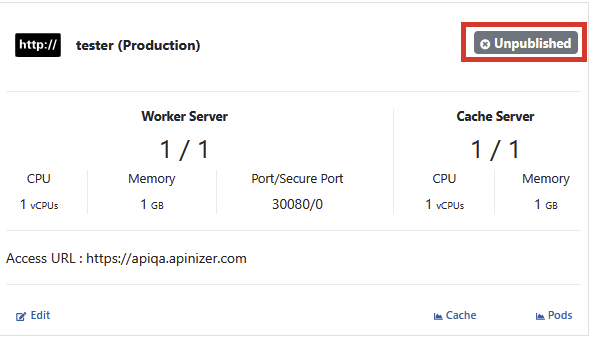
Click the Publish button from the window that appears to confirm the operation, and the Gateway Runtime environment is deployed to the Kubernetes server.

Environment Republishing
Hover over an environment that is in published status and click the Published button.
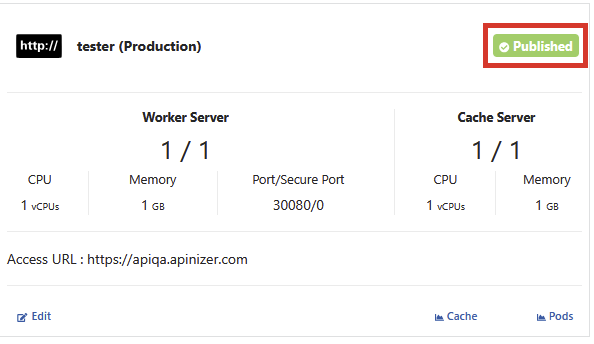
Click the Republish button from the window that appears to confirm the operation.

After the Environment Republish operation, Pods are also restarted.
There may be a few minutes of interruption during the republishing operation. This operation is required for changes made to Gateway Engine configuration, Host Aliases, and other environment settings to take effect.
JWT Token Validation Key
If the environment has been saved, the JWT Token Validation Key has been generated. This token is the value of the private key involved in token generation via Apinizer Token Service for authentication policies. If users want to generate their own token, they should use the private key here.
To access this information, go to the JWT Token Validation Keys tab.
Available Operations:
- Redeploy: Reloading the current key to servers without making changes
- Regenerate & Deploy: Generating a new key and loading it to servers
- Upload & Deploy: Uploading a PEM Encoded Private Key file to generate a new key
Before 2026.09.3 the token-signing key of a Gateway Runtime (the RSA private key shown on the JWT Token Validation Keys tab) was written in clear text to the audit record every time the environment was saved, to every SIEM destination receiving audit records and — with request-body auditing enabled — to the captured request body. As of 2026.09.3 the field never appears in any audit output; the fix does not clean up history, though: older audit rows and syslog files still carry the key. On every environment where audit records or SIEM forwarding have been in use, rotate the key from the Gateway Runtimes screen with Regenerate & Deploy. Rotation invalidates the tokens that environment's Apinizer Token Service has already signed; clients must obtain new tokens. To purge the older audit rows see Cleaning the Audit Event Collection.

Environment Deletion
By selecting the environment, information related to the environment is deleted from the database by clicking Remove Environment from the Remove Environment tab at the bottom.

Warning: When the deletion operation is completed, all API Proxy deployments registered in this environment are also deleted and API Proxies previously deployed to this environment can no longer be accessed through this environment.
Metric Monitor
To monitor the status of Gateway pods on Kubernetes, click the Pods link of the relevant Gateway Runtime environment from the Gateway Runtime environment list.
An image containing the Pods screen is shown below:
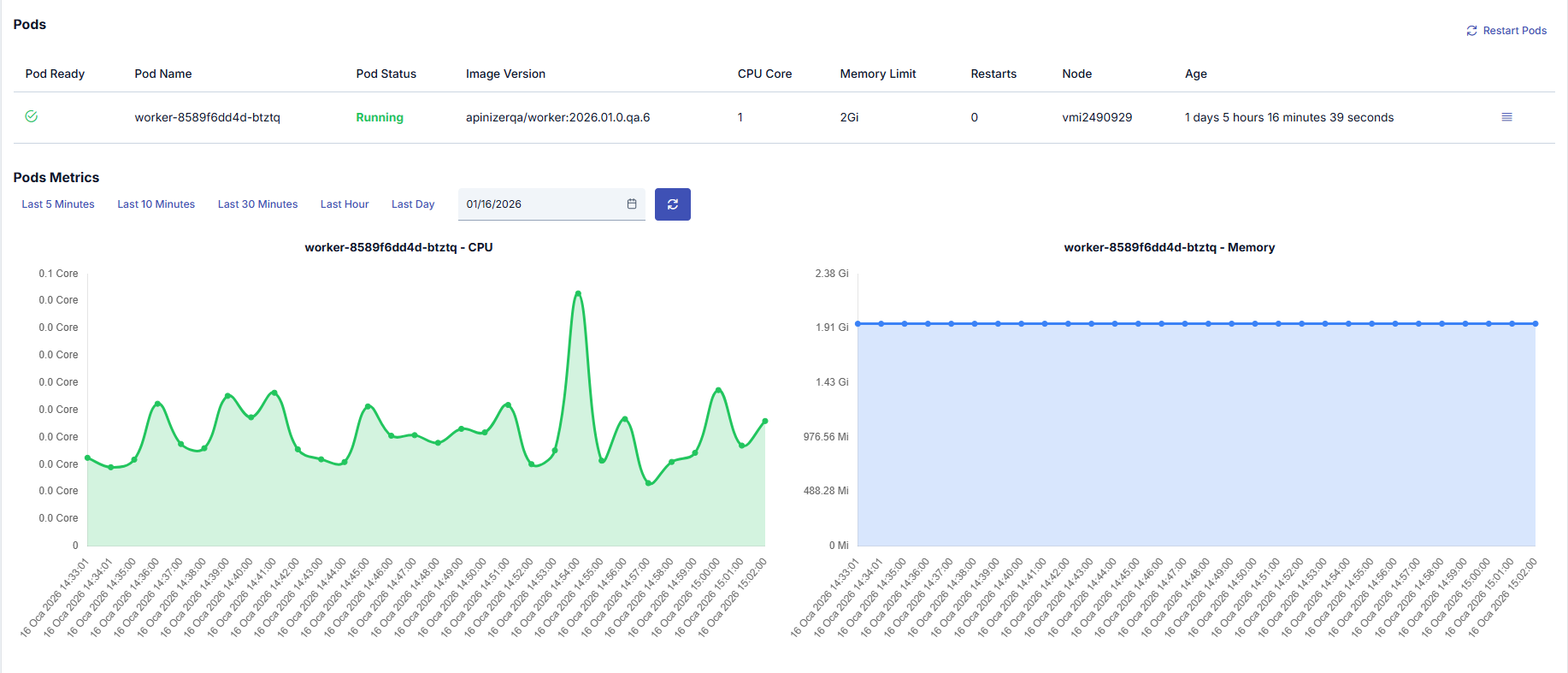
If you want to access metrics of all Gateway Runtime environments, click the Kubernetes Workloads page.
Diagnostics
You can access detailed system metrics, JVM information, thread states, and performance data for Gateway Runtimes. You can access the Diagnostics page by clicking the Diagnostics button of the relevant Gateway Runtime environment from the Gateway Runtime environment list.
For Diagnostics features, usage, and detailed information, see the Environment Diagnostics page.