JWKS Configuration
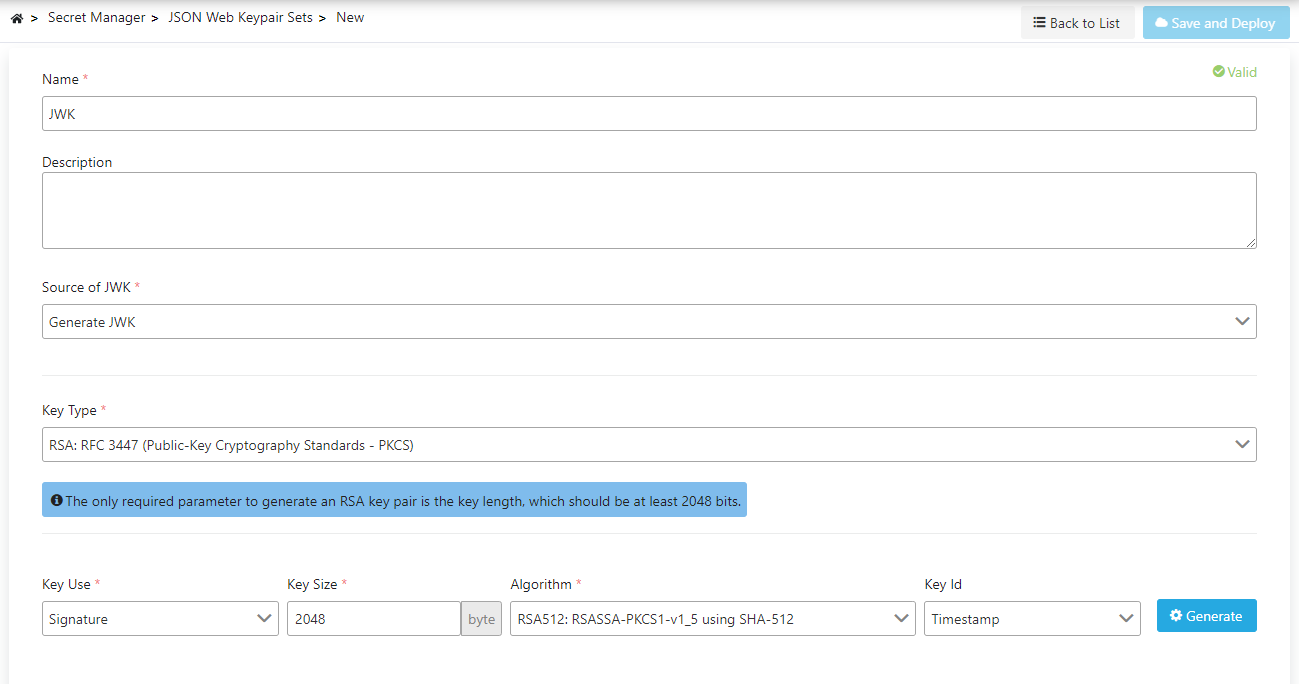
Basic Fields
The fields used for JSON Web Keypair creation configuration are shown in the table below.
| Field | Description |
|---|---|
| Name | A name can be written to facilitate the use and management of the JWK. |
| Description | A description can be written to facilitate the use and management of the JWK. |
| JWK Type (Source of JWK) | Specifies from which source the JWK will be created. The types that can be selected are: • Generate • Receive via URL Connection • Paste from Clipboard • Convert from Keystore • Convert from Public Key • Convert from Private Key • Convert from Certificate |
Configuration Fields by JWK Type
- Generate
- Receive via URL Connection
- Paste from Clipboard
- Convert from Keystore
- Convert from Public Key
- Convert from Private Key
- Convert from Certificate
If the JWK creation type Generate is selected, the following fields become active:
| Field | Description |
|---|---|
| Key Type (Key Type) | Specifies what type the JWK to be created is: • RSA: RFC 3447 (Public-Key Cryptography Standards PKCS) • EC: Elliptic Curve (DSS) • OCT: Octet Sequence (Symmetric Key) • OKP: Octet Key Pair (RFC 8037) Algorithms/curve values vary according to these values. |
| Key Use Type (Key Use) | Specifies whether the JWK will be used for signing/signature verification or encryption/decryption. |
| Key Size (Key Size) | The length of the key to be created in bytes. |
| Curve | The curve type of the JWK to be created. |
| Algorithm (Algorithm) | The algorithm of the JWK to be created. |
| Key Id (Key Id) | Specifies how the id of the JWK to be created will be generated. |
If the JWK creation type Receive via URL Connection is selected, the following fields become active:
| Field | Description |
|---|---|
| URL | The access address where the JWK set is located. |
| Connect Timeout (Connect Timeout) | The connection timeout duration value in milliseconds for the connection to be made to the access address where the JWK set is located. |
| Read Timeout (Read Timeout) | The read timeout duration value in milliseconds for the connection to be made to the access address where the JWK set is located. |
| Size Limit (Size Limit) | The maximum size value in bytes of the data to be read from the access address where the JWK set is located. |
| Key Id | The id of the JWK to be obtained from the access address where the JWK set is located. Even if there are multiple JWKs at the URL address, only one definition can be made on Apinizer at the same time. |
If the JWK creation type Paste from Clipboard is selected, the following fields become active:
| Field | Description |
|---|---|
| JSON Web Keypair Set | This is the field used to enter the text version of the JWK set. |
| Key Id | The id of the JWK to be obtained from within the JWK set. Even if there are multiple JWKs in the text field, only one definition can be made on Apinizer at the same time. |
If the JWK creation type Convert from Keystore is selected, the following fields become active:
| Field | Description |
|---|---|
| Key Store | Used to specify from which keystore the JWK will be created. |
| Environment From | Used to specify from which environment the JWK to be created will be created. |
| Key Store Algorithm (Key Store Algorithm) | Used to specify the algorithm of the JWK to be created from the keystore. |
| Alias (Alias) | Specifies which entry of the keystore is used; the Key Id value of the JWK to be created is obtained from here. It is not mandatory. |
| Use Type (Use Type) | Specifies whether the JWK will be used for signing/signature verification or encryption/decryption. |
When Alias is left empty: If the keystore holds a single usable entry, that entry is selected on its own and the selected alias is shown in the source information of the JWK once the record is saved. If the keystore holds more than one entry the operation stops and a warning lists the aliases you can choose from; the warning also names the entries you cannot pick together with the reason (holds no private key, unsupported key type, name generated by the keystore). No entry is picked on its own while several keys exist: a JWK built from the wrong key is only noticed when a signature fails to verify.
If the JWK creation type Convert from Public Key is selected, the following fields become active:
| Field | Description |
|---|---|
| Public Key (Public Key) | Used to specify from which key the JWK will be created. |
| Environment From | Used to specify from which environment the JWK to be created will be created. |
| Key Store Algorithm (Key Store Algorithm) | Used to specify the algorithm of the JWK to be created from the Public Key. |
| Use Type (Use Type) | Specifies whether the JWK will be used for signing/signature verification or encryption/decryption. |
If the JWK creation type Convert from Private Key is selected, the following fields become active:
| Field | Description |
|---|---|
| Private Key (Private Key) | Used to specify from which key the JWK will be created. |
| Environment From | Used to specify from which environment the JWK to be created will be created. |
| Key Store Algorithm (Key Store Algorithm) | Used to specify the algorithm of the JWK to be created from the Private Key. |
| Use Type (Use Type) | Specifies whether the JWK will be used for signing/signature verification or encryption/decryption. |
If the JWK creation type Convert from Certificate is selected, the following fields become active:
| Field | Description |
|---|---|
| Certificate (Certificate) | Used to specify from which certificate the JWK will be created. |
| Environment From | Used to specify from which environment the JWK to be created will be created. |
| Key Store Algorithm (Key Store Algorithm) | Used to specify the algorithm of the JWK to be created from the Certificate. |
| Use Type (Use Type) | Specifies whether the JWK will be used for signing/signature verification or encryption/decryption. |
JWK Association
When a JWK is created, the system automatically records which source it is associated with based on the source type. This relationship is used to track which certificate, key, or keystore the JWK was created from.
Association Types
When a JWK is created, if one of the following source types is selected, the relationship is automatically created:
| Source Type | Associated Source | Description |
|---|---|---|
| Convert from Keystore | Keystore | JWK is created by converting from the specified keystore. |
| Convert from Public Key | Public Key | JWK is created by converting from the specified public key. |
| Convert from Private Key | Private Key | JWK is created by converting from the specified private key. |
| Convert from Certificate | Certificate | JWK is created by converting from the specified certificate. |
Relationship Information in JWK List
The following information is displayed for each JWK in the JWK list:
- Creation Type: The source type from which the JWK was created (Keystore, Certificate, Public Key, Private Key, etc.)
Relationship Information in JWK Detail Screen
In the JWK detail screen, which source the JWK is associated with is displayed, along with the information "This JWK was created with [Source Type]".
If there is an associated source, the source information and the option to remove the relationship are displayed in the JWK detail screen.
JWK Editing
JWK editing is performed through a dialog:
- Click Edit from the ⋮ menu at the end of the row in the JWK list.
- In the opened dialog, only the JWK name and description can be edited.
- Save the changes to update the JWK.
JWK Deletion
To delete a JWK:
- Click Delete from the ⋮ menu at the end of the row in the JWK list.
- Confirm the deletion operation in the confirmation dialog.
Check Before Deleting:
- The JWK may be used in policies or connections.
- Assign an alternative JWK if necessary.