TCP Connectivity Test
Overview
The TCP Connectivity Test performs a connection attempt from the selected Gateway Runtime environment to a specified host:port, verifying network reachability. The test is executed directly on the Gateway Runtime pod, allowing you to observe real network constraints (firewall rules, DNS access, port availability) as they exist in that environment.
The environment from which the test is performed is selected in the Environment field. The connection is made from a pod belonging to the selected environment.
New Test
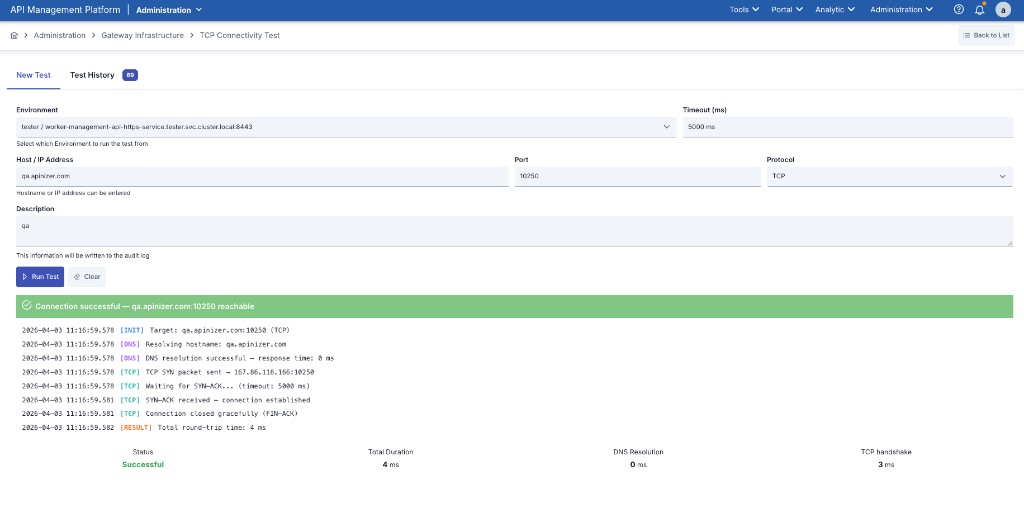
Form Fields
| Field | Description |
|---|---|
| Environment | The Gateway Runtime environment from which the test will be performed. |
| Timeout | Maximum wait time for the connection attempt (milliseconds). Default: 5000 ms. |
| Host / IP Address | The hostname or IP address of the target server. |
| Port | The target server's port number (1–65535). |
| Protocol | Connection protocol: TCP (plain connection) or TLS/TCP (encrypted connection). |
| Description | A short note describing the purpose of the test. Saved to the audit log. |
When TLS/TCP protocol is selected, the target server's certificate is validated. If the certificate cannot be verified, the connection is rejected.
Running the Test
Fill in the form fields and click the Run Test button. The test cannot be started without selecting an environment, entering a host/port, or providing a description.
Test Result
When the test completes, a result panel appears showing the connection status, a step-by-step log stream, and summary metrics.
Connection Statuses
| Status | Description |
|---|---|
| Successful | Connection to the target server was established. |
| Timeout | The connection received no response. Typically indicates the firewall is silently dropping packets. |
| Connection Refused | The port is not open or the service is not running. |
| DNS Failed | The hostname could not be resolved to an IP address. |
| Connection Reset | The connection was reset by the remote host. |
Step-by-Step Log
Each test produces a four-phase log:
| Phase | Description |
|---|---|
INIT | Test parameters and environment information |
DNS | Hostname-to-IP resolution process |
TCP | TCP (or TLS/TCP) connection setup |
RESULT | Final outcome and duration summary |
Summary Metrics
| Metric | Description |
|---|---|
| Status | Successful / Failed |
| Total Duration | Total elapsed time from start to finish (ms) |
| DNS Resolution | Time taken to resolve the hostname to an IP (ms). Displays "Failed" if DNS resolution fails. |
| TCP Handshake | Time taken to establish the TCP connection (ms). Displays "Failed" for unsuccessful connections. |
If DNS resolution succeeds but the TCP connection cannot be established, the issue is at the network layer (firewall rule, closed port, etc.).
Test History
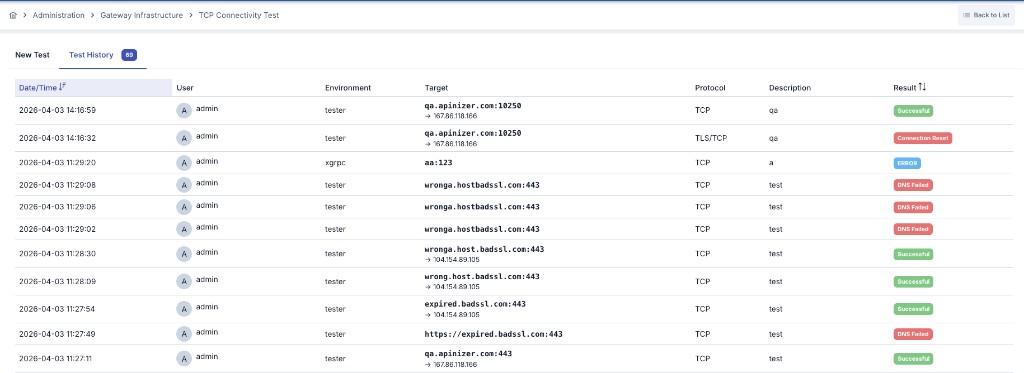
The Test History tab provides access to all previously performed tests. Each record contains:
| Field | Description |
|---|---|
| Date/Time | When the test was performed |
| User | The user who initiated the test |
| Environment | The Gateway Runtime environment used |
| Target | host:port and resolved IP address |
| Protocol | TCP or TLS/TCP |
| Description | The note entered during the test |
| Result | Successful / Timeout / Refused / DNS Failed / Connection Reset |
For information on cleaning up history records, see the TCP Connectivity Test History Collection Cleanup page.