Security Events
Reach this screen by following Administration → Audit & Compliance → Security Events.
The two tabs
The screen has two tabs, and they differ only in which requests they cover. The filters, the columns, and the permission rule are identical.
| Tab | Covers | Collection | Recorded by default |
|---|---|---|---|
| API Security | Only the requests a policy blocked or that ended in an error | log_apisecurityevent | Yes, always |
| API Access | Every request that passed through the Gateway, successful ones included | log_apiaccess | No — see API Access |
Switching tabs keeps your filters, so you can hold a date range and an API Proxy steady and compare the two views. The only filter that changes is Outcome: Success is offered on the API Access tab only, and is cleared for you if you switch back to API Security while it is selected, because API Security has no successful requests to match.
What is recorded
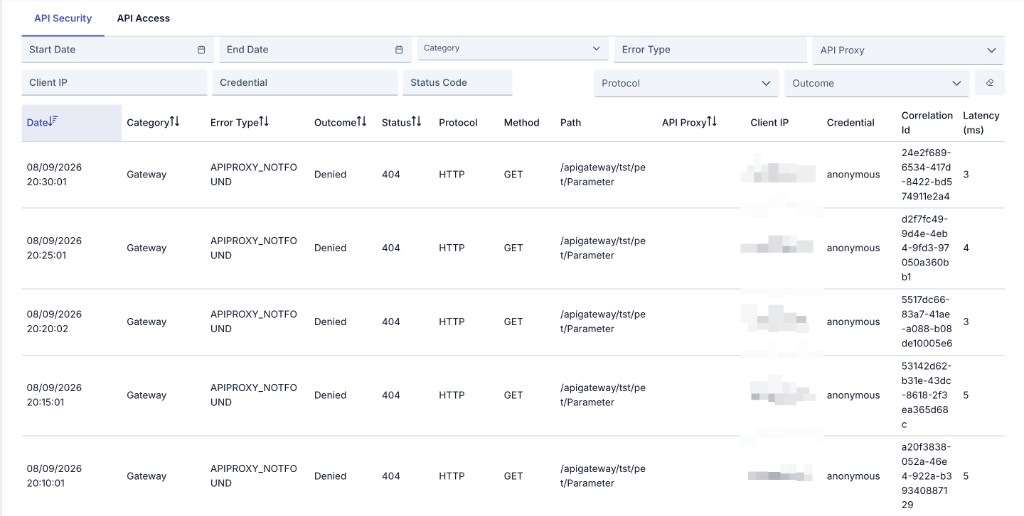
Apinizer's Gateway writes an API Security record for every request whose outcome is blocked by a policy or ends in an error — across HTTP, gRPC, and WebSocket traffic alike. A request that completes successfully is never recorded on that tab; it is recorded on the API Access tab instead, when that stream is switched on.
Every record on either tab is a bodyless metadata snapshot, never a copy of the traffic itself:
- The request and response body are never captured.
- Headers, the query string, and any credential value carried in them are never captured.
- The Path column shows the request path only, with its query string removed, capped at 512 characters.
- When a request carries no credential, the Credential column shows
anonymous. - When the resolved credential itself looks like a live secret — a bearer token, a JWT, or another opaque token-shaped value, which can happen when a Quota or Throttling policy applies its limit by a header — the Credential column shows a short, one-way hash instead of the raw value, so a captured secret can never be read back out of a Security Events record. A plain username or a named API key is unaffected and is still shown as-is.
The Client IP column always reflects the direct network connection to the Gateway. Unlike Login Records, it does not read the X-Forwarded-For header, so behind a load balancer or reverse proxy it shows that intermediary's address rather than the original caller's.
Categories
Each record is assigned one category, based on the kind of policy or Gateway condition that produced it:
| Category | Recorded for |
|---|---|
| Authentication | A failed or blocked authentication check — Basic Auth, API Key, OAuth2, OIDC, SAML, JWT verification, mTLS, or WS-Security identity checks. |
| Authorization | A failed or blocked authorization check — role group or client banner checks. |
| Quota | A quota policy. |
| Throttling | A throttling policy — endpoint rate limiting or AI token rate limiting. |
| Validation | Content filtering, message size limits, JSON or XML schema validation, decryption, or signature verification. |
| IP Security | IP allow/deny lists, allowed hours, or CORS. |
| Threat | An AI guardrail — prompt injection, data loss prevention, loop detection, topic control, context integrity, groundedness, RAG injection, or PII masking guards. |
| Routing | A routing failure, including AI routing. |
| Gateway | The API Proxy itself, a routing condition, a license check, or an internal Gateway error. |
| Other | Any policy error not covered by the categories above. |
gRPC and WebSocket requests do not currently carry a detailed error type, so the Error Type column is empty for them. A blocked gRPC or WebSocket request is categorized as Other; one that ends in an error is categorized as Gateway.
Outcome
| Outcome | When it is shown |
|---|---|
| Success | The request completed. Only on the API Access tab. |
| Denied | The request was blocked by a policy. |
| Failure | The request failed with an error. |
Filtering and columns
You can view results in the table by setting criteria from the filter section at the top of the page — date range, category (multiple selection), error type, API Proxy, Client IP, Credential, Status Code, Protocol, and Outcome.
The date fields also carry a time. Picking a day from the calendar sets the start field to 00:00:00 and the end field to 23:59:59, so the days you select are covered in full. Change the time values by hand when you want a narrower window.
The text filters — Error Type, Client IP, and Credential — are exact matches, never partial ones: 203.0.113 finds nothing, 203.0.113.7 finds the records for that address.
Because the Credential filter is an exact match, searching for a token-shaped credential means searching for its hash, not for the token. Produce the same value the record carries by hashing the credential with SHA-256 and keeping the first 16 characters of the hexadecimal digest, then putting sha256: in front of it.
What you hash has to be exactly the string that would otherwise have appeared in the Credential column, so mind three things:
- Include the scheme prefix. When a Quota or Throttling policy applies its limit by the
Authorizationheader, the credential is the whole header value —Bearer eyJ…, not the token on its own. - Use the URL-encoded form for Quota and Throttling. Those two policies URL-encode the identity they apply their limit by, so the space after
Bearerreaches the record as+(Bearer+eyJ…), and the+ / =characters of a standard Base64 value reach it as%2B %2F %3D. - Drop leading and trailing whitespace. The value is trimmed before it is hashed.
# Linux: sha256sum   |   macOS: shasum -a 256

# A Quota or Throttling policy that applies its limit by the Authorization header
# (the URL-encoded form — this is the usual case for a token-shaped credential):
printf '%s' 'Bearer+eyJhbGciOiJIUzI1NiJ9.eyJzdWIiOiIxIn0.sig' | sha256sum | cut -c1-16
# 6a6b046bb257973a  →  search for: sha256:6a6b046bb257973a

# Any other source, where the value reaches the record as-is:
printf '%s' 'Bearer eyJhbGciOiJIUzI1NiJ9.eyJzdWIiOiIxIn0.sig' | sha256sum | cut -c1-16
# 09268e89ea3eb2a2  →  search for: sha256:09268e89ea3eb2a2
If you are not sure which form a record carries, try both — hashing costs nothing and only one of them can match.
| Column | What it shows |
|---|---|
| Timestamp | When the event was recorded. |
| Category | See Categories above. |
| Error Type | The specific error that triggered the block or the failure. Empty for gRPC and WebSocket. |
| Outcome | Success (API Access tab only), Denied, or Failure. |
| Status Code | The status code returned to the client. |
| Protocol | HTTP, gRPC, or WebSocket. |
| Method | The HTTP method, or the gRPC method name. Empty for WebSocket. |
| Path | The request path, query string removed, capped at 512 characters. |
| API Proxy | The API Proxy the request was made against. |
| Client IP | The direct network peer of the Gateway. |
| Credential | The credential or client key that made the request, or anonymous when none was presented. Shown as a short hash instead of the raw value when the resolved credential is token-shaped rather than a name — see above. |
| Correlation ID | Ties this record to the request's other log entries. |
| Latency (ms) | How long the Gateway spent processing the request. |
There is no detail screen for Security Events — every row is already a complete, bodyless snapshot of the event, so there is nothing further to open.
Permission
System Admin and Project Admin users see every Security Events record, across every project. Every other user only sees the records that belong to a project where they hold the Audit → View permission — the same rule that governs Audit Records.
API Access
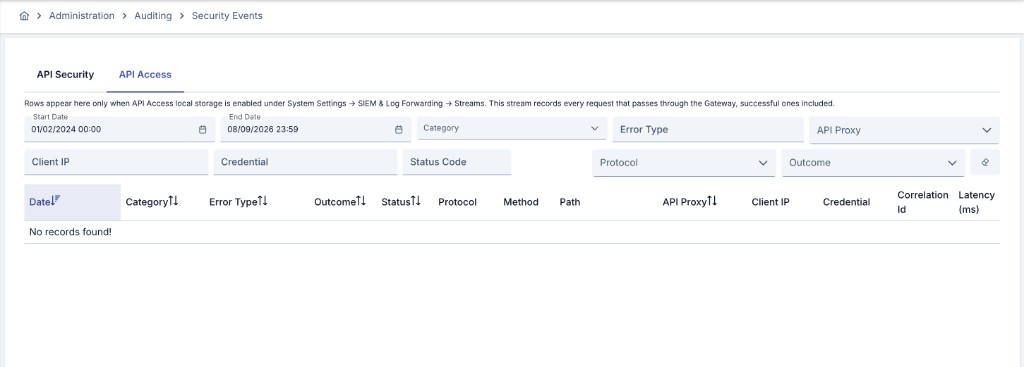
The API Access tab covers everything the Gateway handled, not only what went wrong, which makes it the tab you reach for when you need to answer who called what, and when rather than what was blocked. That completeness is also its cost: it records one row per request, so the collection grows at the rate of your traffic.
For that reason it is off by default, and stays off after an upgrade. Turn it on from Administration → System Settings → SIEM & Log Forwarding → Streams, on the API Access row's Store in the Apinizer database switch. The switch asks for confirmation before it takes effect, and the change is applied when you save the page. Until it is on, the tab stays empty — including when the API Access stream is already being forwarded to a SIEM destination, which is a separate setting.
Before you turn it on, give the collection a short retention — 3 to 7 days is the recommendation, against the 30 days that suits API Security.
A request that was blocked or failed appears on both tabs. That is deliberate: the API Security tab stays a clean incident list whether or not API Access is on. When you forward both streams to a SIEM, see SIEM & Log Forwarding for how to keep them from being counted twice.
Retention
API Security events are always written to the Apinizer database — local storage cannot be turned off for that tab, the same as Audit Records and Login Records. API Access events are written only while their switch is on, as described above.
Automatic cleanup of old records is configurable and off by default for both, from the API Security Events and API Access Events rows on the Application Log Cleanup Tasks page. Both the daily and the hourly cleanup task honor these settings.
A proxy or project running under the No Persist Data Retention Profile produces no Security Events record for its requests at all, on either tab — the same gate that suppresses traffic logs. The No Payload profile suppresses neither tab, because a Security Events record never carries a body in the first place.
Forwarding to SIEM
Security Events can also be forwarded to a SIEM destination: the API Security tab as the API Security stream, and the API Access tab as the API Access stream. See SIEM & Log Forwarding for how to configure destinations, rules, and payload formats for this stream. A destination you create for this stream starts with a default masking profile — Turkish identity number, IBAN and card number — which you can review and edit in the destination's privacy table before saving.