Credential Synchronization
Credential Synchronization automatically turns users from Database Provider, LDAP Active Directory, API Authentication Provider, and OIDC Provider (Keycloak only) sources into Credential records, either on a schedule or on manual trigger. This keeps credentials centrally up to date from the external source instead of being created manually for each provider.
Sync Profile
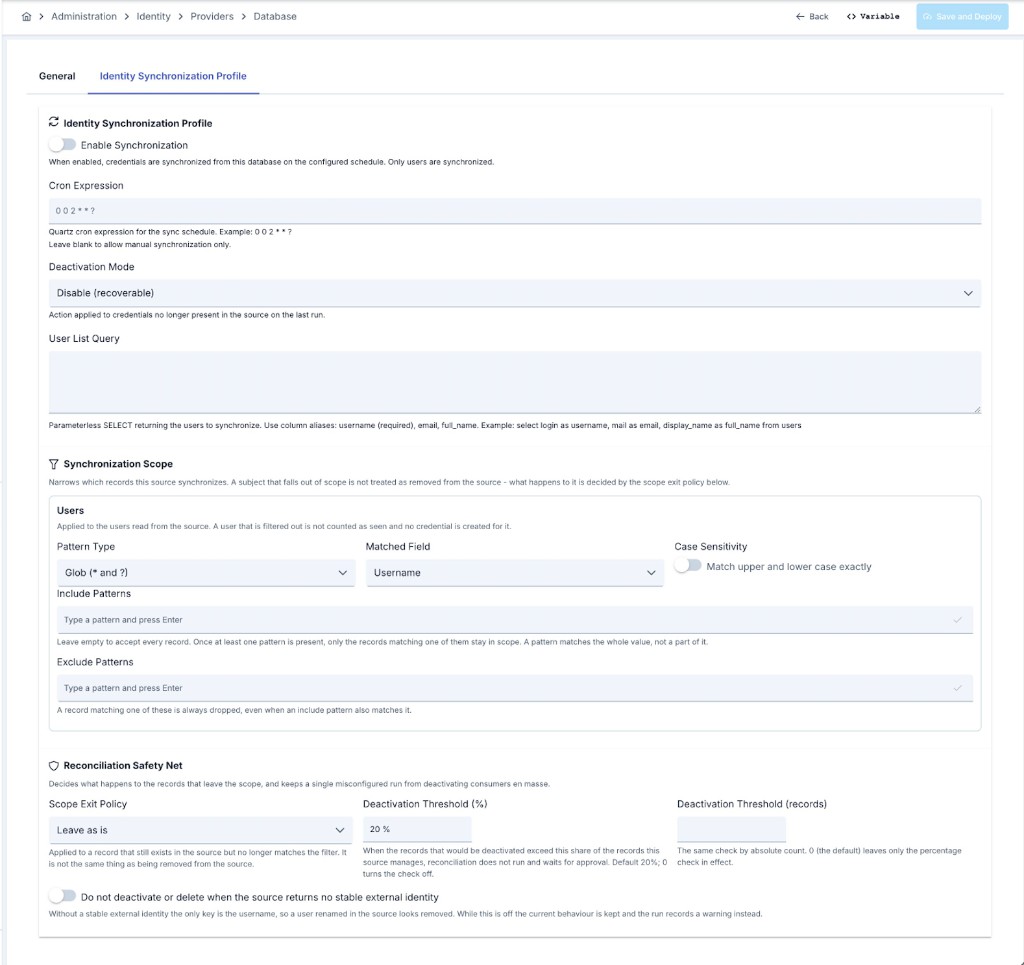
These common fields live in a Sync Profile section of each provider's edit screen: a separate tab for Database Provider, API Authentication Provider, and OIDC Provider (Synchronization for OIDC); for LDAP Active Directory, a Synchronization card with a Configure button that opens them in a drawer — see LDAP Active Directory.
| Field | Description |
|---|---|
| Enable Synchronization | When enabled, credentials are synchronized from this source according to the configured schedule. When disabled, neither the scheduled nor the manual synchronization runs. |
| Cron Expression | A Quartz cron expression that determines how often synchronization runs (e.g. 0 0 2 * * ?). It is optional. If left empty, synchronization can only be triggered manually from the Synchronization screen. While the field is empty it shows a grey hint text, which is not a value. |
| Deactivation Mode | The action applied to credentials — and, when group synchronization is on, to organizations — whose corresponding user or group is no longer present in the source on the last run: • Disable (recoverable) — the credential is disabled but its record is kept. This is the default. • Delete (recoverable) — access is cut the same way it always was, but the record itself is no longer physically deleted: a credential is disabled and retired in place, an organization is retired in place with the bond to its child credentials preserved. Permanent cleanup of retired records is planned as a separate maintenance capability. • None (keep as is) — no action is taken; drift is accepted. |
Delete is not the same thing as the Tombstone scope exit policy, even though both retire a record in place rather than removing it. Tombstone leaves the record's access untouched — it only marks it; Delete still cuts access, exactly as it did before this version, it just no longer removes the row while doing so.
The option is still labelled Delete (irreversible) on the dropdown itself — the label has not caught up with the change described above yet. The behavior above is the current one regardless of that label.
Provider-specific additional fields are described below.
LDAP Active Directory
| Field | Description |
|---|---|
| Base DN (from the connection) | Read-only. Synchronization reads users and groups under the Base DN of the selected LDAP connection. To narrow the search, fill in User Base DN Attribute or Group Base DN Attribute in the object class definitions. |
LDAP synchronization synchronizes not only users but also the organization tree the users belong to. The parent of an organization comes from the directory tree: an OU or group that sits under another OU or group in its DN is placed under it. Active Directory cannot place a group under another group, so a group that is a member of another group is placed under that group. An organization has one parent: when a group is a member of several groups, the group with the longest DN becomes its parent. The OIDC (Keycloak) source can also synchronize the group tree in addition to users when Synchronize Groups is enabled. The Database and API sources build an organization tree too — derived from the organization path on each user row and, optionally, completed from a separate organization list query/endpoint — but none of the four sources synchronizes roles except OIDC, and Database/API do not synchronize groups as separate objects the way LDAP and OIDC do. On the organization screens, the code of an organization that comes from LDAP is shown as <provider name>: <group DN>. The stored code does not change; hover over the code to see the full value.
Database Provider
| Field | Description |
|---|---|
| User List Query | A parameterless SELECT statement that returns the users to synchronize. The returned columns must use the following aliases: username (required), email, full_name. Example: select login as username, mail as email, display_name as full_name from users |
API Authentication Provider
| Field | Description |
|---|---|
| User List URL | The endpoint that returns the list of users to synchronize. |
| HTTP Method | The HTTP method used when calling the user list endpoint. |
| Timeout | The request is terminated after this many seconds. |
| Request Body | An optional request body sent to the user list endpoint (for POST/PUT). |
| Request Headers | Optional HTTP headers sent with the user list request (e.g. Authorization). |
| Users Array JSON Path | The JSON Path expression to the user array in the response. Default: $ |
| Username JSON Path | The JSON Path expression to the username within a user item. Required. |
| Email JSON Path | The JSON Path expression to the email within a user item. |
| Full Name JSON Path | The JSON Path expression to the full name within a user item. |
OIDC Provider (Keycloak)
Available only when the provider's Vendor is Keycloak — see OIDC Provider for the full field reference.
| Field | Description |
|---|---|
| Realm | The Keycloak realm to synchronize from. |
| Admin API Base URL | The base URL of the Keycloak Admin REST API. |
| Sync Client ID | The service-account client used to call the Admin API. Requires, at minimum, the view-users and query-groups realm-management roles — see Keycloak Service Account Roles. |
| Sync Page Size | The page size used when paging through Keycloak's user list. Default: 250. |
| Synchronize Groups | When enabled, the realm's group tree is also synchronized as Credential organizations. |
| Role Sync Source | Realm Roles, Client Roles, or Groups — which Keycloak role assignment becomes the synchronized user's roles. |
Unlike the other three sources, users synchronized from Keycloak are passwordless — the password stays with Keycloak, and authentication is verified through the OIDC Authentication policy's token validation, not through a stored password. See Password Model and Username Contract.
Synchronization Scope
By default a source synchronizes everything it can read. The Synchronization Scope card on the same tab narrows that set, with separate include/exclude pattern lists for Users, Groups / Organizations (LDAP, OIDC, and Database — not yet offered on the API provider's screen), and Roles (OIDC only).
| Field | Description |
|---|---|
| Pattern Type | Glob — * matches any number of characters (the / separator included), ? matches exactly one, and every other character is literal, so a . or a ( in a pattern means that character. Regular Expression — the pattern is compiled exactly as written; see the warning below. |
| Matched Field | Which field of the record the patterns are applied to. Users can be matched on username, e-mail or full name on every source, on external identity on LDAP and OIDC, and on their DN (path) on LDAP. Groups are matched on path or name, roles on name. |
| Case Sensitivity | Off by default: patterns match regardless of case. |
| Include Patterns | While empty, every record is a candidate. Once at least one pattern is present, a record has to match one of them to stay in scope. |
| Exclude Patterns | A record matching one of these is dropped even when an include pattern also matches it — exclude always wins. |
A pattern matches the whole value, not a part of it: admin matches the user named admin and nothing else, while *admin* matches every username that contains it.
When the matched field is Path, both the record's value and the pattern are normalized before they are compared, so an LDAP DN and a Keycloak group path reduce to the same shape: CN=Dev,OU=Eng,DC=acme,DC=corp and /Eng/Dev both become /Eng/Dev. One pattern therefore means the same thing on every source, and you may write it in whichever dialect you find natural — ou=eng,dc=acme and /Eng/* are equally valid.
Filter patterns are compiled once, at the very start of the run. A pattern that does not compile, that is longer than 512 characters, or that is rejected as unsafe to evaluate (a shape that can make matching take exponentially long on non-matching input) ends the run as Failed — the run does not carry on as though the filter were absent. Continuing without it would bring back into scope everyone an exclude pattern was meant to drop, which is by far the more dangerous of the two outcomes. Globs are checked the same way, because a pattern such as *a*a*a*a*b is just as expensive once translated.
What Happens to a Record That Leaves the Scope
A user that still exists in the source but no longer matches the filter is not treated as removed from the source. Its credential is stamped as seen by the run — so the reconciliation step does not count it as stale — and the Scope Exit Policy decides what happens to it:
| Policy | Effect |
|---|---|
| Leave as is (default) | The credential is left untouched. |
| Disable | The credential is disabled; the record is kept. |
| Tombstone | The credential is marked as tombstoned. |
A manually created credential, and a credential owned by another identity source, are never touched by this policy — the same protections that apply to synchronization in general apply here.
How many records the filter dropped in a run is shown in the Filtered column of the run history. No per-user issue record is written for them: a scope narrowing that drops tens of thousands of users would otherwise fill the run's issue list and push the real skip reasons out of it.
Reconciliation Safety Net
The fields below sit under the scope filter and govern what reconciliation is allowed to do.
| Field | Description |
|---|---|
| Scope Exit Policy | What happens to a record that leaves the scope — see above. Default: Leave as is. |
| Deactivation Threshold (%) | When the records that would be deactivated exceed this share of the records the source manages, reconciliation does not run and waits for approval — see Deactivation Threshold and Reconcile Approval. Default: 20%. |
| Deactivation Threshold (records) | The same check by absolute count. Default 0, which leaves only the percentage check in effect. |
| Do not deactivate or delete when the source returns no stable external identity | Off by default. See the warning below. |
Reconciliation decides that a user is gone by not seeing it in the run. Without a stable external identity — an id that stays the same when the user is renamed — the only key is the username, so a user renamed in the source looks removed, and a destructive reconciliation acts on that appearance.
Which sources return such an identity today:
| Source | Stable external identity |
|---|---|
| OIDC (Keycloak) | Yes — the user's Keycloak UUID. |
| LDAP / Active Directory | Only when a stable attribute (for example entryUUID or objectGUID) is among the attributes fetched for the user object class. Synchronization does not request one on its own — changing the existing directory queries would be a change of behavior in itself. |
| Database | Optional — via the external_id column, when the user list query includes it. A row that leaves it blank falls back to matching by user name for that row. |
| API | Optional — via the Stable Id JSON Path field, when configured. A row it does not match falls back to matching by user name for that row. |
Current behavior is unchanged in this version. A source with no stable identity still disables or deletes exactly as it did before; the run only records a warning in its issue list so that the risk is visible where it happens. Turning Do not deactivate or delete when the source returns no stable external identity on makes reconciliation stop for that source instead of acting on a username.
That opt-in is planned to become the default in a future major version. Turning it on early is the safe direction for LDAP connections that do not fetch a stable attribute, and for Database and API sources that leave the stable-identity column or field unconfigured — the sources where a stable identity cannot be obtained at all.
Synchronization Status and History
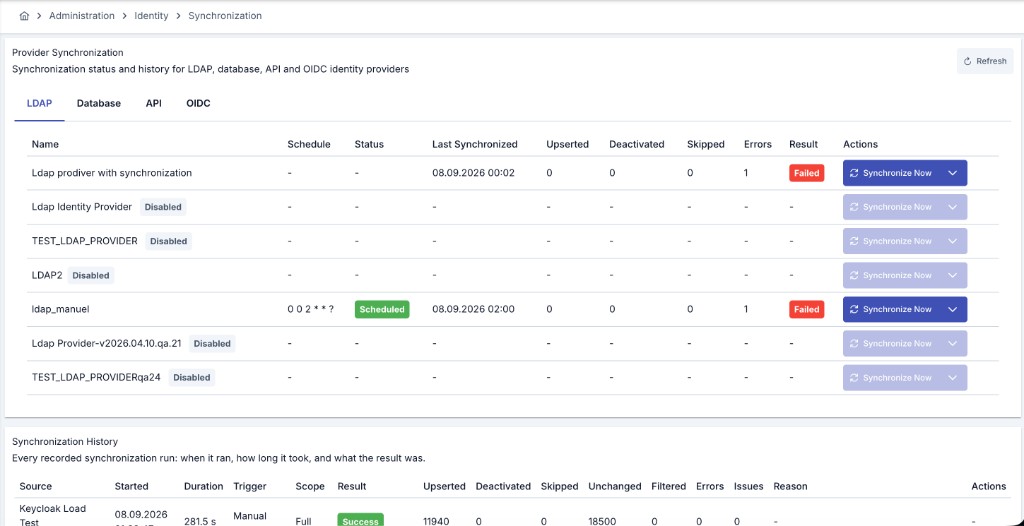
The screen opened from Identity > Providers > Synchronization lists LDAP, Database, API, and OIDC sources in separate tabs. Each row shows:
| Field | Description |
|---|---|
| Name | The name of the identity provider, with its description under it. A source whose synchronization is off shows a Sync disabled badge. |
| Schedule | The job status as a badge (Scheduled, Running, Paused, Blocked, Complete, or Error) and the cron expression under it. A source with synchronization on but no cron expression shows a Manual only badge. |
| Last Synchronized | The completion time of the last run. |
| Result | The result of the last run as a badge: Succeeded, Warning, or Failed. Hover over the badge to see the reason. While a run of the source is queued or running, this cell shows the running badge instead. |
| Upserted, Deactivated, Skipped, Errors | The record counts processed on the last run. A zero is shown in grey. A non-zero Deactivated count is an orange badge. A non-zero Errors count is a red badge. |
Starting a Synchronization
Each row has a Synchronize… button. It starts a synchronization without waiting for the schedule. The start has two steps: a dialog where you select the scope, and a second confirmation.
Synchronize Now starts the run in the background and returns at once — the counts shown the moment the button is pressed still belong to the previous run.
The run record does not wait, though: a row appears in the Run History table the moment the button is pressed, in Queued state; it becomes Running once a node picks it up, and takes its result when it finishes. A run that never manages to start is therefore still visible on screen.
Seeing the result no longer requires a manual refresh on this screen: the history table follows the running synchronization live, and the moment the run finishes, the summary counts on the source rows above are refreshed too. The message shown after the trigger says as much — it no longer asks you to refresh the table.
The Synchronize… button is disabled for a source whose synchronization is off (the Enable Synchronization field is off). It is also disabled while a run of that source is queued or running. Hover over the button to see the reason.
A Full or Users only run can deactivate consumers. If you are not sure about the result, first run a dry run on the edit screen of the provider: Directory Preview > Full scan (dry run) for LDAP, Source Preview with Dry run for Database and API, Preview Directory for OIDC.
-
Click Synchronize… on the row of the source. The synchronization dialog opens.
-
Check the connection block at the top of the dialog. It shows the name and the description of the source, and where the source is read from:
- LDAP: the connection, the server address, the security (LDAPS or StartTLS), the base DN, the bind DN, the user base DN, the group base DN, and the membership mode.
- Database: the connection, the JDBC URL, and the database user.
- API: the user list URL, the HTTP method, and the organization list URL (when it is set).
- OIDC: the issuer URL, the realm, the admin API base URL, the client ID, and the group synchronization setting.
The block never shows a password or a secret. If you cannot view connections, some lines are missing and the dialog tells you so.
-
Select the scope under What should be synchronized?. LDAP and OIDC sources have three scopes:
- Full (Recommended): users, groups/organizations and their parents are read. Then the records that left the source are handled.
- Users only: consumers are created or updated. The organization tree does not change.
- Groups only: only the organization tree is updated. Consumers do not change.
Database and API sources support only full synchronization. For these sources, the dialog shows a note instead of the scopes.
-
Read the Last run and Expected duration lines. The expected duration comes from an earlier run of the source, preferably a run with the same scope. If there is no earlier run, the expected duration is unknown.
-
Read the information note. It changes with the scope:
- Full and Users only: at the end of the run, consumers that are no longer in the source are deactivated or deleted, according to the deactivation mode of the source.
- Groups only: at the end of the run, organizations that are no longer in the source are handled. Consumers do not change.
-
Click Start synchronization. A second confirmation opens. It shows the scope, the source, what the run changes, and the expected duration.
-
Click Yes, start to start the run. To go back to the dialog without starting a run, click No, go back.
While a run is queued or running, the Result cell of its row shows a badge such as Running · Users only or Queued · Full. The line under the badge shows the phase (Reading the source or Applying the changes) and the number of users processed so far. The page refreshes this information itself; the phase and the count change about every 15 seconds. When the run ends, the row shows the new result.
The rows learn about a running synchronization from the first page of the Synchronization History table below. If you move that table to a later page, the running badge is not shown until you go back to the first page.
A Synchronize Now button is also on the detail screen of a synchronized credential or organization, for users with identity management permission. It starts a full synchronization of the entire source provider of the record, not only that one record.
Choosing What a Manual Run Covers
On LDAP and OIDC sources the Synchronize Now button carries a scope menu; pressing the button itself still runs a full synchronization.
| Scope | What it does |
|---|---|
| Full | Users, the group/organization tree and roles, then reconciliation. This is what a scheduled run always does, and what Synchronize Now did before this version. |
| Users only | Reads users only. The group/organization tree is not read — so it is not reconciled either, and users keep the organization and roles they already have instead of being cleared by a pass that fetched nothing. A user disabled in the source is still reflected as disabled. |
| Groups only | Reads the group/organization tree only. No user is read or written; only the organization reconciliation runs. |
Database and API sources always fetch users and organizations together in a single pass, so they have no separate users-only or groups-only phase, and their button carries no scope menu — every run on these two sources is Full. A run's scope is shown in the Scope column of the run history; rows recorded before this version show Full, which is what those runs were.
The distinction the run scope carries is between "it was fetched and came back empty" and "it was never fetched". A users-only run does not read the group tree, so it makes no statement about organizations and roles, and the engine leaves both alone. A full run that reads the tree and finds a user in no group does make that statement, and the user's organization is cleared — as it always has been.
Run History
Beyond the last-run snapshot in the table above, Apinizer keeps a permanent record of every synchronization run. A Synchronization History card appears at the bottom of two screens:
- The Identity > Providers > Synchronization screen described above — the card here lists runs from every source in the current project, with a Source column identifying which provider each row belongs to.
- Each provider's own view screen (LDAP Active Directory, Database Provider, API Authentication Provider, OIDC Provider) — the same card, scoped to that source only, without the Source column.
Both surfaces show the same columns, paged from the server (10 / 20 / 50 rows per page):
| Column | Description |
|---|---|
| Source | The provider's name and type. Shown only on the project-wide Synchronization screen. |
| Started | The time the run was queued — the row is born at this moment. |
| Duration | How long the run actually executed; time spent waiting in the queue is not counted. |
| Trigger | A Scheduled or Manual badge. For a manual run, the username of the administrator who started it is shown under the badge. |
| Scope | The scope of the run as a badge: Full, Users only, Groups only, or Reconcile apply — see Choosing What a Manual Run Covers. Rows recorded before this version show Full. |
| Result | The run's current state as a badge: Queued, Running, Success, Warning, Failed, Interrupted, Cancelled, or Awaiting Reconcile Approval — see Run Lifecycle. |
| Upserted, Deactivated, Skipped, Unchanged, Errors | The record counts processed by this run — see Skipping Unchanged Users for what Unchanged means. A zero is shown in grey. A non-zero Deactivated count is an orange badge. A non-zero Errors count is a red badge. |
| Filtered | How many records the synchronization scope filter dropped. Runs recorded before the filter existed show - rather than 0: not knowing and dropping nothing are different statements. |
| Issues | The number of user-level records (warnings and errors) of the run, as a badge such as 3 issues. Click the badge to open the issues panel — see Run Issue List. Runs that executed before the issue log existed show - in this column. |
| Reason | A translated explanation of the result. A Failed, Interrupted, or Cancelled run also shows a reason badge classifying why — see Failure Reason. |
| Actions | Carries Approve Reconciliation while a staged reconciliation is still approvable — see Deactivation Threshold and Reconcile Approval. Carries Cancel while the run is still Queued or Running — see Cancelling a Run. |
Additional Columns for LDAP Sources
Rows for LDAP sources carry these extra counters in addition to the columns above:
| Column | Description |
|---|---|
| Users read | Total number of user entries read from the directory in this run. |
| With membership attribute | Users whose own entry carried the membership attribute (memberOf and the like). |
| Groups read | Total number of group/OU entries read in this run. |
| Groups with members | Groups whose member attribute was non-empty. |
| Groups filtered out | Groups dropped by the scope filter; this is your own scope decision, not an error. |
| Linked (S1) | Users attached to an organization from the membership attribute on their own entry. |
| Linked (S2) | Users attached from a group member list. |
| Linked (S3) | Users attached from the OU their DN sits under. |
| Unlinked | Users no strategy could attach to an organization. |
| Re-enabled | Records this run automatically re-enabled because they came back in the source. |
These columns are populated only for LDAP source runs. They show - for LDAP runs recorded before this
counter set existed, and for every non-LDAP source. For field descriptions, see
LDAP Active Directory.
Additional Columns for Database and API Sources
Rows for Database and API sources carry these extra counters in addition to the columns above:
| Column | Description |
|---|---|
| Organizations read | Rows read from the source's organization list. 0 means no organization list is configured. |
| Organizations derived | Organizations built from the path on the user row because the organization list has no matching row. |
| Linked | Users attached to an organization. On LDAP sources the same information is split into the three S1/S2/S3 columns, so this column stays empty there. |
| Disabled at source | Records this run switched off because the account is disabled at the source. Distinct from Deactivated, which means the record is no longer seen in the source at all. |
| Pages read | Pages actually read from a paging source. Empty for sources that read everything in one query. |
These columns are populated only for Database and API source runs. They show - on LDAP and OIDC runs, and on runs recorded before this counter set existed.
Failure Reason
When a run's result is Failed, Interrupted, or Cancelled, the Reason column also carries a small reason badge classifying why, together with a tooltip that suggests what to do next — the full, untranslated error message stays available for deeper troubleshooting.
| Reason badge | When it applies | What to do |
|---|---|---|
| Unreachable | The source could not be reached at all — a network, DNS, or TLS failure. | Check network connectivity to the source and its TLS configuration. |
| Timeout | Connecting to the source, or reading from it, did not finish within the configured timeout. | Check whether the source is responsive, or raise the timeout if it is simply slow. |
| Auth rejected | The source rejected the credentials used to connect (an HTTP 401, or the equivalent LDAP bind failure). | Check the credentials configured for this source. |
| Permission missing | The connection succeeded, but the account used does not have permission to read what this run needed (an HTTP 403, or the equivalent LDAP permission failure). The tooltip names which read failed — Users, Groups, or Roles. For a directory source this also covers a bind account that may connect but may not search under the configured base DN. | Grant the missing read permission for the named area. For a directory source, grant the bind account read and search rights on that branch. For an OIDC (Keycloak) source, see Keycloak Service Account Roles. |
| HTTP error | The source returned an HTTP error other than 401 or 403. The status code is shown alongside the badge. | Check the source's own logs for that status code. |
| Configuration | The run could not even attempt to reach the source — a required connection field was missing or invalid — or the directory refused the read because the configured base DN does not exist. The reason text names the base DN that was tried. | Check the source's connection settings. For a directory source, correct the base DN of the connection or of the user/group object class. |
| Interrupted | The run went silent before finishing — see Run Lifecycle. | Trigger the synchronization again. |
| Cancelled | The run was cancelled before it finished — see Cancelling a Run. | No action needed; trigger a new run if the work is still wanted. |
| Unknown | The failure does not match any of the classifications above. | Check the untranslated error message for detail. |
Every run is recorded — including a run that failed outright and a run that was rejected during pre-checks before synchronization could even start (for example, a missing connection or a required field left empty). The run an administrator is looking for is often the one that didn't work. Because the row is created before the scheduler is triggered, even a run whose trigger failed leaves a row behind, carrying the Failed result and its reason; previously such an attempt left no trace at all.
A Warning result means the run finished without error, but its deactivation/reconciliation step was skipped as a safety measure. There are two possible causes:
- The source returned zero users. Nothing is upserted, deactivated, or skipped-and-counted for that run. Check the source's user filter, base DN, or query settings.
- The user list could only be read in part. The directory server did not support paged results (or did not allow them), so only the first page was read. The records that were read are upserted normally; the only step skipped is deactivation — because a partial list would make every record on an unread page look as if it no longer existed in the source. The same applies when even a single record read from the directory cannot be converted: the run counts as incomplete and deactivation/deletion is skipped. See LDAP Active Directory.
The goal is the same in both cases: keeping a transient source outage — or an incomplete read — from causing a mass deactivation.
A directory that refuses the read is not one of these two cases. A base DN that does not exist, and a bind account that may not search under it, end the run as Failed with a Configuration or Permission missing badge and a reason that names the base DN — not as a Warning about an incomplete read. Both are settings an administrator can correct, and reporting them as a partial read made them indistinguishable from a directory server that simply refuses paging.
The source name in history is a snapshot captured when the run was recorded. Renaming the provider does not change that snapshot. Deleting the provider removes its run history and issue lists together.
Run Lifecycle
Every run is born Queued, becomes Running once a Manager node takes it over, and ends in a result state. Result states are final — once a run has concluded, its result no longer changes.
| State | Meaning |
|---|---|
| Queued | The run is recorded and the scheduler has been triggered; no node has picked up the work yet. |
| Running | A Manager node is executing the run and reports a heartbeat while it works — throughout every phase, including the initial fetch from the source. A large source (tens of thousands of users) that takes longer than ten minutes to read is therefore not mistaken for an abandoned run. |
| Success | The run completed; upsert and (where configured) deactivation both ran. |
| Warning | The run finished without error, but its reconciliation step was skipped as a safety measure — see the Warning note above. |
| Failed | The run errored, was rejected in pre-checks, or could not be triggered at all. |
| Interrupted | The run went silent before finishing: the node executing it stopped sending heartbeats (it was restarted, shut down, or lost the network). Its counters may be incomplete. |
| Cancelled | An administrator cancelled the run before it finished — see Cancelling a Run. Nothing fetched during the run is written: records read from the source are held in memory until the fetch completes, and a cancellation during the fetch discards them along with skipping the deactivation/reconciliation step. |
| Awaiting Reconcile Approval | The run finished without error and its upsert step ran, but the number of records that would have been deactivated exceeded the deactivation threshold, so the reconciliation step did not run at all and is waiting for an administrator. Nothing was deactivated or deleted. See Deactivation Threshold and Reconcile Approval. |
A maintenance task runs every five minutes and scans for unfinished runs. A Running run whose heartbeat has been silent for roughly ten minutes, and a Queued run that no node has taken over for roughly fifteen minutes, are both marked Interrupted, which releases the source so it can be synchronized again.
When you need to tell the two apart in a customer environment, the Manager application log is enough at INFO level: the sweeper writes a WARN line for every run it marks — Identity sync run <id> ... marked INTERRUPTED: no heartbeat for <n>s (lastHeartbeatAt=..., phase=..., processed=...) — and the run itself writes fetch starting, one ... phase complete line per phase (groups, roles, users) with the number of source requests and the elapsed time, and fetch complete. A source request slower than five seconds is logged as SLOW Keycloak admin read with its path and duration. If fetch starting is present but no phase complete follows and the node kept running, the source is answering too slowly; if the log simply stops, the node went down. With several Manager replicas, check every replica's log.
Marking a run interrupted never touches the source's last-synchronization counters: the abandoned run produced no counts of its own, so the numbers from the previous run stay as they were rather than being overwritten with a misleading zero.
Runs in the Awaiting Reconcile Approval state are not part of that scan. Such a run has not died, it has finished — it simply carries a decision nobody has applied yet. Sweeping it would turn the window an administrator has to review the approval into ten minutes.
Cancelling a Run
A Cancel action appears in the Actions column of the run history table while a run is still Queued or Running, for administrators with identity management permission on the source.
Cancelling does not stop the run instantly. The engine checks for the cancellation request at the next page boundary while it pages through the source, and stops fetching there. Records read from the source during the fetch are held in memory, not written as they arrive, so a cancellation during the fetch discards them — nothing from that run reaches a credential. The deactivation/deletion step (reconciliation) is skipped as well, for the same reason a partial read skips it elsewhere: a partial list would make every record on a page that was never fetched look as if it no longer existed in the source.
The run's own result becomes Cancelled, and because reconciliation did not run, the source's last-synchronization status reads Warning, the same as any other run whose reconciliation step was skipped as a safety measure.
Cancelling a run that has already finished is refused with 409 and a translated "already finished" message.
Deactivation Threshold and Reconcile Approval
The reconciliation step disables or deletes the credentials that no longer appear in the source, according to the Deactivation Mode setting. A single misconfiguration on the source side — a wrong base DN, a narrowed search filter, a group that emptied out — can turn that step into an operation that cuts off thousands of consumers in one run.
So reconciliation takes two counts before it starts: how many records this run would touch, and how many sync-managed records the source owns in total. If the ratio exceeds the deactivation threshold, reconciliation does not run at all — not a single record is written — and the run closes in the Awaiting Reconcile Approval state.
The threshold values are configured in each identity provider's synchronization settings; the percentage threshold defaults to 20%, and the count threshold is undefined by default (only the ratio is checked). Setting a threshold to zero or a negative number turns that check off; with both turned off no measurement is taken at all.
The check belongs to the destructive path only: it is made when the Deactivation Mode is Disable or Delete, and skipped when it is None, where nothing would be deactivated in the first place. It is also a safety net rather than a policy — a filter change small enough to stay under the threshold does not trigger it, and what happens to those records is decided by the scope exit policy.
While a run is awaiting approval:
- The source is not locked. The run has closed, so the source can be synchronized again and scheduled runs keep working. A new threshold breach that happens while you wait refreshes the pending approval with the current measurement — each source has at most one approval waiting, and it always carries the newest run's numbers. The approve action then belongs to that newer row: approving from the older one is refused, because the numbers on that screen are no longer the numbers that would be applied.
- The source's last synchronization result reads as Warning. That is accurate: the run finished without error and nothing was deactivated. The wait for approval lives on the run row, not in the source's summary.
- An approval is valid for 24 hours. A lapsed approval cannot be applied; the source's next run produces a new one from a current measurement.
When an administrator approves reconciliation from the row in the Synchronization History table, that same run does not resume: a new run starts that only applies the reconciliation. It fetches nothing from the source and applies exactly the measurement that was approved.
Immediately before touching the first record, the apply run re-verifies the approval: the candidate list, the synchronization filter and the deactivation mode must be identical to what they were when the approval was granted. If the filter was edited in the meantime, if the mode was switched from disable to delete, or if a normal run re-stamped some of the candidates, the apply is refused, the run ends as Failed, and no record is changed.
The way forward in that case is to run the synchronization again and approve the new result. The system never silently recomputes and applies — an approved number differing from the work performed is exactly what this mechanism exists to prevent.
The approving user is recorded, and an approval is single-use: once applied it cannot be used again. No separate permission is required — an administrator who can manage the identity provider can approve.
Following a Running Synchronization
While a Queued or Running row is visible in the Synchronization History table, the table updates itself silently about every five seconds: the paginator does not jump back to the first page, an expanded issue list stays open, and no loading spinner flickers. The updates stop by themselves once the run reaches a result — with no active run on screen, the table issues no requests at all.
This behavior belongs to the table itself, so it works the same way on all five screens the table appears on: the Identity > Providers > Synchronization screen and the view screen of each of the four providers (LDAP, Database, API, OIDC).
A run's state (Queued → Running → result) is reflected immediately, but the number of records processed so far and the current phase are written by the engine only about every fifteen seconds. So even though the table refreshes every five seconds, those counters advance in steps; the same number staying put across a few refreshes is expected behavior, not a stall. Refreshing more often would not make the counters move faster — it would only add read load.
The live refresh has two limits:
- It engages only when a running row is on the currently displayed page. Runs are sorted newest first, so an active run is on page one by definition; while paging back through history the table is not refreshed.
- It does not pick up a scheduled run that starts in the background — the live refresh only follows a run row that is already on screen. This is why each of the four provider view screens also carries a Refresh button next to the Synchronization History heading: refreshing the table once brings the new run in.
On the Identity > Providers > Synchronization screen, the moment the table sees a run finish, the summary counts on the source rows above it are refreshed as well. The last-run summary box on the provider view screens is not part of that refresh; use the Refresh button on those screens to update it.
Single Run per Source
Only one run can be active for a given identity source at a time. While a run is queued or running, a second trigger for the same source is rejected with an "already running" error; synchronization of other sources is unaffected.
The rule holds when Manager runs as a cluster of several nodes: the database decides the winner, so even simultaneous triggers on two nodes synchronize the source only once. In earlier versions this check consulted only the memory of the node that received the request, and could not see a run in progress on another node.
Run Issue List
A run may skip individual users from the source and carry on with the rest. Previously those skips only moved the Skipped counter; now each one is written, with its reason, to the run's own issue list.
Clicking the count in the Issues column expands the row and lists the first 50 records for that run: severity, the user in question, when it occurred, and the reason. The recorded reasons are:
| Reason | When it occurs |
|---|---|
| Manually created credential conflict | A credential created outside synchronization already exists for that username; synchronization does not overwrite it. |
| Managed by another source | The credential belongs to a different identity source and is not taken over. |
| Cross-project username conflict | The same username is already registered in another project, so no new credential is created. |
| No identity key | The record coming from the source has neither a username nor an e-mail address. |
| External identity conflict | The user's stable external identity is already bound to a different credential, or a claim on an identity that has left the source's scope was refused. The user is skipped for that run: no credential is created or updated until an administrator resolves the ownership. |
| Deactivated without a stable external identity | Reconciliation disabled or deleted records on a source that returns no stable external identity. This one is a warning about the run as a whole rather than about a single user: nothing was skipped, and the run's result is unaffected. |
| Duplicate login name | Another source record read on the same page uses the same login name. The first one read is kept; the second is skipped, so only one credential is created for that name. On LDAP, both records' distinguished names are recorded so you can tell which two directory objects collided. |
At most 1000 issue records are kept per run. If a source produces more skips than that, the Issues column still shows the true total, but the stored list stops at 1000 and the expanded row displays a notice saying so. This keeps a single run record from growing out of proportion on very large directories.
Three further issue reasons are specific to LDAP and do not skip a credential — the user is still created or updated, only the organization link is affected:
- One issue per user (up to 500 per run) when that user could not be linked to any organization by any membership source.
- One run-level issue once the unlinked count passes that 500 cap, summarizing how many more users had the same result.
- One run-level issue when every user read in the run ended up unlinked — this points at a configuration problem (membership mode, member attribute, group scope) rather than at individual users.
To see which membership source failed for a given user and why, use Explain, or the Directory Preview's Issues tab (codes I01–I04) — see Troubleshooting.
Skipping Unchanged Users
Synchronization keeps a fingerprint of the fields it writes for each user. On the next run, if the value coming from the source produces the same fingerprint as last time, the record is not rewritten and is not redeployed to gateways — only its "last synchronized" timestamp is refreshed, together with every other unchanged record's, in one bulk operation.
This is why, in a healthy repeat run against a source that has not changed, seeing Updated 0 / Unchanged N is normal rather than a sign that the run did nothing — see the Unchanged counter in the run history.
The first run after upgrading to a version that has this behavior rewrites every record once, because no fingerprint exists yet to compare against; from the next run on, only records that actually changed are written.
If the bulk timestamp refresh itself fails, the run ends in Warning and its reconciliation step is skipped — so that users whose timestamp could not be refreshed are not mistaken for users who left the source.
Issues of a Run
Click the N issues badge in the Issues column. The issues panel opens on the right side of the screen and covers at least half of it. The table stays in place behind the panel.
The panel contains:
- Header: the source name, the start time, the duration, and the result, scope, and trigger badges of the run.
- Summary boxes: Upserted, Deactivated, Warnings, and Errors.
- Reason: the explanation of the run result, as an information note.
- Severity filter: All, Warning, or Error, each with its record count.
- Records: one card per record, with the severity badge, the time, the user, and the reason.
The panel shows the first 50 records of the run. The Warnings and Errors boxes and the filter counts cover these records. If the run wrote more records, the panel shows how many of the total are on screen. If the server kept only part of the records, a warning tells you so.
Retention
History records are not deleted automatically. An administrator can turn on automatic cleanup for the Identity Synchronization History entry on the Application Log Cleanup Tasks screen; while it stays off (the default), no history record is ever removed regardless of age.
This setting now also clears the run issue lists along with the run rows; the issue list has no separate retention setting of its own. While the setting is off (the default) neither is deleted; when it is on, both are deleted by the same age. Deleting an identity source removes that source's run records and issue lists together, regardless of the setting.
Audit Attribution
When a synchronization run changes a credential, the resulting entry in Audit Records shows its Principal as sync:<SOURCE_TYPE>:<source name> (for example sync:LDAP:corp-ad or sync:OIDC:keycloak-prod) instead of the generic SYSTEM — so a synchronization-driven change can be told apart from one made by a person, and traced back to the source that made it. The administrator who manually triggered the run is not part of this value; that name appears in the Trigger column of the Run History table instead.
Source Key
Every identity source is assigned a permanent source key derived from its name when it is created (for example, a provider named Keycloak Prod gets keycloak-prod). The key contains only lower-case letters, digits, and dashes, and is unique within one project for one source type.
- The key is immutable: renaming a source does not change it, so external references to the source survive a rename.
- It cannot be edited from the screen; the system generates it. If a second source with the same name is created in the same project, a number is appended to the key.
- Uniqueness is per source type: an LDAP source and an OIDC source in the same project may carry the same key, and that is not a conflict.
- On import the key in the package is ignored: when an existing record is replaced, the target's own key is kept; when the record is imported as new, the key is re-derived from its final name.
Consumer Key
Every credential created by synchronization — from LDAP, Database, API, or OIDC (Keycloak) — is assigned a permanent consumer key, the same way a manually created credential is, and carries a first synchronized timestamp recording when it was first written. The inventory and migration screen, and export, no longer treat these records as keyless.
Credentials created before this version that were left without a consumer key were already backfilled with one during startup. This section covers credentials synchronized from this point on.
Triggering Synchronization Externally
Besides the Synchronize Now button, synchronization can be triggered with a management request. The two endpoints behave identically (both queue the same run); only their responses differ:
| Request | Response |
|---|---|
POST /api/authentication-ldap/{id}/sync-runsPOST /api/authentications-database/{id}/sync-runsPOST /api/authentication-apis/{id}/sync-runsPOST /api/authentication-oidc-providers/{id}/sync-runs | 202 — the run has been queued. The body carries the run id, the source, the state, and the time it was queued; the Location header addresses the run record. If the source is busy, 409 is returned. |
POST .../sync-now (existing endpoint) | 200 — the response shape and its fields are unchanged; only an optional run id field has been added. If the source is busy it still returns 400, as before. |
A run's progress is read with GET /api/identity-sync-run-histories/{runId}, and the users it skipped with GET /api/identity-sync-run-histories/{runId}/issues. Both require identity management view permission.
The behavior of the Synchronize Now button is unchanged by this — the button keeps using the existing endpoint. The new endpoint is for organizations writing their own automation: because it returns the run id directly, the outcome of that specific run can be queried later.
The sync-runs endpoints accept an optional mode query parameter that carries the run scope: FULL (the default when the parameter is absent), USERS_ONLY, or GROUPS_ONLY. A scope the source does not support is refused with 400 runModeNotSupported — the request is never quietly downgraded to a full run, because doing the work the caller did not ask for under the name of the work it did ask for is worse than refusing. RECONCILE_APPLY is not accepted here: such a run is born only from an approval.
The legacy sync-now endpoint takes no mode parameter and its contract is unchanged.
A staged reconciliation is approved with:
| Request | Response |
|---|---|
POST /api/identity-sync-run-histories/{runId}/actions/approve-reconcile | 202 — a RECONCILE_APPLY run has been queued to apply the pending approval; the body carries the new run's id. The approval itself is only consumed just before that new run's first credential write, not at this call. 409 reconcileApprovalConflict when the run is not awaiting approval or a newer run has replaced the pending approval, 400 reconcileApprovalNotFound when the source has no pending approval, and 400 reconcileApprovalExpired when it has lapsed. |
The request requires identity management permission on the source — the same permission that lets an administrator run the synchronization — and no separate approval privilege exists.
A Queued or Running run is cancelled the same way, from the same permission:
| Request | Response |
|---|---|
POST /api/identity-sync-run-histories/{runId}/actions/cancel | 200 — the same behavior as the Cancel button in the run history table, described in Cancelling a Run. A run that is not Queued or Running is refused with 409 and a translated message. |
How the Organization Link Is Determined
On every source, a consumer is linked to at most one organization. When a user qualifies for more than one candidate organization in the source, a single winner is chosen; the other candidate memberships are not written to the consumer. On LDAP, those other memberships are still visible in the Explain tool's diagnostic output — see Troubleshooting.
| Source | Candidates | How the winner is chosen |
|---|---|---|
| LDAP | Groups and OUs that are inside the synchronization scope | The candidate with the most RDN components (the deepest one) wins. At equal depth, which candidate wins is not guaranteed — do not design a directory layout around it. In OU and group mode, the OU the user's own entry lives in is tried first; only when that does not resolve is an explicit group membership used. |
| OIDC (Keycloak) | Groups reached while Synchronize Groups is on | The deepest group path (most / separators) wins. At equal depth, the group the run happened to process first wins — this follows Keycloak's own group tree order, not a setting you control. |
| Database | The single organization path read from the user's row | There is no selection to make: the row names one path, and that path is the organization. |
| API | The single organization path read from the configured Organization Path JSON Path | Same as Database — one path, no selection. |
When a user's group or path changes at the source, the next Full run updates the consumer's organization to match. If the user no longer qualifies for any in-scope organization, the link is cleared. Because the source's answer always wins on a full run, an organization you reassigned by hand on a synced consumer is replaced the same way, the next time a full run reads that user.
A run that does not read the group/organization phase makes no statement about organizations, so it leaves the existing link exactly as it is. What counts as "did not read" differs by source:
| Source | When the organization link is left untouched |
|---|---|
| LDAP | The run's scope is Users only — see Choosing What a Manual Run Covers. If the organization tree could only be read in part (a paging warning) and no organization was found for a given user in that partial read, the existing link is also kept — "unknown this run" is not the same statement as "no organization". |
| OIDC (Keycloak) | The run's scope is Users only. Turning Synchronize Groups off does not, by itself, leave the link alone: a normal Full run still runs, still does not read any group, and still writes the organization as empty — so the next full run after Synchronize Groups is turned off clears every existing link from this source. |
| Database | The Organization Path column is not part of the User List Query at all. If the column is present but a given row leaves it blank, the link is removed for that row specifically. |
| API | The Organization Path JSON Path field is left empty. If the field is configured but its expression matches nothing on a given row, the link is removed for that row specifically. |
Matching is keyed by a stable identity, not by the display name that happens to be shown on screen. LDAP matches first by a stable attribute (when one is fetched) and falls back to distinguished name; OIDC matches by group path; Database and API match by organization path. Two source groups with different paths that happen to carry the same display name resolve to two separate organizations — this is expected and does not raise a warning. When the resolved path is identical to an existing manually created organization, synchronization links users to that existing record instead of creating a duplicate — see Synchronization Behaviors.
Behavior and Safety Notes
- If a manually created (non-sync-managed) credential's username also exists in the source, synchronization does not overwrite that record; an administrator must resolve the conflict.
- If a credential is already managed by another source (for example LDAP), a different source (for example Database) does not take it over.
- If the same username already exists in another project, synchronization does not create a new credential with that username in a different project.
- If the user list cannot be fetched from the source (connection error, etc.), the source returns zero users, or the list can only be read in part, the deactivation step for that run is skipped so that a transient source outage cannot cause a mass deactivation. A partial list would make the records that were not read look as if they no longer existed in the source.
- A user dropped by the synchronization scope filter is out of scope, not missing from the source: its credential is stamped as seen, and only the scope exit policy may change it. Without that distinction, narrowing a filter would silently become a deactivation.
- A consumer that synchronization disabled because it disappeared from the source is automatically re-enabled once it reappears — this is the same on every source, not only LDAP. A consumer disabled by hand is never touched by this. When a source explicitly reports the account as still inactive, that answer wins and the consumer stays disabled; only a source that says nothing about account state lets the earlier automatic disable be lifted.
Which user each of the first three rules skipped, and why, is shown together with the username in the run's issue list.
Related Pages
For provider connection settings, see Database Provider, LDAP Active Directory, API Authentication Provider, and OIDC Provider. For the synchronized records, see Credentials.