OIDC Provider
Accessible and manageable by roles that have the "Manage Authentication Services" permission such as "Project Owner".
Identity Provider specifies the user pool to be given to clients. This predefined Identity Provider is used when creating JWT, OAuth 2, or OIDC Authentication policies, and can also be selected as the shared connection settings for the OIDC Authentication policy.
Where a provider can be selected and what it does there:
| Policy | Where | Behaviour |
|---|---|---|
| OIDC Authentication | Provider reference mode | Browser login (authorization code / implicit / hybrid) and bearer validation using the provider's endpoints. |
| JWT Authentication | Identity Role Group → OIDC | PASSWORD grant: the policy issues its own token after the provider validates the presented token. CLIENT_CREDENTIALS: the policy issues no token; the provider-issued token is validated on every request (JWKS / introspection) and /auth/* answers 400. |
| OAuth 2 Authentication | Identity Role Group → OIDC | Same as JWT; opaque tokens are validated through introspection. |
| Basic Authentication | Identity Role Group → OIDC, only with Use API Key as Bearer Token | The bearer value is treated as a provider-issued token and validated the same way. |
For client-credentials tokens issued by Keycloak the identity claim is preferred_username = service-account-<clientId>; set Username Claim Path to azp when your Consumers are named after the client id.
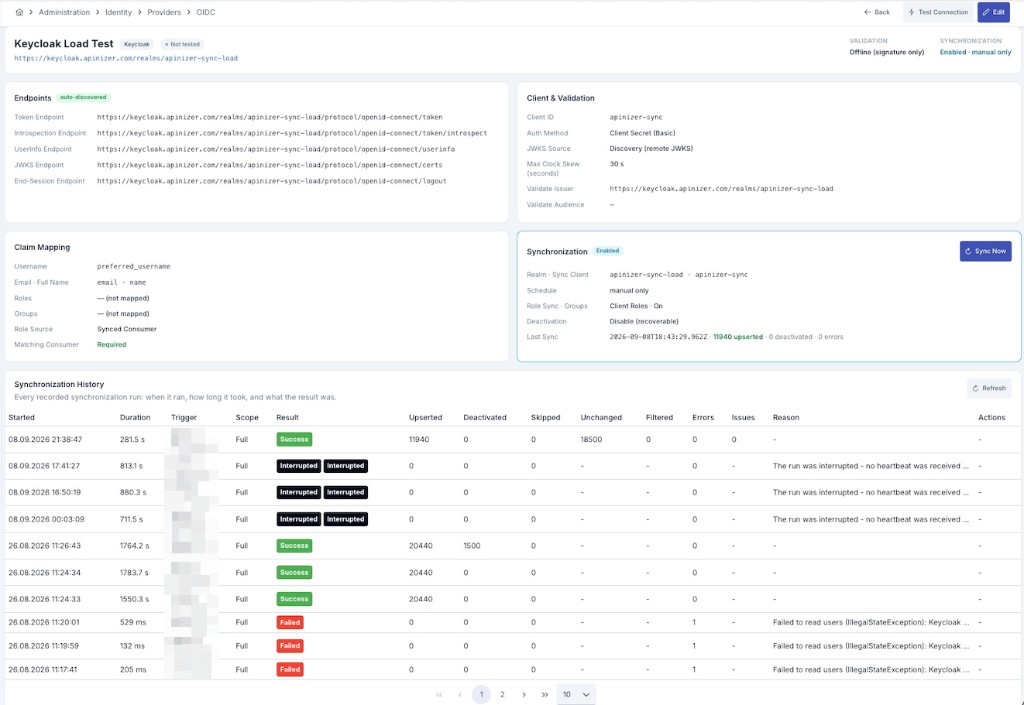
The provider's read-only detail (view) screen shows the fields documented below grouped into the same sectioned panels.
Use the [<> Variable] button at the top of the page to select a dynamic value for URL/client fields such as Issuer URL, Discovery URL, the endpoint fields, and Client ID — these fields resolve ${var}/#{var} syntax on the backend. For details, see Dynamic Variables.
Why a Separate Identity Provider for OIDC?
Verifying an OIDC/OAuth2 access or ID token — checking its signature, issuer, audience, and expiration — is a standardized operation defined by the OIDC/OAuth2 specifications, so it can be configured once, centrally, and reused by every policy that needs it. Listing the users that exist behind that token, on the other hand, is not part of any OIDC/OAuth2 specification: it is a vendor-specific administrative capability. Only some providers (such as Keycloak) expose an administrative API for it.
This is why the OIDC Provider is split into two independent capabilities:
- Token validation (available for every provider): standards-based, works against any OIDC/OAuth2-compliant issuer.
- Identity synchronization (available for Keycloak only, and optional even then): reads users, groups, and role memberships through Keycloak's Admin REST API and turns them into Consumer records, the same way LDAP Active Directory or a Database Provider does.
A provider with synchronization turned off is still fully usable for authentication — the incoming token is validated and its claims are read directly. The Consumer requirement, however, is not tied to synchronization: it is governed by the separate Require matching Consumer field on the Validation tab, which is on by default. While that field is on, a validated token is accepted only if a Consumer with the same username already exists — regardless of where that Consumer came from (this provider's synchronization, an LDAP or Database provider, or manual entry). Turn it off if you want a validated token's claims to be trusted on their own.
General tab
| Field | Description |
|---|---|
| Name | Name of the OIDC Provider. |
| Description | A description can be written to facilitate management related to the created OIDC Provider. |
| Vendor | The OIDC provider family: • Generic — any standards-compliant OIDC/OAuth2 provider; discovery and token validation only. • Keycloak — same discovery/validation behavior, plus makes the Synchronization tab available. |
| Issuer URL | The OIDC issuer (iss) URL, e.g. https://keycloak.example.com/realms/acme. Also used to derive the discovery document address when Discovery URL is left empty. |
| Discovery URL | Overrides the default {Issuer URL}/.well-known/openid-configuration address. Leave empty to use the default. |
| Auto-discover endpoints | When enabled, the endpoint fields on the Endpoints tab are fetched from the discovery document and shown read-only. When disabled, every endpoint is entered manually. |
Endpoints tab
| Field | Description |
|---|---|
| Discover | Fetches the discovery document from Issuer URL/Discovery URL and fills in the empty endpoint fields below. Does not overwrite fields that already have a value, and does not save the provider by itself — review the result and save separately. |
| Token Endpoint | Token endpoint URL. |
| Introspection Endpoint | Token introspection endpoint URL (RFC 7662) — used by Online validation. |
| UserInfo Endpoint | UserInfo endpoint URL — used by Online validation for opaque tokens. |
| JWKS Endpoint | The JSON Web Key Set URL used to verify token signatures in Offline validation. |
| End-Session Endpoint | Logout/end-session endpoint URL. |
When Auto-discover endpoints is enabled, these fields are read-only and reflect the last fetched discovery document.
Client tab
| Field | Description |
|---|---|
| Client ID | OAuth/OIDC client identifier registered with the provider. |
| Client Secret | Client secret (show/hide, copy). Leave unchanged to keep the current secret when editing. |
| Client Authentication Method | How the provider client authenticates itself to the token/introspection endpoint: • Client Secret (Basic) — client_id/client_secret sent as an HTTP Basic header.• Client Secret (POST body) — sent as form fields in the request body. • Private Key JWT — a signed JWT assertion, no client secret required. |
Validation tab
| Field | Description |
|---|---|
| Validation Mode | See Offline, Online, and Hybrid validation below. |
| JWKS Source | Where signing keys come from for local signature verification: • Discovery (remote JWKS) — fetched from JWKS Endpoint and cached. • Static (pasted JWKS) — no discovery/network call; keys come from Static JWKS (JSON) or Certificate. |
| Static JWKS (JSON) | The JWKS document (a JSON object with a keys array) pasted directly. Used only when JWKS Source is Static. |
| Certificate | A Certificate whose key material is used for signature verification. Used only when JWKS Source is Static. |
| Allowed Signature Algorithms | The JWT signature algorithms accepted during validation. Default: RS256, RS384, RS512, ES256. |
| Max Clock Skew (seconds) | Tolerance applied to iat/exp/nbf comparisons to absorb clock drift between systems. Default: 30. |
| Connection Timeout (seconds) | Connect timeout for calls to the provider. Default: 10. |
| Read Timeout (seconds) | Read timeout for calls to the provider. Default: 10. |
| Validate Issuer | Checks the token's iss claim. Enabled by default — see Security Defaults below. |
| Expected Issuer | The issuer value tokens are compared against. If left empty while Validate Issuer is on, falls back to Issuer URL. |
| Validate Audience | Checks the token's aud claim. Enabled by default — see Security Defaults below. |
| Expected Audience | The audience value(s) tokens are compared against. If left empty while Validate Audience is on, falls back to Client ID. |
Offline, Online, and Hybrid validation
| Mode | Behavior | Typical use |
|---|---|---|
| Offline | The token's signature is verified locally against JWKS (Discovery or Static). No call to the provider on every request — low latency. | Default choice; also the only mode that works fully air-gapped when JWKS Source is Static. |
| Online | Every request calls the provider's Introspection Endpoint (RFC 7662) or UserInfo Endpoint to validate the token. Immediately reflects a revoked token, at the cost of an extra network round trip per request. | Opaque (non-JWT) tokens, or deployments that need instant revocation visibility. |
| Hybrid | Signature is verified locally first; introspection is used to confirm when needed. | A middle ground between the two above. |
Choosing Static JWKS Source with Offline validation means the provider never needs outbound network access to validate tokens — the standard path for air-gapped environments where the Gateway cannot reach the identity provider's network.
Security Defaults: Validate Issuer and Validate Audience
Both Validate Issuer and Validate Audience default to enabled, and both are fail-closed: turning a check on without giving it something to compare against does not silently skip that check — the provider is rejected at save time (empty Issuer URL/Expected Issuer with Validate Issuer on, or empty Client ID/Expected Audience with Validate Audience on), and if the effective value is somehow still empty at token-validation time, the token itself is rejected rather than accepted.
This default matters most for a shared-realm Keycloak (or any shared-realm OIDC) deployment, where several applications register as separate clients under the same realm. Without audience validation, a completely valid, correctly signed, unexpired token issued for a different application in that realm would also be accepted here — a cross-client token replay. Requiring the expected audience to match closes that gap. Because Expected Audience falls back to Client ID when left empty, this protection does not require any additional configuration in the common case: create the provider, and audience validation applies to that client automatically.
Claim Mapping tab
| Field | Description |
|---|---|
| Username Claim | The claim used to resolve the authenticated username. Default: preferred_username. |
| Email Claim | The claim used to resolve the user's email. Default: email. |
| Full Name Claim | The claim used to resolve the user's display name. Default: name. |
| Roles Claim | The claim used to resolve the user's roles, when Role Source reads from the token. |
| Groups Claim | The claim used to resolve the user's group memberships, when Role Source reads from the token. |
| Require matching Consumer | When on (default), a token that validates successfully but has no matching Consumer record is rejected rather than accepted anonymously. When off (not recommended), such a token is still accepted, but since no Consumer gets bound to the request, consumer-based ACL, quota, and rate-limit checks do not apply to it, and with Role Source = Synced Consumer the role list comes back empty. |
| Role Source | Where the authenticated user's roles come from: • Token Claim — read from Roles Claim/Groups Claim on the token itself. • Synced Consumer (default) — read from the Consumer/role membership created by identity synchronization. • Both — the union of the two. |
Password Model and Username Contract
The user's password is never sent to or stored in Apinizer — it stays with the identity provider (Keycloak or any other IdP) end to end. Authentication is entirely token- and claim-based: the caller authenticates at the provider, receives a token, and Apinizer verifies that token. Consequently, records created by identity synchronization are passwordless Consumers; they exist to carry the synchronized username/roles/group membership, not a comparable secret.
Because of this, the Username Claim on this tab and the synchronized username on the Synchronization tab must resolve to the same underlying identity. The default, preferred_username, is deliberately matched to the Keycloak "username" field that synchronization writes into Consumer.username. If Username Claim is changed to a different claim, the synchronized username and the validated token's resolved username can silently stop matching the same user — and with Require matching Consumer on, valid tokens would then be rejected. Change this field only if you understand which claim your provider populates and keep it aligned with what the source actually treats as the username.
Synchronization tab
Available only when Vendor is Keycloak. Synchronizes users (and, optionally, groups and role memberships) from the realm's Admin REST API into Consumer records, on a schedule or via a manual run — the same Provider Synchronization mechanism used by LDAP, Database, and API providers.
When Vendor is Generic, every field on this tab is disabled, and enabling synchronization is rejected at save time (and, for an already-saved record, when Synchronize Now is clicked) — change Vendor to Keycloak first.
| Field | Description |
|---|---|
| Enable Synchronization | When enabled, consumers are synchronized from this provider according to the configured schedule. |
| Realm | The Keycloak realm to synchronize from. |
| Admin API Base URL | The base URL of the Keycloak Admin REST API (e.g. https://keycloak.example.com), independent of the OIDC issuer/token endpoints used for login. |
| Sync Client ID | Only used when Role Sync Source = Client Roles: names the Keycloak client whose roles are read as the user's roles. It is NOT the client that authenticates to the Admin API — that is the Client ID / Client Secret on the Client tab. |
| Sync Page Size | The page size used when paging through Keycloak's user list. Default: 250. |
| Synchronize Groups | When enabled, the realm's group tree is also synchronized, and each user's deepest group membership is reflected as their Consumer organization. If a Keycloak group's path resolves to the same organization code as an existing organization owned by a different source (a manually created one, or one synchronized from another provider), that node is not adopted — it is skipped (counted in Skipped on the sync history) and left untouched, rather than being taken over and later deleted once it disappears from this provider's tree. |
| Role Sync Source | Which Keycloak role assignment is read as the synchronized user's roles: • Realm Roles (default) • Client Roles — read from the client identified by Sync Client ID. • Groups — the names of the groups (and subgroups) the user belongs to. |
When Vendor is Keycloak, the Enable Synchronization, Synchronize Groups, and Role Sync Source fields each carry an (i) hint describing the realm-management roles the Admin API client needs for that particular read — see Keycloak Service Account Roles for the full list, which is not repeated here. For a Generic vendor, where synchronization is unavailable, the hint is a general explanation instead.
The Cron Expression and Deactivation Mode fields, along with the Synchronize Now action and the synchronization status/history display, follow the same shared behavior documented in Provider Synchronization — this page documents only the fields specific to the OIDC/Keycloak source.
One behavior specific to this source: a user still listed by Keycloak but marked enabled=false there is deactivated on every run regardless of Deactivation Mode — Deactivation Mode only governs users that stop appearing in Keycloak's response entirely.
A consumer this provider previously disabled through synchronization is re-enabled automatically once Keycloak reports it active again — the same rule every other source follows, see Behavior and Safety Notes.
Sync Now starts the synchronization in the background; the result is not returned in the response to that request. On the provider's view page, the last-run summary and the Synchronization History table below it refresh themselves about three seconds after the trigger and show the new run. When that refresh arrives, the row may still read Queued or Running — the run record is created together with the trigger and takes its result only when it finishes.
From that point on, the Synchronization History table follows the run on its own: while a running row is visible it updates itself silently about every five seconds and shows the result once the run finishes. A long run — a large realm, or many users and groups — therefore lands on screen too; reloading the page in the browser is no longer needed. For how that live refresh works and where it stops, see Provider Synchronization.
Only one run can be active per source at a time. For what each run state means, how interrupted runs are closed, and where to read a run's issue list, see Provider Synchronization.
The last-run summary above the table is not part of that live refresh: even after the table shows the run's result, the numbers in the summary box can still belong to the previous run. Use the Refresh button next to the Synchronization History heading to reload the summary and the table together; it also returns the table to its first page, where the newest run appears. A scheduled run that starts in the background while the screen is open does not switch the live refresh on by itself either — Refresh is what brings that run onto the screen.
The Sync History section on the provider's edit page behaves the same way. It shows only the last run's summary, with its own Refresh button; the complete list of runs lives in the Synchronization History table on the provider's view page.
Keycloak Service Account Roles
The Client ID / Client Secret on the Client tab is what acquires the Admin API token, so THAT client must be a confidential client with a service account. Its service account needs, at minimum, the realm-management client roles view-users, query-groups and view-realm (view-realm is required to read role membership — without it /roles/{name}/users returns 403). Depending on which options are enabled:
- Synchronize Groups additionally needs
query-groups(already listed above) to read the group tree and membership. - Role Sync Source = Client Roles additionally needs
view-clientsto resolve the target client's role list.
Without these roles, Keycloak's Admin REST API returns 403 Forbidden for the corresponding calls, and the synchronization run reports the failure without deactivating any existing consumers (see Behavior and Safety Notes).
Connection Test and Directory Preview
Three diagnostic buttons sit side by side at the top of a saved provider's edit screen. All three work against the values currently entered in the form, and none of them saves anything. They appear only on a saved provider — a newly created one has to be saved first.
| Action | What it does |
|---|---|
| Test Connection | Fetches the discovery document, confirms the JWKS endpoint is reachable, and — when Client ID and Client Secret are both set — attempts a client_credentials token request against the token endpoint. Reports a descriptive error on the first failing step. When JWKS Source is Static, no network call is made at all; only the pasted JWKS/Certificate are validated locally. This button and its behavior are unchanged. |
| Run Connection Test | Measures the same connection as eight separate steps and shows each one on its own row — see Connection Test Step Matrix. |
| Preview Directory | Reads the first user, group, and role records from the provider directory — see Directory Preview. |
| Discover (Endpoints tab) | Fetches the discovery document and fills in empty endpoint/issuer fields, without saving. |
All of these send requests, from the Manager, to the addresses entered in the form — they therefore require the "Manage Authentication Services" permission, the same as saving the provider.
Connection Test Step Matrix
Instead of one pass/fail verdict, Run Connection Test splits the connection into eight steps and measures each one separately — a failing step does not hide the ones after it. The results are listed in a dialog with step, status, duration, explanation, HTTP status, and provider error code columns, so when a step fails its reason is read straight from the table rather than from a separate error message.
| Step | What it measures |
|---|---|
| Configuration Check | Whether the form is internally consistent, without any network call: can a discovery address be derived from the values entered, and — when JWKS Source is Static — is the pasted key material valid. |
| Discovery Document | Whether the discovery address is reachable and returns a valid document. |
| Signature Keys (JWKS) | Whether the signing-key address can be resolved and read; with a Static source the key material is validated locally. |
| Client Credentials Token | Whether a token can be obtained from the token endpoint with the configured client. |
| Admin API Token | Whether the Keycloak Admin API can be reached with a service-account token. |
| User Read | Whether the realm's user list can be read. |
| Group Read | Whether the group tree can be read. |
| Role Read | Whether the role list can be read. |
Every step reports one of four statuses:
| Status | Meaning |
|---|---|
| Succeeded | The step ran and returned the expected result. |
| Failed | The step ran and failed. The reason, and where available the HTTP status and error code returned by the provider, appear on the same row. |
| Not applicable | The step does not run in this configuration. Either it is unnecessary (no discovery document is fetched when JWKS Source is Static; groups are not read when group synchronization is off), or a preceding step failed and this one could not be measured. The row's explanation says which of the two it was. |
| Unsupported | The provider cannot perform this step at all — it is not something a configuration change can enable. |
When the User Read, Group Read, or Role Read step fails with an HTTP 403, its explanation reads as a permission-missing error naming the scope that could not be read (Users, Groups, or Roles) and points at that field's (i) hint (see Synchronization tab) instead of just showing the raw status code. A 401 on any of these steps is read the same way as an authentication rejection; any other HTTP status is shown as-is. The run history classifies a synchronization run that hits the same errors the same way.
When Vendor is Generic, the first four steps (configuration, discovery, JWKS, client credentials) run normally: they are part of the OIDC/OAuth2 standard and work against any compliant provider. The last four (Admin API token, user/group/role read) come back Unsupported, because a Generic provider has no Keycloak Admin API to read. This is exactly why the matrix exists: the connection is not "half working" — what the provider can and cannot do is reported separately.
The provider error code column carries only the standard OAuth error code from the provider's response (for example invalid_client). The error description, the raw response body, the client secret, and token values are never shown on this screen.
Directory Preview
Preview Directory answers the "what will come out of this provider" question without running a synchronization: it reads the first 10 user, group, and role records from the Keycloak directory and shows them on the Users / Groups / Roles / Issues tabs.
- Users — username, e-mail, full name, and whether the user is enabled at the provider.
- Groups — each node's name, path, normalized organization code, and depth in the tree, so what the engine's fixed mapping would produce from this data can be seen before synchronization runs.
- Roles — the role names read according to the Role Sync Source setting.
- Issues — the reason, if one of the three areas could not be read. One area failing does not stop the others from being shown.
When the directory holds more records than were read, a note below the list says the first 10 records are shown and more exist.
Directory preview only reads the provider directory. No consumer, organization, or role record is created, updated, or deleted on the Apinizer side, and the source's synchronization counters and run history are left untouched. The preview is not a synchronization run — it creates no row in the run history and does not block a run that is in progress.
- No total count is shown. The provider does not return a total user/group count on this read, so the screen reports "the first N records, and there are more" rather than inventing a total.
- Per-user organization and role assignments are not previewed. Producing them would require scanning each group's member list, which on a large realm would stop being a lightweight read. The preview reads the directory itself only.
- The group tree stops at the first nodes. The walk ends once the requested number of records is collected; a deep tree is not traversed in full.
- Not available for a Generic vendor. The button is disabled when Vendor is Generic — with no Admin API to read, there is nothing to preview.
Troubleshooting — synchronization fails with "user fetch failed"
When a synchronization run fails, Administration > Logging > Application Logs shows an IdentitySyncService: user fetch failed ... line. That line only says the fetch failed; the reason is in the provider line just above it.
When the source answered with something other than the expected user/group/role list, the provider writes this WARN line:
OidcIdentitySyncProvider: Keycloak admin response is NOT a JSON array — kind=HTML diagnosis='...'
path=/admin/realms/<realm>/users status=200 contentType=text/html bodyLength=1834 bodyPreview=[...]
providerId=... realm=... adminBaseUrl=...
The fields are: a fixed classification of the answer (kind), a readable explanation (diagnosis), which endpoint was read (path — query parameters are never written), the HTTP status that came back (status), the response type (contentType), the body length (bodyLength), the first 200 characters of the body (bodyPreview — token-, password- and query-string values are masked with ***), and the provider being synchronized (providerId, realm, adminBaseUrl).
The run itself also fails with an IdentitySyncService: user fetch failed ... line that repeats kind, path, status, contentType and bodyLength — so the classification is still readable when only ERROR-level lines were kept. Only the WARN line above shows the body preview.
Where to look, by kind:
| kind | What it means | What to do |
|---|---|---|
KEYCLOAK_ERROR_OBJECT | The source returned its own error object instead of a list (error / error_description, or errorMessage). The error code and description are printed in diagnosis. | This is usually a permission or client problem. Verify that the service account holds view-users, query-groups and view-realm under realm-management (plus view-clients when Role Sync Source is Client Roles). |
HTML | The answer is an HTML page — typically the Keycloak login screen, or an error page from a reverse proxy in front of it. | Verify the Admin Base URL on the Endpoints tab and the Realm on the General tab; on older Keycloak versions the address ends with an /auth prefix. If a reverse proxy or WAF fronts Keycloak, check that the /admin/realms/... path is not intercepted. |
EMPTY | The source answered successfully but with no body. Keycloak returns an empty array for an empty list, never an empty body. An empty body ends the paging loop early, so the list Apinizer read is partial. | A reverse proxy or load balancer in between may be dropping the body. Call the same address directly from the Apinizer server and compare the answer. The run is marked as an incomplete read: the records that were read are still applied, deactivation is skipped, and the run ends with a warning. |
JSON_OBJECT | The answer is valid JSON but a single object, not a list. | Verify that the Admin Base URL points at a Keycloak Admin API root; it may be routed to a different service (or to an API gateway). |
MALFORMED | The answer is neither a JSON array nor a JSON object — a truncated or binary body. | Check for a proxy that rewrites or compresses the answer, and compare a direct call from the Apinizer server. |
The same diagnosis applies to user, group and role reads alike; the path field says which read failed.
A matching line is written when the admin token request answers successfully but carries no access_token (OidcIdentitySyncProvider: OIDC admin token response carries no access_token — kind=... diagnosis=...). It reports the same classification for the Token Endpoint on the Endpoints tab, and — because a successful answer there would contain a real token — it never prints a body preview.
When the user list cannot be read, the run ends with an error and no consumer is deactivated — this is what keeps unread records from being treated as "removed at the source". For details, see Behavior and Safety Notes.
Connection Test on the provider screen runs the same reads with a single record and reports them step by step, surfacing the same problem without waiting for a synchronization run. See Connection Test and Directory Preview.
Related Pages
For how a JWT, OAuth 2, or Basic/Plain-Text Authentication policy selects an identity service (including OIDC), see JWT Authentication and OAuth 2 Authentication. For how the OIDC Authentication policy can reference this provider directly instead of configuring endpoints inline, see its Shared OIDC Provider section. For the synchronized records, see Consumers. For scheduling, deactivation behavior, and monitoring shared with the other providers, see Provider Synchronization.