OIDC Authentication
This document explains the detailed usage of a specific policy. If you are using Apinizer policies for the first time or want to learn the general working principles of policies, we recommend reading the What is Policy? page first.
Overview
What is its Purpose?
- Standardize end-user authentication by routing API Proxy traffic to external OIDC providers.
- Lighten authentication load of microservices and centralize security with ID token and access token verification.
- Sustain long-term user sessions securely thanks to session, cookie, and cache management.
- Apply fine-grained authorization rules at API layer with role mapping and header injections.
Working Principle
- Request Arrival: For each HTTP/HTTPS request arriving at the API Gateway, the source IP address of the request is identified.
- Policy Check: If the OIDC Authentication policy is active, the system checks in the following order:
- Is a Condition defined? If so, is the condition met?
- Is the policy active (active=true)?
- Is a Variable being used or is Apinizer default?
- OIDC Authorization Flow: Request is routed according to selected OIDC/OAuth2 flow type; issuer/discovery metadata is fetched, PKCE and nonce/state values are generated, token is validated.
- Decision Making:
- Match Found: User information is extracted from verified token, header/cookie is updated, optional authorization service is triggered, and request is allowed.
- No Match: Authorization fails, defined error message or redirect rule is applied.
- Error Handling: Customizable HTTP status code and error message are returned for requests that do not comply with the policy rule.
Features and Capabilities
Basic Features
- Dynamic OIDC Discovery: Reduces manual configuration need by automatically discovering issuer, JWKS, and other metadata information through well-known endpoint.
- Multiple Flow Support: Manages Authorization Code, Implicit, Hybrid, and pure OAuth2 Authorization Code flows in the same policy; increases security with PKCE support.
- Token Verification Controls: Provides ID/Access token verification, signature algorithm control, user information retrieval, and API-based token verification options.
- Active/Passive Status Control: Easily change the active or passive status of the policy. In passive mode, the policy is not applied but its configuration is preserved.
- Condition-Based Application: Determine when the policy will be applied by creating complex conditions with Query Builder (e.g., only for specific endpoints or header values).
Advanced Features
- Advanced Session Management: Meets corporate security standards with session cookie name, timeout, state/nonce verification, session encryption, and compression settings.
- Role and Authorization Integration: Provides in-depth access management with role mapping, adding role to header, external authorization service, or the roles of the matched consumer.
- Adaptable Token Carrying: Can accept token via header, cookie, or both; can make bearer format mandatory, can use custom header names.
- Export/Import Feature: Export policy configuration as a ZIP file. Import to different environments (Development, Test, Production). Version control and backup capability.
- Policy Group and Proxy Group Support: Manage multiple policies within Policy Group. Bulk policy assignment to Proxy Groups. Centralized update and deploy operations.
- Deploy and Versioning: Deploy policy changes to live environment. See which API Proxies use it (Policy Usage). Proxy Group and Policy Group usage reports.
Usage Scenarios
| Scenario | Status | Solution (Policy Application) | Expected Behavior / Result |
|---|---|---|---|
| Corporate Portal SSO | Single sign-on is desired | Authorization Code + PKCE, global policy | User is authorized in all API Proxies with single login. |
| Mobile App Security | Token leakage risk exists in mobile clients | PKCE enabled, short token cache duration | Mobile app stores token in secure storage, renews when expired. |
| Legacy API Protection | Old services use Basic Authentication | Token validation + header injection | Authentication is done at gateway, service only reads header. |
| External Business Partner Integration | External systems want cookie-based access | Token is written to cookies, SameSite/secure is set | Business partner browsers carry session without additional config. |
| Multiple OIDC Provider Management | Different tenants use different issuers | Custom condition + discovery URL variable | Each tenant request is routed to its own issuer and verified. |
| High-Security API | Token signature and aud verification mandatory | ValidateJwtSignature + ExpectedAudience list | Tokens containing wrong issuer/audience are rejected with 403. |
| Developer Sandbox (optional) | Light verification needed in test environment | Condition with /sandbox/* path selection, debug logging open | Only sandbox calls pass weak verification, live traffic is not affected. |
Configuring Policy Parameters
In this step, users can create a new policy or configure existing policy parameters to define access rules. The defined parameters directly affect how the policy works (e.g., which IPs will be allowed, geographical restrictions, conditional activations, etc.). This allows the policy to be customized according to organization-specific requirements while being centrally manageable.
Creating a New OIDC Authentication Policy
The sections below walk through the OIDC (Keycloak, Okta, Azure AD, …) configuration profile in tab order, with screenshots and field tables for that profile. For how OAuth2 (External OAuth2 Provider) differs, finish these OIDC sections first, then read OIDC vs OAuth2 configuration profile — UI differences right after them (including OAuth2 Parameters and Session & HTML screenshots).
Connection tab
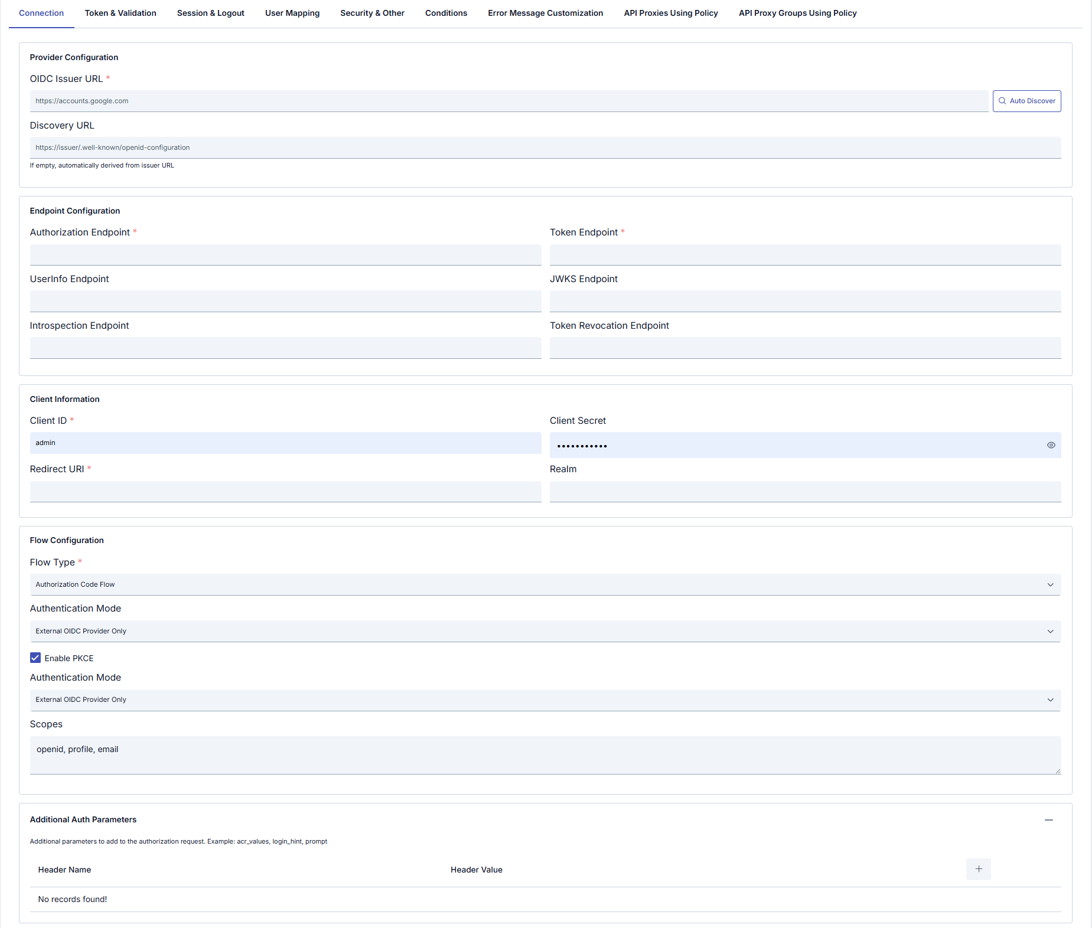
Configuration Profile: OIDC (Keycloak, Okta, Azure AD, …) or OAuth2 (External OAuth2 Provider) — determines flow type, visible tabs, and fields; many fields remain editable after selection.
| Section | Field | Notes |
|---|---|---|
| Provider Configuration | Shared OIDC Provider | Optional. Selects a shared OIDC Provider to resolve the endpoint, client, and claim-mapping fields below from it instead of entering them inline. See Connecting to a Shared OIDC Provider below. |
| OIDC Issuer URL (required) | e.g. https://accounts.google.com. Use Auto Discover for metadata. | |
| Discovery URL | If empty, derived from issuer; or set explicitly (e.g. …/.well-known/openid-configuration). Help text: If empty, automatically derived from Issuer URL. | |
| Endpoint Configuration | Authorization Endpoint (required) | Authorization endpoint URL. |
| Token Endpoint (required) | Token endpoint URL. | |
| UserInfo Endpoint | UserInfo URL. OIDC profile only. | |
| JWKS Endpoint | JWKS URL for signature verification. OIDC profile only. | |
| Introspection Endpoint | Token introspection URL. OIDC profile only. | |
| Token Revocation Endpoint | Revocation URL. OIDC profile only. | |
| oauth2ResourceEndpoint (required) | OAuth2 profile only; replaces the four endpoints above. | |
| Client Information | Client ID (required) | OAuth/OIDC client identifier. |
| Client Secret | Client secret (show/hide). | |
| Redirect URI (required) | OAuth redirect URI. | |
| Realm | Provider-specific realm when applicable. Hidden in OAuth2 profile. | |
| Flow Configuration | Flow Type (required) | OIDC: choose from list (e.g. Authorization Code Flow). OAuth2: OAUTH2_AUTHORIZATION_CODE is fixed in the backend; OAuth2 Username Extraction Path appears on this profile. |
| Authentication Mode | e.g. External OIDC Provider Only. Some builds may show the same label twice; keep values consistent. | |
| Enable PKCE | Proof Key for Code Exchange (checkbox). | |
| Scopes | Comma-separated scopes, e.g. openid, profile, email. | |
| Additional Auth Parameters | + to add rows | Extra authorization request parameters (acr_values, login_hint, prompt, etc.). OIDC profile only; use OAuth2 Parameters tab for OAuth2. |
Connecting to a Shared OIDC Provider
By default, this policy's OIDC/OAuth2 endpoint, client, and claim-mapping settings are configured entirely inline, on this policy itself — this is how every existing installation is configured today, and nothing changes for it. Optionally, the Shared OIDC Provider field (Connection tab, Provider Configuration section) can instead point the policy at a shared OIDC Provider record:
-
Left empty (default): the policy behaves exactly as documented in the rest of this page — every endpoint, client credential, and claim path is read from this policy's own inline fields.
-
Set to a provider: the issuer, discovery, token/userinfo/JWKS/introspection endpoints, client ID, and claim-mapping fields are resolved from the referenced provider at deploy time instead of from this policy's inline fields (shown read-only on the Connection tab once selected; the locked inputs display the provider's value greyed out and do not need to be filled in — the policy can be saved with them empty). Fields that only make sense at the policy/flow level — redirect URI, flow type, scopes, session, and cookie settings — always stay on the policy itself; a shared provider has no concept of them.
The claim-validation switches are resolved from the provider as well, not just the expected values: whether issuer and audience are checked at all (Validate Issuer / Validate Audience) is taken from the provider record, together with its Expected Issuer and Expected Audience. The provider is the single authority here — a provider that has audience validation enabled cannot be weakened by a policy-level setting, and one that has it disabled is not re-enabled by the policy. This matters because a token issued by the same authorization server for a different client is otherwise a fully valid, correctly signed token; without the audience check it would be accepted by this proxy (cross-client token replay).
This is useful when the same identity provider backs multiple policies (for example, several API Proxies behind the same Keycloak realm): the endpoint/client configuration is maintained once, and every policy that references it picks up a change (a rotated client secret, an updated JWKS endpoint) on its next redeploy, instead of having to be edited individually.
If a policy references a Shared OIDC Provider that is not deployed to the environment the request is running in, the request is rejected — the policy does not fall back to its (likely empty) inline fields. Falling back silently would mean any well-formed token could pass validation once the inline JWKS/issuer checks are effectively empty, which is an authentication bypass. Make sure the referenced provider is deployed to every environment this policy is deployed to.
Consumer and Role Behavior with a Shared Provider
When this policy references a Shared OIDC Provider, it also follows two of the provider's Claim Mapping settings after the token is validated:
- Require matching Consumer (default: on): if the username resolved from the claim has no matching Consumer record, or that Consumer is inactive, the request is rejected. The username-resolution chain itself is unchanged.
- Role Source set to Synced Consumer or Both: the roles carried by the synchronized Consumer are added on top of the roles resolved from the token. The policy's own Role Mappings and the token-derived roles are preserved — this is additive, never a replacement.
If directory synchronization is not yet set up for this environment, turn off Require matching Consumer on the OIDC Provider's Claim Mapping tab. The policy then accepts a validated token even when no matching Consumer exists — this is how it behaved before it started following the provider's setting.
Policies that keep their configuration inline (Shared OIDC Provider left empty) are unaffected by either setting.
Authorization and Roles
When authorization is on, the policy applies the role list and the method access. A request whose identity has none of the required roles gets HTTP 401 with error code ERR-104. If role resolution fails, the policy authorizes with an empty role list, so a policy with a role list rejects the request. This is a fix in 2026.10.0: in earlier versions the policy did not apply the OIDC role rejection.
On a proxy that uses the Standard MCP profile, the identity and the roles come only from the Authorization bearer token of the request. The policy uses no session. When Role Source is Synced Consumer, the current roles of the synchronized Consumer apply, not the roles in the token. On this profile a role or method rejection returns HTTP 403 with WWW-Authenticate: Bearer error="insufficient_scope", so that the MCP client does not start a new sign-in.
Token & Validation tab
OIDC configuration profile only. The OAuth2 profile uses the OAuth2 Parameters tab instead of this one.
Defines how incoming tokens are validated, forwarded to backends, and cached (JWT checks, UserInfo, header/cookie behavior).
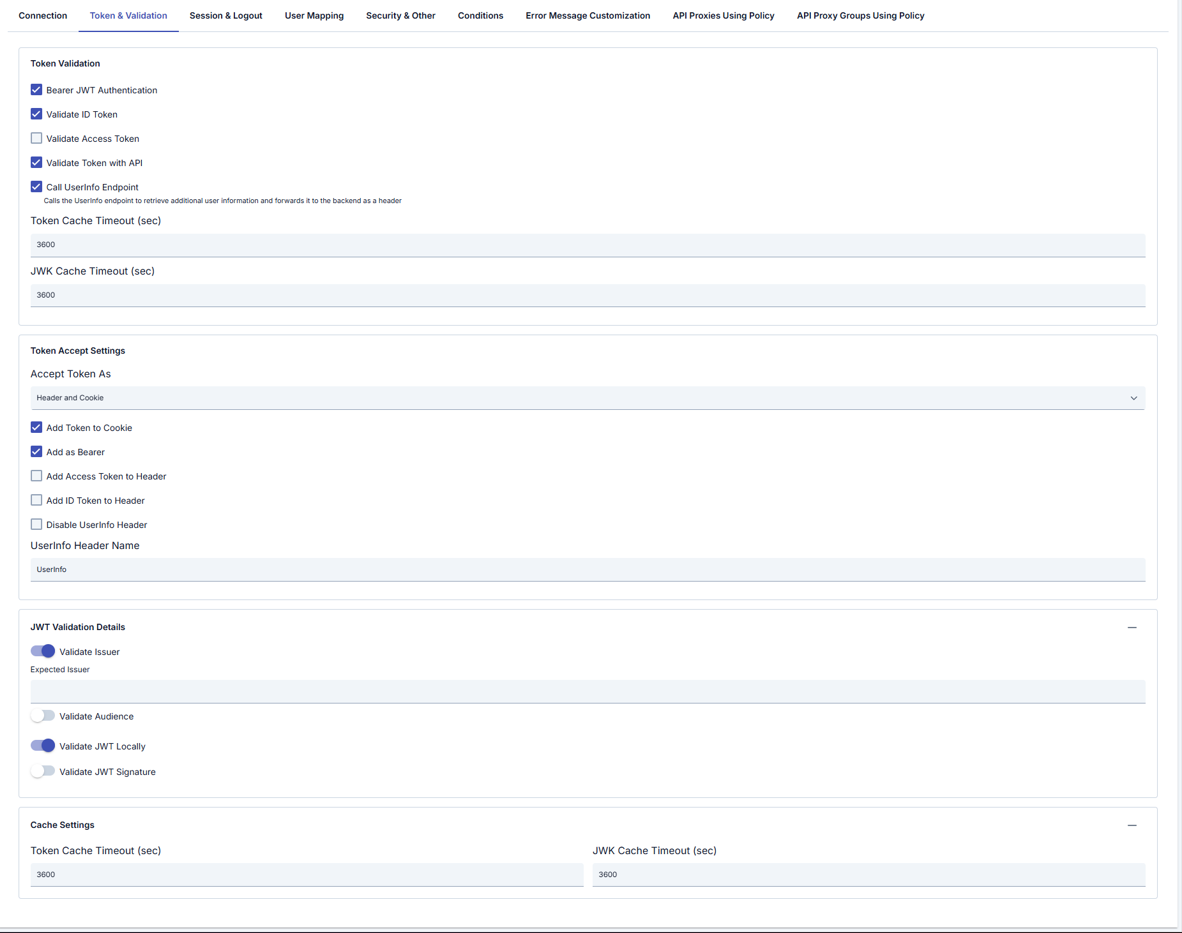
Token Validation
| Field | Description |
|---|---|
| Bearer JWT Authentication | Authenticate using Bearer JWT. |
| Validate ID Token | Validate the ID token. |
| Validate Access Token | Validate the access token. |
| Validate Token with API | Validate the token via API. |
| Call UserInfo Endpoint | Calls the UserInfo endpoint; additional user information can be forwarded to the backend as a header (see inline help). |
| Token Cache Timeout (sec) | Token cache TTL (seconds). |
| JWK Cache Timeout (sec) | JWKS cache TTL (seconds). |
Token Accept Settings
| Field | Description |
|---|---|
| Accept Token As | e.g. Header and Cookie — where the token is accepted from. |
| Add Token to Cookie | Write token to cookie. |
| Add as Bearer | Use Bearer format. |
| Add Access Token to Header | Forward access token in a header; when enabled, a header name field may appear. |
| Add ID Token to Header | Forward ID token in a header; when enabled, a header name field may appear. |
| Disable UserInfo Header | Do not add UserInfo payload as a header. |
| UserInfo Header Name | e.g. UserInfo. |
JWT Validation Details
| Field | Description |
|---|---|
| Validate Issuer | Validate iss; when enabled, set Expected Issuer if needed. |
| Validate Audience | Validate aud. |
| Validate JWT Locally | Local JWT validation. |
| Validate JWT Signature | Signature verification. |
Cache Settings (duplicate block in UI)
| Field | Description |
|---|---|
| Token Cache Timeout (sec) | Token cache duration. |
| JWK Cache Timeout (sec) | JWK cache duration. |
Session & Logout tab
OIDC configuration profile only (full session and logout). The OAuth2 profile uses Session & HTML instead (simplified session + HTML templates).
Session cookie, token cookies, and logout behavior.
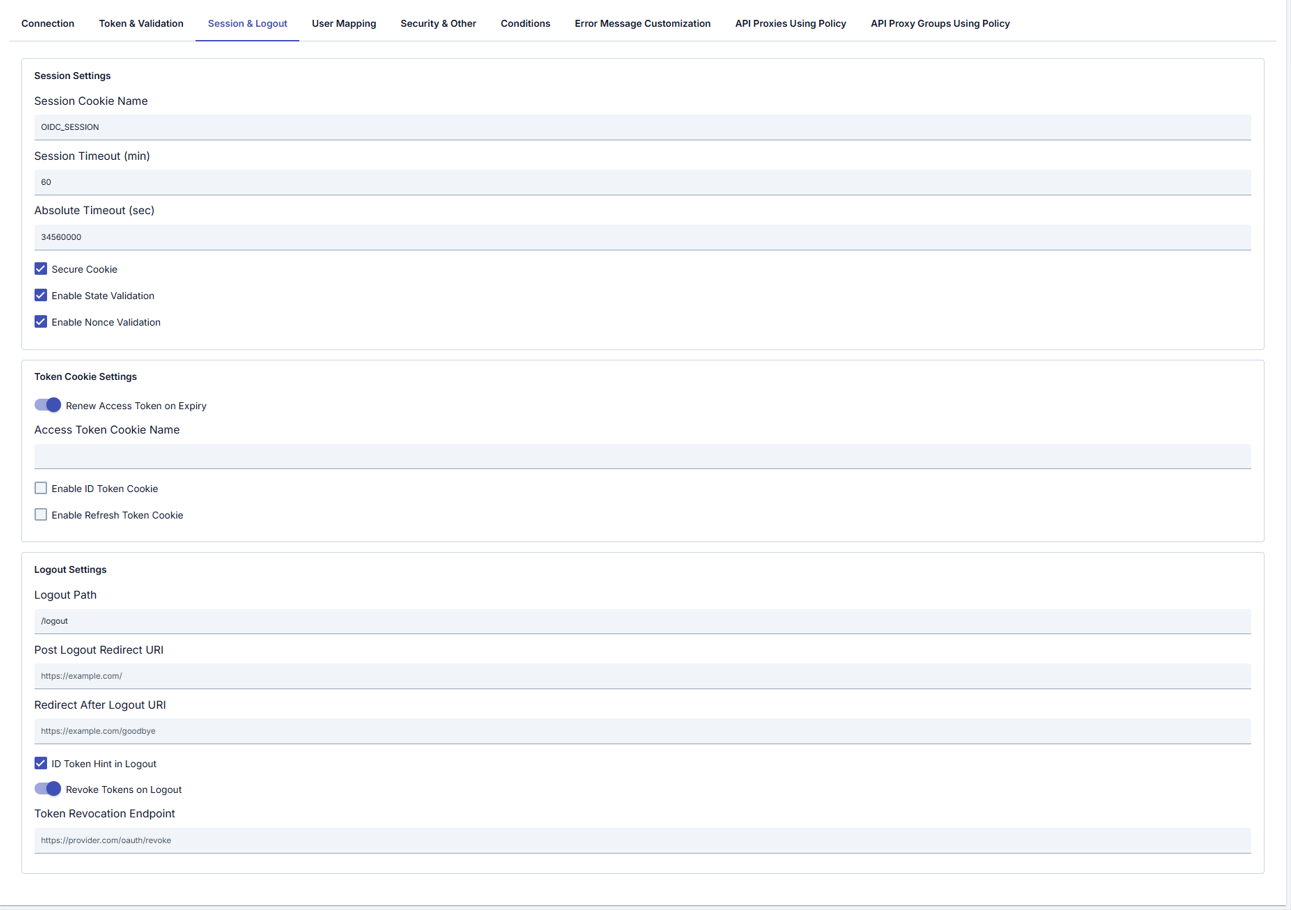
Session Settings
| Field | Description |
|---|---|
| Session Storage Type | Where the authenticated session is stored: Cache (default) or Cookie. See Session Storage Options: Cache vs Cookie below. This setting covers the authenticated session ONLY — the login flow's temporary session is controlled by a separate field (see next row). |
| Login Flow Session Storage | Where the temporary login session (state / nonce / PKCE verifier / return URL) is kept during the authorize→callback round trip. If left empty, follows Session Storage Type. When Cookie (explicit or inherited), the login flow is carried in an AES-256-GCM encrypted, per-state named, HttpOnly + SameSite=Lax temporary cookie and never touches the cache. |
| Session Cookie Name | Session cookie name (e.g. OIDC_SESSION). |
| Session Timeout (min) | Session idle timeout (minutes). |
| Absolute Timeout (sec) | Absolute session lifetime (seconds) — authenticated session only. |
| Login Flow Timeout (sec) | Completion window for the login flow (seconds), default 600. Covers the time the user spends authenticating at the IdP; independent of Absolute Timeout (sec) — see warning below. |
| Secure Cookie | Send cookie only over HTTPS. |
| Enable State Validation | Validate OAuth state. |
| Enable Nonce Validation | Validate OpenID nonce. |
Do not set Login Flow Timeout (sec) too low. A value such as 30 seconds does not give users enough time to enter a password/OTP at the IdP, and the callback fails with state validation failed (CSRF protection): temporary session not found (expired or already consumed). This field is completely independent of Absolute Timeout (sec) (the authenticated session's lifetime) — shortening Absolute Timeout does not shorten the login window, and vice versa. The default of 600 seconds is usually enough; increase it for slower IdP flows such as SMS/email OTP.
Session Storage Type covers the authenticated session ONLY. Even with Cookie selected, the login flow's temporary session keeps going to the distributed cache unless Login Flow Session Storage is also Cookie (explicitly, or by inheriting from Session Storage Type). This is the source of the "I chose Cookie but the cache is still required" surprise. For a login flow with zero dependency on the cache service, leave Login Flow Session Storage empty (it follows Session Storage Type) or set it explicitly to Cookie.
While editing Session Timeout (min) or Absolute Timeout (sec), the form shows a non-blocking warning underneath them when either value would produce an unexpectedly short session: Session Timeout (min) set below 5 minutes, or Absolute Timeout (sec) shorter than Session Timeout (min) converted to seconds. The warning is only a reminder — it never blocks saving — and it disappears again once the values no longer trigger it. The same warning appears on both configuration profiles: here, on the OIDC profile's Session & Logout tab, and on the OAuth2 profile's Session & HTML tab below.
Token Cookie Settings
| Field | Description |
|---|---|
| Renew Access Token on Expiry | Refresh access token when it expires. |
| Access Token Cookie Name | Cookie name for access token. |
| Enable ID Token Cookie | Store ID token in cookie. |
| Enable Refresh Token Cookie | Store refresh token in cookie. |
Logout Settings
| Field | Description |
|---|---|
| Logout Path | Logout URL path (e.g. /logout). |
| Post Logout Redirect URI | Redirect after logout at provider. |
| Redirect After Logout URI | Redirect after logout in Apinizer. |
| ID Token Hint in Logout | Send id_token_hint on logout. |
| Revoke Tokens on Logout | Revoke tokens when logging out. |
| Token Revocation Endpoint | Revocation endpoint URL. |
User Mapping tab
OIDC configuration profile only. There is no User Mapping tab on the OAuth2 profile; use OAuth2 Username Extraction Path on Connection and the OAuth2 Parameters tab.
Maps OIDC claims to user fields, roles, and backend headers.
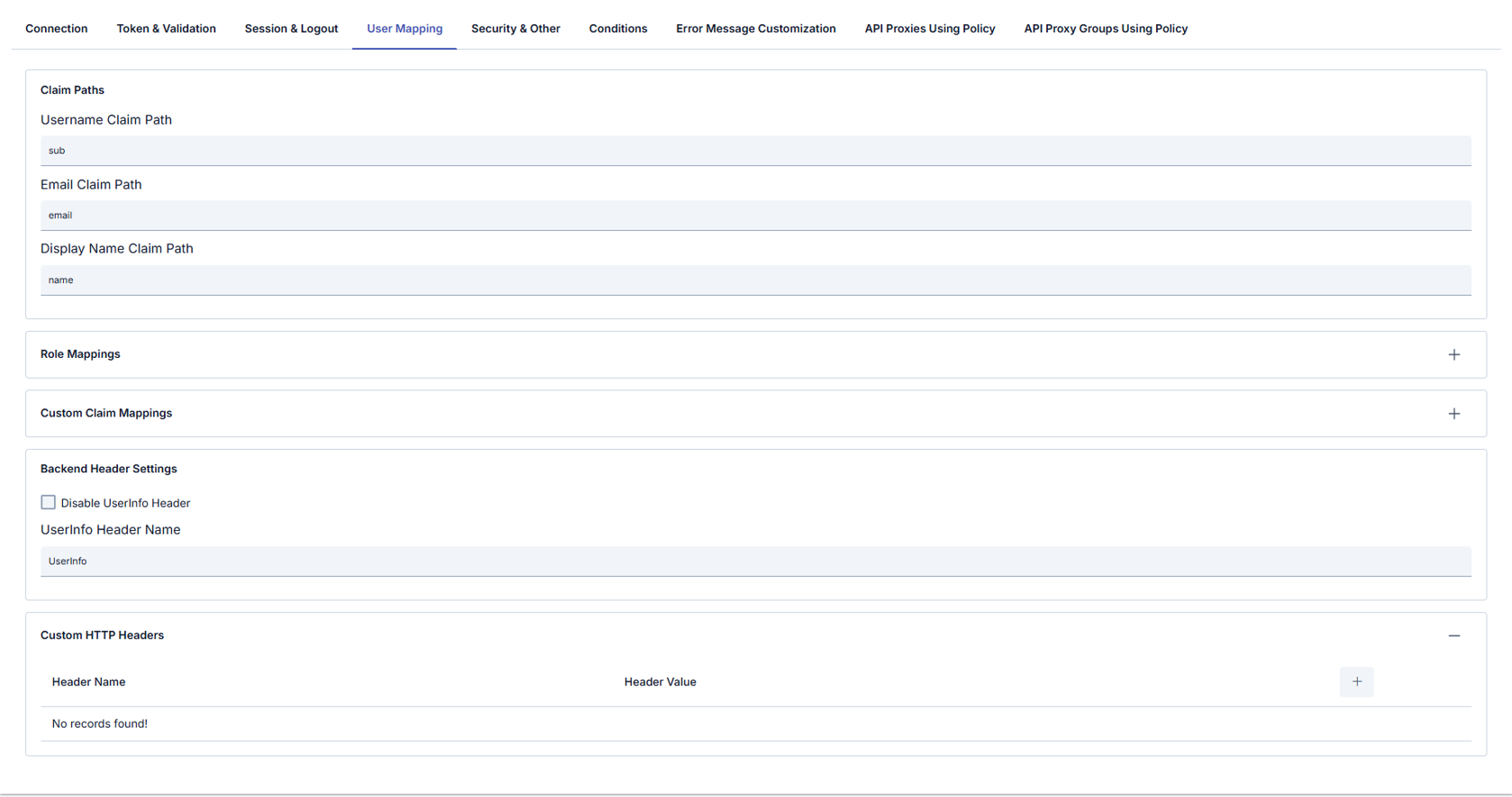
Claim Paths
| Field | Description |
|---|---|
| Username Claim Path | Claim for username (e.g. sub). |
| Email Claim Path | Claim for email (e.g. email). |
| Display Name Claim Path | Claim for display name (e.g. name). |
Role Mappings (table)
| Column | Description |
|---|---|
| Claim Path | Claim to match. |
| Claim Value | Expected value. |
| Target Role | Role to assign. |
Custom Claim Mappings (table: Header Name / Header Value)
Backend Header Settings
| Field | Description |
|---|---|
| Disable UserInfo Header | Do not forward UserInfo as a backend header. |
| UserInfo Header Name | Header name for UserInfo (e.g. UserInfo). |
Custom HTTP Headers (table: Header Name / Header Value) — additional headers sent to the backend.
Security & Other tab
TLS/mTLS to the provider, timeouts, request filtering, error redirects, and debug options.
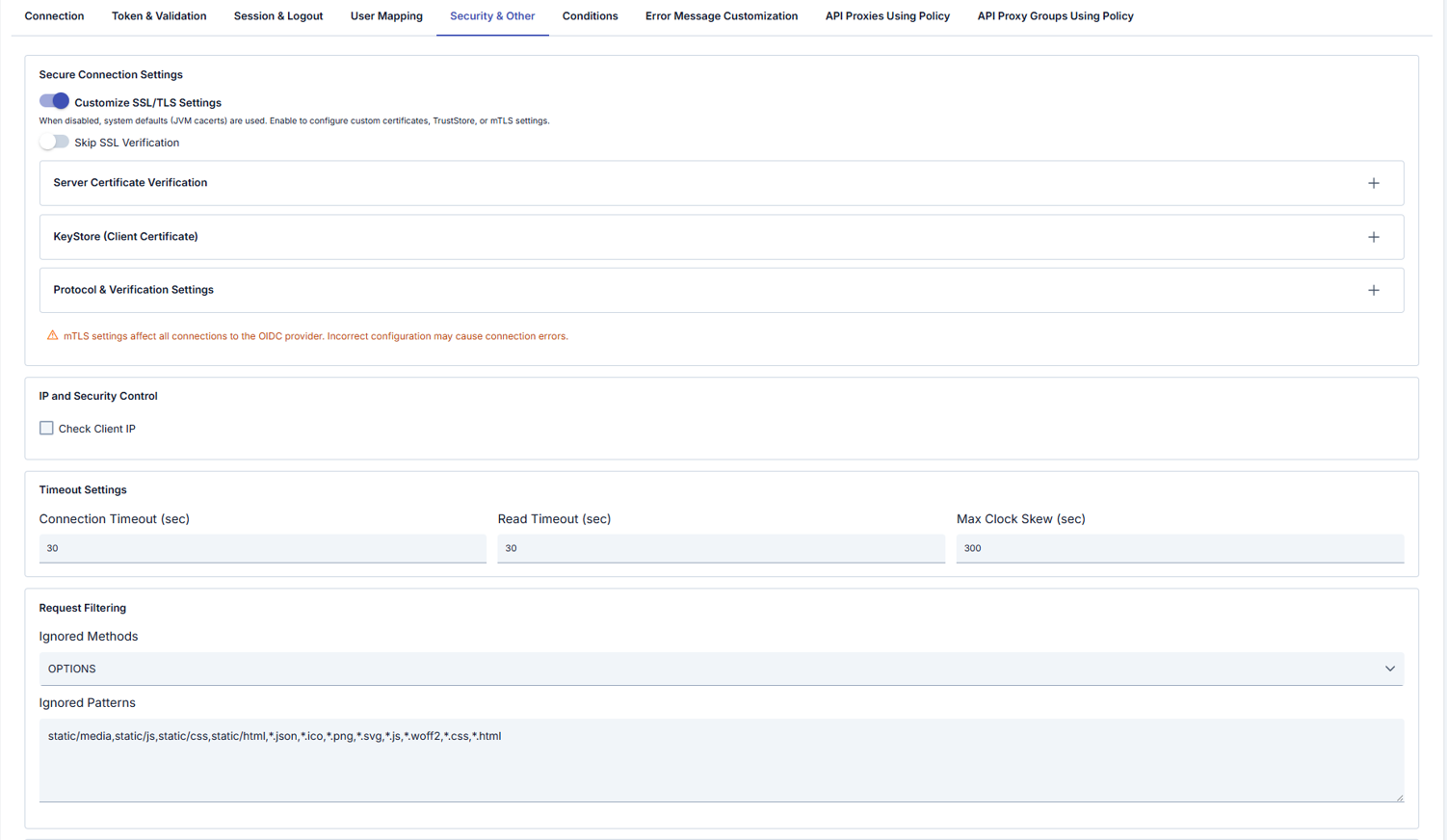
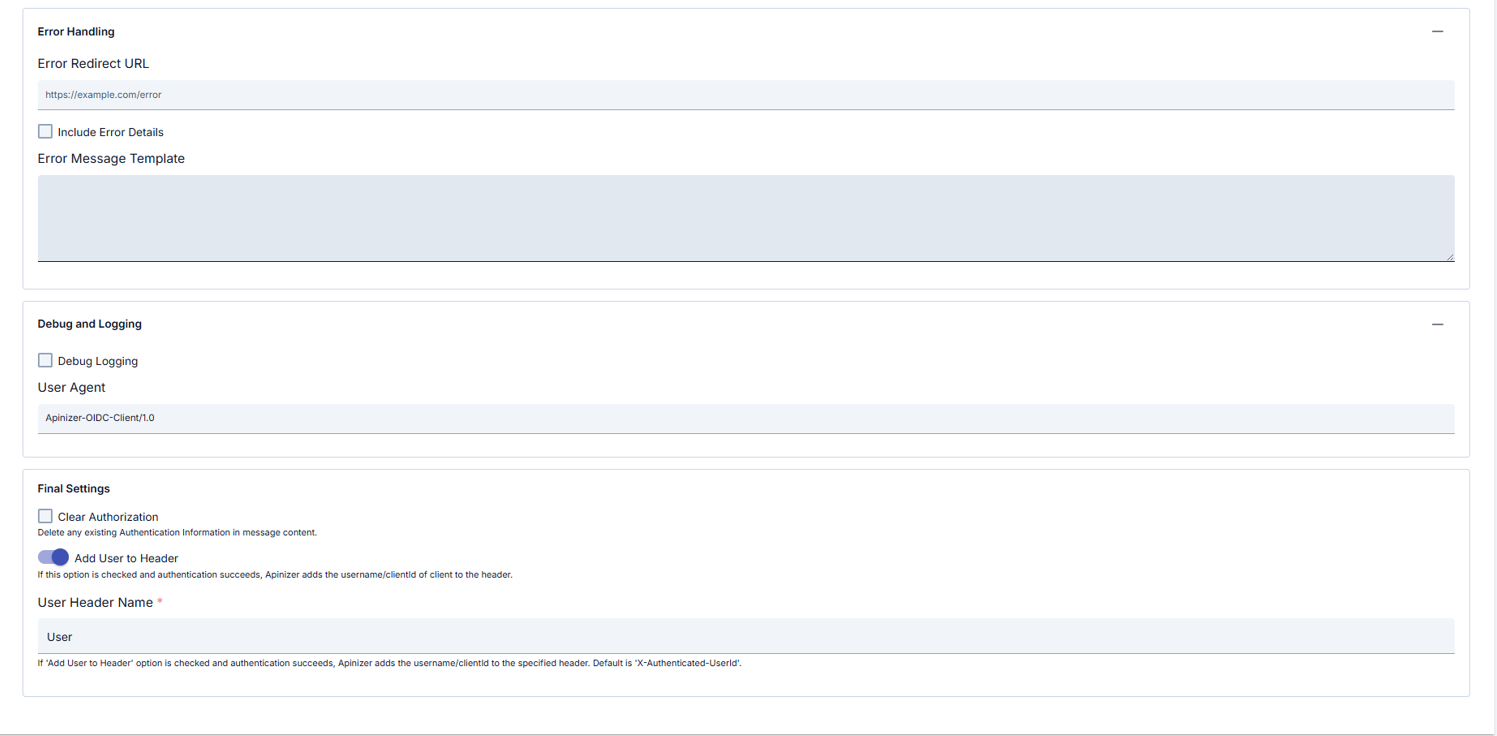
Secure Connection Settings
| Field | Description |
|---|---|
| Customize SSL/TLS Settings | When off, system defaults (e.g. JVM cacerts) are used; when on, you configure custom certificates, TrustStore, or mTLS. |
| Skip SSL Verification | Skip server certificate verification (use only for testing). |
| Server Certificate Verification | Server certificate verification details (collapsible panel, opens with +). |
| KeyStore (Client Certificate) | Client certificate / mTLS (collapsible panel). |
| Protocol & Verification Settings | Protocol and verification (collapsible panel). |
UI warning: mTLS settings affect all connections to the OIDC provider; incorrect configuration can cause connection errors.
IP and Security Control
| Field | Description |
|---|---|
| Check Client IP | Validate client IP. OIDC configuration profile only. |
Timeout Settings
| Field | Description |
|---|---|
| Connection Timeout (sec) | Connect timeout. |
| Read Timeout (sec) | Read timeout. |
| Max Clock Skew (sec) | Clock skew tolerance for JWT iat/exp, etc. |
Request Filtering
| Field | Description |
|---|---|
| Ignored Methods | HTTP methods skipped by the policy (e.g. OPTIONS). OIDC configuration profile only. |
| Ignored Patterns | Comma-separated path/file patterns (e.g. static/js, *.css, *.png). OIDC configuration profile only. |
Error Handling
| Field | Description |
|---|---|
| Error Redirect URL | Redirect URL on error. |
| Include Error Details | Include error details in the response. |
| Error Message Template | Custom error message template. |
Debug and Logging
| Field | Description |
|---|---|
| Debug Logging | Verbose logging. |
| User Agent | User-Agent for OIDC requests (e.g. Apinizer-OIDC-Client/1.0). |
Other
| Field | Description |
|---|---|
| Clear Authorization | Remove existing authentication information from the message. |
| Set Resolved Identity to Context | Determines whether the identity resolved by this policy (username/key) is recorded as the request identity. When on (default), this identity appears in traffic logs and subsequent policies and scripts. When off, the identity is used only for the necessary internal authentication/authorization checks and is not persisted as the request identity. |
| Add User to Header | On success, add username or clientId to a header. |
| User Header Name (required) | Header name; help text may reference default e.g. X-Authenticated-UserId (UI may show e.g. User). |
OIDC vs OAuth2 configuration profile — UI differences
The OAuth2 (External OAuth2 Provider) profile is designed for OAuth 2.0 providers that do not issue an OpenID Connect identity token and return user identity from a dedicated resource service instead of a standard user-info endpoint (for example, the Turkish e-Devlet Gateway). For these providers, the identity is retrieved from the resource service called after authorization, then extracted via OAuth2 Username Extraction Path and passed to the backend. For standard OpenID Connect providers (Keycloak, Okta, Azure AD), use the OIDC profile.
The tables above document the OIDC profile tabs in order. When Configuration Profile is set to OAuth2 (External OAuth2 Provider), Manager shows or hides different tabs and conditional fields on the same policy screen; this section summarizes that behavior.
In Apinizer Manager, the Configuration Profile radio buttons (OIDC / OAuth2) control this.
Summary table
| OIDC (Keycloak, Okta, Azure AD, …) | OAuth2 (External OAuth2 Provider) | |
|---|---|---|
flowType in the background | Selected from dropdown: Authorization Code, Implicit, Hybrid (pure OAuth2 Authorization Code is not listed) | Fixed: OAUTH2_AUTHORIZATION_CODE — set in code when the profile changes |
| Issuer URL | Required (provider identity and metadata discovery) | Not required; this profile uses explicit endpoints and the resource service instead of an issuer |
| Connection — endpoints | UserInfo, JWKS, Introspection, Revocation fields are shown | Those four are hidden; instead the required oauth2ResourceEndpoint field is shown |
| Realm | Shown | Hidden |
| Extra authorization parameters | Additional Auth Params panel (OIDC) | No panel here; instead OAuth2 Auth / Token / Resource parameter tables on a separate tab |
| Flow panel | No Username Extraction Path (OAuth2-specific) | OAuth2 Username Extraction Path is shown |
| Tab order | Connection → Token & Validation → Session & Logout (full) → User Mapping → Security & Other | Connection → OAuth2 Parameters → Session & HTML → Security & Other |
Both profiles typically also include: Conditions, Error Message Customization, API Proxies Using Policy, API Proxy Groups Using Policy (logic is largely independent of profile).
Hidden or different when OAuth2 profile is selected (vs OIDC)
- Token & Validation tab: Bearer JWT, ID/access token checks, UserInfo, JWT issuer/audience/signature, token accept settings, etc.
- Full Session & Logout tab (OIDC): state/nonce, absolute timeout, token cookie names, logout path, revoke, post-logout, etc.
- User Mapping tab: claim paths, role mappings, custom claim mappings.
- On Security & Other, Check Client IP and Ignored Methods / Patterns — OIDC profile only.
Additional / different on OAuth2 profile
The following tabs and screenshots appear only when OAuth2 (External OAuth2 Provider) is selected. Tables use Header Name / Header Value pairs or template editors as appropriate.
OAuth2 Parameters tab
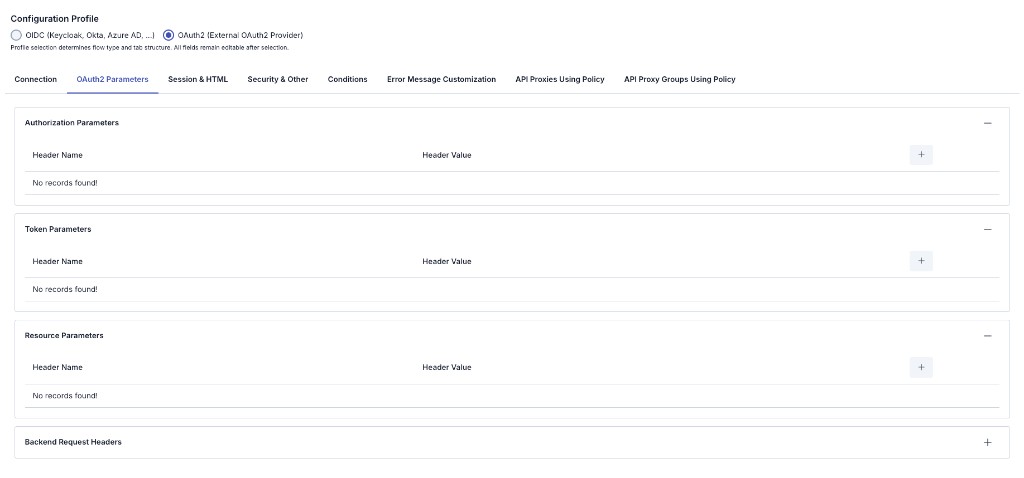
| Section | Description |
|---|---|
| Authorization Parameters | Extra HTTP headers for the authorization request (oauth2AuthParams). Table: Header Name / Header Value; use + to add rows. |
| Token Parameters | Extra headers for the token exchange request (oauth2TokenParams). |
| Resource Parameters | Extra headers when calling the resource / user-info request (oauth2ResourceParams). |
| Backend Request Headers | Extra headers sent to the backend after successful authentication (collapsible section; + to add rows). |
Session & HTML tab
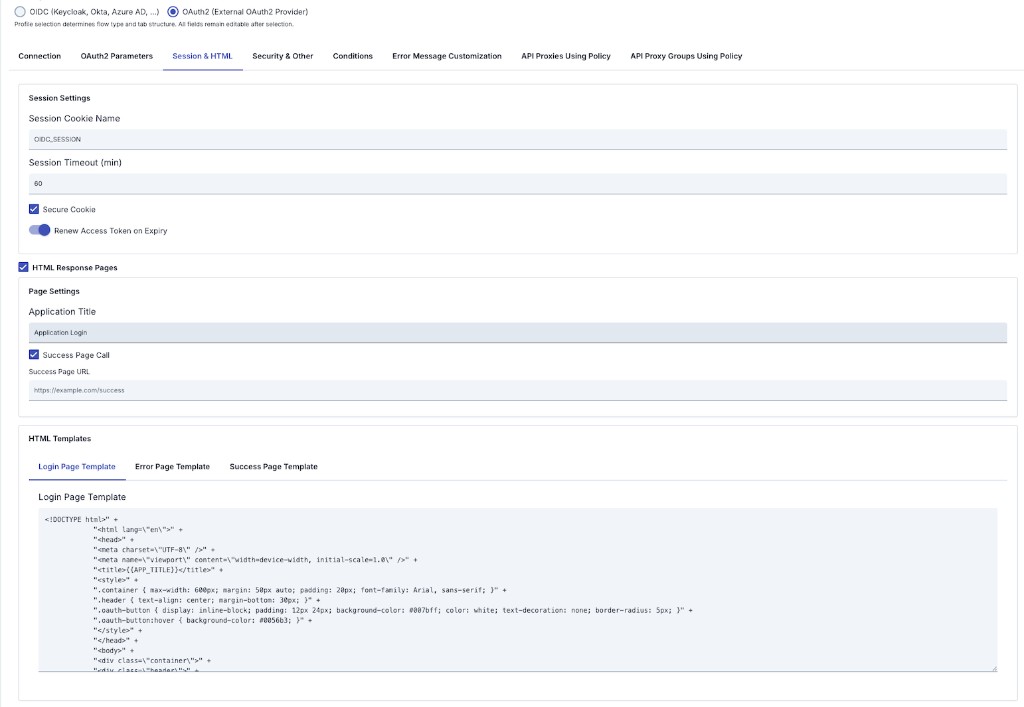
Replaces the full OIDC Session & Logout and User Mapping tabs for this profile: simplified session fields and optional HTML Response Pages for login, error, and success.
Session Settings
| Field | Description |
|---|---|
| Session Storage Type | Where the authenticated session is stored: Cache (default) or Cookie — see the OIDC section's Session Storage Options: Cache vs Cookie. Covers the authenticated session only. |
| Login Flow Session Storage | Where the temporary login session (state / nonce / PKCE verifier / return URL) is kept. If left empty, follows Session Storage Type. When Cookie, the login flow has zero dependency on the cache. |
| Session Cookie Name | Session cookie name (e.g. OIDC_SESSION). |
| Session Timeout (min) | Session lifetime in minutes. |
| Login Flow Timeout (sec) | Completion window for the login flow (seconds), default 600. Independent of Session Absolute Timeout — too low a value produces state validation failed at the callback. |
| Secure Cookie | Send cookie only over HTTPS. |
| Renew Access Token on Expiry | Attempt to refresh the access token when it expires. |
For the full behavior of Session Storage Type and Login Flow Session Storage — including the Cookie mode size limits and Login Flow Timeout warnings — see the OIDC profile → Session & Logout tab → Session Settings section above; these fields work identically on both profiles.
HTML Response Pages (when enabled)
| Field | Description |
|---|---|
| HTML Response Pages | Enables custom HTML pages (similar to enableHtmlResponsePages). |
| Application Title | Title shown on pages (may be referenced in templates, e.g. {{APP_TITLE}}). |
| Success Page Call | Redirect after successful authentication. |
| Success Page URL | Target URL after success. |
| Login / Error / Success Page Template | Three sub-tabs for HTML templates for login, error, and success flows. |
Common to both profiles
- Connection is largely shared: Issuer, Discovery URL, Authorization Endpoint, Token Endpoint, Client ID, Client Secret, Redirect URI, PKCE, Scopes, Authentication Mode (endpoint and flow fields differ per summary table above).
- Security & Other: mTLS/SSL, connection/read timeout, max clock skew, error redirect, debug, user headers; Conditions and Error Message Customization remain profile-independent in behavior.
If documentation states a single tab order for both profiles, that does not fully match the Manager UI: with OAuth2 selected, OAuth2 Parameters and Session & HTML replace Token & Validation, full Session & Logout, and User Mapping.
Note: UI behavior depends on profile flags such as isOIDCProfile / isOAuth2Profile; fields may change between Apinizer versions.
Configuration Steps
OIDC profile recommended order: Connection → Token & Validation → Session & Logout → User Mapping → Security & Other → optional Conditions, Error Message Customization, API usage tabs.
OAuth2 profile order differs: Connection → OAuth2 Parameters → Session & HTML → Security & Other → same optional tabs. This page first documents OIDC tabs in tables; OAuth2 differences are in the OIDC vs OAuth2 configuration profile — UI differences section immediately above.
The steps below follow the OIDC flow first; if you use OAuth2, fill Connection using the summary table in that section, then use OAuth2 Parameters and Session & HTML instead of Steps 5–6 as written for OIDC.
| Step | Description / Operation |
|---|---|
| Step 1: Go to Creation Page | - Go to Development → Global Settings → Global Policies → OIDC Authentication Policy from the left menu. - Click the [+ Create] button at the top right. |
| Step 2: Enter Basic Information | Policy Status: Shows Active/Passive status. New policies are active by default. Name (Required): Example: Production_OIDCAuth- Enter a unique name, does not start with space. - System automatically checks. Green checkmark: available. Red X: existing name. Description: Example: "OIDC SSO for corporate users" - Max. 1000 characters. - Explain the purpose of the policy. |
| Step 3: Variable Usage | - In the action button area at the top of the page, you can use the [<> Variable] button to select dynamic values. - Using context/global variable expressions, you can manage policy parameters with variable-based values instead of fixed values. - This reduces manual update effort when values change and provides operational convenience. - For detailed information, review Dynamic Variables. |
| Step 4: Connection — provider, endpoints, client, flow | - Choose Configuration Profile (OIDC or OAuth2). - Enter OIDC Issuer URL; use Auto Discover or Discovery URL as needed. - OIDC: After discovery or manual entry, verify Authorization, Token, UserInfo, JWKS, Introspection, and Token Revocation; use Realm and Additional Auth Parameters on this profile. - OAuth2: UserInfo / JWKS / Introspection / Revocation are not shown; fill required oauth2ResourceEndpoint; Realm and the Connection Additional Auth Parameters panel are absent (use OAuth2 Parameters tab). Flow is fixed to OAUTH2_AUTHORIZATION_CODE in the backend; set OAuth2 Username Extraction Path when needed.- Client ID, Client Secret, Redirect URI are shared. Redirect URI must exactly match the provider-registered URL. - Set Enable PKCE, Scopes, Authentication Mode, etc. |
| Step 5: Token & session tabs or OAuth2 tabs → Security & Other | OIDC profile: In order: (1) Token & Validation, (2) Session & Logout, (3) Security & Other — matches tables above. Token validation, UserInfo, cache; session/logout; no skip-SSL in production; on OIDC, Check Client IP, Ignored Methods / Ignored Patterns live here. Do not confuse Error Redirect URL with Step 8 JSON body; enable Debug Logging only briefly. OAuth2 profile: No Token & Validation or full Session & Logout. Use OAuth2 Parameters ( oauth2AuthParams, oauth2TokenParams, oauth2ResourceParams, Backend Request Headers) and Session & HTML (simplified session + HTML login/error/success); then Security & Other (shared TLS, timeouts, error redirect, debug, user headers — Check Client IP and ignore fields are not shown on OAuth2). |
| Step 6: User Mapping (OIDC) or backend headers | OIDC profile: Claim Paths, Role Mappings, Custom Claim Mappings, Backend Header Settings, Custom HTTP Headers — keep consistent with Token & Validation UserInfo/header behavior. OAuth2 profile: Use Backend Request Headers under OAuth2 Parameters and username extraction on Connection instead; there is no classic User Mapping tab. |
| Step 7: Define Condition (Optional) | - Go to Condition tab. - Conditions determine when the policy will be active. Examples: - Environment-based: Header = X-Environment, Operator = Equals, Value = production- API Key-based: Header = X-API-Key, Starts With = PROD-- Endpoint-based: Path = /api/admin/*If no condition is defined, policy is always active |
| Step 8: Customize Error Message (Optional) | - Go to Error Message Customization tab. - Customize the JSON API response body when access is denied. This differs from Error Redirect URL on Security & Other (browser redirect); if you use both, test the combined behavior. Default: { "statusCode": 403, "message": "[Default error message]" }Custom: { "statusCode": 403, "errorCode": "[CUSTOM_ERROR_CODE]", "message": "[Custom message]" } |
| Step 9: Save | - Click the [Save] button at the top right. Checklist (summary): - Unique Name and required Connection fields: Authorization / Token; Client ID; Redirect URI. The OIDC profile also requires OIDC Issuer URL and Flow Type; the OAuth2 profile also requires oauth2ResourceEndpoint (Issuer is not required on this profile). - Redirect URI matches the provider registration. - OIDC: Token & Validation / Session & Logout / User Mapping complete as needed; OAuth2: OAuth2 Parameters and Session & HTML complete. - Optional Conditions / Error Message Customization tested. Result: Policy is added to the list; can be connected to APIs; if global, applied automatically. |
For descriptions of Conditions and Error Message Customization panels, you can review the Conditions and Error Message Customization sections on the What is Policy? page.
For a complete guide on all layers, priority order and scenario examples of the error message configuration system, see the Error Message Configuration Guide page.
Deleting the Policy
For deletion steps of this policy and operations to be applied when in use, you can refer to the Removing Policy from Flow section on the Policy Management page.
Exporting/Importing the Policy
For export (Export) and import (Import) steps of this policy, you can refer to the Export/Import page.
Connecting the Policy to API
For the process of how this policy will be connected to APIs, you can refer to the Connect Policy to API section on the Policy Management page.
Advanced Features
| Feature | Description and Steps |
|---|---|
| Dynamic Metadata Discovery | - Automatically fetches issuer, JWKS, endpoint information when Discovery URL is entered. - Performance adjustment is made with metadata cache timeout. - Policy returns error message if discovery fails. |
| Session Management | - Choose where session data is stored: Cache (server-side, default) or Cookie (stateless, entire session encrypted in browser cookie) via Session Storage Type. - In Cache mode, session data is kept on the server and the browser cookie carries only the session ID; this is backward-compatible and allows server-side session revocation. - In Cookie mode, the entire session is encrypted and embedded in the cookie; no server state is maintained and the cache is not consulted. Cookie size is limited (~4 KB); not recommended when using both ID token and refresh token together (large payloads). - Session encryption key and IV are automatically generated from policy ID; configure with session cookie name, timeout, absolute timeout, and optional compression. - Login Flow Session Storage and Login Flow Timeout (sec) manage the login flow's temporary session (state/nonce/PKCE verifier) independently of the authenticated session; default 600 seconds, and if left empty, Login Flow Session Storage follows Session Storage Type. |
| mTLS Configuration | - mTLS can be used when connecting to OIDC provider. - KeyStore/TrustStore-based SSL connection and skip SSL verification option are provided. |
| Token Cookie Configuration | - Access token cookie name can be customized; ID and refresh token storage in cookies is controlled with checkboxes. - Use Renew Access Token on Expiry to control refresh-on-expiry behavior. |
| Token Acceptance Path | - Where token is read from (header, cookie, or both) can be determined. |
| Logout and Token Revocation | - Tokens are revoked via revocation endpoint on logout. - Redirect URL after logout can be defined. |
| Authentication Mode | - EXTERNAL_ONLY (external OIDC), INTERNAL_ONLY (Bearer only), HYBRID (both). - Both authentications can be enforced in Hybrid mode. |
| OAuth 2.0 HTML Pages | - Custom login, error, and success pages are shown in OAuth 2.0 flow. - Page templates can be customized. - Post-authentication redirect can be configured. |
| Role Mapping and Header Injection | - Claim path and target role matching is done. - Roles can be added to header, header names can be customized. - Role selection is done with Identity Role Group Service. |
Session Storage Options: Cache vs Cookie
OIDC session data can be stored in two ways:
This section describes the AUTHENTICATED session only. The Session Storage Type field determines where the session lives AFTER the user completes the login flow. The temporary session held during the login flow itself (state, nonce, PKCE verifier, return URL) is controlled by a separate field — Login Flow Session Storage. If left empty it follows Session Storage Type, but if it is explicitly set to CACHE, the temporary session keeps going to the cache even when Session Storage Type is Cookie. This is the source of the "I chose Cookie but the cache is still required" surprise — for a fully stateless login flow with zero cache dependency, leave Login Flow Session Storage empty (it follows Session Storage Type) or set it explicitly to Cookie. In addition, the login flow's completion window is managed separately by Login Flow Timeout (sec) (default 600 seconds) and is independent of Absolute Timeout (sec) — see the Session Settings table above.
Cache (Default)
- Session data is kept in the server-side distributed cache.
- The browser cookie carries only the session ID.
- This is the backward-compatible, classic behavior.
- Allows server-side revocation of individual sessions.
Cookie (Stateless)
- The entire session data (including token information) is encrypted and embedded directly in the browser cookie.
- No session state is kept on the server; the cache is not consulted on each request.
- Suitable for high-scalability and stateless architectures.
Cookie Mode Size Limits Browser cookies have an approximate 4 KB size limit. If the encrypted session data exceeds this limit, the session cannot be created and an error is returned.
Cookie mode is not recommended when both ID token and refresh token are used together (large payload). It suits scenarios carrying small data (for example, pure OAuth2 authorization flows or e-Government integrations with minimal claims).
When to use Cookie Mode Choose Cookie mode for high-scalability deployments with small session payloads and stateless architecture requirements. Optionally, session data can be compressed before encryption to reduce size.
Important Timeout Differences
- In Cache mode, both idle (sliding) timeout and absolute (total) session lifetime are enforced.
- In Cookie mode, the idle/sliding timeout does not apply; only the absolute (total) session lifetime is enforced.
Revocation Behavior
- In Cache mode, sessions can be individually revoked from the server.
- In Cookie mode, because no session is stored on the server, sessions cannot be individually revoked (no central revocation point).
Best Practices
Things to Do and Best Practices
| Category | Description / Recommendations |
|---|---|
| OIDC Provider Management | Bad: Using single issuer for all environments. Good: Defining different issuers for test and live. Best: Making environment-based issuer selection with Condition. |
| Token Security | Bad: Closing signature verification. Good: Performing JWT signature verification. Best: Caching JWKS keys and refreshing periodically. |
| Session Durations | Bad: Leaving durations at default; confusing Login Flow Timeout with Absolute Timeout. Good: Determining timeout according to user profile. Best: Implementing Session absolute timeout + refresh token strategy; tuning Login Flow Timeout (sec) separately for the IdP's typical authentication time (including SMS/email OTP) — shortening it does not affect Absolute Timeout and vice versa. |
| Role Management | Bad: Using single claim for roles. Good: Extracting role with claim path. Best: Making centralized role mapping with Identity Role Group Service. |
| Error Management | Bad: Transmitting general error message. Good: Specifying OIDC-specific error message. Best: Providing different content that is user-friendly and log-friendly in Error Message Customization. |
Security Best Practices
| Security Area | Description / Warnings |
|---|---|
| TLS Mandatory | All endpoint addresses must be HTTPS. |
| PKCE Usage | enablePKCE=true should be configured for mobile and SPAs, code verifier should not be logged. |
| Nonce/State Protection | Nonce and state verification should not be disabled; mandatory against replay attacks. |
| Session Security | Choose between Cache (server-side, default) and Cookie (stateless, encrypted) storage for sessions. In Cache mode, session data is stored server-side with only the session ID in the browser cookie. In Cookie mode, encryption key is automatically generated from policy ID; encrypted session is embedded in the cookie (~4 KB limit). TLS must be mandatory in both modes. Server-side revocation is available only in Cache mode; Cookie mode does not support individual session revocation. Session Storage Type covers the authenticated session only — if you also want the login flow's temporary session out of the cache, control Login Flow Session Storage separately. |
| Cookie Security | Secure, HttpOnly, and SameSite policies should be enabled; token cookies should be sent with minimum permissions. |
Things to Avoid
| Category | Description / Warnings |
|---|---|
| Default Key Usage | Why to avoid: Manual session key values may be predictable. Alternative: Session encryption is automatically generated from policy ID; ensure policy ID is unique. |
| Wide Scope Definitions | Why to avoid: Excessive scope causes privilege escalation. Alternative: Add only necessary scopes with least privilege principle. |
| Long Cache Durations | Why to avoid: If JWKS/token cache is kept long, compliance with key rotation weakens. Alternative: Select cache duration between 15-60 minutes and establish refresh mechanism. |
| Keeping Debug Logs Open in Live | Why to avoid: Sensitive token information may fall into logs. Alternative: Open debug logging only briefly during troubleshooting. |
Performance Tips
| Criterion | Recommendation / Impact |
|---|---|
| Metadata Cache | Recommendation: Keep providerMetadataCacheTimeoutSeconds value between 900-1800 seconds. Impact: Discovery endpoint calls decrease, latency drops. |
| Token Cache Timeout | Recommendation: Adjust tokenCacheTimeoutSeconds according to OIDC access token lifetime. Impact: Unnecessary re-verifications are prevented, back-end load decreases. |
| JWKS Cache | Recommendation: Do not exceed 3600 seconds upper limit for jwkCacheTimeoutSeconds. Impact: Acceptance of incorrect signatures during key rotation is prevented. |
| Ignore Patterns | Recommendation: Add static content paths to ignore patterns field. Impact: Static files are freed from unnecessary redirection, response time increases. |
| Backend Header Management | Recommendation: Remove unnecessary backend header entries. Impact: Request size and processing time going to backend decreases. |
Frequently Asked Questions (FAQ)
| Category | Question | Answer |
|---|---|---|
| General | What is OIDC authentication? | OpenID Connect (OIDC) is an authentication protocol built on OAuth 2.0. Verifies user identity using ID token and access token. |
| General | Which flow types are supported? | Authorization Code, Implicit, Hybrid, and pure OAuth2 Authorization Code flow types are supported. |
| Technical | How is token verified? | Gateway receives token, verifies JWT signature with public key obtained from JWKS endpoint, performs audience and issuer check. |
| Technical | What is PKCE? | Proof Key for Code Exchange (PKCE) is a security mechanism providing protection against authorization code interception attacks. |
| Usage | How are different OIDC providers used for different tenants? | Tenant-based issuer selection can be done with Condition or discovery URL variable can be used. |
| Usage | How can I change default error message? | You can edit status code, error code, and message fields from Error Message Customization tab. |
| General | Can OIDC policy work together with Basic Authentication policy? | Yes, but Basic Authentication is recommended only as fallback; you can determine which policy will work conditionally. |
| General | Does global copy get affected when I convert policy to local? | No, Localize operation creates a new local policy; global policy remains unchanged. |
| Technical | Which fields should I fill if I don't use Discovery URL? | You need to manually enter Authorization, Token, UserInfo, JWKS, and Introspection endpoint addresses. |
| Technical | Which log messages should I look for when token verification fails? | You can examine error details of validateAccessTokenWithApi and validateJwtSignature steps by opening Policy debug logs. |
| Usage | How do I share same policy for multiple API Proxies? | You can create policy globally and assign to relevant API Proxies or use Policy Group. |
| Usage | Is PKCE mandatory for mobile applications? | Recommended for strong security; activate enablePKCE=true setting to prevent code interception attacks. |
| Technical | What does authentication mode (EXTERNAL_ONLY, INTERNAL_ONLY, HYBRID) mean? | EXTERNAL_ONLY: OIDC redirect only. INTERNAL_ONLY: Bearer token only (header/cookie). HYBRID: Both; both can be enforced in Hybrid mode. |
| Technical | How is token revocation done on logout? | Enable token revocation on logout option and define revocation endpoint. If not set, it is derived from introspection endpoint (/introspect → /revoke). |
| Technical | What happens if Login Flow Timeout (sec) is set too low? | The user cannot finish entering a password/OTP at the IdP in time, and the callback fails with state validation failed (CSRF protection): temporary session not found (expired or already consumed). Increase the 600-second default according to the IdP's typical authentication time; this field is independent of Absolute Timeout (sec). |
| Usage | I set Session Storage Type to Cookie, but traffic still hits the distributed cache — why? | Session Storage Type covers only the authenticated (logged-in) session. The login flow's temporary session (state/nonce/PKCE verifier) keeps going to the cache unless Login Flow Session Storage is also Cookie (explicitly, or by leaving it empty so it inherits Session Storage Type = Cookie). For a login flow with zero cache dependency, leave Login Flow Session Storage empty (it follows Session Storage Type) or set it explicitly to Cookie. |