Global Settings Group
You can visit the Settings Tab (Settings Tab) page for settings details.
The Settings Group screen is used to configure and edit settings specific to API Proxies or API Proxy Groups. It allows grouping and applying different settings. Existing setting groups can be edited, made default, or new settings can be defined to customize the behavior of API Proxies/API Proxy Groups.
Settings Group settings are shown in the following image:
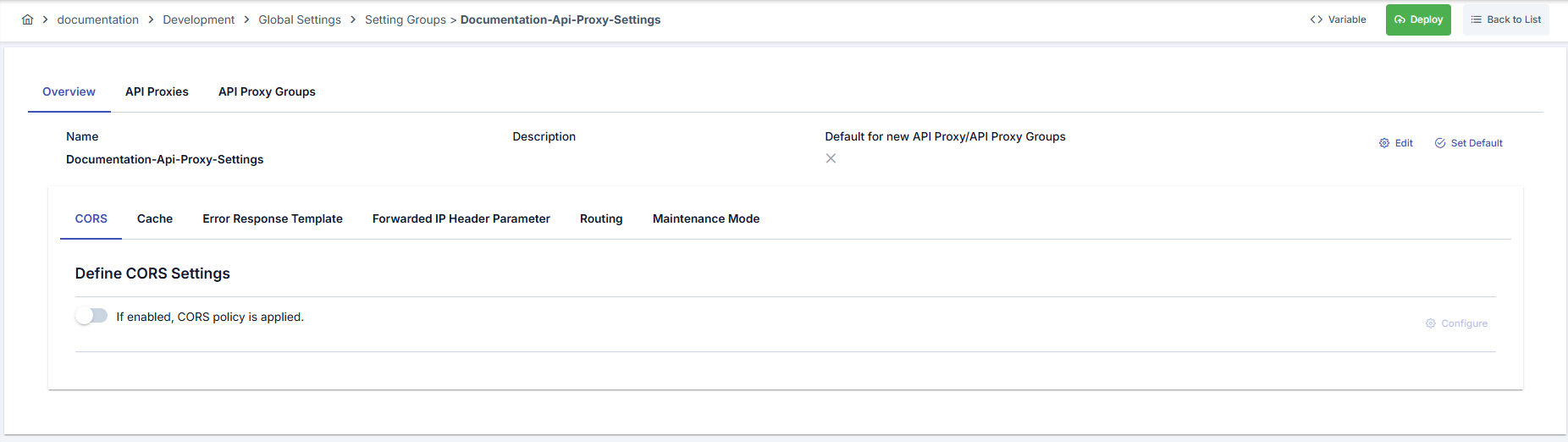
The fields used for API Proxy settings configuration are shown in the table below.
| Field | Description |
|---|---|
| Name | Name used for API Proxy setting. |
| Description | Descriptive information about the settings group. |
| Default for API Proxies (Default for API Proxies) | Determines whether this settings group is the default setting for newly created API Proxies/API Proxy Groups. "Set Default" option from the "Actions" menu can be used to make it default. |
| Actions (Actions) | - Edit (Edit): Provides the ability to edit the existing settings group. - Set Default (Set Default): Makes the settings group default for new API Proxies/API Proxy Groups. :::info |
If "Set Default" (Set Default) setting is selected, if there is a settings group marked as default, the default property on it is removed. Existing API Proxies/API Proxy Groups are not affected by this change. New API Proxies and API Proxy Groups created after this setting are created with this new setting as default.
::: |
| Settings Tabs | CORS (Cross-Origin Resource Sharing):
Determines whether the CORS policy will be enabled. When the setting is enabled, configuration details can be edited with the 'Configure' button.
Cache:
Enables configuration of caching settings for API Proxies. This tab is used to determine rules for how and for how long responses will be cached.
Error Response Template:
Provides the ability to customize the format and content of error messages returned by the API Proxy.
Forwarded IP Header Parameter:
Configures how IP headers forwarded through API Proxies will be processed.
Routing:
Contains settings for determining target server or path for the API Proxy. Used to define which server or path the proxy will route requests to.
Maintenance Mode:
Used to put the API Proxy into maintenance mode. This mode is used to temporarily stop API access during system updates or planned maintenance operations. The API responds with a predefined HTTP status code and message structure.
:::info
You can visit the Settings Tab (Settings Tab) page for settings details.
::: | | Variable Button (Variable) | You can select dynamic values for related fields using the [<> Variable] button at the top of the page. For details, review Dynamic Variables. |
Settings created on the API Proxy Settings screen can be assigned to proxies and proxy groups. This operation is performed through a selection screen as shown in the image.
Settings for adding API Proxy settings to Proxy and Proxy Group are shown in the following images:

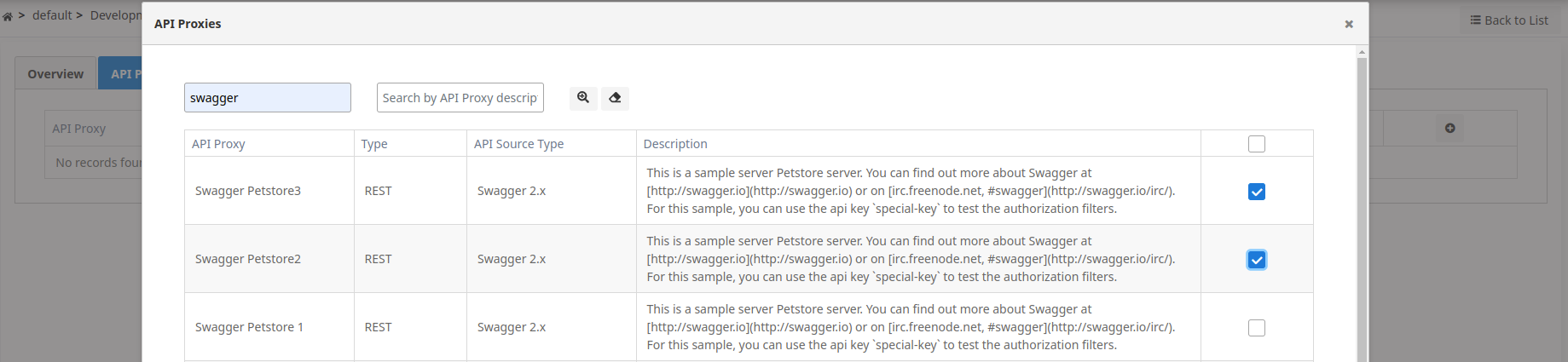
- The user can select one or more of the listed API Proxies.
- Similarly, API Proxy Settings can also be assigned to Proxy groups from the same screen.
Settings Group Deploy Operation
When any change is made to a settings group, the status of API Proxies and API Proxy Groups using this group changes to "Redeploy Required". Attaching a proxy or proxy group to a settings group, or detaching it, also marks that proxy or proxy group's deployed environments as "Redeploy Required" — since either action changes the configuration the Gateway is expected to serve, even if you don't edit the group's own settings on the same step. Instead of deploying them one by one, the "Settings Group Deploy" feature enables bulk deployment of all API Proxies and API Proxy Groups using this settings group to a specific working environment (environment).
When a proxy or proxy group is attached to a settings group, any setting the group defines (for example CORS, Cache, Error Response Template, Forwarded IP Header Parameter, or Maintenance Mode) is taken over by the group: the proxy's own values for that tab are replaced by the group's the next time the group or the attachment is saved, and the tab is shown as read-only with a note pointing to the group. Detaching the proxy from the group does not revert these values on its own — whatever was last applied from the group stays on the proxy until you edit it directly.
When the deploy operation is initiated, a confirmation dialog opens. This dialog contains the following information and options:
- Policy/Settings Group Name: The name of the settings group to be deployed is displayed. This information is shown in the confirmation mechanism since it is a bulk operation.
- API Proxy and API Proxy Group Selection: You can select whether the deploy operation will be applied to API Proxies, API Proxy Groups, or both. Both options can be selected.
- Filter Option: You can select one of the following options to filter which API Proxies and API Proxy Groups will be deployed:
- All: All API Proxies and API Proxy Groups using this settings group are deployed.
- Only deployed ones: Only API Proxies and API Proxy Groups that are deployed in the selected environment and do not require redeploy are deployed.
- Only deployed and redeploy required ones: Only API Proxies and API Proxy Groups that are deployed in the selected environment and require redeploy are deployed.
- Deployable Object Counts: The number of API Proxies and API Proxy Groups to be deployed is displayed according to the selected filter option.
When the filter option is changed, the deployable object counts are automatically updated. When the deploy operation is initiated, the API Proxies and API Proxy Groups determined according to the selected filter option are deployed.
When the deploy operation is completed, a results screen named Deployment Results showing the result of the deploy operation is presented to the user.
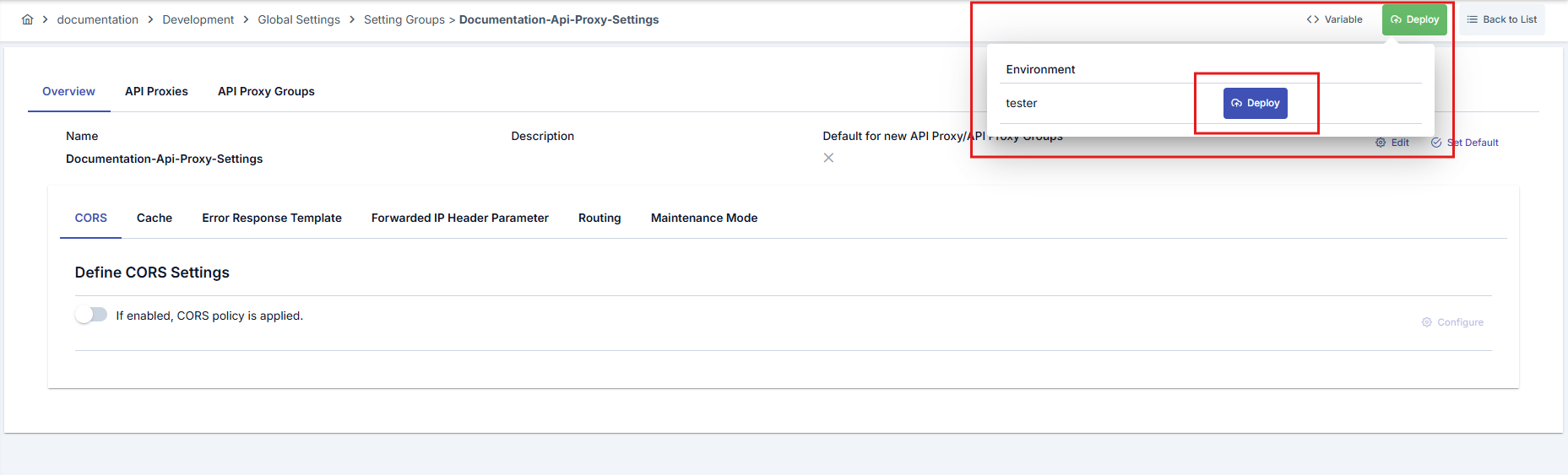
Settings Group Deploy detail is shown in the following image: