gRPC Routing
If API type is gRPC, this tab is visible.
This section contains routing settings for gRPC API Proxy Type.
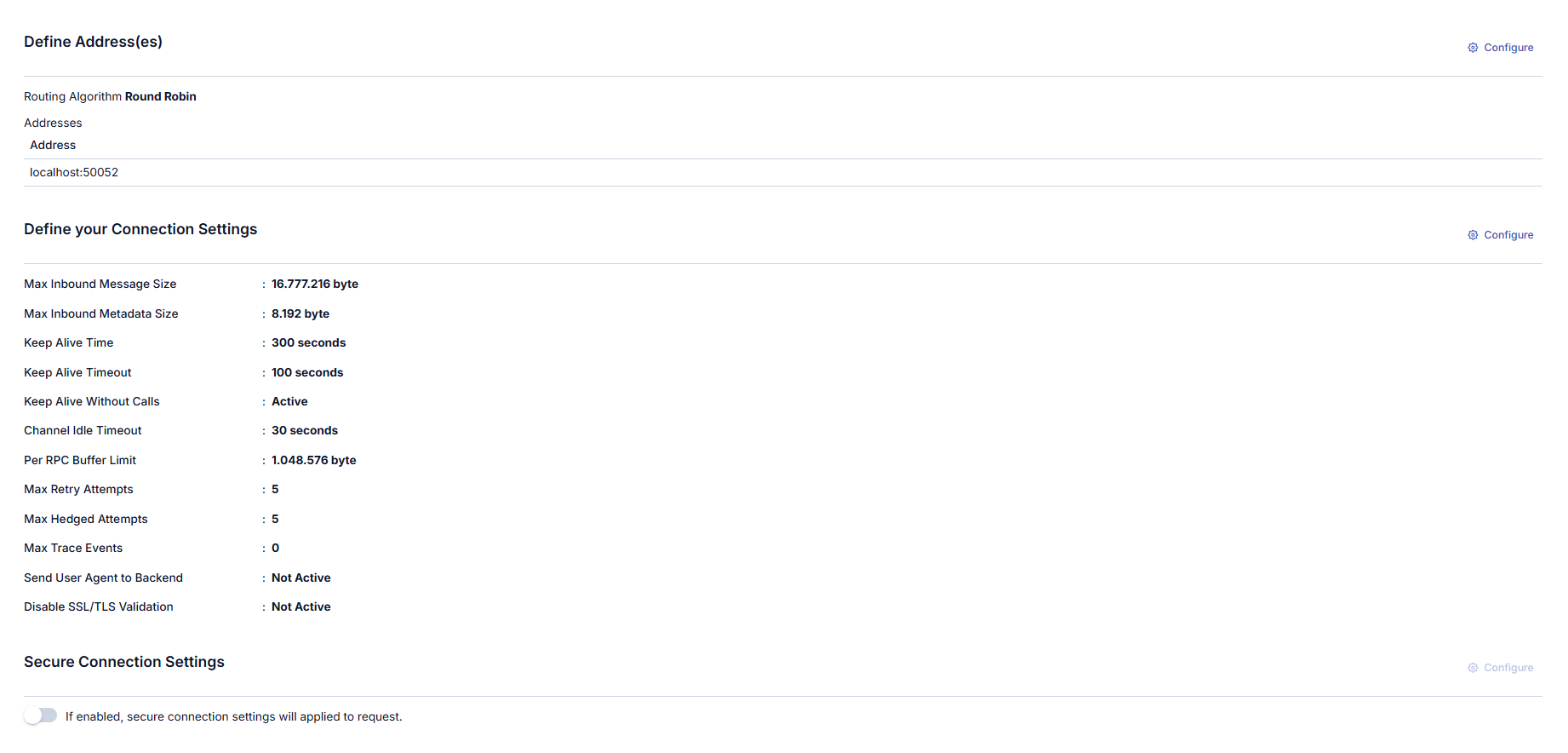
After the API Proxy receives messages from clients and executes policies if any, it routes the message to the Backend API. The Routing tab is the tab where this routing operation is configured.
Routing Tab settings are shown in the following image:
Adding New Address
A new address can be added from the window that opens when the ➕ button in the column header area at the far right of the window opened with the Configure button is clicked.
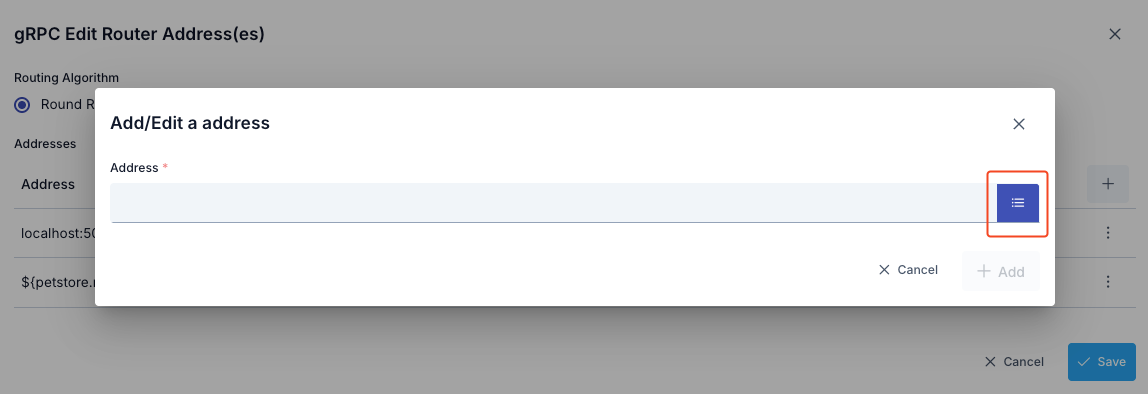
In the new address addition window:
- Backend API address is entered in the Address field or environment variable is used
- Environment Variables Selection Dialog can be opened by clicking the list icon button on the right of the Address field
- Selected environment variable is copied to clipboard and pasted into the Address field
Updating Address
The address can be updated in the window that opens when the Configure button in the Address (Address) column of the table showing addresses is clicked.
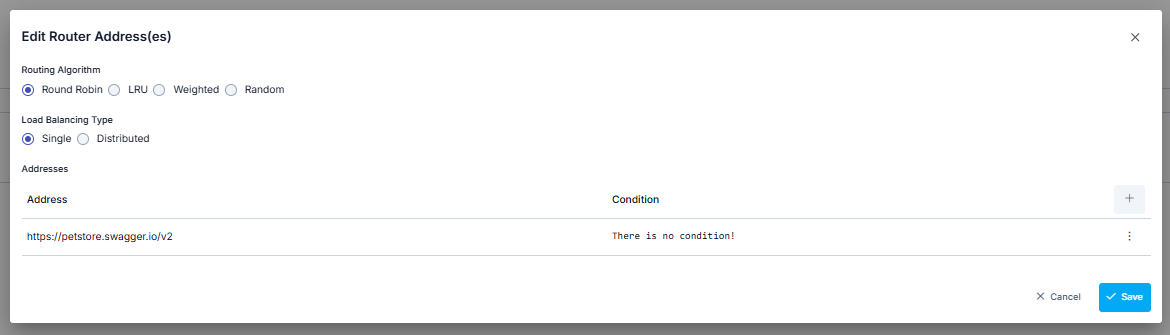
If this value is desired to change automatically according to the environment it is in, selection can be made from Environment Variables (Environment Variable).
The address can be updated in the window that opens when the Configure button in the Address (Address) column of the table showing addresses is clicked.
Environment Variables (Environment Variable) Selection dialog detail is specified in the following image.
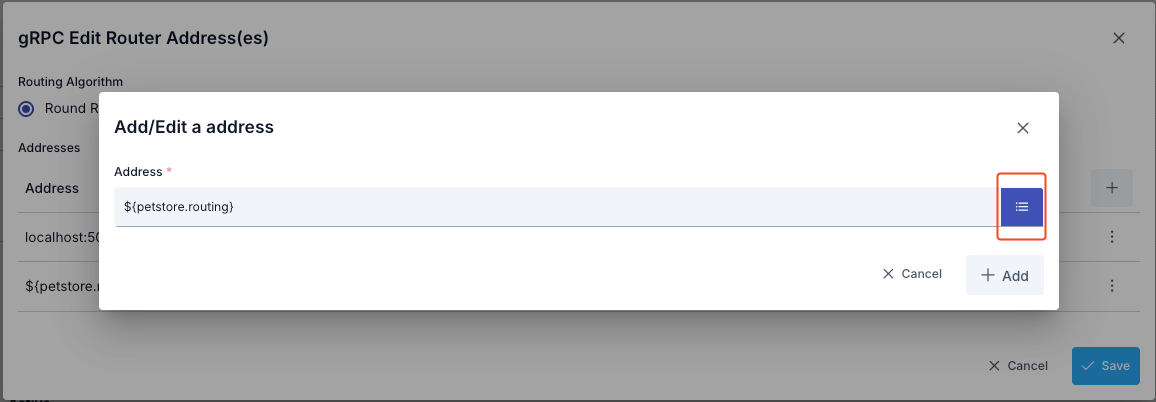
When the list icon button on the right of the address input field is clicked, the Environment Variables Selection Dialog opens. Through this dialog, all environment variables (Environment Variables) defined in the project can be viewed and selected.
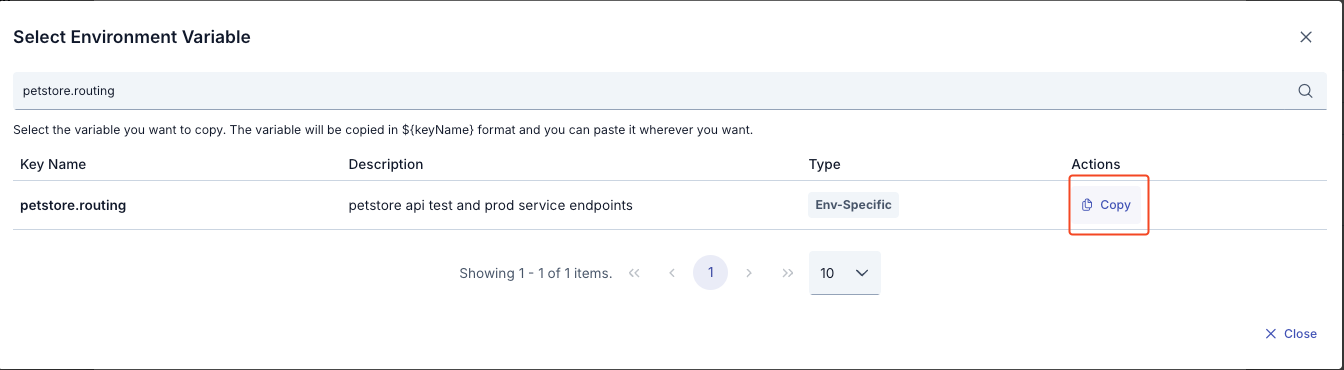
In the Environment Variables Selection Dialog:
- All environment variables are listed (Global and Environment-Specific)
- Filtering can be done by variable name or description with the search box
- Key Name, Description, Type information is displayed for each variable
- The format of the selected variable (
${variableName}) is automatically copied to clipboard with the Copy button - The copied value can be used by pasting it into the Address field
Example Usage:
- Environment variable:
GRPC_BACKEND_URL = localhost:50051(for Development environment) - Environment variable:
GRPC_BACKEND_URL = grpc.example.com:443(for Production environment) - Value entered in Address field:
${GRPC_BACKEND_URL} - At runtime in Development environment:
localhost:50051 - At runtime in Production environment:
grpc.example.com:443
Routing Algorithm
Which algorithm to use among the algorithms that can be used for load balancing can be determined by the user.
| Algorithm | Description |
|---|---|
| Round Robin | Request messages are sent to addresses in the list in order. When the end of the list is reached, it returns to the beginning of the list and the same cycle continues. |
| Pick First | Request messages are routed to the first address in the list. |
Deleting Address
The address is deleted by selecting the Remove option from the dropdown menu at the end of the row of the address to be deleted.
At least one address is required for the API Proxy to route. Therefore, after deleting the last address, the save button becomes inactive and does not allow saving.
Connection Settings Configuration
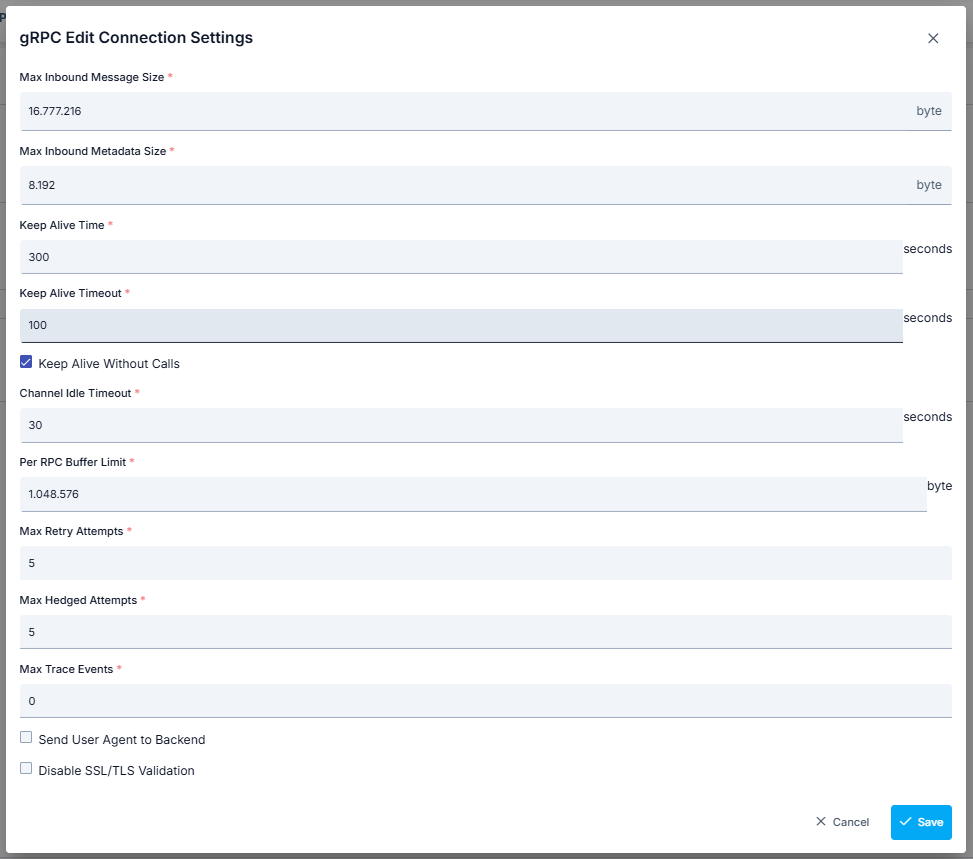
The gRPC Connection Settings Definition Tab enables configuration of connections made over the gRPC protocol. This tab contains various parameters necessary to optimize the performance and security of connections. Below are the details of the settings in this tab.
The parameters used for connection settings configuration are shown below.
| Field | Description |
|---|---|
| Max Inbound Message Size (Max Inbound Message Size) | Determines the maximum message size that can be received from the client. |
| Max Inbound Metadata Size (Max Inbound Metadata Size) | Determines the maximum metadata size that can be received from the client. |
| Keep Alive Time (Keep Alive Time) | Sets the time elapsed to keep the connection alive. |
| Keep Alive Timeout (Keep Alive Timeout) | Determines the timeout of Keep Alive messages. |
| Keep Alive Without Calls (Keep Alive Without Calls) | Sets whether the connection will be kept alive without calls. |
| Channel Idle Timeout (Channel Idle Timeout) | Determines the idle time of the channel. |
| Per RPC Buffer Limit (Per RPC Buffer Limit) | Defines the buffer memory limit to be allocated for each RPC. |
| Max Retry Attempts (Max Retry Attempts) | Determines the maximum number of attempts for retry. |
| Max Hedged Attempts (Max Hedged Attempts) | Sets the maximum number of attempts when the same request is sent multiple times. |
| Max Trace Events (Max Trace Events) | Determines the maximum number of trace events. |
| Send User Agent to Backend (Send User Agent to Backend) | Information that User Agent information will be sent when sending request to Backend. When this option is enabled, the User-Agent value can be customized. |
Secure Connection Setting
When this setting is enabled, the selected connection settings are applied to the request.
Thus, the Apinizer client that will send from Apinizer to the target service verifies the target service's certificate and indicates that it also has a certificate and must be verified by the target service.
The target service also verifies the client's certificate, and thus secure communication is established with the client.
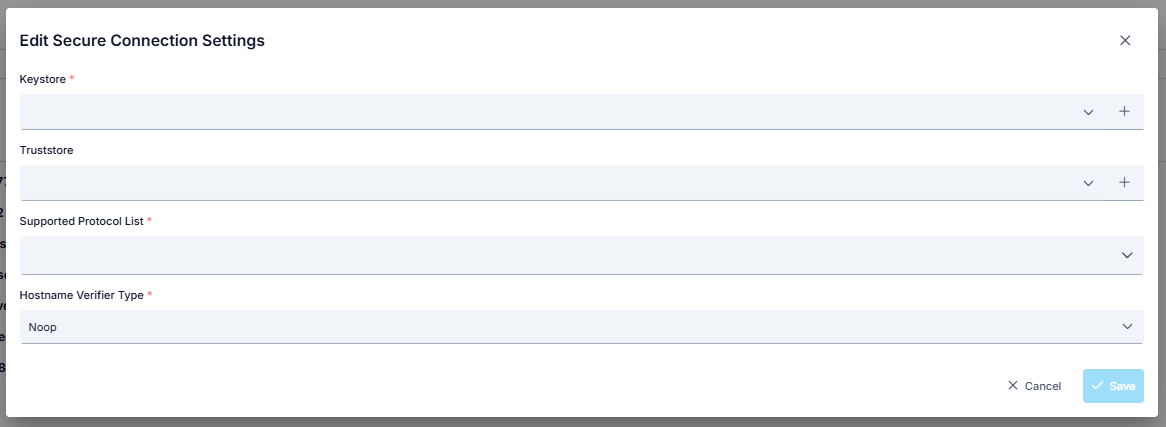
The parameters used for connection settings configuration are shown below.
| Field | Description |
|---|---|
| Keystore | Keystore is used to authenticate the client side. Keystore content should contain: If there is no mTLS verification at the server address, it should be empty. If there is mTLS verification at the server address: client privatekey, Client certificate (with public key), Certificate chain (if any intermediate and root CA certificates) should be present. |
| Truststore | Truststore is used to verify the server certificate. Truststore content should contain: The root CA certificate of the target server, Intermediate CA certificates (if any) should be present. A truststore is not a separate record type: your JKS/PKCS12 file is uploaded as a Key Store record under Administration → Secret → Key Stores, and that record is what you select here. |
| Supported Protocol List (Supported Protocol List) | Supported protocols are selected. Options: TLSv1.3, TLSv1.2, TLSv1.1, TLSv1, SSLv3 |
| Hostname Verifier Type (Hostname Verifier Type) | Noop Hostname Verification disables hostname verification that could pose a security risk in SSL/TLS connections. To prevent man-in-the-middle (MITM) attacks where an attacker could intercept SSL/TLS communication and impersonate the server, it is important to verify the server's hostname. Instead of using Noop Hostname Verification, you can use one of the following hostname verification implementations provided by the Apache HttpComponents client framework: Default Hostname Verification: This implementation performs standard hostname verification according to rules defined in RFC 2818 and RFC 6125. It checks the common name (CN) of the server certificate and subject alternative names (SANs) to ensure the hostname matches. Strict Hostname Verification: This implementation performs stricter hostname verification than Default Hostname Verification. It requires an exact match between the hostname and the CN or SANs of the server certificate. It also checks whether the hostname is a fully qualified domain name (FQDN) and is not an IP address or wildcard domain name. Browser Compat Hostname Verification: This implementation performs relaxed hostname verification based on rules used by popular web browsers. It allows a wildcard domain name to match any subdomain of the domain name and ignores case sensitivity of the hostname. |
When Secure Connection settings are active, the existing "http connection pool" in routing, whose values are specified in environment settings, is disabled.