Basic Authentication
This document describes the detailed usage of a specific policy. If you are using Apinizer policy structure for the first time or want to learn the general working principles of policies, we recommend that you first read the What is Policy? page.
Overview
Authenticate API requests securely using HTTP Basic Authentication standard. Perform identity verification by decoding username and password information sent in requests with base64.
What is its Purpose?
- Authenticate API requests securely using HTTP Basic Authentication standard. Perform identity verification by decoding username and password information sent in requests with base64.
- Connect to centralized authentication infrastructure with Secret Manager, LDAP, database, or external API integrations. Verify user information securely through Identity/Role Group services.
- Provide access control at endpoint or method level by checking user's roles and permissions. Guarantee that only authorized users can access specific APIs with Authorization configuration.
- Transmit authenticated user information (username, user ID, etc.) to backend services with special header. Enable backend to perform operations in user context.
- Provide multi-layered security by adding advanced security layers such as IP address control, clear auth, and error message customization.
Working Principle
- Request Arrival: For each HTTP/HTTPS request arriving at API Gateway, the request's
Authorizationheader is checked and base64 encoded credentials (username:password) withBasicprefix are searched. - Policy Check: If Base64 Authentication policy is active, the system checks in the following order:
- Is a condition defined? If so, is the condition met?
- Is the policy active (active=true)?
- Is a variable used or is Apinizer default used?
- Authentication Check: Authorization header is decoded and username/password are extracted. Credentials are verified with Identity Role Group service (Secret Manager, LDAP, Database, or API). If
checkClientIpAddressis active, client IP address is also checked. - Decision Making:
- Authentication Successful: If user is verified, authorization (role check) is optionally performed. If
addUserToHeaderis active, user information is transmitted to backend with special header. IfclearAuthis active, Authorization header is not sent to backend. - Authentication Failed: If user credentials are invalid or user has no permission, HTTP 401/403 error is returned.
- Authentication Successful: If user is verified, authorization (role check) is optionally performed. If
- Error Handling: Customizable HTTP status code and error message are returned for requests that do not comply with policy rules.
: characterAfter the base64 decode, only the first : separates the username from the password; every character after it is part of the password (RFC 7617). For example user:12:34 is resolved as the username user and the password 12:34.
Requests from users whose password contained a : were previously rejected with a "missing credentials" error. A : cannot be used in the username — that is what the standard requires.
Features and Capabilities
Basic Features
- HTTP Basic Authentication Support: Authentication in base64 encoded username:password format compliant with RFC 7617 standard. Automatic decode and credential extraction from Authorization header.
- Identity/Role Group Integration: Centralized identity management with Secret Manager, LDAP, Database, or external API services. Secure verification of user information and retrieval of role information.
- Username Variable Support: Writing authenticated username to Apinizer variables. Access to user information throughout policy chain and ability to transfer to backend.
- Active/Passive Status Control: Easily change policy's active or passive status (active/passive toggle). Policy is not applied in passive state but its configuration is preserved.
- Condition-Based Application: Determine when the policy will be applied by creating complex conditions with Query Builder (e.g., only for specific endpoints or header values).
Advanced Features
- Authorization (Authorization) Configuration: Method-based access control (GET, POST, PUT, DELETE, etc.). Role-based authorization and consumer role list definition. Transmitting roles to backend as header (addRolesToHeader).
- IP Address Control: Client IP address verification in addition to user credentials in Secret Manager mode. Two-factor security layer.
- Clear Auth and Header Manipulation: Not sending Authorization header to backend (clearAuth). Transmitting authenticated user information to backend with special header (addUserToHeader). Customizing header name (userHeaderName).
- Export/Import Feature: Export policy configuration as ZIP file. Import to different environments (Development, Test, Production). Version control and backup capability.
- Policy Group and Proxy Group Support: Manage multiple policies within Policy Group. Bulk policy assignment to Proxy Groups. Centralized updates and deploy operations.
- Deploy and Versioning: Deploy policy changes to live environment. See which API Proxies use it (Policy Usage). Proxy Group and Policy Group usage reports.
Usage Scenarios
| Scenario | Status | Solution (Policy Application) | Expected Behavior / Result |
|---|---|---|---|
| Enterprise Authentication | LDAP-based authentication required for internal APIs. All users are defined in Active Directory. | LDAP service is selected as Identity Role Group. Username variable is defined. Policy is assigned to all APIs. | Authorization header is checked on every request. User is verified from LDAP. If successful, request is forwarded to backend. |
| Microservice Identity Transfer | Backend microservices need user information but password information should not be sent. | addUserToHeader=true and clearAuth=true are set. Header name is set as X-Authenticated-User. | Gateway performs authentication, does not send Authorization header to backend. Only transmits username with X-Authenticated-User header. |
| Role-Based Access Control | Admin users should access all methods, normal users should only do GET and POST. | Authorization configuration is activated. Method Access is defined: Admin role: ALL, User role: GET, POST. | User's role is checked on every request. Admin can DELETE but User role gets 403 error. |
| IP Restricted Authentication | Users defined in Secret Manager should only access from specific IPs. | Secret Manager Identity is selected. checkClientIpAddress=true is set. IP list is entered when defining consumer in Secret Manager. | Both username/password and IP address are checked when request arrives. If IP doesn't match, 401 error is returned. |
| Test and Production Separation | Authentication should not be performed in test environment, should be performed in production. | Condition is defined: Header = X-Environment, Equals, production. Policy is assigned as active. | Policy is skipped in test environment because X-Environment header is not present. Authentication is performed in production if header exists. |
| External API Authentication | User information is stored in external REST API. | API service is selected as Identity Role Group. API endpoint and parameters are configured. | On every request, API Gateway sends user information to external API. Authentication is performed according to response returned from API. |
| Multiple Identity Sources | Some users are defined in LDAP, some in Database. | Two separate Base64 Authentication policies are created. Separated with Condition: Header = X-Auth-Source, Equals, LDAP for LDAP users. | Appropriate identity source is selected according to request. Authentication is performed from LDAP or Database. |
Configuring Policy Parameters
In this step, users can create a new policy or configure existing policy parameters to define access rules. Defined parameters directly affect how the policy works (e.g., which IPs will be allowed, geographical restrictions, conditional activations, etc.). This allows the policy to be customized according to organization-specific requirements and managed centrally.
Creating New Base64 Authentication Policy
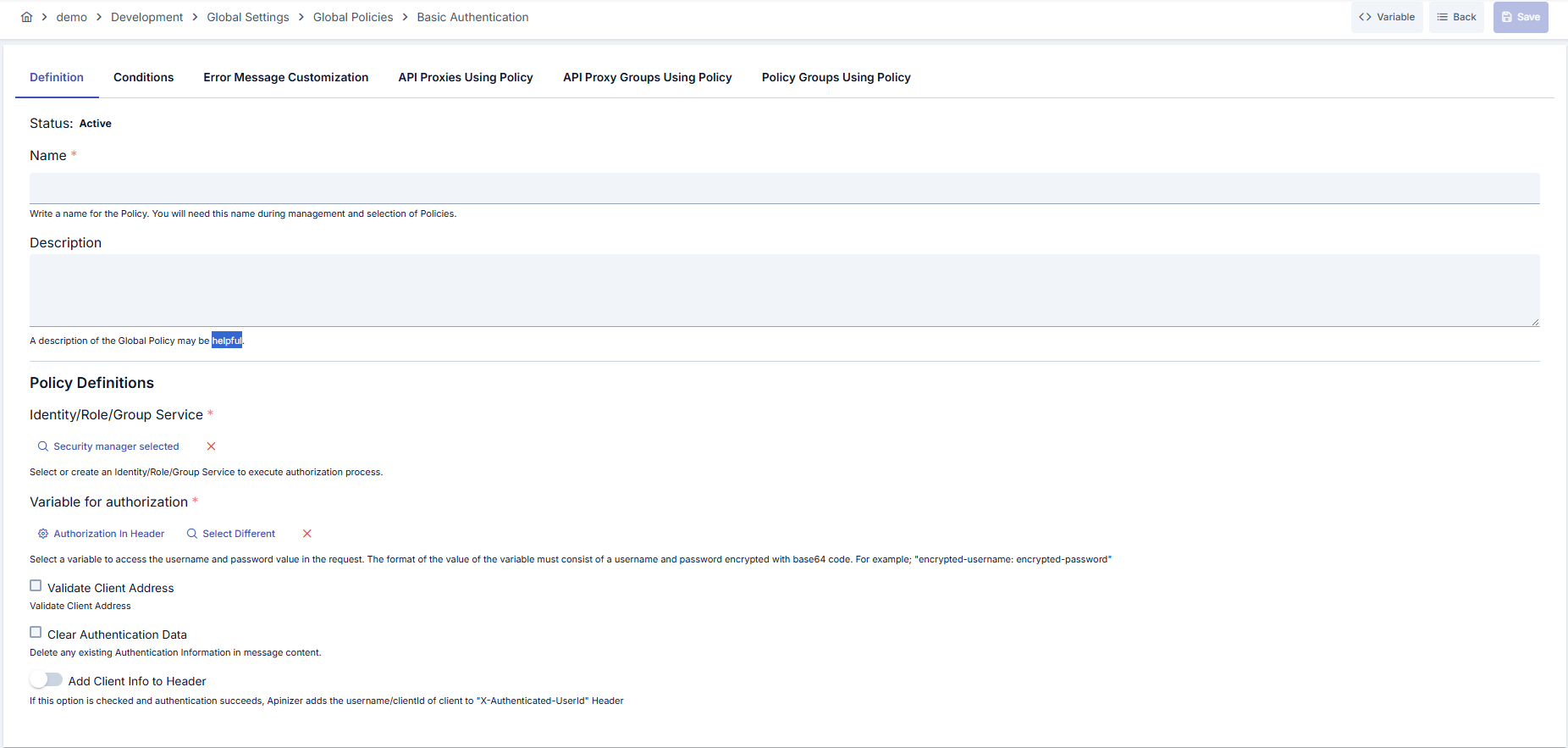
Configuration Steps
| Step | Description / Operation |
|---|---|
| Step 1: Go to Creation Page | - Go to Global Policies → Basic Authentication from the left menu and create a new policy. |
| Step 2: Enter Basic Information | Status: Shows Active/Passive status. New policies are active by default. Name (Name) Required: Example: Production_Basic_Auth- Enter unique name, does not start with space. - System automatically checks. Green checkmark: available. Red X: existing name. Description (Description): Example: "LDAP-based authentication for production environment" - Max. 1000 characters. - Explain policy's purpose. |
| Step 3: Variable Usage | - In the action button area at the top of the page, you can use the [<> Variable] button to select dynamic values. - Using context/global variable expressions, you can manage policy parameters with variable-based values instead of fixed values. - This reduces manual update effort when values change and provides operational convenience. - For detailed information, review Dynamic Variables. |
| Step 4: Identity/Role/Group Service Selection (Required) | - Click [Click to Select] button in Identity/Role/Group Service field. - Select identity source in opened dialog: Secret Manager: User/password/IP lists defined in Apinizer LDAP: Active Directory or OpenLDAP integration Database: Query user information from database API: Authentication with external REST API - After making selection, click [Select] button. - If you make wrong selection, you can clear it with [X] button. |
| Step 5: Username Variable Definition (Required) | - Make variable selection in Variable for Authorization field. - Two options are available: 1. Selecting Existing Variable: Click [Select Different] button. Select variable from variable list where username information will be written. 2. Updating Variable: You can edit properties of selected variable by clicking [Update Variable] button. - Authenticated username is written to this variable. - Subsequent policies in policy chain or backend can use this variable. |
| Step 6: Optional Security Settings | Validate Client Address (only Secret Manager): - If checkbox is activated, client IP is compared with IP list defined in Secret Manager. - If IP doesn't match, 401 error is returned. Clear Authentication Data: - If checkbox is activated, Authorization header is not transmitted to backend. - Used to prevent backend from accessing password information in microservice architectures. Set Resolved Identity to Context: Determines whether the identity resolved by this policy (username/key) is recorded as the request identity. When on (default), this identity appears in traffic logs and subsequent policies and scripts. When off, the identity is used only for the necessary internal authentication/authorization checks and is not persisted as the request identity. Add Client Info to Header: - If toggle is activated, authenticated user information is transmitted to backend with special header. - Authenticated User Header Name field opens (default: X-Authenticated-UserId).- Backend can read this header and perform operations in user context. Validate ACL for Client: On by default. Shown only when the identity source is Secret Manager. When off, the policy only resolves and verifies the identity and does not check the consumer's access list (ACL) for this API Proxy or Proxy Group. See Identity-Only Mode (ACL Off). |
| Step 7: Define Condition (Optional) | - Go to Condition tab. - Conditions determine when the policy will be active. Examples: - Environment-based: Header = X-Environment, Operator = Equals, Value = production- API Key-based: Header = X-API-Key, Starts With = PROD-- Endpoint-based: Path = /api/admin/*If condition is not defined, policy is always active |
| Step 8: Customize Error Message (Optional) | - Go to Error Message Customization tab. - Customize message to return when access is denied. Default: { "statusCode": 401, "message": "Unauthorized: Invalid credentials" }Custom: { "statusCode": 401, "errorCode": "AUTH_FAILED", "message": "Authentication failed. Username or password is incorrect." } |
| Step 9: Save | - Click [Save] button at top right. Checklist: - Unique name - Required fields filled - At least one Identity Role Group selected Result: - Policy is added to list. - Can be bound to APIs. - If global policy, automatically applied. |
An OIDC Provider is not offered in the Identity/Role/Group Service selection list. If token validation is needed, use the OIDC Authentication or JWT Authentication policies. If authentication with only an API key (using the Bearer scheme) is needed, see the Use API Key as Bearer Token option of the Plain-Text Authentication policy.
For descriptions of Conditions and Error Message Customization panels, you can review the Conditions and Error Message Customization sections on the What is Policy? page.
For a complete guide on all layers, priority order and scenario examples of the error message configuration system, see the Error Message Configuration Guide page.
Identity-Only Mode (ACL Off)
When Validate ACL for Client is off, the policy works in identity-only mode. It still resolves and verifies the identity, but it does not check the consumer's access list (ACL) for this API Proxy or Proxy Group.
| Still applied when ACL is off | Skipped when ACL is off |
|---|---|
| The consumer exists and is enabled. The consumer's organization and parent organizations are active. The consumer's validity (expire date) has not passed. The consumer's contracts have not passed their end date. The password or secret is correct. The client IP is in the consumer's IP list (when Validate Client Address is on). The API Client owner is active. Role authorization (if enabled) and Limit Plan rules apply. The request is marked as authenticated and the resolved identity is written to the traffic log. | The consumer's access row for this API Proxy or Proxy Group (its expiry, environment enable switch, disallowed methods and proxies). API Client subscription and access grants (portal subscriptions). The traffic log does not show the subscription product and plan for these requests, because this information comes from the access row. |
With ACL off, every active consumer in the environment that passes the identity rules can call the API. There is no project boundary.
LDAP, Database and API identity sources never consult the ACL. The option has no effect with these sources.
On the security tab of an API Product, a policy with ACL off is reported with the existing "Managed from policy" status: authentication is managed from the policy, not the consumer store (ACL), so application credentials do not authorize there.
Deleting Policy
For deletion steps of this policy and operations to be applied when in use, you can refer to the Removing Policy from Flow section on the Policy Management page.
Exporting/Importing Policy
For export (Export) and import (Import) steps of this policy, you can refer to the Export/Import page.
Binding Policy to API
For the process of how this policy will be bound to APIs, you can refer to the Binding Policy to API section on the Policy Management page.
Advanced Features
| Feature | Description and Steps |
|---|---|
| Authorization (Authorization) Configuration | - Activate Enable Authorization toggle on policy editing page. - Select Authorization Type (API, Database, LDAP, or Secret Manager). - If Enable Method Access is activated, method-based authorization is performed. Permitted roles are defined for each HTTP method (GET, POST, PUT, DELETE, etc.). - If Add Roles to Header is activated, user's roles are transmitted to backend as header. |
| Multiple Identity Source Support | - Create separate policies for different identity sources (e.g., LDAP_Auth, Database_Auth). - Define Condition for each policy: Header = X-Auth-Type, Equals, LDAP or Header = X-Auth-Type, Equals, DB.- Add both policies to same API. Gateway runs appropriate policy according to request. |
| Cascading Authentication (Chain Authentication) | - Perform authentication with first policy (Base64 Authentication). - Add additional security check with second policy (e.g., IP Whitelist). - Order policies correctly. Authentication should come first, other checks should come after. |
Tips and Best Practices
Things to Do and Best Practices
| Category | Description / Recommendations |
|---|---|
| Identity Source Selection | Bad: Defining separate Secret Manager consumer for each API. Good: Using group consumer definitions in Secret Manager. Best: Using centralized LDAP or Identity Provider (IdP) integration. - All users are managed from single point, password changes are automatically reflected. |
| Variable Usage | Bad: Not defining username variable and backend not being able to access user information. Good: Defining username variable and sending to backend with addUserToHeader. Best: Defining username variable + user ID variable + roles variable and transferring all user context to backend. - Subsequent policies in policy chain can also use this information. |
| Clear Auth Usage | Bad: Sending Authorization header to backend microservices. Password information is unnecessarily transmitted. Good: Setting clearAuth=true and clearing Authorization header.Best: Combination of clearAuth=true + addUserToHeader=true.- Backend doesn't see password, only receives authenticated user information. |
| Condition Usage | Bad: Assigning same policy to all APIs without condition. Good: Separating production and test environments with condition. Best: Granular control with path, method, header, and query parameter combinations. - E.g., separate condition for admin endpoints, separate condition for public endpoints. |
| Error Message Customization | Bad: Using default error messages. User doesn't understand what went wrong. Good: Defining Turkish error messages: "Authentication failed". Best: Detailed error codes and routing information: { "errorCode": "AUTH_001", "message": "Username or password is incorrect", "supportUrl": "https://support.example.com/auth" } |
Security Best Practices
| Security Area | Description / Warnings |
|---|---|
| HTTPS Requirement | Critical: Base64 Authentication should only be used over HTTPS. Base64 encoding can be easily decoded in HTTP and credentials are exposed. HTTPS enforcement should be active on Gateway, HTTP requests should be automatically redirected to HTTPS or rejected. |
| IP Restriction (Defense in Depth) | Recommendation: If Secret Manager is used, set checkClientIpAddress=true. Both credential and IP checks are performed. Attackers cannot access from different IP even if they steal credentials. Defense in depth principle is applied. |
| Credential Rotation | Warning: Regularly change user passwords defined in Secret Manager (30-90 days). If LDAP/Database is used, password expiration policy should be active. Old passwords should be revoked, new passwords should be strong (min 12 characters, complex). |
| Brute Force Protection | Recommendation: Limit failed authentication attempts from same IP with Rate Limiting policy. Example: IP block for 15 minutes after 5 failed attempts. Monitor failed authentication attempts in logs, perform anomaly detection. |
| Authorization Control | Critical: Authentication alone is not sufficient, authorization should also be performed. Set enableAuthorization=true and add method-based role control. Otherwise, every authenticated user can access all endpoints (privilege escalation risk). |
Things to Avoid
| Category | Description / Warnings |
|---|---|
| Basic Auth Over HTTP | Why to avoid: HTTP traffic is not encrypted. Base64 encoding is only encoding, not encryption. Credentials can be easily stolen with network sniffing. Alternative: Use Basic Auth only over HTTPS. Reject HTTP requests on Gateway or redirect to HTTPS. |
| Transmitting Authorization Header to Backend | Why to avoid: Backend microservices don't need password information. Password information may be written to backend logs or exposed in 3rd party integrations. Alternative: Use clearAuth=true + addUserToHeader=true. Backend only receives authenticated user information. |
| Not Being Careful in Global Policy | Why to avoid: Global policy changes affect all APIs. Wrong configuration may cause all services to become inaccessible. Alternative: Try global policy changes in test environment. Check "Used Proxies" before deploying to production. |
| Not Defining Username Variable | Why to avoid: Backend cannot access user information. Audit log, user tracking, and personalization features don't work. Alternative: Always define username variable and transmit to backend with header. User context should be consistent across all microservices. |
Performance Tips
| Criterion | Recommendation / Impact |
|---|---|
| Identity Service Cache | Recommendation: If LDAP or Database authentication is used, credential caching should be activated on Gateway. External service call on every request causes performance loss. Impact: Cache duration can be 5-15 minutes. If cache hit rate is 80%+, response time decreases by 50-100ms. |
| Connection Pooling | Recommendation: Use connection pool in LDAP or Database connections. Opening new connection on every request creates overhead. Impact: Connection pool size can be set between 10-50. 20-30ms gain is achieved with connection reuse. |
| Condition Evaluation Order | Recommendation: Write condition rules in simple → complex order. Evaluate conditions that give quick results first (e.g., header check → regex check). Impact: Condition evaluation time decreases by 30-40%. |
| Authorization Cache | Recommendation: If role-based authorization is used, cache user roles. It's unnecessary to query roles on every request. Impact: Cache TTL 10-30 minutes. Authorization overhead decreases by 60-70% with cache usage. |
| Lightweight Identity Service | Recommendation: Use Secret Manager if possible. It's 3-5x faster than LDAP or Database because it runs in local memory. Impact: Secret Manager response time less than 5ms. LDAP/Database response time 20-50ms. Secret Manager should be preferred for critical performance requirements. |
Frequently Asked Questions (FAQ)
| Category | Question | Answer |
|---|---|---|
| General | What is the difference between Base64 Authentication and JWT Authentication? | Base64 Authentication sends username and password on every request, Gateway queries Identity Service. In JWT Authentication, it works token-based, user logs in once and sends token in subsequent requests. JWT is stateless and more performant. Base64 Auth is simpler but has authentication overhead on every request. |
| General | Is Base64 Authentication secure? | It's secure when used over HTTPS. Should never be used in HTTP because base64 is only encoding, not encryption. HTTPS traffic is encrypted with TLS, credentials remain secure. IP restriction and rate limiting should be added for additional security. |
| Technical | How is IP obtained from X-Forwarded-For header? | LDAP (Active Directory) is preferred in enterprise environments because it provides centralized user management. Secret Manager is sufficient for small-scale projects. 3rd party Identity Provider (IdP) API integration can be used for external users. Database option is suitable for legacy systems. |
| Technical | Which service should be selected as Identity Role Group? | LDAP (Active Directory) is preferred in enterprise environments because it provides centralized user management. Secret Manager is sufficient for small-scale projects. 3rd party Identity Provider (IdP) API integration can be used for external users. Database option is suitable for legacy systems. |
| Technical | When should checkClientIpAddress be used? | Should be used in scenarios requiring high security (e.g., admin panel, financial transactions). Effective if user's IP address can be fixed (e.g., office IP). Not useful for mobile users or dynamic IP scenarios because IP changes frequently. |
| Usage | When should clearAuth be used? | Should definitely be used in microservice architecture if backend doesn't need password information. Gateway performs authentication, backend only receives authenticated user information. As security best practice, credentials should not be sent to backend (least privilege principle). |
| Usage | Should I use Global policy or Local policy? | Use Global policy if most APIs use same authentication rule. Provides centralized management and consistency. Create Local policy if only 1-2 APIs need different rule. Local policy is more flexible in test and development phase. |