JWT Authentication
This document describes the detailed usage of a specific policy. If you are using Apinizer policy structure for the first time or want to learn the general working principles of policies, we recommend that you first read the What is Policy? page.
Overview
What is its Purpose?
- Standardize centralized JWT generation: Gathers reliable JWT creation flow for different client types on Apinizer.
- Manage authentication sources: Makes Secret Manager, LDAP, Database, API, or OIDC-based authentication services selectable.
- Facilitate authorization integration: Coordinates role and method-based authorization on the same policy as JWT generation.
- Provide operational control: Provides audit and traceability by centrally controlling token durations, refresh rights, and header transfers.
Working Principle
- Request Arrival: For each HTTP/HTTPS request arriving at the API Gateway, the source IP address of the request is detected.
- Policy Check: If the JWT Authentication policy is active, the system checks in the following order:
- Is a Condition defined? If so, is the condition met?
- Is the policy active (active=true)?
- Is a Variable used or is Apinizer default?
- JWT Generation and Validation Process: Authentication source is triggered according to selected grant type, signing algorithm is applied, token lifetime and refresh rights are calculated.
- Decision Making:
- Match Found: Token is created or validated, redirected to target service with user/role headers added if necessary.
- No Match: Request is rejected with default or customized error message; refresh token generation/cancellation is not performed.
- Error Handling: Returns customizable HTTP status code and error message for requests that do not comply with the policy rule.
Features and Capabilities
Basic Features
- Grant Type Management: Quick switching between Client Credentials and Password grant types, automatic checking of required authentication components for each type.
- Identity Source Selection: Integrates Secret Manager, LDAP, Database, external API, or OIDC Provider sources into JWT generation process.
- Token Lifecycle Control: Detailed configuration and default value assignments for token lifetime, refresh right count, and durations.
- Active/Passive Status Control: Easily change the active or passive status of the policy (active/passive toggle). In passive state, the policy is not applied but its configuration is preserved.
- Conditional Application: Determine when the policy will be applied by creating complex conditions with Query Builder (e.g., only for specific endpoints or header values).
Advanced Features
- JWT Signature Algorithms: Provides signing suitable for target system requirements with RS256, RS384, RS512 options.
- Header Injection: Carries user identity and role information to target with desired header names; works integrated with role-based authorization.
- Refresh Token Policies: Establishes security/comfort balance through refresh token generation, usage limit, and durations.
- Export/Import Feature: Export policy configuration as a ZIP file. Import to different environments (Development, Test, Production). Version control and backup capability.
- Policy Group and Proxy Group Support: Manage multiple policies within Policy Group. Bulk policy assignment to Proxy Groups. Centralized update and deploy operations.
- Deploy and Versioning: Deploy policy changes to live environment. See which API Proxies use it (Policy Usage). Proxy Group and Policy Group usage reports.
Usage Scenarios
| Scenario | Situation | Solution (Policy Application) | Expected Behavior / Result |
|---|---|---|---|
| Mobile Client JWT Distribution | Mobile apps will connect with separate client identities | Grant Type: CLIENT_CREDENTIALS, Secret Manager selected, token duration 30 min | JWT is automatically generated for each mobile client, backend validation works smoothly |
| Authorized User Session | Login with username/password | Grant Type: PASSWORD, LDAP source, token 15 min + refresh 2 times | JWT is generated after LDAP validation, session extends to 45 min with refresh |
| Inter-Microservice Communication | Services calling each other in background | Grant Type: CLIENT_CREDENTIALS, allowUrlParameters closed, header transfer active | Services carry token only through header, URL leakage is prevented |
| Geographically Restricted Access | Requests from specific locations will be accepted | Condition: Geolocation header check, checkClientIpAddress open | Allowed IPs/locations get JWT, others return 403 |
| JWT Refresh Limit | Refresh token count must be limited | RefreshTokenAllowed true, Count=2, duration 24 hours | User must re-login after 2 refreshes |
| Authorization Header Injection | Roles will be carried to target service | Authorization tab active, addRolesToHeader true, custom header name set | Roles are added to specified header, target service applies RBAC |
Configuring Policy Parameters
In this step, users can create a new policy or configure existing policy parameters to define access rules. The defined parameters directly affect how the policy works (e.g., which IPs will be allowed, geographical restrictions, conditional activations, etc.). This way, the policy can be customized according to organization-specific requirements and managed centrally.
Creating New JWT Authentication Policy
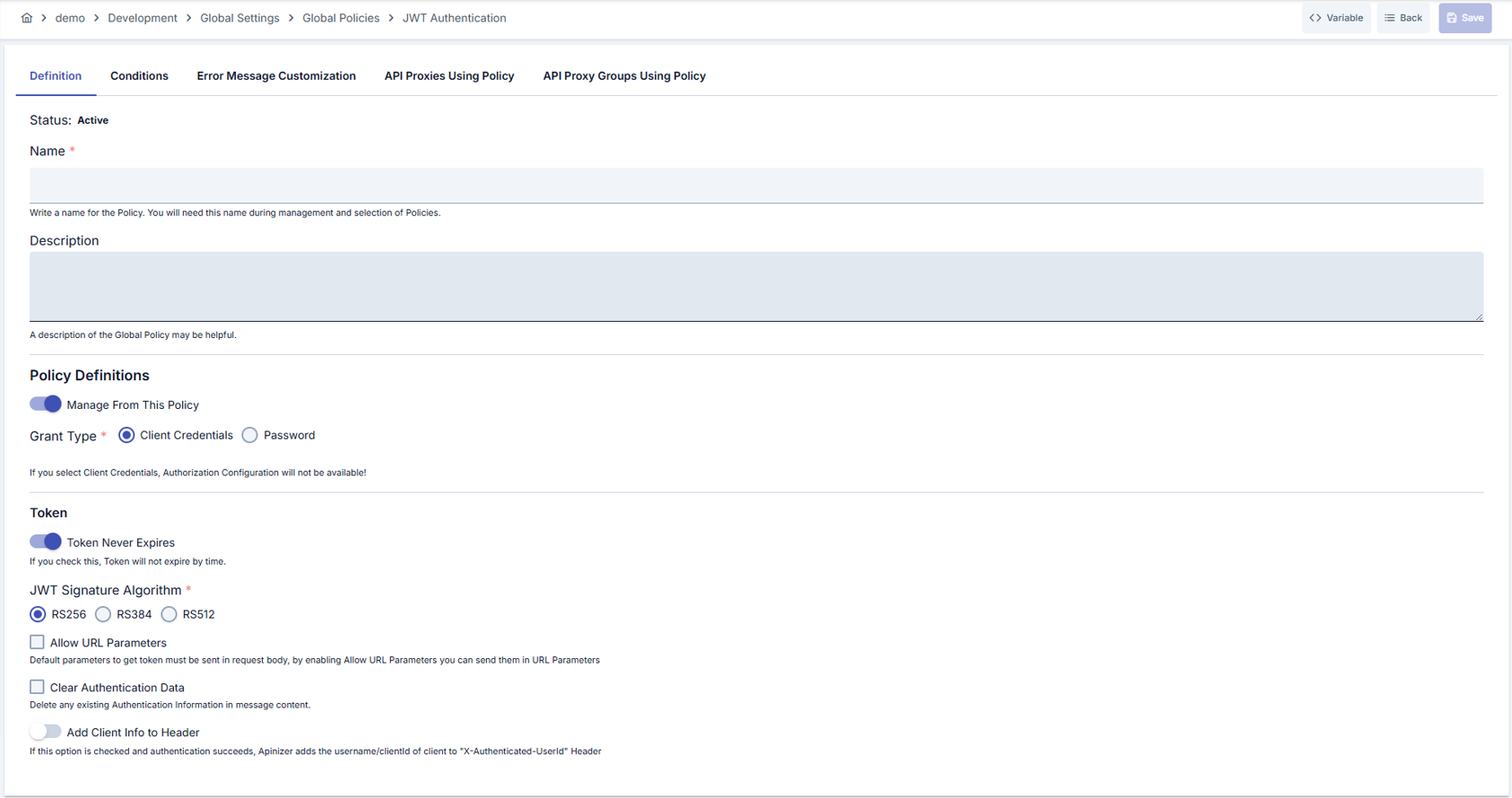
Configuration Steps
| Step | Description / Operation |
|---|---|
| Step 1: Going to Creation Page | - Go to Development → Global Settings → Global Policies → JWT Authentication Policy section from the left menu. - Click the [+ Create] button at the top right. |
| Step 2: Entering Basic Information | Policy Status: Shows Active/Passive status. New policies are active by default. Name (Required): Example: Production_JWTAuth- Enter a unique name, does not start with space. - System automatically checks. Green check: available. Red X: existing name. Description: Example: "Generates JWT through LDAP with Password grant." - Max. 1000 characters. - Describe the purpose of the policy. |
| Step 3: Variable Usage | - In the action button area at the top of the page, you can use the [<> Variable] button to select dynamic values. - Using context/global variable expressions, you can manage policy parameters with variable-based values instead of fixed values. - This reduces manual update effort when values change and provides operational convenience. - For detailed information, review Dynamic Variables. |
| Step 4: JWT Authentication Parameters | - Management (default: Manage From This Policy): One of two choices is selected. - Manage From ACL: Consumers, API clients and their ACL rows decide who may call; tokens follow the API client's settings. - Manage From This Policy: This policy's identity source, grant types and token settings decide; the API client settings are not used. - The Grant Type, identity source and token settings, as well as the browser login, Show API Key, client address check, URL parameters, clear authentication and add-user-to-header fields, are shown only while Manage From This Policy is selected. The Management choice is not shown when the identity source is OIDC. - Grant Type: Select CLIENT_CREDENTIALS or PASSWORD; selection determines available identity sources. - Identity Source: Shown for every grant type. For PASSWORD, make selection from Identity Role Group modal: LDAP/Database/API/OIDC or Secret Manager. For CLIENT_CREDENTIALS only Secret Manager (default — the policy issues and validates its own tokens exactly as before) or OIDC are offered. Selecting OIDC opens a searchable list of OIDC Provider records (name, description, vendor type); a Generic-vendor provider is a valid choice here, since only its token validation is used, not synchronization. (OIDC is not listed in the JWT Refresh Service selector — the refresh service can only be an API-type service.) - OIDC with CLIENT_CREDENTIALS (IdP-issued tokens): the policy issues no tokens. The client obtains its access token from the OIDC provider and sends it as Authorization: Bearer; Apinizer validates it on every request through the provider's validation mode (JWKS signature offline, or introspection/userinfo online), resolves the identity from the provider's Username Claim Path and, when Require Matching Consumer is on, matches it to a Consumer for quota, ACL and rate-limit attribution. Token lifetime, refresh and Management settings are hidden because they do not apply, and this proxy's /auth/* token endpoint answers 400 invalid_request. For a Keycloak client-credentials token the identity claim is preferred_username = service-account-<clientId>; set the provider's Username Claim Path to azp when the Consumer is named after the client id.- OIDC with PASSWORD keeps the previous behaviour: the policy still issues its own token after the provider validates the presented bearer token. - Check Client IP Address: Validates the IP from which the request came in Secret Manager-based structures. Validate ACL for Client: On by default. Shown when the identity source is Secret Manager or the Manage From ACL mode is selected; hidden for OIDC. When off, the policy only resolves and verifies the identity and does not check the consumer's access list (ACL) for this API Proxy or Proxy Group. See Identity-Only Mode (ACL Off). |
| Step 5: Token and Refresh Configuration | - Token Never Expires: Open if unlimited token will be generated, otherwise enter duration and unit. - Refresh Token Allowed: Open if refresh permission will be given, define right count and validity duration. - JWT Signature Algorithm: Select from RS256/RS384/RS512 according to target system requirements. |
| Step 6: Header and Authorization Settings | - Allow URL Parameters: Enables sending token with query parameter; only recommended in trusted scenarios. - Clear Auth: Clears incoming Authorization header; used for resetting old JWT. - Set Resolved Identity to Context: Determines whether the identity resolved by this policy (username/key) is recorded as the request identity. When on (default), this identity appears in traffic logs and subsequent policies and scripts. When off, the identity is used only for the necessary internal authentication/authorization checks and is not persisted as the request identity. - Add User/Roles to Header: Sends user and role information to target service with custom header names. - Authorization Configuration: Open advanced options such as role-based embedding, method access, and JWT refresh service. |
| Step 7: Defining Condition (Optional) | - Go to Condition tab. - Conditions determine when the policy will be active. Examples: - Environment-based: Header = X-Environment, Operator = Equals, Value = production- API Key-based: Header = X-API-Key, Starts With = PROD-- Endpoint-based: Path = /api/admin/*If no condition is defined, policy is always active |
| Step 8: Error Message Customization (Optional) | - Go to Error Message Customization tab. - Customize the message to be returned when access is denied. Default: { "statusCode": 403, "message": "[Default error message]" }Custom: { "statusCode": 403, "errorCode": "[CUSTOM_ERROR_CODE]", "message": "[Custom message]" } |
| Step 9: Saving | - Click the [Save] button at the top right. Checklist: Unique name. Required fields filled. At least one identity source selection completed. Result: - Policy is added to the list. - Can be connected to APIs. - If global policy, automatically applied. |
For the description of Conditions and Error Message Customization panels, you can review the Conditions and Error Message Customization sections on the What is Policy? page.
For a complete guide on all layers, priority order and scenario examples of the error message configuration system, see the Error Message Configuration Guide page.
Browser Login (authorization_code)
In Manage From This Policy mode, you can turn on the Browser login (authorization_code) switch in the policy. When the switch is on, a standard OAuth2 client (for example Claude Code or MCP Inspector) uses Apinizer as the authorization server. The user signs in on the /auth login page of the gateway, and the application gets a token on behalf of the user. The selected legacy grant (client credentials or password) keeps working.
- The users come from the identity source of the policy: Secret Manager, LDAP, database or API. When the identity source is OIDC, the switch is off.
- Token Never Expires must be off in the policy and the access token lifetime must be finite. If you allow a refresh token, the refresh lifetime must be finite too. Browser login never issues a token without an expiry.
- The client is an API client that belongs to an application. The
client_idis the client ID of this client. The application also needs an ACL row for the proxy. - You can use the switch only in the own token policy of an API Proxy. You cannot use it in a proxy group policy or in the policy of a method.
- After you turn the switch on or off, save the policy and redeploy the proxy. If you turn the switch off, the tokens issued by browser login become invalid immediately.
- Do not turn the switch on before all workers are upgraded.
- In Manage From ACL mode the switch is not shown. In this mode you turn on browser login in the API client of the application.
When you save the policy, you can see these error messages:
| Message | Meaning |
|---|---|
| The grant list of the token policy is not valid. It must name one legacy grant (client credentials or password), the same as the selected grant type, and can add browser login (authorization_code). | The grant list is not valid. |
| Browser login (authorization_code) on this policy needs a finite access token lifetime. When refresh is allowed, the refresh token also needs a finite lifetime. | A lifetime is not finite. |
| Browser login (authorization_code) is not available when the identity source is OIDC. Use the OIDC provider's own login. | The identity source is OIDC. |
| Browser login (authorization_code) is a setting of an API proxy's own token policy. It is not available on a proxy group policy. | The policy is on a proxy group. |
| Browser login (authorization_code) is a setting of the API proxy's token policy on the proxy itself. It is not available on a method's policy. | The policy is on a method. |
For a step-by-step setup, see MCP Gateway Browser Sign-In Without Keycloak. For the endpoints, see Token Service.
Accepting Delegated Tokens (Token Exchange)
The Accept delegated tokens (token exchange) switch lets an agent call this API proxy on behalf of a user. The agent uses a token that it got through token exchange. The switch is off by default. When it is off, the policy refuses a delegated token as before. Direct clients are not affected.
- The switch is shown in both Manage From ACL and Manage From This Policy modes. It is not shown when the identity source is OIDC.
- When you turn the switch on, two more fields appear.
- Allowed agents: Enter the client IDs of the API clients of the agents. For a legacy consumer, enter its username. Type a value and press Enter. An empty list admits no agent.
- Delegation chain depth: Select One agent or Up to two agents. The default is Up to two agents.
- The gateway reads this setting only from the active JWT and OAuth2 policies in the request policy list of the API proxy itself. It does not read policies on a method, on a proxy group or inside a policy group.
The gateway checks these points for a delegated token:
- The token is for this API proxy only. Its audience is the canonical address of this proxy.
- Every agent in the chain is in Allowed agents. The chain is not longer than the depth.
- Every agent is still active, and its tokens were not revoked.
- The user passes the access checks of this proxy as the request identity. When ACL check is on, the user needs an ACL row.
- The request runs with the current roles of the user. The scope of the token can only narrow them. A role without an OAuth scope name is not carried.
The gateway answers a refused token with the normal "token not valid" response.
The JWT policy validates delegated JWTs. The OAuth2 policy validates stored (opaque) delegated tokens. The token exchange issues the format that the target policy validates. The agent does not choose it.
For more information, see Token Exchange (RFC 8693).
Identity-Only Mode (ACL Off)
When Validate ACL for Client is off, the policy works in identity-only mode. It still resolves and verifies the identity, but it does not check the consumer's access list (ACL) for this API Proxy or Proxy Group.
| Still applied when ACL is off | Skipped when ACL is off |
|---|---|
| The consumer exists and is enabled. The consumer's organization and parent organizations are active. The consumer's validity (expire date) has not passed. The consumer's contracts have not passed their end date. The client IP is in the consumer's IP list (when Validate Client Address is on). The API Client owner is active. Role authorization (if enabled) and Limit Plan rules apply. The request is marked as authenticated and the resolved identity is written to the traffic log. | The consumer's access row for this API Proxy or Proxy Group (its expiry, environment enable switch, disallowed methods and proxies). API Client subscription and access grants (portal subscriptions). The traffic log does not show the subscription product and plan for these requests, because this information comes from the access row. |
With ACL off, every active consumer in the environment that passes the identity rules can call the API. There is no project boundary.
The option also applies to the token endpoints: token issuance for the PASSWORD grant follows the same switch.
LDAP, Database, API and OIDC identity sources never consult the ACL. The option has no effect with these sources.
On the security tab of an API Product, a policy with ACL off is reported with the existing "Managed from policy" status: authentication is managed from the policy, not the consumer store (ACL), so application credentials do not authorize there.
Deleting Policy
For the deletion steps of this policy and operations to be applied while in use, you can refer to the Removing Policy from Flow section on the Policy Management page.
Exporting/Importing Policy
For the export and import steps of this policy, you can refer to the Export/Import page.
Binding Policy to API
For the process of how this policy will be bound to APIs, you can refer to the Binding Policy to API section on the Policy Management page.
Advanced Features
| Feature | Description and Steps |
|---|---|
| Role-Based Header Injection | - Open addRolesToHeader option from Authorization tab.- Determine header name (e.g., X-Authenticated-UserRoles).- Roles are carried from JWT claims to target service. |
| JWT Regenerator Service Integration | - When API is selected as identity source, open second service modal. - Select and save JWT regenerator service. - Works integrated with refresh token usage in Password grant flow. |
| Method-Based Authorization | - Activate Method Access feature in Authorization tab. - Select API method lists and make role matching. - Requests can be rejected with 403 on method basis. |
Best Practices
Things to Do and Best Practices
| Category | Description / Recommendations |
|---|---|
| Token Lifetime Management | Bad: Using default durations in every environment. Good: Setting 15 min for Production, 60 min for Development. Best: Regularly reviewing token duration according to usage metrics. |
| Refresh Token Strategy | Bad: Defining unlimited refresh rights. Good: Using 3 refresh rights and 24-hour duration. Best: Closing refresh in MFA-mandatory sessions. |
| Header Usage | Bad: Leaving default header names unchanged. Good: Defining header names expected by target service. Best: Using custom header names that have passed security scan. |
| Grant Type Selection | Bad: Using PASSWORD grant in all clients. Good: Preferring CLIENT_CREDENTIALS in machine-to-machine communication. Best: Basing grant selection on per-client analysis with minimum privilege principle. |
| Identity Source Management | Bad: Defining multiple identity sources at the same time. Good: Selecting single source in each grant type. Best: Establishing centralized identity management compatible with Secret Manager versions. |
Security Best Practices
| Security Area | Description / Warnings |
|---|---|
| Token Storage | Store tokens in Secure Cookie instead of browser localStorage; make HttpOnly and Secure flags mandatory. |
| Signature Algorithm | When moving beyond RS256, ensure IM certificate management is ready; plan key rotation. |
| Refresh Token Protection | Limit refresh endpoints with IP and device verification; log failed attempts. |
| Header Hijacking Prevention | Activate ClearAuth feature in legacy token transitions; do not create mixed authentication chains. |
| Audit and Monitoring | Transfer policy logs to SIEM; monitor failed logins by grant type in separate dashboards. |
Things to Avoid
| Category | Description / Warnings |
|---|---|
| Unlimited Token Lifetime | Why to avoid: Provides permanent authority in security breaches. Alternative: Shorten token durations by environment. |
| Carrying Token with URL Parameter | Why to avoid: Leads to token leakage in logs. Alternative: Use header or Authorization Bearer. |
| Shared Identity Source | Why to avoid: Production and test identities may mix. Alternative: Use separate Secret Manager domain for each environment. |
| Unauthorized Refresh Service | Why to avoid: Refresh endpoint can be compromised. Alternative: Make JWT Regenerator service accessible only from secure network segments. |
Performance Tips
| Criterion | Recommendation / Impact |
|---|---|
| Token Calculation Time | Recommendation: Prefer RS256 and do not unnecessarily enlarge key size. Impact: JWT generation stays at milliseconds level. |
| Refresh Calls | Recommendation: Limit refresh count, reduce unnecessary round-trip. Impact: Gateway throughput increases. |
| Identity Source Response Time | Recommendation: Support LDAP/API sources with Cache. Impact: High TPS is managed without triggering throttling. |
| Header Size | Recommendation: Keep role lists minimal, do not transfer unnecessary claims. Impact: Header load going to upstream services decreases. |
| Condition Evaluation | Recommendation: Optimize Query Builder rules; do not use unnecessary regex. Impact: Policy evaluation time decreases. |
Client Id / Client Secret Management
When Manage From This Policy is selected, the Client Id and Client Secret values validated in token requests are the keys of the API Proxy, API Proxy Group, or Policy Group that this policy is attached to. The Show API Key option in the policy form opens a dialog where the current Client Id and Client Secret can be viewed, copied, and changed when needed. Both fields are read-only; use the eye button to show a value and the pencil button (Edit Client Id / Edit Client Secret) to change it.
Key Generation Type
When editing the Client Id or Client Secret, you type the name of the related record and select a key generation type:
- Automatic: The system generates a new random value.
- Manual: You type the value yourself. This is the only way to enter a key value by hand; a value consisting only of spaces is not accepted.
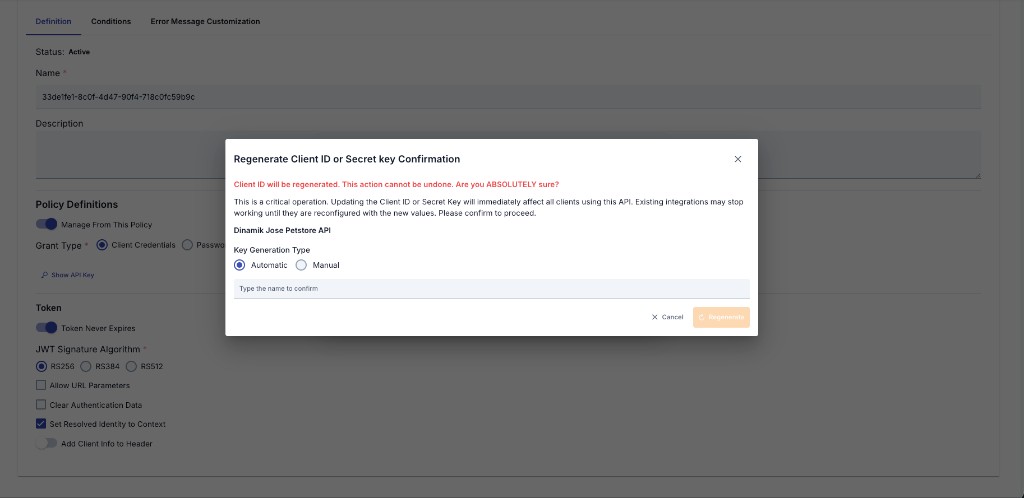
Changing a key is a critical operation: the Client ID will be changed and integrations that use the current value will stop working. You must confirm by typing the name of the related record, clicking Edit, then answering a final question ("Are you sure you want to change the key?"). The new key is kept as a draft; it is not valid until saved (Save, then confirm in the key dialog; Cancel discards the draft); after saving, the API Proxy, API Proxy Group, or Policy Group must be redeployed for the new keys to become active. Existing clients using this policy must also be reconfigured with the new Client Id/Client Secret values.
Consistency Across Screens
This Client Id / Client Secret viewing, copying, and editing experience (including the Automatic/Manual choice, name-confirmation, and final confirmation step) is identical to the key management sections on the API Proxy, Policy Group, and API Proxy Group screens. Whenever this JWT Authentication policy is attached to the policy list of an API Proxy, an API Proxy Group, or a Policy Group — whether selected as a global (shared) policy or created as a local policy specific to that API/Group — the Show API Key option in the policy form provides the same experience.
Client Authentication — Authorization Basic Header Support (RFC 6749 §2.3.1)
Sending Credentials via Basic Authorization Header
Your client credentials (client_id and client_secret) can now be transmitted using HTTP Basic Authentication, following RFC 6749 standard compliance:
# With Basic Authorization header (new)
curl -u "my-client-id:my-secret" \
  -d "grant_type=client_credentials" \
  https://gateway.example.com/credential/token
Backward-Compatible Body Parameters
The legacy method of sending credentials in the request body remains fully supported:
# Via body parameters (backward compatible)
curl -d "grant_type=client_credentials&client_id=my-client-id&client_secret=my-secret" \
  https://gateway.example.com/credential/token
Important Rules
- Mutual exclusivity: If you send both the Authorization Basic header AND
client_id/client_secretin the request body, the server rejects the request withinvalid_request(HTTP 400) per RFC 6749 §2.3.1 "MUST NOT". - Malformed headers: Invalid Base64 encoding or missing colon (
:) in the decoded credentials are rejected withinvalid_client(HTTP 401). - Non-Basic schemes: Authorization headers with schemes other than Basic (e.g.,
Bearer) are ignored; the server falls back to body parameters. - Resource owner password flow:
usernameandpassword(PASSWORD grant type) must always be sent in the request body; the Authorization Basic header is reserved for client credentials only.
Frequently Asked Questions (FAQ)
| Category | Question | Answer |
|---|---|---|
| General | Can I save a policy using Password grant without identity source? | No. When PASSWORD is selected, an Identity Role Group or Secret Manager connection is mandatory; otherwise policy gives Validation error. |
| General | When is Token Never Expires option used? | Only recommended in machine-to-machine communication and situations where security is provided by other layers; risky in user-based access. |
| Technical | Is JWT Regenerator Service API mandatory? | Only required when API is selected as identity source and in refresh token scenario; automatically stays passive in other sources. |
| Technical | How is the role list added to header determined? | Automatically written when addRolesToHeader is active, according to role/claim matches selected in Authorization Configuration field. |
| Usage | What should I do to convert global policy to local copy? | Use [Localize] button from detail page; policy is copied to a new local version and becomes editable. |
| Usage | How do I proceed if policy name conflicts? | System warns with name-exist check; change the name or give unique name by localizing global policy. |