Plain-Text Authentication
This document explains the detailed usage of a specific policy. If you are using Apinizer policy structure for the first time or want to learn the general working principles of policies, we recommend reading the What is Policy? page first.
Overview
What is its Purpose?
- Provides centralized authentication at the API Proxy (API Proxy Server) layer by evaluating requests carrying Plain Text Authentication headers.
- Integrates with enterprise identity services (Database, LDAP, API, Secret Manager) and makes access policy manageable without code changes.
- Securely transfers necessary user/role information to the application layer through role-based authorization and header injection.
- Offers flexible behavior for different endpoint or environment scenarios through error message customization and condition-based activation.
Working Principle
- Request Arrival: For each HTTP/HTTPS request arriving at the API Gateway, the source IP address of the request is identified.
- Policy Check: If the Plain Text Authentication policy is active, the system checks in the following order:
- Is a Condition defined? If so, is the condition met?
- Is the policy active (active=true)?
- Is a Variable used or is Apinizer default?
- Credential Verification: The Plain Text credentials in the Authorization header are resolved, and the username and optionally the password are checked through the selected identity provider (Database/LDAP/API/Secret Manager); if necessary, the registered IP address is matched.
- Decision Making:
- Match Found: The user matches the authorization rules, user/role headers are added to the request, and it is routed to the backend.
- No Match: Authorization fails, the policy error message is triggered, and the request is denied.
- Error Handling: Customizable HTTP status code and error message are returned for requests that do not comply with the policy rule.
Features and Capabilities
Basic Features
- Identity Provider Flexibility: Works with Database, LDAP, external API, or Secret Manager-based identity services; the policy is automatically updated when the selected source changes.
- Credential Variable Management: Manages secret values centrally by binding project variables for username and password.
- Header Management: Adds the authenticated user to customizable headers like
X-Authenticated-UserIdor clears the Authorization header before passing to upstream. - Active/Passive Status Control: Easily change the active or passive status of the policy (active/passive toggle). In passive state, the policy is not applied but its configuration is preserved.
- Condition-Based Application: Determine when the policy will be applied by creating complex conditions with Query Builder (e.g., only for specific endpoints or header values).
Advanced Features
- Role-Based Authorization: Limits user access with ALL/ANY logic by selecting role groups and adds role list header to the request.
- Method-Based Authorization Rules: Applies stricter control to sensitive endpoints by defining role sets and authorization type per API method.
- Secret Manager Integration: Provides zero-code security with IP control and automatic variable matching when Secret Manager is selected.
- Export/Import Feature: Export policy configuration as a ZIP file. Import to different environments (Development, Test, Production). Version control and backup capability.
- Policy Group and Proxy Group Support: Manage multiple policies within Policy Group. Bulk policy assignment to Proxy Groups. Centralized update and deployment operations.
- Deploy and Versioning: Deploy policy changes to live environment. See which API Proxies use it (Policy Usage). Proxy Group and Policy Group usage reports.
Usage Scenarios
| Scenario | Situation | Solution (Policy Application) | Expected Behavior / Result |
|---|---|---|---|
| Production LDAP Verification | Need to verify users logging in with corporate LDAP | LDAP is selected as Authentication provider, checkPassword is enabled, roles are retrieved from LDAP. | Requests without valid user/password combination return 401, successful ones get 200 if authorized. |
| Machine Accounts with Secret Manager | Shared secrets in machine-to-machine integration are stored in Secret Manager | enumPolicyAuthenticationType SECRET_MANAGER, username/password variables are automatically retrieved, checkClientIpAddress is enabled. | Requests from wrong IP or using unmatched secrets are rejected with 403. |
| Database User Pool | Verification with user list stored in application database | Database provider is selected, role tables are linked, addRolesToHeader is enabled. | Backend services access role information through headers and perform authorization. |
| Identity Check with External API | Authentication is delegated to a third-party REST service | API provider is selected, service endpoint is defined, custom error message is configured for failed responses. | If external API returns "fail", policy responds with 401, if successful, user ID is added to headers. |
| Role-Based Authorization Module | Only specified roles should access certain endpoints | Authorization module is opened, role sets and ALL condition are assigned, unauthorized message is customized. | Users without required role receive 403 and custom message. |
| Method-Specific Authorization | /admin/* methods are only open to specific role | Method Access is enabled, role list is linked to relevant API methods. | Only users with the defined role list can call the method. |
| Standardization in API Proxy Group (optional) | Apply the same security policy on multiple API Proxies | Policy is added to Policy Group, linked to Proxy Group, centralized deployment is performed. | All linked API Proxy instances use the same Plain Text Authentication rule. |
Configuring Policy Parameters
At this step, users can create a new policy or configure existing policy parameters to define access rules. The defined parameters directly affect how the policy works (e.g., which IPs will be allowed, geographical restrictions, conditional activations, etc.). This way, the policy can be customized according to organization-specific requirements and managed centrally.
Creating a New Plain Text Authentication Policy
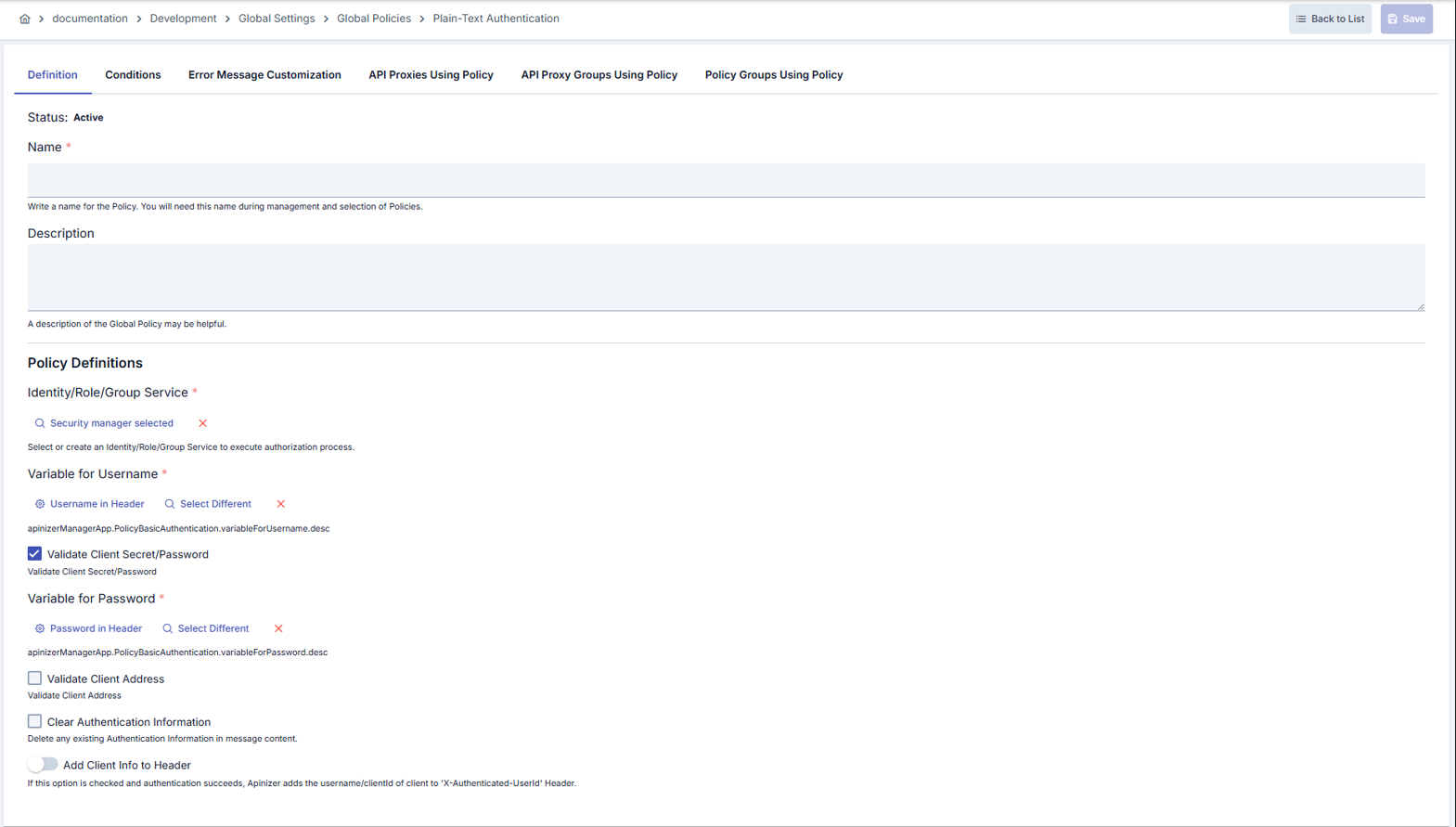
Configuration Steps
| Step | Description / Operation |
|---|---|
| Step 1: Going to Creation Page | - Go to Development → Global Settings → Global Policies → Plain Text Authentication section from the left menu. - Click the [+ Create] button at the top right. |
| Step 2: Entering Basic Information | Status: Shows Active/Passive status. New policies are active by default. Name (Required): Example: Production_PlainTextAuth- Enter a unique name, it cannot start with a space. - System automatically checks. Green checkmark: available. Red cross: existing name. Description: Example: "Plain Text Authentication rule for production service" - Max. 1000 characters. - Explain the purpose of the policy. |
| Step 3: Variable Usage | - In the action button area at the top of the page, you can use the [<> Variable] button to select dynamic values. - Using context/global variable expressions, you can manage policy parameters with variable-based values instead of fixed values. - This reduces manual update effort when values change and provides operational convenience. - For detailed information, review Dynamic Variables. |
| Step 4: Selecting Identity Provider | Identity/Role/Group Service: - Select Database, LDAP, Secret Manager, or external API provider with the -Select button. - Use the cross button to clear the selection. - When Secret Manager is selected, the policy automatically connects to this source. |
| Step 5: Assigning Credential Variables | Username Variable: Bind username input from project variables. Make changes with update or select different variable options. Password Variable: Becomes required if Validate Client Secret/Password is on; the selected variable holds the secret value. |
| Step 6: Request Processing Options | Validate Client Secret/Password: - On by default. When on, a secret/password value must also be supplied together with the username and is checked. - When off, authentication relies only on the username/API key value (key-only authentication) — no separate secret value is checked. Use API Key as Bearer Token (visible only while Validate Client Secret/Password is off): - When on, the value read via the user variable (typically the Authorization header) must carry the Bearer <api-key> scheme; the token itself is used as the API key (Consumer username / API Client clientId).- If the Bearer scheme is missing, authentication fails.- If Validate Client Secret/Password is turned on again, this option is automatically turned off. - For a usage example, see the Authenticating with an API Key as a Bearer Token section below. Validate Client Address: Forces IP matching in Secret Manager scenarios. Clear Authentication Data: Clears the Authorization header after verification without forwarding it to the target service. Set Resolved Identity to Context: Determines whether the identity resolved by this policy (username/key) is recorded as the request identity. When on (default), this identity appears in traffic logs and subsequent policies and scripts. When off, the identity is used only for the necessary internal authentication/authorization checks and is not persisted as the request identity. Add Client Info to Header: Transmits the username with the X-Authenticated-UserId header (changeable in the Authenticated User Header Name field).Validate ACL for Client: On by default. Shown only when the identity source is Secret Manager. When off, the policy only resolves and verifies the identity and does not check the credential's access list (ACL) for this API Proxy or Proxy Group. See Identity-Only Mode (ACL Off). |
| Step 7: Defining Condition (Optional) | - Go to the Condition tab. - Conditions determine when the policy will be active. Examples: - Environment-based: Header = X-Environment, Operator = Equals, Value = production- API Key-based: Header = X-API-Key, Starts With = PROD-- Endpoint-based: Path = /api/admin/*If no condition is defined, the policy is always active |
| Step 8: Customizing Error Message (Optional) | - Go to the Error Message Customization tab. - Customize the message to be returned when access is denied. Default: { "statusCode": 403, "message": "[Default error message]" }Custom: { "statusCode": 403, "errorCode": "[CUSTOM_ERROR_CODE]", "message": "[Custom message]" } |
| Step 9: Saving | - Click the [Save] button at the top right. Checklist: Unique name. Required fields filled. At least one identity provider selected. Result: - Policy is added to the list. - Can be linked to APIs. - If it's a global policy, it is automatically applied. |
In the default username/password mode an OIDC Provider is not offered as an Identity/Role/Group Service option: Plain-Text Authentication compares a password sent on every request, while an OIDC provider validates a token and never hands out a password. Once Use API Key as Bearer Token is enabled (with Validate Client Secret/Password off) the presented value is a bearer token, so OIDC becomes selectable: the token issued by the provider is validated on every request through the provider's validation mode (JWKS signature offline, introspection/userinfo online), the identity is resolved from the provider's Username Claim and, with Require matching Consumer on, matched to a Consumer. Turning Use API Key as Bearer Token off again resets an OIDC identity source to Secret Manager (a warning is shown), and with bearer mode off the server rejects a policy that still carries an OIDC source. For browser-style login flows use the OIDC Authentication policy instead.
Authenticating with an API Key as a Bearer Token
Enable Use API Key as Bearer Token for clients that only present a single opaque key and do not implement a username/password challenge — for example, simple service-to-service or machine clients that should not need a full OIDC/Keycloak token issuance flow just to identify themselves.
With Validate Client Secret/Password off and Use API Key as Bearer Token on, the request must carry the key in a standard Authorization header using the Bearer scheme:
curl https://api.example.com/orders \
  -H "Authorization: Bearer <api-key>"
The token after Bearer is looked up as the API key — the Consumer's username or the API Client's clientId, depending on the selected Identity/Role/Group Service (with an OIDC source, the token is validated by the identity provider instead). A request without the Bearer scheme, or with an empty token, is rejected before the key is looked up.
For the description of Conditions and Error Message Customization panels, you can review the Conditions and Error Message Customization sections on the What is Policy? page.
For a complete guide on all layers, priority order and scenario examples of the error message configuration system, see the Error Message Configuration Guide page.
Identity-Only Mode (ACL Off)
When Validate ACL for Client is off, the policy works in identity-only mode. It still resolves and verifies the identity, but it does not check the consumer's access list (ACL) for this API Proxy or Proxy Group.
| Still applied when ACL is off | Skipped when ACL is off |
|---|---|
| The consumer exists and is enabled. The consumer's organization and parent organizations are active. The consumer's validity (expire date) has not passed. The consumer's contracts have not passed their end date. The password or secret is correct. The client IP is in the consumer's IP list (when Validate Client Address is on). The API Client owner is active. Role authorization (if enabled) and Limit Plan rules apply. The request is marked as authenticated and the resolved identity is written to the traffic log. | The consumer's access row for this API Proxy or Proxy Group (its expiry, environment enable switch, disallowed methods and proxies). API Client subscription and access grants (portal subscriptions). The traffic log does not show the subscription product and plan for these requests, because this information comes from the access row. |
With ACL off, every active consumer in the environment that passes the identity rules can call the API. There is no project boundary.
In key-only mode (Validate Client Secret/Password off), every known API key can call the API.
LDAP, Database, API and OIDC identity sources never consult the ACL. The option has no effect with these sources.
On the security tab of an API Product, a policy with ACL off is reported with the existing "Managed from policy" status: authentication is managed from the policy, not the consumer store (ACL), so application credentials do not authorize there.
Deleting the Policy
For the deletion steps of this policy and the operations to be applied when it is in use, you can refer to the Removing Policy from Flow section on the Policy Management page.
Exporting/Importing the Policy
For the export and import steps of this policy, you can refer to the Export/Import page.
Linking the Policy to API
For the process of how this policy will be linked to APIs, you can refer to the Linking Policy to API section on the Policy Management page.
Advanced Features
| Feature | Description and Steps |
|---|---|
| Secret Manager-Based Verification | - When Secret Manager is selected, credentials are automatically matched. - IP limit per token is applied with checkClientIpAddress.- Policy is automatically updated when password rotation is performed. |
| Hybrid Authorization Structure | - Authentication source and Authorization source can be selected differently (e.g., LDAP + Database). - Separate provider selection is done from the Authorization Configuration component. - Roles are defined with MultiSelect, ALL/ANY selector is applied. |
| Method-Based Restriction Engine | - When enableMethodAccess is enabled, API methods are listed.- Role list and authorization type are assigned for each method. - Request-based rules are applied in API Proxy modes other than Reverse Proxy. |
Best Practices
Things to Do and Best Practices
| Category | Description / Recommendations |
|---|---|
| Identity Provider Selection | Bad: Linking all policies to a single Secret Manager account. Good: Selecting Secret Manager or LDAP according to application type. Best: Using separate providers for each environment and restricting access permissions. |
| Variable Management | Bad: Manually matching username/password variables. Good: Using default project variables. Best: Versioning variables per API Proxy in Secret Manager scenarios. |
| Header Usage | Bad: Leaving user information in default header names. Good: Updating header name according to consumer applications. Best: Carrying role and user headers in secure channel under TLS, masking in logs. |
| Authorization Setup | Bad: Leaving role table empty and relying only on authentication. Good: Defining basic role sets with ALL rule. Best: Enabling Method Access and assigning separate role lists to sensitive methods. |
| Policy Lifecycle | Bad: Making production changes directly in live. Good: Localizing and testing the same policy in test environment. Best: Creating versions with Export/Import and monitoring usage reports after Deploy. |
Security Best Practices
| Security Area | Description / Warnings |
|---|---|
| Credential Management | Store credentials only in Secret Manager or encrypted variables; do not enter plain text values in the policy screen. |
| Header Hijacking Prevention | If addUserToHeader is active, perform header verification on the backend, disable header overwrite in reverse proxy against client manipulation. |
| Authorization Consolidation | If the Authorization module is opened and roles and method rules are not kept up to date, there is a risk of 100% unauthorized access; perform regular audits. |
| IP Restriction | Secret Manager IP verification only accepts trusted source IPs; update whitelist before changes. |
| Error Message Hygiene | Do not provide specific information to users in 401/403 responses; keep error messages general, keep details in logs. |
Things to Avoid
| Category | Description / Warnings |
|---|---|
| Wrong Provider Selection | Why avoid: Selecting Database instead of LDAP produces failed verification due to field differences in identity data. Alternative: Verify the user source before selecting provider. |
| Password Check Without Variable | Why avoid: If password variable is empty when checkPassword is enabled, the policy rejects every request.Alternative: Match password variable with required field check. |
| Skipping Header Clearing | Why avoid: Forwarding Authorization header to backend can create a security vulnerability. Alternative: Actively use the clearAuth option. |
| Deploying Global Changes Directly | Why avoid: Multiple API Proxies are affected at the same time, service interruption may occur. Alternative: First localize and test, then update the global policy. |
Performance Tips
| Criterion | Recommendation / Impact |
|---|---|
| Identity Source Response Time | Recommendation: Optimize indexes in LDAP/Database queries. Impact: Verification time shortens, Gateway wait time decreases. |
| Secret Manager Calls | Recommendation: Store Secret Manager responses briefly with Cache mechanism. Impact: Latency decreases in repeated authentications. |
| External API Usage | Recommendation: Add Timeout and Retry limits to external identity API. Impact: Long-running calls do not block Gateway threads. |
| Role List Size | Recommendation: Reduce unnecessary role assignments, keep MultiSelect list clean. Impact: Authorization check works faster, memory usage decreases. |
| Method Access Intensity | Recommendation: Group method-based rules for frequently used endpoints, disable in unnecessary methods. Impact: Policy evaluation time shortens, CPU load decreases. |
Frequently Asked Questions (FAQ)
| Category | Question | Answer |
|---|---|---|
| General | In which scenarios should Plain Text Authentication policy be preferred? | It can be used in all API Proxy flows where simple username/password verification is sufficient and you want to add security to the application layer with minimum changes. |
| General | What does the clearAuth option do? | Clears the Authorization header after verification without forwarding it to the backend; thus sensitive information does not circulate between services. |
| Technical | What happens if I disable password check? | Gateway only verifies the username; since password is not verified, account lock or brute-force controls may be disabled. |
| Technical | How does IP verification work in Secret Manager scenario? | The registered IP list is checked together with the token or variable; if IP does not match, the policy returns 403. |
| Usage | Can I change the user information header name? | When addUserToHeader is enabled, you can specify the header name you want from the userHeaderName field. |
| Usage | What is the impact on existing API Proxies when I enable role-based authorization? | The policy checks the role list of incoming requests in all API Proxy flows it is linked to; requests that do not meet conditions return 403, details are seen in logs. |