SAML Authentication
This document explains the detailed usage of a specific policy. If you are using Apinizer policy structure for the first time or want to learn the general working principles of policies, we recommend reading the What is Policy? page first.
Overview
What is its Purpose?
- Centralizes identity federation by verifying SAML assertions passing through API Proxy (API Proxy Server) flows.
- Increases access security by ensuring only trusted signers are accepted in user or system SSO requests.
- Enables centralized control of certificate rotations through JKS-based key store management.
- Prevents verified SAML blocks from leaking to downstream services and protects data privacy with XPath-based clearing.
Working Principle
- Request Arrival: For each HTTP/HTTPS request arriving at the API Gateway, the source IP address of the request is identified.
- Policy Check: If the SAML Verification policy is active, the system checks in the following order:
- Is a Condition defined? If so, is the condition met?
- Is the policy active (active=true)?
- Is a Variable used or is Apinizer default?
- SAML Verification Check: The SAML assertion in the request body is verified for signature with certificates in the selected key store; if necessary, the relevant XML node is cleared with XPath expression.
- Decision Making:
- Match Found: If signature is verified, the request is routed to the next step of the flow with updated payload.
- No Match: If signature verification fails or key store is not found, the request is stopped and a customizable error response is returned.
- Error Handling: Customizable HTTP status code and error message are returned for requests that do not comply with the policy rule.
Features and Capabilities
Basic Features
- Key Store Verification: Performs SAML signature verification with certificates in JKS format key store; registration cannot be completed without selecting a key store.
- Unknown Signer Tolerance: Allows controlled acceptance of certificates not linked to known CA chain with the
allowUnknownSigneroption. - XPath-Based SAML Clearing: Prevents data leakage by clearing SAML blocks in message body after verification with
clearSamlandclearSamlPathfields. - Active/Passive Status Control: Easily change the active or passive status of the policy (active/passive toggle). In passive state, the policy is not applied but its configuration is preserved.
- Condition-Based Application: Determine when the policy will be applied by creating complex conditions with Query Builder (e.g., only for specific endpoints or header values).
Advanced Features
- Dynamic Key Store Management: Instantly adds certificate sets to the project you are working on by calling the new key store creation dialog from the configuration screen.
- XPath Test Automation: Reduces the risk of incorrect clearing by testing the
clearSamlPathexpression on real data samples with the Test Transformation Data component. - Default Signature Node Detection: When
clearSamlPathis enabled, default signature node XPath is automatically assigned and can be customized if needed. - Export/Import Feature: Export policy configuration as a ZIP file. Import to different environments (Development, Test, Production). Version control and backup capability.
- Policy Group and Proxy Group Support: Manage multiple policies within Policy Group. Bulk policy assignment to Proxy Groups. Centralized update and deployment operations.
- Deploy and Versioning: Deploy policy changes to live environment. See which API Proxies use it (Policy Usage). Proxy Group and Policy Group usage reports.
Usage Scenarios
| Scenario | Situation | Solution (Policy Application) | Expected Behavior / Result |
|---|---|---|---|
| Corporate SSO Integration | SAML assertions from internal IdP will be routed to microservices | Corporate CA certificate is selected as key store, clearSaml is kept disabled. | Verified SAML assertion passes to other Policy steps. |
| SaaS Authorization Gateway | Third-party certificates exist in SAML from SaaS provider | allowUnknownSigner is enabled, relevant endpoint is targeted with condition. | Unauthorized certificates are accepted but rejected if other conditions are not met. |
| SAML Data Mask | SAML assertion should not remain in message body | clearSaml is active, clearSamlPath is updated according to company standard. | After verification, SAML block is cleared and payload goes to downstream service. |
| Test Environment Verification | Self-signed certificate is used in development environment | A separate test key store is imported, linked to environment header with condition. | Self-signed is accepted only in test requests, rejected in live. |
| Key Store Rotation | Certificates need periodic renewal | New key store is imported, old key store is disabled with condition. | Certificate transition is performed without interruption. |
| Error Message Localization | Custom error messages will be shown to different clients | Locale-based messages are defined in Error Message Customization tab. | Customized 4xx responses are returned according to client language. |
Configuring Policy Parameters
At this step, users can create a new policy or configure existing policy parameters to define access rules. The defined parameters directly affect how the policy works (e.g., which IPs will be allowed, geographical restrictions, conditional activations, etc.). This way, the policy can be customized according to organization-specific requirements and managed centrally.
Creating a New SAML Verification Policy
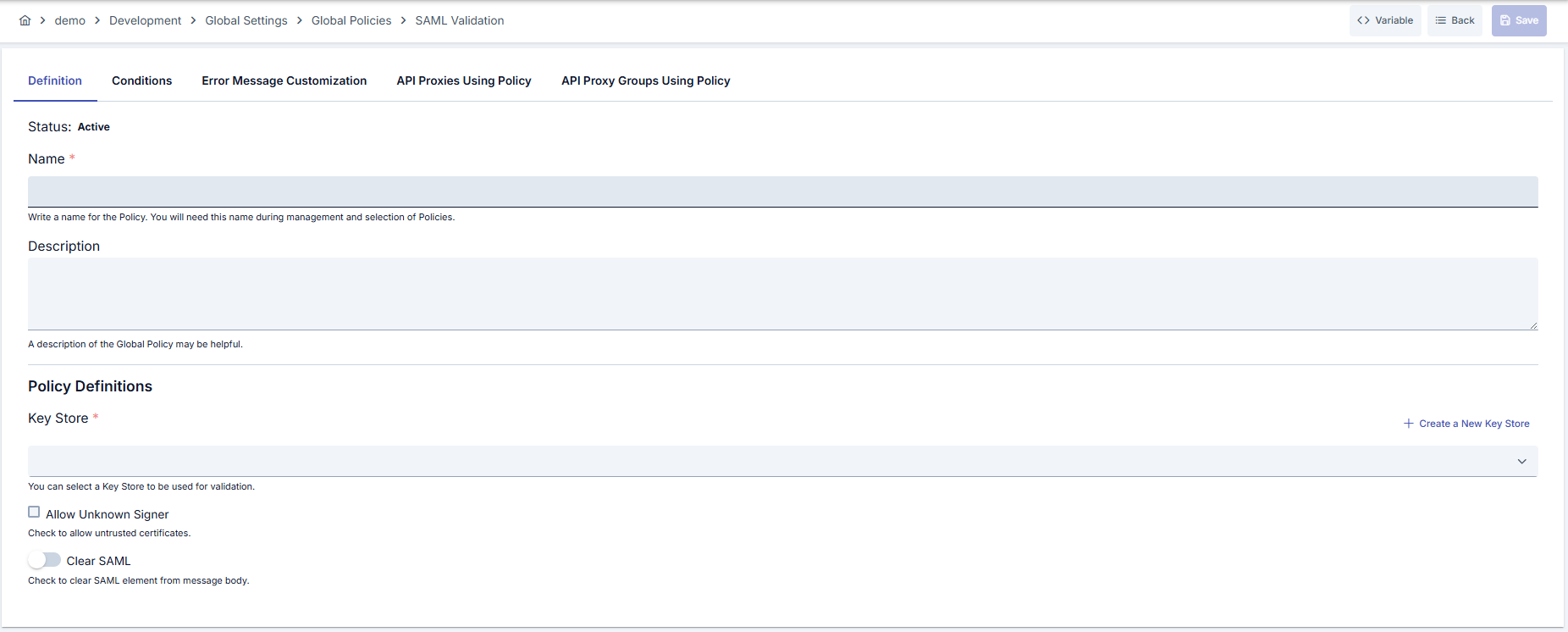
Configuration Steps
| Step | Description / Operation |
|---|---|
| Step 1: Going to Creation Page | - Go to Development → Global Settings → Global Policies → SAML Verification section from the left menu. - Click the [+ Create] button at the top right. |
| Step 2: Entering Basic Information | Policy Status: Shows Active/Passive status. New policies are active by default. Name (Required): Example: Production_SAMLValidation- Enter a unique name, it cannot start with a space. - System automatically checks. Green checkmark: available. Red cross: existing name. Description: Example: "Corporate IdP SAML verification" - Max. 1000 characters. - Explain the purpose of the policy. |
| Step 3: Variable Usage | - In the action button area at the top of the page, you can use the [<> Variable] button to select dynamic values. - Using context/global variable expressions, you can manage policy parameters with variable-based values instead of fixed values. - This reduces manual update effort when values change and provides operational convenience. - For detailed information, review Dynamic Variables. |
| Step 4: Key Store and Signature Verification Configuration | - Select the required JKS key store or open the new key store creation dialog. - Registration cannot be completed without selecting a key store. - Enable AllowUnknownSigner option according to requirements. |
| Step 5: SAML Clearing Settings (If Any) | - Clear the verified SAML node by enabling the clearSaml option.- Update the clearSamlPath field according to your XML structure; keep the default XPath if needed. |
| Step 6: XPath Test and Defaults (If Any) | - Run the clearSamlPath expression on sample payload with Test Transformation Data component, prevent incorrect node deletion. |
| Step 7: Defining Condition (Optional) | - Go to the Condition tab. - Conditions determine when the policy will be active. Examples: - Environment-based: Header = X-Environment, Operator = Equals, Value = production- API Key-based: Header = X-API-Key, Starts With = PROD-- Endpoint-based: Path = /api/admin/*If no condition is defined, the policy is always active |
| Step 8: Customizing Error Message (Optional) | - Go to the Error Message Customization tab. - Customize the message to be returned when access is denied. Default: { "statusCode": 403, "message": "[Default error message]" }Custom: { "statusCode": 403, "errorCode": "[CUSTOM_ERROR_CODE]", "message": "[Custom message]" } |
| Step 9: Saving | - Click the [Save] button at the top right. Checklist: Unique name. Required fields filled. At least one SAML verification requirement (key store selection, optional XPath) exists Result: - Policy is added to the list. - Can be linked to APIs. - If it's a global policy, it is automatically applied. |
For the description of Conditions and Error Message Customization panels, you can review the Conditions and Error Message Customization sections on the What is Policy? page.
For a complete guide on all layers, priority order and scenario examples of the error message configuration system, see the Error Message Configuration Guide page.
Deleting the Policy
For the deletion steps of this policy and the operations to be applied when it is in use, you can refer to the Removing Policy from Flow section on the Policy Management page.
Exporting/Importing the Policy
For the export and import steps of this policy, you can refer to the Export/Import page.
Linking the Policy to API
For the process of how this policy will be linked to APIs, you can refer to the Linking Policy to API section on the Policy Management page.
Advanced Features
| Feature | Description and Steps |
|---|---|
| Key Store Dialog Integration | - Open the new record creation button from the key store listing field. - Import the new JKS file and fill in required fields. - The created key store is automatically set in the policy form. |
| XPath Clearing Test | - After filling the clearSamlPath field, press the test button.- Preview the XPath result with sample XML data. - Update the XPath if incorrect node selection is detected. |
| Global Policy Localization | - Click the Localize button from the detail screen. - Edit conditions and key store in the local copy according to the new environment. - If needed, update the global version and redeploy. |
Best Practices
Things to Do and Best Practices
| Category | Description / Recommendations |
|---|---|
| Key Store Management | Bad: Updating key store with manually copied JKS files. Good: Maintaining separate JKS versions for each environment. Best: Using centralized key store management for automatic certificate rotation and expiration tracking. |
| XPath Maintenance | Bad: Leaving default XPath unchanged for every payload. Good: Adapting XPath according to real XML structure. Best: Verifying with Test Transformation Data on every change and storing in version control. |
| Error Message Design | Bad: Returning generic 500 message. Good: Adding specific explanations to 401/403 codes. Best: Customizing error codes according to client type and localizing. |
| Condition Design | Bad: Applying policy to all traffic. Good: Defining endpoint-based conditions. Best: Providing granular control with combined conditions based on environment, client, and method. |
| Inter-Environment Transfer | Bad: Copying Production key store to Development environment. Good: Preparing environment-based key store sets. Best: Applying naming standards and dependency checks in Export/Import processes. |
Security Best Practices
| Security Area | Description / Warnings |
|---|---|
| Certificate Lifecycle | Track expiration dates of JKS files, renew in advance when expiration approaches. |
| Signature Verification Policies | Enable allowUnknownSigner feature only for temporary requirements, otherwise untrusted certificates may be accepted. |
| Key Store Access Authorization | Limit key store management to authorized DevOps users, store access logs. |
| Payload Cleanliness | After using clearSamlPath, log the output to ensure sensitive data does not leave the system. |
| Error Message Masking | Do not show assertion details in error messages, reduce exploitation risk. |
Things to Avoid
| Category | Description / Warnings |
|---|---|
| Wrong Key Store | Why avoid: Selecting wrong JKS makes all verifications fail. Alternative: Tag key stores appropriate for environment and ensure correct listing. |
| Generic XPath Usage | Why avoid: Default XPath does not work in every schema and may delete wrong nodes. Alternative: Define verified custom XPath for each payload type. |
| Continuous Allow Unknown Signer | Why avoid: Certificates leaking through firewall may be accepted. Alternative: Enable only for temporary tests, then disable. |
| Unconditional Application | Why avoid: Creates unnecessary verification load and incorrect blocking. Alternative: Determine target endpoint or header-based conditions with Query Builder. |
Performance Tips
| Criterion | Recommendation / Impact |
|---|---|
| Key Store Size | Recommendation: Clean unnecessary certificates from JKS. Impact: Verification time shortens. |
| XPath Complexity | Recommendation: Use simple and specific XPath expressions. Impact: XML parse and clearing time decreases. |
| Condition Filtering | Recommendation: Policy should run only on necessary endpoints and methods. Impact: CPU load on Gateway decreases. |
| Log Level | Recommendation: Keep debug logs closed in Production. Impact: IO load and latency decrease. |
| Error Message Customization | Recommendation: Cache frequently used error responses. Impact: Response creation times decrease. |
Frequently Asked Questions (FAQ)
| Category | Question | Answer |
|---|---|---|
| General | In which network flows should SAML Verification policy be used? | Should be used in all API Proxy flows where identity federation is performed and SAML assertions are carried. |
| General | Can policy be saved without key store? | No, a JKS key store must be selected as mandatory. |
| Technical | Are other checks performed when allowUnknownSigner is active? | Conditions in the policy and other Policy steps continue to work, only certificate chain check becomes flexible. |
| Technical | What happens if clearSamlPath field is left empty? | If the field is empty when clearSaml is enabled, verification fails and policy cannot be saved. |
| Usage | Can XPath test function be used in Production? | Yes, but mask sensitive data when entering sample payload. |
| Usage | What changes after converting global policy to local copy? | Local copy is only valid for the selected API Proxy and updates in the global version do not affect the local copy. |