Backend API Authentication
This document describes the detailed usage of a specific policy. If you are using Apinizer policy structure for the first time or want to learn the general working principles of policies, we recommend that you first read the What is Policy? page.
Overview
Backend API Authentication policy defines the authentication credentials that API Gateway will use when accessing backend services. It establishes secure connections to backend systems by supporting different authentication methods such as Plain-Text, Basic, API Key, and Digest. Ideal for centrally managing different authentication requirements of each service in microservice architectures.
What is its Purpose?
- Ensures authentication credentials are automatically added to calls made to backend API services, eliminating the need for manual credential management for each request.
- Supports four different authentication types: Basic, Digest, Base64, and custom API Authentication, and allows conditional username/password definitions.
- Enables authentication information to be transmitted to backend via HTTP Header, URL Parameter, Body Message, or Body Injection methods.
- Provides message content support in XML and JSON formats, working compatibly with both SOAP and REST services.
- Different user information can be used in different scenarios (e.g., based on environment, endpoint, header value) thanks to condition-based credential management.
Working Principle
- Request Arrival: For each HTTP/HTTPS request arriving at API Gateway, it is checked whether authentication information needs to be added before the request is routed to backend service.
- Policy Check: If API Authentication policy is active, the system checks in the following order:
- Is a condition defined? If so, is the condition met?
- Is the policy active (active=true)?
- Is a variable used or is Apinizer default used?
- Authentication Type Selection: Appropriate credentials are prepared according to the defined Auth Type (API, BASIC, BASE64, DIGEST). If Conditional Expression is defined, correct username/password is selected according to conditions.
- Decision Making:
- If Condition is Met: Relevant credential information is added to backend call with selected Send Type method (Header, Param, Body Message, Body Injection) and request is forwarded.
- If Condition is Not Met or Credential Not Found: Request is rejected and customizable error message is returned.
- Error Handling: Customizable HTTP status code and error message are returned for requests that do not comply with policy rules.
Features and Capabilities
Basic Features
- Four Different Authentication Types: Support for API (ready auth service), Basic Authentication, Base64 encoded Authorization, Digest Authentication.
- Conditional Credential Management: Ability to make dynamic credential selection based on environment, endpoint, or header value by defining separate conditions for each username/password pair.
- Four Different Transmission Methods: Ability to send credentials to backend via HTTP Header, URL Parameter, Body Message, or Body Injection methods.
- XML and JSON Support: Support for both XML (SOAP) and JSON (REST) formats in body-based authentication and ability to perform XPath/JSONPath injection.
- API Authentication Integration: Ability to perform centralized credential management using pre-defined Authentication API services.
- Active/Passive Status Control: Easily change policy's active or passive status (active/passive toggle). Policy is not applied in passive state but its configuration is preserved.
- Condition-Based Application: Determine when the policy will be applied by creating complex conditions with Query Builder (e.g., only for specific endpoints or header values).
Advanced Features
- Dynamic Field Name and Injection Path Definition: Create flexible authentication configuration by customizing field names and paths for header, parameter, or body injection.
- Digest Authentication Support: Ability to perform Digest authentication with advanced security parameters such as nonce, created timestamp (SOAP WS-Security compatible).
- Body Message Template Support: Create quick SOAP/REST authentication configuration using ready body message templates for XML and JSON.
- XPath and JSONPath Test Tool: Ability to test and validate body injection and message paths live.
- Username Expression Table: Ability to perform multi-scenario credential management by defining multiple username/password pairs and setting different conditions for each.
- Export/Import Feature: Export policy configuration as ZIP file. Import to different environments (Development, Test, Production). Version control and backup capability.
- Policy Group and Proxy Group Support: Manage multiple policies within Policy Group. Bulk policy assignment to Proxy Groups. Centralized updates and deploy operations.
- Deploy and Versioning: Deploy policy changes to live environment. See which API Proxies use it (Policy Usage). Proxy Group and Policy Group usage reports.
Usage Scenarios
| Scenario | Status | Solution (Policy Application) | Expected Behavior / Result |
|---|---|---|---|
| Connecting to Backend SOAP Service with WS-Security | SOAP backend service is protected with Basic Authentication and expects WS-Security header | Auth Type: BASIC Send Type: BODY_MESSAGE Message Type: XML Username/Password: Defined with Conditional Expression Body Message: Use WS-Security template | Gateway automatically adds WS-Security header to all SOAP requests. Backend service passes authentication and returns response. |
| Environment-Based Different Credential Usage | test_user should be used in test environment, prod_user in production environment | Auth Type: BASIC Send Type: HEADER Conditional Expression 1: Header X-Environment = test → username: test_user Conditional Expression 2: Header X-Environment = prod → username: prod_user | Gateway selects correct credential according to X-Environment header in incoming request and forwards to backend. |
| Adding Base64 Authorization Header to REST API | REST backend service expects "Authorization: Basic base64string" header | Auth Type: BASE64 Send Type: HEADER Password Field Name: Authorization Conditional Expression: Relevant username/password defined | Gateway automatically Base64 encodes username and password and sends to backend by adding to Authorization header. |
| Using Ready Authentication API | Token needs to be obtained from centralized OAuth/OIDC service and sent to backend | Auth Type: API Auth API ID: Selected Authentication API service Send Type and other parameters according to API configuration | Gateway calls defined Authentication API, sends authenticated request to backend service using obtained token |
| Digest Authentication to JSON REST API | JSON backend service expects digest authentication and requests nonce/created information | Auth Type: DIGEST Send Type: BODY_INJECTION Message Type: JSON Field Names: username, password, nonce, created Injection Paths: Paths determined with JSONPath | Gateway creates necessary nonce and created values for digest authentication, injects into JSON body and sends to backend. |
| Authentication with URL Parameter | Legacy backend service expects credentials as query string parameter | Auth Type: BASIC Send Type: PARAM Username Param Name: api_user Password Param Name: api_key Conditional Expression: Relevant credential defined | Gateway adds credentials to URL query string: ?api_user=xxx&api_key=yyy |
| Endpoint-Based Different Credential | /admin endpoint requires admin credential, /user endpoint requires user credential | Condition (Policy Condition): Path starts with /admin → Admin API Authentication Policy Condition (Policy Condition): Path starts with /user → User API Authentication Policy | Gateway applies correct policy according to path of incoming request and uses relevant credential. Two separate policies or conditional expression within single policy can be used. |
Configuring Policy Parameters
In this step, users can create a new policy or configure existing policy parameters to define access rules. Defined parameters directly affect how the policy works (e.g., which IPs will be allowed, geographical restrictions, conditional activations, etc.). This allows the policy to be customized according to organization-specific requirements and managed centrally.
Creating New API Authentication Policy
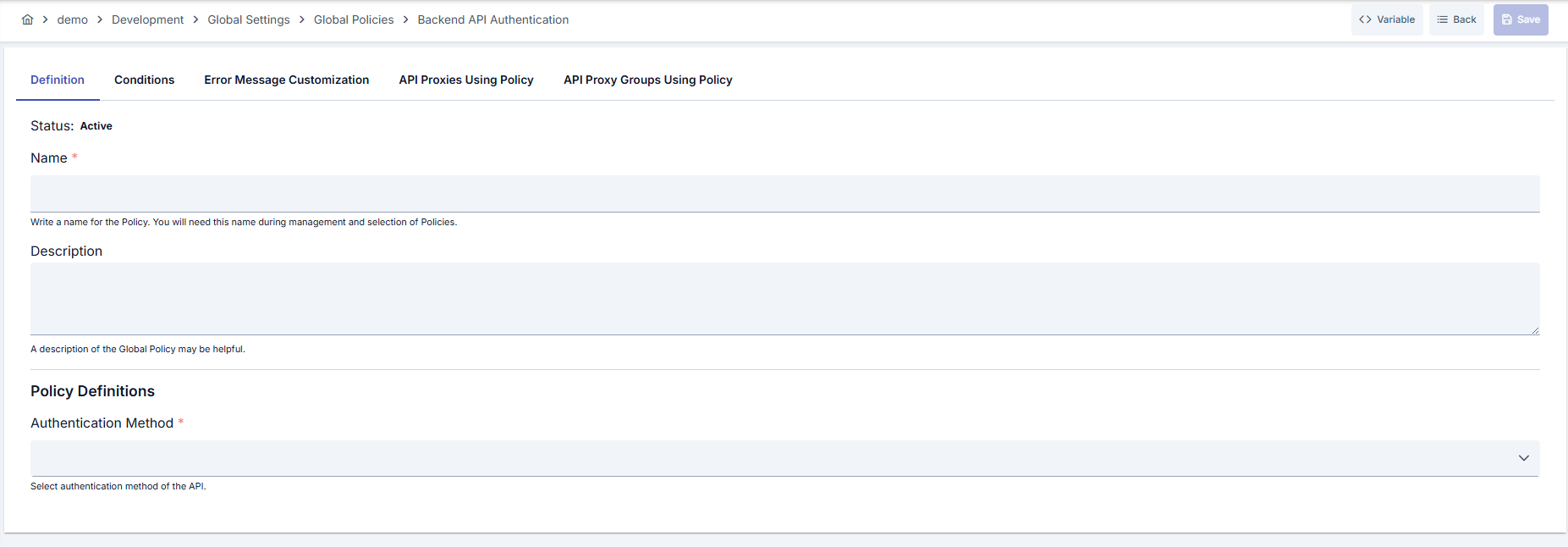
Configuration Steps
| Step | Description / Operation |
|---|---|
| Step 1: Go to Creation Page | - Go to Development → Global Settings → Global Policies → API Authentication from left menu. - Click [+ Create] button at top right. |
| Step 2: Enter Basic Information | Policy Status (Policy Status): Shows Active/Passive status. New policies are active by default. Name (Name) Required: Example: Production_Backend_Auth- Enter unique name, does not start with space. - System automatically checks. Green checkmark: available. Red X: existing name. Description (Description): Example: "Adds authentication information to backend services for production environment" - Max. 1000 characters. - Explain policy's purpose. |
| Step 3: Variable Usage | - In the action button area at the top of the page, you can use the [<> Variable] button to select dynamic values. - Using context/global variable expressions, you can manage policy parameters with variable-based values instead of fixed values. - This reduces manual update effort when values change and provides operational convenience. - For detailed information, review Dynamic Variables. |
| Step 4: Authentication Type Selection (Auth Type) | Auth Type Dropdown (Required): Options: - API: Uses pre-defined Authentication API service (OAuth, OIDC, etc.) - BASIC: Basic authentication with username and password - BASE64: Base64 encoded authorization header - DIGEST: Digest authentication (secure authentication with nonce, created) Note: - If API is selected: "Select Authentication API" button appears, ready auth service is selected. - If BASIC/BASE64/DIGEST is selected: Username/Password Expression Table appears. |
| Step 5: Username/Password Expression Definition (For Auth Type: BASIC, BASE64 or DIGEST) | In this section, conditional username and password definitions are made. Multiple credentials can be defined and different conditions can be set for each. Username/Password Expression Table: - Click [+ Add] button. - Username: Enter relevant username (e.g., backend_user, ${variable.username})- Password: Enter relevant password (e.g., backend_pass123, ${variable.password})- Condition (Condition): Define condition with Query Builder - Example: Header[X-Environment] Equals production- Example: Path Starts With /adminNote: - At least one username/password definition is required. - Conditions are evaluated in order, first match is used. |
| Step 6: Transmission Method Selection (Send Type) (For Auth Type: BASIC, BASE64 or DIGEST) | Send Type Dropdown (Required): HEADER: Credentials are sent in HTTP headers - Username Header Name: Username header name (e.g., X-Username)- Password Header Name: Password header name (e.g., X-Password)- For Digest: Created Header Name, Nonce Header Name PARAM: Credentials are sent as URL parameter - Username Param Name: Username parameter name (e.g., user)- Password Param Name: Password parameter name (e.g., pass)- For Digest: Created Param Name, Nonce Param Name BODY_MESSAGE: Ready message template is added to body - Message Content Type: Select XML or JSON - Body Message: Template is automatically loaded (XML for WS-Security, username/password object for JSON) - Body Message Injection Path: Where template will be added (XPath or JSONPath) BODY_INJECTION: Field injection is performed on existing body - Message Content Type: Select XML or JSON - Username Field Name: Username field name (e.g., username)- Username Injection Path: XPath or JSONPath (e.g., $.credentials.username)- Password Field Name: Password field name (e.g., password)- Password Injection Path: XPath or JSONPath (e.g., $.credentials.password)- For Digest: Created Field Name, Created Injection Path, Nonce Field Name, Nonce Injection Path |
| Step 7: Define Condition (Optional) | - Go to Condition tab. - Conditions determine when the policy will be active. Examples: - Environment-based: Header = X-Environment, Operator = Equals, Value = production- API Key-based: Header = X-API-Key, Starts With = PROD-- Endpoint-based: Path = /api/admin/*If condition is not defined, policy is always active |
| Step 8: Customize Error Message (Optional) | - Go to Error Message Customization tab. - Customize message to return when access is denied. Default: { "statusCode": 401, "message": "Unauthorized: Authentication credentials are missing or invalid" }Custom: { "statusCode": 401, "errorCode": "AUTH_FAILED", "message": "Backend authentication failed. Please contact system administrator." } |
| Step 9: Save | - Click [Save] button at top right. Checklist: - Unique name - Required fields filled - At least one username/password definition exists Result: - Policy is added to list. - Can be bound to APIs. - If global policy, automatically applied. |
For descriptions of Conditions and Error Message Customization panels, you can review the Conditions and Error Message Customization (Error Message Customization) sections on the What is Policy? page.
For a complete guide on all layers, priority order and scenario examples of the error message configuration system, see the Error Message Configuration Guide page.
Deleting Policy
For deletion steps of this policy and operations to be applied when in use, you can refer to the Removing Policy from Flow section on the Policy Management page.
Exporting/Importing Policy
For export (Export) and import (Import) steps of this policy, you can refer to the Export/Import page.
Binding Policy to API
For the process of how this policy will be bound to APIs, you can refer to the Binding Policy to API section on the Policy Management page.
Advanced Features
| Feature | Description and Steps |
|---|---|
| Variable Expression Usage | - Use variable expressions in username and password fields (e.g., ${env.backend_user}, ${vault.db_password})- Define relevant variables from API Proxy or Global Settings → Variables section - Variables are resolved at runtime and secure credential management is provided Benefit: Credentials are not hardcoded in code, centralized management and security increase. |
| XPath and JSONPath Test Tool | - Select BODY_MESSAGE or BODY_INJECTION as Send Type - Click [Test] button next to Field Name and Injection Path fields - Enter your sample XML/JSON message in test window - See if your defined XPath/JSONPath expression works correctly Benefit: You can test your injection paths before going live, reducing error risk. |
| Authentication API Integration | - Define OAuth, OIDC or Custom Auth service from Global Settings → Authentication API section - Select Auth Type = API in API Authentication policy - Click "Select Authentication API" button to select defined auth service - Token is automatically obtained and used in backend calls Benefit: Complex auth flows like OAuth/OIDC are centrally managed and token refresh is automatic. |
Tips and Best Practices
Things to Do and Best Practices
| Category | Description / Recommendations |
|---|---|
| Credential Management | Bad: Hardcoding username and password in policy: username: admin, password: 12345Good: Using variable expression: username: ${backend.user}, password: ${backend.pass}Best: Using variable expression + Vault integration: username: ${vault.backend_user}, password: ${vault.backend_password}- Security at maximum level, credential rotation easy |
| Condition Definition | Bad: Using same credential for all environments in single global policy Good: Creating separate policy for each environment (Dev_Auth, Test_Auth, Prod_Auth) Best: Environment-based credential management using conditional expression within single policy: Header[X-Environment] = prod → prod_user- Centralized management, fewer policies, easier maintenance |
| Send Type Selection | Bad: Using BODY_MESSAGE/BODY_INJECTION for legacy systems (performance decreases) Good: Using HEADER for modern REST APIs (standard and fast) Best: Selecting appropriate method according to backend's expectation: BODY_MESSAGE for SOAP WS-Security, HEADER for REST, PARAM for Legacy - Balance of compatibility and performance |
| Test and Deploy Strategy | Bad: Creating and testing global policy directly in production Good: Testing as local policy first, then making it global Best: Creating global policy in dev environment and testing → Export → Import to test environment → Test → Import to prod environment - Risk minimized, controlled deploy |
| Authentication API Usage | Bad: Trying to manually manage OAuth tokens (token expiration, refresh logic, etc.) Good: Writing separate auth logic for each API Best: Defining centralized Authentication API and using in all APIs - Token refresh automatic, centralized management, no code duplication |
Security Best Practices
| Security Area | Description / Warnings |
|---|---|
| Credential Security | Warning: Never log credentials. Avoid hardcoding credentials in policy. Do not store passwords as plain text. Solution: Use variable expression + Vault integration. Log masking should be active. Apply credential rotation policies. |
| HTTPS Usage | Warning: If backend authentication information is sent over HTTP, it becomes vulnerable to man-in-the-middle attacks. Solution: Always connect to backend services over HTTPS. Use TLS 1.2 or higher. Do not use self-signed certificate (for prod). |
| Least Privilege Principle | Warning: Using same admin credential for all backend services creates major security risk. Solution: Use separate credential with only necessary permissions for each backend service. Perform service-based credential management with conditional expression. |
| Audit and Monitoring | Warning: If you don't monitor authentication failures, you miss attack attempts. Solution: Activate auth failure logs. Set up monitoring and alerting. Limit failed auth attempts (use together with Rate Limiting). |
| Policy Update Security | Warning: When updating global policy, authentication may be interrupted in all connected APIs. Solution: Try in test environment first. Take backup before making update in production. Test in Used Proxies after deploy. Use blue-green deployment strategy. |
Things to Avoid
| Category | Description / Warnings |
|---|---|
| Hardcoded Credential Usage | Why to avoid: Creates security risk. When credential changes, all policies need to be manually updated. Credentials are visible in code reviews. Alternative: Use variable expression and Vault: ${vault.backend_credentials.username} |
| Wrong Send Type Selection | Why to avoid: If transmission is made in format other than what backend expects, authentication fails. BODY_MESSAGE may overwrite existing body. Alternative: Review backend documentation and select appropriate Send Type. Test correctness of paths when using BODY_INJECTION. |
| Creating Many Policies Without Using Conditional Expression | Why to avoid: Management becomes difficult. Deploy becomes complex. Repeating same logic in different policies increases error risk. Alternative: Manage different scenarios using conditional expression within single policy. Use Policy Group. |
| Deploying to Production Without Testing | Why to avoid: Wrong configuration breaks all backend calls. If credential is wrong, services become inaccessible. Downtime occurs. Alternative: Test as local policy first. Verify in Dev/Test environments. Use canary deployment. |
Performance Tips
| Criterion | Recommendation / Impact |
|---|---|
| Send Type Performance | Recommendation: Use HEADER or PARAM (fastest). BODY_MESSAGE and BODY_INJECTION require more processing. Impact: HEADER: ~1ms additional time, BODY_MESSAGE: ~5-10ms, BODY_INJECTION: ~10-20ms (depending on message size) |
| Conditional Expression Count | Recommendation: Keep conditional expression count at reasonable level (max 5-10). Use simple conditions instead of complex XPath/JSONPath. Impact: Each expression adds ~0.5ms. Too many expressions create runtime overhead. |
| Variable Expression Resolution | Recommendation: Resolve variable expressions from cached variables. Avoid going to external Vault on every request (use caching). Impact: Cache hit: ~0.1ms, Cache miss + Vault call: ~50-100ms |
| Message Content Type | Recommendation: Use JSON (lighter and faster parse). XML is only necessary for SOAP services. Impact: JSON parsing: ~2-5ms, XML parsing: ~10-20ms (depending on message size) |
| Authentication API Cache | Recommendation: If using Authentication API, activate token cache. Optimize token expiration duration (too short: frequent refresh, too long: security risk). Impact: Cached token: ~0.5ms, Getting new token: ~100-500ms (depending on auth service) |
Frequently Asked Questions (FAQ)
| Category | Question | Answer |
|---|---|---|
| General | When should API Authentication policy be used? | You should use this policy if your backend services require authentication and you don't want to manually add this information in every request. Especially ideal for situations like SOAP WS-Security, Basic Auth, OAuth token management. |
| General | Can multiple Authentication policies be assigned to same API? | No, only one API Authentication policy can be assigned to an API. However, you can manage multiple scenarios within single policy using conditional expression. |
| Technical | What is the difference between BODY_MESSAGE and BODY_INJECTION? | BODY_MESSAGE: Adds a ready template to a specific place in message (e.g., SOAP Header). Does not change existing body, only adds. BODY_INJECTION: Injects credential information into specific fields within existing body. Finds target fields with XPath/JSONPath and assigns values. |
| Technical | Is token refresh automatic when using Authentication API? | Yes, if token expiration and refresh logic are defined in Authentication API configuration, Apinizer automatically refreshes token. Manual intervention not needed. |
| Usage | How to manage environment-based different credentials? | Two methods: 1) Make definition in form Header[X-Environment] = prod → prod_user using Conditional Expression within single policy.2) Create separate policy for each environment and activate correct policy during deployment. First method is recommended (centralized management). |
| Usage | Which variable sources can I use in variable expression? | ${env.VAR_NAME}: Environment variables${variable.VAR_NAME}: API Proxy or Global Variables${vault.PATH}: Vault integration (HashiCorp Vault, AWS Secrets Manager, etc.)${header.HEADER_NAME}: Getting value from request headers |
| Security | Are credentials visible in logs? | No, Apinizer masks credential fields from logs by default. However, if using custom log policy, check masking rules. |
| Security | How are nonce and created created in digest authentication? | Apinizer automatically creates unique nonce (Base64 encoded random value) and created (ISO 8601 timestamp) values for each request. Manual intervention not needed. |
| Troubleshooting | I'm getting "Authentication credentials are missing or invalid" error | Check the following: 1) Are your conditional expressions correct? (if none match, you get error) 2) Can variable expressions be resolved? 3) Is Send Type compatible with format backend expects? 4) Are field names and injection paths correct? Review API logs and policy execution logs for debugging. |