mTLS Authentication
This document explains the detailed usage of a specific policy. If you are using Apinizer policies for the first time or want to learn the general working principles of policies, we recommend reading the What is Policy? page first.
Overview
What is its Purpose?
- Establish a strong authentication layer that carries no password or token, by requiring the certificate the client presents during the TLS handshake.
- Bind the client to a known identity by matching the identity resolved from the certificate with a Consumer defined in Apinizer.
- Reject forged or unauthorized certificates by validating the certificate chain presented by the client against the Key Store bound to the matched Consumer.
- Verify access permission, validity period and address restrictions after the identity is authenticated, and combine it with role-based authorization when needed.
Prerequisites
This policy can only work when the client certificate reaches the gateway. Unless the following three conditions are met, the policy accepts no request:
| Condition | Description |
|---|---|
| Environment settings | HTTPS must be enabled and the mTLS option must be checked in the environment where the policy is applied. When mTLS is off, the gateway does not request a certificate from the client and the policy finds none. |
| Where TLS terminates | The TLS connection must terminate on the gateway. If a load balancer or ingress component in front terminates TLS, the client certificate does not reach the gateway; in that case the connection must be passed through to the gateway. |
| Proxy type | The policy works only on HTTP/HTTPS API Proxies. It is not supported on gRPC or WebSocket API Proxies; if defined on either, the request is rejected with a 500 error before any certificate check runs. |
If HTTPS and mTLS are not enabled in the environment settings, requests are rejected on the grounds that no certificate was found, even when this policy is added. The policy works only in the environment where these settings are enabled.
Working Principle
- TLS handshake: If mTLS is enabled in the environment, the gateway requests the client's certificate while the connection is established. The certificate presented by the client is validated against the trusted certificates in the environment's key store. A connection that fails this validation is closed before the policy runs at all.
- Retrieving the certificate: The policy reads the client certificate coming from the handshake. If no certificate was presented, the request is rejected.
- Resolving the identity: According to the Identity Source setting, a name is read from the certificate and an enabled Consumer matching that name is searched for. If no match is found, the request is rejected.
- Certificate validity: If the Validate Certificate option is on, the certificate's validity dates are checked and it is verified that the certificate was issued for client authentication purposes. Expired certificates or those issued for a different purpose are rejected.
- Trust validation: If the Validate Certificate's Issuer option is on, the entire certificate chain presented by the client is validated against the trusted certificates in the key store bound to the matched Consumer. If the chain cannot be anchored to that store, the request is rejected.
- Access control: If the Validate ACL for Issuer option is on, the matched Consumer's access permission for this API, its validity period and any address/location restrictions are verified.
- Result: If all checks succeed, the resolved identity is written to the request, added to a header if requested, and role checks run when authorization is enabled. If any stage fails, the request is stopped and the configured error response is returned.
Trust validation (step 5) runs before access control (step 6). This way a client is not considered authenticated before the trustworthiness of its certificate is proven.
Behavior change when ACL is off. Before, a request with ACL off was not marked as authenticated, Limit Plans were not applied, and the consumer's expiry and IP list were not checked. Now the same identity rules as the other authentication policies apply: the consumer must exist and be enabled, its organization and parent organizations must be active, its validity period and contracts must not have ended, and the client IP must be in the consumer's IP list when Validate Client Address is on. Requests from other IPs, expired consumers and ended contracts are rejected. The request is marked as authenticated, Limit Plans apply, and the resolved identity is written to the traffic log. Only the consumer's access row for this API Proxy or Proxy Group (and API Client subscription grants) is skipped. The IP check, identity and authorization fields are no longer hidden when ACL is off. See Identity-Only Mode (ACL Off).
Identity Source
A certificate carries two distinct names: the subject of the certificate (the client itself) and its issuer (the signing authority). The policy determines which of these names the identity is resolved from through the Identity Source setting.
| Option | Where the identity is read from | When to use |
|---|---|---|
| Certificate Subject (Subject CN) | From the subject name of the client certificate itself | Setups where each client is defined as a separate Consumer. The narrowest scope and the most precise distinction. |
| Certificate Issuer (Issuer CN) | From the name of the authority that signed the certificate | Setups where all client certificates issued by an organization's own certificate authority are accepted as a single organizational identity. |
| Subject, then Issuer | The subject name is tried first; if no match is found, the issuer name is tried | The default option. Supports setups where both naming approaches are used together. |
The identity is read only from the client's own certificate. The names of intermediate or root certificates in the chain sent by the client are not used as an identity. With the "Certificate Issuer" option, the issuer name is read from the information on the client certificate itself, so the identity can be resolved even when the client does not send the chain.
The Identity Source selection must be consistent with the user name of the Consumer you set up. For example, if your organization's certificate authority carries the name MyRootCA and you want to gather all clients issued by that authority under a single identity, the Consumer's user name must be MyRootCA and the Identity Source must be set to Certificate Issuer (or left at the default). If you want to define each client separately, the Consumer's user name must match the subject name of the client certificate and Certificate Subject must be selected.
Features and Capabilities
Basic Features
- Flexible Identity Resolution: Choose whether the identity is resolved from the certificate's subject name or issuer name; recognize each client individually or all clients under one authority as a single identity.
- Certificate Validity Check: Reject expired or out-of-purpose certificates by verifying validity dates and intended usage on every request.
- Chain-Based Trust Validation: Validate the certificate chain presented by the client against the key store bound to the identity; support chains containing intermediate certificate authorities.
- Access Control: Verify the identity's access permission for the API, its validity period and address/location restrictions.
- Active/Passive Status Control: Change the active or passive status of the policy. In passive mode, the policy is not applied but its configuration is preserved.
- Condition-Based Application: Determine when the policy will be applied by creating conditions with Query Builder (e.g., only for specific endpoints or header values).
Advanced Features
- Header Injection Management: Transfer the identity resolved from the certificate to backend services by writing it into a custom header.
- Authorization Service Integration: Combine authentication with role-based access; resolve roles from API, database or secret management sources.
- Method-Based Permission Restrictions: Control sensitive operations at a granular level by defining access rules according to the HTTP method.
- Export/Import Feature: Export the policy configuration and import it into different environments.
- Policy Group and Proxy Group Support: Manage multiple policies within a group, assign policies to groups in bulk.
- Deploy and Versioning: Deploy policy changes to the live environment, see which API Proxies use it.
Usage Scenarios
| Scenario | Status | Solution (Policy Application) | Expected Behavior / Result |
|---|---|---|---|
| Corporate Device Access | Financial services are only called from company devices | A Consumer is defined with the organization's certificate authority name, the authority's certificate is added to that identity's key store, Identity Source is set to Certificate Issuer | Requests arriving with certificates issued by the corporate authority are accepted, others are rejected |
| Device-Based Identity | Each edge device has its own certificate and must be tracked separately | A separate Consumer is defined per device with the certificate's subject name, Identity Source is set to Certificate Subject | Each device is recognized by its own identity, appears separately in traffic logs, and a single device's access can be revoked independently |
| Partner API Access | Limited endpoint access will be granted to external partners | A Consumer is defined with the partner authority name, a path condition is set in Query Builder, and only the relevant API is added to that identity's access list | If the partner certificate matches, access is provided only to the defined endpoints |
| Expired Certificate | Access of unrenewed client certificates must be cut | Validate Certificate is kept on | Requests arriving with expired certificates are rejected |
| Role-Based Authorization | Different service roles will be applied with the same certificate | Authorization is enabled, roles are written to the header | The backend service grants authorization by reading the role header |
| Address Restriction | Address matching against certificate sharing risk | Validate Client Address is enabled, allowed addresses are defined on the Consumer | Requests arriving from outside the defined addresses are rejected |
Configuring Policy Parameters
In this step, users can create a new policy or configure existing policy parameters to define access rules. The defined parameters directly affect how the policy works. This allows the policy to be customized according to organization-specific requirements while being centrally manageable.
Creating a New mTLS Authentication Policy
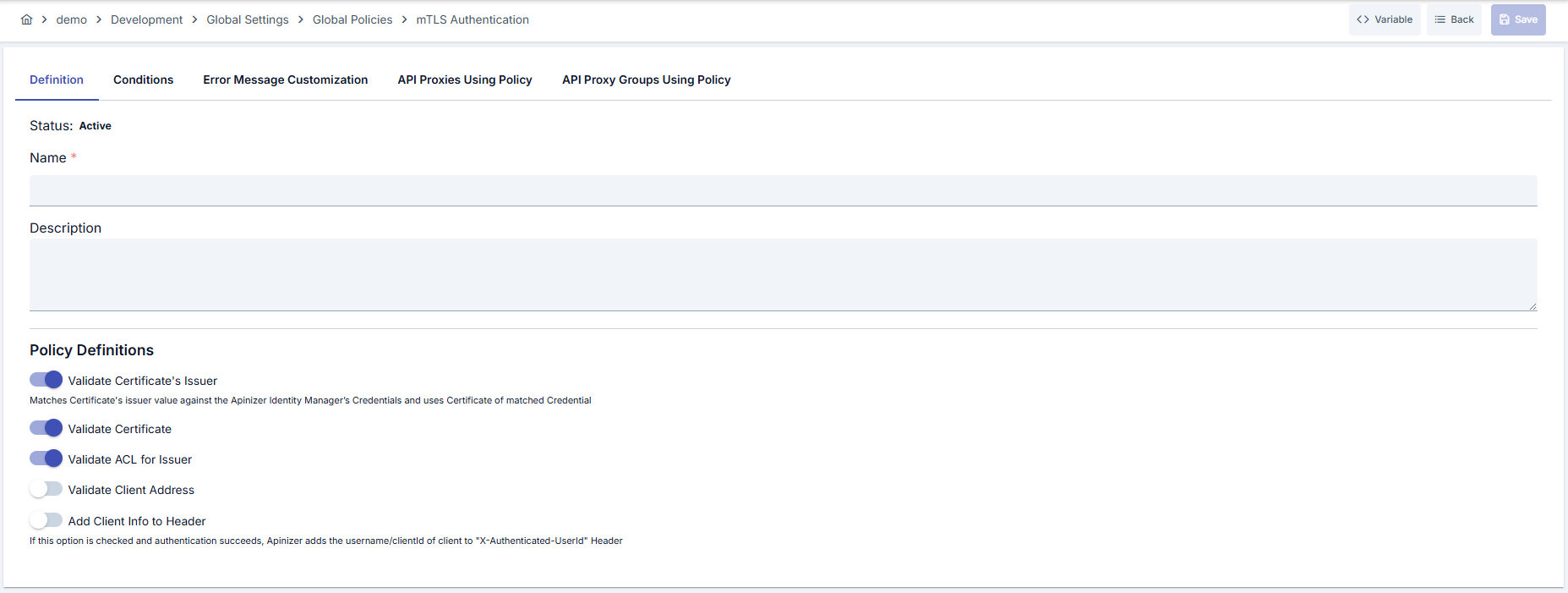
Configuration Steps
| Step | Description / Operation |
|---|---|
| Step 1: Preparation | - Make sure HTTPS and mTLS settings are enabled in the environment where you will use the policy. - Load the certificate of the authority that signs the client's certificate into a key store. - Bind this key store to the Consumer that will represent the client, and add the relevant API to that Consumer's access list. |
| Step 2: Go to Creation Page | - Go to Development → Global Settings → Global Policies → mTLS Authentication Policy from the left menu. - Click the [+ Create] button at the top right. |
| Step 3: Enter Basic Information | Policy Status: Shows Active/Passive status. New policies are active by default. Name (Required): Example: Production_mTLSAuth- Enter a unique name, does not start with space. - System automatically checks. Green checkmark: available. Red X: existing name. Description: Example: "mTLS authentication for corporate clients" - Max. 1000 characters. |
| Step 4: Identity Source Selection | - Identity Source: Determines which name on the certificate the identity is resolved from. - Certificate Subject (Subject CN): When each client is a separate Consumer. - Certificate Issuer (Issuer CN): When all clients issued by one authority form a single identity. - Subject, then Issuer: Default; supports both approaches. - Make sure your selection is consistent with the Consumer's user name. |
| Step 5: Certificate Verification Parameters | - Validate Certificate: Checks the certificate's validity dates and that it was issued for client authentication purposes. - Validate Certificate's Issuer: Validates the certificate chain presented by the client against the key store bound to the Consumer. If no key store is defined on the Consumer, the request is rejected. - Validate ACL for Issuer: Verifies the Consumer's API access permission, validity period and address restrictions. |
| Step 6: Address Control | - Validate Client Address: Seeks a match between the address the request comes from and the allowed address and location list defined on the Consumer. - Keeping this control enabled is recommended against certificate sharing risk. |
| Step 7: Header and Authorization Settings | - Set Resolved Identity to Context: Determines whether the identity resolved by this policy is recorded as the request identity. When on (default), this identity appears in traffic logs, subsequent policies and scripts. When off, the identity is used only for the necessary internal checks. - Add Client Info to Header: Writes the resolved identity into the specified header. - Authenticated User Header Name: Default X-Authenticated-UserId, customize if needed.- Enable Authorization: Activates role and method-based controls; resources and roles in the Authorization tab must be defined. |
| Step 8: Define Condition (Optional) | - Go to Condition tab. - Conditions determine when the policy will be active. Examples: - Environment-based: Header = X-Environment, Operator = Equals, Value = production- Endpoint-based: Path = /api/admin/*If you do not define a condition, the policy is always active |
| Step 9: Customize Error Message (Optional) | - Go to Error Message Customization tab. - Customize the message to be returned when access is denied. |
| Step 10: Save | - Click the [Save] button at the top right. Checklist: Unique name. Identity Source selection consistent with the Consumer user name. Key store bound to the Consumer. The relevant API present in the Consumer's access list. Result: - Policy is added to the list. - Can be connected to APIs. - If global policy, automatically applied. |
For descriptions of Conditions and Error Message Customization panels, you can review the Conditions and Error Message Customization sections on the What is Policy? page.
For a complete guide on all layers, priority order and scenario examples of the error message configuration system, see the Error Message Configuration Guide page.
For an end-to-end example covering certificate, key store and Consumer preparation, see the mTLS Authentication Scenario page.
Deleting the Policy
For deletion steps of this policy and operations to be applied when in use, you can refer to the Remove Policy from Flow section on the Policy Management page.
Exporting/Importing the Policy
For export (Export) and import (Import) steps of this policy, you can refer to the Export/Import page.
Connecting the Policy to API
For the process of how this policy will be connected to APIs, you can refer to the Connect Policy to API section on the Policy Management page.
Best Practices
Things to Do and Best Practices
| Category | Description / Recommendations |
|---|---|
| Identity Source Selection | Bad: Leaving the Identity Source inconsistent with the Consumer user name Good: Consciously choosing the option that fits the setup's naming approach Best: Defining each client as a separate Consumer and using Certificate Subject, so a single client's access can be revoked independently |
| Certificate Management | Bad: Forgetting to update the key store when the authority certificate is renewed Good: Updating the key store after renewal and redeploying the policy Best: Tracking the certificate renewal schedule with automatic reminders |
| Trust Validation | Bad: Turning off Validate Certificate's Issuer and relying on name matching alone Good: Keeping the option on and binding its own key store to each identity Best: Defining a narrowly scoped key store per identity that contains only its own authority's certificate |
| Authorization Integration | Bad: Leaving role lists empty when authorization is on Good: Applying the minimum privilege principle for roles Best: Running automatic tests in CI/CD when roles change |
| Header Usage | Bad: Backend services not validating the identity header Good: Implementing header validation in services behind the gateway Best: Additionally using a secure channel between the gateway and the backend |
| Deployment Process | Bad: Making direct changes in the production environment Good: Trying certificate scenarios in a test environment Best: Creating a Blue/Green deployment plan |
Security Best Practices
| Security Area | Description / Warnings |
|---|---|
| Narrowly Scoped Key Store | The broader the key store bound to an identity, the larger the set of certificates that can be accepted on behalf of that identity. Define a store per identity that contains only the required authority. |
| Identity Source Scope | With the Certificate Issuer option, all certificates issued by that authority are accepted as the same identity. Use Certificate Subject if you need to distinguish clients individually. |
| Certificate Revocation List | If revocation checks are done outside the gateway, update them periodically; remove the identity match of revoked certificates. |
| Header Protection | Use signature or secure communication against header spoofing in backend services. |
| Address Matching | Keep the allowed list current for clients using dynamic addresses if address control is active. |
| Logging | Store certificate validation errors masked in secure logs, anonymize personal data. |
Things to Avoid
| Category | Description / Warnings |
|---|---|
| Turning Off Trust Validation | Why to avoid: Only name matching is relied upon; the policy layer does not prove that the certificate genuinely came from a trusted authority. Alternative: Keep the option on and bind a key store to the identity. |
| Broadly Scoped Identity | Why to avoid: All certificates issued by an authority become a single identity; revoking a single client's access becomes impossible. Alternative: Use Certificate Subject if client-level distinction is needed. |
| Skipping the Environment Setting | Why to avoid: When HTTPS or mTLS is off, the policy cannot accept any request. Alternative: Verify the environment settings before adding the policy. |
| Skipping Test Environment | Why to avoid: Errors in the certificate chain create interruption in live. Alternative: Validate every change in a test environment with the same chain. |
Performance Tips
| Criterion | Recommendation / Impact |
|---|---|
| Handshake Optimization | Recommendation: Enable TLS session resumption. Impact: Handshake time decreases, latency drops. |
| Key Store Scope | Recommendation: Do not bloat key stores with unnecessary certificates. Impact: Chain validation speeds up, and the security scope narrows as well. |
| Logging Level | Recommendation: Activate verbose logs only in the Development environment. Impact: I/O load and disk usage decrease in the Production environment. |
| Authorization Calls | Recommendation: Add timeout and Circuit Breaker to authorization service calls. Impact: External service slowdowns do not affect API response time. |
Frequently Asked Questions (FAQ)
| Category | Question | Answer |
|---|---|---|
| General | What is mTLS authentication? | Mutual TLS (mTLS) is a bidirectional authentication mechanism where both the client and the server verify each other's certificates. |
| General | When should this policy be used? | It can be used in all scenarios requiring certificate-based client verification (partner integrations, corporate device access, high-security APIs). |
| Technical | Where on the certificate is the identity resolved from? | According to the Identity Source setting, from the client certificate's subject name, its issuer name, or subject first then issuer. The names of intermediate and root certificates in the chain sent by the client are not used as an identity. |
| Technical | What should the Consumer's user name be? | It depends on your Identity Source selection: if you chose Certificate Subject, it must be the subject name of the client certificate; if you chose Certificate Issuer, it must be the name of the authority that signed the certificate. |
| Technical | How does trust validation work? | The entire certificate chain presented by the client is validated against the trusted certificates in the key store bound to the matched Consumer. Chains containing intermediate certificate authorities are supported. |
| Technical | Does the policy work on gRPC or WebSocket API Proxies? | No. The policy works only on HTTP/HTTPS API Proxies; if defined on a gRPC or WebSocket proxy, the request is rejected with a 500 error. |
| Technical | What happens when mTLS is off in the environment settings? | The gateway does not request a certificate from the client, the policy finds none and requests are rejected. Verify the environment settings before adding the policy. |
| Technical | What happens if no key store is defined on the Consumer? | While Validate Certificate's Issuer is on, the request is rejected. If you turn the option off, trust validation is not performed and only name matching is relied upon. |
| Technical | My certificate is valid but is still rejected, why? | Common reasons: the Identity Source selection being inconsistent with the Consumer user name, the signing authority not being present in the identity's key store, the relevant API missing from the Consumer's access list, or the certificate not being issued for client authentication purposes. |
| Usage | How are different certificate rules defined for different endpoints? | Create endpoint-based conditions in Query Builder and assign a separate policy for each condition. |
| Usage | How can I change the default error message? | You can edit status code, error code, and message fields from the Error Message Customization tab. |
| Usage | How should I test policy changes? | Try handshakes using the same certificate chain in a test environment, validate conditions with automation tests. |