Digest Authentication
This document describes the detailed usage of a specific policy. If you are using Apinizer policy structure for the first time or want to learn the general working principles of policies, we recommend that you first read the What is Policy? page.
Overview
Verifies HTTP Digest credentials and provides custom headers and authorization options.
What is its Purpose?
- Enforce incoming HTTP Digest authentication and prevent anonymous access by matching with Secret Manager variables stored in directory.
- Check request's Authorization header and provide secure user identity and role transfer for upstream services.
- Reduce attack surface with optional client IP verification and Clear Auth and similar additional controls.
- Centralize role-based access decisions by integrating with internal authorization engine or external services.
- Enable policy to adapt to different environment requirements with error message and condition-based execution options.
Working Principle
- Request Arrival: For each HTTP/HTTPS request arriving at API Gateway, the request's source IP address is detected.
- Policy Check: If Digest Authentication policy is active, the system checks in the following order:
- Is a condition defined? If so, is the condition met?
- Is the policy active (active=true)?
- Is a variable used or is Apinizer default used?
- Digest Authentication Check: Digest parameters in Authorization header are resolved, username/password/nonce/created variables are obtained from Secret Manager and RFC-compliant digest comparison is performed; if any variable is missing, request is immediately rejected.
- Decision Making:
- Match Exists: If user is defined, request continues, if Clear Auth is off, original header is preserved, if Add User to Header is active, user information is added to desired header, if authorization is on, role list is calculated.
- No Match: Default or customized error response is prepared, request transmission is stopped, authorization calls are not triggered.
- Error Handling: Customizable HTTP status code and error message are returned for requests that do not comply with policy rules.
Features and Capabilities
Basic Features
- Secret Manager Variable Management: Username, password, nonce, and created values are associated with Apinizer Secret Manager variables; variable updates are managed from single point.
- Authorization Header Processing: Sensitive identity information can be deleted before passing to upstream services after verification with Clear Auth option.
- Client IP Verification: Credential sharing attacks are prevented by ensuring requesting IP matches registered identity information with checkClientIpAddress parameter.
- Active/Passive Status Control: Easily change policy's active or passive status (active/passive toggle). Policy is not applied in passive state but its configuration is preserved.
- Condition-Based Application: Determine when the policy will be applied by creating complex conditions with Query Builder (e.g., only for specific endpoints or header values).
Advanced Features
- Authorization Layer Integration: Role verification based on LDAP, database, or REST API can be added with AuthorizationConfiguration component, roles can be moved to header.
- Method-Based Access Restriction: Role requirement is defined according to HTTP method with enableMethodAccess, sensitive operations are separately protected.
- Secret Manager Synchronization: Automatic variable selection quickly loads username/password/nonce/created defaults specific to digest policies.
- Export/Import Feature: Export policy configuration as ZIP file. Import to different environments (Development, Test, Production). Version control and backup capability.
- Policy Group and Proxy Group Support: Manage multiple policies within Policy Group. Bulk policy assignment to Proxy Groups. Centralized updates and deploy operations.
- Deploy and Versioning: Deploy policy changes to live environment. See which API Proxies use it (Policy Usage). Proxy Group and Policy Group usage reports.
Usage Scenarios
| Scenario | Status | Solution (Policy Application) | Expected Behavior / Result |
|---|---|---|---|
| Enterprise Portal | Only registered users should access portal interface | Username/password/nonce/created variables are selected from Secret Manager, Add User to Header is activated | Successful user information is moved to X-Authenticated-UserId header, other requests return 401 |
| Operations API | Access should not be allowed outside operations team IP list | checkClientIpAddress is activated, IP variables are updated in Secret Manager | Digest requests from IP outside list return 401, logged |
| Third-Party Integration | Partner service needs role-based authorization | enableAuthorization is opened, Authorization API is selected, roles are added to header | Authenticated user roles are transmitted to upstream service in X-Authenticated-UserRoles |
| Live Maintenance Time | Digest should be temporarily disabled during maintenance | Policy is made passive, maintenance note is added to description | Requests pass without digest check, reactivated after maintenance |
| Microservice Security | Additional security needed on some endpoints | Condition is added to /admin/* path with Query Builder, Clear Auth is closed | Digest works only on management endpoints, policy doesn't activate on others |
| Test Environment Simulation | Different user set will be used in QA environment | Export is taken, imported in test environment and Secret Manager variables are updated with QA users | QA environment works isolated with its own digest credentials |
Configuring Policy Parameters
In this step, users can create a new policy or configure existing policy parameters to define access rules.
Creating New Digest Authentication Policy
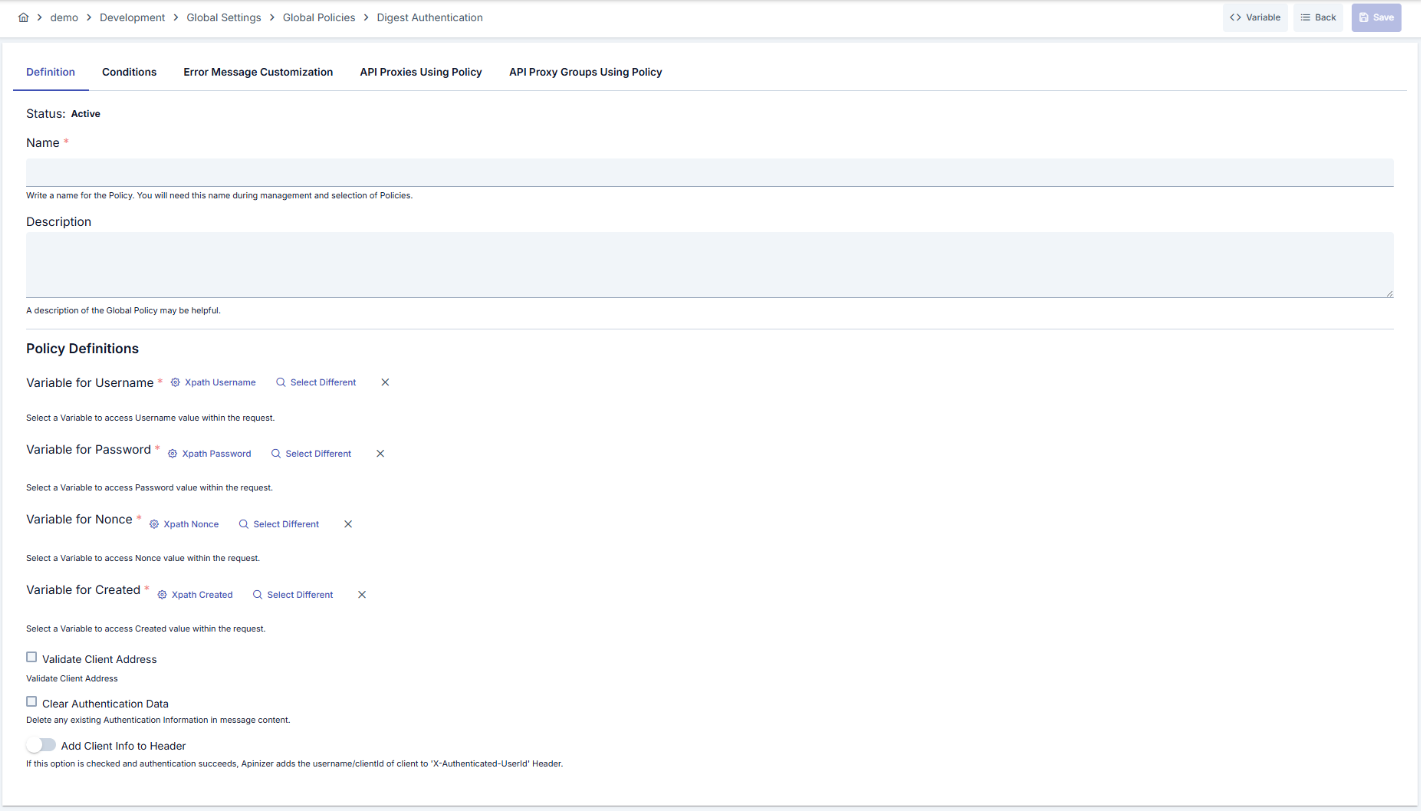
Configuration Steps
| Step | Description / Operation |
|---|---|
| Step 1: Go to Creation Page | - Go to Development → Global Settings → Global Policies → Digest Authentication Policy from left menu. - Click [+ Create] button at top right. |
| Step 2: Enter Basic Information | Policy Status (Policy Status): Shows Active/Passive status. New policies are active by default. Name (Name) Required: Example: Production_DigestAuth- Enter unique name, does not start with space. - System automatically checks. Green checkmark: available. Red X: existing name. Description (Description): Example: "Digest authentication for live environment" - Max. 1000 characters. - Explain policy's purpose. |
| Step 3: Variable Usage | - In the action button area at the top of the page, you can use the [<> Variable] button to select dynamic values. - Using context/global variable expressions, you can manage policy parameters with variable-based values instead of fixed values. - This reduces manual update effort when values change and provides operational convenience. - For detailed information, review Dynamic Variables. |
| Step 4: Select Secret Manager Variables | Determine Username, Password, Nonce, and Created variables in order. - You can update existing records or select new ones with variable dialogs. - Policy cannot be saved without all four variables selected. |
| Step 5: Set Client Controls | Clear Auth: - If checkbox is activated, clears Authorization header before sending to upstream service. - Used to prevent backend from accessing password information in microservice architectures. Check Client IP Address: - If checkbox is activated, IP check is performed. - Prevents credential sharing. Validate ACL for Client: On by default. Shown only when the identity source is Secret Manager. When off, the policy only resolves and verifies the identity and does not check the consumer's access list (ACL) for this API Proxy or Proxy Group. See Identity-Only Mode (ACL Off). |
| Step 6: Header and Authorization Configuration | Set Resolved Identity to Context: Determines whether the identity resolved by this policy (username/key) is recorded as the request identity. When on (default), this identity appears in traffic logs and subsequent policies and scripts. When off, the identity is used only for the necessary internal authentication/authorization checks and is not persisted as the request identity. Add User to Header: - If toggle is activated, authenticated user information is transmitted to backend with special header. - User Header Name field opens (default: X-Authenticated-UserId).AuthorizationConfiguration: - Define Authorization Source, role header, and method restrictions. |
| Step 7: Define Condition (Optional) | - Go to Condition tab. - Conditions determine when the policy will be active. Examples: - Environment-based: Header = X-Environment, Operator = Equals, Value = production- API Key-based: Header = X-API-Key, Starts With = PROD-- Endpoint-based: Path = /api/admin/*If condition is not defined, policy is always active |
| Step 8: Customize Error Message (Optional) | - Go to Error Message Customization tab. - Customize message to return when access is denied. Default: { "statusCode": 403, "message": "[Default error message]" }Custom: { "statusCode": 403, "errorCode": "[CUSTOM_ERROR_CODE]", "message": "[Custom message]" } |
| Step 9: Save | - Click [Save] button at top right. Checklist: - Unique name - Required fields filled - At least one digest variable set selected Result: - Policy is added to list. - Can be bound to API Proxies. - If global policy, automatically applied. |
For descriptions of Conditions and Error Message Customization panels, you can review the Conditions and Error Message Customization sections on the What is Policy? page.
For a complete guide on all layers, priority order and scenario examples of the error message configuration system, see the Error Message Configuration Guide page.
When the digest comparison uses the secret of an API client, the validity window of the secret applies. A secret that has expired or has not started yet is not accepted. During a secret rotation, the previous secret is also accepted until its grace period ends. See Secret rotation.
Identity-Only Mode (ACL Off)
When Validate ACL for Client is off, the policy works in identity-only mode. It still resolves and verifies the identity, but it does not check the consumer's access list (ACL) for this API Proxy or Proxy Group.
| Still applied when ACL is off | Skipped when ACL is off |
|---|---|
| The consumer exists and is enabled. The consumer's organization and parent organizations are active. The consumer's validity (expire date) has not passed. The consumer's contracts have not passed their end date. The password or secret is correct. The client IP is in the consumer's IP list (when Validate Client Address is on). The API Client owner is active. Role authorization (if enabled) and Limit Plan rules apply. The request is marked as authenticated and the resolved identity is written to the traffic log. | The consumer's access row for this API Proxy or Proxy Group (its expiry, environment enable switch, disallowed methods and proxies). API Client subscription and access grants (portal subscriptions). The traffic log does not show the subscription product and plan for these requests, because this information comes from the access row. |
With ACL off, every active consumer in the environment that passes the identity rules can call the API. There is no project boundary.
LDAP, Database, API and OIDC identity sources never consult the ACL. The option has no effect with these sources.
On the security tab of an API Product, a policy with ACL off is reported with the existing "Managed from policy" status: authentication is managed from the policy, not the consumer store (ACL), so application credentials do not authorize there.
Deleting Policy
For deletion steps of this policy and operations to be applied when in use, you can refer to the Removing Policy from Flow section on the Policy Management page.
Exporting/Importing Policy
For export (Export) and import (Import) steps of this policy, you can refer to the Export/Import page.
Binding Policy to API
For the process of how this policy will be bound to APIs, you can refer to the Binding Policy to API section on the Policy Management page.
Advanced Features
| Feature | Description and Steps |
|---|---|
| Authorization Source Scenarios | - Select LDAP, Database, or API source from AuthorizationConfiguration component. - Fill credentialRoleIdList list for role mapping. - Keep sensitive connection information in manageable variables with Use Secret Manager option. |
| Method-Based Access Control | - Activate enableMethodAccess option. - Match HTTP method and required role under policyAuthorizationMethodDefList. - Define custom error message for method calls without permission. |
| Role Header Placement | - Check addRolesToHeader option. - Update rolesHeaderName field according to header expected by target service. - Roles should be automatically transmitted in created header on successful verification. |
Best Practices
Things to Do and Best Practices
| Category | Description / Recommendations |
|---|---|
| Secret Manager Management | Bad: Storing digest users as plain text Good: Creating variable in Secret Manager Best: Limiting access to variables with RBAC |
| Authorization Header Usage | Bad: Forwarding sensitive header while Clear Auth is closed Good: Keeping Clear Auth active in sensitive integrations Best: Applying Clear Auth plus custom log masking |
| Condition Design | Bad: Applying policy to every request Good: Putting condition only on management endpoints Best: Optimizing conditions according to environment, method, and header combinations |
| Role Transmission | Bad: Relying on downstream authorization without roles Good: Using default header for roles Best: Applying Add Roles to Header + signed header validation |
| Versioning | Bad: Not taking backup before saving changes Good: Taking export and storing Best: Archiving export files in enterprise version management |
Security Best Practices
| Security Area | Description / Warnings |
|---|---|
| Credential Protection | Audit Secret Manager accesses, do not embed variables in application source code. |
| Replay Protection | Make nonce and created values mandatory, mask in logs. |
| IP Whitelisting | Activate checkClientIpAddress option for consumers with fixed IP. |
| Log Masking | Summarize or apply masking rules when logging Authorization header. |
| Authorization Audit | When enableAuthorization is on, perform regular audits to ensure role mappings are current. |
Things to Avoid
| Category | Description / Warnings |
|---|---|
| Missing Variable Definition | Why to avoid: Policy rejects requests without mandatory digest fields. Alternative: Select all variables from Secret Manager and test. |
| Wrong Header Name | Why to avoid: Upstream service cannot read user identity. Alternative: Match userHeaderName with name expected by target service. |
| Uncontrolled Use with Clear Auth Closed | Why to avoid: Authorization header unnecessarily spreads in internal network. Alternative: Open Clear Auth and carry necessary information in special header. |
| Untested Authorization Rules | Why to avoid: Wrong role assignments can lead to production outage. Alternative: Test roles scenario-based in Development environment. |
Performance Tips
| Criterion | Recommendation / Impact |
|---|---|
| Secret Manager Access | Recommendation: Load frequently used variables into Secret Manager cache. Impact: Authentication delay decreases. |
| Authorization Service Calls | Recommendation: Keep external authorization API in low latency state. Impact: Total policy response time decreases. |
| Condition Evaluation | Recommendation: Clean unnecessary OR blocks in Query Builder. Impact: Condition evaluation time per request shortens. |
| Logging Level | Recommendation: Lower log level to DEBUG instead of INFO for successful requests. Impact: Log writing cost decreases in high traffic. |
| Role Distribution | Recommendation: Generate role headers only when enableAuthorization is active. Impact: Unnecessary header creation load is eliminated. |
Frequently Asked Questions (FAQ)
| Category | Question | Answer |
|---|---|---|
| General | In which requests does Digest Authentication Policy activate? | Checks Authorization header in all HTTP/HTTPS requests where policy is active and conditions are met. |
| General | When should Clear Auth be used? | Should be activated in situations where upstream services don't need digest header, only need user identity. |
| Technical | How is Secret Manager variable selected? | Existing variables are listed with variable dialog, selected record is automatically matched with relevant field. |
| Technical | What happens if authorization integration fails? | If authorization returns error, policy produces 403 Forbidden and customized error message is triggered. |
| Usage | Are different nonce values supported for same user? | Yes, nonce variable can be dynamically updated in Secret Manager; unique values are recommended for replay protection. |
| Usage | What changes when policy is localized? | Localize operation copies global policy, new policy is edited only within selected API Proxy. |