Organizations
Creating an Organization
The organizations list shows every organization with its source, parent organization, counts, last synchronized time, and status. Click a name, or choose Open from the menu at the end of the row, to open the organization page. The same row menu also has Duplicate and Delete.
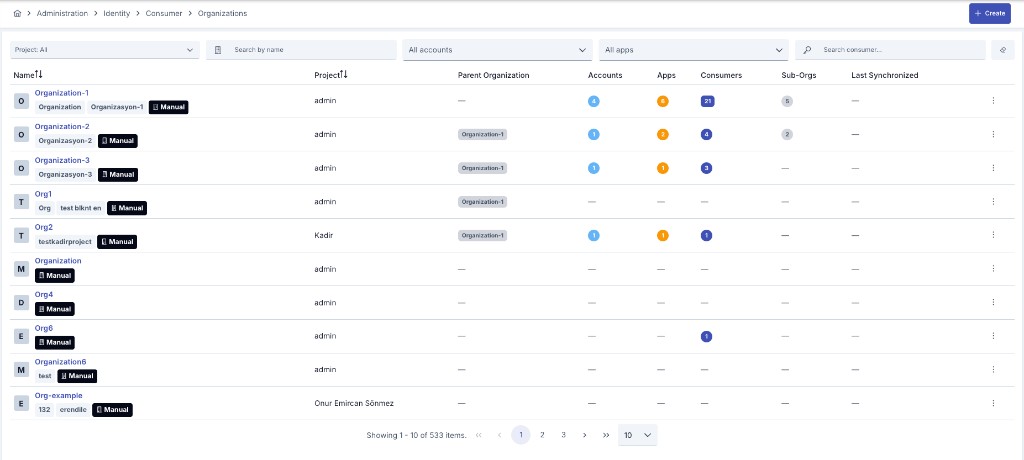
To add a new organization, press the + Create button in the top right. Fill in the information in the Create Organization dialog and press Create. The organization is created, and its page opens. Metadata, members, and limit plans are added on that page.
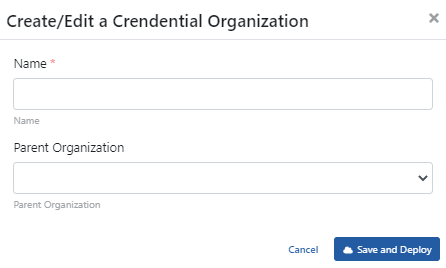
The fields used for organization configuration are shown in the table below.
| Field | Description |
|---|---|
| Code | Short code that identifies the organization. |
| Name | The name of the organization. When the portal has a secondary language, a second Name field for that language follows it. |
| Parent Organization | The parent organization that this organization is linked to. |
| Notification E-mails | E-mail addresses used as dynamic recipients for organization quota alerts. |
| Verified e-mail domains | Portal sign-ups from these e-mail domains do not create a new organization; they become a join request to this organization. Set on the organization page by system administrators and portal roles. |
| Source | Shows where the organization record comes from: Manual (created directly in Apinizer), LDAP OU, LDAP Group, OIDC Group, Database, or API — together with the source provider's name. See Synchronization below. |
The Organization Page
View and edit are on one page. The header shows the organization name, its status, and its code, parent organization, and project. Use Back to return to where you came from. The How to Read button explains what each tab sets. The ⋯ menu at the top right holds the organization actions: Activate or Deactivate, Export, Move to Global, Merge into… and Revoke consumers (system administrators and portal roles), Audit and Rollback, and Delete.
The tabs depend on the menu that opened the page.
| Opened from | Tabs |
|---|---|
| Identity menu | Overview, Consumers/Applications, Limits, Metadata, Source |
| Portal menu | Overview, Members, Apps & Subscriptions, Metadata, Source |
Members and Apps & Subscriptions are shown to system administrators and portal roles. Limits needs permission to view limits.
Each card is edited in place. Users with Identity Management Manage permission see a Configure button on the card. It opens the card's form in a side panel. Cancel, or closing the panel, drops the edits. Save first shows what changes and which consumers, applications, sub-organizations, and gateways the change applies to. After you confirm, the change is saved and sent to the gateways in one step. A global organization is read-only on a project's menu.
Overview
The Overview tab has two cards.
- Organization Information shows the code, parent organization, names, verified e-mail domains, source, member-since date, and status. Configure edits the code, names, parent organization, and verified e-mail domains. Verified domains are saved at once and are not sent to the gateways.
- Notification E-mails shows the recipients of the organization's quota alerts. Configure edits the list.
A How it works panel next to the cards summarizes what the organization gives to the identities under it.
Consumers/Applications
This tab lists the consumers and applications of the organization, with their type, project, and status. Use the type selector and the search box to narrow the list. The list is loaded page by page.
Users with Manage permission see an Add button. It opens a dialog where you pick consumers and applications that belong to other organizations. After Save, a confirmation dialog lists them and asks you to type the organization name. When you confirm, they move into this organization. Their API clients, access rows, and issued tokens move with them, and the gateways are updated. Moving an application needs a system administrator or a portal role. An organization that belongs to a project only accepts identities of that project; a global organization accepts identities from any project.
A consumer always belongs to exactly one organization, so it is removed from an organization by moving it to another one, either with Add on the other organization or from the consumer's own page. See Transferring a Consumer to Another Organization.
Members
The Members tab lists the portal accounts that sign in to the Developer Portal on behalf of the organization, with their role (Owner, Developer, or Viewer), status, and joined date. Pick a portal account and a role and press Add Member to add one. You can change a role in the table or remove a member. These actions apply at once. A portal account is a person who signs in; a consumer is an API identity that calls the gateway.
Apps & Subscriptions
This tab lists the organization's subscriptions and its applications, together with each application's registered products and consumers. Only consumer metadata is shown; a secret is never displayed.
Metadata
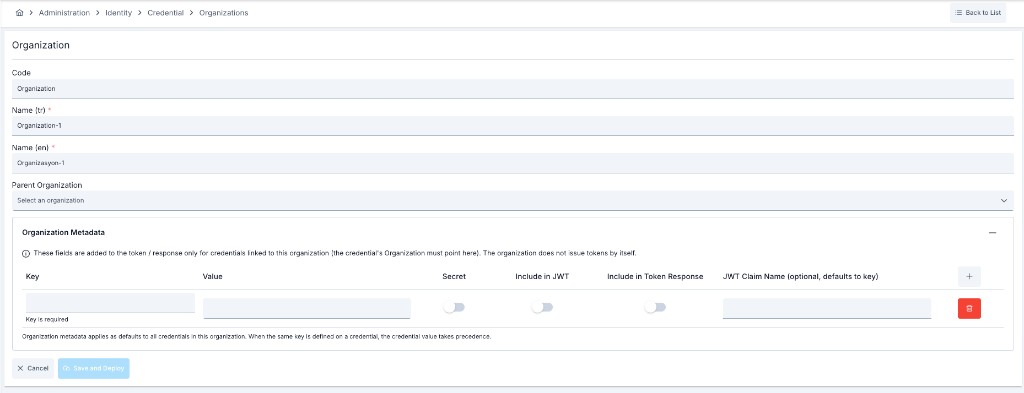
You can define user-defined key/value metadata entries on an organization. Configure opens the editor. Organization metadata applies as defaults to every consumer in that organization; when the same key is also defined on a consumer, the consumer's value takes precedence.
These entries can be emitted as JWT claims or OAuth token response fields at token issuance, secret values are stored encrypted and shown masked, and they are available to script policies. For field details, reserved names, and script access, see Consumer Metadata.
Limits
The Limits tab of the organization page shows the limit plans that apply to the organization, in one section per type: API Request Count, and AI Token Limit when the AI Gateway licence is present. The tab is shown when the page is opened from the Identity menu. It lists definitions only; for consumption, use the Quota Usage & Alerts screen.
Each applied plan is a card. The card header shows the plan name (a link to the plan), the plan status (Active or Inactive), the Counted As choice, where the assignment comes from, and the limits of the plan. An organization can carry more than one plan of a type; each plan counts on its own, and a different limit needs a separate plan.
Click Add Limit Plan in a section to add a plan. The list shows every plan of that type. A plan that cannot be added is disabled, and its tooltip gives the reason (for example, that it limits the same traffic as a plan the organization already has). Choose the plan and set Counted As:
| Counted As | What it does |
|---|---|
| Organization total | One shared counter for the whole organization. Everything under it is counted together, including the API clients of its consumers and applications. |
| Each API client | Every API client under the organization that has no assignment of its own gets the plan with its own counter. |
| Each consumer | Every consumer and application under the organization that has no assignment of its own gets the plan with its own counter. |
| Each sub-organization and the direct members | Every sub-organization under the organization that has no assignment of its own gets the plan with its own counter and counts its own subtree. The direct members of the organization (its consumers and applications and their API clients) share one more counter. |
The "Each …" choices cover the identities that already exist and the identities added later, so a new consumer under the organization is limited without any extra step. Counted As is chosen only when the plan is added and cannot be changed afterwards; to change it, remove the plan and add it again.
- Add and Apply. A plan added here is in force at once. If the plan itself is inactive, the organization gets it now and its limits apply once the plan is activated. An assignment stored as a draft elsewhere shows an Apply button on its card.
- Remove. Remove stops the plan from applying to the organization right away; the plan itself is not deleted and still applies to other identities. You can enter a reason. Removed plans are listed in the Removed Limit Plans table (plan, type, start, end, reason). If the same plan is added again, it starts with a new counter. A plan assigned from the Administration menu shows the Assigned from Administration badge, and only a system administrator can remove it.
- Inherited Limit Plans. A sub-organization also lists, read-only, the plans that an organization above it applies with an "Each …" choice. It gets the nearest one. When the sub-organization has its own assignment that covers a request, the own assignment is used for that request.
- Overlaps. Two plans that are counted the same way cannot limit the same API, endpoint or LLM Gateway. The screen blocks the choice and the server rejects it. When a request condition separates the two plans, the screen only warns.
- Users need permission to view limits to see the tab, and permission to manage limits to add or remove plans. Unlike the cards on the other tabs, a limit plan is added and removed directly on this tab, without a Configure form.
Plans can also be placed on an organization from the plan side, through the plan's own Target Audience (see Limit Plans), and in bulk through Bulk Assignment.
Source and Synchronization
The Source tab shows where the organization comes from. An organization created directly in Apinizer is Manual. An organization created by directory synchronization — LDAP or OIDC (Keycloak) group sync, or Database/API user-list sync; see Synchronization — shows the following fields.
| Field | Description |
|---|---|
| Source Type | How this organization was synchronized: LDAP OU, LDAP Group, OIDC Group, Database, or API. |
| Identity Provider | The name of the specific provider record that synchronized this organization. |
| LDAP DN | Shown only for LDAP-sourced organizations; the record's full distinguished name in the directory. |
| Last Synchronized | The completion time of the provider's last synchronization run. |
| Sync Managed | Whether synchronization actively manages this organization. |
Configure on this tab binds a manual organization to an LDAP directory OU or group (Search in Directory), or sets it back to Manual. It is not offered for a sync-managed organization or a Database- or API-sourced one. Synchronization runs are started and monitored on the Synchronization screen.
A synchronized organization is marked Synced in the page header.
On a synchronized organization, the code, names, and parent organization are read-only: the identity source manages them. The lock is driven by a separate flag that marks an organization as actively managed by synchronization, not by which source it is bound to: an organization linked to a source from the Source tab stays editable until a sync run from that source actually adopts it. The same lock applies to Database- and API-sourced organizations.
Notification e-mails, organization metadata, and verified e-mail domains stay editable. The Organization Information form shows a banner naming the fields that come from the source.
The same rule applies to an update sent through the management API or APIops. A source-owned field in the request body is ignored and kept at its stored value; an operator-owned field is saved as sent.
A consumer synchronized by an identity source has its organization assigned from the directory. A manual change to that consumer's organization is reverted on the next synchronization run of its source.
Organization Status
An organization is active by default. System administrators and portal roles can choose Deactivate under Status in the ⋯ menu. The dialog lists what the change affects and asks you to type the organization name. After confirmation, the gateways reject the requests of the organization's consumers, applications, and API clients, and of those in its sub-organizations, at once. Nothing is deleted. Activate in the same menu lets them work again, unless an organization above it is deactivated; a consumer disabled on its own stays disabled. The current state is shown in the page header and in the Status column of the list.
Globalizing Organization
Organizations are moved to the Admin page with the "Globalize" option, made available in all projects, and management is left to the Admin user.
To globalize the Organization, Move to Global (Move to Global) is selected from the menu at the end of the row in the list, or from the ⋯ menu on the organization page.
Deleting an Organization
An organization can only be deleted while it is empty. Use Delete in the row menu of the list or in the ⋯ menu of the organization page. If any of the following still point at it, the deletion is refused and the organization is left untouched:
- sub-organizations that name it as their parent organization,
- consumers linked to it,
- portal applications belonging to it,
- portal accounts belonging to it.
The message shown on refusal names the categories of records that can block a delete; it does not say which of them apply to this organization or how many there are. Check the organization's sub-organizations, consumers, applications and portal accounts to find what is actually still attached, move or remove it, then try the delete again. Once nothing references the organization any more, it can be deleted. Deletion clears the organization link on the records that carried it and cannot be undone, which is why the organization name has to be typed into the confirmation dialog.
A consumer or a portal application can be moved to a different organization of the same project without deleting it — see Transferring a Consumer to Another Organization and Transferring an Application to Another Organization.
An organization managed by directory synchronization cannot be deleted manually at all, on any surface — the manager interface or the Management API both refuse it the same way. Records are no longer physically deleted by directory synchronization either: a stale organization is retired in place by its provider's synchronization run instead, which keeps it out of the way while preserving the bond its child consumers had with it. Permanent cleanup of retired records is planned as a separate maintenance capability. See Synchronization.
The rule is enforced on the server, not only in the interface. A deletion sent directly to the Management API for an organization that still has attached records, or for a sync-managed organization, is refused the same way the manager interface refuses it.
If a delete for the same organization is already being processed, a second attempt is refused with an HTTP 409 response until the first one finishes. See Concurrent Deletion if this persists long after nothing is actually running.