Portal Applications
A Portal Application is the record created by a Portal account/developer to subscribe to API products and obtain API keys. This page describes managing Portal Applications.
Portal Applications are managed from Portal > Applications. API product subscriptions are also shown there.
Internal applications are managed on the Consumers screen of the Identity menu, together with the consumers; see Internal Applications on the Consumers Screen. The Identity menu has no separate Applications entry.
Application Types
Every application carries a Type, which decides who owns it and where it is visible:
| Type | Description |
|---|---|
| Portal | The ordinary consumer application. It belongs to a portal, is created by a Portal account/developer or by an administrator on their behalf, and is visible on the portal. |
| Internal | A first-party application created by an administrator for the organization's own use. It belongs to no portal and is never listed on a portal surface: a Portal user cannot see it, create it, or edit it, and it cannot be promoted to production. |
The type is chosen while the application is being created and cannot be changed afterwards. An application whose type is not shown is a Portal application created before this distinction existed.
The application quota defined for an organization applies to Portal applications only; Internal applications are not counted against it. An organization that already holds internal applications therefore has more room for new portal applications than it did before this version.
Application List
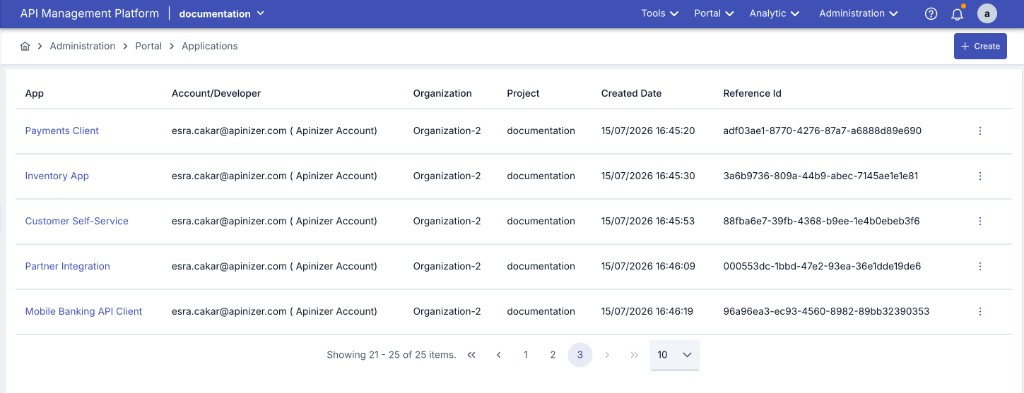
The list shows the application name, its type, the linked account/developer, organization, creation date, and reference id. The Type: All filter above the list narrows the list to a single type; while nothing is selected, both types are listed. Clicking an application in the list opens its detail page.
Creating / Editing an Application
Use the Create button above the list to create a new application. Use the Edit option in the row actions menu to edit an existing application.
| Field | Description |
|---|---|
| Name | The name of the application. Required. |
| Type | Portal or Internal. It is fixed while the application is being created: an application created from Portal > Applications is a Portal application, and an Internal application is created from the Consumers screen. On an existing application it is shown read-only. See Application Types. |
| Application Key | A permanent, readable identity generated by the server when the application is created. It cannot be edited, and it is shown with a copy button on the edit and detail screens. |
| Reference Id | A reference value used to uniquely identify the application in external systems. It is generated automatically when the application is created and can be changed manually if needed. Required. |
| Description | A description of the application. |
| Account | The Portal account/developer the application belongs to. Required. |
| Do not log traffic | Stops the API traffic of every consumer bound to this application from being written to the traffic log connectors. Off by default. See Turning Traffic Logging Off for an Application. |
The application key identifies the application permanently, so it is never carried over to another record: an application created by copying or by importing a package receives a new key of its own. The same rule applies to the consumer key.
The Edit screen also shows the same read-only Details and Linked Resources panels as the application's detail view — organization, project, creation date, type, traffic-log status, application key, reference id, and the Consumers/API Products counts — so switching from the detail view to Edit does not lose that context. The three fields you edit here (name, description, do-not-log-traffic) are shown only as live controls below, not repeated in the read-only panel.
Application Detail
The application detail page has three tabs: Overview, API Clients and Metadata.
Overview
This tab shows the application's name, type, application key, reference id, linked account/developer, organization, and creation date. It also lists the API keys defined for the application: the key itself, its enabled/disabled state, its creation date, and its expiration date (if any). From the edit screen you can generate a new API key for the application or revoke an existing one.
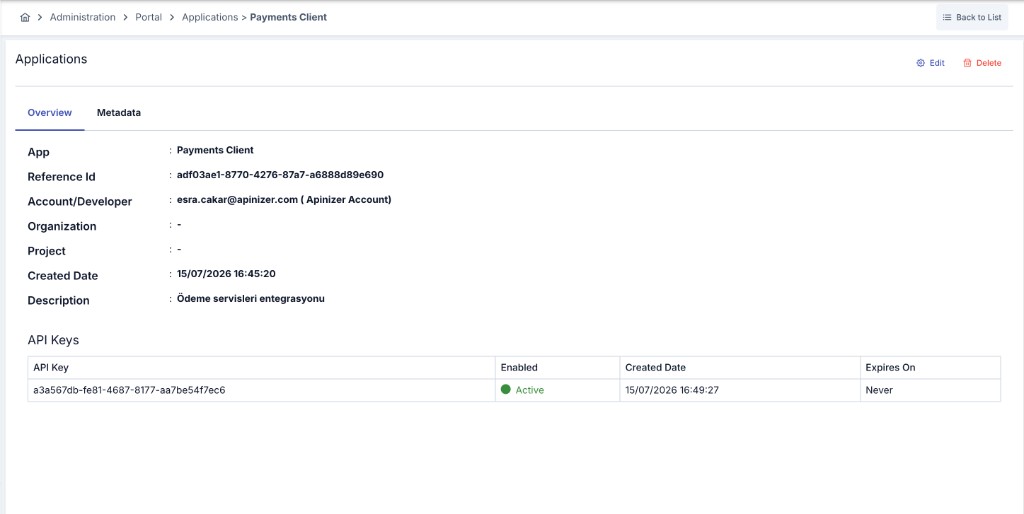
The view of a Portal application additionally lists the API Products the application is subscribed to, along with their plan/approval status. An Internal application belongs to no portal and has no API product subscriptions.
API Clients
An application can hold its own API clients: machine identities with their own client id and their own versioned client secrets, obtaining tokens on behalf of the application rather than on behalf of a single consumer beneath it. The tab works exactly like the one on the consumer screen: New creates the client together with its first secret, and the client is active at once. For the client secret ceremony, the rules for showing a secret again and how a client is authorized, see Consumers.
An API client can obtain a token and use it to call an API Proxy directly, governed by Authorization of an API Client and Owner and Client Lifecycle. The second of those applies to the application itself, too: suspending the application (see Deleting an Application) immediately rejects both live traffic and new token requests for every API client it owns, in addition to its own consumers — the client's own state and the ACL rows are irrelevant while its owner is suspended. The same holds one level up: while the organization the application belongs to (or any organization above it) is suspended, every API client under the application is rejected the same way.
In an API client, whether it belongs to an application or to a consumer, you can turn on Browser login (authorization code + PKCE). When the switch is on, these fields are shown:
| Field | Description |
|---|---|
| Client type | Public (no secret): for browser, desktop and CLI applications that cannot keep a secret, and it cannot use client_credentials. Confidential (with secret): for server applications that keep a client secret. You can switch a client that has client secrets to Public and back. The secrets are kept, and no secret authenticates the client while it is public. You can also give a public client a secret; it is not used while the client is public. |
| Redirect URIs | One address on each line, with no limit on the number of addresses. Each address must be different, absolute, without a fragment, and at most 2048 characters. You can use http on any host. Addresses are matched exactly. For http://127.0.0.1, http://[::1] and http://localhost, only the port can differ. |
| Access token lifetime | Applies to all tokens of this client. It must be finite. |
| Allow refresh token and its lifetime | If refresh is on, enter a finite lifetime. |
Do not turn on this switch before all workers are upgraded to a version that supports browser login. The application also needs an access row for the API Proxy. For the user sign-in and the endpoints, see MCP Gateway Browser Sign-In Without Keycloak.
Access of an Application
An application has no access tab of its own. Its access is held as access rows on the Access Control screen, under the application's id — the same rows a consumer has, and the only place where access is defined.
- When a portal subscription is approved, the rows for its API Proxies are written under the application's id. This also holds for an application that has no consumer.
- When a subscription is cancelled, when the account is revoked, or when the application or the API Product is deleted, those rows are removed and undeployed from the gateways.
- An API client owned by the application is authorized by these rows, unless it was derived from a legacy credential — see Authorization of an API Client.
Metadata
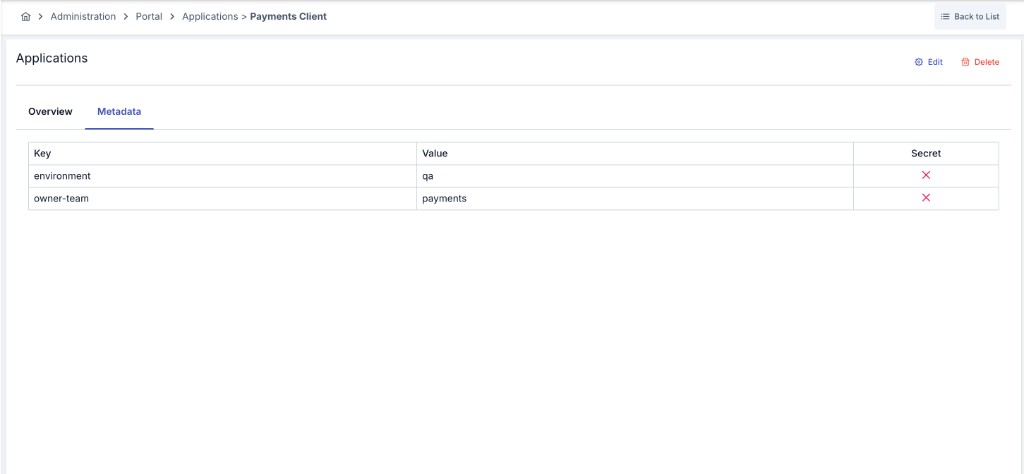
This tab lets you define application-specific key-value entries. Complex data types are not supported; only plain text values can be entered.
| Field | Description |
|---|---|
| Key | The key of the metadata entry. Required, and unique within the application; the same key cannot be used more than once. |
| Value | The value corresponding to the key. |
| Secret | When enabled, the value is stored encrypted and masked in lists. |
Use the + button at the start of a row to add a new entry, and the delete button at the end of a row to remove one. Changes are applied with the Save button.
Internal Applications on the Consumers Screen
System administrators, Portal managers and Portal developers see the Internal applications in the list of the Consumers screen, marked with an Application badge; the All / Consumer / Application filter narrows the list. See Consumer List. Portal applications are not listed there.
- Creating. Click Create and answer What do you want to create? with Application. Enter the name and the reference id, and optionally the organization, a description and the Do not log traffic switch. After you create it, its page opens.
- The application page. An application opens on the same page as a consumer, with the Overview, API Clients, Access Control, Limits, Token Settings, Secrets and Metadata tabs. It is saved the way a consumer is: Save in a drawer applies the change at once, and Activate and Deactivate are in the ⋯ menu under Status; see Saving Changes.
- Row actions. The actions menu of an application row offers View and Edit. The other actions are on the application page.
- Deleting. Deleting an application from its page asks you to type the application name. The server refuses the delete while related records remain.
Turning Traffic Logging Off for an Application
Some customers ask, on privacy or data-protection grounds, that their API traffic not be retained. Do not log traffic answers that request at the application level: while it is on, the traffic of every consumer bound to the application — both classic consumers and API Clients — is sent to no traffic log connector at all (Elasticsearch, Kafka, Syslog, Database and the rest).
Applications with the switch on carry a Traffic log off badge in the application list, so a silenced customer is visible without opening each record.
The scope is deliberately narrow. Turning this on does not stop:
- Trace records and OpenTelemetry spans — the operational trail used to diagnose an incident
- Prometheus metrics — request counts and durations, which carry no message content
- Security and access events — the audit trail behind quota, anomaly and security investigations
- Requests that failed authentication — a request is only silenced once the gateway has actually verified the identity presented. A caller who sends a silenced consumer's username with a wrong password, an invalid API key or a rejected token is not that consumer as far as this switch is concerned, and the blocked request is written to the traffic log connectors as usual. Failed-authentication traffic is exactly what a later investigation needs, so it is never something an unverified caller can suppress.
A privacy preference must not be able to erase a security or audit trail, which is why those lanes stay open. When an installation genuinely needs zero retention, the right instrument is the No Persist data retention profile, not this switch.
This switch is set from the Manager screens (or through APIops) by someone with administrative rights. It is deliberately not offered on the API Portal: a portal customer editing their own record or their own application cannot turn it on or off, and a value sent in a portal request body is ignored rather than applied. The reason is that switching it on removes a customer's traffic from the SIEM/Elasticsearch/Kafka feeds security and fraud monitoring rely on — that has to stay an operator's decision.
The same switch exists on individual consumers (Consumers). The two are independent and combine as either one is enough: a consumer is silenced if it has been switched off itself or its application has.
Saving is enough. The application's consumers and API Clients are redeployed to the running environments automatically, so no manual redeploy is required and the change applies to the next request.
Deleting an Application
Only an application in the Test promotion state can be permanently deleted, and even then only while it holds no consumers, access grants, product subscriptions or API clients not yet revoked. An application that still carries any of those is refused the same way a promoted application is — resolve or remove the relationship first (for an API client, revoke it), or archive the application instead. A Test application that truly has nothing attached is deleted along with its (empty) API key and subscription records. Deletion is confirmed with a confirmation dialog.
An application whose promotion is Pending, whose promotion request was Rejected, or that is already in Production carries production access or an open promotion decision, so it can no longer be deleted. Its Delete action is not offered in the list; use Suspend to stop its traffic while keeping every record.
The same two checks — promotion state, then whether anything is still attached — apply to the decision on a deletion request coming from the portal. Approve as Archive — which retires the application while preserving its consumption and audit history — is offered first and needs no extra confirmation; Approve as Delete is offered only where the delete can actually succeed; Reject is always available. Submitting a deletion request only disables the application's consumers, it does not remove them, so approving as a hard delete still requires the same clean slate as deleting the application directly.
Deleting an entire portal from Danger Zone applies these exact same checks to every application it contains — see Portal Deletion for what that means for the portal as a whole.
An application whose promotion request was rejected cannot be deleted either. A rejected request can still be completed and resubmitted by the consumer, so the application and its history are kept. If it will no longer be used, archive or suspend it.
A Test application that still had consumers, access grants or subscriptions used to be deleted along with them. That is no longer the case: the relationship has to be resolved, or the application archived, before a delete is offered. A pending deletion request that used to be approved as a hard delete may now need to be approved as an archive instead.
The rule is enforced on the server, not only in the interface. A deletion sent directly to the Management API for a promoted application, or for a Test application that still has something attached, is refused the same way the manager interface refuses it, and the application is left untouched.
If a delete for the same application is already being processed, a second attempt is refused with an HTTP 409 response until the first one finishes. See Concurrent Deletion if this persists long after nothing is actually running.
Creating, editing, and deleting applications is available to roles with system administrator or portal management/developer authority.
Transferring an Application to Another Organization
An application can be moved to a different organization of the same project with the Transfer button among the header actions of the application's detail view, which opens a dialog to pick the target organization. The move carries everything the application owns along with it: the consumers the application owns — together with their own API clients, access control entries and tokens — and the application's own API clients and product subscriptions are all re-linked to the new organization in the same operation, and the application's API clients are re-pushed so the change takes effect immediately. Quota usage figures are not rewritten by the transfer itself — they correct themselves on their next regular synchronization.
If the target organization is suspended, traffic for the application and the consumers it owns stops immediately after the transfer. Resume the target organization to let traffic flow again.
The transfer is refused, and nothing is changed, when:
- the application is being deleted or is already archived;
- a delete of the application, or of the organization it is leaving or joining, is currently in progress;
- the target organization does not resolve, does not belong to the same project as the application, or has been merged into another organization;
- the target organization is the one the application is already in.
The rule is enforced on the server, not only in the interface. A transfer request sent directly to the Management API is refused the same way for an application being deleted or archived, an unresolved or cross-project target, or while a delete is in progress on the application or on either organization.
Audit Records
Every change made to an application is written to the audit log. An application that carries a project is now audited under that project, so its records are listed when the audit screen is filtered by the project it belongs to. An application created from the portal is given the portal's project when that portal is bound to exactly one project; when the portal covers several projects — or none — no project is guessed and the application keeps being audited in the shared (admin) scope, as before.
Audit records written before this version are not rewritten. An application whose records used to be listed in the shared (admin) scope keeps its earlier history there, while records written from this version on appear under the application's own project. No data is lost — the history of such an application is simply read from two scopes.
Related Pages
For the consumers granted access to the application and their API Proxy-based access settings, see Access Control. For the consumer records of the account the application belongs to, see Consumers.