MCP Gateway Browser Sign-In Without Keycloak
What You Build
In this scenario you use the Apinizer OAuth2 or JWT policy as the authorization server. You do not need an external identity provider.
- An MCP Gateway (Passthrough or Expose Tools) that uses the Standard MCP OAuth profile.
- A flow where the user signs in on the Apinizer login page in the browser (authorization code + PKCE).
- An application, with a public API client, that gets tokens on behalf of the user.
There are two management modes. The OAuth2 or JWT policy of the proxy selects the mode.
| Manage From ACL | Manage From This Policy | |
|---|---|---|
| Endpoint family | /credential | /auth |
| Issuer | https://gateway.example.com/credential | https://gateway.example.com/auth |
| Signed-in user | An Apinizer consumer. The user enters the consumer name and the secret of an API client of the consumer. A consumer with a local password, or a consumer synchronized with LDAP, also works. | A user of the identity source of the policy: Secret Manager, LDAP, database or API. |
| Access | ACL row of the user ∩ ACL row of the application | Authorization of the policy ∩ ACL row of the application |
| CORS settings that apply | CORS settings of the environment (worker) | CORS settings of the target proxy (Settings tab) |
| Extra policy setting | None. You turn on browser login in the API client. | The Browser login (authorization_code) switch |
The profile itself is described in Standard MCP Client Profile. To use an external identity provider instead, see MCP Gateway Sign-In with Keycloak.
Prerequisites
- The access URL of the environment is defined. The issuer comes only from this configuration. Without an access URL, browser login is closed: the authorization endpoint is not advertised, and an authorize request returns an error.
- All workers of the environment run a version that supports browser login. Upgrade every worker first, then turn on browser login.
- The access URL uses HTTPS. The login page keeps the sign-in in a secure browser cookie, and browsers accept this cookie only over HTTPS. For local development,
http://localhostandhttp://127.0.0.1also work. - If an ingress adds a path prefix, it must route the host-root
/.well-known/oauth-authorization-server/...path to the gateway. See Limits and Behavior. - The identity source of the users is not OIDC. Browser login does not support an OIDC identity source.
The examples use one scenario in the project Order Management on the gateway https://gateway.example.com:
| Item | Example |
|---|---|
| Passthrough proxy | Order Desk MCP, path /order-desk. The backend MCP server has the tools get_order_status, list_open_orders and cancel_order. |
| Expose Tools proxy | Order Service Tools, path /order-tools. It publishes methods of the REST proxy Order Service API. |
| Application | Claude Code, with the public API client claude-code-desktop. |
| Consumers | jane.doe (role Order Viewer) and sam.lee (roles Order Viewer and Order Manager). |
| Roles | Order Viewer (OAuth Scope Name orders.read) and Order Manager (OAuth Scope Name orders.write). |
| Service application | Order Tools Gateway, with the API client order-tools-gateway. |
The canonical resource of the Order Desk MCP proxy is:
https://gateway.example.com/apigateway/order-desk
Common Steps for Both Modes
The application and the public API client
An API client of any owner, an application or a consumer, can use browser login. This guide uses an API client of an application.
Create an application (for example Claude Code) that represents the client that gets tokens on behalf of the user. See Portal Applications.
On the API Clients tab of the application, create a new API client. The client ID of the client is the OAuth client_id. In the example it is claude-code-desktop.
In the client editor, turn on Browser login (authorization code + PKCE) and fill in these fields:
| Field | Value |
|---|---|
| Client type | Public (no secret). MCP clients cannot keep a secret. |
| Redirect URIs | The redirect URI that the MCP client uses. One URI on each line. Example: http://localhost:33418/callback |
| Access token lifetime | A finite lifetime. Example: 15 minutes. |
| Allow refresh token | On. Enter a finite refresh lifetime. Example: 8 hours. |
There is no limit on the number of redirect URIs. Each URI must be different, absolute, without a fragment, and at most 2048 characters. http is allowed on any host. A redirect URI is matched exactly. For http://127.0.0.1, http://[::1] and http://localhost, only the port can differ.
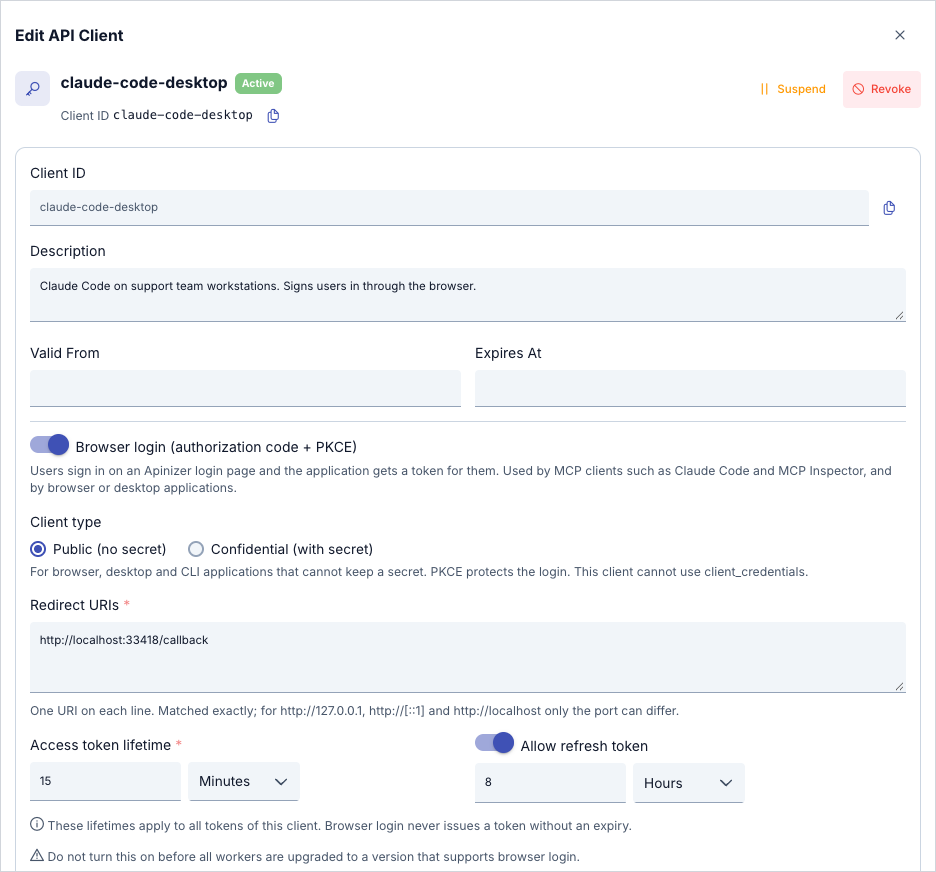
Save the client and activate it. A public client needs no secret. If the client has secrets, they are kept but not used while the client is public.
Browser login never issues a token without an expiry. You cannot save a client with an empty or 0 access or refresh lifetime.
The ACL row of the application
The application must have an access row for the MCP proxy. Add the row under the identity of the application in the Access Control screen. Without access for the application, Apinizer does not open the login page for the user and returns unauthorized_client.
Access follows this rule: access of the user ∩ access of the application. If one is missing, the token does not work. If you remove one of the two rows after a token is issued, the gateway refuses the call with 403.
A. Manage From ACL Mode (/credential)
Create a Consumer for the person who signs in (for example jane.doe). A consumer that you create on this version has no password. Its API clients hold the secrets:
- On the API Clients tab of the consumer, create a new API client. Leave Browser login off. The client is then a confidential client.
- Create a client secret for the client. Apinizer shows the secret only once. The user keeps it.
- Activate the API client.
- Deploy the consumer.
The user signs in with the consumer name and this client secret.
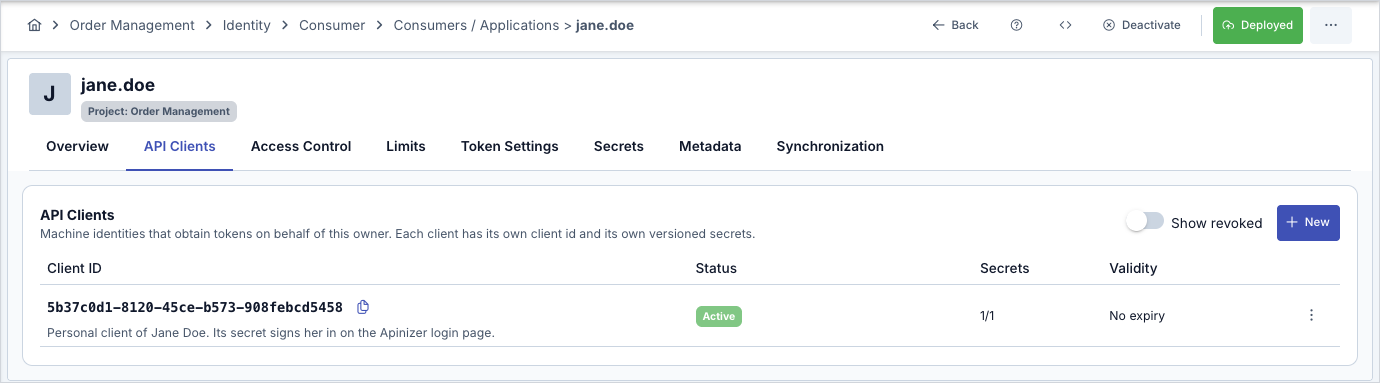
The user can also enter the client ID of an API client and its own secret. The client ID of a public client never counts as a user. A consumer that is expired, cut off, refused by IP or disabled is refused. A consumer with a local password (an older consumer) or a consumer synchronized with LDAP signs in as before. A consumer synchronized with Keycloak or another OIDC provider is not supported. The identity of an application and its API clients cannot be users.
Add the access row of the consumer for the MCP proxy. See API Proxy ACL.
Add the access row of the application for the same proxy. The row is described above.
On the Routing tab, select Configure in the Routing Mode panel. Under Client Authentication Profile, select Standard MCP OAuth and save. Deploy the proxy.
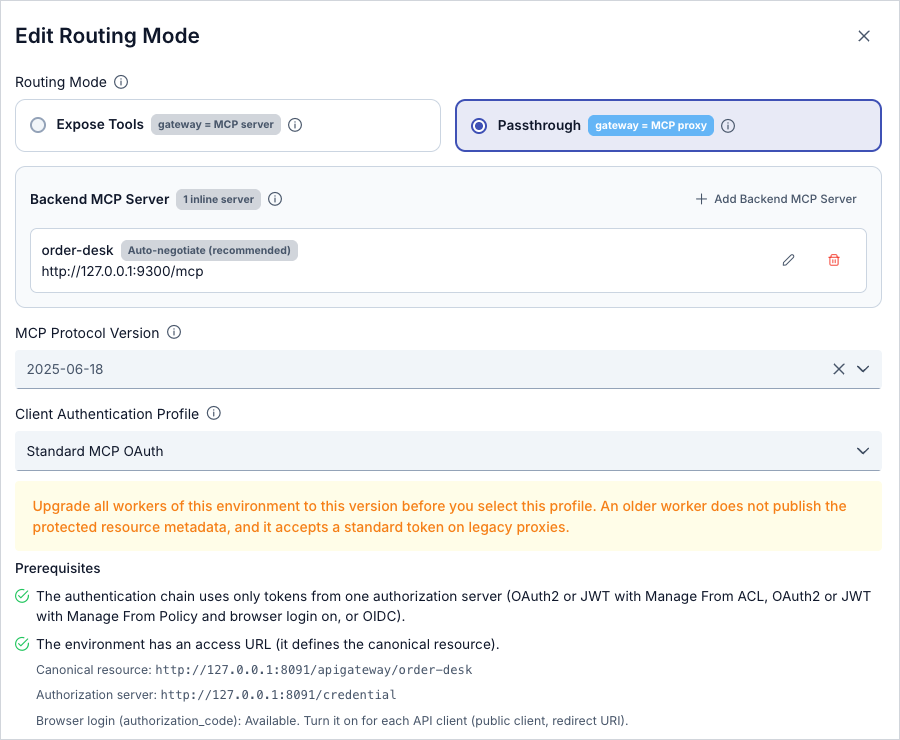
In this mode the client uses https://gateway.example.com/credential/authorize and https://gateway.example.com/credential/token. The same family also has the /credential/revoke and /credential/introspect endpoints.
The browser login client sets the access lifetime and the refresh lifetime. It has no refresh count field. The sign-in ceiling bounds the refresh. See Sign-in lifetime.
B. Manage From This Policy Mode (/auth)
Add a JWT or OAuth2 policy with Manage From This Policy to the MCP proxy. Select the identity source: Secret Manager, LDAP, database or API. When you select OIDC, the switch is off.
Turn off Token Never Expires and enter an access token lifetime. If you allow a refresh token, enter a finite refresh lifetime. The policy cannot be saved with lifetimes that are not finite. You can also limit the refreshes with Refresh Token Count. See below.
Turn on the Browser login (authorization_code) switch in the policy. The selected legacy grant (client credentials or password) keeps working.
Prepare the application, the public API client and the ACL row of the application from the common steps. The application needs its ACL row in this mode too.
Select the Standard MCP OAuth profile in the proxy. Save the policy and redeploy the proxy. Turning the switch on or off needs a new save and deploy.
In this mode the client uses https://gateway.example.com/auth/authorize and https://gateway.example.com/auth/token. The client_id is the client ID of the API client of the application. It is not the proxy Client Id from the Show API Key window.
The users come from the identity source of the policy:
- Secret Manager. The user must be a consumer. The user signs in in the same way as in Manage From ACL mode: the consumer name with the secret of a confidential API client of the consumer, or the client ID of an API client with its own secret. The gateway checks the user again on every request.
- LDAP, database, API. The source is not queried on every request. The roles are queried again at refresh.
Refresh Token Count. In this mode, the Refresh Token Count setting of the JWT or OAuth2 policy limits the number of refreshes in one sign-in (one token family). An empty value means unlimited. The last allowed refresh returns a new access token without a new refresh token. After that, the user signs in again.
The roles travel in the scope of the token. A client can ask for a role by its name or by the OAuth Scope Name of the role. Both give the role.
Expose Tools Proxies
The same sign-in flow works for an MCP Gateway in Expose Tools mode, where REST API methods are published as MCP tools. The endpoints, the login page and the tokens are the same. Only the canonical resource differs: it is the URL of the Expose Tools proxy, for example https://gateway.example.com/apigateway/order-tools.
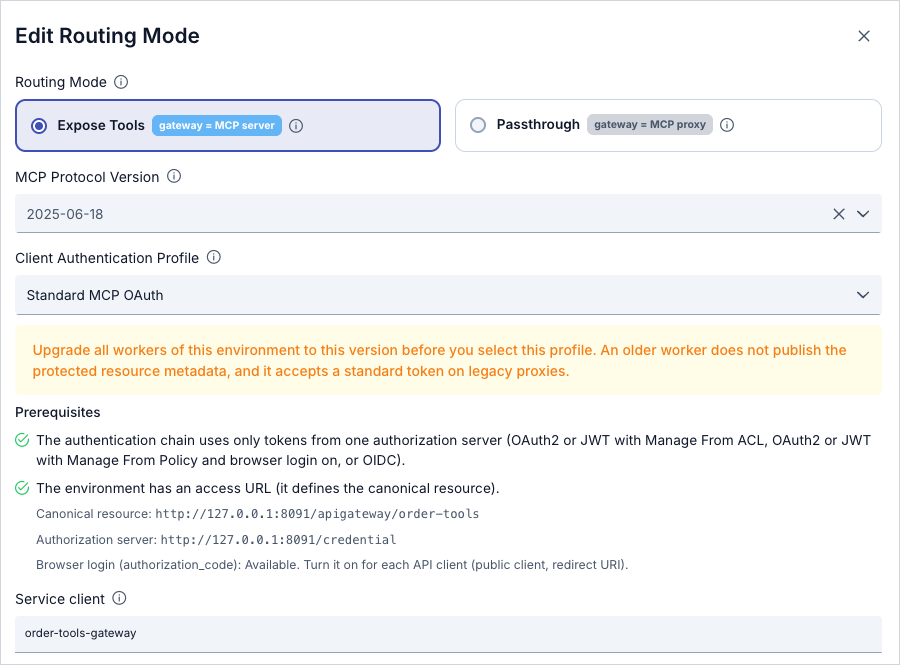
With the Standard MCP OAuth profile, an Expose Tools proxy needs a service client. The gateway calls the target REST proxy as this client. Create an application (for example Order Tools Gateway) with an active API client (for example order-tools-gateway) in the same project. The service client does not call the MCP proxy, so it needs no ACL row there. Deploy the application after you add the API client.
On the Routing tab of the Order Service Tools proxy, select Configure in the Routing Mode panel. Select Standard MCP OAuth. Under the Prerequisites list, enter the client ID of the service client in the Service client field. Save and deploy the proxy. If you save without a service client, Apinizer refuses the save: "STANDARD_MCP_OAUTH needs a service client for the exposed tools".
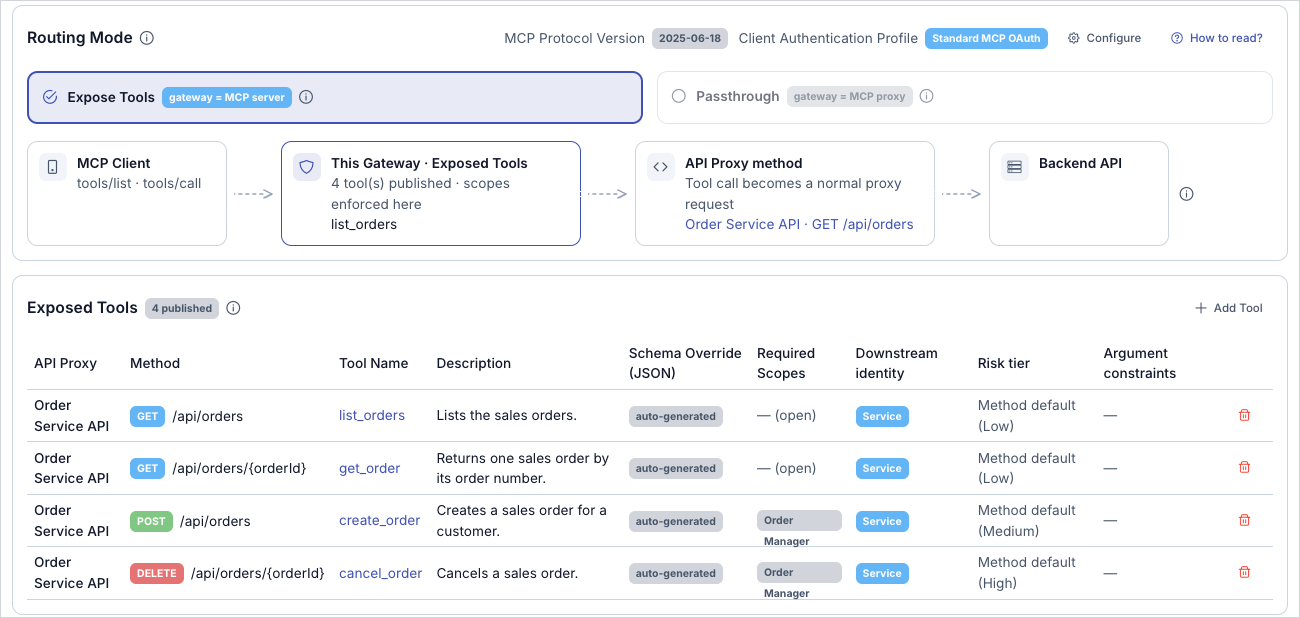
Each exposed tool has a Downstream identity:
- Service. The gateway calls the target as the service client. The user is recorded only for audit.
- Delegated user. The gateway calls the target as the signed-in user. See Calls to the tool target.
For more information, see Calling an API on Behalf of the Signed-In User (Delegated Tokens).
In Required Scopes of a tool, enter the role name, for example Order Manager. The field placeholder shows a scope example, but you must enter the role name. A tool with an empty Required Scopes field shows as open in the tool table.
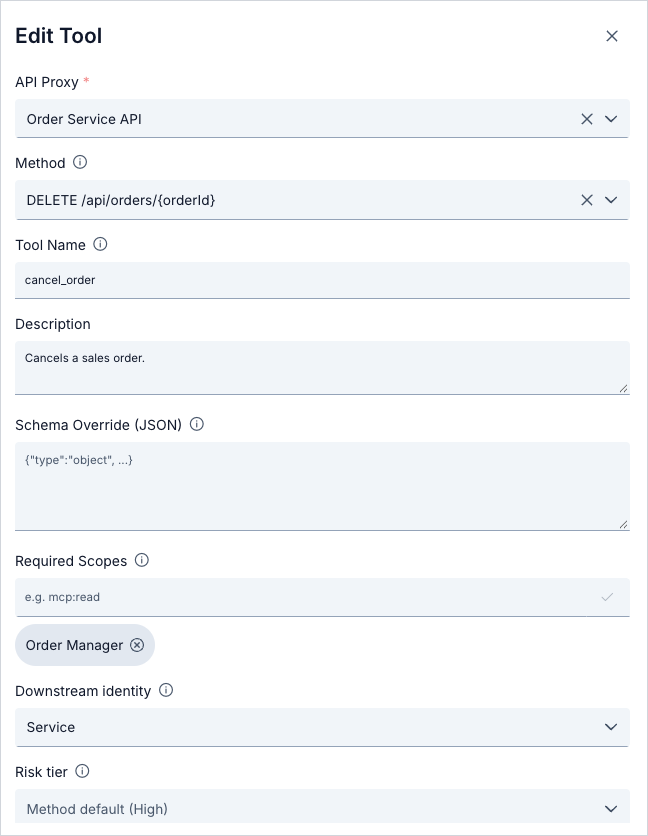
In the example, list_orders and get_order have no required scope. create_order and cancel_order need the role Order Manager.
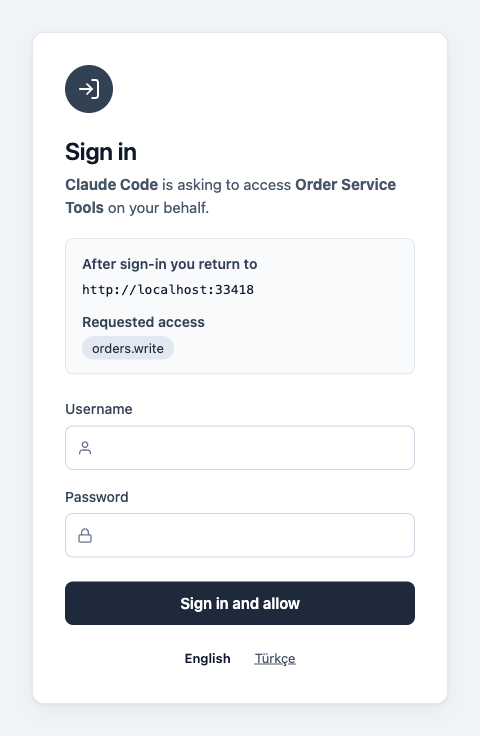
How the scope works. The client asks for the OAuth Scope Name of the role (for example orders.write) in the scope parameter of the authorize request. The protected resource metadata lists these names in scopes_supported. The login page shows the asked scopes under Requested access. Without a scope, it shows Basic access.
The example uses the roles Order Viewer (no scope needed) and Order Manager (OAuth Scope Name orders.write):
| User | Roles | Result with scope=orders.write |
|---|---|---|
jane.doe | Order Viewer | The token scope is empty. tools/list shows only list_orders and get_order. tools/call for cancel_order returns HTTP 403. |
sam.lee | Order Viewer, Order Manager | The token scope is orders.write. tools/list shows all four tools. cancel_order succeeds. |
A tool that the caller cannot use is not shown in tools/list. If the caller calls such a tool, the gateway answers with 403 and this header:
WWW-Authenticate: Bearer error="insufficient_scope", scope="orders.write", resource_metadata="https://gateway.example.com/apigateway/order-tools/.well-known/oauth-protected-resource"
The user and the Claude Code application each need their ACL row for the MCP proxy, as in the other modes. The access is the user ∩ the application. Deploy the applications after you add API clients.
Connecting an MCP Client
A standard MCP client (Claude Code, MCP Inspector) follows this order by itself:
- The client calls without a token and reads the
resource_metadataaddress in the401answer. - The client reads
<proxy URL>/.well-known/oauth-protected-resource. The document names the Apinizer issuer inauthorization_servers:/credentialor/auth. - The client reads the authorization server metadata.
- The client opens the browser with the Apinizer login page.
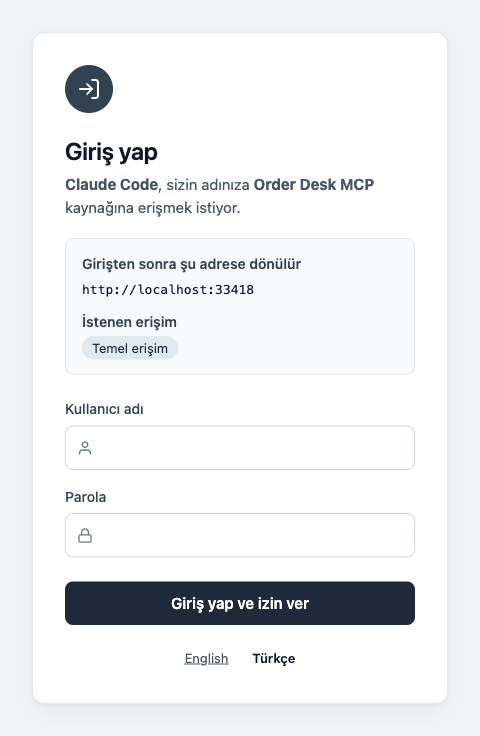
The login page shows the name of the application, the redirect address, the target resource and the requested access. The page has username and password fields and a Sign in and allow button. The user enters the consumer name and the client secret (see Manage From ACL Mode). If the secret is wrong, the same page opens again with this message: "Sign-in failed. Check your username and password and try again." The message does not tell which part is wrong. If the sign-in succeeds, Apinizer redirects the browser to the redirect address with the code, state and iss parameters. The client exchanges the code for a token and calls the tools.
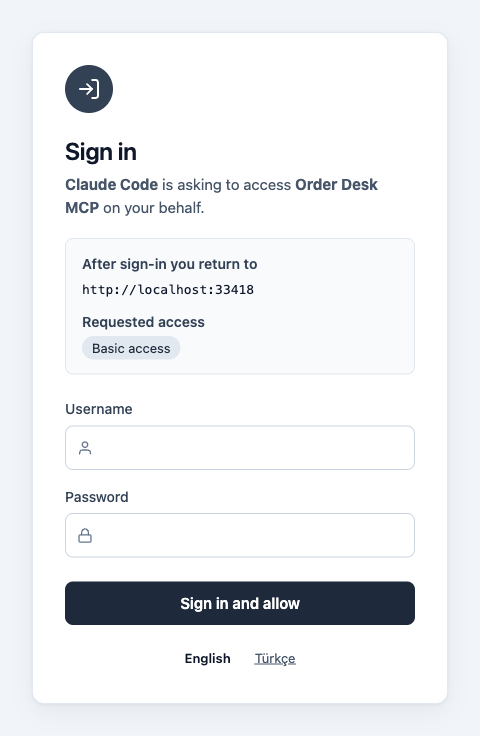
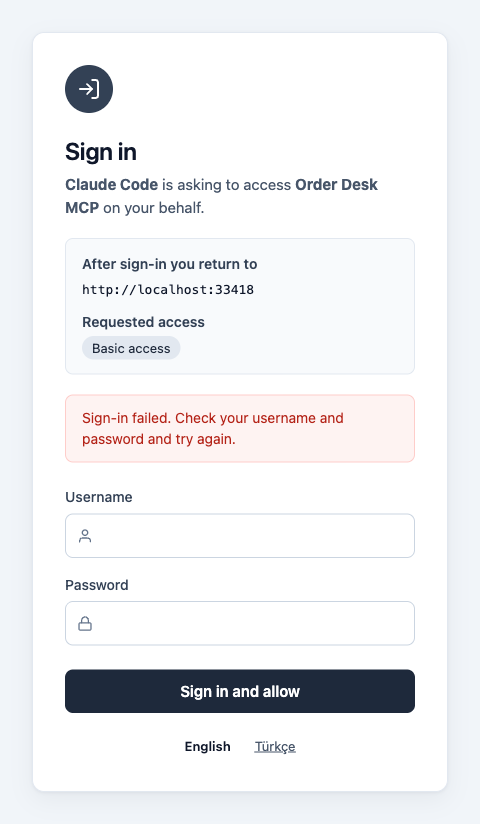
Language. The page has English and Türkçe buttons under the form. The client can also send ui_locales (for example ui_locales=tr) in the authorize request. Without a button choice or ui_locales, the Accept-Language header of the browser decides. A language switch shows the same page again. It is never a sign-in attempt. The page uses no JavaScript. The Enter key signs in.
For Claude Code, give the client ID of the API client and a fixed callback port. The registered redirect URI and the address that the client uses must be the same.
claude mcp add --transport http --client-id claude-code-desktop --callback-port 33418 order-desk https://gateway.example.com/apigateway/order-desk
Then select the server on the /mcp screen and use Authenticate.
MCP Inspector runs in the browser. Allow the origin of Inspector in CORS, so that the browser can send requests to the token endpoint. Which CORS setting applies depends on the mode:
- Manage From ACL (
/credential). The CORS settings of the environment (worker) apply. - Manage From This Policy (
/auth). The CORS settings of the target proxy apply (the Settings tab of the proxy). This is the same as for the legacy/authendpoints.
See Token Service.
Verifying with curl
The examples use the Manage From ACL mode. For the other mode, write /auth instead of /credential. In the examples, <client secret> is the secret of the API client. Never write a real secret in a script or a document.
1. Read the metadata. The protected resource metadata names the Apinizer issuer. The authorization server metadata is at the canonical address:
curl -s https://gateway.example.com/apigateway/order-desk/.well-known/oauth-protected-resource

curl -s https://gateway.example.com/.well-known/oauth-authorization-server/credential
2. Generate a PKCE pair:
VERIFIER=$(openssl rand -base64 48 | tr -d '=+/\n' | cut -c1-64)
CHALLENGE=$(printf '%s' "$VERIFIER" | openssl dgst -sha256 -binary | openssl base64 -A | tr '+/' '-_' | tr -d '=')
echo "$CHALLENGE"
3. Open the authorize URL in a browser. The redirect_uri must be registered in the API client. resource is required:
https://gateway.example.com/credential/authorize?response_type=code&client_id=claude-code-desktop&redirect_uri=http%3A%2F%2Flocalhost%3A33418%2Fcallback&code_challenge=<CHALLENGE value>&code_challenge_method=S256&resource=https%3A%2F%2Fgateway.example.com%2Fapigateway%2Forder-desk&state=abc123
Enter the consumer name (for example jane.doe) and the <client secret> on the login page. The browser goes to http://localhost:33418/callback?code=...&state=abc123&iss=https%3A%2F%2Fgateway.example.com%2Fcredential. If nothing listens on this port, the browser shows a connection error. Copy the code value from the address bar. The iss value equals the issuer.
For an Expose Tools proxy, use the canonical resource of that proxy and ask for the OAuth Scope Name of the role in scope:
https://gateway.example.com/credential/authorize?response_type=code&client_id=claude-code-desktop&redirect_uri=http%3A%2F%2Flocalhost%3A33418%2Fcallback&code_challenge=<CHALLENGE value>&code_challenge_method=S256&resource=https%3A%2F%2Fgateway.example.com%2Fapigateway%2Forder-tools&scope=orders.write&state=abc123
4. Exchange the code for a token. Send code in the body. A code in the URL query is refused:
curl -s -X POST https://gateway.example.com/credential/token \
  -d grant_type=authorization_code \
  -d code=<code value> \
  -d code_verifier="$VERIFIER" \
  -d redirect_uri=http://localhost:33418/callback \
  -d client_id=claude-code-desktop \
  -d resource=https://gateway.example.com/apigateway/order-desk
The answer contains access_token, refresh_token, expires_in and token_type:
{"access_token":"…","refresh_token":"…","token_type":"Bearer","expires_in":900}
The header of a JWT access token has typ: at+jwt. A decoded token looks like this:
{
  "header": {"typ": "at+jwt", "alg": "RS256", "kid": "…"},
  "claims": {
    "sub": "jane.doe",
    "tokenSubjectType": "CONSUMER",
    "clientOwnerType": "APPLICATION",
    "iss": "https://gateway.example.com/credential",
    "client_id": "claude-code-desktop",
    "aud": "https://gateway.example.com/apigateway/order-desk",
    "X-TokenProfile": "mcp-standard",
    "grantType": "authorization_code",
    "exp": 0,
    "iat": 0,
    "jti": "…"
  }
}
5. Call the proxy:
curl -i -X POST https://gateway.example.com/apigateway/order-desk \
  -H "Authorization: Bearer <access_token>" \
  -H "Content-Type: application/json" \
  -H "Accept: application/json, text/event-stream" \
  -d '{"jsonrpc":"2.0","id":1,"method":"tools/list"}'
For an Expose Tools proxy, a call to a tool that needs a role the user does not have returns 403 with insufficient_scope:
curl -i -X POST https://gateway.example.com/apigateway/order-tools \
  -H "Authorization: Bearer <access_token>" \
  -H "Content-Type: application/json" \
  -H "Accept: application/json, text/event-stream" \
  -d '{"jsonrpc":"2.0","id":2,"method":"tools/call","params":{"name":"cancel_order","arguments":{"orderId":"1001"}}}'
6. Refresh the token. The refresh token rotates on every use. If you send an old refresh token again, Apinizer returns 400 invalid_grant ("Refresh Token is not valid!") and revokes the whole token family:
curl -s -X POST https://gateway.example.com/credential/token \
  -d grant_type=refresh_token \
  -d refresh_token=<refresh_token> \
  -d client_id=claude-code-desktop
A refresh is also refused with invalid_grant when refresh is no longer allowed for the client or the policy.
7. Sign out. A public client revokes its own token with the client_id only. Revoking the refresh token ends the whole family:
curl -s -X POST https://gateway.example.com/credential/revoke \
  -d token=<refresh_token> \
  -d client_id=claude-code-desktop
Limits and Behavior
Access URL and issuer. The issuer comes only from the access URL of the environment. Request headers do not set the issuer. Without an access URL, browser login is closed.
Metadata addresses. The canonical address follows RFC 8414: https://gateway.example.com/.well-known/oauth-authorization-server/credential or .../auth. The older addresses keep working: /auth/.well-known/oauth-authorization-server, /credential/.well-known/oauth-authorization-server and /credential/.well-known/openid-configuration. When the issuer equals the configured value, the older documents also contain the new fields.
Ingress prefix. If an ingress adds a prefix to the path, the issuer carries this prefix too. The canonical address becomes https://host/.well-known/oauth-authorization-server/<prefix>/auth. In the ingress, route the host-root /.well-known/oauth-authorization-server path to the gateway. This is an installation step.
Not supported.
- Proxy group policies. If you add a policy with browser login on to a proxy group, the save is refused.
- Method-level policies.
- An OIDC identity source. In this case, use the own login of the OIDC provider.
- Dynamic client registration (DCR) and client ID metadata documents (CIMD).
Protocol rules.
- Only PKCE
S256is accepted. - The redirect URI is matched exactly. On loopback addresses only the port is free.
resourceis required. Without it, or if this authorization server does not serve it,invalid_targetis returned.- The redirect carries the RFC 9207
issparameter. - A JWT access token has
typ: at+jwtin its header. - The login page accepts at most 10 sign-in attempts per minute for each client address and for each user name. More attempts are refused temporarily. The account is not locked.
- The refresh token rotates on every use. If a used refresh token comes again, the token family is revoked.
- After a family is revoked, a JWT access token stays valid until it expires. For an immediate effect, set Revocation Strictness to STRICT.
Sign-in lifetime. At sign-in, a ceiling is set: the longest of the access and refresh lifetimes. Refresh does not extend this ceiling. When the ceiling is reached, the user signs in again. In Manage From This Policy mode, Refresh Token Count also limits the refreshes in one sign-in.
Turning the switch off. In Manage From This Policy mode, if you turn the switch off, save and deploy, the tokens issued by browser login become invalid immediately. The refresh of these tokens is refused too. Tokens from the legacy grants are not affected.
Disabling an account.
- Secret Manager users are checked again on every request.
- With LDAP, database and API sources, an account that is disabled in the source can work until the token family expires. A deleted user or a revoked role is dropped at refresh. In a token family that carries no role, a deleted user can also work until the family expires.
- If a consumer is suspended, or an API client is revoked, the tokens stop on the next request.
Role authorization. At sign-in, the role authorization on method level is not asked, because there is no method yet. A user whose role is not enough gets a token. The gateway refuses the call. In an Expose Tools proxy, the gateway also hides the tools that the caller cannot use.
Legacy flows. Tokens from client_credentials, password and the older refresh_token keep working. An MCP proxy with the Standard profile still refuses a token of the legacy type.
Troubleshooting
| Problem | Cause | Fix |
|---|---|---|
| The authorize request shows an error page and does not redirect | The client_id is unknown, or the redirect_uri does not match a registered address. | Compare the address with the registration in the API client, character by character. |
unauthorized_client | The application has no ACL row for the proxy, or authorization_code is not on for this client. | Check the ACL row of the application and the browser login switch. |
access_denied | The user has no ACL row. | Give the user access to the proxy. |
invalid_target | resource is missing or does not match the canonical resource. The client targets a proxy in the other mode. | Check the canonical resource. Check the mode of the policy and the endpoint family. |
| A lifetime error when you save | The access or refresh lifetime is not finite. | Enter a finite lifetime. An authorize request also returns invalid_request for an infinite setting. |
The protected resource metadata address answers 404 | The Standard profile is not selected, or the chain still has a blocker. | Check the prerequisites panel on the Routing tab and the prerequisites in Standard MCP Client Profile. |
The canonical authorization server address answers 404 | The access URL of the environment is not defined, or the path is not /auth or /credential. | Define the access URL. Check the path. |
| After the password, the page says the sign-in expired or does not continue | The access URL is plain http on an address that is not loopback, so the browser drops the secure sign-in cookie; or the user opened the login page from another address than the access URL. | Use an HTTPS access URL and open the authorize address under it. |
Sign-in works but the call gets 403 | After the token, the ACL row of the user or the application was removed, or the role is not enough. | Check the ACL rows and the OAuth scope name of the role. |
| Sign-in failed with the consumer name | The API client is public, is not active, or is not deployed. The secret is expired. The consumer is not deployed. | Use a confidential API client (browser login off). Activate it, check the secret, and deploy the consumer. |
| An Expose Tools proxy cannot be saved: it needs a service client | The Standard MCP OAuth profile needs a service client for the exposed tools. | Enter the client ID of an active API client of the same project in Service client. |
tools/call returns 403 with insufficient_scope | The user does not hold the role of the tool, or the client did not ask for the OAuth Scope Name of the role. | Give the user the role. Ask for the OAuth Scope Name in the scope parameter of the authorize request. |
| MCP Inspector shows a CORS error | The origin of Inspector is not allowed in the CORS settings that apply to the mode. | In Manage From ACL mode, change the CORS settings of the environment. In Manage From This Policy mode, change the CORS settings on the Settings tab of the proxy. |
Checking the Setup
- When you add the proxy to Claude Code, does the Apinizer login page open?
- Does the login page show the application name and the target resource?
- Can the user sign in with the consumer name and the secret of a confidential API client?
- When you enter a wrong secret, does the same page open again with an error message?
- When you use the Türkçe and English buttons, does the page change language without a sign-in attempt?
- After the sign-in, does the tool list arrive?
- In an Expose Tools proxy, does a user without the role not see the scoped tools, and does a call to such a tool return
403? - When the access token expires, does the client keep working without a new sign-in?
- When you send the same refresh token a second time, is the request refused?
- In Manage From This Policy mode, after the number of refreshes in Refresh Token Count, does the user have to sign in again?
- When you remove the ACL row of the application, is the next call refused?
- When you remove the ACL row of the user, is the next call refused?
- When you disable the consumer, is the next call refused?
- In Manage From This Policy mode, when you turn the switch off and deploy, is a token from browser login refused?
- Does the sign-in work in both the Manage From This Policy and the Manage From ACL mode?
- Does an older
client_credentialstoken still work?