Token Service
Apinizer can work as an identity provider service in addition to authorization. Clients can generate tokens using Apinizer's token generation service with their credentials. They can send the generated tokens within the message and perform authentication and authorization through these tokens instead of their own credentials.
Apinizer runs on two separate planes, and the token endpoints belong to the API Gateway:
- API Manager (control plane). The administrative component where all configuration is made — API proxies, consumers, policies, settings. The Management API and APIops endpoints run here. The Manager is not exposed to the outside world; only administrators use it, to apply configuration changes. It is off the request hot path.
- API Gateway (data plane). The high-performance runtime that processes every API request. The token endpoints run here, not on the Manager. They are open to client access: a client calls them to obtain a token and then uses that token to reach the proxied APIs. Because the Gateway carries production traffic, it is typically placed behind a load balancer and scaled horizontally.
In short: configuration changes go to the Manager (APIops); token acquisition and API access go to the Gateway (token API). The two are deliberately separated — the Manager stays private and administrative, while the token API is reachable by clients.
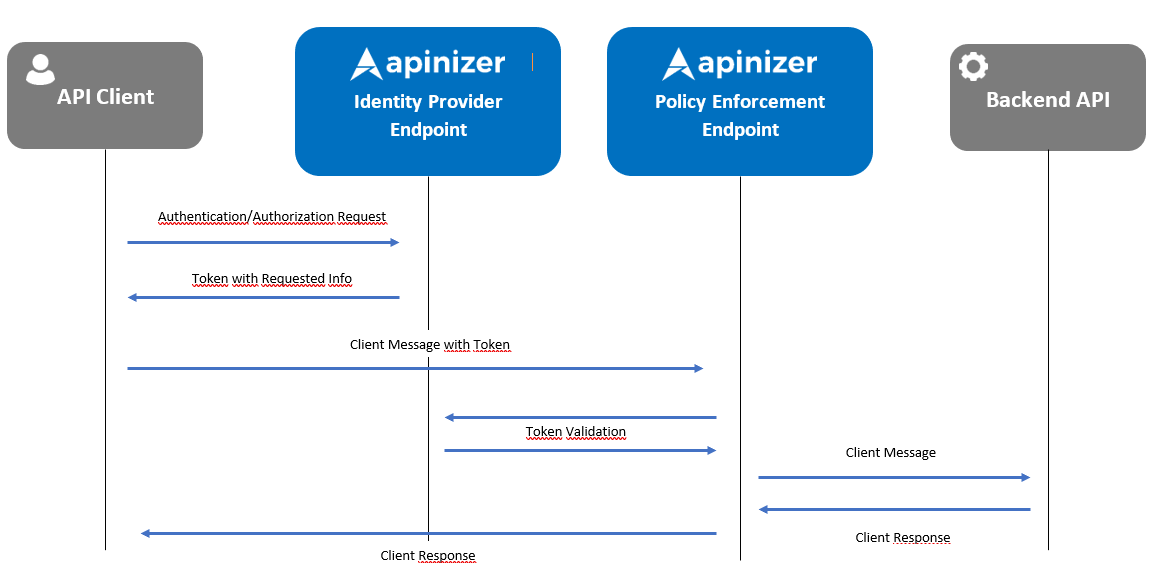
The data flow between the client and Apinizer is shown simply in the following image:
Apinizer stores tokens generated for OAuth2 authentication in its own database and also caches them for performance.
Access and refresh tokens are never written to the database as plain text. Apinizer stores only a SHA-256 digest of each token value; validation, refresh, and revocation are all matched against this digest, while the token value itself exists only in memory and in the response returned to the client. If the database is ever exposed, the stored records alone cannot be used to reconstruct a working token.
When upgrading to a version that introduces this storage change, the first Manager start automatically computes any digest that is still missing and then removes the old plain-text columns — no operator action is required, though this step can add to first-boot time on an installation with a very large token history. See Apinizer Version Upgrade before upgrading a multi-node installation.
In JWT authentication, Apinizer does not need any token storage area for token validation. Instead, it stores the RSA key belonging to the Worker in each environment. The token is validated by checking the RSA key with which the JWT token was generated. This check only verifies that the token was generated by Apinizer and that the data has not been corrupted or changed (remains as generated). In addition to this validation, the policy also checks the "claim" values within the token according to the API Proxy information from which the message came.
Apinizer prefers generating JWT tokens through API calls rather than sharing the key value with the client.
Although the key value is often shared for generating JWT token values, Apinizer prefers generating JWT tokens through API calls with a new approach at this point. Thus, it makes token generation and key management easier for clients instead of key control and sharing. In this approach, standard parameters requested in OAuth2 are requested in the JWT token generation API and processed similarly.
To view the description of the JWT token acquisition and OAuth2 token acquisition panel, you can visit the Token Acquisition Methods page.
When acquiring tokens with JWT or OAuth2, if "Manage From This Policy" is selected, the CORS and XFF settings configured from the "Settings" tab of the API Proxy will be valid.
However, if this option is not checked, if it is managed through "Manage From ACL", the CORS and XFF settings you added to the Worker in "Gateway Environments" will be valid. See.
Token Exchange (RFC 8693)
With Manage From ACL, the token endpoint (/credential/token) also accepts the token exchange grant. An agent uses it to get a token that lets it call a target API on behalf of a user. The agent keeps its own identity, and the target sees both.
The agent sends a POST request to https://yourApinizerAddress/credential/token. It authenticates as for the client credentials grant (client ID and secret). The consumer of the agent must use the client credentials grant type. These parameters go in the request body:
| Parameter | Value |
|---|---|
grant_type | urn:ietf:params:oauth:grant-type:token-exchange |
subject_token | The access token of the user. See the subject token rules below. |
subject_token_type | urn:ietf:params:oauth:token-type:access_token or urn:ietf:params:oauth:token-type:jwt |
requested_token_type | Optional. The same two values. |
resource or audience | The target. Send exactly one of them, with one value. It is the canonical address of the target API proxy. |
scope | Optional. It can only narrow the scope of the user. |
Rules:
- The target API proxy must accept delegated tokens: Accept delegated tokens (token exchange) must be on in its JWT or OAuth2 authentication policy, and the name of the agent must be in Allowed agents. The policy also sets the depth of the delegation chain (one or two agents). Without this setting the request fails with
invalid_target. - The agent is identified by the client ID of its API client. Put this value in Allowed agents of the target.
- The token service accepts these subject tokens:
- An access token that this token service issued for an MCP proxy that uses the Standard MCP client profile. This includes the browser login (authorization code) token of a user who signed in through the authorization server of Manage From ACL (
/credential). - A token from an earlier token exchange. This adds the next agent to the chain.
- An access token that this token service issued for an MCP proxy that uses the Standard MCP client profile. This includes the browser login (authorization code) token of a user who signed in through the authorization server of Manage From ACL (
- The token service refuses these subject tokens with
invalid_grant:- Opaque (non-JWT) tokens.
- Revoked tokens.
- Browser login tokens of the
/authauthorization server (Manage From This Policy). - Tokens issued for ordinary API proxies. Examples are browser login, password or client credentials tokens of a non-MCP proxy.
- Tokens of another issuer.
- Refresh tokens.
- The target can be any API proxy (REST, SOAP or MCP) whose JWT or OAuth2 policy accepts delegated tokens. The source, which is the token of the user, must come from an MCP proxy with the Standard profile. A user token of an ordinary API proxy cannot be exchanged to call another API proxy on behalf of the user.
- If the agent exchanges a user token itself, the MCP proxy must use a JWT authentication policy, because opaque subject tokens are refused. The Delegated user mode of the MCP Gateway does not have this limit. The gateway uses the identity that it already verified. The MCP proxy can use a JWT or an OAuth2 policy.
- The new token is for the target only (
audis the target). It carries the user as the subject and the agents as the actor chain (act). - The target applies the current roles of the user. The scope of the new token can only narrow them. A role without an OAuth scope name is not carried.
- The new token expires with the earlier of the user token and the lifetime of the agent token. When both have no expiry, it expires in one hour. The response has no refresh token.
- An agent token that is exchanged again adds the next agent to the chain. The chain cannot be longer than the target allows.
subject_tokenin the URL query is refused. Send it in the body.- Errors use the RFC 8693 and RFC 6749 codes with HTTP 400 (HTTP 500
server_errorfor a server fault). The other grant types are not changed. - The authorization server metadata at
/credential/.well-known/openid-configurationlists the grant. The olderoauth-authorization-serverdocument does not.
The Apinizer gateway itself uses the same grant when a tool of an MCP Gateway runs in Delegated user mode.
Browser Login: The Authorize Endpoint
The token service also supports browser sign-in of a user with the authorization code + PKCE flow. Standard OAuth2 clients (Claude Code, MCP Inspector, single-page applications, mobile applications) use this flow.
| Mode | Endpoints |
|---|---|
| Manage From ACL | https://yourApinizerAddress/credential/authorize, /credential/token, /credential/revoke, /credential/introspect |
| Manage From This Policy | https://yourApinizerAddress/auth/authorize, /auth/token, /auth/revoke, /auth/introspect |
- The
authorizeendpoint shows the login page to the user with aGETrequest. After the sign-in, the browser is redirected to the redirect address with thecode,stateand RFC 9207issparameters. - Only PKCE
S256is accepted. The redirect URI is matched exactly. On loopback addresses (127.0.0.1,[::1],localhost), only the port can differ. - The
resourceparameter is required. Its value is the canonical address of the target API proxy. Without it, the errorinvalid_targetis returned. - The
tokenendpoint acceptsgrant_type=authorization_codewithcode,code_verifier,redirect_uri,client_idandresource. Sendcodein the request body. A public client sends no secret. - If the access token is a JWT, its header has
typ: at+jwt. The refresh token rotates on every use. If a used refresh token comes again, the token family is revoked. - A public client cannot introspect. For revocation, the
client_idis enough. - If the access URL of the environment is not defined, browser login is closed. The issuer comes only from this configuration.
- The login page accepts at most 10 sign-in attempts per minute for each client address and for each user name. More attempts are refused temporarily. The account is not locked.
The authorization server metadata (RFC 8414) is published at the canonical address:
| Mode | Canonical address |
|---|---|
| Manage From ACL | https://yourApinizerAddress/.well-known/oauth-authorization-server/credential |
| Manage From This Policy | https://yourApinizerAddress/.well-known/oauth-authorization-server/auth |
The older addresses keep working. For details, see Token Introspection, Revocation and Discovery. For the setup and the limits, see MCP Gateway Browser Sign-In Without Keycloak.
Related Pages
- Token Introspection, Revocation and Discovery — Inspect, revoke, and discover token endpoints
- Gateway Token Endpoints — Full endpoint reference with request/response details