WS-Security Token
This document explains the detailed usage of a specific policy. If you are using Apinizer policies for the first time or want to learn the general working principles of policies, we recommend reading the What is Policy? page first.
Overview
What is its Purpose?
- Standardizes authentication of SOAP services by managing WS-Trust 1.3 compatible Security Token Service calls with centralized policy.
- Provides operational flexibility by matching environment-based username/password pools according to conditions.
- Accelerates service provider work by configuring WS-Addressing headers (Action, To, ReplyTo, etc.) from a single point.
- Reduces unnecessary STS traffic and delays with token caching and timestamp settings.
Working Principle
- Request Arrival: For each HTTP/HTTPS request arriving at the API Gateway, the source IP address of the request is identified.
- Policy Check: If the WS Security STS Token policy is active, the system checks in the following order:
- Is a Condition defined? If so, is the condition met?
- Is the policy active (active=true)?
- Is a Variable used or is Apinizer default used?
- WS Security STS Token Validation: According to
configureIssueTokensetting, either WS-Trust Issue request is sent to defined STS service endpoint or external token is obtained viaapiEndPointURL; user information and WS-Addressing headers are injected into the request. - Decision Making:
- Match Found: Token is obtained, used from cache if cache period has not expired, added to SOAP request.
- No Match: Token cannot be generated; SOAP headers of request are not modified.
- Error Handling: Customizable HTTP status code and error message are returned for requests that do not comply with the policy rule.
Features and Capabilities
Basic Features
- Configuration Mode Selection: Provides options to generate STS token through Apinizer or call external Endpoint with
configureIssueToken. - SOAP Version Support: Guarantees service compatibility by selecting between SOAP 1.1 and SOAP 1.2.
- Token Service Parameters: Manages STS integration in detail with Token service name, port name, WS-Trust 1.3 URL and AppliesTo URL fields.
- Active/Passive Status Control: Easily change the active or passive status of the policy (active/passive toggle). In passive state, the policy is not applied but its configuration is preserved.
- Condition-Based Application: Determine when the policy will be applied by creating complex conditions with Query Builder (e.g., only for specific endpoints or header values).
Advanced Features
- Token Caching and Renewal: Prevents unnecessary STS calls by determining token renewal threshold with
tokenCachePeriodandexpirationPeriod. - WS-Addressing Setting Engine: Manages WSA Action, To, ReplyTo and MessageId fields in detail through
app-soap-api-method-wsa-settingscomponent. - Conditional Credential Pool: Prevents wrong credential usage in wrong environment by associating multiple username/passwords with Query Builder conditions and environment tags.
- Export/Import Feature: Export policy configuration as a ZIP file. Import to different environments (Development, Test, Production). Version control and backup capability.
- Policy Group and Proxy Group Support: Manage multiple policies within Policy Group. Bulk policy assignment to Proxy Groups. Centralized update and deploy operations.
- Deploy and Versioning: Deploy policy changes to live environment. See which API Proxies use it (Policy Usage). Proxy Group and Policy Group usage reports.
Usage Scenarios
| Scenario | Status | Solution (Policy Application) | Expected Behavior / Result |
|---|---|---|---|
| Corporate SOAP Authentication | Corporate CRM rejects access without token request through STS | configureIssueToken=true, token service information and PasswordDigest selection | SOAP request contains STS token, returns 200 |
| Environment-Based STS Separation | Different STS users for Test and Production environments | Separate user record for each environment, condition with Query Builder Header=X-Environment | Request goes to STS with correct credentials, access is provided |
| External STS Delegation | Need to redirect to STS outside Apinizer | configureIssueToken=false, external URL entered as apiEndPointURL | Policy makes external service call, adds token to SOAP header |
| WS-Addressing Requirement | Service provider expects WSA Action header | Action, To and MessageId fields filled in WSA settings | STS request becomes WSA compatible, integration completes without error |
| Token Caching Need | High-traffic service should not go to STS on every call | tokenCachePeriod=300, expirationPeriod=5 | Token is reused for 5 minutes, performance increases. |
| Multiple Identity Provider | Different user information per partner | Conditional user record, selection according to partner header | Correct credential is used per partner, wrong token is prevented |
Configuring Policy Parameters
In this step, users can create a new policy or configure existing policy parameters to define access rules. The defined parameters directly affect how the policy works (e.g., which IPs will be allowed, geographical restrictions, conditional activations, etc.). This allows the policy to be customized according to organization-specific requirements and managed centrally.
Creating a New WS Security Token Policy
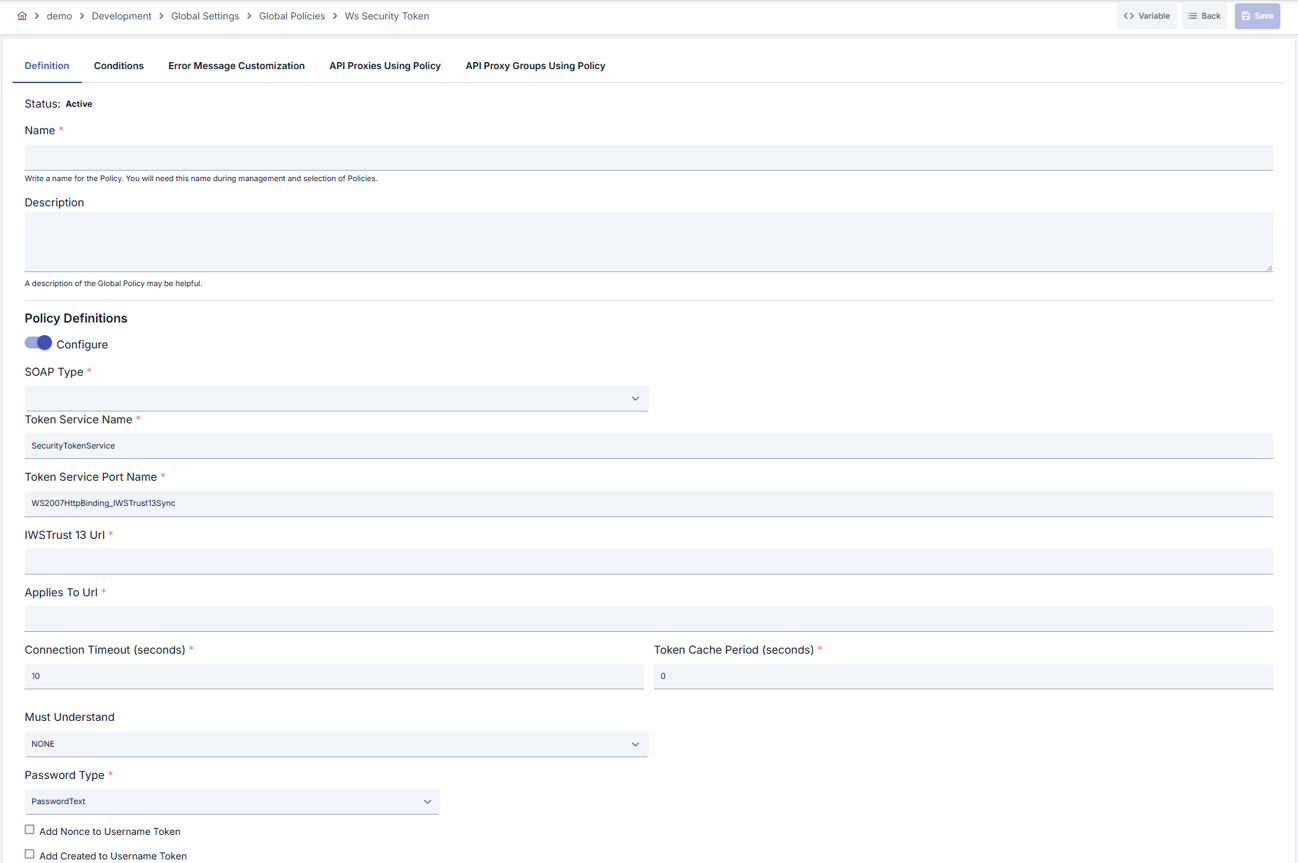
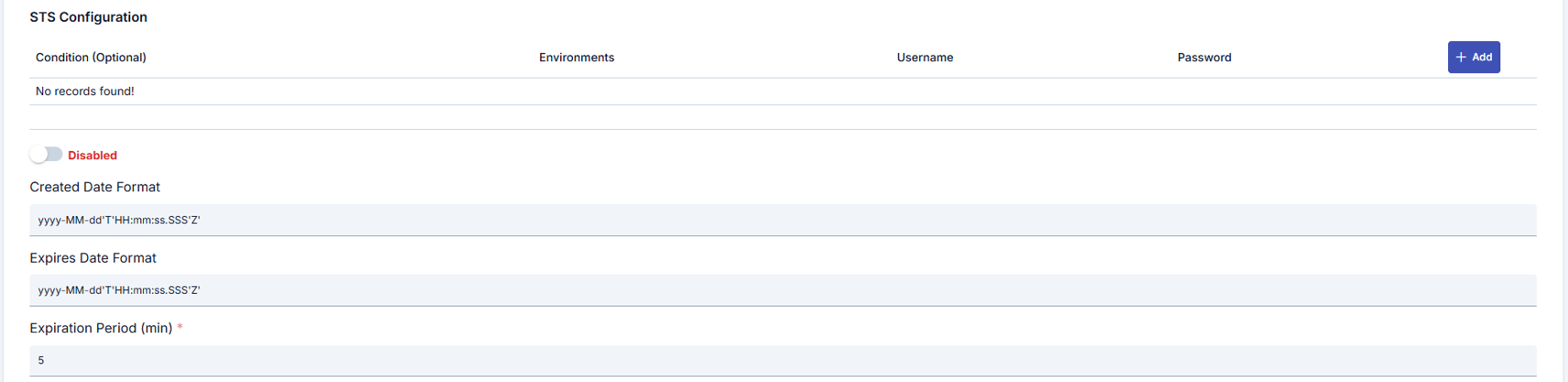
Configuration Steps
| Step | Description / Operation |
|---|---|
| Step 1: Going to Creation Page | - Go to Development → Global Settings → Global Policies → WS Security Token Policy from the left menu. - Click the [+ Create] button at the top right. |
| Step 2: Entering Basic Information | Policy Status (Policy Status): Shows Active/Passive status. New policies are active by default. Name (Name) Required: Example: Production_WSSTS- Enter a unique name, does not start with space. - System automatically checks. Green checkmark: available. Red X: existing name. Description (Description): Example: "Corporate STS token management" - Max. 1000 characters. - Explain the purpose of the policy. |
| Step 3: Variable Usage | - In the action button area at the top of the page, you can use the [<> Variable] button to select dynamic values. - Using context/global variable expressions, you can manage policy parameters with variable-based values instead of fixed values. - This reduces manual update effort when values change and provides operational convenience. - For detailed information, review Dynamic Variables. |
| Step 4: STS Token Service Configuration | - If configureIssueToken is open, fill Token Service Name, Port Name, WS-Trust 1.3 URL and AppliesTo URL fields as required.- Enter values in seconds for connectionTimeout and tokenCachePeriod (tokenCachePeriod ≥1).- Select appropriate value for wsaMustUnderstand if required. |
| Step 5: Credential and Password Management | - Select PasswordText or PasswordDigest as passwordType (Nonce/Created automatically become active when PasswordDigest is selected).- Determine Query Builder conditions and environment list for each record in STS user list. - Match passwords only with necessary environments for security. |
| Step 6: WSA and Timestamp Settings | - Fill WSA Action, To, ReplyTo etc. fields in app-soap-api-method-wsa-settings component.- Update createdDateFormat and expiresDateFormat fields according to corporate standards.- Define token validity period with expirationPeriod (minutes). |
| Step 7: Defining Condition (Optional) | - Go to the Condition tab. - Conditions determine when the policy will be active. Examples: - Environment-based: Header = X-Environment, Operator = Equals, Value = production- API Key-based: Header = X-API-Key, Starts With = PROD-- Endpoint-based: Path = /api/admin/*If no condition is defined, the policy is always active For details, see: Conditions |
| Step 8: Error Message Customization (Optional) | - Go to the Error Message Customization tab. - Customize the message to be returned when access is denied. Default: { "statusCode": 403, "message": "[Default error message]" }Custom: { "statusCode": 403, "errorCode": "[CUSTOM_ERROR_CODE]", "message": "[Custom message]" } |
| Step 9: Saving | - Click the [Save] button at the top right. Checklist: Unique name. Required fields filled. At least one STS user record exists. Result: - Policy is added to the list. - Can be connected to APIs. - If global policy, automatically applied. |
For the description of Conditions and Error Message Customization panels, you can review the Conditions and Error Message Customization sections on the What is Policy? page.
For a complete guide on all layers, priority order and scenario examples of the error message configuration system, see the Error Message Configuration Guide page.
Deleting the Policy
For the deletion steps of this policy and the operations to be applied while in use, you can refer to the Removing Policy from Flow section on the Policy Management page.
Exporting/Importing the Policy
For the export and import steps of this policy, you can refer to the Export/Import page.
Connecting the Policy to API
For the process of how this policy will be connected to APIs, you can refer to the Connecting Policy to API section on the Policy Management page.
Advanced Features
| Feature | Description and Steps |
|---|---|
| Concurrent STS Renewal Plan | - Determine renewal window with expirationPeriod value before token expires.- Trigger new Issue request without exceeding cache period with tokenCachePeriod.- Add delay to avoid exceeding throttling limits of STS service in heavy traffic. |
| Multiple Conditional Credential Pool | - Create partner, environment or IP conditions in Query Builder. - Map different user/password for each condition. - Remember that default record will be used when condition does not match. |
| WSA Defaults Automation | - Automatically generate empty Action/To values by activating wsaAddDefaultAction and wsaAddDefaultTo fields.- Create unique MessageId for each call using wsaGenerateMessageId.- Fill wsaFaultTo address in Fault scenarios. |
Best Practices
Things to Do and Best Practices
| Category | Description / Recommendations |
|---|---|
| STS Endpoint Design | Bad: Sharing single STS URL with all environments Good: Defining different URL per environment Best: Managing configureIssueToken mode with environment-based condition |
| Credential Management | Bad: Manually updating passwords Good: Creating environment-based user records Best: Conditioning with Query Builder by partner or tenant |
| WS-Addressing Usage | Bad: Using default WSA values in all calls Good: Filling required fields Best: Dynamically planning Action/To/ReplyTo according to service requirements |
| Token Caching | Bad: Leaving tokenCachePeriod=0 valueGood: Defining basic cache period according to STS limits Best: Keeping cache period compatible with expirationPeriod and monitoring periodically |
| Error Message Management | Bad: Returning general 500 message Good: Giving clear messages for 403 and 401 Best: Redirecting consumer with custom error codes. |
Security Best Practices
| Security Area | Description / Warnings |
|---|---|
| Credential Storage | Keep passwords only in policy screen, do not copy to external systems. |
| Encryption Standards | Provide protection against replay attacks by preferring PasswordDigest. |
| WS-Addressing Accuracy | Verify as wrong Action/To values may open unauthorized channel in SOAP service. |
| Token Duration | Do not keep expirationPeriod value unnecessarily long, increases stolen token risk. |
| Error Message Content | Do not share user/password information or STS URL in error messages. |
Things to Avoid
| Category | Description / Warnings |
|---|---|
| Hard-coded STS Passwords | Why avoid: Credentials are exposed in source code leaks. Alternative: Manage passwords only in policy screen. |
| Zero Cache Period | Why avoid: Increases delay and throttling risk by making STS call on every request. Alternative: Define tokenCachePeriod according to need. |
| Leaving WSA Fields Empty | Why avoid: Some services return 500 due to missing headers. Alternative: Fill required WSA fields according to service documentation. |
| Single Environment Credential | Why avoid: Wrong credential may be used in wrong environment. Alternative: Create separate user for each environment, condition with Query Builder. |
Performance Tips
| Criterion | Recommendation / Impact |
|---|---|
| STS Call Frequency | Recommendation: Select tokenCachePeriod ≥ 120 seconds.Impact: STS traffic load and delays decrease. |
| Connection Timeout | Recommendation: Set connectionTimeout value according to STS SLA.Impact: Fast error detection without unnecessary waiting. |
| Condition Evaluation | Recommendation: Keep Query Builder conditions minimal. Impact: Policy evaluation time shortens. |
| WSA Automation | Recommendation: Disable unnecessary WSA fields. Impact: Header serialization cost decreases. |
| Token Renewal Window | Recommendation: Leave 1-2 minute buffer between expirationPeriod and tokenCachePeriod.Impact: Token renewal conflicts decrease. |
Frequently Asked Questions (FAQ)
| Category | Question | Answer |
|---|---|---|
| General | What API types is WS Security STS Token Policy compatible with? | Works compatibly with SOAP-based and WS-Trust 1.3 supported services. Not suitable for REST calls. |
| General | Can I share the same policy with multiple API Proxies? | Yes, when deployed as global policy, it can be used by all appropriate API Proxy instances. |
| Technical | What does configureIssueToken=false do? | Makes direct SOAP call to defined external STS Endpoint instead of creating Issue request in Apinizer. |
| Technical | Why do Nonce/Created lock when PasswordDigest is selected? | Nonce and Created fields are mandatory for Digest calculation according to WS-Security standards, system automatically activates them. |
| Usage | How do I select environment-based user? | Select relevant environments in environmentIdList field in STS user list, add additional condition with Query Builder if needed. |
| Usage | Can I ensure token renewal before expiration? | You can control token renewal by determining expirationPeriod value according to real duration and keeping tokenCachePeriod shorter. |