WS-Security Signature Verification
This document explains the detailed usage of a specific policy. If you are using Apinizer policy structure for the first time or want to learn the general working principles of policies, we recommend reading the What is Policy? page first.
Overview
What is its Purpose?
- Provides integrity and authentication by verifying WS-Security Signature blocks in SOAP envelopes.
- Increases Production Environment security by blocking calls coming with unauthorized certificates or corrupted signatures.
- Standardizes signature verification processes with centralized KeyStore integration for key management.
- Provides customizable security levels for different workloads through advanced verification options.
Working Principle
- Request Arrival: For each HTTP/HTTPS request arriving at the API Gateway, the source IP address of the request is identified.
- Policy Check: If the WS Security Signature Verification policy is active, the system checks in the following order:
- Is a Condition defined? If so, is the condition met?
- Is the policy active (active=true)?
- Is a Variable used or is Apinizer default?
- WS-Security Signature Verification: Signature element in SOAP message is verified with public key certificate in selected KeyStore; signature removal and mustUnderstand headers are optionally checked.
- Decision Making:
- Match Found: Signature verification is successful, message processing continues.
- No Match: Signature verification fails, error code and message in policy configuration are returned.
- Error Handling: Customizable HTTP status code and error message are returned for requests that do not comply with the policy rule.
Features and Capabilities
Basic Features
- KeyStore Verification: Uses certificates in selected KeyStore source for signature verification operations.
- Advanced Signature Inspection: Provides additional checks to perform deep verification in multiple digital signature variations.
- SOAP MustUnderstand Support: Guarantees mandatory processing of
mustUnderstandmarked WS-Security headers. - Active/Passive Status Control: Easily change the active or passive status of the policy (active/passive toggle). In passive state, the policy is not applied but its configuration is preserved.
- Condition-Based Application: Determine when the policy will be applied by creating complex conditions with Query Builder (e.g., only for specific endpoints or header values).
Advanced Features
- Signature Removal Option: Enables backend services to receive clean content by removing signature blocks from message after verification.
- Case-Insensitive ID Control: Verifies ID values in SOAP signature references in case-insensitive comparison mode.
- Dereference Signature Management: Supports re-resolution of SOAP body in referenced signature removal scenarios.
- Export/Import Feature: Export policy configuration as a ZIP file. Import to different environments (Development, Test, Production). Version control and backup capability.
- Policy Group and Proxy Group Support: Manage multiple policies within Policy Group. Bulk policy assignment to Proxy Groups. Centralized update and deployment operations.
- Deploy and Versioning: Deploy policy changes to live environment. See which API Proxies use it (Policy Usage). Proxy Group and Policy Group usage reports.
Usage Scenarios
| Scenario | Situation | Solution (Policy Application) | Expected Behavior / Result |
|---|---|---|---|
| Certified SOAP Access | Signed SOAP calls coming for external banking integration | Default KeyStore is selected, Enhanced Signature Validation is enabled. | Signature is verified, 200 is returned for valid requests, 403 for invalid signature. |
| Blocking Unsigned Requests | Clients without signature are abusing system | MustUnderstand is active, error message is customized. | Unsigned calls are blocked with 403, reason is visible in logs. |
| Multiple Certificate Management | Different certificate versions exist for same Endpoint | Policy is copied, different KeyStore records are assigned. | Access is provided using correct certificate for each version. |
| Performance Optimization | Backend service does not support signature blocks | Remove Signature is enabled. | Message is simplified after signature is verified, service compatibility issue is resolved. |
| Legacy Compatibility | Old clients mix case in ID field | Enhanced Validation + Case-Insensitive ID is enabled. | Requests are allowed with case-insensitive comparison. |
| Dereference Protection | Reference resolution difficulties in messages | Signature Removal for Dereferencing is enabled. | Reference pointers in body are properly resolved. |
| Certificate Testing in Test Environment (optional) | New certificates will be tested in test environment | Policy is localized, new KeyStore is assigned. | Verification is provided in test, error messages are recorded. |
Configuring Policy Parameters
At this step, users can create a new policy or configure existing policy parameters to define access rules. The defined parameters directly affect how the policy works (e.g., which IPs will be allowed, geographical restrictions, conditional activations, etc.). This way, the policy can be customized according to organization-specific requirements and managed centrally.
Creating a New WS Security Signature Verification Policy
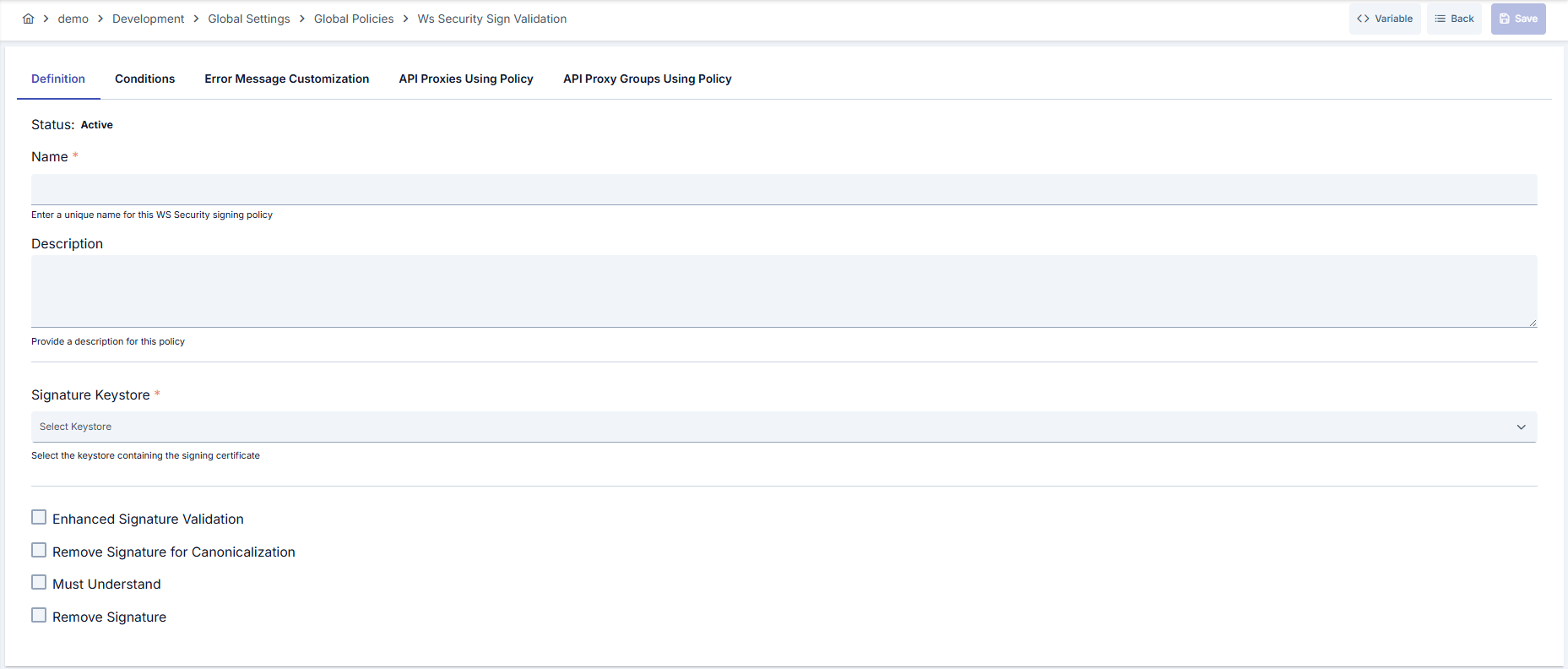
Configuration Steps
| Step | Description / Operation |
|---|---|
| Step 1: Going to Creation Page | - Go to Development → Global Settings → Global Policies → WS Security Signature Verification section from the left menu. - Click the [+ Create] button at the top right. |
| Step 2: Entering Basic Information | Policy Status: Shows Active/Passive status. New policies are active by default. Name (Required): Example: Production_WS_SignValidation- Enter a unique name, it cannot start with a space. - System automatically checks. Green checkmark: available. Red cross: existing name. Description: Example: "WS-Security signature verification for external SOAP services" - Max. 1000 characters. - Explain the purpose of the policy. |
| Step 3: Variable Usage | - In the action button area at the top of the page, you can use the [<> Variable] button to select dynamic values. - Using context/global variable expressions, you can manage policy parameters with variable-based values instead of fixed values. - This reduces manual update effort when values change and provides operational convenience. - For detailed information, review Dynamic Variables. |
| Step 4: KeyStore Selection | - Select certificate to be used in signature verification from Verification KeyStore field. - KeyStore records belonging to active project come alphabetically sorted in list. - Requests cannot be verified and policy cannot be saved if no selection is made. |
| Step 5: Advanced Verification Options | - Enable extra WS-Security checks with Enable Enhanced Signature Validation checkbox. - Allow Case Insensitive ID field becomes visible when this option is active and makes ID comparison case-insensitive. - Use Enable Signature Removal for Dereferencing option to prevent dereference errors. |
| Step 6: SOAP Behavior Parameters | - Must Understand option checks mandatory WS-Security headers. - You can remove Signature element from message after verification with Remove Signature. - This option enables backend services to focus only on business data. |
| Step 7: Defining Condition (Optional) | - Go to the Condition tab. - Conditions determine when the policy will be active. Examples: - Environment-based: Header = X-Environment, Operator = Equals, Value = production- API Key-based: Header = X-API-Key, Starts With = PROD-- Endpoint-based: Path = /api/admin/*If no condition is defined, the policy is always active For details, you can refer to: Conditions |
| Step 8: Customizing Error Message (Optional) | - Go to the Error Message Customization tab. - Customize the message to be returned when access is denied. Default: { "statusCode": 403, "message": "[Default error message]" }Custom: { "statusCode": 403, "errorCode": "[CUSTOM_ERROR_CODE]", "message": "[Custom message]" } |
| Step 9: Saving | - Click the [Save] button at the top right. Checklist: Unique name. Required fields filled. At least one KeyStore selection exists Result: - Policy is added to the list. - Can be linked to APIs. - If it's a global policy, it is automatically applied. |
For the description of Conditions and Error Message Customization panels, you can review the Conditions and Error Message Customization sections on the What is Policy? page.
For a complete guide on all layers, priority order and scenario examples of the error message configuration system, see the Error Message Configuration Guide page.
Deleting the Policy
For the deletion steps of this policy and the operations to be applied when it is in use, you can refer to the Removing Policy from Flow section on the Policy Management page.
Exporting/Importing the Policy
For the export and import steps of this policy, you can refer to the Export/Import page.
Linking the Policy to API
For the process of how this policy will be linked to APIs, you can refer to the Linking Policy to API section on the Policy Management page.
Advanced Features
| Feature | Description and Steps |
|---|---|
| Dynamic KeyStore Refresh | - Updates made in KeyStore service are automatically reflected in list. - No need to refresh page after adding new certificate. - Shortens maintenance times with quick transition. |
| Global-Local Matching Support | - Customize for testing purposes by converting global policy to local copy. - Try different KeyStore or error messages in local copy. - Make it global again if needed. |
| Error Message Scenarios | - Provide guiding feedback to clients by defining different error codes. - Add detailed error fields in JSON format. - Optimize logging level after successful verification. |
Best Practices
Things to Do and Best Practices
| Category | Description / Recommendations |
|---|---|
| KeyStore Management | Bad: Managing all environments with single certificate. Good: Separating KeyStore by environment. Best: Versioning with export/import in certificate renewals. |
| Error Messages | Bad: Leaving default message. Good: Adding short custom message. Best: Returning JSON containing error code, tracking ID, and support contact information. |
| Condition Usage | Bad: Applying unconditionally to all API Proxies. Good: Defining conditions only for SOAP endpoints. Best: Creating sensitive conditions with Endpoint, Header, and method combinations. |
| Advanced Verification | Bad: Leaving unnecessary vulnerabilities open in old clients. Good: Testing and enabling Enhanced validation. Best: Activating case-insensitive ID and dereference removal options scenario-based. |
| Signature Removal | Bad: Enabling Remove Signature without checking backend compatibility. Good: Performing functional test in QA environment. Best: Running performance and security tests together. |
Security Best Practices
| Security Area | Description / Warnings |
|---|---|
| Certificate Security | Give KeyStore access only to authorized administrators, store passwords in Config Vault. |
| Signature Verification | Monitor additional signature verification logs when Enhanced validation is enabled, quickly filter out invalid signatures. |
| Must Understand Management | SOAP compatibility may break if mustUnderstand is disabled; verify backend support status before disabling. |
| Logging | Log Header and Endpoint information masked in requests returning 403. |
| Not Opening Attack Surface | Reduce SOAP content injection risks by keeping dereference removal feature closed for unknown clients. |
Things to Avoid
| Category | Description / Warnings |
|---|---|
| Wrong KeyStore Selection | Why avoid: May return 403 to all requests with wrong certificate. Alternative: Create environment-based verification checklist. |
| Unconditional Application | Why avoid: JSON/REST endpoints may fail unnecessarily. Alternative: Define conditions limited to SOAP paths only. |
| Leaving Error Message Empty | Why avoid: Client side cannot understand root cause, support load increases. Alternative: Add support contact information to JSON error message. |
| Remove Signature Without Testing | Why avoid: Some backend services expect signature. Alternative: First verify in test environment, then take to Production Environment. |
Performance Tips
| Criterion | Recommendation / Impact |
|---|---|
| KeyStore Access Time | Recommendation: Clean unnecessary records in KeyStore service. Impact: Signature verification time shortens. |
| Enhanced Validation | Recommendation: Enable only when necessary in high-traffic environments. Impact: CPU usage is balanced. |
| Remove Signature | Recommendation: Enable if necessary in backend JSON conversion. Impact: Reduces latency in SOAP → REST converters. |
| Condition Filters | Recommendation: Prevent unnecessary verifications with Endpoint and Header-based conditions. Impact: Gateway load lightens. |
| Log Level | Recommendation: Do not keep log level at DEBUG instead of INFO in successful verifications. Impact: Disk usage and IO cost decrease. |
Frequently Asked Questions (FAQ)
| Category | Question | Answer |
|---|---|---|
| General | In which API types does WS Security Signature Verification policy work? | Targets SOAP-based and WS-Security signed SOAP messages; you can disable by adding condition for REST calls. |
| General | Can policy registration be done without selecting KeyStore? | No, at least one KeyStore selection is mandatory for verification, otherwise policy cannot be saved. |
| Technical | What does Enhanced Signature Validation provide? | Prevents signature spoofing attacks by performing additional checks in signature reference resolution, canonicalization, and ID matching. |
| Technical | In which scenarios should Case-Insensitive ID be used? | Enable if old clients have mixed case usage in ID fields, keep closed in modern clients. |
| Usage | Does Remove Signature option affect backend service? | Signature is removed from SOAP message after verification; should be used when backend service does not expect signature. |
| Usage | How do I apply policy on API Proxy basis? | You can link global policy from Policies tab in API settings or create local copy and customize. |