WS-Security Username Token
This document explains the detailed usage of a specific policy. If you are using Apinizer policies for the first time or want to learn the general working principles of policies, we recommend reading the What is Policy? page first.
Overview
What is its Purpose?
- Creates username and password-based WS-Security UsernameToken and adds it to SOAP messages to provide the authentication expected by service providers.
- Ensures compliance variability with target service password policies by managing security flags such as password type, nonce, and created timestamps.
- Reduces integration errors by meeting header control requirements of consumed services through the MustUnderstand flag.
- Enhances observability by providing configurable error message and status code management for API Proxy calls.
Working Principle
- Request Arrival: For each HTTP/HTTPS request arriving at the API Gateway, the source IP address of the request is identified.
- Policy Check: If the WS Security Username Token policy is active, the system checks in the following order:
- Is a Condition defined? If so, is the condition met?
- Is the policy active (active=true)?
- Is a Variable used or is Apinizer default used?
- UsernameToken Generation: WS-Security UsernameToken is created using the username, password, and password type in the policy configuration; nonce and created fields are optionally added.
- Decision Making:
- Match Found: UsernameToken is added to the Security header of the SOAP envelope and the request is routed to the target Endpoint.
- No Match: Policy is not applied; request is forwarded with existing header contents.
- Error Handling: Customizable HTTP status code and error message are returned for requests that do not comply with the policy rule.
Features and Capabilities
Basic Features
- UsernameToken Injection: Generates and adds WS-Security UsernameToken to SOAP messages with configured username and password.
- Password Type Management: Provides appropriate encryption level for target service expectations with PasswordText or PasswordDigest options.
- Authentication Enrichment: Creates an additional security layer against replay attacks by adding Nonce and Created fields.
- Active/Passive Status Control: Easily change the active or passive status of the policy (active/passive toggle). In passive state, the policy is not applied but its configuration is preserved.
- Condition-Based Application: Determine when the policy will be applied by creating complex conditions with Query Builder (e.g., only for specific endpoints or header values).
Advanced Features
- MustUnderstand Flag Management: Triggers mandatory checks of target services by adding the mustUnderstand attribute to the WS-Security header.
- Token Creation Control: Ensures compatibility with services that perform timestamped validation thanks to the addition of the
Createdtimestamp. - Nonce Generation: Increases security against replay attacks in PasswordDigest scenarios with random nonce generation.
- Export/Import Feature: Export policy configuration as a ZIP file. Import to different environments (Development, Test, Production). Version control and backup capability.
- Policy Group and Proxy Group Support: Manage multiple policies within Policy Group. Bulk policy assignment to Proxy Groups. Centralized update and deploy operations.
- Deploy and Versioning: Deploy policy changes to live environment. See which API Proxies use it (Policy Usage). Proxy Group and Policy Group usage reports.
Usage Scenarios
| Scenario | Status | Solution (Policy Application) | Expected Behavior / Result |
|---|---|---|---|
| Legacy SOAP Services | Target service only accepts WS-Security UsernameToken. | PasswordText is selected and fixed username/password is entered. | Requests are successfully authenticated, returns 200 OK. |
| Banking Integration | Service requires PasswordDigest and nonce. | PasswordDigest is selected, Nonce and Created are marked. | Service verifies replay attack protection, secure integration is provided. |
| Partner API Differences | Different user credentials are used in partner environments. | Separate policy is copied for each environment, applied based on conditions. | Error rate due to incorrect credentials decreases. |
| Test Environment Simulation | Testing is desired without sharing live information. | Fake user set is assigned with development condition. | Test requests work with isolated user, live environment is not affected. |
| Global Policy Management | Multiple APIs use the same credentials. | Policy is defined globally, connected to relevant API Proxies. | Single-point management is provided, changes automatically propagate. |
| Error Message Customization | Service expects a custom error code. | JSON message is updated in Error Message Customization section. | Target system receives understandable error message, support team diagnosis time is shortened. |
| DevOps Automation (optional) | Need to move policy versions in CI/CD pipeline. | ZIP packages are created with Export/Import and deployed in pipeline. | Transitions between environments become traceable. |
Configuring Policy Parameters
In this step, users can create a new policy or configure existing policy parameters to define access rules. The defined parameters directly affect how the policy works (e.g., which IPs will be allowed, geographical restrictions, conditional activations, etc.). This allows the policy to be customized according to organization-specific requirements and managed centrally.
Creating a New WS Security Username Token Policy
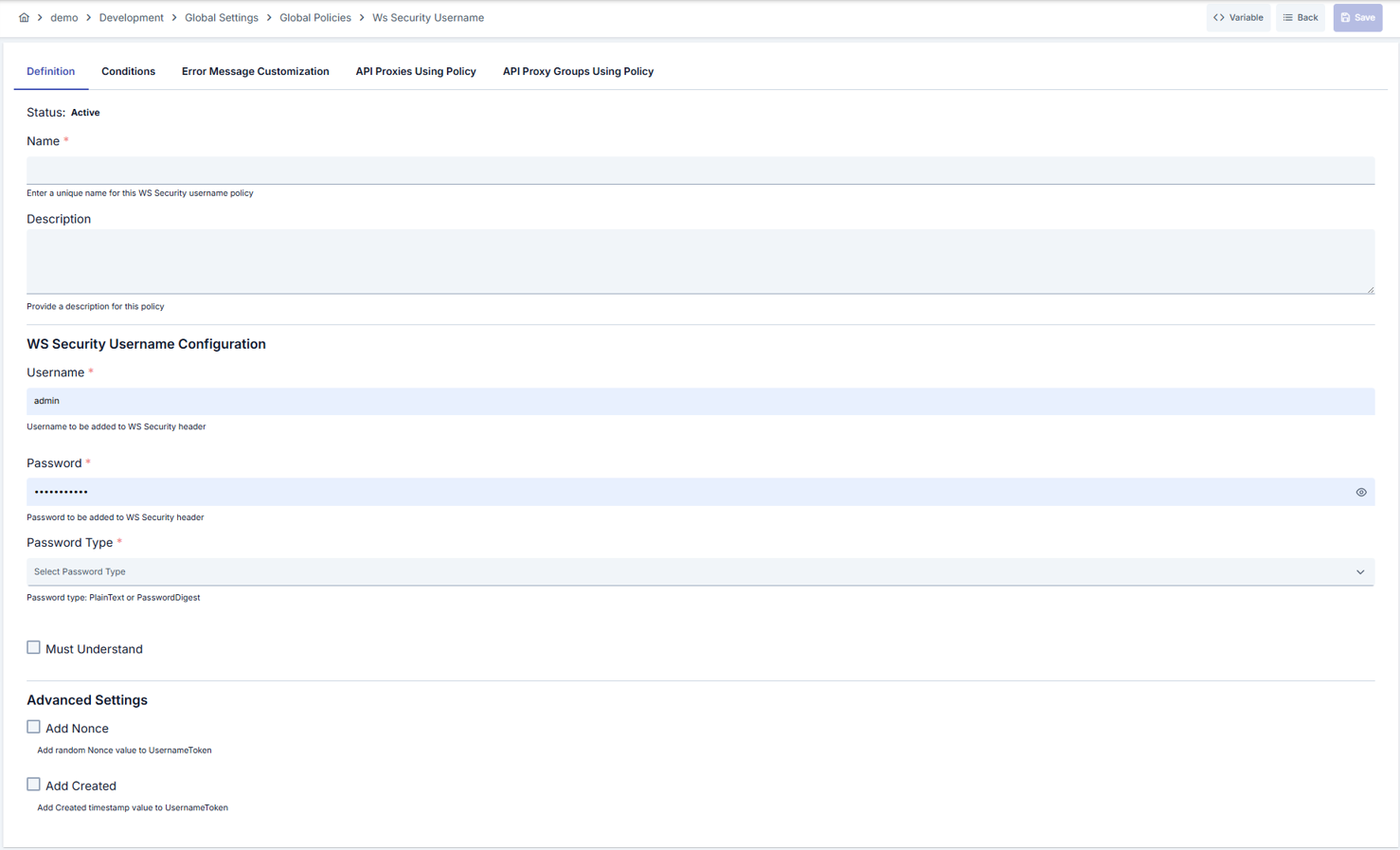
Configuration Steps
| Step | Description / Operation |
|---|---|
| Step 1: Going to Creation Page | - Go to Development → Global Settings → Global Policies → WS Security Username Token Policy from the left menu. - Click the [+ Create] button at the top right. |
| Step 2: Entering Basic Information | Policy Status (Policy Status): Shows Active/Passive status. New policies are active by default. Name (Name) Required: Example: Production_WSUserToken- Enter a unique name, does not start with space. - System automatically checks. Green checkmark: available. Red X: existing name. Description (Description): Example: "Adds WS Security UsernameToken for BankCore SOAP service." - Max. 1000 characters. - Explain the purpose of the policy. |
| Step 3: Variable Usage | - In the action button area at the top of the page, you can use the [<> Variable] button to select dynamic values. - Using context/global variable expressions, you can manage policy parameters with variable-based values instead of fixed values. - This reduces manual update effort when values change and provides operational convenience. - For detailed information, review Dynamic Variables. |
| Step 4: UsernameToken Parameters | - Username: Enter the username to be used in the SOAP header. - Password: Write the password in the masked field. - Password Type: Select PasswordText or PasswordDigest; when digest is selected, password is automatically hashed with nonce and time value. Password values are sensitive; limit access permissions as needed. |
| Step 5: Must Understand and Security Flags | - Must Understand: Check if you want the service to require the WS-Security header. - Password Decryption: Automatically managed by the system, does not allow password decryption. - These options ensure target SOAP service compatibility. |
| Step 6: Nonce and Created Settings | - Nonce: Check to add random Nonce against replay attacks. - Created: Add the creation date to the UsernameToken. - If using digest, it is recommended to keep both active. |
| Step 7: Defining Condition (Optional) | - Go to the Condition tab. - Conditions determine when the policy will be active. Examples: - Environment-based: Header = X-Environment, Operator = Equals, Value = production- API Key-based: Header = X-API-Key, Starts With = PROD-- Endpoint-based: Path = /api/admin/*If no condition is defined, the policy is always active For details, see: Conditions |
| Step 8: Error Message Customization (Optional) | - Go to the Error Message Customization tab. - Customize the message to be returned when access is denied. Default: { "statusCode": 403, "message": "[Default error message]" }Custom: { "statusCode": 403, "errorCode": "[CUSTOM_ERROR_CODE]", "message": "[Custom message]" } |
| Step 9: Saving | - Click the [Save] button at the top right. Checklist: Unique name. Required fields filled. At least one UsernameToken parameter defined. Result: - Policy is added to the list. - Can be connected to APIs. - If global policy, automatically applied. |
For the description of Conditions and Error Message Customization panels, you can review the Conditions and Error Message Customization sections on the What is Policy? page.
For a complete guide on all layers, priority order and scenario examples of the error message configuration system, see the Error Message Configuration Guide page.
Deleting the Policy
For the deletion steps of this policy and the operations to be applied while in use, you can refer to the Removing Policy from Flow section on the Policy Management page.
Exporting/Importing the Policy
For the export and import steps of this policy, you can refer to the Export/Import page.
Connecting the Policy to API
For the process of how this policy will be connected to APIs, you can refer to the Connecting Policy to API section on the Policy Management page.
Advanced Features
| Feature | Description and Steps |
|---|---|
| Multi-Environment Credential Management | - Create different user/password sets according to environment. - Link conditions to environment header. - Keep synchronized between environments with Export/Import. |
| Token Continuity Monitoring | - Organize error codes according to log format through Error Message Customization. - Add correlation ID with monitoring tools. - Report failed token generations centrally. |
| Policy Group Automation | - Group APIs using the same UsernameToken with Policy Group. - Perform bulk deploy through Policy Group. - Monitor usage reports, detect unnecessary copies. |
Best Practices
Things to Do and Best Practices
| Category | Description / Recommendations |
|---|---|
| Credential Management | Bad: Using shared user for all services. Good: Defining service-based users. Best: Using separate user and password vault integration according to RBAC. |
| Password Security | Bad: Leaving PasswordText option as default. Good: Using PasswordDigest. Best: Connecting secret management service that automates password rotation. |
| Condition Design | Bad: Allowing the policy to run on all requests. Good: Defining endpoint-based conditions. Best: Creating condition matrix according to environment, endpoint and header combinations. |
| Error Management | Bad: Not changing the default error message. Good: Giving understandable error to user. Best: Using structured JSON error responses compatible with monitoring systems. |
| Deploy Process | Bad: Manually deploying directly to live. Good: Validating in test environment and deploying to live. Best: Designing approval mechanism and automatic rollback plan in CI/CD pipeline. |
Security Best Practices
| Security Area | Description / Warnings |
|---|---|
| Password Rotation | Renew passwords at regular intervals; integrate with secret vaults. |
| Access Permissions | Give policy editing permission only to trusted administrators. |
| Audit Logging | Log token addition results; trigger SIEM alerts for failed attempts. |
| Encryption Standards | Prefer PasswordDigest; PasswordText should only be used in mandatory cases. |
| Nonce Usage | Keep nonce and created combination active to prevent replay attacks. |
Things to Avoid
| Category | Description / Warnings |
|---|---|
| Shared Credentials | Why avoid: Creates traceability and security vulnerability. Alternative: Assign separate user for each service. |
| Unencrypted Storage | Why avoid: Plain password may remain in configuration files. Alternative: Use password vault or environment variable. |
| Untested Changes | Why avoid: Live services may error. Alternative: Validate in test environment before going live. |
| Unconditional Application | Why avoid: Causes unnecessary load and wrong token addition. Alternative: Define Path or header-based conditions. |
Performance Tips
| Criterion | Recommendation / Impact |
|---|---|
| Token Creation Cost | Recommendation: Use PasswordDigest only when necessary. Impact: Hash calculation load is balanced. |
| Condition Filtering | Recommendation: Define narrow-scoped conditions in Query Builder. Impact: Delay is reduced by avoiding unnecessary token generations. |
| Log Management | Recommendation: Collect failure logs with sampling. Impact: Log volume is kept under control. |
| Policy Groups | Recommendation: Group APIs using the same token with Policy Group. Impact: Deploy times shorten, consistency increases. |
| Monitoring Metrics | Recommendation: Add token addition time to APM metrics. Impact: Performance anomalies are detected early. |
Frequently Asked Questions (FAQ)
| Category | Question | Answer |
|---|---|---|
| General | What type of services is WS Security Username Token Policy used in? | Used in scenarios requiring authentication in SOAP and WS-Security supported services. |
| General | Why does global policy change require approval? | Global policies affect multiple APIs; if approval is not given, the risk of unwanted interruption increases. |
| Technical | How is the password protected when PasswordDigest is selected? | Password is hashed with nonce and created and sent; plain text is not kept. |
| Technical | What does the MustUnderstand field do? | Target service understands that the WS-Security header is mandatory; if header is missing, request is rejected. |
| Usage | How to manage different username for different API Proxy? | You can use different configurations for each API by defining conditions or creating local policy. |
| Usage | How do I use the policy export file in pipeline? | You can include the ZIP file in CI/CD stage and perform automatic distribution with import command. |