WS-Security Signing
This document explains the detailed usage of a specific policy. If you are using Apinizer policy structure for the first time or want to learn the general working principles of policies, we recommend reading the What is Policy? page first.
Overview
What is its Purpose?
- Guarantees transmission integrity by determining XML nodes that need to be signed in SOAP-based requests.
- Standardizes key usage by providing centralized signature management in selected API Proxy (API Proxy Server) and Policy flows.
- Configures signature algorithms and canonicalization options compliant with WS-Security standards from a single center.
- Enables layered compliance checks in integrations requiring WSI BSP compliance.
Working Principle
- Request Arrival: For each HTTP/HTTPS request arriving at the API Gateway, the source IP address of the request is identified.
- Policy Check: If the WS Security Signing policy is active, the system checks in the following order:
- Is a Condition defined? If so, is the condition met?
- Is the policy active (active=true)?
- Is a Variable used or is Apinizer default?
- Signature Configuration Validation: Policy verifies that sigKeyStoreId, sigKeyIdType, and if necessary sigCustomKeyIdentifier fields are completely defined, selected algorithms are compatible with keystore, and parts to be signed are listed.
- Decision Making:
- Match Found: Determined XML parts are signed with selected algorithms, mustUnderstand flag is processed in SOAP header if needed, and transmitted to target.
- No Match: Request is routed to next Policy check without applying signature or triggering error message.
- Error Handling: Customizable HTTP status code and error message are returned for requests that do not comply with the policy rule.
Features and Capabilities
Basic Features
- Key Store Integration: Signing is performed using certificates in organization's centralized KeyStore service with SigKeyStoreId field; registered store list is automatically loaded.
- Flexible Key Identifier Options: Compatibility with different SOAP consumers is provided by selecting WS-Security key identifiers such as X509, Subject Key Identifier, or Custom Key Info.
- Managing Parts to be Signed: Signature scope is customized by marking Body, Header, or custom elements at ELEMENT/CONTENT level through SigPartList.
- Active/Passive Status Control: Easily change the active or passive status of the policy (active/passive toggle). In passive state, the policy is not applied but its configuration is preserved.
- Condition-Based Application: Determine when the policy will be applied by creating complex conditions with Query Builder (e.g., only for specific endpoints or header values).
Advanced Features
- Advanced Algorithm Tuning: Balances performance and compatibility by selecting from RSA, DSA, ECDSA, or HMAC-based signature/digest algorithms.
- WSI BSP Compliance Mode: Facilitates compliance tests of external systems by enabling Basic Security Profile checks with SigWsiBSPCompliant flag.
- Certificate Usage Optimization: Manages single certificate or chain-based signature strategies with SigUseSingleCert option; simplifies complex keystore scenarios.
- Export/Import Feature: Export policy configuration as a ZIP file. Import to different environments (Development, Test, Production). Version control and backup capability.
- Policy Group and Proxy Group Support: Manage multiple policies within Policy Group. Bulk policy assignment to Proxy Groups. Centralized update and deployment operations.
- Deploy and Versioning: Deploy policy changes to live environment. See which API Proxies use it (Policy Usage). Proxy Group and Policy Group usage reports.
Usage Scenarios
| Scenario | Situation | Solution (Policy Application) | Expected Behavior / Result |
|---|---|---|---|
| Corporate SOAP SLA | B2B SOAP services are left unsigned | Company certificate is enabled with SigKeyStoreId selected, RSA_SHA256 signature and SHA256 digest. | Other party verifies signature, message integrity is ensured. |
| Hybrid Key Identifier | Different consumers expect different key identifier | Global policy is duplicated by filling Custom Key Info field. | Correct Subject or Custom reference is returned for each consumer. |
| XML Part Protection | Only payment fields should be signed | Payment element (ELEMENT) is added to SigPartList. | Relevant element is signed, other fields remain free. |
| WSI BSP Inspection | Certification tests require BSP compliance | SigWsiBSPCompliant is enabled, canonicalization C14N_EXCL is selected. | Test tools do not report BSP violation. |
| Single Certificate Constraint | Keystore contains single certificate | SigUseSingleCert is checked, key identifier X509 is selected. | Policy simplifies certificate search, errors decrease. |
| Must Understand Requirement | Middleware requires mustUnderstand | MustUnderstand flag is enabled. | SOAP header contains WSU:MustUnderstand=1, middleware does not error. |
| Internal Communication Scenario (optional) | Internal systems require low security | Left in Passive mode, applied only to prod requests with condition. | Test environment remains unsigned, Production environment is protected. |
Configuring Policy Parameters
At this step, users can create a new policy or configure existing policy parameters to define access rules. The defined parameters directly affect how the policy works (e.g., which IPs will be allowed, geographical restrictions, conditional activations, etc.). This way, the policy can be customized according to organization-specific requirements and managed centrally.
Creating a New WS Security Signing Policy
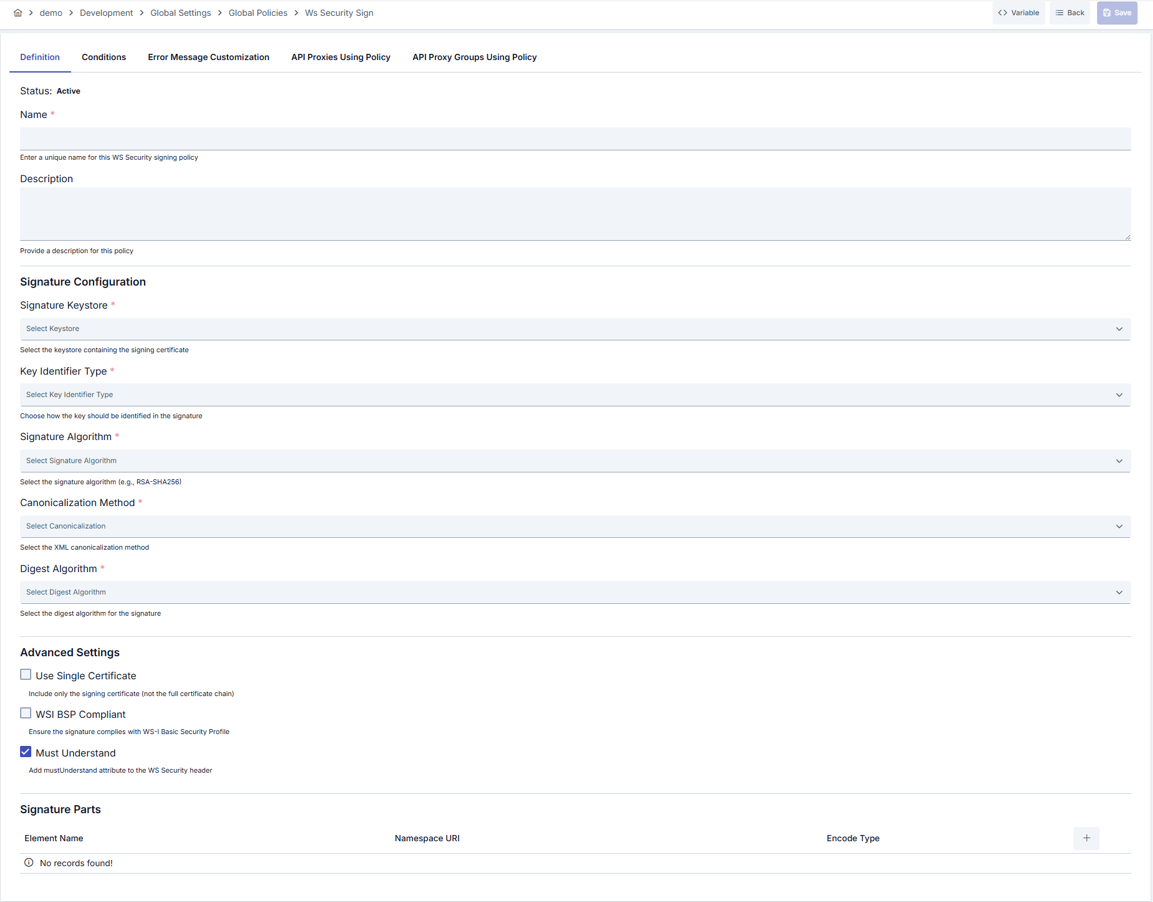
Configuration Steps
| Step | Description / Operation |
|---|---|
| Step 1: Going to Creation Page | - Go to Development → Global Settings → Global Policies → WS Security Signing Policy section from the left menu. - Click the [+ Create] button at the top right. |
| Step 2: Entering Basic Information | Policy Status: Shows Active/Passive status. New policies are active by default. Name (Required): Example: Production_WS_Sign- Enter a unique name, it cannot start with a space. - System automatically checks. Green checkmark: available. Red cross: existing name. Description: Example: "Provides outbound signature in SAP integrations." - Max. 1000 characters. - Explain the purpose of the policy. |
| Step 3: Variable Usage | - In the action button area at the top of the page, you can use the [<> Variable] button to select dynamic values. - Using context/global variable expressions, you can manage policy parameters with variable-based values instead of fixed values. - This reduces manual update effort when values change and provides operational convenience. - For detailed information, review Dynamic Variables. |
| Step 4: Signature Key Configuration | - Select certificate store to be used from Signature KeyStore list. - Signature detection method (X509, Subject Key Identifier, Custom Key Info, etc.) is determined with Key Identifier Type. - Fill sigCustomKeyIdentifier and sigCustomKeyIdentifierValueType fields when Custom Key Info is selected. |
| Step 5: Signature Algorithms and Compliance Selections | - Select appropriate algorithms from sigSigAlgorithm, sigC14n, sigDigAlgorithm fields.- Determine certificate usage strategy and BSP compliance with sigUseSingleCert and sigWsiBSPCompliant flags.- mustUnderstand option creates requirement at SOAP header level. |
| Step 6: Defining SOAP Parts to be Signed | - Add Body, Header, or custom elements to list with Add Signature Part button.- Specify XML scope by selecting name, namespace, and encodeType (ELEMENT/CONTENT) for each part. - Edit or delete existing records if needed. |
| Step 7: Defining Condition (Optional) | - Go to the Condition tab. - Conditions determine when the policy will be active. Examples: - Environment-based: Header = X-Environment, Operator = Equals, Value = production- API Key-based: Header = X-API-Key, Starts With = PROD-- Endpoint-based: Path = /api/admin/*If no condition is defined, the policy is always active For details, you can refer to: Conditions |
| Step 8: Customizing Error Message (Optional) | - Go to the Error Message Customization tab. - Customize the message to be returned when access is denied. Default: { "statusCode": 403, "message": "[Default error message]" }Custom: { "statusCode": 403, "errorCode": "[CUSTOM_ERROR_CODE]", "message": "[Custom message]" } |
| Step 9: Saving | - Click the [Save] button at the top right. Checklist: Unique name. Required fields filled. At least one part to be signed or basic signature parameter exists Result: - Policy is added to the list. - Can be linked to APIs. - If it's a global policy, it is automatically applied. |
For the description of Conditions and Error Message Customization panels, you can review the Conditions and Error Message Customization sections on the What is Policy? page.
For a complete guide on all layers, priority order and scenario examples of the error message configuration system, see the Error Message Configuration Guide page.
Deleting the Policy
For the deletion steps of this policy and the operations to be applied when it is in use, you can refer to the Removing Policy from Flow section on the Policy Management page.
Exporting/Importing the Policy
For the export and import steps of this policy, you can refer to the Export/Import page.
Linking the Policy to API
For the process of how this policy will be linked to APIs, you can refer to the Linking Policy to API section on the Policy Management page.
Advanced Features
| Feature | Description and Steps |
|---|---|
| Dynamic Signature Algorithm Profiling | - Selection is made from predefined RSA, DSA, ECDSA options for common signature requirements. - Algorithms are separated by deriving multiple policies for different consumers. - Appropriate algorithm combination is maintained with performance tracking. |
| Custom Key Identifier Applications | - Identifier and valueType fields are filled when Custom Key Info is selected. - Values are determined according to reference format expected by SOAP consumer. - Changes are exported and transferred to other environments. |
| Signature Part Management Automation | - XML parts are saved with SigPartList. - Entire element or only content is signed with EncodeType selection. - Parts are edited or deleted through menu, tracked in version control. |
Best Practices
Things to Do and Best Practices
| Category | Description / Recommendations |
|---|---|
| Keystore Management | Bad: Using ambiguous keystore names. Good: Adding environment-based prefixes ( Prod_KS).Best: Labeling keystores with name, certificate type, and duration. |
| Algorithm Selection | Bad: Sticking to default SHA1 algorithm. Good: Using SHA256. Best: Selecting SHA384/SHA512 proton according to other party's support. |
| Signature Parts Management | Bad: Signing entire message. Good: Selecting critical fields. Best: Managing by documenting EncodeType and namespace information. |
| Must Understand Usage | Bad: Making mandatory in every integration. Good: Selecting according to middleware requirements. Best: Enabling only if SOAP intermediary requires it. |
| BSP Compliance Control | Bad: Leaving closed in all scenarios. Good: Opening when external system requests. Best: Managing profile-based after compliance tests by copying policy. |
Security Best Practices
| Security Area | Description / Warnings |
|---|---|
| Certificate Cycle | Track certificate duration, update keystore and redeploy policy before expiration. |
| Key Sharing | Separate keystore access, allow only authorized DevOps users. |
| Custom Identifier Usage | Log Custom Key Info values masked in environments requiring privacy. |
| Algorithm Updates | Monitor security announcements, disable algorithms considered weak such as RSA_SHA1. |
| Error Message Management | Do not share internal system details in customized error messages, use general expressions. |
Things to Avoid
| Category | Description / Warnings |
|---|---|
| Missing Signature Part Definition | Why avoid: Message can be manipulated if critical element is not signed. Alternative: Create SigPartList for every element that needs to be signed. |
| Incompatible Algorithm Selection | Why avoid: Returns error when other system does not support. Alternative: Review consumer documentation and select supported algorithms. |
| Keystore Access Error | Why avoid: Wrong keystore ID prevents policy from working. Alternative: Save policy again when keystore list is updated. |
| Making BSP Compliance Mandatory | Why avoid: Some systems may be incompatible with WSI BSP constraints. Alternative: Leave flag passive in integrations without requirement. |
Performance Tips
| Criterion | Recommendation / Impact |
|---|---|
| Algorithm Complexity | Recommendation: SHA256 and RSA_SHA256 are sufficient for most scenarios. Impact: CPU consumption is balanced, latency does not increase. |
| Number of Signature Parts | Recommendation: Sign only mandatory elements. Impact: XML canonicalization time shortens. |
| Keystore Access Time | Recommendation: Keystore service should be in same data center. Impact: Signature creation latency decreases. |
| Policy Cache Usage | Recommendation: Cache frequently used policies at API layer. Impact: Policy loading times are reduced. |
| Error Message Processing | Recommendation: Use standard error message in heavy traffic. Impact: JSON creation cost decreases. |
Frequently Asked Questions (FAQ)
| Category | Question | Answer |
|---|---|---|
| General | When should WS Security Signing Policy be used? | Should be enabled when there is message integrity or authentication request in SOAP-based services. |
| General | Does deactivating policy completely close signature? | Yes, signature is not applied when you deactivate policy but configuration is preserved. |
| Technical | Which fields are required when I select Custom Key Info? | sigCustomKeyIdentifier and sigCustomKeyIdentifierValueType fields must be filled; otherwise policy errors. |
| Technical | Can multiple signature algorithms be selected? | No, single signature, single canonicalization, and single digest algorithm are selected for each policy; copy policy for different profiles. |
| Usage | Is it mandatory to write namespace in Signature parts list? | No, but it is recommended to add namespace if there are similarly named elements to avoid confusion. |
| Usage | How does Must Understand flag affect application? | Security block in SOAP header is made mandatory; middleware may return fault if it does not understand this block. |