WS-Security (To Target)
Last Updated: November 11, 2025
Target Audience: System Administrators, Backend Developers, DevOps Engineers
This document explains the detailed usage of a specific policy. If you are using Apinizer policy structure for the first time or want to learn the general working principles of policies, we recommend reading the What is Policy? page first.
| Field | Value |
|---|---|
| Policy Name | WS Security To Target Policy |
| Summary | Automatically applies authentication, signing, and encryption by adding WS-Security layer to messages going to SOAP target. |
| Category | Security and Access Control |
| Return Status Codes | Detailed information is provided in the table below. |
Return Status Codes
| Error Code | Error Message | HTTP Status Code |
|---|---|---|
| ERR-060 | WS-Security policy failed! Error message is: 0 | 500 |
Overview
What is its Purpose?
- Adding security layer to SOAP target: Meets integration requirements by adding security components compliant with WS-Security standards to messages going to target service.
- Authentication and authorization enforcement: Includes necessary credentials and digital signature in messages for services requiring UsernameToken or signature verification.
- Ensuring data integrity and privacy: Protects message integrity and privacy during transmission by controlling encryption and signing order.
- Compliance and auditability: Facilitates passing compliance checks of service providers with timestamp and Must Understand settings.
Working Principle
- Request Arrival: For each HTTP/HTTPS request arriving at the API Gateway, the source IP address of the request is identified.
- Policy Check: If the WS Security To Target policy is active, the system checks in the following order:
- Is a Condition defined? If so, is the condition met?
- Is the policy active (active=true)?
- Is a Variable used or is Apinizer default?
- Compilation of Security Components: WS-Security entry order (Timestamp, UsernameToken, Encryption, Signature) in policy definition is read; necessary keys, passwords, and algorithms are validated for each selected component and prepared to be added to SOAP envelope.
- Decision Making:
- Match Found: If required fields of all selected components are filled and keystore access is provided, SOAP message is updated and securely routed to target Endpoint.
- No Match: If missing certificate, user information, or algorithm selection is detected, policy execution is stopped and error response is prepared for request.
- Error Handling: Customizable HTTP status code and error message are returned for requests that do not comply with the policy rule.
Features and Capabilities
Basic Features
- Multiple WS-Security Component Management: Meets target WS-Security requirements by combining Timestamp, UsernameToken, Encryption, and Signature elements in a single policy.
- Dynamic Operation Order: Matches the order expected by service provider by determining execution order of security components with drag-and-drop.
- Part-Based Encryption/Signing: Supports part-based encryption and signature definitions by selecting specific element or content parts of SOAP message.
- Active/Passive Status Control: Easily change the active or passive status of the policy (active/passive toggle). In passive state, the policy is not applied but its configuration is preserved.
- Condition-Based Application: Determine when the policy will be applied by creating complex conditions with Query Builder (e.g., only for specific endpoints or header values).
Advanced Features
- Keystore Integration: Provides centralized certificate management by selecting encryption and signature keystores through Apinizer Secret Manager.
- Algorithm Flexibility: Provides ability to select Symmetric, Key Encryption, Signature, Canonicalization, and Digest algorithms from standard lists.
- Custom Key Identifiers: Meets special requirements of target services with custom SOAP header fields such as Custom Key Info or Embedded Key Info.
- Export/Import Feature: Export policy configuration as a ZIP file. Import to different environments (Development, Test, Production). Version control and backup capability.
- Policy Group and Proxy Group Support: Manage multiple policies within Policy Group. Bulk policy assignment to Proxy Groups. Centralized update and deployment operations.
- Deploy and Versioning: Deploy policy changes to live environment. See which API Proxies use it (Policy Usage). Proxy Group and Policy Group usage reports.
Usage Scenarios
| Scenario | Situation | Solution (Policy Application) | Expected Behavior / Result |
|---|---|---|---|
| Banking Integration | Target SOAP service requires UsernameToken. | UsernameToken component is added, username and password are entered, PasswordDigest is selected. | Target service accepts authentication, transaction is approved. |
| Insurance Web Service | Service requests both signature and encryption. | Encryption and Signature components are added, separate keystores are assigned. | Message is signed and encrypted, service passes security checks. |
| Time-Limited Service | Service accepts requests within certain TTL. | Timestamp component is added, tsTimeToLive value is set to 300 seconds. | Message is delivered with timestamp expected by target system. |
| Access Monitoring | Target service checks MustUnderstand flag. | Must Understand is checked, flag is sent as true for all components. | Service processes message, no compliance violation occurs. |
| Regional Anonymization | Some XML fields should be encrypted. | Relevant element namespaces are added to Encryption part list. | Only relevant fields are encrypted, other parts remain readable. |
| HMAC for Internal Systems | Internal service expects HMAC signature. | HMAC_SHA256 is selected as Signature algorithm, single certificate usage is disabled. | Message is signed with HMAC, target successfully completes verification. |
| Simple Identity in Test Environment (optional) | Only user information needed in test system. | Only UsernameToken is enabled, encryption and signature are left passive. | Configuration is quickly tested, unnecessary crypto load does not occur. |
Configuring Policy Parameters
At this step, users can create a new policy or configure existing policy parameters to define access rules. The defined parameters directly affect how the policy works (e.g., which IPs will be allowed, geographical restrictions, conditional activations, etc.). This way, the policy can be customized according to organization-specific requirements and managed centrally.
Creating a New WS Security To Target Policy
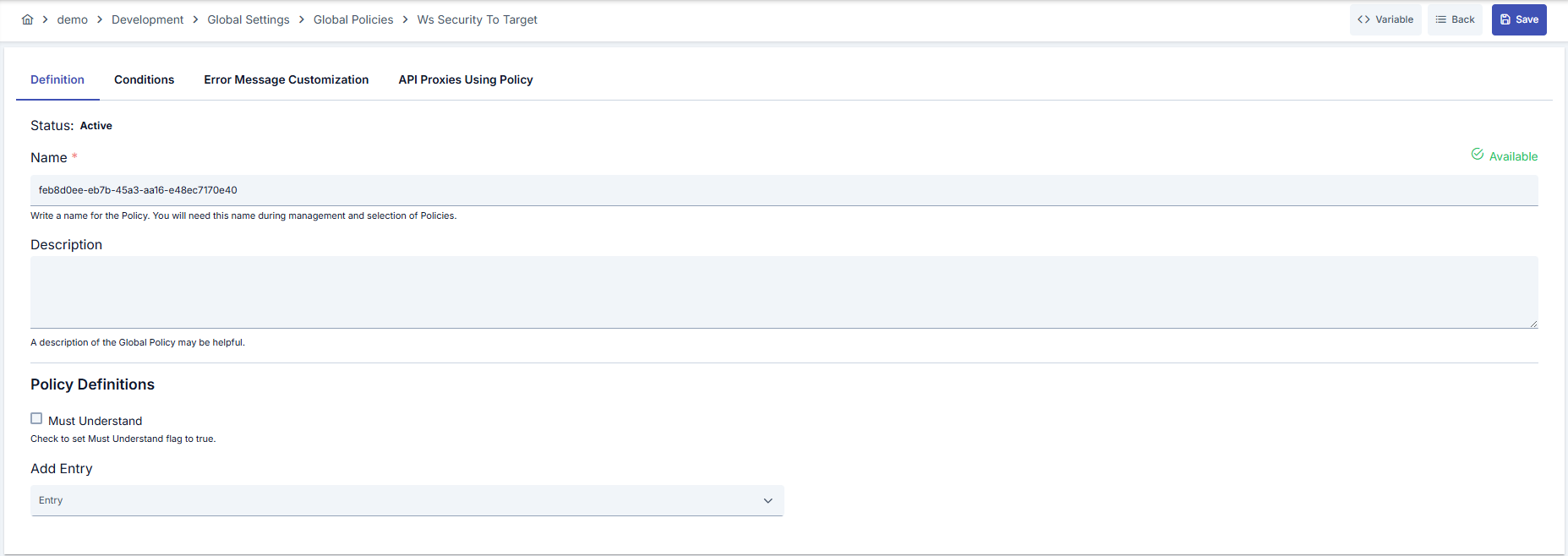
Configuration Steps
| Step | Description / Operation |
|---|---|
| Step 1: Going to Creation Page | - Go to Development → Global Settings → Global Policies → WS Security To Target section from the left menu. - Click the [+ Create] button at the top right. |
| Step 2: Entering Basic Information | Policy Status: Shows Active/Passive status. New policies are active by default. Name (Required): Example: Production_WSST- Enter a unique name, it cannot start with a space. - System automatically checks. Green checkmark: available. Red cross: existing name. Description: Example: "Adds WS-Security to target SOAP service" - Max. 1000 characters. - Explain the purpose of the policy. |
| Step 3: Variable Usage | - In the action button area at the top of the page, you can use the [<> Variable] button to select dynamic values. - Using context/global variable expressions, you can manage policy parameters with variable-based values instead of fixed values. - This reduces manual update effort when values change and provides operational convenience. - For detailed information, review Dynamic Variables. |
| Step 4: Defining WS-Security Entries | - Enable Must Understand flag if necessary.- Select required modules (Timestamp, UsernameToken, Encryption, Signature) via Add Entry.- Arrange entry order with drag-and-drop according to required workflow. |
| Step 5: Setting Encryption Parameters | - Select keystore to be used in Encryption section or open new keystore.- Determine key identifier and symmetric/key encryption algorithms according to options supported by target service. - Add XML elements to be encrypted to Encryption Parts table. |
| Step 6: Setting Signature Parameters | - Select signature keystore in Signature section.- Determine Signature, Canonicalization, and Digest algorithms. - Fill credential fields in scenarios requiring Custom Key Info. - Add fields to be signed to Signature Parts table. |
| Step 7: Defining Condition (Optional) | - Go to the Condition tab. - Conditions determine when the policy will be active. Examples: - Environment-based: Header = X-Environment, Operator = Equals, Value = production- API Key-based: Header = X-API-Key, Starts With = PROD-- Endpoint-based: Path = /api/admin/*If no condition is defined, the policy is always active For details, you can refer to: Conditions |
| Step 8: Customizing Error Message (Optional) | - Go to the Error Message Customization tab. - Customize the message to be returned when access is denied. Default: { "statusCode": 403, "message": "[Default error message]" }Custom: { "statusCode": 403, "errorCode": "[CUSTOM_ERROR_CODE]", "message": "[Custom message]" } |
| Step 9: Saving | - Click the [Save] button at the top right. Checklist: Unique name. Required fields filled. At least one WS-Security component selected. Result: - Policy is added to the list. - Can be linked to APIs. - If it's a global policy, it is automatically applied. |
For the description of Conditions and Error Message Customization panels, you can refer to the Conditions section on the What is Policy? page.
For a complete guide on all layers, priority order and scenario examples of the error message configuration system, see the Error Message Configuration Guide page.
Deleting the Policy
For the deletion steps of this policy and the operations to be applied when it is in use, you can refer to the Removing Policy from Flow section on the Policy Management page.
Exporting/Importing the Policy
For the export and import steps of this policy, you can refer to the Export/Import page.
Linking the Policy to API
For the process of how this policy will be linked to APIs, you can refer to the Adding Policy to Flow section on the Policy Management page.
Advanced Features
| Feature | Description and Steps |
|---|---|
| Key Identifier Modes | - Select Binary Token, Issuer Serial, or Custom Key Info according to target service request. - Enter identifier values as required when Custom is selected. - Specify embedded key name for Embedded Key Info. |
| Part-Based Security | - Add XML elements to table for encryption or signature. - Protect only content or entire node with Content or Element selection. - Make test calls to verify namespace matching. |
| Multiple Keystore Management | - Define two separate keystores if different certificates are needed in integrations. - Use + button to open new keystore when needed.- Secret Manager updates are automatically reflected in list. |
Best Practices
Things to Do and Best Practices
| Category | Description / Recommendations |
|---|---|
| Keystore Management | Bad: Keeping keystore password in shared document. Good: Storing password in secret vault. Best: Managing keystore with Apinizer Secret Manager and restricting access based on roles. |
| Algorithm Selection | Bad: Using default SHA1 signature in every environment. Good: Selecting strongest algorithm supported by service. Best: Performing periodic security review with current algorithms such as RSA_SHA256 or AES_256_CBC. |
| Component Ordering | Bad: Leaving random ordering. Good: Following order in service documentation. Best: Validating ordering according to security test results and performing regression tests on changes. |
| Policy Naming | Bad: Generic names (e.g., "policy1"). Good: Adding environment and scope (e.g., "Prod_WSST"). Best: Using {Environment}_{Service}_{Components} format and matching with governance reports. |
| UsernameToken Management | Bad: Manually updating passwords. Good: Planning periodic password rotation. Best: Retrieving password from external secret vault and automatically updating with Apinizer variables. |
Security Best Practices
| Security Area | Description / Warnings |
|---|---|
| Certificate Lifecycle | Track expiration dates of keystore certificates, do not ignore expiry warnings. |
| Nonce and Created Usage | Keep Nonce and Created fields active in UsernameToken to prevent replay attacks. |
| Must Understand Flag | Must mark flag if target service indicates WS-Security tags are mandatory. |
| Digest Algorithm Currency | Prefer SHA256+ options instead of fragile algorithms such as SHA1 or MD5. |
| Error Message Masking | Do not share sensitive details in customized error messages, use general error codes. |
Things to Avoid
| Category | Description / Warnings |
|---|---|
| Missing Keystore Assignment | Why avoid: Policy errors if Encryption/Signature is enabled without keystore. Alternative: First define and select relevant keystore in Secret Manager. |
| Wrong Namespace Definition | Why avoid: Target element cannot be found, encryption/signature is skipped. Alternative: Copy correct namespace from WSDL or sample response. |
| Improper Ordering | Why avoid: Some services validate order, wrong order is rejected. Alternative: Match ordering with documentation, verify with test calls. |
| Fixed Passwords | Why avoid: Password leak risks entire integration. Alternative: Change passwords periodically and keep in secret vault. |
Performance Tips
| Criterion | Recommendation / Impact |
|---|---|
| Cryptographic Load | Recommendation: Enable only necessary components. Impact: Latency decreases by removing unnecessary encryption. |
| Keystore Size | Recommendation: Limit keystore to only necessary certificates. Impact: Memory usage decreases, loading time shortens. |
| Digest Algorithm | Recommendation: SHA256 is optimum in most scenarios. Impact: Balances CPU cost while maintaining security/performance balance. |
| Number of Parts | Recommendation: Keep encrypted/signed elements at minimum level. Impact: Message size decreases, target service processing time shortens. |
| Cache Usage | Recommendation: Store keystore access results in Cache. Impact: Certificate reading time decreases, response time remains stable. |
Frequently Asked Questions (FAQ)
| Category | Question | Answer |
|---|---|---|
| General | When is WS Security To Target policy necessary? | Should be used in all scenarios where target SOAP service requires WS-Security (Timestamp, UsernameToken, Encryption, or Signature). |
| General | Is configuration lost when I deactivate the policy? | No, parameters are preserved in passive mode; applied the same way when reactivated. |
| Technical | How can I add keystore? | Create keystore in JKS format in Secret Manager; add to list and select with + button in policy screen. |
| Technical | When should Custom Key Info be used? | Custom Key Info should be selected and identifier fields should be filled when target service expects a special key identifier in signature. |
| Usage | How can I hide UsernameToken password? | Store password with Apinizer Secret Manager variable and reference relevant variable in policy. |
| Usage | Is deploy needed after matching with API Proxy? | Yes for global policies; deployment operation must be performed before changes are transferred to live. |