WS-Security Decrypt
This document explains the detailed usage of a specific policy. If you are using Apinizer policy structure for the first time or want to learn the general working principles of policies, we recommend reading the What is Policy? page first.
Overview
What is its Purpose?
- Enables plain text content transmission to application by decrypting WS-Security encrypted SOAP messages at API Proxy (API Proxy Server) layer.
- Manages message decryption keys in a centralized key store and prevents unauthorized access.
- Decryption operation runs only in specific Endpoint flows through condition-based activation.
- Provides meaningful feedback to consumer applications with customizable error messages.
Working Principle
- Request Arrival: For each HTTP/HTTPS request arriving at the API Gateway, the source IP address of the request is identified.
- Policy Check: If the WS Security Decryption policy is active, the system checks in the following order:
- Is a Condition defined? If so, is the condition met?
- Is the policy active (active=true)?
- Is a Variable used or is Apinizer default?
- Decryption Check: WS-Security
EncryptedDatablocks in SOAP envelope are examined, private key is retrieved from selected key store, and message content is decrypted. - Decision Making:
- Match Found: Content is decrypted with key in key store and message content is transmitted to backend service as plain text.
- No Match: Policy fails in case of key ID mismatch or missing WS-Security header, request continuation is stopped.
- Error Handling: Customizable HTTP status code and error message are returned for requests that do not comply with the policy rule.
Features and Capabilities
Basic Features
- SOAP Decryption Engine: Analyzes
EncryptedKeyandEncryptedDatablocks in WS-Security standard, retrieves key from keystore, decrypts content, and updates message. - Key Store Integration: Lists keystores from organization-specific KeyStore service, associates selected store with policy, and filters according to project.
- Flexible Error Management: Provides detailed feedback in decryption errors with default and customized error messages.
- Active/Passive Status Control: Easily change the active or passive status of the policy (active/passive toggle). In passive state, the policy is not applied but its configuration is preserved.
- Condition-Based Application: Determine when the policy will be applied by creating complex conditions with Query Builder (e.g., only for specific endpoints or header values).
Advanced Features
- Case-Insensitive Key Matching: Matches
KeyIdentifiervalues in encrypted blocks independently of case sensitivity withallowCaseInsensitiveIdoption. - Global/Local Policy Flow: Share same configuration globally and customize with local copies, automatic name uniqueness check during localization.
- Concurrent Usage Tracking: Provides impact analysis before change or deletion by showing list of APIs and Proxy Groups using the policy.
- Export/Import Feature: Export policy configuration as a ZIP file. Import to different environments (Development, Test, Production). Version control and backup capability.
- Policy Group and Proxy Group Support: Manage multiple policies within Policy Group. Bulk policy assignment to Proxy Groups. Centralized update and deployment operations.
- Deploy and Versioning: Deploy policy changes to live environment. See which API Proxies use it (Policy Usage). Proxy Group and Policy Group usage reports.
Usage Scenarios
| Scenario | Situation | Solution (Policy Application) | Expected Behavior / Result |
|---|---|---|---|
| SOAP Secure Traffic | SOAP messages from external system arrive encrypted with WS-Security | ProductionDecryptKS keystore belonging to project is selected in global policy. | Message content is decrypted, backend service does not see encrypted data. |
| Partial Decryption | Decryption needed only for management service | Path = /api/admin/* is defined in condition. | Management calls are decrypted, others are skipped. |
| Key Rotation | New certificate will be put into service | New keystore is created and updated in policy. | New key is used without interruption. |
| Case ID Mismatch | Supplier system sends KeyIdentifier values with different case | allowCaseInsensitiveId is enabled. | Key ID differences are tolerated, errors do not occur. |
| Test Environment Isolation | Different keystore should be used in test environment | Local policy is created and assigned to relevant API. | Test key is used only in that API. |
| Error Analysis | Meaningful notification needed when decryption fails | Custom error message is configured, 403 status code is selected. | Descriptive JSON error is returned to client. |
| Performance Monitoring (optional) | Decryption is costly for large messages | Policy is disabled according to content type in condition. | Unnecessary decryption is prevented, latency decreases. |
Configuring Policy Parameters
At this step, users can create a new policy or configure existing policy parameters to define access rules. The defined parameters directly affect how the policy works (e.g., which IPs will be allowed, geographical restrictions, conditional activations, etc.). This way, the policy can be customized according to organization-specific requirements and managed centrally.
Creating a New WS Security Decryption Policy
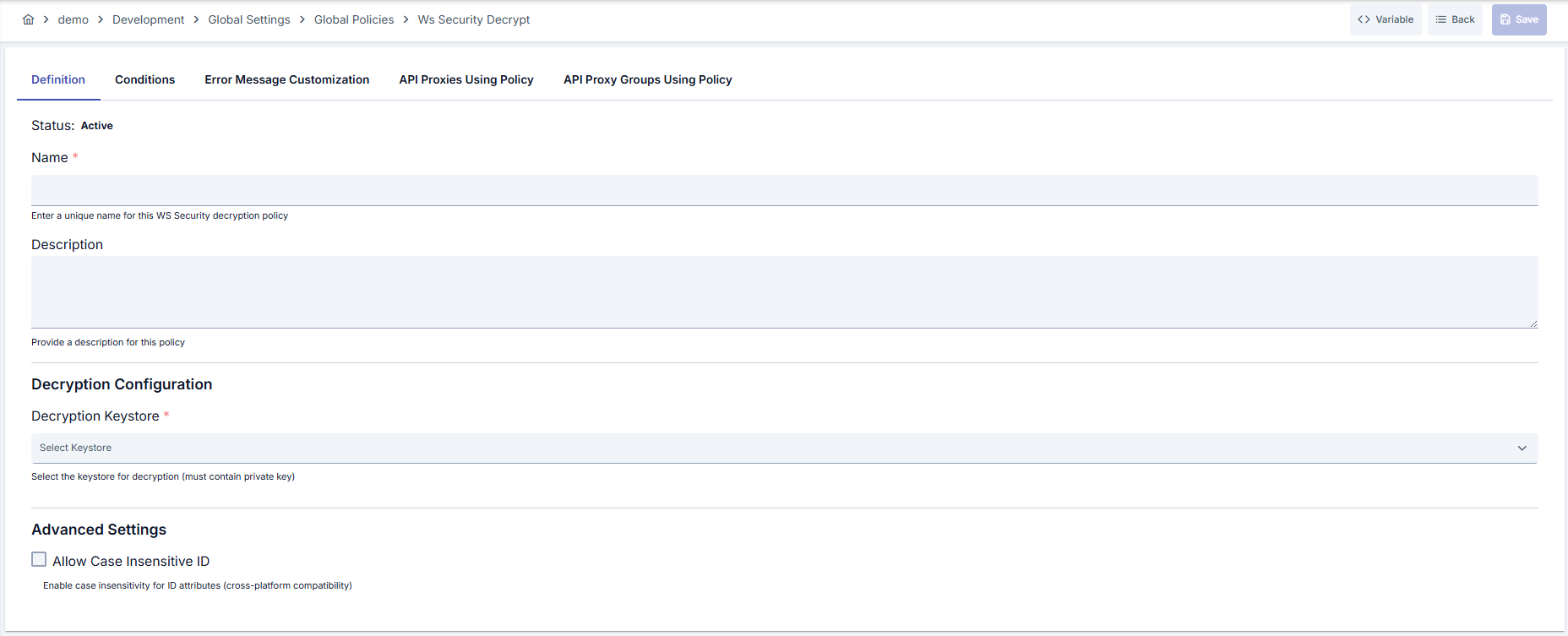
Configuration Steps
| Step | Description / Operation |
|---|---|
| Step 1: Going to Creation Page | - Go to Development → Global Settings → Global Policies → WS Security Decryption section from the left menu. - Click the [+ Create] button at the top right. |
| Step 2: Entering Basic Information | Policy Status: Shows Active/Passive status. New policies are active by default. Name (Required): Example: Production_WsDecrypt- Enter a unique name, it cannot start with a space. - System automatically checks. Green checkmark: available. Red cross: existing name. Description: Example: "SOAP decryption for banking integrations" - Max. 1000 characters. - Explain the purpose of the policy. |
| Step 3: Variable Usage | - In the action button area at the top of the page, you can use the [<> Variable] button to select dynamic values. - Using context/global variable expressions, you can manage policy parameters with variable-based values instead of fixed values. - This reduces manual update effort when values change and provides operational convenience. - For detailed information, review Dynamic Variables. |
| Step 4: WS-Security Decryption Parameters | Decryption KeyStore (Required): Select relevant keystore from list. Keystore contains decryption key. KeyStore Tooltips: Verifies that selected source is appropriate for project scope. |
| Step 5: Case-Insensitive ID Control (If Any) | Allow Case-Insensitive Identifier: Ignore case difference of KeyIdentifier fields by checking. Enable if SOAP provider uses different case. |
| Step 6: Decryption Validation Notes (If Any) | Manually send SOAP message in test environment and check error logs; error code 401 is returned in case of wrong keystore selection. |
| Step 7: Defining Condition (Optional) | - Go to the Condition tab. - Conditions determine when the policy will be active. Examples: - Environment-based: Header = X-Environment, Operator = Equals, Value = production- API Key-based: Header = X-API-Key, Starts With = PROD-- Endpoint-based: Path = /api/admin/*If no condition is defined, the policy is always active For details, you can refer to: Conditions |
| Step 8: Customizing Error Message (Optional) | - Go to the Error Message Customization tab. - Customize the message to be returned when access is denied. Default: { "statusCode": 403, "message": "[Default error message]" }Custom: { "statusCode": 403, "errorCode": "[CUSTOM_ERROR_CODE]", "message": "[Custom message]" } |
| Step 9: Saving | - Click the [Save] button at the top right. Checklist: Unique name. Required fields filled. At least one WS-Security key configuration exists Result: - Policy is added to the list. - Can be linked to APIs. - If it's a global policy, it is automatically applied. |
For the description of Conditions and Error Message Customization panels, you can review the Conditions and Error Message Customization sections on the What is Policy? page.
For a complete guide on all layers, priority order and scenario examples of the error message configuration system, see the Error Message Configuration Guide page.
Deleting the Policy
For the deletion steps of this policy and the operations to be applied when it is in use, you can refer to the Removing Policy from Flow section on the Policy Management page.
Exporting/Importing the Policy
For the export and import steps of this policy, you can refer to the Export/Import page.
Linking the Policy to API
For the process of how this policy will be linked to APIs, you can refer to the Linking Policy to API section on the Policy Management page.
Advanced Features
| Feature | Description and Steps |
|---|---|
| KeyStore Backup Integration | - Define version tag in keystore service. - Select correct tag when saving policy. - Archive old key with export after rotation. |
| Multi-Layer Condition Management | - Use AND/OR blocks in Query Builder.- Exclude non-SOAP requests with Header and Path combinations. - Validate condition text with preview. |
| Error Scenario Test Automation | - Define custom code in Error Message tab. - Verify this code in test automation. - Track failed attempts in Apinizer logs. |
Best Practices
Things to Do and Best Practices
| Category | Description / Recommendations |
|---|---|
| Key Management | Bad: Sharing single keystore with all environments. Good: Using environment-based separate keystores. Best: Providing segmentation based on environment + usage purpose (transaction type). |
| Condition Design | Bad: Applying to all traffic without defining conditions. Good: Adding path-based filter. Best: Determining minimum scope with Path + Header + Method combination. |
| Error Visibility | Bad: Not changing default error message. Good: Adding general error message. Best: Defining JSON message containing error code and support contact information. |
| Version Management | Bad: Editing without tracking changes. Good: Manually documenting changes. Best: Taking export files into version control and creating change history. |
| Test Processes | Bad: Testing on Production Environment. Good: Performing manual verification in test environment. Best: Regularly testing decryption and error scenarios with automation scripts. |
Security Best Practices
| Security Area | Description / Warnings |
|---|---|
| Key Storage | Restrict keystore access permissions, keep key files in encrypted storage area. |
| Certificate Rotation | Create certificate renewal schedule, import new keystore before rotation and prepare policy. |
| Condition Security | Configure conditions only according to trusted traffic, try not to use open wildcards. |
| Audit Logs | Log decryption errors and success events and forward to SIEM. |
| Authorization Audit | Limit policy editing and deployment operations to ROLE_MANAGE_GLOBAL_POLICIES. |
Things to Avoid
| Category | Description / Warnings |
|---|---|
| Wrong Keystore Selection | Why avoid: Decryption fails with wrong key, 401 is returned. Alternative: Standardize keystore name according to environment name and verify in selection. |
| Unconditional Application | Why avoid: Unnecessary processing load occurs in non-encrypted messages. Alternative: Add condition that checks WS-Security header. |
| Passive Policy Tracking | Why avoid: Policy may be disabled when needed. Alternative: Regularly review passive policies, delete if needed. |
| Error Message Privacy | Why avoid: Too much technical detail may leak. Alternative: Give general message and keep details in logs. |
Performance Tips
| Criterion | Recommendation / Impact |
|---|---|
| Message Size | Recommendation: Enable compression for large SOAP bodies. Impact: Transfer time after decryption shortens. |
| Condition Evaluation | Recommendation: Do not use unnecessary regex in conditions. Impact: Policy evaluation time decreases. |
| Keystore Access | Recommendation: Set Cache duration of keystore service. Impact: Latency decreases in key access, throttle risk decreases. |
| Concurrent Requests | Recommendation: Use together with Throttling and Rate Limiting policies. Impact: Decryption queue is managed in sudden loads. |
| Log Level | Recommendation: Open debug logs only in Development environment. Impact: Production Environment performance is preserved. |
Frequently Asked Questions (FAQ)
| Category | Question | Answer |
|---|---|---|
| General | Which message types does WS Security Decryption policy support? | You can use the policy for SOAP-based WS-Security EncryptedData and EncryptedKey structures; REST JSON messages are not supported. |
| General | What happens when policy is made passive? | Policy conditions do not work, decryption is not performed; configuration is preserved and can be reactivated. |
| Technical | When should allowCaseInsensitiveId be enabled? | Enable to resolve incompatibility if external system sends KeyIdentifier values with different case variations. |
| Technical | Is deploy needed after keystore change? | Yes for global policy; after change is saved, deploy and ensure update in linked API Proxies. |
| Usage | Can multiple WS Security Decryption policies be used on the same API? | Only one policy should be active in the same flow; you can create local copies for different Endpoints. |
| Usage | Where can I customize error message? | You can edit status code and JSON body in Error Message Customization tab in policy form. |