WS-Security Encryption
This document explains the detailed usage of a specific policy. If you are using Apinizer policies for the first time or want to learn the general working principles of policies, we recommend reading the What is Policy? page first.
Overview
What is its Purpose?
- Ensures data privacy by requiring encryption of sensitive fields in SOAP-based integrations with the certificate set expected by the target system.
- Provides a reusable security layer compliant with corporate standards with selectable encryption algorithms and key identifier types.
- Enables implementation of differentiated protection strategies by field by performing fragment-based encryption on service messages passing through API Proxy.
- Creates a flexible and controlled security mechanism that is applied only in calls where the target system has WS-Security support, with mustUnderstand flag and condition-based application support.
Working Principle
- Request Arrival: For each HTTP/HTTPS request arriving at the API Gateway, the source IP address of the request is identified.
- Policy Check: If the WS-Security Encryption policy is active, the system checks in the following order:
- Is a Condition defined? If so, is the condition met?
- Is the policy active (active=true)?
- Is a Variable used or is Apinizer default used?
- WS-Security Encryption Check: The policy encrypts XML elements or contents defined in encPartList using the certificate in the selected keystore, with specified encodeType and algorithms.
- Decision Making:
- Match Found: All parts are successfully encrypted, SOAP envelope is updated and sent to target endpoint.
- No Match: Policy is not applied, request is forwarded in original form.
- Error Handling: Customizable HTTP status code and error message are returned for requests that do not comply with the policy rule.
Features and Capabilities
Basic Features
- Certificate-Based Encryption: Encryption is performed with the public key expected by the target system by selecting X.509 certificates stored in corporate keystores.
- Flexible Encryption Algorithms: Selection can be made from common WS-Security algorithms such as AES 128/192/256-CBC and RSA/RSA-OAEP.
- Target Fragment Management: XML fragments determined by namespace and element name can be encrypted at content or element level.
- Active/Passive Status Control: Easily change the active or passive status of the policy (active/passive toggle). In passive state, the policy is not applied but its configuration is preserved.
- Condition-Based Application: Determine when the policy will be applied by creating complex conditions with Query Builder (e.g., only for specific endpoints or header values).
Advanced Features
- mustUnderstand Enforcement: Ensures that the target service must process the WS-Security block by marking the mustUnderstand flag in the SOAP header.
- Embedded Key Name Management: When Embedded Key Info is selected, key name is defined to meet special requirements of the target system.
- Multiple Fragment Configuration: Supports complex message templates by simultaneously encrypting multiple SOAP Segments.
- Export/Import Feature: Export policy configuration as a ZIP file. Import to different environments (Development, Test, Production). Version control and backup capability.
- Policy Group and Proxy Group Support: Manage multiple policies within Policy Group. Bulk policy assignment to Proxy Groups. Centralized update and deploy operations.
- Deploy and Versioning: Deploy policy changes to live environment. See which API Proxies use it (Policy Usage). Proxy Group and Policy Group usage reports.
Usage Scenarios
| Scenario | Status | Solution (Policy Application) | Expected Behavior / Result |
|---|---|---|---|
| Finance SOAP Service | Financial credit calculation service expects customer TCKN field encrypted. | Relevant certificate is selected from keystore, CustomerInfo element is added to encPartList as ELEMENT. | Customer information in SOAP envelope is encrypted, target system requirement is met. |
| Health Information Sharing | SOAP message carrying health data contains sensitive fields. | MedicalRecord element is marked as CONTENT, AES-256 is selected. | Content can only be decrypted at target system, data privacy is protected. |
| Multiple Endpoint Management | Need to use the same policy in different API Proxies. | Global policy is created, assigned to relevant API Proxies through Policy Group. | Centralized management is provided, updates propagate from single point. |
| Signed and Encrypted Message | Target system expects both signature and encryption. | WS-Security Encryption policy handles encryption part, additionally WS-Security Signature policy is applied. | Integrity and privacy are ensured through combined use. |
| Temporary Key in Test Environment | Different keystore required for test environment. | Copied to test environment with Import, encKeyStoreId is updated to point to test keystore. | Encryption continues with environment-specific certificate, live configuration is preserved. |
| mustUnderstand Requirement | Target SOAP server indicates that WS-Security header is mandatory. | mustUnderstand is marked, custom error message is defined for failure cases. | If target service does not process header, error is returned, issue is quickly detected. |
| Content-Based Condition | Encryption required only in certain operations. | Policy is applied for relevant operations by checking SOAPAction header in Condition. | Unnecessary encryption is prevented, performance is optimized. |
Configuring Policy Parameters
In this step, users can create a new policy or configure existing policy parameters to define access rules. The defined parameters directly affect how the policy works (e.g., which IPs will be allowed, geographical restrictions, conditional activations, etc.). This allows the policy to be customized according to organization-specific requirements and managed centrally.
Creating a New WS-Security Encryption Policy
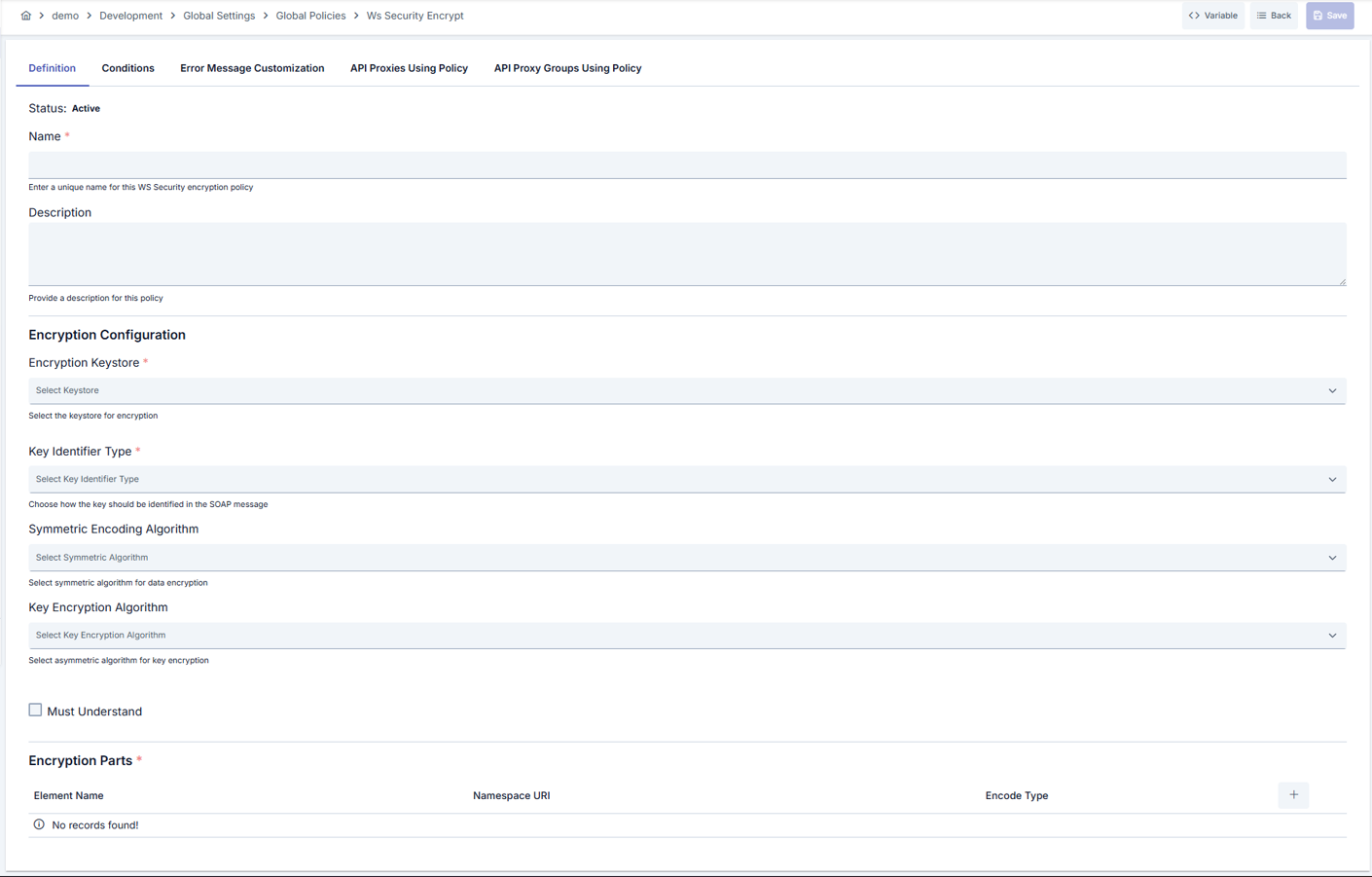
Configuration Steps
| Step | Description / Operation |
|---|---|
| Step 1: Going to Creation Page | - Go to Development → Global Settings → Global Policies → WS-Security Encryption from the left menu. - Click the [+ Create] button at the top right. |
| Step 2: Entering Basic Information | Policy Status (Policy Status): Shows Active/Passive status. New policies are active by default. Name (Name) Required: Example: Production_WSS_Encrypt- Enter a unique name, does not start with space. - System automatically checks. Green checkmark: available. Red X: existing name. Description (Description): Example: "WS-Security encryption settings for Finance SOAP calls" - Max. 1000 characters. - Explain the purpose of the policy. |
| Step 3: Variable Usage | - In the action button area at the top of the page, you can use the [<> Variable] button to select dynamic values. - Using context/global variable expressions, you can manage policy parameters with variable-based values instead of fixed values. - This reduces manual update effort when values change and provides operational convenience. - For detailed information, review Dynamic Variables. |
| Step 4: Selecting Encryption Key and Identifier | - Select the certificate for the target environment from the Key Store list. - Determine how the certificate will be referenced in the message in the Key Identifier Type field (e.g., ISSUER_NAME_AND_SERIAL_NUMBER).- When Embedded Key Info is selected, enter the key name expected by the target system in the Embedded Key Name field. |
| Step 5: Setting Algorithms and mustUnderstand Flag (If applicable) | - Select content encryption algorithm with Symmetric Encoding Algorithm (AES-128/192/256). - Determine how the symmetric key will be wrapped with Key Encryption Algorithm (RSA or OAEP). - Ensure that the SOAP header is mandatorily processed by the target by checking the mustUnderstand box. |
| Step 6: Defining Encryption Fragments (If applicable) | - Click the Add button to add a new record to encPartList.- Enter the QName of the element to be encrypted (excluding prefix) in the Name field.- Define the target namespace with the Namespace field (optional).- Select CONTENT (content only) or ELEMENT (complete node) as Encode Type.- At least one fragment must be defined for each call. |
| Step 7: Defining Condition (Optional) | - Go to the Condition tab. - Conditions determine when the policy will be active. Examples: - Environment-based: Header = X-Environment, Operator = Equals, Value = production- API Key-based: Header = X-API-Key, Starts With = PROD-- Endpoint-based: Path = /api/admin/*If no condition is defined, the policy is always active For details, see: Conditions |
| Step 8: Error Message Customization (Optional) | - Go to the Error Message Customization tab. - Customize the message to be returned when access is denied. Default: { "statusCode": 403, "message": "[Default error message]" }Custom: { "statusCode": 403, "errorCode": "[CUSTOM_ERROR_CODE]", "message": "[Custom message]" } |
| Step 9: Saving | - Click the [Save] button at the top right. Checklist: Unique name. Required fields filled. At least one encrypted fragment exists Result: - Policy is added to the list. - Can be connected to APIs. - If global policy, automatically applied. |
For the description of Conditions and Error Message Customization panels, you can review the Conditions and Error Message Customization sections on the What is Policy? page.
For a complete guide on all layers, priority order and scenario examples of the error message configuration system, see the Error Message Configuration Guide page.
Deleting the Policy
For the deletion steps of this policy and the operations to be applied while in use, you can refer to the Removing Policy from Flow section on the Policy Management page.
Exporting/Importing the Policy
For the export and import steps of this policy, you can refer to the Export/Import page.
Connecting the Policy to API
For the process of how this policy will be connected to APIs, you can refer to the Connecting Policy to API section on the Policy Management page.
Advanced Features
| Feature | Description and Steps |
|---|---|
| Certificate Rotation | - Add new certificate to keystore. - Update encKeyStoreId on policy. - Enable certificate change in all connected API Proxies by deploying. |
| Multiple Fragment Encryption Strategy | - Add different elements to encPartList. - Select appropriate Encode Type for each element.- Verify that encrypted fields are correctly decrypted at target with test calls. |
| Compatibility Testing with mustUnderstand | - Activate mustUnderstand flag. - Verify target service's capacity to process WS-Security block. - Provide customized SOAP Fault message in error cases. |
Best Practices
Things to Do and Best Practices
| Category | Description / Recommendations |
|---|---|
| Certificate Management | Bad: Noticing expired certificates in production. Good: Manually tracking certificate expiration dates in keystore. Best: Including certificate renewals in CI/CD pipeline and receiving automatic notifications. |
| Algorithm Selection | Bad: Using default AES-128 algorithm in all integrations. Good: Preferring AES-256 in critical applications. Best: Creating policy groups that mandate strong algorithms according to target system support. |
| Fragment Determination | Bad: Encrypting entire SOAP envelope. Good: Encrypting sensitive fields as CONTENT.Best: Making minimal but sufficient encryption with ELEMENT and CONTENT mix according to target system requirements. |
| mustUnderstand Usage | Bad: Leaving mustUnderstand flag unnecessarily open. Good: Opening after verifying target system's WS-Security support. Best: Testing mustUnderstand combinations in QA environment and moving to production only in verified integrations. |
| Inter-Environment Management | Bad: Manually updating policy in each environment. Good: Moving configuration with Export/Import. Best: Storing policy versions in Git repository and distributing to environments with pipeline. |
Security Best Practices
| Security Area | Description / Warnings |
|---|---|
| Keystore Access | Keep keystore user permissions minimal, give read permission only to roles that need it. |
| Certificate Accuracy | Verify by matching certificate fingerprint and issuer information with target system. |
| Algorithm Currency | Quickly update weakening algorithms by following security bulletins. |
| Error Message Content | Do not reveal technical details in customized error messages, only publish codes necessary for tracking. |
| Policy Usage Audit | Regularly audit which API Proxies use the policy from Policy Usage screen and remove unauthorized assignments. |
Things to Avoid
| Category | Description / Warnings |
|---|---|
| Wrong Namespace Usage | Why avoid: Namespace error leaves unencrypted fields. Alternative: Review XML sample and use exact namespace URI. |
| Keystore ID Gap | Why avoid: Policy produces 500 error when certificate is not found. Alternative: Pass mandatory field validation before saving. |
| Incompatible Algorithm Selection | Why avoid: Target system may not be able to decrypt. Alternative: Verify the algorithm list supported by the other party. |
| mustUnderstand Wrong Usage | Why avoid: SOAP Fault occurs when header is not processed. Alternative: Enable mustUnderstand only in truly mandatory integrations. |
Performance Tips
| Criterion | Recommendation / Impact |
|---|---|
| Keystore Access Frequency | Recommendation: Use keystores with memory cache. Impact: Delay decreases during encryption. |
| Fragment Count | Recommendation: Encrypt only necessary XML nodes. Impact: CPU usage decreases, throughput increases. |
| Algorithm Selection | Recommendation: Use AES-128 if security policy allows. Impact: Encryption time shortens. |
| Conditioning | Recommendation: Disable policy in unnecessary calls with Condition. Impact: SOAP message conversion cost decreases. |
| Policy Group Management | Recommendation: Group same encryption requirements under single Policy Group. Impact: Management cost decreases, distribution speeds up. |
Frequently Asked Questions (FAQ)
| Category | Question | Answer |
|---|---|---|
| General | In which scenarios is WS-Security Encryption policy mandatory? | Mandatory in all integrations where sensitive data is carried with SOAP and target system expects encrypted fields. |
| General | Can the policy be created locally? | Yes, local policy can be created per API by copying global configuration with Localize button. |
| Technical | What is the difference between Encode Type CONTENT and ELEMENT? | CONTENT encrypts only the content of the element, ELEMENT wraps the element completely including namespace. |
| Technical | How does mustUnderstand flag affect encryption? | mustUnderstand only ensures mandatory processing of SOAP header; does not change encryption process but produces SOAP Fault if target is incompatible. |
| Usage | How do I safely enable keystore change? | Add new certificate, update policy, validate in test environment, then deploy. |
| Usage | What should I do when fields that need to be encrypted change? | Update records in encPartList, add new element name and namespace and save policy again. |