Rate Limit Control List (RLCL)
The Rate Limit Control List described here was retired in 2026.09 and its screen was removed in 2026.09.3. Existing lists were converted automatically into Limit Plans and assignments at upgrade; the same targeted rules are now written as callers matching a condition on the plan's Target Audience tab. The article is kept for the reasoning behind the design.
Why Do We Need This?
APIs are everywhere in the digital world! Applications talk to each other, systems share data, devices are constantly connecting. This level of open, intense communication inevitably brings certain security risks. Abuse, attacks, service outages—so it's no longer enough to ask only "who can access?" We also need to ask "who can access how much?"
In the dynamic world of API development and management, controlling the flow of incoming requests is essential to maintain system stability, ensure fair usage, and prevent abuse.
That's exactly where we at Apinizer come in:
Our Inspiration: Access Control Lists (ACL)
The "Access Control List" (ACL) concept, used in security for many years, determines who can access certain resources. It is list-based, target-oriented, and contains clear rules. At Apinizer we thought: "Why not use this logic for rate limiting?"
And Rate Limit Control List (RLCL) was born.
ACL vs RLCL: Apinizer's Powerful Dual Solution
Apinizer offers both ACL and RLCL solutions for security and traffic management. The two solutions complement each other to fully protect your APIs:
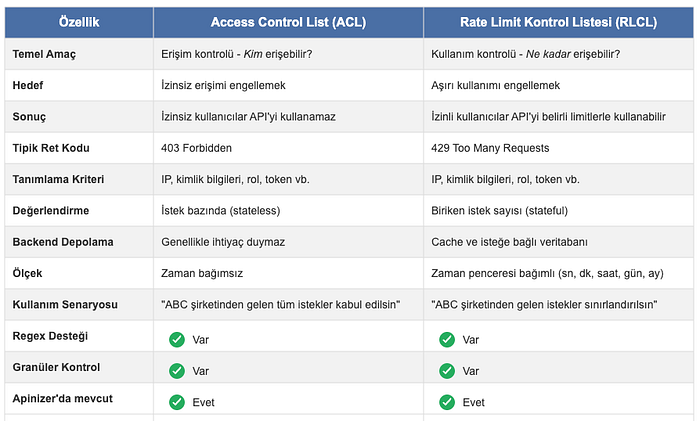
By using these two powerful mechanisms together, you can make your API security complete. First define who can access with ACL, then define the limits of that access with RLCL.
So What Exactly Is RLCL?
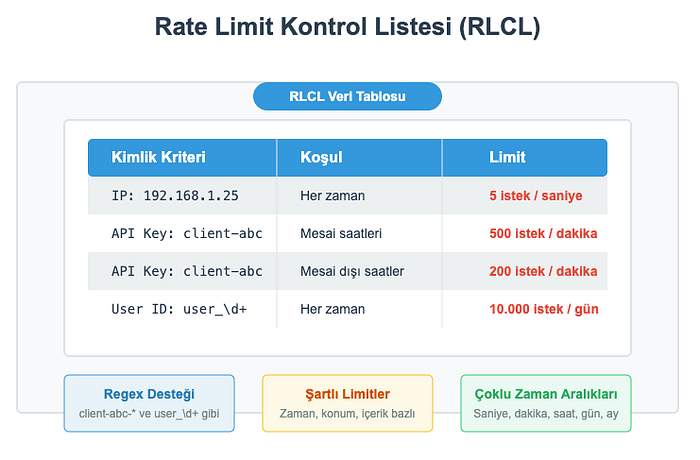
As the name suggests: a system that lets you define rate limit rules in a list-based, targeted way. You no longer have to apply a single limit to every IP, every API key, every user. You can define custom limits such as:
- 5 requests per second for IP
192.168.1.25, - 500 requests per minute for API keys starting with
client-abc-*, - 10,000 requests per day for specific user IDs
You can also use operator-based flexible target audience conditions (such as equals, contains, starts with, ends with, is in the list) or conditional definitions (e.g. different limits during business hours vs. outside). So the era of "one rule for everyone" is over!
How Does RLCL Work in Apinizer?
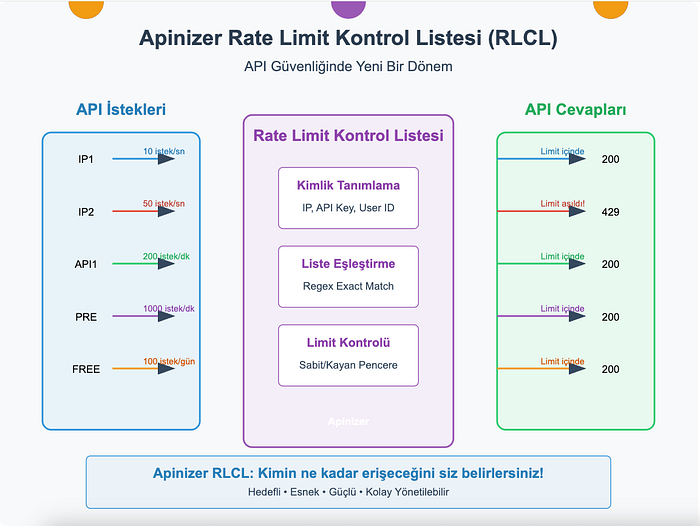
It's not complicated; the steps are clear:
- A request arrives.
- The identity of the request is determined: depending on the selected identity source, either the value of a variable (IP, header, user ID, etc.) or the user resolved from authentication is used.
- The system checks whether this identity belongs to the target audience (is it in the identity list, or does it match one of the target audience conditions?).
- If it is in the target audience, the rate limit rule defined specifically for it is applied.
- If it is not in the target audience, the out-of-target action you defined is applied: the request is either blocked, or a general quota reserved for out-of-target requests is applied. When a general quota is used, you can choose between a single shared counter for all out-of-target identities, or a separate counter for each out-of-target identity.
- If the limit is exceeded, the request is rejected (usually with a 429 Too Many Requests error).
- Optionally, rate limit status can be added to response headers (
X-RateLimit-*).
Apinizer RLCL Flexibility
Apinizer's Rate Limit Control List solution stands out for its flexibility:
Time Window Options
RLCL supports both Fixed Window (FIXED) and Sliding Window (SLIDING) approaches:
- Fixed Window: Counters are reset at fixed time intervals (e.g. every hour)
- Sliding Window: For any moment, requests in the last X minutes/hours/days are evaluated
This lets you offer solutions suited to different business scenarios.
Dynamic Identity Definition
Apinizer RLCL offers highly flexible options for determining request identity:
- IP address
- API key
- User ID
- Request headers
- Cookie values
- URL parameters
- Request body fields
You can even use combinations of these! For example, you can define special rules for "requests with a certain user ID coming from a certain IP block."
Flexible Target Audience Conditions
RLCL lets you define operator-based flexible conditions to determine the target audience. Each condition consists of an operator and a value; the conditions are evaluated with OR logic. For example:
- All IP addresses starting with
192.168. - API keys that contain a certain value
- User IDs that equal a certain value
- Identities that are in a list of values
This way you can reduce management overhead by defining matching rules instead of individual values.
Simple, Clear Settings
At Apinizer we keep our usual ease-of-use principle and offer you simple, clear interfaces. We handle the hard part in the background. Without worrying about complex rate limiting mechanisms and algorithms, you can meet all your needs with these straightforward settings:
- Name and Description: For easier management.
- Execution Order: Should it run before or after other policies?
- Time Window Type: Fixed or sliding?
- Allowed Request Count: How many requests can pass?
- Time Interval: You can set it in seconds, minutes, hours, days, or months.
- Identity Source: Should the identity be determined from a variable (IP, API key, user ID) or from the user resolved from authentication?
- Target Audience: You can define it as a list or with operator-based conditions.
- Response Headers: Do you want to show rate limit statistics?
- Counting Mode: Should requests rejected for exceeding the limit still count against it? In the default (All requests) mode they do — this is Apinizer's historical behaviour. With Accepted only, a rejected request never consumes the limit.
- Limit Change Action: Determines what happens to the counter in the open window when the allowed request count changes. The default (Clamp to previous limit) clamps the counter to the previous limit value (not the new one), so that when the limit is raised the remaining allowance can be used immediately. The counter can instead be reset only when the limit is raised, or left untouched.
Flexible Execution Order
The rate limit policy can be positioned at multiple points in the request processing flow, giving you precise control over when identity checking and rate limiting occur. You can choose one of six positions:
- Before or after proxy-group policies
- Before or after API-proxy policies
- Before or after API-method policies
The default position is before the API-proxy policies, which allows the policy to check identities in request headers before those headers might be processed or cleared by other policies.
When you choose to resolve the identity from authentication, the policy is automatically locked to run after the API-method policies, because the identity is only available after authentication has completed. The system shows a warning if your selected position runs before an authentication policy, since the identity might not be reliably determined at that point.
Error Message Customization
The responses sent when a rate limit error occurs can be customized to match your API's style and business needs. For each type of rate-limit error (such as rate limit exceeded, identity not in the target list, or identity resolution failure), you can define:
- A custom HTTP status code
- A custom error code
- A custom error message
Beyond these basic fields, you can create a custom message template that becomes the full response body. Templates support variables for the error code, error message, HTTP status code, request details (headers, method, URL), and timestamp information.
For convenience, you can also define a plan-wide global custom message template. This template is used by default for all errors that do not have their own specific template.
Specific error templates take precedence over the global template, which takes precedence over the system default message. This three-level hierarchy ensures that your most precise definitions always apply first.
Why RLCL? What's the Difference?
Granular control: You get clear answers to who can access how much.
Targeted limiting: A single bad actor cannot lock down your entire API.
Flexibility: Partner, customer, service—whoever it is, you can define different SLAs.
Transparency: You can include remaining limit information in responses.
Manageability: Definitions are simple and readable.
Performance: It runs fast with cache support and doesn't slow down your system.
Real-World Examples
-
Free vs. Premium Users: In your freemium service you can apply "100 requests per day" for free users and "50 requests per second" for premium users. Your API stays both accessible and fair.
-
Geography-Based Protection: You can apply different limits to requests from certain countries or IP blocks. This is especially useful for suspicious traffic sources.
-
DDoS Prevention: You can quickly detect IPs sending sudden high traffic and apply special restrictions. Thus you isolate the problem without affecting your other users.
-
Partner Management: You can define specific API usage limits for each business partner. According to everyone's needs—some can make 1000 requests per minute while others make 10 per hour.
Closing Words
At Apinizer we wanted to bring a fresh approach to API security and management. We turned rate limits from just a number into a targeted, flexible, and powerful control tool. Because we know that in the modern API world, "the same rules for everyone" is no longer enough.
Our Rate Limit Control List solution stands out with its adaptable structure for different needs, easy configuration, and strong performance.
With Apinizer, you decide who accesses how much.