Explaining API and API Management to Our Parents
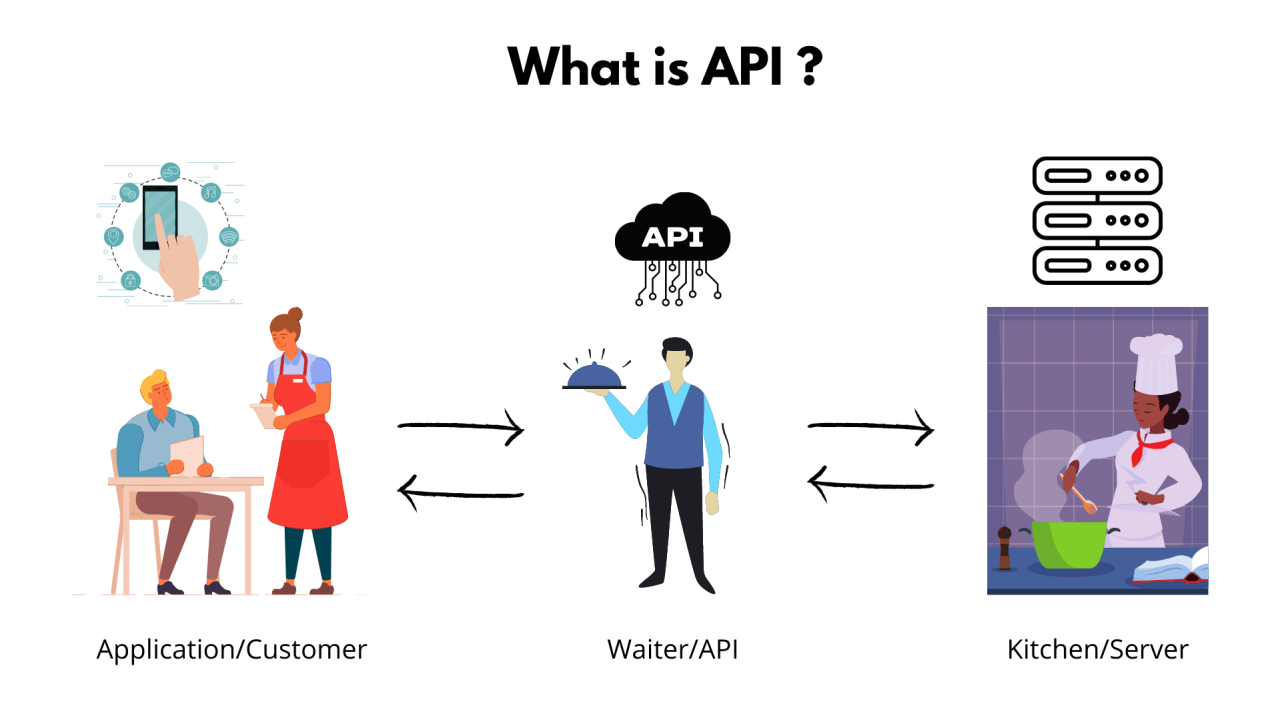
In this article we explain all parts of API Management using a restaurant analogy. When we talk about technical topics, we sometimes forget that not everyone has a technical background. So it’s important to take a step back and find a common language to explain certain terms.
So, what do you do?
Hello, my name is Ertuğrul and I’m a Co-Founder and Developer of the product Apinizer. One of my biggest challenges is explaining to my parents what I do. If I say something like “We’re building Apinizer, we monitor and secure APIs!”, they say “oh, nice” but it doesn’t really convince them or help them fully understand my job.
We need a concrete example to explain what API and API Management are. The restaurant analogy is something everyone can relate to, and you may have seen it in many articles.
The Restaurant Analogy
- Customer (client): We use the same term in API Management. The customer is the party that sends the request and does so through the API.
- API Specification (menu): A restaurant menu is like an API specification (WSDL and Swagger/OpenAPI). On the menu you see what you can order and a description of each item.
- Backend application (kitchen): The kitchen is where your order is prepared. You don’t need to care what goes on in the kitchen; what matters is that your order reaches you the way you wanted it.
- Waiter (API): The waiter is the bridge between the customer and the kitchen. They take orders, pass them to the kitchen, and bring back the results (response). APIs work the same way: they receive requests, process them, and return results.
Your application’s backend is the equivalent of the restaurant kitchen. The kitchen will prepare your food, plate it, and serve it—and with a bit of luck give you exactly what you ordered. That’s the backend’s job: to give you the information you need, apply the right processing to the data, and maybe ask for more information from other sources. The kitchen handles processing: freezing, thawing, slicing, chopping, cooking. The kitchen may need to request more ingredients. While all this is happening, you as the customer don’t need to know or care; you just want your order!
The customer wants food, the food is in the kitchen — why do we need a waiter?
So we have a customer (client), a menu (API specification), and a kitchen (backend). One key piece is missing: how will the kitchen know what you want? You could go into the kitchen and ask the chef directly, but the chef is stressed and doesn’t want to talk to dozens of people at dinner time. It’s also not very hygienic to have people in the kitchen, and having 50 customers rush in and shout their orders isn’t very practical. How do we handle a party of 10 while trying not to make the kids at the other end of the room cry? The waiter! That’s where our waiter becomes the API Gateway.
Waiters are the equivalent of APIs (in Apinizer terms, API Proxy). The waiter goes to the customer, takes the order, and brings it. They also:
- Prevent over-consumption (two dishes is enough — Rate Limit)
- Suggest alternatives when something on the menu isn’t available (smoked salmon is out, but smoked trout is a great alternative)
- Adjust the timing and arrival of requests in certain situations (I’ll bring some bread for the kids right away)
When the food is ready, they’ll also provide the right cutlery and deliver the overall experience you expect. A waiter works between your requests (orders from the menu) and responses (dishes brought to your table) much like APIs do. When you make API calls and get responses (called policies in Apinizer), a number of things happen:
- They help secure your API calls (sorry, you’ve had enough to drink)
- Apply transformation (I’ll cut the food for your child)
- Gather more information so the backend can do its job (validation) — any allergies the kitchen should know about?
- Process a response (you ordered soup, I’ll bring a spoon)
How do APIs know how to handle these situations? There are common concerns like security and data transformation, but how do we handle organization-specific policy? Back to our restaurant. There are many common tasks (taking and delivering orders), but the restaurant may have specific policies: managing queues for customers waiting to get in and for orders themselves, prioritizing certain orders, or basic rules that apply to the whole restaurant.
API Management
API Management is like what the restaurant manager does. Managers define how the waiters (APIs) work between the kitchen (backend) and the customers. They also analyze customer traffic and keep things running smoothly. For example, they define and manage what policies the waiters (APIs) must follow.
Conclusion
With the restaurant analogy, API Management can be summarized as:
- Restaurant: System architecture
- Customer: Client application
- Menu: API specification
- Kitchen: Backend application
- Waiter: API
- Restaurant Manager: API Management System
I use this to explain my job to my parents, and I hope it’s useful for those of you working in tech as well. Simplifying technical terms makes our work easier to understand and strengthens collaboration.
Final Thoughts
During the day our team talks in terms of gateways, proxies, policies, API, web services, XML, JSON, and so on. But what matters is understanding what users are trying to achieve. Asking “Why?” helps us see the real needs beneath the surface and build better solutions. If you can explain something even to a six-year-old, it’s a sign you really know the subject!
Hopefully our parents understand us now.